
回调是一项高级功能,可提供强大的机制,让您使用 Python 代码钩入特定代理的执行流程。它们可让您在特定的预定义点观察、自定义甚至控制代理的行为。
您可以利用各种回调类型,每种回调类型都在对话轮次的特定时间点执行。 以下部分将介绍这些类型。
Python 运行时和类
在 Python 回调代码中,您可以访问某些类和函数,这些类和函数可帮助您编写代码。如需了解详情,请参阅 Python 运行时参考文档。
回调类型
根据回调的类型,您的主要回调函数必须具有特定名称。这样一来,您就可以在回调代码中定义任意名称的辅助函数。
每种类型的回调都会在对话轮次的特定时间点执行:
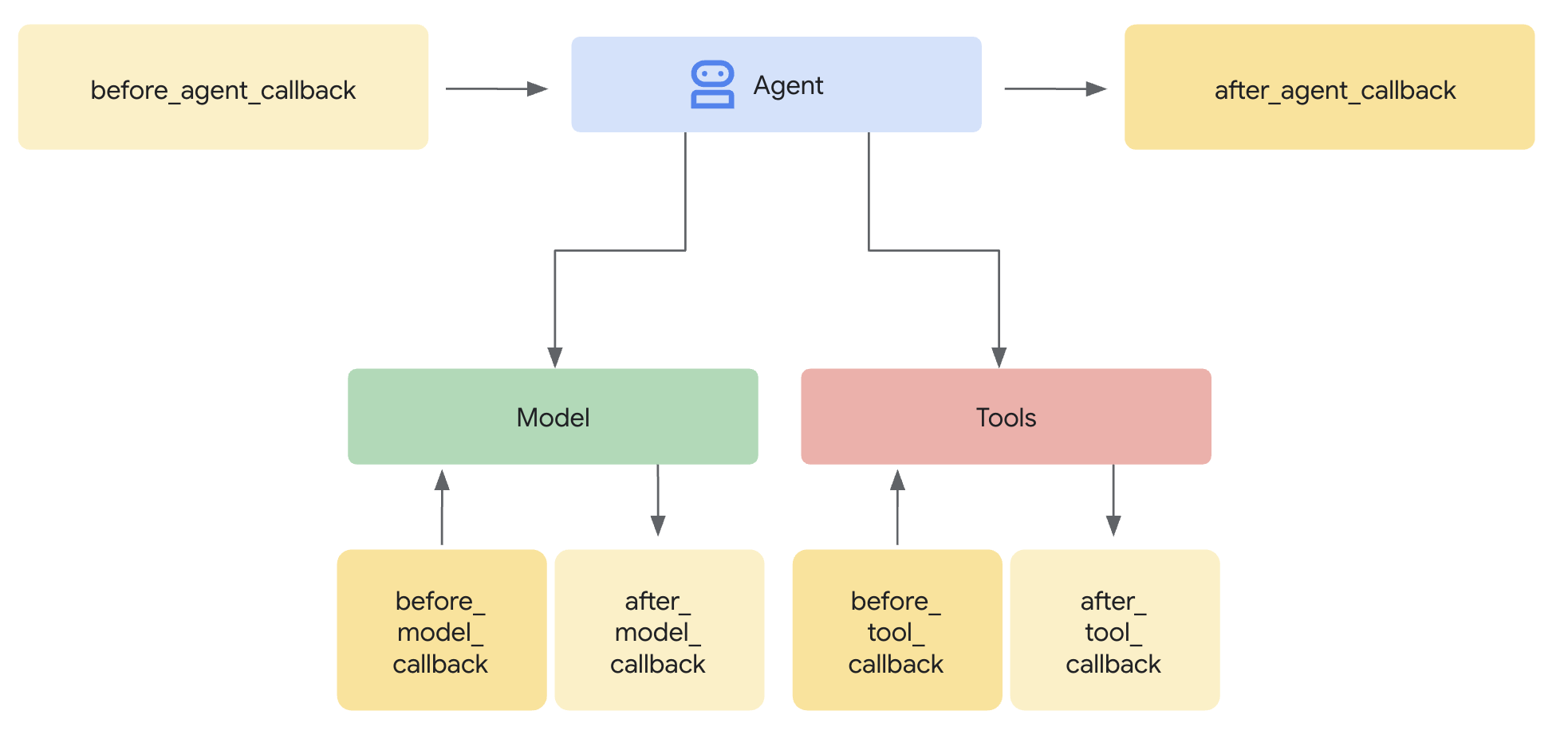
如果您定义了多个特定类型的回调,它们将按您定义的顺序执行。
以下部分介绍了每种回调类型,其中针对每种类型描述了以下信息:
| X | X |
|---|---|
| 名称 | 必需的回调函数名称 |
| 执行 | 对话回合中的执行点。 |
| 用途 | 使用回调的实用场景。 |
| 参数 | 函数的输入实参。 |
| 返回 | 函数的返回值。 |
| ADK 回调 | 指向相应 ADK 回调文档的链接。 |
在代理开始之前 (before_agent_callback)
| X | X |
|---|---|
| 名称 | before_agent_callback |
| 执行 | 在调用代理之前调用。 |
| 用途 | 可用于设置代理所需的资源或状态、对会话状态执行验证检查,或避免调用代理。 |
| 参数 | CallbackContext |
| 返回 | 内容(可选):如果设置,则不调用代理,而是使用提供的回答。 |
| ADK 回调 | 调用智能体之前的回调 |
代码示例:
import random

def before_agent_callback(
  callback_context: CallbackContext
) -> Optional[Content]:
  username = callback_context.variables.get("username", None)
  if not username:
    # default user
    final_name = "Default Name"
  else:
    # add a random integer to the username
    final_name = f"{username} {random.randint(1,10)}"
  # update the username variable
  callback_context.variables["username"] = final_name
在智能体完成操作后 (after_agent_callback)
| X | X |
|---|---|
| 名称 | after_agent_callback |
| 执行 | 在代理完成操作后调用。 |
| 用途 | 适用于清理任务、执行后验证、修改最终状态或更新代理响应。 |
| 参数 | CallbackContext |
| 返回 | 内容(可选):如果设置,则将代理的输出替换为提供的输出。 |
| ADK 回调 | 调用代理之后的回调 |
代码示例:
def after_agent_callback(
  callback_context: CallbackContext
) -> Optional[Content]:
  if callback_context.agent_name == "Routing Agent":
    counter = callback_context.variables.get("counter", 0)
    counter += 1
    # increment the invoked counter for this agent
    callback_context.variables["counter"] = int(counter)
在 LLM 调用之前 (before_model_callback)
| X | X |
|---|---|
| 名称 | before_model_callback |
| 执行 | 在模型请求之前调用。 |
| 用途 | 可用于检查/修改模型请求,或避免使用模型。 |
| 参数 | CallbackContext、LlmRequest |
| 返回 | LlmResponse:如果已设置,则跳过模型调用,并使用该响应,就好像它来自模型一样。 |
| ADK 回调 | 调用模型之前的回调 |
代码示例:
def before_model_callback(
  callback_context: CallbackContext,
  llm_request: LlmRequest
) -> Optional[LlmResponse]:
  """
  This callback executes *before* a request is sent to the LLM.

  By returning an `LlmResponse` object, we are intercepting the call to the
  LLM. The LLM will *not* be called, and the framework will instead use the
  `LlmResponse` we provide as if it came from the model.

  This is the core mechanism for implementing input guardrails, prompt
  validation, or serving responses from a cache. Here, we force the agent to
  call a function instead of thinking with the LLM.
  """
  # Modify the shared session state.
  callback_context.variables['foo'] = 'baz'

  # Skip the LLM call and return a custom response telling the agent to
  # execute a specific function.
  return LlmResponse(
    content=Content(parts=[Part(
      function_call=FunctionCall(
        name="function_name", args={"arg_name": "arg_value"}))],
      role="model"))
在 LLM 调用之后 (after_model_callback)
| X | X |
|---|---|
| 名称 | after_model_callback |
| 执行 | 在收到模型响应后调用。 |
| 用途 | 可用于重新设置模型回答的格式、审查模型生成的敏感信息、解析模型中的结构化数据以供在变量中使用,以及处理模型错误。 |
| 参数 | CallbackContext、LlmResponse |
| 返回 | LlmResponse:如果已设置,则将模型回答替换为提供的回答。 |
| ADK 回调 | 调用模型之后的回调 |
代码示例:
def after_model_callback(
  callback_context: CallbackContext,
  llm_response: LlmResponse
) -> Optional[LlmResponse]:
  """
  This callback executes *after* a response has been received from the LLM,
  but before the agent processes it.

  The `llm_response` parameter contains the actual data from the LLM.
  By returning `None`, we are approving this response and allowing the agent
  to use it as-is.

  If we returned a new `LlmResponse` object, it would *replace* the original,
  which is useful for redacting sensitive information, enforcing output
  formatting, or adding disclaimers.
  """
  # Returning None allows the LLM's actual response to be used.
  return None
工具调用之前 (before_tool_callback)
| X | X |
|---|---|
| 名称 | before_tool_callback |
| 执行 | 在调用工具之前调用。 |
| 用途 | 可用于检查和修改工具实参、在执行工具之前进行授权检查,或实现工具级缓存。 |
| 参数 | 工具,Dict[str, Any]:工具输入,CallbackContext |
| 返回 | Dict[str,Any]:如果设置,则跳过工具执行,并将此输出提供给模型。 |
| ADK 回调 | 调用工具之前的回调 |
代码示例:
def before_tool_callback(
  tool: Tool,
  input: dict[str, Any],
  callback_context: CallbackContext
) -> Optional[dict[str, Any]]:
  """
  This callback executes *before* a specific tool is called by the agent.

  Here, we modify the input arguments intended for the tool and then return
  a dictionary. By returning a dictionary instead of `None`, we are
  overriding the default behavior. The actual tool function will *not* be
  executed. Instead, the dictionary we return will be treated as the
  llm.tool's result and passed back to the LLM for the next step.

  This is ideal for validating tool inputs, applying policies, or returning
  mocked/cached data for testing.
  """
  # Modify the shared session state.
  callback_context.variables['foo'] = 'baz'

  # Modify the arguments for the tool call in-place.
  input['input_arg'] = 'updated_val1'
  input['additional_arg'] = 'updated_val2'

  # Override the tool call and return a mocked result.
  return {"result": "ok"}
工具调用后 (after_tool_callback)
| X | X |
|---|---|
| 名称 | after_tool_callback |
| 执行 | 在工具完成时调用。 |
| 用途 | 在将工具响应发送回模型之前,可用于检查和修改工具响应、对工具结果进行后处理,或将工具响应的特定部分保存到变量中。 |
| 参数 | 工具,Dict[str,Any]:工具输入,CallbackContext,Dict[str,Any]:工具响应 |
| 返回 | Dict[str,Any]:如果设置,此参数会替换提供给模型的工具响应。 |
| ADK 回调 | 调用工具之后的回调 |
代码示例:
# Previous tool was named `get_user_info`
# Previous tool returned the payload:
# {"username": "Patrick", "fave_food": ["pizza"]}

def after_tool_callback(
  tool: Tool,
  input: dict[str, Any],
  callback_context: CallbackContext,
  tool_response: dict
) -> Optional[dict]:

  if tool.name == "get_user_info":
    tool_response["username"] = "Gary"
    tool_response["pet"] = "dog"

    # Override tool response
    return tool_response
创建回调
如需创建回调,请执行以下操作:
- 打开代理设置。
- 点击添加代码。
- 选择回电类型。
- 提供 Python 代码。
- 点击保存。
自定义载荷 (custom_payloads)
借助自定义载荷,您可以在代理的响应中添加补充的非文本结构化数据(通常采用 JSON 格式)。此载荷有助于指导或增强代理与外部系统或客户端应用的互动。
载荷值对大语言模型 (LLM) 不可见;它仅用于生成最终回答。
自定义载荷是使用回调(具体而言是 before_model_callback 或 after_model_callback)生成和设置的。
自定义载荷可用于多种用途,通常围绕着实现丰富且结构化的互动:
- 客服升级/转接:通常用于通过提供路由说明(例如要路由到的特定队列)将互动转接给人工客服。
- 丰富的内容和客户端操作:支持将丰富的 widget 和其他丰富的内容直接嵌入到聊天体验中,这对于自定义聊天集成尤其有用。
- 例如,为使用通话伴侣等界面的客户显示图片网址或快速回复功能块和选项。
- 响应组成:
自定义载荷可以配置为以各种方式返回:
- 仅以确定性方式返回显式载荷。
- 返回载荷以及 LLM 生成的文本响应。
- 返回包含静态文本响应的载荷
代理设置
只能使用回调生成和设置自定义载荷。
载荷设置为 mime_type 为 application/json 的 Blob。
Part.from_json(data=payload_string)
after_model_callback 示例
这是一个示例 after_model_callback,它会返回模型响应以及额外的自定义载荷响应。
import json

def after_model_callback(callback_context: CallbackContext, llm_response: LlmResponse) -> Optional[LlmResponse]:
 """
 Adds a custom payload to every model response which is a text
 """
 if (llm_response.content.parts[0].text is not None):
   # construct payload
   payload_dict = { "custom_payload_key": "custom_payload_value"}
   payload_json_string = json.dumps(payload_dict)

   new_parts = []
   # Keep the origial agent response part, as model only sees text in the historical context.
   new_parts.append(Part(text=llm_response.content.parts[0].text))

   # Append custom payload
   new_parts.append(Part.from_json(data=payload_string))

   return LlmResponse(content=Content(parts=new_parts))
before_model_callback 示例
这是一个示例 before_model_callback,用于在触发特定工具后返回额外的自定义载荷。
import json

def has_escalate(llm_request: LlmRequest) -> bool:
  for content in llm_request.contents:
    for part in content.parts:
      if part.function_call and part.function_call.name == 'escalate':
        return True
  return False

def before_model_callback(callback_context: CallbackContext, llm_request: LlmRequest) -> Optional[LlmResponse]:
  # checks if `escalate` tool is being called
  if not has_escalate(llm_request):
    return None
  payload_dict = { "escalate": "user ask for escalation"}
  payload_json_string = json.dumps(payload_dict)

  return LlmResponse(content=Content(parts=[Part(text="ESCALATE!!!"), Part.from_json(data=payload_json_string)]))
在响应中运行时验证载荷
对于 RunSession 和 BidiRunSession,载荷都会在 payload 字段中填充为结构体。
LLM 看不到载荷值。