設定靜態外部 IP 位址

您可以為虛擬機器 (VM) 和裸機執行個體指派靜態外部 IP 位址。您也可以變更、列出及釋出執行個體的靜態 IP 位址。如要預留靜態外部 IP 位址,請參閱「預留靜態外部 IP 位址」。

外部 IP 位址可以是靜態或暫時。如果執行個體需要不會變更的固定外部 IP 位址,請執行下列操作:

  1. 取得靜態外部 IP 位址。您可以預留新的外部 IP 位址,或升級現有的暫時性外部 IP 位址。
  2. 將預留 IP 位址指派給現有執行個體,或在建立新執行個體時指派。

如果您需要在內部 Compute Engine 網路上使用靜態 IP 位址,請改為參閱「保留靜態內部 IP 位址」。

如要瞭解如何預留靜態外部 IP 位址或建立全域外部 IP 位址,請參閱「預留靜態外部 IP 位址」。

事前準備

  • 瞭解 IP 位址。
  • 請參閱靜態外部 IP 位址的配額與限制。
  • 請參閱外部 IP 位址定價。
  • 如果尚未設定驗證,請先完成設定。 驗證可確認您的身分,以便存取 Google Cloud 服務和 API。如要從本機開發環境執行程式碼或範例,請選取下列其中一個選項,向 Compute Engine 進行驗證:

    選取這個頁面上範例的預計用途分頁:

    控制台

    使用 Google Cloud 控制台存取 Google Cloud 服務和 API 時,不需要設定驗證。

    gcloud

    1. 安裝 Google Cloud CLI。 完成後,執行下列指令來初始化 Google Cloud CLI:

      gcloud init

      如果您使用外部識別資訊提供者 (IdP),請先 使用聯合身分登入 gcloud CLI。

  • 設定預設區域和可用區。
  • Terraform

    如要在本機開發環境中使用本頁的 Terraform 範例,請安裝並初始化 gcloud CLI,然後使用使用者憑證設定應用程式預設憑證。

    1. 安裝 Google Cloud CLI。

    2. 如果您使用外部識別資訊提供者 (IdP),請先 使用聯合身分登入 gcloud CLI。

    3. 如果您使用本機殼層,請為使用者帳戶建立本機驗證憑證:

      gcloud auth application-default login

      如果您使用 Cloud Shell,則不需要執行這項操作。

      如果系統傳回驗證錯誤,且您使用的是外部識別資訊提供者 (IdP),請確認您已 使用聯合身分登入 gcloud CLI。

    詳情請參閱「 設定本機開發環境的驗證機制」。

    REST

    如要在本機開發環境中使用本頁的 REST API 範例,請使用您提供給 gcloud CLI 的憑證。

      安裝 Google Cloud CLI。

      如果您使用外部識別資訊提供者 (IdP),請先 使用聯合身分登入 gcloud CLI。

    詳情請參閱 Google Cloud 驗證說明文件中的「使用 REST 進行驗證」。

必要的角色

如要取得設定及管理靜態 IP 位址所需的權限,請要求管理員在專案中授予您下列 IAM 角色:

如要進一步瞭解如何授予角色,請參閱「管理專案、資料夾和組織的存取權」。

這些預先定義的角色具備設定及管理靜態 IP 位址所需的權限。如要查看確切的必要權限,請展開「Required permissions」(必要權限) 部分:

所需權限

如要設定及管理靜態 IP 位址,必須具備下列權限:

  • compute.instances.update
  • compute.instances.updateNetworkInterface
  • compute.instances.addAccessConfig
  • compute.instances.deleteAccessConfig
  • compute.networks.list
  • compute.subnetworks.use
  • compute.subnetworks.list
  • 如要建立執行個體,請按照下列步驟操作:
    • 專案的 compute.instances.create 權限
    • 如要使用自訂映像檔建立 VM,請在映像檔上按一下 compute.images.useReadOnly
    • 如要使用快照建立 VM,請按一下快照上的 compute.snapshots.useReadOnly
    • 如要使用執行個體範本建立 VM,請按一下執行個體範本上的 compute.instanceTemplates.useReadOnly
    • 如要將舊版網路指派給 VM,請在專案中執行 compute.networks.use
    • 如要為 VM 指定靜態 IP 位址,請在專案中執行下列步驟:compute.addresses.use
    • 如要在使用舊版網路時,為 VM 指派外部 IP 位址,請在專案中執行 compute.networks.useExternalIp
    • 如要為 VM 指定子網路,請在專案或所選子網路上執行 compute.subnetworks.use
    • 使用虛擬私有雲網路時,將外部 IP 位址指派給 VM:compute.subnetworks.useExternalIp 在專案或所選子網路上
    • 如要為 VM 設定 VM 執行個體中繼資料,請在專案中執行下列指令:compute.instances.setMetadata
    • 如要為 VM 設定標記,請在 VM 上執行下列步驟:compute.instances.setTags
    • 如要為 VM 設定標籤,請在 VM 上執行下列指令:compute.instances.setLabels
    • 如要設定 VM 使用的服務帳戶,請在 VM 上執行 compute.instances.setServiceAccount
    • 為 VM 建立新磁碟:在專案中按一下 compute.disks.create
    • 如要以唯讀或讀寫模式掛接現有磁碟,請按一下磁碟上的 compute.disks.use
    • 如要以唯讀模式連結現有磁碟,請按一下磁碟上的 compute.disks.useReadOnly
  • 如要編輯組織政策,請按照下列步驟操作:
    • orgpolicy.policy.get
    • orgpolicy.policies.create
    • orgpolicy.policies.delete
    • orgpolicy.policies.update

您或許還可透過自訂角色或其他預先定義的角色取得這些權限。

限制

  • 一次只有一個資源可使用靜態外部 IP 位址。

  • 每個運算執行個體可以有多個網路介面,且每個介面可根據其堆疊類型指派下列 IP 位址:

    • 僅限 IPv4 的介面:
      • 內部 IPv4 位址 (必要)
      • 外部 IPv4 位址 (選用)
    • 雙重堆疊 (IPv4 和 IPv6) 介面:
      • 內部 IPv4 位址 (必要)
      • 外部 IPv4 位址 (選用)
      • /96 IPv6 位址範圍,內部或外部皆可,但不能同時提供兩者 (必要)
    • 僅限 IPv6 的介面:
      • /96 IPv6 位址範圍,內部或外部皆可,但不能同時提供兩者 (必要)
  • 如果運算執行個體使用僅限 IPv6 的網路介面,您就無法取消指派或變更外部 IPv6 位址。不過,您可以將資源的臨時外部 IP 位址升級為靜態外部 IP 位址,這樣即使刪除資源,系統仍會保留該位址。

  • 靜態 IP 位址的名稱無法變更。

附註:網路介面可接收來自多個轉送規則的流量,這些規則可能適用於其他外部 IP 位址。透過這些轉送規則,任意數量的外部 IP 位址都可以參照網路介面,但每個網路介面只能指派一個外部 IPv4 位址和一個外部 /96 IPv6 位址範圍。

如要進一步瞭解負載平衡和轉送規則,請參閱負載平衡文件。

查看可用的靜態外部 IP 位址

如要列出您為專案保留的靜態外部 IP 位址,請按照下列步驟操作。

控制台

  1. 前往 Google Cloud 控制台的「IP addresses」(IP 位址) 頁面。

    前往「IP addresses」(IP 位址) 頁面

  2. 按一下「外部 IP 位址」。

gcloud

使用 gcloud compute addresses list 指令:

  • 如要列出所有 IP 位址,請使用下列指令:

    gcloud compute addresses list
  • 如要列出所有全域 IP 位址,請使用下列指令:

    gcloud compute addresses list --global
  • 如要列出指定區域中的所有區域性 IP 位址,請使用下列指令:

    gcloud compute addresses list \
        --regions=REGION
    

    將 REGION 替換為要列出位址的區域。如要列出多個區域的位址,請指定以半形逗號分隔的區域名稱:

    gcloud compute addresses list \
        --regions=REGION1,REGION2,..REGION_n_
    

API

  • 如要列出區域性 IPv4 或 IPv6 位址,請呼叫 addresses.list 方法:

    GET https://compute.googleapis.com/compute/v1/projects/PROJECT_ID/regions/REGION/addresses
    

    更改下列內容:

    • PROJECT_ID:這項要求的專案 ID
    • REGION:這項要求的區域名稱
  • 如要列出所有區域中的所有位址,請呼叫 addresses.aggregatedList 方法:

    GET https://compute.googleapis.com/compute/v1/projects/PROJECT_ID/aggregated/addresses
    
  • 如要列出全域 IPv4 或 IPv6 位址,請呼叫 globalAddresses.list 方法:

    GET https://compute.googleapis.com/compute/v1/projects/PROJECT_ID/global/addresses
    

    更改下列內容:

    PROJECT_ID:這項要求的專案 ID

Go

import (
	"context"
	"fmt"
	"io"

	compute "cloud.google.com/go/compute/apiv1"
	"google.golang.org/api/iterator"

	"cloud.google.com/go/compute/apiv1/computepb"
)

// listRegionalExternal retrieves list external IP addresses in Google Cloud Platform region.
func listRegionalExternal(w io.Writer, projectID, region string) ([]*computepb.Address, error) {
	// projectID := "your_project_id"
	// region := "europe-west3"

	ctx := context.Background()
	// Create the service client.
	addressesClient, err := compute.NewAddressesRESTClient(ctx)
	if err != nil {
		return nil, err
	}
	defer addressesClient.Close()

	// Build the request.
	req := &computepb.ListAddressesRequest{
		Project: projectID,
		Region:  region,
	}

	// List the addresses.
	it := addressesClient.List(ctx, req)

	// Iterate over the results.
	var addresses []*computepb.Address
	for {
		address, err := it.Next()
		if err == iterator.Done {
			break
		}
		if err != nil {
			return nil, err
		}
		addresses = append(addresses, address)
	}

	// Print the addresses.
	fmt.Fprint(w, "Fetched addresses: \n")
	for _, address := range addresses {
		fmt.Fprintf(w, "%s\n", *address.Name)
	}

	return addresses, nil
}

// listGlobalExternal retrieves list external global IP addresses in Google Cloud Platform.
func listGlobalExternal(w io.Writer, projectID string) ([]*computepb.Address, error) {
	// projectID := "your_project_id"

	ctx := context.Background()
	// Create the service client.
	addressesClient, err := compute.NewGlobalAddressesRESTClient(ctx)
	if err != nil {
		return nil, err
	}
	defer addressesClient.Close()

	// Build the request.
	req := &computepb.ListGlobalAddressesRequest{
		Project: projectID,
	}

	// List the addresses.
	it := addressesClient.List(ctx, req)

	// Iterate over the results.
	var addresses []*computepb.Address
	for {
		address, err := it.Next()
		if err == iterator.Done {
			break
		}
		if err != nil {
			return nil, err
		}
		addresses = append(addresses, address)
	}

	// Print the addresses.
	fmt.Fprint(w, "Fetched addresses: \n")
	for _, address := range addresses {
		fmt.Fprintf(w, "%s\n", *address.Name)
	}

	return addresses, nil
}

Java


import com.google.cloud.compute.v1.Address;
import com.google.cloud.compute.v1.AddressesClient;
import com.google.cloud.compute.v1.GlobalAddressesClient;
import com.google.cloud.compute.v1.ListAddressesRequest;
import com.google.cloud.compute.v1.ListGlobalAddressesRequest;
import com.google.common.collect.Lists;
import java.io.IOException;
import java.util.List;
import java.util.concurrent.ExecutionException;
import java.util.concurrent.TimeoutException;

public class ListStaticExternalIp {

  public static void main(String[] args)
          throws IOException, ExecutionException, InterruptedException, TimeoutException {
    // TODO(developer): Replace these variables before running the sample.
    // Project ID or project number of the Google Cloud project you want to use.
    String projectId = "your-project-id";
    // Region where the VM and IP is located.
    String region = "your-region-id";

    listStaticExternalIp(projectId, region);
  }

  // Lists all static external IP addresses, either regional or global.
  public static List<Address> listStaticExternalIp(String projectId, String region)
          throws IOException {
    // Use regional client if a region is specified
    if (region != null) {
      // Initialize client that will be used to send requests. This client only needs to be created
      // once, and can be reused for multiple requests.
      try (AddressesClient client = AddressesClient.create()) {
        ListAddressesRequest request = ListAddressesRequest.newBuilder()
                .setProject(projectId)
                .setRegion(region)
                .build();

        return Lists.newArrayList(client.list(request).iterateAll());
      }
    } else {
      // Initialize client that will be used to send requests. This client only needs to be created
      // once, and can be reused for multiple requests.
      try (GlobalAddressesClient client = GlobalAddressesClient.create()) {
        ListGlobalAddressesRequest request = ListGlobalAddressesRequest.newBuilder()
                .setProject(projectId)
                .build();

        return Lists.newArrayList(client.list(request).iterateAll());
      }
    }
  }
}

Python

from typing import List, Optional

from google.cloud.compute_v1.services.addresses.client import AddressesClient
from google.cloud.compute_v1.services.global_addresses import GlobalAddressesClient
from google.cloud.compute_v1.types import Address


def list_static_ip_addresses(
    project_id: str, region: Optional[str] = None
) -> List[Address]:
    """
    Lists all static external IP addresses, either regional or global.

    Args:
    project_id (str): project ID.
    region (Optional[str]): The region of the IP addresses if regional. None if global.

    Returns:
    List[Address]: A list of Address objects containing details about the requested IPs.
    """
    if region:
        # Use regional client if a region is specified
        client = AddressesClient()
        addresses_iterator = client.list(project=project_id, region=region)
    else:
        # Use global client if no region is specified
        client = GlobalAddressesClient()
        addresses_iterator = client.list(project=project_id)

    return list(addresses_iterator)  # Convert the iterator to a list to return

設定靜態外部 IP 位址

以下各節說明如何為執行個體設定靜態外部 IP 位址。

建立使用靜態外部 IP 位址的執行個體

預留靜態外部 IP 位址後,即可將其指派給執行個體。

控制台

  1. 前往 Google Cloud 控制台的「Create an instance」(建立執行個體) 頁面。

    前往「建立執行個體」

  2. 如要為執行個體指派靜態外部 IP 位址,請執行下列操作:

    1. 點選導覽選單中的「Networking」(網路)。

    2. 在「網路介面」部分,使用下列選項指定執行個體所需的網路介面:

      • 如要新增網路介面,請按一下「新增網路介面」。然後在「Network」(網路) 清單中選取網路。

      • 如要刪除網路介面,請按一下「刪除」

    3. 選取下列選項之一:

      • 如要指派靜態外部 IPv4 位址,請按照下列步驟操作:

        1. 展開網路介面。
        2. 從「外部 IPv4 位址」清單中選取 IP 位址。
      • 如要指派靜態外部 IPv6 位址,請執行下列操作:

        1. 展開包含具有外部 IPv6 位址範圍的子網路的網路介面。
        2. 從「子網路」清單中選取該子網路。
        3. 在「IP stack type」(IP 堆疊類型),選取「IPv4 and IPv6 (dual-stack)」(IPv4 和 IPv6 (雙重堆疊)) 或「IPv6 (single-stack)」(IPv6 (單一堆疊))。
        4. 從「外部 IPv6 位址」清單中,選取新保留的外部 IPv6 位址。或者,選取「Reserve static external IPv6 address」(保留靜態外部 IPv6 位址),並保留新的靜態外部 IPv6 位址。
        5. 將「網路服務級別」設為「進階」。
    4. 如要完成修改網路介面,請按一下「完成」。

  3. 繼續執行個體建立程序。

gcloud

您可以建立執行個體,並指派已保留的靜態區域外部 IP 位址。

  • 如要指派靜態外部 IPv4 位址,請按照下列步驟操作:

    gcloud compute instances create INSTANCE_NAME \
        --zone=ZONE \
        --address=IPV4_ADDRESS
    
  • 如要指派靜態外部 IPv6 位址,請按照下列步驟操作:

    gcloud compute instances create INSTANCE_NAME \
        --zone=ZONE \
        --subnet=SUBNET \
        --stack-type=STACK_TYPE \
        --external-ipv6-address=IPV6_ADDRESS \
        --external-ipv6-prefix-length=96 \
        --ipv6-network-tier=PREMIUM
    

    更改下列內容:

    • INSTANCE_NAME:運算執行個體的名稱。
    • ZONE:要建立執行個體的可用區
    • IPV4_ADDRESS:要指派給執行個體的 IPv4 位址。請使用預留的靜態外部 IP 位址,而非位址名稱。
    • SUBNET:包含外部 IPv6 位址的子網路
    • STACK_TYPE:執行個體的堆疊類型,可以是 IPV4_IPV6 (雙重堆疊) 或 IPV6_ONLY
    • IPV6_ADDRESS:要指派給執行個體的 IPv6 位址。請使用預留的靜態外部 IP 位址,而非位址名稱。

Terraform

您可以使用 google_compute_instance 資源指派外部 IP 位址。

resource "google_compute_instance" "default" {
  name         = "dns-proxy-nfs"
  machine_type = "n1-standard-1"
  zone         = "us-central1-a"

  boot_disk {
    initialize_params {
      image = "ubuntu-1404-trusty-v20160627"
    }
  }

  network_interface {
    network = "default"
    access_config {
      nat_ip = google_compute_address.default.address
    }
  }
}

如要瞭解如何套用或移除 Terraform 設定,請參閱「基本 Terraform 指令」。

REST

  • 如要將靜態外部 IPv4 位址指派給新的運算執行個體,請按照下列步驟操作:

    在建立新執行個體的要求中,明確提供 networkInterfaces[].accessConfigs[].natIP 屬性和要使用的外部 IPv4 位址,例如:

    {
      "name": "INSTANCE_NAME",
      "machineType": "zones/ZONE/machineTypes/MACHINE_TYPE",
      "networkInterfaces": [{
          "accessConfigs": [{
            "type": "ONE_TO_ONE_NAT",
            "name": "External NAT",
            "natIP": "IPV4_ADDRESS"
          }],
          "network": "global/networks/default"
      }],
      "disks": [{
          "autoDelete": "true",
            "boot": "true",
            "type": "PERSISTENT",
            "initializeParams": {
                "sourceImage": "SOURCE_IMAGE"
             }
      }]
    }
    

    更改下列內容:

    • INSTANCE_NAME:運算執行個體的名稱
    • ZONE:要建立執行個體的可用區
    • MACHINE_TYPE:選用。建立執行個體時要使用的機型資源完整或部分網址,格式如下:zones/ZONE/machineTypes/MACHINE_TYPE
    • IPV4_ADDRESS:要指派給執行個體的 IPv4 位址。請使用預留的靜態外部 IP 位址,而非位址名稱。
    • SOURCE_IMAGE:公開映像檔的特定版本,例如 projects/debian-cloud/global/images/debian-10-buster-v20200309,或映像檔系列,例如 projects/debian-cloud/global/images/family/debian-10
  • 如要將靜態外部 IPv6 位址指派給新執行個體,請執行下列操作:

    在建立新執行個體的要求中,明確提供 networkInterfaces[].ipv6AccessConfigs[].externalIpv6 屬性和要使用的外部 IPv6 位址,例如:

    {
      "name": "INSTANCE_NAME",
      "machineType": "zones/ZONE/machineTypes/MACHINE_TYPE",
      "networkInterfaces": [{
              "ipv6AccessConfigs": [{
             "externalIpv6": "IPV6_ADDRESS",
             "externalIpv6PrefixLength": 96,
             "name": "external-ipv6-access-config",
             "networkTier": "PREMIUM",
             "type": "DIRECT_IPV6"
              }],
          "stackType": "STACK_TYPE",
          "subnetwork":"SUBNETWORK"
      }],
      "disks": [{
          "autoDelete": "true",
          "boot": "true",
          "mode": "READ_WRITE",
          "type": "PERSISTENT",
          "initializeParams": {
              "sourceImage": "SOURCE_IMAGE"
          },
      }],
    }
    

    更改下列內容:

    • INSTANCE_NAME:運算執行個體的名稱
    • ZONE:要建立執行個體的可用區
    • MACHINE_TYPE:選用。建立執行個體時要使用的機型資源完整或部分網址,格式如下:zones/ZONE/machineTypes/MACHINE_TYPE
    • IPV6_ADDRESS:要指派給執行個體的 IPv6 位址。請使用預留的靜態外部 IP 位址,而非位址名稱。
    • STACK_TYPE:執行個體的堆疊類型,可以是 IPV4_IPV6 (雙重堆疊) 或 IPV6_ONLY
    • SUBNET:包含外部 IPv6 位址的子網路
    • SOURCE_IMAGE:公開映像檔的特定版本,例如 "projects/debian-cloud/global/images/debian-10-buster-v20200309",或是映像檔系列,例如 "projects/debian-cloud/global/images/family/debian-10"

Go


// assignStaticExternalToNewVM creates a new VM instance and assigns a static external IP address to it.
// NOTE: ip address is expected to exist and be located in the same region as new VM
func assignStaticExternalToNewVM(w io.Writer, projectID, zone, instanceName, ipAddress string) error {
	// projectID := "your_project_id"
	// zone := "europe-central2-b"
	// instanceName := "your_instance_name"
	// ipAddress := 301.222.11.123

	ctx := context.Background()
	instancesClient, err := compute.NewInstancesRESTClient(ctx)
	if err != nil {
		return fmt.Errorf("NewInstancesRESTClient: %w", err)
	}
	defer instancesClient.Close()

	imagesClient, err := compute.NewImagesRESTClient(ctx)
	if err != nil {
		return fmt.Errorf("NewImagesRESTClient: %w", err)
	}
	defer imagesClient.Close()

	// List of public operating system (OS) images: https://cloud.google.com/compute/docs/images/os-details.
	newestDebianReq := &computepb.GetFromFamilyImageRequest{
		Project: "debian-cloud",
		Family:  "debian-12",
	}
	newestDebian, err := imagesClient.GetFromFamily(ctx, newestDebianReq)
	if err != nil {
		return fmt.Errorf("unable to get image from family: %w", err)
	}

	req := &computepb.InsertInstanceRequest{
		Project: projectID,
		Zone:    zone,
		InstanceResource: &computepb.Instance{
			Name: proto.String(instanceName),
			Disks: []*computepb.AttachedDisk{
				{
					InitializeParams: &computepb.AttachedDiskInitializeParams{
						DiskSizeGb:  proto.Int64(10),
						SourceImage: newestDebian.SelfLink,
						DiskType:    proto.String(fmt.Sprintf("zones/%s/diskTypes/pd-standard", zone)),
					},
					AutoDelete: proto.Bool(true),
					Boot:       proto.Bool(true),
					Type:       proto.String(computepb.AttachedDisk_PERSISTENT.String()),
				},
			},
			MachineType: proto.String(fmt.Sprintf("zones/%s/machineTypes/n1-standard-1", zone)),
			NetworkInterfaces: []*computepb.NetworkInterface{
				{
					AccessConfigs: []*computepb.AccessConfig{
						{
							Type:        proto.String(computepb.AccessConfig_ONE_TO_ONE_NAT.String()),
							Name:        proto.String("External NAT"),
							NetworkTier: proto.String(computepb.AccessConfig_PREMIUM.String()),
							NatIP:       proto.String(ipAddress),
						},
					},
				},
			},
		},
	}

	op, err := instancesClient.Insert(ctx, req)
	if err != nil {
		return fmt.Errorf("unable to create instance: %w", err)
	}

	if err = op.Wait(ctx); err != nil {
		return fmt.Errorf("unable to wait for the operation: %w", err)
	}

	fmt.Fprintf(w, "Static address %s assigned to new VM", ipAddress)

	return nil
}

Java


import com.google.cloud.compute.v1.AccessConfig;
import com.google.cloud.compute.v1.AccessConfig.Type;
import com.google.cloud.compute.v1.Address.NetworkTier;
import com.google.cloud.compute.v1.AttachedDisk;
import com.google.cloud.compute.v1.AttachedDiskInitializeParams;
import com.google.cloud.compute.v1.GetInstanceRequest;
import com.google.cloud.compute.v1.ImagesClient;
import com.google.cloud.compute.v1.InsertInstanceRequest;
import com.google.cloud.compute.v1.Instance;
import com.google.cloud.compute.v1.InstancesClient;
import com.google.cloud.compute.v1.NetworkInterface;
import java.io.IOException;
import java.util.UUID;
import java.util.concurrent.ExecutionException;
import java.util.concurrent.TimeUnit;
import java.util.concurrent.TimeoutException;

public class AssignStaticExternalNewVmAddress {

  public static void main(String[] args)
          throws IOException, ExecutionException, InterruptedException, TimeoutException {
    // TODO(developer): Replace these variables before running the sample.
    // Project ID or project number of the Google Cloud project you want to use.
    String projectId = "your-project-id";
    // Instance ID of the Google Cloud project you want to use.
    String instanceId = "your-instance-id";
    // Name of the zone to create the instance in. For example: "us-west3-b"
    String zone = "your-zone-id";
    // machine type of the VM being created. This value uses the
    // following format: "zones/{zone}/machineTypes/{type_name}".
    // For example: "zones/europe-west3-c/machineTypes/f1-micro"
    String machineType = String.format("zones/%s/machineTypes/{your-machineType-id}", zone);
    // boolean flag indicating if the instance should have an external IPv4 address assigned.
    boolean externalAccess = true;
    // external IPv4 address to be assigned to this instance. If you specify
    // an external IP address, it must live in the same region as the zone of the instance.
    // This setting requires `external_access` to be set to True to work.
    String externalIpv4 = "your-externalIpv4-id";

    assignStaticExternalNewVmAddress(projectId, instanceId, zone,
            externalAccess, machineType, externalIpv4);
  }

  // Create a new VM instance with assigned static external IP address.
  public static Instance assignStaticExternalNewVmAddress(String projectId, String instanceName,
                                                          String zone, boolean externalAccess,
                                                          String machineType, String externalIpv4)
          throws IOException, ExecutionException, InterruptedException, TimeoutException {
    String sourceImage;
    // Initialize client that will be used to send requests. This client only needs to be created
    // once, and can be reused for multiple requests.
    try (ImagesClient imagesClient = ImagesClient.create()) {
      sourceImage = imagesClient.getFromFamily("debian-cloud", "debian-13").getSelfLink();
    }
    AttachedDisk attachedDisk = buildAttachedDisk(sourceImage, zone);

    return createInstance(projectId, instanceName, zone,
            attachedDisk, machineType, externalAccess, externalIpv4);
  }

  private static AttachedDisk buildAttachedDisk(String sourceImage, String zone) {
    AttachedDiskInitializeParams initializeParams = AttachedDiskInitializeParams.newBuilder()
            .setSourceImage(sourceImage)
            .setDiskSizeGb(10)
            .setDiskType(String.format("zones/%s/diskTypes/pd-standard", zone))
            .build();

    return AttachedDisk.newBuilder()
            .setInitializeParams(initializeParams)
            // Remember to set auto_delete to True if you want the disk to be deleted
            // when you delete your VM instance.
            .setAutoDelete(true)
            .setBoot(true)
            .build();
  }

  // Send an instance creation request to the Compute Engine API and wait for it to complete.
  private static Instance createInstance(String projectId, String instanceName,
                                         String zone, AttachedDisk disks,
                                         String machineType, boolean externalAccess,
                                         String externalIpv4)
          throws IOException, ExecutionException, InterruptedException, TimeoutException {
    // Initialize client that will be used to send requests. This client only needs to be created
    // once, and can be reused for multiple requests.
    try (InstancesClient client = InstancesClient.create()) {
      Instance instanceResource =
              buildInstanceResource(instanceName, disks, machineType, externalAccess, externalIpv4);

      InsertInstanceRequest build = InsertInstanceRequest.newBuilder()
              .setProject(projectId)
              .setRequestId(UUID.randomUUID().toString())
              .setZone(zone)
              .setInstanceResource(instanceResource)
              .build();
      client.insertCallable().futureCall(build).get(60, TimeUnit.SECONDS);

      GetInstanceRequest getInstanceRequest = GetInstanceRequest.newBuilder()
              .setInstance(instanceName)
              .setProject(projectId)
              .setZone(zone)
              .build();

      return client.get(getInstanceRequest);
    }
  }

  private static Instance buildInstanceResource(String instanceName, AttachedDisk disk,
                                                String machineType, boolean externalAccess,
                                                String externalIpv4) {
    NetworkInterface networkInterface =
            networkInterface(externalAccess, externalIpv4);

    return Instance.newBuilder()
            .setName(instanceName)
            .addDisks(disk)
            .setMachineType(machineType)
            .addNetworkInterfaces(networkInterface)
            .build();
  }

  private static NetworkInterface networkInterface(boolean externalAccess, String externalIpv4) {
    NetworkInterface.Builder build = NetworkInterface.newBuilder()
            .setNetwork("global/networks/default");
    if (externalAccess) {
      AccessConfig.Builder accessConfig = AccessConfig.newBuilder()
              .setType(Type.ONE_TO_ONE_NAT.name())
              .setName("External NAT")
              .setNetworkTier(NetworkTier.PREMIUM.name());
      if (externalIpv4 != null) {
        accessConfig.setNatIP(externalIpv4);
      }
      build.addAccessConfigs(accessConfig.build());
    }

    return build.build();
  }
}

Python

from __future__ import annotations

import re
import sys
from typing import Any
import warnings

from google.api_core.extended_operation import ExtendedOperation
from google.cloud import compute_v1


def get_image_from_family(project: str, family: str) -> compute_v1.Image:
    """
    Retrieve the newest image that is part of a given family in a project.

    Args:
        project: project ID or project number of the Cloud project you want to get image from.
        family: name of the image family you want to get image from.

    Returns:
        An Image object.
    """
    image_client = compute_v1.ImagesClient()
    # List of public operating system (OS) images: https://cloud.google.com/compute/docs/images/os-details
    newest_image = image_client.get_from_family(project=project, family=family)
    return newest_image


def disk_from_image(
    disk_type: str,
    disk_size_gb: int,
    boot: bool,
    source_image: str,
    auto_delete: bool = True,
) -> compute_v1.AttachedDisk:
    """
    Create an AttachedDisk object to be used in VM instance creation. Uses an image as the
    source for the new disk.

    Args:
         disk_type: the type of disk you want to create. This value uses the following format:
            "zones/{zone}/diskTypes/(pd-standard|pd-ssd|pd-balanced|pd-extreme)".
            For example: "zones/us-west3-b/diskTypes/pd-ssd"
        disk_size_gb: size of the new disk in gigabytes
        boot: boolean flag indicating whether this disk should be used as a boot disk of an instance
        source_image: source image to use when creating this disk. You must have read access to this disk. This can be one
            of the publicly available images or an image from one of your projects.
            This value uses the following format: "projects/{project_name}/global/images/{image_name}"
        auto_delete: boolean flag indicating whether this disk should be deleted with the VM that uses it

    Returns:
        AttachedDisk object configured to be created using the specified image.
    """
    boot_disk = compute_v1.AttachedDisk()
    initialize_params = compute_v1.AttachedDiskInitializeParams()
    initialize_params.source_image = source_image
    initialize_params.disk_size_gb = disk_size_gb
    initialize_params.disk_type = disk_type
    boot_disk.initialize_params = initialize_params
    # Remember to set auto_delete to True if you want the disk to be deleted when you delete
    # your VM instance.
    boot_disk.auto_delete = auto_delete
    boot_disk.boot = boot
    return boot_disk


def wait_for_extended_operation(
    operation: ExtendedOperation, verbose_name: str = "operation", timeout: int = 300
) -> Any:
    """
    Waits for the extended (long-running) operation to complete.

    If the operation is successful, it will return its result.
    If the operation ends with an error, an exception will be raised.
    If there were any warnings during the execution of the operation
    they will be printed to sys.stderr.

    Args:
        operation: a long-running operation you want to wait on.
        verbose_name: (optional) a more verbose name of the operation,
            used only during error and warning reporting.
        timeout: how long (in seconds) to wait for operation to finish.
            If None, wait indefinitely.

    Returns:
        Whatever the operation.result() returns.

    Raises:
        This method will raise the exception received from `operation.exception()`
        or RuntimeError if there is no exception set, but there is an `error_code`
        set for the `operation`.

        In case of an operation taking longer than `timeout` seconds to complete,
        a `concurrent.futures.TimeoutError` will be raised.
    """
    result = operation.result(timeout=timeout)

    if operation.error_code:
        print(
            f"Error during {verbose_name}: [Code: {operation.error_code}]: {operation.error_message}",
            file=sys.stderr,
            flush=True,
        )
        print(f"Operation ID: {operation.name}", file=sys.stderr, flush=True)
        raise operation.exception() or RuntimeError(operation.error_message)

    if operation.warnings:
        print(f"Warnings during {verbose_name}:\n", file=sys.stderr, flush=True)
        for warning in operation.warnings:
            print(f" - {warning.code}: {warning.message}", file=sys.stderr, flush=True)

    return result


def create_instance(
    project_id: str,
    zone: str,
    instance_name: str,
    disks: list[compute_v1.AttachedDisk],
    machine_type: str = "n1-standard-1",
    network_link: str = "global/networks/default",
    subnetwork_link: str = None,
    internal_ip: str = None,
    external_access: bool = False,
    external_ipv4: str = None,
    accelerators: list[compute_v1.AcceleratorConfig] = None,
    preemptible: bool = False,
    spot: bool = False,
    instance_termination_action: str = "STOP",
    custom_hostname: str = None,
    delete_protection: bool = False,
) -> compute_v1.Instance:
    """
    Send an instance creation request to the Compute Engine API and wait for it to complete.

    Args:
        project_id: project ID or project number of the Cloud project you want to use.
        zone: name of the zone to create the instance in. For example: "us-west3-b"
        instance_name: name of the new virtual machine (VM) instance.
        disks: a list of compute_v1.AttachedDisk objects describing the disks
            you want to attach to your new instance.
        machine_type: machine type of the VM being created. This value uses the
            following format: "zones/{zone}/machineTypes/{type_name}".
            For example: "zones/europe-west3-c/machineTypes/f1-micro"
        network_link: name of the network you want the new instance to use.
            For example: "global/networks/default" represents the network
            named "default", which is created automatically for each project.
        subnetwork_link: name of the subnetwork you want the new instance to use.
            This value uses the following format:
            "regions/{region}/subnetworks/{subnetwork_name}"
        internal_ip: internal IP address you want to assign to the new instance.
            By default, a free address from the pool of available internal IP addresses of
            used subnet will be used.
        external_access: boolean flag indicating if the instance should have an external IPv4
            address assigned.
        external_ipv4: external IPv4 address to be assigned to this instance. If you specify
            an external IP address, it must live in the same region as the zone of the instance.
            This setting requires `external_access` to be set to True to work.
        accelerators: a list of AcceleratorConfig objects describing the accelerators that will
            be attached to the new instance.
        preemptible: boolean value indicating if the new instance should be preemptible
            or not. Preemptible VMs have been deprecated and you should now use Spot VMs.
        spot: boolean value indicating if the new instance should be a Spot VM or not.
        instance_termination_action: What action should be taken once a Spot VM is terminated.
            Possible values: "STOP", "DELETE"
        custom_hostname: Custom hostname of the new VM instance.
            Custom hostnames must conform to RFC 1035 requirements for valid hostnames.
        delete_protection: boolean value indicating if the new virtual machine should be
            protected against deletion or not.
    Returns:
        Instance object.
    """
    instance_client = compute_v1.InstancesClient()

    # Use the network interface provided in the network_link argument.
    network_interface = compute_v1.NetworkInterface()
    network_interface.network = network_link
    if subnetwork_link:
        network_interface.subnetwork = subnetwork_link

    if internal_ip:
        network_interface.network_i_p = internal_ip

    if external_access:
        access = compute_v1.AccessConfig()
        access.type_ = compute_v1.AccessConfig.Type.ONE_TO_ONE_NAT.name
        access.name = "External NAT"
        access.network_tier = access.NetworkTier.PREMIUM.name
        if external_ipv4:
            access.nat_i_p = external_ipv4
        network_interface.access_configs = [access]

    # Collect information into the Instance object.
    instance = compute_v1.Instance()
    instance.network_interfaces = [network_interface]
    instance.name = instance_name
    instance.disks = disks
    if re.match(r"^zones/[a-z\d\-]+/machineTypes/[a-z\d\-]+$", machine_type):
        instance.machine_type = machine_type
    else:
        instance.machine_type = f"zones/{zone}/machineTypes/{machine_type}"

    instance.scheduling = compute_v1.Scheduling()
    if accelerators:
        instance.guest_accelerators = accelerators
        instance.scheduling.on_host_maintenance = (
            compute_v1.Scheduling.OnHostMaintenance.TERMINATE.name
        )

    if preemptible:
        # Set the preemptible setting
        warnings.warn(
            "Preemptible VMs are being replaced by Spot VMs.", DeprecationWarning
        )
        instance.scheduling = compute_v1.Scheduling()
        instance.scheduling.preemptible = True

    if spot:
        # Set the Spot VM setting
        instance.scheduling.provisioning_model = (
            compute_v1.Scheduling.ProvisioningModel.SPOT.name
        )
        instance.scheduling.instance_termination_action = instance_termination_action

    if custom_hostname is not None:
        # Set the custom hostname for the instance
        instance.hostname = custom_hostname

    if delete_protection:
        # Set the delete protection bit
        instance.deletion_protection = True

    # Prepare the request to insert an instance.
    request = compute_v1.InsertInstanceRequest()
    request.zone = zone
    request.project = project_id
    request.instance_resource = instance

    # Wait for the create operation to complete.
    print(f"Creating the {instance_name} instance in {zone}...")

    operation = instance_client.insert(request=request)

    wait_for_extended_operation(operation, "instance creation")

    print(f"Instance {instance_name} created.")
    return instance_client.get(project=project_id, zone=zone, instance=instance_name)


def assign_static_external_ip_to_new_vm(
    project_id: str, zone: str, instance_name: str, ip_address: str
) -> compute_v1.Instance:
    """
    Create a new VM instance with assigned static external IP address.

    Args:
        project_id (str): project ID or project number of the Cloud project you want to use.
        zone (str): name of the zone to create the instance in. For example: "us-west3-b"
        instance_name (str): name of the new virtual machine (VM) instance.
        ip_address(str): external address to be assigned to this instance. It must live in the same
        region as the zone of the instance and be precreated before function called.

    Returns:
        Instance object.
    """
    newest_debian = get_image_from_family(project="debian-cloud", family="debian-12")
    disk_type = f"zones/{zone}/diskTypes/pd-standard"
    disks = [disk_from_image(disk_type, 10, True, newest_debian.self_link, True)]
    instance = create_instance(
        project_id,
        zone,
        instance_name,
        disks,
        external_ipv4=ip_address,
        external_access=True,
    )
    return instance

變更外部 IP 位址,或將該位址指派給現有執行個體

您可以變更或指派臨時或靜態外部 IP 位址,給現有的僅限 IPv4 或雙堆疊執行個體。僅支援 IPv6 的執行個體不支援這項程序。

運算執行個體可以有多個介面。單一堆疊介面可以有一個外部 IP 位址。雙重堆疊介面可以有一個外部 IPv4 位址和一個外部 IPv6 位址。如果執行個體已有外部 IP 位址,請先移除該位址。然後將新的外部 IP 位址指派給現有執行個體。

控制台

  1. 前往 Google Cloud 控制台的「VM instances」(VM 執行個體) 頁面。

    前往 VM 執行個體

  2. 按一下要指派外部 IP 的執行個體名稱。「Instance details」(執行個體詳細資料) 頁面隨即顯示。

  3. 在「Instance details」(執行個體詳細資料) 頁面中,完成下列步驟:

    1. 按一下 [編輯]。
    2. 展開「網路介面」。
    3. 選取要指派給執行個體的外部 IP 位址。如果執行個體僅支援 IPv4,且您想指派 IPv6 位址,請先將堆疊類型變更為雙重堆疊。
      1. 在「External IPv4 address」(外部 IPv4 位址) 部分,選取「Ephemeral」(暫時) 或靜態外部 IPv4 位址。
      2. 在「外部 IPv6 位址」部分,選取「暫時 (自動)」、「暫時 (自訂)」或靜態外部 IPv6 位址。
    4. 按一下「完成」。
  4. 按一下 [儲存]。

gcloud

  1. 選用:保留靜態外部 IP 位址。

    如要指派靜態外部 IP 位址,請務必保留位址,並確認該位址未供其他資源使用。如有需要,請按照操作說明預留新的靜態外部 IP 位址,或取消指派靜態外部 IP 位址。

    如要使用臨時外部 IP 位址,可以略過這個步驟,Compute Engine 會隨機指派臨時外部 IP 位址。

  2. 如「取消指派靜態外部 IP 位址」一文所述,移除所有現有的 IP 位址指派。

  3. 指派新的外部 IP 位址。

    • 如要指派 IPv4 位址,請使用 instances add-access-config 子指令:

      注意:請勿將 IP_ADDRESS 替換為靜態 IP 位址名稱。請務必使用實際 IP 位址。
      gcloud compute instances add-access-config INSTANCE_NAME \
        --access-config-name="ACCESS_CONFIG_NAME" --address=IP_ADDRESS
      

      更改下列內容:

      • INSTANCE_NAME:執行個體的名稱。
      • ACCESS_CONFIG_NAME:呼叫這項存取設定的名稱。請確實將完整名稱加入引號內。
      • IP_ADDRESS:要新增的 IP 位址。

      如要讓 Compute Engine 指派臨時外部 IP 位址,而非使用靜態外部 IP 位址,請省略 --address IP_ADDRESS 屬性:

      gcloud compute instances add-access-config INSTANCE_NAME \
        --access-config-name="ACCESS_CONFIG_NAME"
      
    • 如要將執行個體變更為雙重堆疊,並指派 IPv6 位址,請使用 instance network-interfaces update 子指令:

      gcloud compute instances network-interfaces update INSTANCE_NAME \
        --network-interface=NIC \
        --ipv6-network-tier=PREMIUM \
        --stack-type=STACK_TYPE \
        --external-ipv6-address=IPV6_ADDRESS \
        --external-ipv6-prefix-length=96 \
        --zone=ZONE
      

      更改下列內容:

      • INSTANCE_NAME:執行個體的名稱。
      • NIC:網路介面的名稱。
      • STACK_TYPE:執行個體的堆疊類型,必須是 IPV4_IPV6。您無法將堆疊類型變更為 IPV6_ONLY。
      • IPV6_ADDRESS:要指派給執行個體的 IPv6 位址。指定 /96 範圍中的第一個 IPv6 位址。
      • ZONE:執行個體的可用區。

REST

如要變更執行個體的外部 IPv4 或 IPv6 位址,請為該執行個體新增存取權設定。

  1. 如「取消指派靜態外部 IP 位址」一文所述,移除所有現有的 IP 位址指派。

  2. 對 instances.deleteAccessConfig 方法提出 POST 要求,刪除現有的存取權設定。

    POST https://compute.googleapis.com/compute/v1/projects/PROJECT_ID/zones/ZONE/instances/INSTANCE_NAME/deleteAccessConfig
    
  3. 向 instances.addAccessConfig 方法發出 POST 要求,為執行個體的網路介面新增存取權設定。

Go

import (
	"context"
	"fmt"
	"io"

	"google.golang.org/protobuf/proto"

	compute "cloud.google.com/go/compute/apiv1"
	"cloud.google.com/go/compute/apiv1/computepb"
)

// assignStaticAddressToExistingVM assigns a static external IP address to an existing VM instance.
// Note: VM and assigned IP must be in the same region.
func assignStaticAddressToExistingVM(w io.Writer, projectID, zone, instanceName, IPAddress, networkInterfaceName string) error {
	// projectID := "your_project_id"
	// zone := "europe-central2-b"
	// instanceName := "your_instance_name"
	// IPAddress := "34.111.222.333"
	// networkInterfaceName := "nic0"

	ctx := context.Background()
	instancesClient, err := compute.NewInstancesRESTClient(ctx)
	if err != nil {
		return fmt.Errorf("NewInstancesRESTClient: %w", err)
	}
	defer instancesClient.Close()

	reqGet := &computepb.GetInstanceRequest{
		Project:  projectID,
		Zone:     zone,
		Instance: instanceName,
	}

	instance, err := instancesClient.Get(ctx, reqGet)
	if err != nil {
		return fmt.Errorf("could not get instance: %w", err)
	}

	var networkInterface *computepb.NetworkInterface
	for _, ni := range instance.NetworkInterfaces {
		if *ni.Name == networkInterfaceName {
			networkInterface = ni
			break
		}
	}

	if networkInterface == nil {
		return fmt.Errorf("No network interface named '%s' found on instance %s", networkInterfaceName, instanceName)
	}

	var accessConfig *computepb.AccessConfig
	for _, ac := range networkInterface.AccessConfigs {
		if *ac.Type == computepb.AccessConfig_ONE_TO_ONE_NAT.String() {
			accessConfig = ac
			break
		}
	}

	if accessConfig != nil {
		// network interface is immutable - deletion stage is required in case of any assigned ip (static or ephemeral).
		reqDelete := &computepb.DeleteAccessConfigInstanceRequest{
			Project:          projectID,
			Zone:             zone,
			Instance:         instanceName,
			AccessConfig:     *accessConfig.Name,
			NetworkInterface: networkInterfaceName,
		}

		opDelete, err := instancesClient.DeleteAccessConfig(ctx, reqDelete)
		if err != nil {
			return fmt.Errorf("unable to delete access config: %w", err)
		}

		if err = opDelete.Wait(ctx); err != nil {
			return fmt.Errorf("unable to wait for the operation: %w", err)
		}
	}

	reqAdd := &computepb.AddAccessConfigInstanceRequest{
		Project:  projectID,
		Zone:     zone,
		Instance: instanceName,
		AccessConfigResource: &computepb.AccessConfig{
			NatIP: &IPAddress,
			Type:  proto.String(computepb.AccessConfig_ONE_TO_ONE_NAT.String()),
		},
		NetworkInterface: networkInterfaceName,
	}

	opAdd, err := instancesClient.AddAccessConfig(ctx, reqAdd)
	if err != nil {
		return fmt.Errorf("unable to add access config: %w", err)
	}

	if err = opAdd.Wait(ctx); err != nil {
		return fmt.Errorf("unable to wait for the operation: %w", err)
	}

	fmt.Fprintf(w, "Static address %s assigned to the instance %s\n", IPAddress, instanceName)

	return nil
}

Java


import com.google.cloud.compute.v1.AccessConfig;
import com.google.cloud.compute.v1.AccessConfig.Type;
import com.google.cloud.compute.v1.Instance;
import com.google.cloud.compute.v1.InstancesClient;
import com.google.cloud.compute.v1.NetworkInterface;
import java.io.IOException;
import java.util.concurrent.ExecutionException;
import java.util.concurrent.TimeUnit;
import java.util.concurrent.TimeoutException;

public class AssignStaticExistingVm {

  public static void main(String[] args)
          throws IOException, ExecutionException, InterruptedException, TimeoutException {
    // TODO(developer): Replace these variables before running the sample.
    // Project ID or project number of the Google Cloud project you want to use.
    String projectId = "your-project-id";
    // Instance ID of the Google Cloud project you want to use.
    String instanceId = "your-instance-id";
    // Name of the zone to create the instance in. For example: "us-west3-b"
    String zone = "your-zone-id";
    // Name of the network interface to assign.
    String netInterfaceName = "your-netInterfaceName-id";

    assignStaticExistingVmAddress(projectId, instanceId, zone, netInterfaceName);
  }

  // Updates or creates an access configuration for a VM instance to assign a static external IP.
  // As network interface is immutable - deletion stage is required
  // in case of any assigned ip (static or ephemeral).
  // VM and ip address must be created before calling this function.
  // IMPORTANT: VM and assigned IP must be in the same region.
  public static Instance assignStaticExistingVmAddress(String projectId, String instanceId,
                                                       String zone, String netInterfaceName)
          throws IOException, ExecutionException, InterruptedException, TimeoutException {
    // Initialize client that will be used to send requests. This client only needs to be created
    // once, and can be reused for multiple requests.
    try (InstancesClient client = InstancesClient.create()) {
      Instance instance = client.get(projectId, zone, instanceId);

      NetworkInterface networkInterface = null;
      for (NetworkInterface netInterface : instance.getNetworkInterfacesList()) {
        if (netInterface.getName().equals(netInterfaceName)) {
          networkInterface = netInterface;
          break;
        }
      }

      if (networkInterface == null) {
        throw new IllegalArgumentException(
                String.format(
                        "No '{network_interface_name}' variable found on instance %s.",
                        instanceId)
        );
      }
      AccessConfig accessConfig = null;
      for (AccessConfig config : networkInterface.getAccessConfigsList()) {
        if (config.getType().equals(Type.ONE_TO_ONE_NAT.name())) {
          accessConfig = config;
          break;
        }
      }

      if (accessConfig != null) {
        // Delete the existing access configuration first
        client.deleteAccessConfigAsync(projectId, zone, instanceId,
                        accessConfig.getName(), netInterfaceName)
                .get(30, TimeUnit.SECONDS);
      }

      // Add a new access configuration with the new IP
      AccessConfig newAccessConfig = AccessConfig.newBuilder()
              // Leave this field undefined to use an IP from a shared ephemeral IP address pool
              // .setNatIP(ipAddress)
              .setType(Type.ONE_TO_ONE_NAT.name())
              .setName("external-nat")
              .build();

      client.addAccessConfigAsync(projectId, zone, instanceId, netInterfaceName, newAccessConfig)
              .get(30, TimeUnit.SECONDS);

      // return updated instance
      return client.get(projectId, zone, instanceId);
    }
  }
}

Python

import uuid

from google.cloud.compute_v1 import InstancesClient
from google.cloud.compute_v1.types import AccessConfig
from google.cloud.compute_v1.types import AddAccessConfigInstanceRequest
from google.cloud.compute_v1.types import DeleteAccessConfigInstanceRequest


def assign_static_ip_to_existing_vm(
    project_id: str,
    zone: str,
    instance_name: str,
    ip_address: str,
    network_interface_name: str = "nic0",
):
    """
    Updates or creates an access configuration for a VM instance to assign a static external IP.
    As network interface is immutable - deletion stage is required in case of any assigned ip (static or ephemeral).
    VM and ip address must be created before calling this function.
    IMPORTANT: VM and assigned IP must be in the same region.

    Args:
        project_id (str): Project ID.
        zone (str): Zone where the VM is located.
        instance_name (str): Name of the VM instance.
        ip_address (str): New static external IP address to assign to the VM.
        network_interface_name (str): Name of the network interface to assign.

    Returns:
        google.cloud.compute_v1.types.Instance: Updated instance object.
    """
    client = InstancesClient()
    instance = client.get(project=project_id, zone=zone, instance=instance_name)
    network_interface = next(
        (ni for ni in instance.network_interfaces if ni.name == network_interface_name),
        None,
    )

    if network_interface is None:
        raise ValueError(
            f"No network interface named '{network_interface_name}' found on instance {instance_name}."
        )

    access_config = next(
        (ac for ac in network_interface.access_configs if ac.type_ == "ONE_TO_ONE_NAT"),
        None,
    )

    if access_config:
        # Delete the existing access configuration first
        delete_request = DeleteAccessConfigInstanceRequest(
            project=project_id,
            zone=zone,
            instance=instance_name,
            access_config=access_config.name,
            network_interface=network_interface_name,
            request_id=str(uuid.uuid4()),
        )
        delete_operation = client.delete_access_config(delete_request)
        delete_operation.result()

    # Add a new access configuration with the new IP
    add_request = AddAccessConfigInstanceRequest(
        project=project_id,
        zone=zone,
        instance=instance_name,
        network_interface="nic0",
        access_config_resource=AccessConfig(
            nat_i_p=ip_address, type_="ONE_TO_ONE_NAT", name="external-nat"
        ),
        request_id=str(uuid.uuid4()),
    )
    add_operation = client.add_access_config(add_request)
    add_operation.result()

    updated_instance = client.get(project=project_id, zone=zone, instance=instance_name)
    return updated_instance

將外部 IP 位址限制為特定執行個體

針對某些工作負載,您可能會有包括安全性和網路限制的必要條件。舉例來說,您可能想限制外部 IP 位址,只允許特定 Compute Engine 執行個體使用。這個選項有助於防止資料竊取或維持網路隔離。

透過行使組織政策,您可以使用限制,將外部 IP 位址限制為特定執行個體,以便控管機構或專案中執行個體的外部 IP 位址使用情形。

控管執行個體外部 IP 位址的限制條件如下:

constraints/compute.vmExternalIpAccess

如未指定外部 IP 位址的組織政策,所有執行個體都會允許使用外部 IP 位址。如要使用這項限制,請指定組織政策,並採用下列其中一種設定:

  • 指定空白 allowedValues 清單,禁止所有運算執行個體擁有任何外部 IP 位址。
  • 指定可擁有外部 IP 位址的運算執行個體 allowedValues 清單。
    • 只有列在allowedValues清單中的運算執行個體,才能獲派外部 IP 位址 (暫時或靜態)。
    • 組織或專案中未在政策中明確定義的所有其他運算執行個體,都不得有外部 IP 位址。
  • 或者,您也可以指定 deniedValues 清單,僅防止指定的運算執行個體擁有外部 IP 位址。請謹慎使用這種做法,尤其是當組織政策限制套用至專案時,會覆寫套用至上層資料夾或機構的限制。因為系統只會禁止 deniedValues 清單中指定的運算執行個體使用外部 IP 位址,所以專案中新建立的運算執行個體都可以使用外部 IP 位址。

在允許和拒絕清單中,執行個體是透過 URI 識別:

projects/PROJECT_ID/zones/ZONE/instances/INSTANCE_NAME

限制外部 IP 位址的規格

  • 您只能將compute.vmExternalIpAccess 清單限制 套用至運算執行個體。
  • 您無法回溯套用限制。在您啟用政策之前,所有具有外部 IP 位址的運算執行個體都會保留其外部 IP 位址。
  • 這項限制接受 allowedValues 或 deniedValues 清單,但同一政策中不能同時包含兩者。
  • 您或具備必要權限的管理員可管理及維護運算執行個體的生命週期和完整性。這項限制只會驗證執行個體的 URI,不會防止允許清單中的執行個體遭到變更、刪除或重新建立。

限制外部 IP 位址的指南

請按照下列規範,允許或拒絕運算執行個體的外部 IP 位址:

  • 如果您的安全性目標是只允許建立部分具有外部 IP 位址的運算執行個體,但禁止建立其他具有外部 IP 位址的執行個體,請在使用 constraints/compute.vmExternalIpAccess 組織政策限制中的 allowedValues 清單或 deniedValues 清單時,留意下列事項:

    • 確認constraints/compute.vmExternalIpAccess組織政策限制未遭constraints/compute.vmExternalIpAccess組織政策限制定義於子項資源而覆寫。

    • 建議:在constraints/compute.vmExternalIpAccess組織政策限制中使用 allowedValues 清單,僅指定允許擁有外部 IP 位址的運算執行個體。專案中新建立的執行個體會自動排除,因為這些執行個體未列在組織政策限制的 allowedValues 清單中,因此無法擁有外部 IP 位址。如需範例,請參閱「在專案層級設定政策」。

  • 如要從constraints/compute.vmExternalIpAccess組織政策限制中排除資源階層中的特定專案,請使用 setOrgPolicy 方法並指定 restoreDefault。

  • 使用 Shared VPC 時,將 constraints/compute.vmExternalIpAccess 組織政策限制套用至 Shared VPC 主專案,只會影響實際位於主專案中的運算執行個體。除非您對每個服務專案套用 constraints/compute.vmExternalIpAccess 組織政策限制,否則服務專案中的執行個體不會受到影響。

  • 搭配使用組織政策和 IAM 角色,進一步控管環境。這項政策僅適用於運算執行個體。如要進一步控管及限制網路裝置的外部 IP 位址,請只將 compute.networkAdmin 角色授予適當人員。

搭配代管服務使用外部 IP 位址組織政策

constraints/compute.vmExternalIpAccess 組織政策限制會套用至新建立的運算執行個體,前提是該執行個體位於組織政策限制範圍內的專案。受影響的執行個體包括 Google Kubernetes Engine 節點、Dataflow 執行個體和 Managed Service for Apache Spark 執行個體,前提是這些執行個體是在您的專案中建立,且專案在該組織政策限制的範圍內。

使用私人服務連線的執行個體代管服務,是由位於服務生產者專案中的運算執行個體提供,這些專案與您的專案分開。代管服務的運算執行個體在服務生產者網路中具有網路介面,該網路會與您的虛擬私有雲網路對等互連。如果 constraints/compute.vmExternalIpAccess 組織政策限制適用於您的專案 (包含虛擬私有雲網路的專案),則組織政策限制不會對專案外部代管服務的運算執行個體產生任何影響。

部分代管服務提供類似功能的專屬機構組織政策限制,例如 Cloud SQL 的 constraints/sql.restrictPublicIp。

限制外部 IP 位址所需的權限

要在專案或機構層級設定限制,您必須已獲授予機構的 orgpolicy.policyAdmin 角色。

在機構層級設定政策限制

控制台

  1. 前往「機構政策」頁面。

    前往「組織政策」

  2. 如有需要,請從專案下拉式選單中選取所需機構。
  3. 在「Filter」(篩選器) 選單中,輸入文字 Define allowed。

    「政策」表格中應該會顯示兩列。

  4. 在表格的「名稱」欄中,按一下政策名稱,選取「為 VM 執行個體定義允許的外部 IP」政策。

  5. 在政策詳細資料頁面中,按一下「管理政策」,即可編輯外部 IP 政策。如果無法存取「Manage policy」(管理政策) 連結,代表您沒有適當的權限。

  6. 按一下「Manage Policy」(管理政策)。

    「編輯政策」頁面隨即開啟。

  7. 在「適用於」部分,選取「覆寫上層政策」。

  8. 在「政策強制執行」部分,選擇「與上層合併」。

  9. 點選「新增規則」。

    1. 在「政策值」部分,選取「自訂」。

    2. 在「Policy type」(政策類型) ,選取組織政策應接受或拒絕指定值。

    3. 在「Custom value」(自訂值) 欄位中,輸入執行個體的 URI。 URI 必須採用下列格式:

      projects/PROJECT_ID/zones/ZONE/instances/INSTANCE_NAME
      
    4. 如要新增更多運算執行個體,請按一下「新增值」,然後輸入其他執行個體的 URI。

  10. 如要強制執行這項政策,請按一下「設定政策」。

gcloud

如要設定外部 IP 存取權的限制,請先取得機構 ID。您可以執行 organizations list 指令,並在回應中尋找數字 ID,找出組織 ID:

gcloud organizations list

gcloud CLI 會以下列格式傳回組織清單:

DISPLAY_NAME               ID
example-organization1      29252605212
example-organization2      1234567890

使用 gcloud resource-manager org-policies set-policy 指令設定政策。您必須以 JSON 檔案形式提供政策。 建立下列格式的 JSON 檔案:

{
"constraint": "constraints/compute.vmExternalIpAccess",
"listPolicy": {
  "allowedValues": [
     "projects/PROJECT_ID/zones/ZONE/instances/INSTANCE_NAME",
     "projects/PROJECT_ID/zones/ZONE/instances/INSTANCE_NAME",
     "projects/PROJECT_ID/zones/ZONE/instances/INSTANCE_NAME"
  ]
 }
}

更改下列內容:

  • PROJECT_ID:這項要求的專案 ID,例如 example-project。請注意,這與設定組織政策不同,後者需要機構的數字 ID。
  • ZONE:執行個體的可用區
  • INSTANCE_NAME:執行個體的名稱

或者,您也可以指定 deniedValues 清單,明確指出要禁止哪些執行個體擁有外部 IP 位址。不在清單上的執行個體會隱含允許擁有外部 IP 位址。您可以選擇指定 allowedValues 或 deniedValues,但不能兩者同時指定。

然後將檔案連同要求一併傳送:

gcloud resource-manager org-policies set-policy MY_POLICY.JSON --organization=ORGANIZATION_ID

將 ORGANIZATION_ID 替換為組織的數字 ID。

如不希望任何執行個體擁有外部 IP 存取權,可以將 allValues 設為 DENY 來設定政策:

{
  "constraint": "constraints/compute.vmExternalIpAccess",
  "listPolicy": {
    "allValues": "DENY"
  }
}

REST

使用 setOrgPolicy() API 定義限制。您在 allowedValues 清單中指定的執行個體可以擁有外部 IP 位址。或者,您也可以指定 deniedValues 清單,明確禁止執行個體擁有外部 IP 位址。凡是不在清單中的執行個體,都會隱含允許擁有外部 IP 位址。你只能指定 allowedValues 或 deniedValues,但不能同時指定兩者。

舉例來說,以下是將 compute.vmExternalIpAccess 限制套用至機構的請求,允許機構內特定專案的執行個體擁有外部 IP 位址:

POST https://cloudresourcemanager.googleapis.com/v1/organizations/ORGANIZATION_ID:setOrgPolicy

其中 ORGANIZATION_ID 是機構的數字 ID。

現在,請在要求主體中提供這項限制的政策:

{
  "policy": {
    "constraint": "constraints/compute.vmExternalIpAccess",
    "listPolicy": {
      "allowedValues": [
        "projects/PROJECT_ID/zones/ZONE/instances/INSTANCE_NAME",
        "projects/PROJECT_ID/zones/ZONE/instances/INSTANCE_NAME",
        "projects/PROJECT_ID/zones/ZONE/instances/INSTANCE_NAME"
        ]
      }
    }
 }

如不希望任何執行個體擁有外部 IP 存取權,可以將 allValues 設為 DENY 來設定政策:

{
  "policy": {
    "constraint": "constraints/compute.vmExternalIpAccess",
    "listPolicy": {
      "allValues": "DENY"
      }
    }
 }

在專案層級設定政策

在專案層級設定的政策會覆寫機構層級的政策。舉例來說,如果組織層級在 allowedValues 清單中包含 example-vm-1,但專案層級的政策在 deniedValues 清單中包含相同的執行個體,則該執行個體不得擁有外部 IP 位址。

控制台

請按照「在機構層級設定政策限制」一文所述的相同程序操作,但請從專案選取器選擇專案,而非機構。
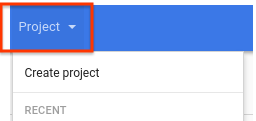
專案選取器。

gcloud

使用 gcloud resource-manager org-policies set-policy 指令設定政策。您必須以 JSON 檔案形式提供政策。建立格式如下的 JSON 檔案:

{
 "constraint": "constraints/compute.vmExternalIpAccess",
 "listPolicy": {
  "allowedValues": [
   "projects/PROJECT_ID/zones/ZONE/instances/INSTANCE_NAME"
  ]
 }
}

更改下列內容:

  • PROJECT_ID:這項要求的專案 ID,例如 example-project。請注意,這與設定組織政策不同,後者需要組織數字 ID。
  • ZONE:執行個體的可用區。
  • INSTANCE_NAME:執行個體的名稱。

或者,您也可以指定 deniedValues 清單,明確禁止清單中的執行個體擁有外部 IP 位址。凡是未列於清單中的執行個體,都會隱含允許擁有外部 IP 位址。你只能指定 allowedValues 或 deniedValues,但不能同時指定兩者。

然後將檔案連同要求一併傳送:

gcloud resource-manager org-policies set-policy MY_POLICY.JSON --project=example-project

REST

使用 setOrgPolicy API 定義限制。您指定的 allowedValues 清單中的執行個體可以有外部 IP 位址。或者,您也可以指定 deniedValues 清單,明確指出要禁止哪些執行個體擁有外部 IP 位址。凡是未列於清單中的執行個體,一律允許使用外部 IP 位址。您只能指定 allowedValues 或 deniedValues,不能同時指定兩者。

舉例來說,以下是針對專案設定 compute.vmExternalIpAccess 限制的要求,允許特定執行個體擁有外部 IP 位址:

POST https://cloudresourcemanager.googleapis.com/v1/projects/PROJECT_ID:setOrgPolicy

將 PROJECT_ID 替換為這項要求的專案 ID。

要求主體包含這項限制的政策:

{
  "policy": {
    "constraint": "constraints/compute.vmExternalIpAccess",
    "listPolicy": {
      "allowedValues": [
        "projects/PROJECT_ID/zones/ZONE/instances/INSTANCE_NAME"
      ]
    }
  }
}

管理靜態外部 IP 位址

以下各節說明如何管理執行個體的靜態外部 IP 位址。

判斷外部 IP 位址是暫時還是靜態

在多數情況下,靜態和臨時外部 IP 位址的行為和顯示方式都相同。不過,使用靜態外部 IP 位址時,即使刪除並重新建立資源,您仍可為同一資源使用相同的 IP 位址。

一般來說,如果您停止或刪除資源,系統就會釋出臨時 IP 位址。

如要判斷位址是靜態還是臨時,請按照下列步驟操作:

  1. 前往 Google Cloud 控制台的「IP addresses」(IP 位址) 頁面。

    前往「IP addresses」(IP 位址) 頁面

  2. 在清單中找出地址,然後查看「類型」欄,瞭解 IP 位址類型。

取消指派靜態外部 IP 位址

取消指派 IP 位址會將其從資源中移除,但會保留 IP 位址。取消指派 IP 位址後,您可以將 IP 位址重新指派給其他資源。這項程序適用於雙重堆疊執行個體,但不適用於僅支援 IPv6 的執行個體。

您也可以刪除執行個體,取消指派 IPv4 或 IPv6 位址。

控制台

  1. 前往 Google Cloud 控制台的「IP addresses」(IP 位址) 頁面。

    前往「IP addresses」(IP 位址) 頁面

  2. 按一下「外部 IP 位址」。

  3. 選取要取消指派的靜態 IP 位址。

  4. 按一下「查看動作」,然後選取「重新指派給其他資源」選項。

  5. 在「Attach to」(附加至) 下拉式選單中,選取「None」(無)。

  6. 按一下 [確定]。

gcloud

  1. 使用 gcloud compute addresses list 指令,檢查是否使用靜態 IP 位址:

    gcloud compute addresses list
    

    輸出結果會與下列內容相似:

    NAME                      REGION    ADDRESS                  STATUS
    example-address-ipv4      REGION    198.51.100.1             RESERVED
    example-address-new-ipv4  REGION    203.0.113.1              IN_USE
    example-address-ipv6      REGION    2001:db8:1:1:1:1:1:1     RESERVED
    example-address-new-ipv6  REGION    2001:db8:4:4:4:4:4:4     IN_USE
    
    • 如果 IP 位址未使用,狀態會是 RESERVED。
    • 如果 IP 位址正在使用中,狀態會是 IN_USE。
  2. 擷取使用 IP 位址的執行個體名稱:

    gcloud compute addresses describe ADDRESS_NAME \
      --region=REGION
    

    更改下列內容:

    • ADDRESS_NAME:IPv6 位址資源的名稱。
    • REGION:IPv6 位址資源的區域。

    輸出結果會與下列內容相似:

    address: IP_ADDRESS
    addressType: EXTERNAL
    ...
    region: https://www.googleapis.com/compute/v1/projects/PROJECT/regions/REGION
    selfLink: https://www.googleapis.com/compute/v1/projects/PROJECT/regions/REGION/addresses/ADDRESS_NAME
    status: IN_USE
    subnetwork: https://www.googleapis.com/compute/v1/projects/PROJECT/regions/REGION/subnetworks/SUBNET
    users:
    - https://www.googleapis.com/compute/v1/projects/PROJECT/zones/ZONE/instances/INSTANCE_NAME
    

    users 欄位會顯示使用 IP 位址的執行個體名稱。

  3. 從執行個體取消指派 IP 位址。

    • 如要取消指派 IPv4 位址,請刪除執行個體的存取權設定檔:

      1. 取得要刪除的存取設定名稱。如要取得名稱,請使用 gcloud compute instances describe 指令。將 INSTANCE_NAME 替換為執行個體名稱。

        gcloud compute instances describe INSTANCE_NAME
        

        存取設定將透過以下格式顯示:

        networkInterfaces:
          - accessConfigs:
            - kind: compute#accessConfig
              name: external-nat
              natIP: 203.0.113.1
              type: ONE_TO_ONE_NAT
        
      2. 使用 gcloud compute instances delete-access-config 指令刪除存取設定:

        gcloud compute instances delete-access-config INSTANCE_NAME \
          --access-config-name="ACCESS_CONFIG_NAME"
        

        更改下列內容:

        • INSTANCE_NAME:執行個體的名稱。
        • ACCESS_CONFIG_NAME:要刪除的存取權設定名稱。請務必在引號之間加入全名。
    • 如要取消指派 IPv6 位址範圍,請使用 instance network-interfaces update 指令:

      gcloud compute instances network-interfaces update INSTANCE_NAME \
        --network-interface=nic0 \
        --stack-type=IPV4_ONLY \
        --zone=ZONE
      

      更改下列內容:

      • INSTANCE_NAME:使用 IP 位址的執行個體名稱。
      • ZONE:執行個體的可用區。
  4. 確認您的靜態外部 IP 位址現可存取,且標示為 RESERVED,而非 IN_USE。

    gcloud compute addresses list \
      --filter="ADDRESS_NAME AND region=REGION"
    

    更改下列內容:

    • ADDRESS_NAME:IP 位址資源的名稱。
    • REGION:IP 位址資源的區域。

既然您的靜態外部 IP 位址已可存取,您可以選擇將其指派給另一個執行個體。

REST

如要取消指派靜態外部 IPv4 或 IPv6 位址,請按照下列步驟操作:

  • 如果是 IPv4 位址,請刪除附加至使用該位址的執行個體的存取權設定。

    1. 如要查看執行個體的存取設定詳細資料,請對 instances.get 方法發出 GET 要求。

      GET https://compute.googleapis.com/compute/v1/projects/PROJECT_ID/zones/ZONE/instances/INSTANCE_NAME
      
    2. 向 instances.deleteAccessConfig 方法提出 POST 要求,刪除現有的存取權設定。

      POST https://compute.googleapis.com/compute/v1/projects/PROJECT_ID/zones/ZONE/instances/INSTANCE_NAME/deleteAccessConfig
      

      更改下列內容:

      • PROJECT_ID:這項要求的專案 ID
      • ZONE:執行個體所在的可用區
      • INSTANCE_NAME:執行個體的名稱
  • 如果是 IPv6 位址,請更新附加 IPv6 位址的執行個體網路介面堆疊類型。

    1. 向 instances.updateNetworkInterface 方法發出 PATCH 要求。

    2. 在要求主體中,將 stackType 欄位的值更新為 IPV4_ONLY。

      例如:

      PATCH https://compute.googleapis.com/compute/v1/projects/PROJECT_ID/zones/ZONE/instances/INSTANCE_NAME/updateNetworkInterface
      
      {
        "networkInterfaces": [{
          ...
          "stackType" : "IPV4_ONLY"
          ...
          }]
      }
      

Java


import com.google.cloud.compute.v1.AccessConfig;
import com.google.cloud.compute.v1.AccessConfig.Type;
import com.google.cloud.compute.v1.Instance;
import com.google.cloud.compute.v1.InstancesClient;
import com.google.cloud.compute.v1.NetworkInterface;
import java.io.IOException;
import java.util.concurrent.ExecutionException;
import java.util.concurrent.TimeUnit;
import java.util.concurrent.TimeoutException;

public class UnassignStaticIpAddress {

  public static void main(String[] args)
          throws IOException, ExecutionException, InterruptedException, TimeoutException {
    // TODO(developer): Replace these variables before running the sample.
    // Project ID or project number of the Google Cloud project you want to use.
    String projectId = "your-project-id";
    // Instance ID of the Google Cloud project you want to use.
    String instanceId = "your-instance-id";
    // Name of the zone to create the instance in. For example: "us-west3-b"
    String zone = "your-zone";
    // Name of the network interface to assign.
    String netInterfaceName = "your-netInterfaceName";

    unassignStaticIpAddress(projectId, instanceId, zone, netInterfaceName);
  }

  public static Instance unassignStaticIpAddress(String projectId, String instanceId,
                                                 String zone, String netInterfaceName)
          throws IOException, ExecutionException, InterruptedException, TimeoutException {
    // Initialize client that will be used to send requests. This client only needs to be created
    // once, and can be reused for multiple requests.
    try (InstancesClient client = InstancesClient.create()) {
      Instance instance = client.get(projectId, zone, instanceId);
      NetworkInterface networkInterface = null;
      for (NetworkInterface netIterface : instance.getNetworkInterfacesList()) {
        if (netIterface.getName().equals(netInterfaceName)) {
          networkInterface = netIterface;
          break;
        }
      }

      if (networkInterface == null) {
        throw new IllegalArgumentException(
                String.format(
                        "No '{network_interface_name}' variable found on instance %s.",
                        instanceId)
        );
      }

      AccessConfig accessConfig = null;
      for (AccessConfig config : networkInterface.getAccessConfigsList()) {
        if (config.getType().equals(Type.ONE_TO_ONE_NAT.name())) {
          accessConfig = config;
          break;
        }
      }

      if (accessConfig != null) {
        // Delete the existing access configuration first
        client.deleteAccessConfigAsync(projectId, zone, instanceId,
                        accessConfig.getName(), netInterfaceName).get(30, TimeUnit.SECONDS);
      }

      // return updated instance
      return client.get(projectId, zone, instanceId);
    }
  }
}

Python

import uuid

from google.cloud.compute_v1 import InstancesClient
from google.cloud.compute_v1.types import DeleteAccessConfigInstanceRequest


def unassign_static_ip_from_existing_vm(
    project_id: str,
    zone: str,
    instance_name: str,
    network_interface_name: str = "nic0",
):
    """
    Updates access configuration for a VM instance to unassign a static external IP.
    VM (and IP address in case of static IP assigned) must be created before calling this function.

    Args:
        project_id (str): Project ID.
        zone (str): Zone where the VM is located.
        instance_name (str): Name of the VM instance.
        network_interface_name (str): Name of the network interface to unassign.
    """
    client = InstancesClient()
    instance = client.get(project=project_id, zone=zone, instance=instance_name)
    network_interface = next(
        (ni for ni in instance.network_interfaces if ni.name == network_interface_name),
        None,
    )

    if network_interface is None:
        raise ValueError(
            f"No network interface named '{network_interface_name}' found on instance {instance_name}."
        )

    access_config = next(
        (ac for ac in network_interface.access_configs if ac.type_ == "ONE_TO_ONE_NAT"),
        None,
    )

    if access_config:
        # Delete the existing access configuration
        delete_request = DeleteAccessConfigInstanceRequest(
            project=project_id,
            zone=zone,
            instance=instance_name,
            access_config=access_config.name,
            network_interface=network_interface_name,
            request_id=str(uuid.uuid4()),
        )
        delete_operation = client.delete_access_config(delete_request)
        delete_operation.result()

    updated_instance = client.get(project=project_id, zone=zone, instance=instance_name)
    return updated_instance

釋出靜態外部 IP 位址

如果不再需要靜態外部 IPv4 或 IPv6 位址,可以刪除 IP 位址資源,釋出 IP 位址。刪除執行個體不會自動釋出靜態外部 IP 位址。不再需要靜態外部 IP 位址時,請務必手動釋出。

如要釋出靜態外部 IP 位址,請參閱虛擬私有雲說明文件中的「釋出靜態外部 IP 位址」。

後續步驟