

This document explains the requirements and limitations that apply when you use Symphony Connectors for Google Cloud.
IBM Spectrum Symphony Connectors for Google Cloud let you add compute resources from Google Cloud to your Symphony clusters. When your high performance computing (HPC) workloads need more capacity than your existing infrastructure provides, the connectors let Symphony's host factory service automatically provision Compute Engine virtual machines (VM) instances or pods in Google Kubernetes Engine (GKE). This approach lets you scale your Symphony environment into Google Cloud to meet peak demand for your HPC workloads.
When to use Symphony Connectors for Google Cloud
Symphony Connectors for Google Cloud integrate Symphony's host factory service with Google Cloud, letting you use Google Cloud resources in your Symphony cluster. Use Symphony Connectors for Google Cloud in the following scenarios:
Cloud bursting: When your on-premises cluster resources are insufficient, dynamically scale your Symphony workloads into Google Cloud to access additional compute capacity. Symphony Connectors for Google Cloud automates the provisioning of resources as needed, integrated with existing Symphony job scheduling.
Hybrid cloud deployments: If you run Symphony workloads across both on-premises and Google Cloud infrastructure, you can use this solution to unify resource management through the Symphony host factory framework. This approach lets you manage your on-premises and Google Cloud resources from a single interface, simplifying job submission, monitoring, and resource management.
Cost optimization: Use Google Cloud's flexible instance types and pricing models, such as Spot VMs to run cost-sensitive workloads.
Development and testing: To provision temporary compute resources for development or testing workflows, use Symphony Connectors for Google Cloud to quickly create and delete environments. Costs are optimized through automatic resource cleanup.
Unified management: Use the host factory to create a consistent interface to manage both GKE pods and the Compute Engine instances that are used by Symphony.
Seamless enterprise integration: Use this solution to extend your existing Symphony deployments into Google Cloud without requiring significant architectural changes.
Learn how Symphony Connectors for Google Cloud works
Symphony Connectors for Google Cloud provide the necessary components to make Google Cloud a provider for the host factory service.
The following diagram shows the architecture of Symphony Connectors for Google Cloud:
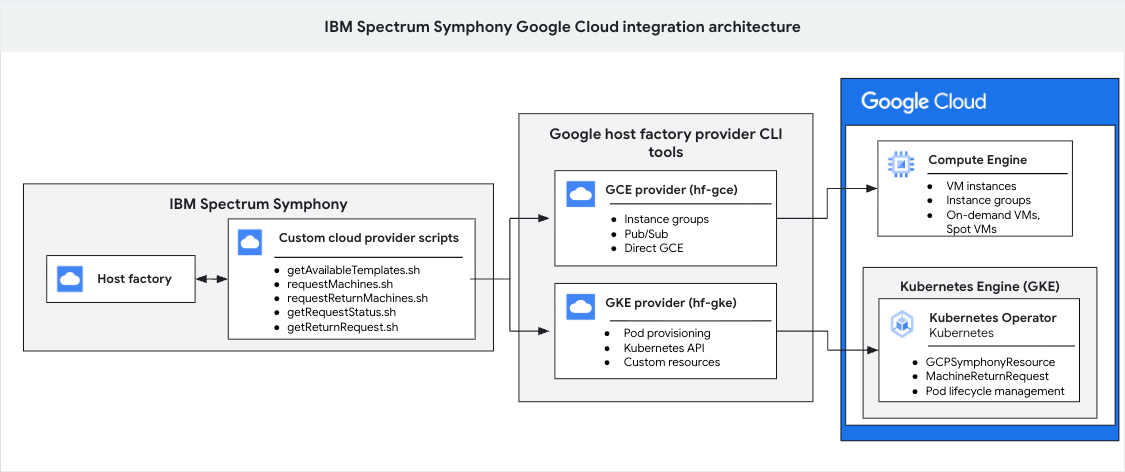
This architecture contains three main groups: an IBM Spectrum Symphony environment, a Google Cloud host factory provider layer, and Google Cloud services. The Symphony environment contains the host factory and provider scripts. This architecture uses the Google Cloud host factory provider CLI tools layer to translate requests, allowing the Symphony scripts to control Compute Engine resources and a Kubernetes operator running in GKE.
The following sections explain the main components of Symphony Connectors for Google Cloud.
IBM Spectrum Symphony host factory
An IBM Spectrum Symphony service that manages the lifecycle of compute hosts from various providers based on workload demand. This Symphony component is the software that Google Cloud integrates with.
Provider scripts
The Symphony host factory service uses a set of shell scripts to integrate with a cloud provider. These scripts request and return resources.
By default, Symphony doesn't include a host factory provider for Google Cloud.
The Google Cloud host factory provider lets the Symphony host factory framework communicate with Google Cloud.
The following table shows the scripts that Symphony Connectors for Google Cloud uses:
| Name | Description | IBM documentation |
|---|---|---|
getAvailableTemplates.sh |
Retrieves the available
resource templates that are defined in the provider configuration. Host factory
calls getAvailableTemplates.sh to know what types of
resources it can request. |
getAvailableTemplates |
requestMachines.sh |
Provisions new compute resources from Google Cloud. It receives a JSON payload that specifies the template and quantity. | requestMachines |
requestReturnMachines.sh |
Host factory deprovisions compute resources that are used by the Symphony cluster. It receives a JSON payload that identifies the machines to be returned. | requestReturnMachines |
getRequestStatus.sh |
Host factory polls the status of ongoing provisioning requests
that are initiated by requestMachines.sh. It receives a JSON payload
that contains request IDs. |
getRequestStatus |
getReturnRequests.sh |
Host factory polls the
status of ongoing deprovisioning requests that are initiated by
requestReturnMachines.sh. It receives a JSON payload that
contains request IDs. | getReturnRequests |
Google Cloud host factory provider
The Google Cloud host factory provider connects IBM Spectrum Symphony's host factory framework to Google Cloud. This plugin includes command-line interface (CLI) tools, called providers, that Symphony calls to request and manage resources for the following workloads:
For Compute Engine, use the Compute Engine provider.
For GKE workloads, use the GKE provider. For GKE workloads, you must install an additional Kubernetes operator. This operator runs within your GKE cluster to manage the lifecycle of the IBM Spectrum Symphony compute pods that are requested by using the GKE provider.
Because the CLI tools are Python modules, you can also run them manually by using the Python interpreter. For more information, see Running from Python in GitHub.
Compute Engine provider
The Compute Engine provider (hf-gce) is a CLI tool designed to
integrate Symphony's host factory with
Compute Engine. After you install the Compute Engine provider, you
must configure it in
Symphony host factory. After this configuration is complete, host factory
automatically invokes scripts that use the hf-gce CLI.
The Compute Engine provider interacts directly with the Google Compute Engine API to manage the lifecycle of VM instances based on Symphony's demands and the configurations defined in the provider instance and templates. The provider creates, monitors, and terminates Compute Engine VMs, which then join the Symphony cluster as compute nodes.
GKE provider
The GKE provider (hf-gke) is a CLI tool that connects
Symphony's host factory service with GKE. Host factory uses
scripts that call the hf-gke CLI.
The GKE provider interacts with the API of the
GKE cluster to create, query, and delete custom resources,
specifically GCPSymphonyResource and MachineReturnRequest resources.
The Kubernetes operator that runs within the GKE cluster handles pod lifecycle management based on these custom resources. The GKE provider connects Symphony's resource requests to the Kubernetes custom resource-based orchestration.
Google Cloud service integrations
You can connect to Compute Engine and GKE. There are no additional components for Compute Engine connections. For GKE connections, there is a Kubernetes operator.
Kubernetes operator
This operator is only required for GKE workloads that you run by using the GKE provider. This operator runs within your GKE cluster to manage the lifecycle of Symphony compute pods that are requested by using the GKE provider. The GKE operator has the following features:
- Asynchronous operations: supports high-performance asynchronous processing, suitable for large-scale deployments.
- Preemption handling: includes automatic detection and management of Spot VM preemptions.
- Custom resource definitions: uses
GCPSymphonyResourceandMachineReturnRequestcustom resources to manage resources. - Resource cleanup: automates cleanup of completed resources, with configurable retention periods.
- Health monitoring: monitors integration health with built-in health checks and status reporting.
Limitations
Symphony Connectors for Google Cloud provision and manage the underlying compute infrastructure (VM instances and GKE pods) for your Symphony cluster; they don't create new Symphony workloads. You continue to use the Symphony software to create, manage, schedule, and run your workloads.
What's next
- Install the Compute Engine Symphony provider
- Install the GKE provider
- Troubleshoot IBM Spectrum Symphony connectors