

AI zones are specialized zones used for Artificial Intelligence and Machine Learning (AI and ML) training and inference workloads. They provide significant ML accelerator (GPU and TPU) capacity.
Within a region, AI zones are geographically located away from standard
(non-AI) zones. The following figure shows an example of an AI zone
(us-south1-ai1b) located further away relative to the standard zones in the
us-south1 region.
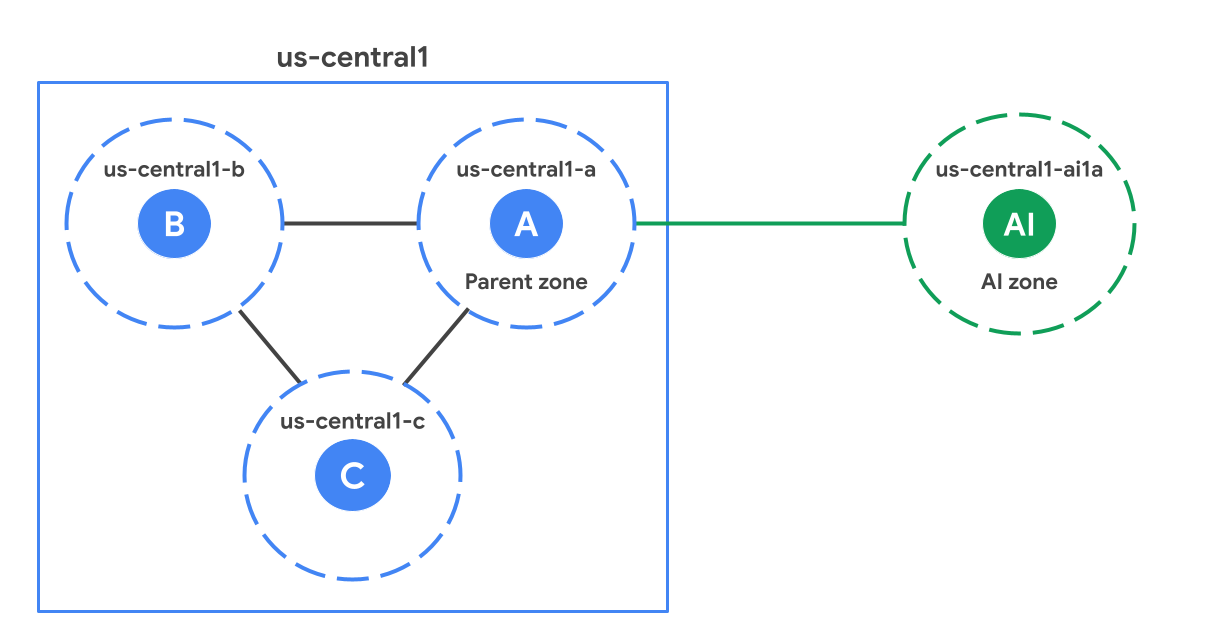
Parent zone
Each AI zone is associated with a standard zone in the region, referred to as
its parent zone. A parent zone is a standard zone with the same suffix as the
AI zone. For example, in the diagram, us-central1-a is the parent zone of
us-central1-ai1a. They share software update schedules and sometimes
infrastructure. This means that any software or infrastructure issues affecting
a parent zone could also affect the AI zone. When designing your high
availability solutions, review the
High availability (HA) considerations to account for the
dependency on the parent zone.
When to use AI zones
AI zones are optimized for AI and ML workloads. Use the following guidance to determine which of your workloads are best suited for AI zones and which are better served by standard zones.
Recommended for:
Large-scale training: Ideal for large-scale training workloads—such as Large Language Model (LLM) and foundational model training—because of the availability of a large number of accelerators.
Small-scale training, fine-tuning, bulk inference, and retraining: AI zones perform well for workloads that require substantial accelerator capacity.
Real-time ML inference: AI zones support real-time inference workloads. Performance depends on the application design and model latency requirements, especially if the workload requires round-trip requests to the parent region.
Not recommended for:
- Non-ML workloads: Since AI zones do not offer all Google Cloud services locally, we recommend running your non-ML workloads in the standard zones.
Access services from an AI zone
You can access all Google Cloud products in a Google Cloud region from its AI zone. However, accessing services in a Google Cloud region from an AI zone can add network latency, as the AI zone is physically separate from the locations of the region's standard zones.
To view AI zones in the Google Cloud console, the Google Cloud CLI, and REST API, you must turn on AI zone visibility for your project. AI zone visibility is separate from access control and Organization Policy Service boundaries. For more information, see Manage AI zone visibility.
Specific products support creating or accessing zonal resources locally in an AI zone. For more information about these services, see the following table:
| Product | Description |
|---|---|
| Google Kubernetes Engine (GKE) | Setup for using AI zones in GKE clusters, including configuration using ComputeClasses, node auto-provisioning, and GKE Standard node pools. Using AI zones in GKE |
| Cloud Storage | Configuration of object storage for workloads in AI zones, including zonal storage to maximize performance during active jobs and persistent storage for datasets and model checkpoints. Use AI zones with Cloud Storage |
| Compute Engine | Methods to identify available AI zones using the console, Google Cloud CLI, and REST API, including how to filter by naming convention, accelerator type, or machine Find available AI zones |
| Google Cloud Managed Lustre | Optimize performance for AI and ML workloads that are deployed on GKE Standard Optimize AI and ML workloads with Google Cloud Managed Lustre |
Locations
AI zones are available in the following locations:
| AI zone | AI zone location | Google Cloud region | Google Cloud region location | Parent zone |
|---|---|---|---|---|
europe-west4-ai1a |
De Kooy, Netherlands, Europe | europe-west4 |
Eemshaven, Netherlands, Europe | europe-west4-a |
us-south1-ai1b |
Austin, Texas, North America | us-south1 |
Dallas, Texas, North America | us-south1-b |
us-central1-ai1a |
Lincoln, Nebraska, North America | us-central1 |
Council Bluffs, Iowa, North America | us-central1-a |
To review which GPU and TPU types are available in AI zones, see the following:
- View GPU types and locations available in AI zones
- View TPU types and locations available in AI zones
Deploying resources to AI zones
AI zones are accessible through the Google Cloud console, Google Cloud CLI, or REST. However, when using the Google Cloud console to create your VMs, you must manually select an AI zone. It isn't selected for you, as it is with standard zones. To use AI zones with the following features, you must explicitly select an AI zone while you're setting up these resources.
Certain Compute Engine features: AI zones aren't automatically selected in certain Compute Engine regional features, such as regional bulk insert operations or regional managed instance groups (MIGs).
Bulk Insert: To include AI zones in regional bulk insert operations, you must use the
locationPolicy.zones[]field. Thelocations[]field doesn't support AI zones. The following example shows this format for the zoneus-south1-ai1b:{ "locationPolicy": { "zones": [ "zones/us-south1-ai1b" ] } }Regional MIGs: To create instances in an AI zone in the selected region, you must explicitly specify it in the distribution policy (
distributionPolicy.zones[]) together with the other preferred zones. The following example shows this format for the zoneus-south1-ai1b:{ "distributionPolicy": { "zones": [ "zones/us-south1-a", "zones/us-south1-b", "zones/us-south1-ai1b" ] } }
Certain GKE features: AI zones aren't automatically selected in certain GKE regional features, such as regional GKE clusters. For more details about GKE, see Using AI zones in GKE in this document.
Vertex AI: GKE based Vertex AI regional products must configure GKE to include AI zones in regional clusters. You don't need to opt in to Vertex AI. Vertex AI manages this configuration.
Google Cloud Service Metadata Locations API: You must enable the
--extraLocationTypesflag when using the locations.list API to ensure AI zones appear only to those who intend to use them.Non-accelerator workload restrictions: Compute Engine limits creation of CPU-only VMs in AI zones.
Using AI zones in GKE
By default, GKE doesn't deploy your workloads in AI zones. To use an AI zone, you configure one of the following options:
ComputeClasses: Set your highest priority to request on-demand TPUs in an AI zone. ComputeClasses help you define a prioritized list of hardware configurations for your workloads. For an example, see About ComputeClasses.
Node auto-provisioning: Use a
nodeSelectorornodeAffinityin your pod specification to instruct node auto-provisioning to create a node pool in the AI zone. If your workload doesn't explicitly target an AI zone, node auto-provisioning considers only standard zones when creating new node pools. This configuration ensures that workloads that don't run AI/ML models remain in standard zones unless you explicitly configure otherwise. For an example of a manifest that uses anodeSelector, see Set the default zones for auto-created nodes.GKE Standard: If you directly manage your node pools, use an AI zone in the
--node-locationsflag when you create a node pool. For an example, see Deploy TPU workloads in GKE Standard.
Limitations
The following are not available in AI zones:
Design considerations with AI zones
Consider the following when designing your applications to use AI zones.
High availability (HA) considerations
AI zones share software rollouts and infrastructure with their parent zones. To ensure high availability for your workloads, avoid these deployment patterns when you select zones, whether automatically or manually:
Avoid deploying HA workloads across an AI zone and its parent zone.
Avoid deploying HA workloads across two AI zones that share the same parent zone.
Storage best practices
We recommend a tiered storage architecture to balance cost, durability, and performance:
- Cold storage layer: Use regional Cloud Storage buckets in standard zones for persistent, highly-durable storage of your training datasets and model checkpoints.
Performance layer: Use specialized zonal storage services to act as a high-speed cache or temporary scratch space. This approach eliminates inter-zonal latency and maximizes goodput during active jobs.
To help ensure that GPUs and TPUs remain fully saturated, maximizing goodput, provision your performance layer in the same AI zone as your compute resources.
The following storage solutions are recommended for optimizing AI and ML system performance with AI zones:
| Storage service | Description | Use cases |
|---|---|---|
| Anywhere Cache feature of Cloud Storage | A fully managed, SSD-backed zonal read cache that brings frequently read data from a bucket into the AI zone. | Recommended for:
|
Include or exclude AI zones
To manually include or exclude AI zones from a list of zones, use a filter:
- To filter a list of zones to include only AI zones, see Search for AI zones.
- To filter a list of zones to exclude AI zones, see Exclude AI zones from lists.