


使用連結試算表
連結試算表將 BigQuery 的大規模資料處理能力,整合到了您熟悉的 Google 試算表介面。透過連結試算表,您可以預覽 BigQuery 資料,並在以完整資料集建立的資料透視表、公式和圖表中使用這些資料。
你也可以執行下列操作:
與合作夥伴、分析師或其他相關人員利用熟悉的試算表介面協同合作。
不需要額外匯出試算表,就能確保您是使用相同的來源進行資料分析。
簡化報表和資訊主頁的工作流程。
除了您要求之外,「連結試算表」也可以根據預先排定的時間表,在 BigQuery 中代替您執行查詢。這些查詢的結果會儲存在試算表中,方便您分析及共用資料。
應用實例
以下僅列出幾個使用案例,說明連結試算表如何讓您在試算表中分析大量資料,不必具備 SQL 相關知識。
業務規劃:建構及準備資料集,然後允許其他人從資料中找出洞察資訊。舉例來說,分析銷售資料,判斷不同地點的熱銷產品。
客戶服務:找出每 10,000 位顧客中,投訴次數最多的商店。
銷售:製作內部財務和銷售報表,並與銷售代表分享收益報表。
存取控管
BigQuery 資料集和資料表的直接存取權,是在 BigQuery 中控管。如要只授予使用者 Google 試算表存取權,請共用試算表,但不要授予 BigQuery 存取權。
如果使用者只有 Google 試算表存取權,可以在試算表中執行分析,並使用其他 Google 試算表功能,但無法執行下列動作:
- 在試算表中手動重新整理 BigQuery 資料。
- 排定重新整理工作表資料的時間。
在連結試算表中篩選資料時,系統會根據您選取的專案,重新整理傳送至 BigQuery 的查詢。您可以在相關專案中,使用下列記錄篩選器查看已執行的查詢:
resource.type="bigquery_resource"
protoPayload.metadata.firstPartyAppMetadata.sheetsMetadata.docId != NULL_VALUE
VPC Service Controls
您可以使用 VPC Service Controls 限制Google Cloud 資源的存取權。由於 VPC Service Controls 不支援 Google 試算表,因此您可能無法存取 VPC Service Controls 保護的 BigQuery 資料。不過,如果您具備必要權限且符合 VPC Service Controls 的存取限制規定,只要設定 VPC Service Controls 範圍,即可允許透過「連結試算表」發出的查詢。如要執行這項操作,請使用下列項目設定重疊範圍:
- 存取層級或輸入規則,允許來自 perimeter 外部的受信任 IP 位址、身分和受信任的用戶端裝置提出要求。
- 外送規則,允許將查詢結果複製到使用者的試算表。
瞭解如何設定輸入和輸出政策,以及如何設定存取層級,以正確設定規則。如要設定允許複製必要資料的周邊防護範圍,請使用下列 YAML 檔案:
# Allows egress to Sheets through the Connected Sheets feature
- egressTo:
    operations:
    - serviceName: 'bigquery.googleapis.com'
      methodSelectors:
      - permission: 'bigquery.vpcsc.importData'
    resources:
    - projects/628550087766 # Sheets-owned Google Cloud project
  egressFrom:
    identityType: ANY_USER_ACCOUNT
事前準備
首先,請確認您符合在 Google 試算表中存取 BigQuery 資料的條件,詳情請參閱 Google Workspace 主題「開始在 Google 試算表中使用 BigQuery 資料」的「必要條件」一節。
如果沒有已設定計費功能的 Google Cloud 專案,請按照下列步驟操作:
- 登入 Google Cloud 帳戶。如果您是 Google Cloud新手,歡迎 建立帳戶,親自評估產品在實際工作環境中的成效。新客戶還能獲得價值 $300 美元的免費抵免額,可用於執行、測試及部署工作負載。
-
In the Google Cloud console, on the project selector page, select or create a Google Cloud project.
Roles required to select or create a project
- Select a project: Selecting a project doesn't require a specific IAM role—you can select any project that you've been granted a role on.
-
Create a project: To create a project, you need the Project Creator role
(
roles/resourcemanager.projectCreator), which contains theresourcemanager.projects.createpermission. Learn how to grant roles.
-
Verify that billing is enabled for your Google Cloud project.
-
In the Google Cloud console, on the project selector page, select or create a Google Cloud project.
Roles required to select or create a project
- Select a project: Selecting a project doesn't require a specific IAM role—you can select any project that you've been granted a role on.
-
Create a project: To create a project, you need the Project Creator role
(
roles/resourcemanager.projectCreator), which contains theresourcemanager.projects.createpermission. Learn how to grant roles.
-
Verify that billing is enabled for your Google Cloud project.
- 新專案會自動啟用 BigQuery。如要在現有專案中啟用 BigQuery,請前往
啟用 BigQuery API。
啟用 API 時所需的角色
如要啟用 API,您必須具備
serviceusage.services.enable權限。如果您建立了專案,可能已透過「擁有者」角色 (roles/owner) 取得這項權限。否則,您可以透過「服務使用情形管理員」角色 (roles/serviceusage.serviceUsageAdmin) 取得這項權限。瞭解如何授予角色。
如要避免繼續計費,可以刪除您建立的資源。詳情請參閱清除所用資源一節。
從連結試算表開啟 BigQuery 資料集
以下範例使用公開資料集,說明如何從 Google 試算表連線至 BigQuery:
建立或開啟 Google 試算表。
依序點選「資料」、「資料連接器」,然後點選「連結至 BigQuery」。
選取已啟用計費功能的 Google Cloud 專案。
按一下「公開資料集」。
在搜尋框中輸入「chicago」,然後選取「chicago_taxi_trips」資料集。
選取「taxi_trips」資料表,然後點按「連線」。

試算表應類似以下內容:
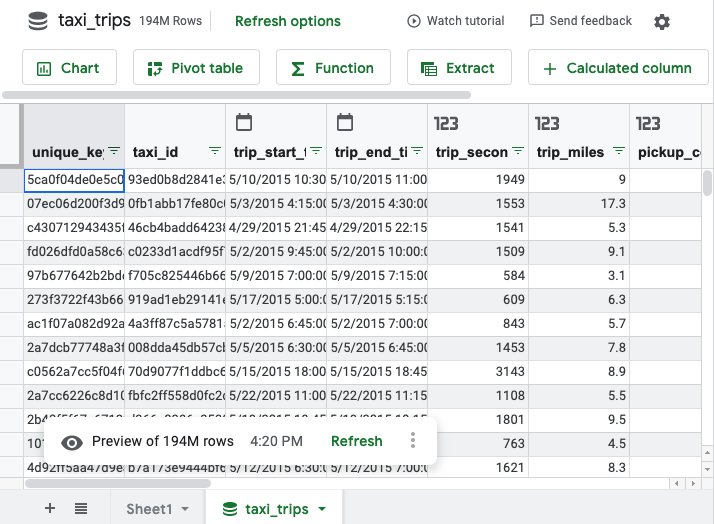
開始使用試算表。您可以使用熟悉的 Google 試算表技巧,建立資料透視表、公式、圖表、計算欄和排定查詢。詳情請參閱連結試算表教學課程。
雖然試算表只會預覽 500 列,但所有資料透視表、公式和圖表都會使用整個資料集。資料透視表傳回的結果最多可有 20 萬列。
您也可以將資料匯出至 Google 試算表。資料擷取作業傳回的資料列和儲存格數量上限取決於下列條件:
- 如果列數小於或等於 50,000,則沒有儲存格限制。
- 如果列數大於 5 萬但小於或等於 50 萬,則儲存格數量必須小於或等於 5 百萬。
- 如果資料列數量超過 50 萬,系統就不支援資料提取功能。
使用連結試算表從資料建立圖表、資料透視表、公式或其他計算儲存格時,連結試算表會代表您在 BigQuery 中執行查詢。如要查看這項查詢,請按照下列步驟操作:
- 選取您建立的儲存格或圖表。
- 將游標懸停在「重新整理」 上。
- 選用:如要重新整理「連結試算表」中的查詢結果,請按一下 「重新整理」。
如要在 BigQuery 中查看查詢,請按一下 「BigQuery 查詢詳細資料」。
查詢會在 Google Cloud 控制台中開啟。
在連結試算表開啟資料表
如要在連結試算表開啟資料表,請按照下列步驟操作:
前往 Google Cloud 控制台的「BigQuery」頁面。
點選左側窗格中的 「Explorer」。

如果沒有看到左側窗格,請按一下 「Expand left pane」(展開左側窗格),開啟窗格。
在「Explorer」窗格中展開專案,按一下「Datasets」,然後按一下包含要透過 Google 試算表開啟的資料表的資料集。
依序點選「總覽」>「表格」,然後在表格名稱旁點選 「查看動作」,並選取「在『已連結的試算表』中開啟」>。
在連結試算表中開啟已儲存的查詢
如要在連結試算表中開啟已儲存的查詢,請按照下列步驟操作:
前往 Google Cloud 控制台的「BigQuery」頁面。
點選左側窗格中的 「Explorer」。
在「Explorer」窗格中展開專案,然後按一下「Queries」。 找出要透過連結試算表開啟的已儲存的查詢。
按一下已儲存的查詢旁的 「開啟動作」 ,然後依序點選 「開啟方式」 > 「連結試算表」。
或者,按一下已儲存的查詢名稱,在詳細資料窗格中開啟查詢,然後依序點選「在以下項目中開啟」>「連結試算表」。
透過連結試算表監控 BigQuery 使用情形
BigQuery 管理員可以監控及稽核連結試算表的資源耗用量,瞭解使用模式、管理費用,以及找出常用報表。以下各節提供 SQL 查詢範例,協助您在機構和專案層級監控這項用量。詳情請參閱「JOBS 查看」。
所有來自連結試算表的查詢都會指派專屬工作 ID 前置字元:sheets_dataconnector。您可以使用這個前置字串,在 INFORMATION_SCHEMA.JOBS 檢視畫面中篩選工作。
在機構層級匯總使用者的連結試算表用量
以下查詢會提供貴機構過去 30 天內,主要連結試算表使用者的摘要,並依總計帳單資料排序。這項查詢會彙整每位使用者的查詢總數、帳單總位元組數和運算單元總毫秒數。這項資訊有助於瞭解採用情形,以及找出資源用量最高的使用者。
SELECT
  user_email,
  COUNT(*) AS total_queries,
  SUM(total_bytes_billed) AS total_bytes_billed,
  SUM(total_slot_ms) AS total_slot_ms
FROM
  `region-REGION_NAME.INFORMATION_SCHEMA.JOBS_BY_ORGANIZATION`
WHERE
  -- Filter for jobs created in the last 30 days
  creation_time >= TIMESTAMP_SUB(CURRENT_TIMESTAMP(), INTERVAL 30 DAY)
  -- Filter for jobs originating from Connected Sheets
  AND job_id LIKE 'sheets_dataconnector%'
  -- Filter for completed jobs
  AND state = 'DONE'
  AND (statement_type IS NULL OR statement_type <> 'SCRIPT')
GROUP BY
  1
ORDER BY
  total_bytes_billed DESC;
將 REGION_NAME 替換為專案的區域。例如:region-us。
傳回的結果看起來類似下列內容:
+---------------------+---------------+--------------------+-----------------+
| user_email          | total_queries | total_bytes_billed | total_slot_ms   |
+---------------------+---------------+--------------------+-----------------+
| alice@example.com   | 152           | 12000000000        | 3500000         |
| bob@example.com     | 45            | 8500000000         | 2100000         |
| charles@example.com | 210           | 1100000000         | 1800000         |
+---------------------+---------------+--------------------+-----------------+
在機構層級尋找連結試算表查詢作業的工作記錄
下列查詢會提供 Google 試算表連結執行的每項個別工作詳細記錄。這項資訊有助於稽核及找出特定高成本查詢。
SELECT
  job_id,
  creation_time,
  user_email,
  project_id,
  total_bytes_billed,
  total_slot_ms
FROM
  `region-REGION_NAME.INFORMATION_SCHEMA.JOBS_BY_ORGANIZATION`
WHERE
  creation_time >= TIMESTAMP_SUB(CURRENT_TIMESTAMP(), INTERVAL 30 DAY)
  AND job_id LIKE 'sheets_dataconnector%'
  AND state = 'DONE'
  AND (statement_type IS NULL OR statement_type <> 'SCRIPT')
ORDER BY
  creation_time DESC;
將 REGION_NAME 替換為專案的區域。例如:region-us。
傳回的結果看起來類似下列內容:
+---------------------------------+---------------------------------+-----------------+------------+--------------------+---------------+
| job_id                          | creation_time                   | user_email      | project_id | total_bytes_billed | total_slot_ms |
+---------------------------------+---------------------------------+-----------------+------------+--------------------+---------------+
| sheets_dataconnector_bquxjob_1  | 2025-11-06 00:26:53.077000 UTC  | abc@example.com | my_project | 12000000000        | 3500000       |
| sheets_dataconnector_bquxjob_2  | 2025-11-06 00:24:04.294000 UTC  | xyz@example.com | my_project | 8500000000         | 2100000       |
| sheets_dataconnector_bquxjob_3  | 2025-11-03 23:17:25.975000 UTC  | bob@example.com | my_project | 1100000000         | 1800000       |
+---------------------------------+---------------------------------+-----------------+------------+--------------------+---------------+
在專案層級匯總使用者連結試算表用量
如果您沒有機構層級的權限,或只需要監控特定專案,請執行下列查詢,找出專案中過去 30 天內最常使用 Google 試算表連結的使用者。這項查詢會彙整每位使用者的查詢總數、計費位元組總數和運算單元毫秒總數。這項資訊有助於瞭解資源採用情況,以及找出資源用量最高的消費者。
SELECT
  user_email,
  COUNT(*) AS total_queries,
  SUM(total_bytes_billed) AS total_bytes_billed,
  SUM(total_slot_ms) AS total_slot_ms
FROM
  -- This view queries the project you are currently running the query in.
  `region-REGION_NAME`.INFORMATION_SCHEMA.JOBS_BY_PROJECT
WHERE
  -- Filter for jobs created in the last 30 days
  creation_time >= TIMESTAMP_SUB(CURRENT_TIMESTAMP(), INTERVAL 30 DAY)
  -- Filter for jobs originating from Connected Sheets
  AND job_id LIKE 'sheets_dataconnector%'
  -- Filter for completed jobs
  AND state = 'DONE'
  AND (statement_type IS NULL OR statement_type <> 'SCRIPT')
GROUP BY
  user_email
ORDER BY
  total_bytes_billed DESC
LIMIT
  10;
將 REGION_NAME 替換為專案的區域。例如:region-us。
傳回的結果看起來類似下列內容:
+---------------------+---------------+--------------------+-----------------+
| user_email          | total_queries | total_bytes_billed | total_slot_ms   |
+---------------------+---------------+--------------------+-----------------+
| alice@example.com   | 152           | 12000000000        | 3500000         |
| bob@example.com     | 45            | 8500000000         | 2100000         |
| charles@example.com | 210           | 1100000000         | 1800000         |
+---------------------+---------------+--------------------+-----------------+
在專案層級尋找連結試算表查詢作業的工作記錄
如果您沒有機構層級的權限,或只需要監控特定專案,請執行下列查詢,查看目前專案所有已連結試算表查詢的詳細記錄:
SELECT
  job_id,
  creation_time,
  user_email,
  total_bytes_billed,
  total_slot_ms,
  query
FROM
  -- This view queries the project you are currently running the query in.
  `region-REGION_NAME.INFORMATION_SCHEMA.JOBS_BY_PROJECT`
WHERE
  creation_time >= TIMESTAMP_SUB(CURRENT_TIMESTAMP(), INTERVAL 30 DAY)
  AND job_id LIKE 'sheets_dataconnector%'
  AND state = 'DONE'
  AND (statement_type IS NULL OR statement_type <> 'SCRIPT')
ORDER BY
  creation_time DESC;
將 REGION_NAME 替換為專案的區域。例如:region-us。
傳回的結果看起來類似下列內容:
+---------------------------------+---------------------------------+------------------+--------------------+-----------------+---------------------------------+
| job_id                          | creation_time                   | user_email       | total_bytes_billed | total_slot_ms   |  query                          |
+---------------------------------+---------------------------------+------------------+--------------------+-----------------+---------------------------------+
| sheets_dataconnector_bquxjob_1  | 2025-11-06 00:26:53.077000 UTC  | abc@example.com  | 12000000000        | 3500000         |  SELECT ... FROM dataset.table1 |
| sheets_dataconnector_bquxjob_2  | 2025-11-06 00:24:04.294000 UTC  | xyz@example.com  | 8500000000         | 2100000         |  SELECT ... FROM dataset.table2 |
| sheets_dataconnector_bquxjob_3  | 2025-11-03 23:17:25.975000 UTC  | bob@example.com  | 1100000000         | 1800000         |  SELECT ... FROM dataset.table3 |
+---------------------------------+---------------------------------+------------------+--------------------+-----------------+---------------------------------+
清除所用資源
如要避免系統向您的 Google Cloud 帳戶收取這個教學課程所用資源的費用,請執行下列操作:
- 前往 Google Cloud 控制台的「Manage resources」(管理資源) 頁面。
- 在專案清單中選取要刪除的專案,然後點選「Delete」(刪除)。
- 在對話方塊中輸入專案 ID,然後按一下 [Shut down] (關閉) 以刪除專案。
後續步驟
如需更多資訊,請參閱「開始在 Google 試算表中使用 BigQuery 資料」主題。
在 YouTube 上觀看「使用連結試算表」播放清單中的影片。
準備好實際操作了嗎?試用實驗室: