

This document provides a reference architecture to create a unified frontend for multiple AI models that are hosted on-premises or by any provider, including third-party and Google Cloud. If all of your inference servers are hosted in Google Kubernetes Engine (GKE), then see Networking for AI inference model serving on GKE.
This architecture is designed to enable your developers to select models without having to specify individual IP addresses for each model. Instead, developers send OpenAI API requests that include the name of the model to the frontend endpoint. The system in the architecture routes the requests to the backend that hosts the specified model. The frontend load balancer in the architecture provides the following centralized administrative functions:
- Single frontend endpoint for all of the model calls regardless of how you host the models.
- API management functionality.
- Checkpoint for AI guardrails.
- Service Extensions insertion point for future extensibility.
This document is for network administrators and administrators of generative AI applications who want to place new or existing generative AI models behind a single inference endpoint. This document doesn't provide guidance about how to design an application or deploy an individual generative AI model. For guidance about how to deploy a model, see Build and deploy generative AI and machine learning models in an enterprise. This architecture works with application networking architectures such as Cross-Cloud Network for distributed applications and with other designs.
Architecture
The following diagram shows an architecture with an endpoint in a consumer network that points to a regional internal Application Load Balancer frontend. This load balancer uses the name of the specified model to route requests to model replica sets that are hosted on-premises or by any provider. The frontend load balancer provides consolidated services for all of the hosted models.
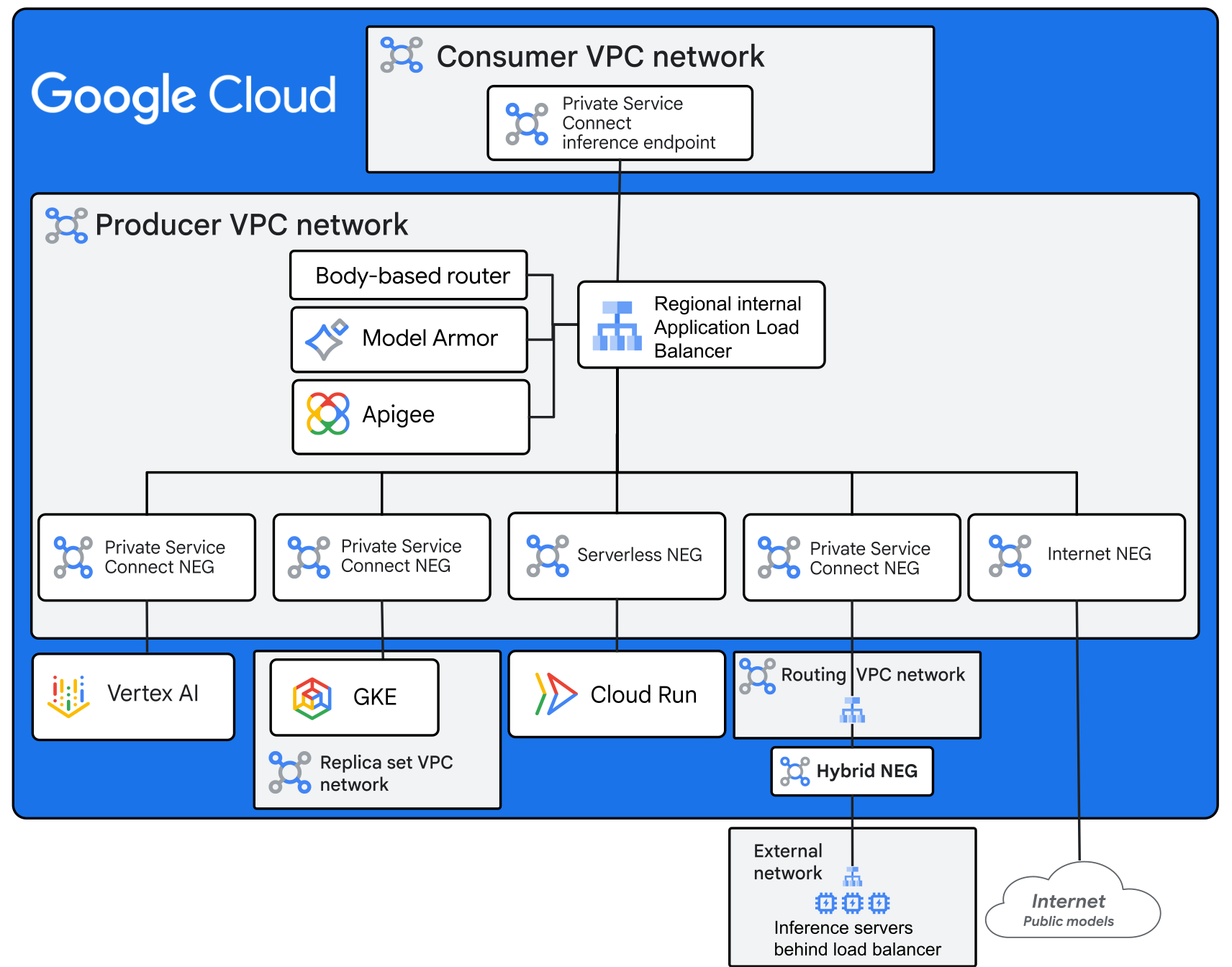
The architecture in the diagram includes the following components:
- Private Service Connect inference endpoint: A unified endpoint for all of the hosted models. The end user sends inference requests to the endpoint IP address. The diagram shows a Private Service Connect endpoint in a single consumer Virtual Private Cloud (VPC) network. You can host endpoints in several VPC networks or in a shared-services VPC network.
- Regional internal Application Load Balancer: In this architecture, the frontend load balancer is a regional internal Application Load Balancer. The frontend load balancer routes traffic to replica pools based on the model name specified in the request. In this architecture, the customer application makes OpenAI API calls to the load balancer. If the backend inference server is compatible with the OpenAI API, then things work transparently. If the inference server isn't compatible with the OpenAI API, then you must implement an API translator by using Service Extensions. This reference architecture doesn't include the implementation of an API translator.
- Service Extensions callouts: You can use callouts to add
additional processing to an
Application Load Balancer. The architecture in this design uses the following
callouts:
- Inference Payload Processor
(previously the body-based router):
The Inference Payload Processor is deployed in Cloud Run. It reads the model
name from the body of the OpenAI API request and writes it to an
X-Gateway-Model-Namefield in the header. The load balancer URL map uses the field to forward the request to the appropriate backend service. The Terraform deployment that's provided with this reference architecture includes the Inference Payload Processor configuration. - Apigee: An API manager that provides for API authentication, security, rate limiting, quota tracking, and other API management services. This architecture uses Apigee, but the architecture supports other options. To call Apigee from the load balancer, the architecture and the Terraform deployment use a Service Extensions traffic extension to call the Apigee Extension Processor.
- Model Armor: An AI guardrails system that performs safety checks on inference prompts before they get to the inference server. It then performs safety checks on the outgoing responses. This architecture uses Model Armor for AI guardrails, but it also supports other options such as NVIDIA NeMo Guardrails. The Terraform deployment that's provided with this reference architecture includes a basic Model Armor configuration.
- Inference Payload Processor
(previously the body-based router):
The Inference Payload Processor is deployed in Cloud Run. It reads the model
name from the body of the OpenAI API request and writes it to an
- Backend services: The load balancer routes requests to backend services based on the name of the model in the request. The backend service contains a network endpoint group (NEG).
- Model replica sets: A model replica is a copy of an inference server that is deployed to one or more GPUs or TPUs. A model replica can be single-node or multi-node. A replica set is a uniform group of model replicas that is fronted by a load balancer. In the architecture, model replicas are contained in a GKE cluster behind a GKE Inference Gateway, in Gemini Enterprise Agent Platform, in Cloud Run, in an on-premises or other-cloud data center, and behind an endpoint on the internet.
Model replica set configurations
In the architecture, the frontend load balancer directs traffic to a particular backend service based on the model name. The inference servers for the specified model can be hosted in one of the configurations that's described in the following table.
| Replica set type | Description | Replica load balancing |
|---|---|---|
| Agent Platform | The model replicas run in Agent Platform. You publish a Agent Platform endpoint as a Private Service Connect Network Endpoint Group (NEG). The frontend load balancer uses Private Service Connect NEGs as backends for each distinct model, with each model structured as a backend service. | Agent Platform scales and load balances internally. Agent Platform performs metric-based weighted load balancing and prefix cache-based routing, which optimizes resource utilization and accelerates inference. For more information, see Deploy a model to an endpoint. |
| GKE | Inference servers run as Pods in a GKE cluster in the GKE replica set VPC network. Multiple model replicas within GKE collectively form a singular backend behind an Inference Gateway. The Inference Gateway publishes a Private Service Connect endpoint that the frontend load balancer accesses using a Private Service Connect NEG. | The Inference Gateway provides model-aware load balancing for inference backends in a GKE cluster. The Inference Gateway uses prefix-cache-aware routing when applicable. Otherwise, the Inference Gateway distributes requests based on request queue length, key-value (KV) cache utilization, and GPU or TPU utilization. This configuration supports Horizontal Pod Autoscaling. |
| Cloud Run | Inference servers run in Cloud Run. Cloud Run publishes an endpoint that the frontend load balancer accesses using a Serverless NEG. | Cloud Run automatically scales the number of replicas based on traffic. It's limited to single-node replicas only. |
| Hybrid | Inference servers run on-premises or in another cloud. You configure a regional internal proxy Network Load Balancer in a routing VPC network. This load balancer publishes a Private Service Connect endpoint that the frontend load balancer accesses using a Private Service Connect NEG. The internal load balancer in the routing VPC network in turn has a hybrid NEG backend that points to the IP address of an on-premises or other-cloud load balancer in front of the on-premises inference servers. | The load balancing mechanism of the external load balancer is configured by the administrators of the external facility. |
| Internet | Inference servers that are accessible from public internet IP addresses. The frontend load balancer has an internet NEG backend that points to the IP address of a model hosted on the internet. | The managed service provider handles scaling. |
Request flow
The system routes inference requests as follows:
- An end user sends an OpenAI API request to the
Private Service Connect endpoint. This request contains the
following:
- The prompt.
- The model name, which must match the model name of one of the hosted inference servers.
- The Private Service Connect endpoint forwards the request to the frontend internal Application Load Balancer.
- The load balancer forwards the request to Service Extensions.
- The Service Extensions Inference Payload Processor
code
reads the model name from the request body and writes it to an
X-Gateway-Model-Nameheader. - The load balancer uses the Service Extensions traffic extension callout to send the request to the API management system for any API management services that are needed.
- The load balancer uses a Service Extensions traffic extension
callout to send the prompt to Model Armor for screening.
- If the prompt contains sensitive information that can't be redacted, the prompt is blocked and Model Armor returns a response to indicate that a policy violation was found.
- If the prompt contains sensitive information that can be redacted, or if the prompt has no issues at all, Model Armor redacts any sensitive information and forwards the prompt along.
- If the request is allowed by Model Armor, the load balancer consults the URL map and forwards the request to a backend service based on the model name custom header. If necessary, the URL map rewrites the URL and path of the request to match what the backend needs.
- The backend service forwards the request to its associated replica set load balancer.
- The load balancer for the specific inference service assigns the request to one of its replicas.
- The replica processes the request and sends back a response.
- The frontend regional internal Application Load Balancer sends the response to Model Armor for screening.
- The Application Load Balancer sends the response back to the Private Service Connect endpoint and on to the end user.
The following diagram shows a routing view of a sample deployment:
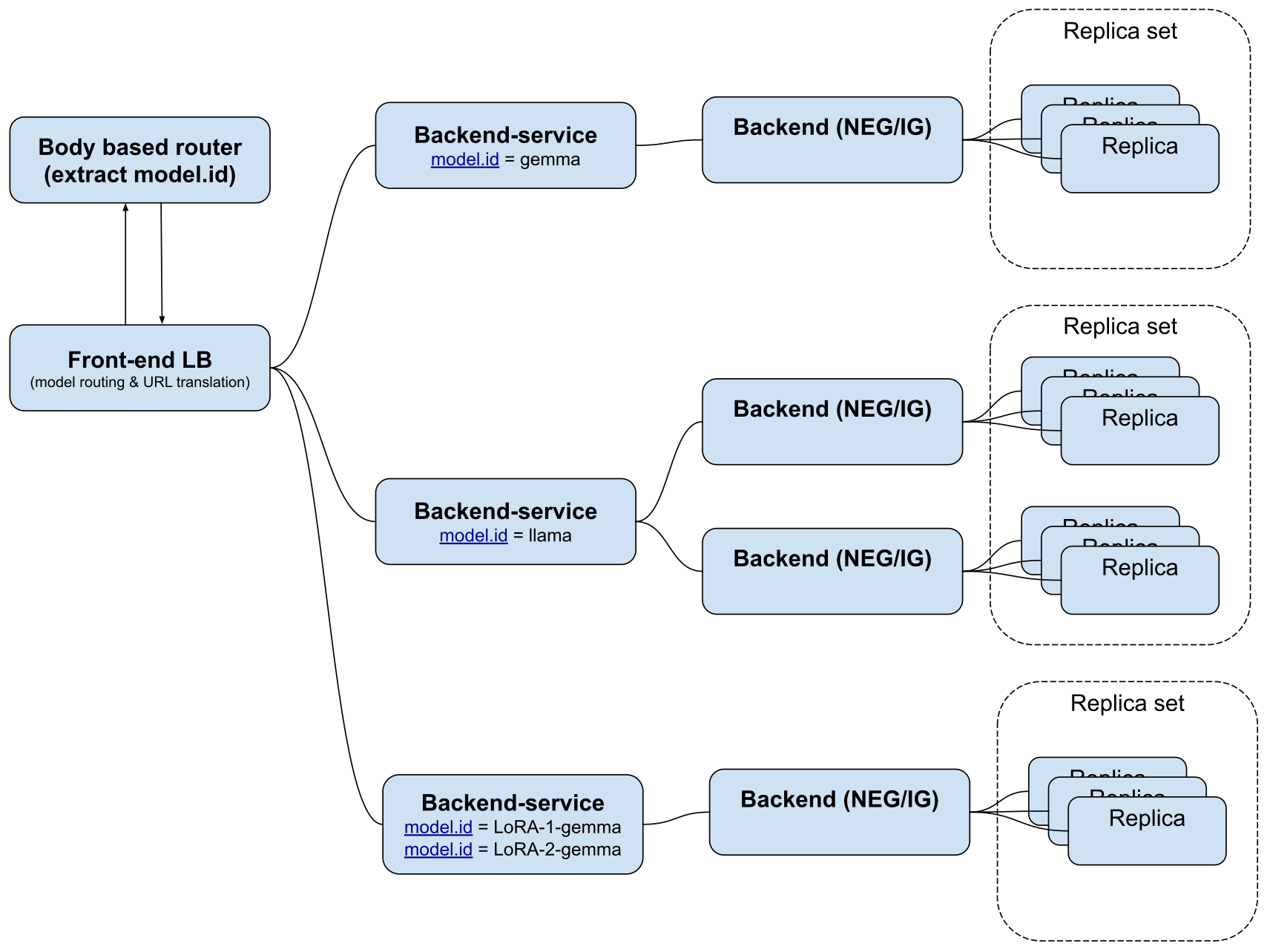
In this example, prompts are handled depending on the model that the user selects:
- Gemma: All prompts are routed to the replica set that hosts the Gemma model.
- Llama: The system load balances these prompts equally between two replica sets that both host the Llama model. These two replica sets don't have to be hosted in the same way. For example, one replica set could be hosted in Agent Platform and the other replica set could be hosted in GKE.
- LoRA-1-gemma or LoRA-2-gemma: The system sends all of the prompts to the same replica set, which can handle both models.
Products used
The reference architecture in this document uses the following Google Cloud products:
- Cloud Load Balancing: A portfolio of high performance, scalable, global and regional load balancers.
- Virtual Private Cloud (VPC): A virtual system that provides global, scalable networking functionality for your Google Cloud workloads. VPC includes VPC Network Peering, Private Service Connect, private services access, and Shared VPC.
- Private Service Connect: A feature that lets consumers access managed services privately from inside their VPC network.
- Cloud Run: A serverless compute platform that lets you run containers directly on top of Google's scalable infrastructure.
- Apigee: An API management tool that gives you granular control over how your APIs are accessed and used. It provides security, rate limiting, quota enforcement, and analytics.
- Model Armor: A service that provides protection for your generative and agentic AI resources against prompt injection, sensitive data leaks, and harmful content.
Design alternatives
This section describes alternatives to some of the base assumptions of this architecture.
AI guardrails
We recommend that you use Model Armor for AI guardrails. To centralize administration, we recommend that you call it directly from the load balancer, as in this architecture. You can also implement Model Armor in these alternative ways:
- Use an API management policy to call Model Armor.
- Deploy Model Armor at the replica only.
If you implement AI guardrails other than at the model endpoint, then you can turn off Model Armor at the frontend load balancer if you don't need it. If you don't want to use Model Armor, you can use traffic extensions to deploy other guardrail offerings such as NVIDIA NeMo Guardrails.
API management
The architecture in this document uses Apigee for API management, which is deployed using Service Extensions. If Apigee doesn't meet your needs, you can use Service Extensions to deploy a different API management service.
If deploying API management using Service Extensions doesn't meet your needs, then you might need to deploy a client-facing network and an API-facing network. In this scenario, the API management service acts as a bridge between the two networks. For information about how to deploy this for Apigee, see Apigee networking options.
Connecting to other networks
The architecture in this document uses a single consumer VPC network. However, you can share the Private Service Connect endpoint with many other networks by using a services-access VPC network in a Cross-Cloud Network deployment.
Design considerations
This section describes design factors, best practices, and recommendations in alignment with the Google Cloud Well-Architected Framework. Consider this information when you use this reference architecture to develop a topology that meets your specific requirements for security, reliability, cost optimization, operational efficiency, and performance.
Security, privacy, and compliance
The baseline architecture isolates inference traffic behind a Private Service Connect endpoint, enforces API policies with Apigee, and screens prompts with Model Armor. To further harden your multi-backend inference topology and meet privacy and compliance requirements, consider the following recommendations:
- Edge and application-layer protection: To add distributed denial-of-service (DDoS) protection, web application firewall (WAF) rules, and IP address inspection, attach Google Cloud Armor security policies to your frontend regional internal Application Load Balancer.
- Zero-trust access and perimeter controls:
- To add a common authentication layer across all backends, implement Identity-Aware Proxy (IAP) to verify identity and enforce authorization policies.
- To enforce fine-grained access rules on the load balancer forwarding rule, configure authorization policies.
- To help prevent data exfiltration from your producer VPC network and model endpoints, configure VPC Service Controls service perimeters. To reach regional Model Armor APIs privately inside a perimeter, create a regional Private Service Connect endpoint.
- Backend identity and authentication: When you route traffic from a web
application to an Agent Platform model, you
must choose an identity model for
authentication:
- Service account identity (recommended for general web apps): The application authenticates the end user through IAP. It then calls Agent Platform using workload identity (such as Cloud Run, GKE, or a third-party identity). This implementation abstracts Identity and Access Management (IAM) from the end user, but it requires application-level logging to track which user generated each prompt.
- End-user identity passthrough (recommended for strict auditability):
The application captures the end user's Google OAuth access token and
passes it directly to Agent Platform in
the
Authorization: Bearerheader. This implementation provides built-in Cloud Audit Logs logging of user actions. However, every end user must be provisioned with IAM permissions (such asroles/aiplatform.user).
- Tailored prompt and response templates: To detect and redact custom sensitive data types in prompts and responses, configure advanced Sensitive Data Protection templates in Model Armor. Because Model Armor load balancer callouts ignore streaming OpenAI API responses, enforce response screening in the application or backend when you stream tokens.
- Agent identity and governance:
- If autonomous AI agents or Model Context Protocol (MCP) tools send or receive inference traffic, govern those interactions with Agent Gateway.
- To assign cryptographic SPIFFE identities and bound credentials to agents, use Agent Identity.
Reliability
The baseline architecture deploys a regional internal Application Load Balancer and Service Extensions callouts in front of regional, hybrid, and external model replica sets. To improve availability during traffic spikes, callout cold starts, and regional or hybrid connectivity outages, consider the following recommendations:
- Multi-regional failover: To guard against regional failures, replicate your deployment to a second region using the Google Cloud multi-regional deployment archetype. If you evaluate a cross-region internal Application Load Balancer, verify supported load balancers for Google service callouts, because Model Armor traffic extensions require regional Application Load Balancers.
- Callout availability: Because every request depends on the Inference Payload Processor callout to set routing headers, configure minimum instances on its Cloud Run service.
- Reserved inference capacity: To help prevent quota exhaustion during traffic spikes, reserve capacity with Provisioned Throughput or Compute Engine reservations.
- Redundant hybrid connectivity: For hybrid replica sets, configure redundant Cloud Interconnect VLAN attachments or high-availability Cloud VPN tunnels across multiple regions.
Cost optimization
Token consumption, accelerator capacity, and cross-region data transfer typically account for the largest share of multi-backend inference costs. To control token usage, reduce redundant model calls, and optimize compute and network spend, consider the following recommendations:
- Token quotas and limits: To control token-based inference spend per
consumer or application, enforce the
LLMTokenQuotaandPromptTokenLimitpolicies in your Apigee API proxies. - Semantic and context caching:
- To reduce redundant model invocations for semantically similar prompts,
configure the Apigee
SemanticCacheLookupandSemanticCachePopulatepolicies with Vector Search. - For repeated system instructions on Agent Platform, enable context caching.
- To reduce redundant model invocations for semantically similar prompts,
configure the Apigee
- Regional colocation: To avoid cross-region data transfer charges, colocate your frontend regional internal Application Load Balancer, Apigee runtime, Model Armor template, and Google Cloud replica sets in the same region.
- Accelerator utilization: To improve accelerator utilization, use Dynamic Workload Scheduler on GKE or model co-hosting on Agent Platform.
Operational efficiency
Operating a multi-backend inference platform requires visibility into load balancer routing, Service Extensions callouts, backend model metrics, and hybrid network paths. To streamline day-2 monitoring, troubleshooting, and model discovery across your inference backends, consider the following recommendations:
- Unified traffic and backend observability:
- To monitor traffic flows so that you can identify and remediate problems quickly, use Cloud Logging logs for your regional internal Application Load Balancer.
- To inspect latency and errors for Service Extensions
callouts, review the
serviceExtensionInfolog fields and callout metrics. - To track inference latency, queue depth, and KV cache hit rates across backends, use Cloud Monitoring with the Inference Gateway dashboard and Agent Platform model observability.
- Network path diagnostics: To diagnose private and hybrid network paths, use Network Intelligence Center.
- Model catalog discovery: To facilitate discovery of the models that your organization supports, implement a list that can be queried to return available models. For example, you can create a list on a server that responds to the list models API call.
Performance optimization
Inference latency and throughput depend on how each backend loads model weights, scales instances, and schedules requests across replicas. To reduce cold-start delays, lower time to first token (TTFT), and increase serving throughput, consider the following recommendations:
- Cloud Run model loading and scaling:
- For models smaller than 10 GB, you can store model weights in the container image for faster instance starts.
- For larger models, load model weights from Cloud Storage over Direct VPC egress with Private Google Access, and consider Rapid Cache to reduce read latency.
- Because Cloud Run scales GPU instances on CPU and concurrency rather than GPU utilization, tune maximum concurrent requests per instance.
- GKE inference serving and routing:
- Follow the recommendations in the Overview of inference best practices on GKE.
- To optimize TTFT and time per output token (TPOT) under variable load, configure serving priorities and predicted latency-based routing in Inference Gateway.
Deployment
To deploy a sample implementation of this architecture, use the Networking for AI Inference Model Serving code sample that's available in GitHub.
For information about how to deploy AI models, see the following resources:
What's next
- For information on adding retrieval-augmented generation to your deployment, see Private connectivity for RAG-capable generative AI applications.
- For more reference architectures, diagrams, and best practices, explore the Cloud Architecture Center.
Contributors
Author: Victor Moreno | Product Manager, Cloud Networking
Other contributors:
- Mark Schlagenhauf | Technical Writer, Networking
- James Duncan | Solutions Product Manager
- Ammett Williams | Developer Relations Engineer