

This document provides a reference architecture that you can use to help secure the network infrastructure for applications with retrieval-augmented generation (RAG). A RAG architecture typically contains separate subsystems to handle the data processing and content retrieval flows. This reference architecture demonstrates how to use Shared VPC to do the following:
- Create separation between the subsystems by using Identity and Access Management (IAM) permissions.
- Connect the application components by using private IP addresses.
The intended audience for this document includes architects, developers, and networking and security administrators. The document assumes that you have a basic understanding of networking. This document doesn't describe the creation of a RAG-based application.
Architecture
The following diagram shows the networking architecture that this document presents:
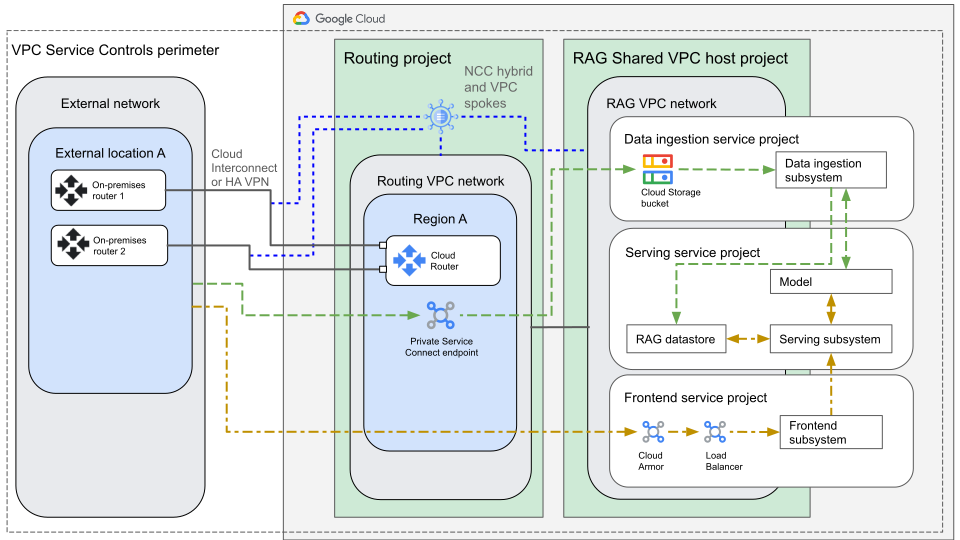
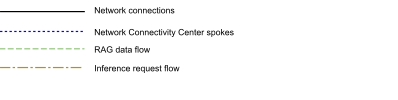
The architecture in the preceding diagram shows the following components:
| Component | Purpose |
|---|---|
| External network, either on-premises or in another cloud |
|
| Routing project |
|
| RAG Shared VPC host project | Hosts a Shared VPC network that hosts the frontend service internal Application Load Balancer and any other services that need a VPC network. All service projects have access to that Shared VPC network. |
| Data ingestion service project |
Contains a Cloud Storage bucket for raw data input. Contains the data ingestion subsystem, which includes the following components:
|
| Serving service project |
Contains the serving subsystem, which includes the following components that provide the services and functions for inference and interaction:
|
| Frontend service project |
Contains the serving subsystem, which is an Application Load Balancer in front of a user-interaction service that runs on Cloud Run or Google Kubernetes Engine (GKE). The project also contains Google Cloud Armor, which helps limit how your service is accessed. If you want to provide access from the internet, you can add a regional external Application Load Balancer. |
| VPC Service Controls perimeter | Helps protect against data exfiltration. Data that's stored in Cloud Storage buckets can't be copied to anywhere outside of the perimeter, and control plane operations are protected. |
The following sections describe the connections and the traffic flows that are in the architecture.
Connections between components
This section describes the connections between the components and networks in this architecture.
External network to routing VPC network
The external networks connect to the Google Cloud routing VPC network over Cloud Interconnect or Cloud VPN, which are hybrid spokes of an NCC hub.
Cloud Routers in the routing VPC network and the external routers in the external network exchange Border Gateway Protocol (BGP) routes:
- Routers in external networks announce the routes for external subnets to the routing VPC Cloud Router. You can express the preference of the routes by using BGP metrics and attributes.
- Cloud Routers in the routing VPC network advertise the routes for prefixes in Google Cloud's VPCs to the external networks.
Routing VPC network to Shared VPC network
You connect the routing VPC network and the RAG VPC network by using the NCC VPC spokes of the NCC hub. The hub also hosts the hybrid spokes to the external network.
Resource-to-resource within the Shared VPC network
In this design, a Cloud Storage bucket receives data from the external network. Inference requests come through a regional internal Application Load Balancer. For the rest of your system, you have the following options:
- Host everything in Google SaaS infrastructure, such as Cloud Storage buckets, Gemini Enterprise Agent Platform, Cloud Run, and Pub/Sub. In this case, the components communicate over private Google infrastructure.
- Host everything in workloads that run in Compute Engine VMs, GKE clusters, Cloud SQL databases, or other components that run in VPC networks. In this case, systems communicate by using private IP addresses across networks that you link through NCC or VPC Network Peering.
- Use a mixture of fully-managed, platform, and infrastructure services. In
this case, you can make connections between a VPC network and a fully
managed service by using the following methods:
- Private Google Access: With this method, workloads that don't have external IP addresses and that run in VPC networks can access Google APIs. This access happens internally over Google infrastructure and this process doesn't expose such traffic to the internet.
- Private Service Connect: With this method, you can create an endpoint in your service project for services like AlloyDB for PostgreSQL that are hosted in managed VPC networks.
External network to frontend service Application Load Balancer
The endpoint of the regional internal Application Load Balancer is an IP address in the RAG network. The RAG network, the routing network, and the hybrid connections to the external network are all spokes of the same NCC hub. Therefore, you can instruct NCC to export all of the spoke subranges to the hub, which then re-exports those subranges to the other spoke networks. End users of the system can then reach the load balanced service from the external network.
Traffic flows
The traffic flows in this reference architecture include a RAG data flow and an inference flow.
RAG population flow
This flow describes how RAG data flows through the system from data engineers to vector storage.
- From the external network, data engineers upload raw data over the Cloud Interconnect connection or Cloud VPN connection. The data is uploaded to the Private Service Connect endpoint in the routing VPC network.
- The data travels over Google's internal infrastructure to the Cloud Storage bucket in the data ingestion service project.
Within the data ingestion service project, data travels between systems by using one of the following methods:
- Private Google Access
- Private Service Connect endpoints
- Direct Google infrastructure
The method depends on whether the systems are hosted in Google Cloud VPC networks or directly in Google Cloud. As part of this flow, the data ingestion subsystem feeds chunked RAG data to the model, which produces vectors for each chunk.
The data ingestion subsystem writes the vector data and chunked data to the appropriate datastore.
Inference flow
This flow describes customer requests.
- From the external network, a customer sends a request to the IP address of the service.
- The request travels over the Cloud Interconnect connection or Cloud VPN connection to the routing VPC network.
- The request travels over the VPC spoke connection to the RAG VPC network.
- The customer request arrives at the Application Load Balancer, which passes the request to the frontend subsystem.
- The frontend subsystem forwards the request to the serving subsystem.
- The serving subsystem augments the request by using the relevant contextual data from the datastore.
- The serving subsystem sends the augmented prompt to the AI model, which generates a response.
Products used
This reference architecture uses the following Google Cloud products:
- Virtual Private Cloud (VPC): A virtual system that provides global, scalable networking functionality for your Google Cloud workloads. VPC includes VPC Network Peering, Private Service Connect, private services access, and Shared VPC.
- Shared VPC: A feature of Virtual Private Cloud that lets you connect resources from multiple projects to a common VPC network by using internal IP addresses from that network.
- Private Service Connect: A feature that lets consumers access managed services privately from inside their VPC network.
- Private Google Access: A feature that lets VM instances without external IP addresses reach the external IP addresses of Google APIs and services.
- Cloud Interconnect: A service that extends your external network to the Google network through a high-availability, low-latency connection.
- Cloud VPN: A service that securely extends your peer network to Google's network through an IPsec VPN tunnel.
- Cloud Router: A distributed and fully managed offering that provides Border Gateway Protocol (BGP) speaker and responder capabilities. Cloud Router works with Cloud Interconnect, Cloud VPN, and Router appliances to create dynamic routes in VPC networks based on BGP-received and custom learned routes.
- Network Connectivity Center: An orchestration framework that simplifies network connectivity among spoke resources that are connected to a central management resource called a hub.
- VPC Service Controls: A managed networking functionality that minimizes data exfiltration risks for your Google Cloud resources.
- Cloud Load Balancing: A portfolio of high performance, scalable, global and regional load balancers.
- Model Armor: A service that provides protection for your generative and agentic AI resources against prompt injection, sensitive data leaks, and harmful content.
- Google Cloud Armor: A network security service that offers web application firewall (WAF) rules and helps to protect against DDoS and application attacks.
- Cloud Storage: A low-cost, no-limit object store for diverse data types. Data can be accessed from within and outside Google Cloud, and it's replicated across locations for redundancy.
Use cases
This architecture is designed for enterprise scenarios where the input, output, and internal communications of the overall system must use private IP addresses and must not traverse the internet:
- Private input: Uploaded data doesn't travel over the internet. Instead, you host your Cloud Storage bucket behind a Private Service Connect endpoint in your Google Cloud routing VPC network. You copy RAG data over your Cloud Interconnect or your Cloud VPN connection by using only private IP addresses.
- Private inter-service connectivity: Services talk to each other over Google's internal interfaces or through private addresses that are internal to your VPC networks.
- Private output: Inference results aren't reachable over the internet unless you choose to set up that access. By default, only users in the designated external network can reach the private endpoint of your service.
Design alternatives
This section presents alternative network-design approaches that you can consider for your RAG-capable application in Google Cloud.
Make the service available publicly
In the architecture that's shown in this document, only users in your internal network can send queries to your application. If your application must be accessible to clients on the internet, use a regional external Application Load Balancer.
Use GKE Inference Gateway
If your frontend subsystem runs on GKE, you can use an Inference Gateway instead of an Application Load Balancer.
Design considerations
This section provides additional guidance to help you deploy networking to support private connectivity for a RAG-capable architecture. This guidance can help you meet your specific requirements for security and compliance, reliability, cost, and performance. The guidance in this section isn't exhaustive. For your particular deployment, you might need to consider additional design factors that aren't covered in this section.
Security, privacy, and compliance
In most cases, you deploy Model Armor in front of the AI model to evaluate both inbound prompts and outbound results. Model Armor helps prevent potential risks and helps ensure responsible AI practices.
In order to reject inappropriate requests before they get to the serving subsystem, you can attach Model Armor to the Application Load Balancer.
This architecture uses VPC Service Controls, which helps prevent unauthorized data exfiltration.
This design uses established security principles to help secure your RAG workloads. For security principles and recommendations that are specific to AI and ML workloads, see AI and ML perspective: Security in the Well-Architected Framework.
Cost optimization
For cost optimization principles and recommendations that are specific to AI and ML workloads, see AI and ML perspective: Cost optimization in the Well-Architected Framework.
Performance optimization
For performance optimization principles and recommendations that are specific to AI and ML workloads, see AI and ML perspective: Performance optimization in the Well-Architected Framework.
Deployment
This section describes the steps to create your application:
- Identify the region for workloads.
- Create Google Cloud projects and VPC networks.
- Connect your external networks to your routing VPC network.
- Link networks by using NCC.
- Identify components for RAG deployment and create service accounts.
- Configure VPC Service Controls.
- Build the data ingestion subsystem.
- Build the serving subsystem.
- Build the frontend subsystem.
- Make your application reachable from the internet.
Identify the region for workloads
In general, you want to place connectivity, VPC subnets, and Google Cloud workloads in close proximity to your on-premises networks or other cloud clients. For more information about how to choose a region for your workloads, see Google Cloud Region Picker and Best practices for Compute Engine regions selection.
Create Google Cloud projects and VPC networks
If your organization has set up Cross-Cloud Network for distributed applications already, your routing project and routing VPC network should already exist.
Create the Google Cloud projects and a VPC network in the following order:
- Create the routing project.
- Create the routing VPC network with Private Google Access enabled.
- Create the RAG project.
- Promote the RAG project to be a Shared VPC host project.
- Create the data ingestion service project.
- Create the serving service project.
- Create the frontend service project.
- Create the Shared VPC RAG network with Private Google Access enabled.
- Give the service projects permission to use the RAG network.
Connect your external networks to your routing VPC network
You can skip this step if you have already set up Cross-Cloud Network for distributed applications.
Set up the connectivity between the external networks and your routing network. To understand the relevant technologies, see External and hybrid connectivity. For guidance about how to choose a connectivity product, see Choosing a Network Connectivity product.
Link networks by using NCC
- In the routing project, create an NCC hub.
- Add the Cloud Interconnect connections as VLAN attachment spokes, or add Cloud VPN connections as VPN spokes.
- Add the RAG VPC network and the routing VPC network to the hub as VPC spokes.
Identify components for RAG deployment and create service accounts
- Choose a RAG deployment and make a list of the components that it needs.
- Identify what access each component needs.
- For each component, create a service account with the appropriate permissions. In some cases, this means that you give a component permission to read from or write to a different service project.
This design assumes that you use a Cloud Storage bucket as your data input component and that you use a Application Load Balancer in your inference frontend. The rest of your design can vary as needed.
Ideally, each component runs as its own service account. Ensure that each component has only the minimum IAM permissions that are necessary to perform its required functions. For example, a Cloud Run job in the data ingestion subsystem needs to read from the input Cloud Storage bucket, but it doesn't need to write to the bucket. In this example, the service project that runs the Cloud Run job should have permission to only read from the bucket, with no write permission.
Configure VPC Service Controls
- Create a VPC Service Controls perimeter around your deployment.
- Configure access rules.
Build the data ingestion subsystem
The data ingestion subsystem takes raw data from data engineers and processes it for use by the serving subsystem.
- In the data ingestion service project, create a Cloud Storage bucket.
- In the routing VPC network, create a regional Private Service Connect endpoint, and connect the endpoint to the bucket.
- In the external network, add a DNS entry for the endpoint by using the IP address and URL that were generated in the previous step.
- Update external network firewall rules to allow access to the endpoint IP address.
- In the data ingestion service project, build out the rest of your ingestion pipeline according to your chosen RAG architecture.
- Grant IAM permissions so that the relevant resource in the ingestion pipeline can access the model that produces the vectors.
- Grant IAM permissions so that the relevant resource in the ingestion pipeline can write to the vector datastore.
Build the serving subsystem
- In the serving service project, build your serving pipeline.
- Grant IAM permissions so that the service account in the frontend system can access the output of the serving subsystem.
Build the frontend subsystem
This section assumes that you use a regional internal Application Load Balancer that uses a serverless NEG in front of Cloud Run. However, you can use a different load balancer and backend.
- Create the code for your frontend system.
- In the frontend service project, deploy your load-balanced frontend system, which includes the optional step to configure a Cloud Armor security policy.
- Configure Cloud Router in the routing VPC network to forward routes from the RAG VPC network to the on-premises routers. This configuration allows clients to reach the Application Load Balancer.
- In your external network, configure the firewall rules to make the load balancer frontend reachable from your external network.
- In your external network, update the DNS to point to the Application Load Balancer forwarding rule.
Make your application reachable from the internet
This section is optional.
This design assumes that you want your service to be reachable from your external network only, but you can also make the service reachable from the internet.
To make the service reachable from the internet, complete the following steps:
- Create a regional external Application Load Balancer that points to the same backend that the internal Application Load Balancer points to. Complete the optional step to configure a Cloud Armor security policy.
- Update VPC Service Controls to let service customers reach backend services.
What's next
- Learn about Cross-Cloud Network for distributed applications.
- Learn how to host AI apps and agents on Cloud Run.
- Learn about responsible AI best practices and Agent Platform safety filters.
- Learn about prompting strategies for LLMs.
- For an overview of architectural principles and recommendations that are specific to AI and ML workloads in Google Cloud, see the AI and ML perspective in the Well-Architected Framework.
- For more reference architectures, diagrams, and best practices, explore the Cloud Architecture Center.
Contributors
Authors:
- Deepak Michael | Networking Specialist Customer Engineer
- Mark Schlagenhauf | Technical Writer, Networking
Other contributors:
- Kumar Dhanagopal | Cross-Product Solution Developer
- Victor Moreno | Product Manager, Cloud Networking
- Samantha He | Technical Writer
- Ammett Williams | Developer Relations Engineer
- Aspen Sherrill | Cloud Security Architect