

This document provides a reference architecture that you can use to deploy a Hybrid or Cross-Cloud Network hub-and-spoke network topology that uses network virtual appliances (NVAs) to route traffic within Google Cloud or with networks outside Google Cloud.
The intended audience for this document is network administrators who build network connectivity and cloud architects who plan how to deploy workloads. The document assumes that you have a basic understanding of routing, the BGP protocol, internet connectivity, and the NVA software that you want to deploy.
The design supports multiple remote connections to on-premises or cloud service provider (CSP) locations and multiple workload Virtual Private Cloud (VPC) networks. It focuses on creating a high-performance, resilient, and multi-region deployment that provides regional affinity and cross-regional failover through the use of dynamic routing. The dynamic routing is powered by BGP for fully automated detection and recovery of NVAs disruptions. The design places NVAs in all flows from Google Cloud to on-premises or to other CSPs and it places NVAs between workload VPC networks.
If you're including NVAs in your network, this architecture is appropriate for the following design requirements:
- Support cross-regional NVA failover: Provide automatic detection for NVA routing failures in a region and re-route traffic to NVAs in a nearby Google Cloud region as needed.
- Maintain regional affinity: Keep routing within Google Cloud regions to reduce latency and data transfer cost unless there is a failure. Traffic is only routed to remote regions or hybrid connections if there is a failure.
This design doesn't provide for symmetric routing across NVAs unless you configure it by using options that are described later in the Scalability section. If symmetric routing is more important to your design than regional failover and local traffic affinity, see VPC Network Peering Cross-Cloud Network with NVAs and regional affinity.
Architecture
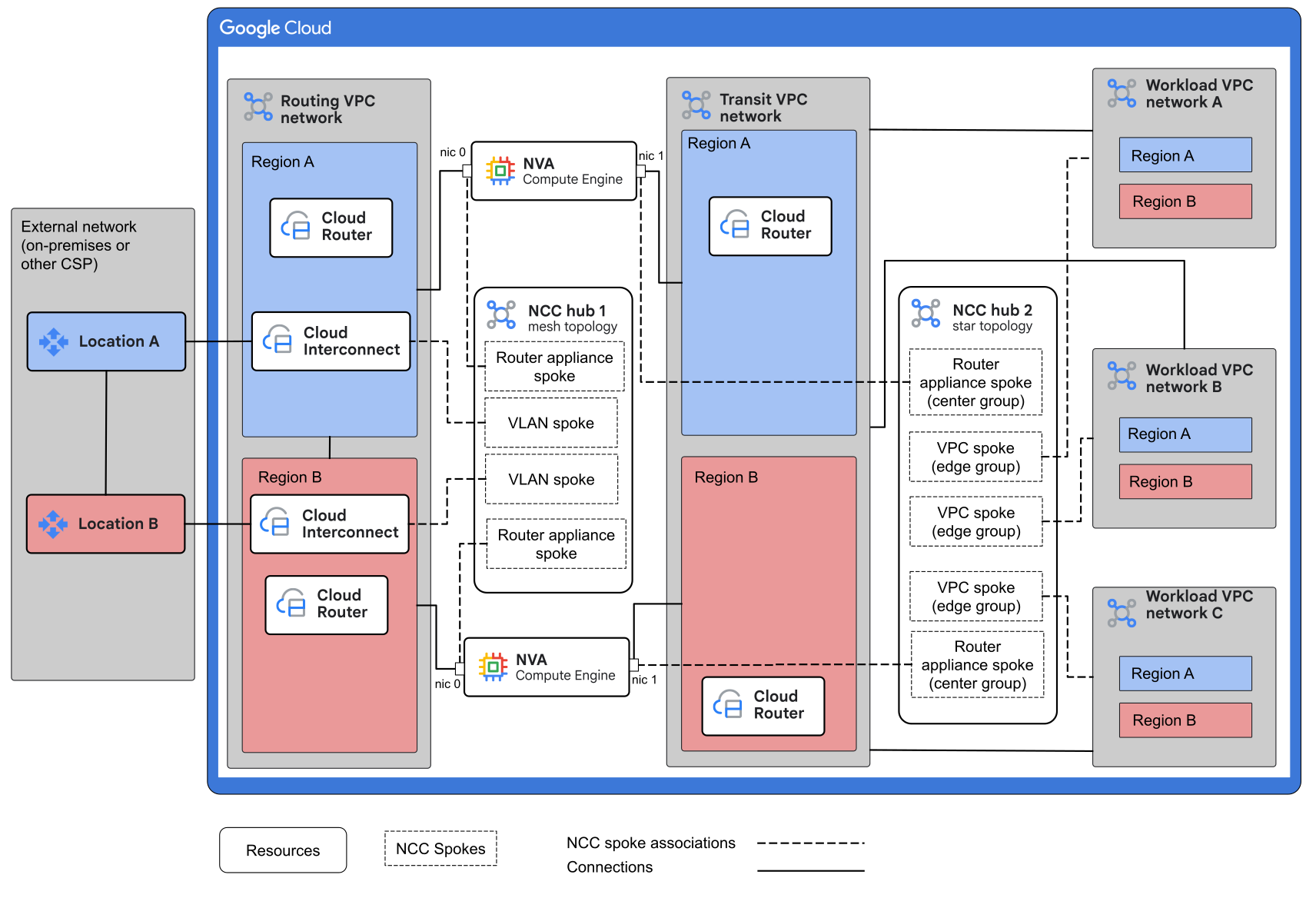
The following diagram shows the components that are used in this architecture. The diagram shows only two regions, but the design can be expanded to additional regions.
Architecture components
The preceding example architecture contains the following components:
- External network (on-premises or other CSP network)
-
The external network can be on-premises or in another CSP. It hosts the clients of applications that run in the workload VPC networks. The external network can also host applications, but the NVAs only process traffic that travels to or from a workload VPC network.
In the diagram, Cloud Interconnect connects the external network to the routing VPC network. This architecture also supports the use of Cloud VPN instead of Cloud Interconnect. The external network uses Cloud Interconnect VLAN attachments or Cloud VPN tunnels to connect to Network Connectivity Center (NCC) hub 1 as hybrid spokes.
- Routing VPC network
-
The routing VPC network connects to external networks by using Cloud Interconnect or Cloud VPN. It connects to the transit VPC network through multi-NIC NVAs.
Traffic that passes between the routing VPC network and the transit VPC network must go through the NVAs. Cloud Routers in the routing VPC network exchange routes with the external network routers and with the NVA NICs that are connected to the routing VPC network.
- Transit VPC network
-
The transit VPC network connects to the routing VPC network through multi-NIC NVAs. This network passes traffic between the routing VPC network and the workload VPC networks.
The transit VPC network also passes traffic from workload VPC networks to the NVAs and then back to the workload VPC networks for workload-workload traffic.
Cloud Routers in the network exchange routes with the NVA NICs that are connected to the transit network.
- NVAs
-
Multi-NIC NVAs are deployed in pairs across multiple Google Cloud regions. Each NVA has one NIC that's connected to the routing VPC network and another NIC that's connected to the transit VPC network. NVAs pass traffic between the two networks, and they can provide other functions such as traffic inspection.
In the architecture, traffic between workload VPC networks must pass through the NVAs. In this architecture, NVAs have at least two NICs: one NIC is attached to the routing VPC network and another NIC is attached to the transit VPC network. The architecture can optionally support additional NICs for management or for connection to additional networks.
- NCC hub 1
-
This NCC hub provides connectivity between the external network hybrid connections and the NVA NICs that are connected to the routing VPC network.
The hub is configured in mesh topology that includes the following types of hybrid spokes: Router appliance spokes, Cloud VPN spokes, and Cloud Interconnect VLAN attachment spokes.
NVA NICs that are attached to the routing VPC network are added to the hub as Router appliance spokes. Up to eight NVAs can be added as a single spoke.
- Workload VPC networks
-
The workload VPC networks host applications that can be accessed from clients in the external network or accessed from clients in other workload VPC networks. Workload VPC networks can also host Private Service Connect endpoints that can be accessed from other networks.
Workload VPC networks are configured as VPC spokes on NCC hub 2. The workload VPC networks are connected to the NVA NICs in the transit VPC network over NCC hub 2. Traffic that leaves a workload VPC network is routed to NVAs regardless of the final destination of the traffic.
- NCC hub 2
-
This NCC hub provides connectivity between workload VPC networks and the Router appliance NVA interfaces in the transit VPC network.
The hub is configured in star topology with the spokes attached as follows:
- The NVA interfaces in the transit VPC network are configured as Router appliance spokes in a center spoke group.
- The workload VPC networks are configured as VPC spokes in an edge spoke group.
Traffic to and from workload VPC networks must pass through the NVAs.
Traffic flows
The following sections show normal traffic flows when all NVAs and connections to external networks are functional and failover traffic flows when connections or NVAs in a region have failed.
Normal traffic flows
The following diagram shows traffic flows when NVAs and connections to external networks are up and functioning:
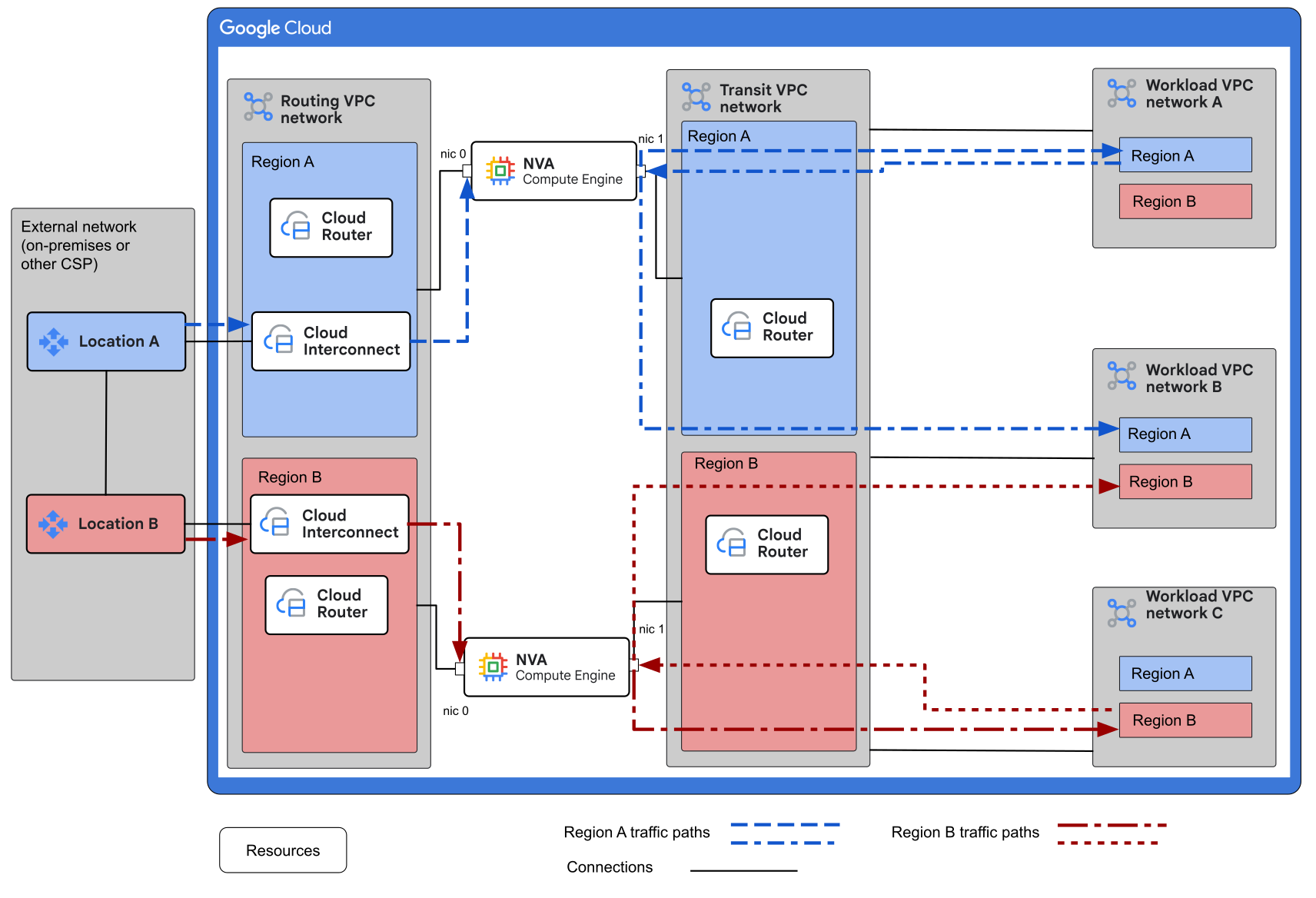
When everything is working correctly, regional traffic stays in its region:
- BGP metrics maintain local traffic (region A to region A or location A) within the region, removing the need for resource or route tagging.
- This architecture positions the NVAs to process traffic between workload VPC networks and between workload VPC networks and the external network.
The following list describes the traffic flows that are shown in the diagram:
- External network to Workload VPC network
-
Traffic follows routes through the Cloud Interconnect connections to the routing VPC network. The routes are announced by the Cloud Router to the NVA through Network Connectivity Center hub.
In the routing VPC network, traffic is routed to the NIC of the active NVA by using dynamic routes learned from the NVA. Traffic follows routes through the NVA to its other NIC, which passes the traffic to the transit VPC network. The traffic follows routes over NCC peerings to the destination workload VPC network.
- Workload VPC network to External network
-
Traffic follows routes that are learned from NCC hub 2 across the NCC peering to the NVA. It enters the active NVA through the NIC.
Traffic follows routes through the NVA to its other NIC, which passes the traffic to the routing VPC network. Traffic follows routes that are programmed into the routing VPC network to the VLAN attachments and across to the remote network.
- Workload VPC network to Workload VPC network
-
Traffic follows routes that are learned from NCC hub 2 across the NCC peering to the NVA. It enters the NVA through the NIC in the transit VPC.
If there is more than one active NVA, then BGP metrics control which NVA is the next hop. Traffic follows routes learned from NCC hub 2 back out through the same NIC and across the NCC peering to the other workload VPC network.
Failover traffic flows
The following diagram shows traffic flows when all of the NVAs in a region have failed:
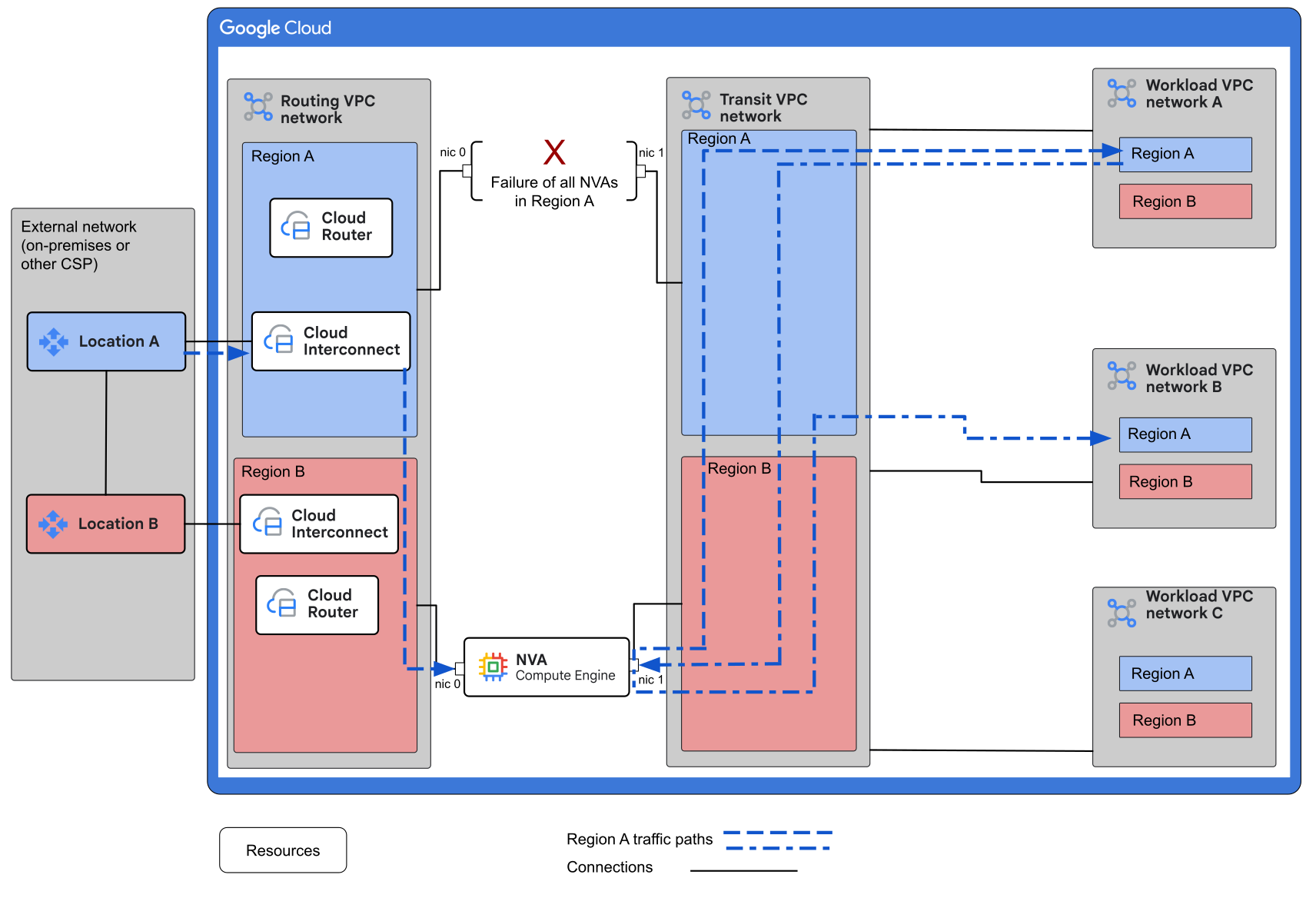
During a situation of total failure of all of the NVAs in one region, the system automatically reroutes traffic through healthy NVAs in the closest remote region. This architecture is also resilient to hybrid connections failures in one region.
Products used
This reference architecture uses the following Google Cloud products:
- Virtual Private Cloud (VPC): A virtual system that provides global, scalable networking functionality for your Google Cloud workloads. VPC includes VPC Network Peering, Private Service Connect, private services access, and Shared VPC.
- Network Connectivity Center: An orchestration framework that simplifies network connectivity among spoke resources that are connected to a central management resource called a hub.
- Cloud Interconnect: A service that extends your external network to the Google network through a high-availability, low-latency connection.
- Cloud VPN: A service that securely extends your peer network to Google's network through an IPsec VPN tunnel.
- Cloud Router: A distributed and fully managed offering that provides Border Gateway Protocol (BGP) speaker and responder capabilities. Cloud Router works with Cloud Interconnect, Cloud VPN, and Router appliances to create dynamic routes in VPC networks based on BGP-received and custom learned routes.
- Compute Engine: A secure and customizable compute service that lets you create and run VMs on Google's infrastructure.
Design alternatives
Depending on your requirements, you can choose from the following design alternatives:
- This architecture doesn't provide centralized access for specific applications. If you want to add centralized access, you can configure a services-access VPC network as described in Cross-Cloud Network for distributed applications.
- This design assumes that VPC networks are distributed among more than one Google Cloud project. However, depending on your project allocation strategy, you can provision your VPC networks in a single project.
Design considerations
This section describes design factors, best practices, and design recommendations that you should consider when you use this reference architecture to develop a topology that meets your specific requirements for secures, reliability, scalability, and performance.
Security and compliance
The following are design considerations and recommendations to design a topology in Google Cloud that meets your workload's security and compliance requirements:
- The NVA software might offer traffic inspection capabilities. However, to
ensure a consistent quality base across your deployment, we recommend that
you use Cloud NGFW:
- Google Threat Intelligence for firewall policy rules to allow or block connections based on Google Threat Intelligence data.
- Geolocation objects for firewall policy rules to allow traffic from only allowed countries and to block embargoed countries.
- Fully qualified domain names (FQDN) filtering uses FQDN objects as sources for ingress rules or as destinations for egress rules in firewall policies.
- Intrusion detection and prevention (IPS) monitors malicious activity and taking preemptive actions to prevent it.
- TLS intercept to inspect encrypted and unencrypted traffic for network attacks and disruptions.
- To gain insights into your traffic patterns, you can use VPC Flow Logs.
- To monitor your network for compliance, use Cloud Logging and Cloud Monitoring.
Reliability
The following are design considerations and recommendations to design a topology in Google Cloud that meets your workload's reliability requirements:
- Increase reliability by spreading NVAs in a region across Google Cloud zones. Doing so eliminates dependency on individual zones, which adds resiliency against zone outages.
- To get 99.99% availability for Cloud Interconnect, you normally must connect to two different Google Cloud regions even if you have VMs in only one region. If you're using Dedicated Interconnect, some regions support 99.99% availability in a single region.
Scalability
This section describes design considerations and recommendations to design a topology in Google Cloud that meets your workload's scalability requirements.
If your design doesn't depend on symmetric routing, then you can scale by adding more NVA nodes.
If your design needs symmetric routing, you can consider the following options depending on the features that are offered by your NVA software:
- Use BGP attributes to maintain a single active NVA node per region, but size that VM to handle your traffic.
- Use vendor capabilities to configure source NAT on the NVAs.
- If your vendor supports it, you can set up session synchronization across nodes.
- Leverage BGP traffic engineering options (like BGP route policies) to configure active-standby configuration per flow. For example, you can configure certain networks to prefer NVA-A over NVA-B and reverse preferences for other networks.
Performance optimization
The following are design considerations and recommendations to design a topology in Google Cloud that meets your workload's performance requirements:
- You might be able to improve network performance by increasing the maximum transmission unit (MTU) of your networks and connections. For more information, see Maximum transmission unit.
- To improve convergence time, consider using BGP BFD where applicable to speed up detection and mitigation of BGP event disruptions. BFD isn't supported in BGP sessions that are configured for Cloud VPN tunnels or for NVAs that are configured as Router appliance spokes.
Deployment
To deploy this reference architecture, complete the following steps:
- Identify Google Cloud regions.
- Design and build project structure.
- Plan IP address allocation.
- Create the routing VPC network.
- Create connections to the external network.
- Create the transit and workload VPC networks.
- Create the NVAs.
- Create NCC hub 1.
- Create NCC hub 2.
- Add private access to Google APIs.
- Set up centralized internet ingress and egress.
- Test connectivity to workloads.
Identify Google Cloud regions
In general, place connectivity, VPC subnets, and Google Cloud workloads in close proximity to your on-premises networks or other cloud clients. For more information about placing workloads, see Google Cloud Region Picker and Best practices for Compute Engine regions selection.
We recommend that you select at least two regions to host NVAs to benefit from the cross-regional failover support of this architecture.
Design and build project structure
Create or identify the projects where you will create your VPC networks. You will need the following projects:
- A project to host your routing network, which is where you connect your external connectivity. This project also hosts the Network Connectivity Center hub that links your hybrid connections to the external-facing NICs of your NVAs.
- Projects to host your transit network and workload VPC networks. For guidance, see Network segmentation and project structure. If you intend to use Shared VPC networks, provision your projects as Shared VPC host projects.
Plan IP address allocation
Create an IP address allocation plan for the necessary networks. To make it easier to aggregate workload VPC network addresses, choose their address ranges from a single larger range. We recommend that you allocate one large supernet range (like /12) to use for the workload VPC network assignments.
Your plan should include IP ranges for the following networks:
- External networks
- Routing VPC network
- Transit VPC network
- An aggregate range for all workload VPC networks
Create the routing VPC network
The routing VPC network hosts the following components:
- Hybrid connections to external networks.
- One NIC from each NVA. In the diagrams, this NIC is labeled as nic 0.
- One Cloud Router per region.
When you create the routing VPC network, do the following:
- In the project where you want your routing VPC network, create the routing network as a global custom mode VPC network with global dynamic routing enabled. Global dynamic routing is necessary for cross-regional routing.
- In the routing network, create a single subnet per region. These subnets host NVA interfaces used for private routing to external networks and, optionally, communication to the Internet.
- Create a
Cloud Router
in each region. The Cloud Router handles BGP between the
VPC network and the external network for that region. We
recommend that you create NVAs and workload VPC networks in
the same region as the hybrid connection to enable local routing between
the hybrid connections and the workloads through the NVAs.
- If you create NVAs and workload networks in the same region, then you only need one Cloud Router deployed in that region.
- If you create NVAs in one region and workload VPC networks in a different region, then you need a Cloud Router in each of those regions.
Create connections to the external network
This design recommends that you use Cloud Interconnect to connect your external network to your Google Cloud routing VPC network. However, you can choose another connectivity product. For more information, see Choosing a Network Connectivity product.
Set up the connectivity between the external networks (on-premises and other clouds) and your routing VPC network. We recommend that you target a 99.99% SLA for production workloads, and that you follow Google best practices when you establish the connection.
When you configure hybrid connections to the external network, if any additional customer networks need routing from and to remote locations, advertise their subnets as custom route advertisements.
Create the transit and workload VPC networks
The role of the transit VPC network is to connect the NVAs with the workload VPC networks.
- In the project where you want your transit network, create the transit network as a global custom mode VPC network with global dynamic routing enabled. Global dynamic routing is necessary for cross-regional routing.
- Create a single subnet per region to host NVA interfaces used for private routing to workload VPC networks.
- Configure a Cloud Router in each region in which you plan to provision NVAs.
- Create workload VPC networks as needed.
Create the NVAs
For information about how to provision an NVA that's listed in Google Cloud Marketplace, refer to the NVA provider's documentation. When you configure your NVAs for this design, follow these guidelines:
- Deploy NVAs in pairs in at least two regions to provide multi-regional resiliency. Because NVAs are added as Network Connectivity Center Router appliance spokes, you don't need to configure them in instance groups.
- NVA VMs need at least two NICs, but some vendors require a dedicated NIC for management. Add the NICs that are necessary to support vendor requirements.
- To assure symmetric routing through a single active NVA, the NVAs need to set BGP metrics, like MEDs, to provide route preferences across NVAs within the region. We recommend you use low MED values, such as 10 for primary and 20 for secondary. Because Google Cloud adds regional weight for remote networks, you don't need to set MEDs for cross-regional preference. For more information about how to assure routing symmetry, see the Scalability section earlier in this document.
- To advertise the workload VPC subnet ranges as an aggregated or summarized supernet route, configure BGP on the NVA NIC that's attached to the transit network. This route is required in order to enable workload-to-workload VPC communication through the NVAs. Configure NVAs to advertise all subnets visible to the Cloud Router.
Create NCC hub 1
The role of the first NCC hub in this design is to enable dynamic route advertisement between hybrid connections and the NVAs. When you configure your NCC hub, follow these guidelines:
- Configure the NCC hub in mesh topology so that it allows all spokes to communicate directly with each other.
- Add hybrid connections (VLAN attachments or VPN) to the hub as hybrid
spokes.
- Enable site-to-site data transfer. For supported locations, see Locations supported for data transfer.
- Enable the option to Include export IPv4 subnet ranges from spoke to hub.
- Enable the option to Include all IPv4 ranges from hub to spoke.
- Identify the NVA NICs that are attached to the routing VPC
network and then add them to NCC hub 1 as Router appliance spokes.
- Enable site-to-site data transfer.
- Enable the option to Include export IPv4 subnet ranges from spoke to hub.
- Enable the option to Include all IPv4 ranges from hub to spoke.
- To ensure resiliency, when you configure Router appliances, create BGP sessions to both interfaces of the Cloud Router.
Create NCC hub 2
The second NCC hub enables dynamic route advertisement between the NVAs and the workload VPC networks. You achieve this by adding the NVA NICs as Router appliance spokes, and the workload VPC networks as VPC spokes.
- Configure the NCC hub in star topology so that traffic between the workload VPC spokes has to pass through the transit VPC network (the hub).
- Add NVAs as Router appliance spokes to the center group of the hub.
- Enable site-to-site data transfers.
- Enable the option to Include export all IPv4 ranges from spoke to hub.
- Enable the option to Include import IPv4 ranges from hub to spoke.
- Add workload VPC spokes to the edge group.
- To ensure resiliency, when you configure Router appliance spokes, create BGP sessions to both interfaces of the Cloud Router.
Add private access to Google APIs and services
If your applications don't need to reach Google APIs, you can skip this section in your initial deployment and proceed to Set up centralized internet ingress and egress.
There are two options to enable private access to Google APIs and services based on logging and visibility requirements. For more information about these services, see types of Google Cloud services.
Direct routing to Private Service Connect services (not through the NVAs)
- Create a Private Service Connect endpoint for Google APIs in each VPC network.
- Create a Private Service Connect endpoint for Google published services in each workload VPC network that needs service access.
- To enable access from the external network, provision Private Service Connect endpoints in the routing VPC network. For information about how to enable private access from on-premises to Google APIs, see Private Service Connect documentation.
Indirect routing through the NVA
- In the routing VPC network, create a Private Service Connect endpoint for Google APIs.
- In the transit VPC network, create a Private Service Connect endpoint for Google APIs.
Configure DNS as follows:
- Workload VPC networks: Configure DNS to resolve API calls to the IP address of the Private Service Connect endpoint in the routing VPC.
- External networks: Configure DNS to resolve API calls to the IP address of the Private Service Connect endpoint that you created in the transit VPC network.
This approach enables NVAs to forward Google APIs traffic.
Create Private Service Connect endpoint for Google published services only in the workload VPC that's associated with the service.
To enable cross-VPC network access to Private Service Connect endpoints for Google published services, enable Private Service Connect propagation on NCC
hub 2.
Set up centralized internet ingress and egress
If your applications don't need to reach the internet through your NVAs, you can skip this section in your initial deployment and proceed to Test connectivity to workloads.
Centralized internet ingress
For ingress from the internet, NVAs need to perform DNAT for the traffic when it's routed to the target resource in the spoke VPC. For information about how to configure ingress, see How to configure Google load balancers with Network Virtual Appliances (NVAs) in Google Cloud. In this configuration, you assign the original target address to the Google load balancer that's placed in the front of the NVAs. The type of the load balancer that you select affects the global nature of the ingress service.
Centralized internet egress
If you want to centralize egress to the internet, NVAs need to perform SNAT for traffic as it is routed to the target resource on the Internet. To route the traffic from the Google Cloud source, the NVAs need to advertise a default route to the spoke VPCs. This routing doesn't require load balancers.
Test connectivity to workloads
To make sure you have visibility into the traffic flows, use traceroute. To test connectivity for the different flows, you can create test VMs in different VPCs.
What's next
- To set up monitoring and logging for your deployment, see Observability in Google Cloud.
- For additional monitoring and troubleshooting tools, see the Network Intelligence Center overview.
- For more reference architectures, diagrams, and best practices, explore the Cloud Architecture Center.
Contributors
Author: Haider Witwit | Networking Specialist Architect
Other contributors:
- Jonathan Almaleh | Staff Technical Solutions Consultant
- Ghaleb Al-habian | Network Specialist
- Mark Schlagenhauf | Technical Writer, Networking
- Ammett Williams | Developer Relations Engineer
- Osvaldo Costa | Networking Specialist Customer Engineer