

This document provides a reference architecture to help you design a single-agent AI system on Google Cloud. The single-agent system in this architecture is built by using Agent Development Kit (ADK) and it's deployed on Cloud Run. You can also deploy the agent on Agent Runtime on Gemini Enterprise Agent Platform or Google Kubernetes Engine (GKE). The architecture uses Model Context Protocol (MCP), which enables the agent to access and process information from multiple sources so that it can provide context-rich insights.
This document is intended for architects, developers, and administrators of AI applications. It assumes that you have a basic understanding of AI, machine learning (ML), and large language model (LLM) concepts. The document also assumes that you have a foundational understanding of AI agents and models. It doesn't provide specific guidance for designing and coding AI agents.
The Deployment section of this document lists code samples that you can use to learn how to build and deploy single-agent AI systems.
Architecture
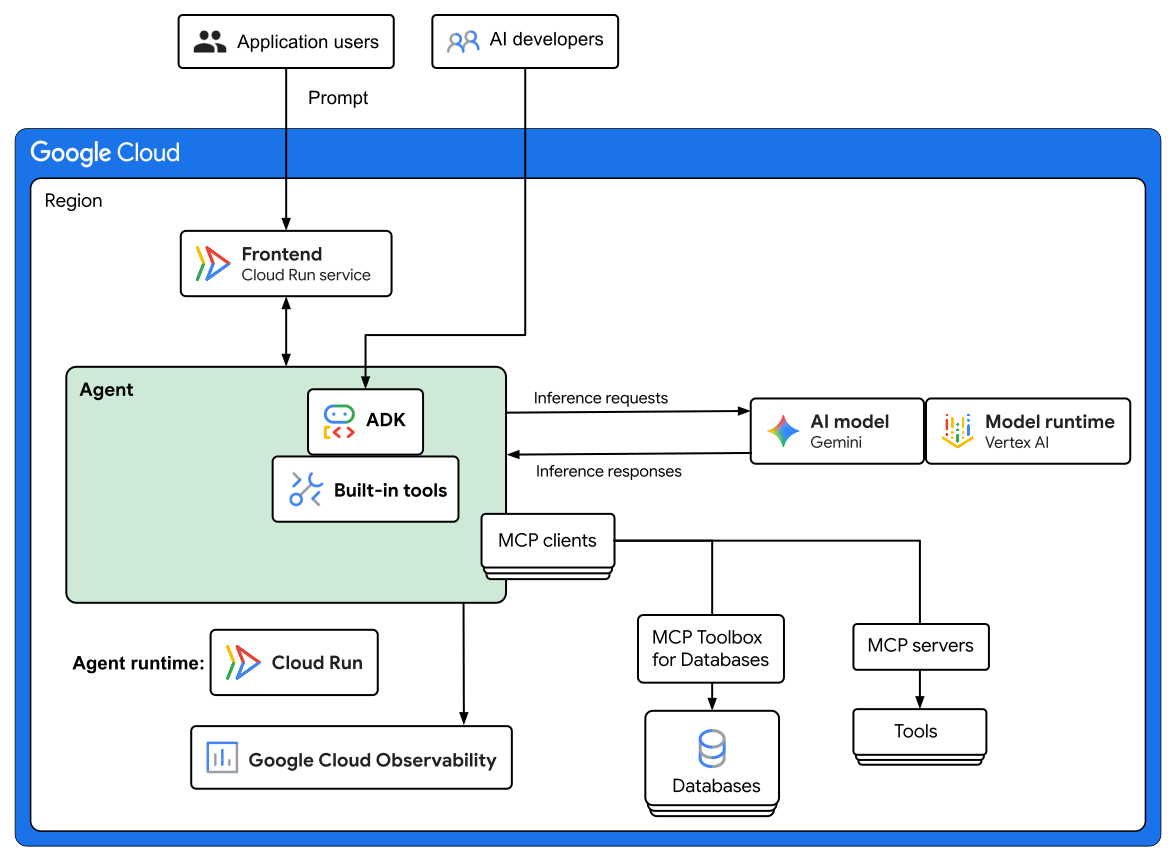
The following diagram shows an architecture for a single-agent AI system that's deployed on Cloud Run:
Architecture components
The example architecture consists of the following components:
| Component | Description |
|---|---|
| Frontend | Users interact with the agent through a frontend, such as a chat interface, that runs as a serverless Cloud Run service. |
| Agent | The agent receives user requests, interprets user intent, selects the appropriate tools, and then it synthesizes information to answer queries. |
| Agent runtime | The agent is built by using ADK and it's deployed as a serverless Cloud Run service. You can also deploy the agent on Agent Runtime on Gemini Enterprise Agent Platform or as a containerized app on GKE. For information about how to choose an agent runtime, see Choose your agentic AI architecture components. |
| ADK | ADK provides tools and a framework to develop, test, and deploy agents. ADK abstracts the complexity of agent creation and lets AI developers focus on the agent's logic and capabilities. When you develop agents by using ADK, you can configure the agents to access and use built-in tools like Google Search. |
| AI model and model runtime | For inference serving, the agent in this example architecture uses the Gemini AI model on Gemini Enterprise Agent Platform. |
| MCP Toolbox | MCP Toolbox for Databases provides database-specific tools for the agent. It can handle complexities such as connection pooling and authentication. |
| MCP clients, servers, and tools | MCP facilitates access to tools by standardizing the interaction between agents and tools. For each agent-tool pair, an MCP client sends requests to an MCP server through which the agent accesses a tool such as a file system or an API. For example, external tools like the StackOverflow LangChain Tool and the Google Search tool can provide data and grounding. |
| Observability | The agent is monitored by using Google Cloud Observability for logging, monitoring, and tracing. |
Agentic flow
The example single-agent system in the preceding architecture has the following flow:
- A user enters a prompt through a frontend, such as a chat interface, which runs as a serverless Cloud Run service.
- The frontend forwards the prompt to the agent.
- The agent uses the AI model to reason about the user's prompt and
synthesize a response:
- The AI model determines which tools to use to gather contextual information or to perform a task.
- The agent performs tool calls and it adds the response to its context.
- The agent performs grounding and intermediate validation.
Products used
This reference architecture uses the following Google Cloud and open-source products and tools:
- Cloud Run: A serverless compute platform that lets you run containers directly on top of Google's scalable infrastructure.
- Gemini: A family of multimodal AI models developed by Google.
- Gemini Enterprise Agent Platform: A comprehensive platform that lets you build, scale, govern, and optimize enterprise‑grade AI agents.
- Model Context Protocol (MCP): An open-source standard for connecting AI applications to external systems.
- MCP Toolbox for Databases: An open-source Model Context Protocol (MCP) server that lets AI agents securely connect to databases by managing database complexities like connection pooling, authentication, and observability.
- Google Cloud Observability: Observability services including Cloud Monitoring, Cloud Logging, and Cloud Trace to help you understand the behavior, health, and performance of your applications.
Use cases
This section describes possible use cases for the architecture that's described in this document.
Automated bug report triage
You can adapt this reference architecture to automate triage for incoming bug reports: understanding the issue, searching for duplicates, gathering relevant technical context, and then creating a bug in the system. An AI-powered agent can act as an intelligent assistant that can perform the initial investigation, which lets human experts focus on more complex problem-solving.
For this use case, the architecture provides the following benefits:
- Faster resolution times: The agent automates the initial research and context-gathering, which can significantly reduce the time that it takes to assign and resolve bug tickets.
- Improved accuracy and consistency: The agent can systematically search across multiple data sources (internal databases, code repositories, and the public web). This capability provides a more comprehensive and consistent analysis than manual triage might allow.
- Reduced manual workload: The agent can offload repetitive triage tasks from IT support and engineering teams, which lets them focus on higher-value work.
This architecture is ideal for any organization that develops software and that wants to improve the efficiency and effectiveness of its bug resolution process. For more information and deployment options, see Software Bug Assistant - ADK Python Sample Agent and Tools Make an Agent: From Zero to Assistant with ADK.
Customer service
You can adapt this reference architecture to help provide a seamless and personalized shopping experience for customers. An AI-powered agent can provide customer service, recommend products, manage orders, and schedule services, which lets human representatives focus on other tasks.
For this use case, the architecture provides the following benefits:
Upselling and promotions: The agent can help increase sales by suggesting products, services, and promotions. The agent's suggestions are based on the customer's current order and relevant sales, the customer's order history, and the items that are in their cart.
Order management and scheduling: The agent can increase efficiency and reduce customer friction by managing the contents of a customer's shopping cart and facilitating self-scheduling for services.
Reduced manual workload: The agent handles general inquiries, orders, and scheduling, which enables human customer service agents to focus on more complex customer issues.
This architecture is ideal for any retail organization that wants to improve their customer experience, increase sales, and simplify their order management and scheduling. For more information and deployment options, see Cymbal Home & Garden Customer Service Agent.
Time-series forecasting
You can adapt this reference architecture to help predict outcomes, such as demand forecasting, traffic patterns prediction, or machine failure analysis and prediction. An AI-powered agent can analyze real-time data, historical trends, and upcoming events. The agent can use these analyses to forecast outcomes for a specified period of time. These forecasts can help you plan and help reduce the time spent by human data analysts.
This use case can benefit organizations in many scenarios, such as the following:
- Inventory management: By using advanced analytics combined with historical sales data and market trends, the agent can help you plan restock orders so that you can prepare for surges or lulls in customer demand.
- Travel routes: The agent can help save time and reduce travel costs for delivery and service providers by analyzing real-time and historical traffic patterns along with events like construction or road closures.
- Avoid outages: The agent can help you avoid potential service interruptions by helping to identify the root cause for historical outages. It can also help predict future potential failure states so that you can mitigate an issue before it becomes a problem.
This architecture is ideal for any organization that needs to adapt to changing patterns based on established trends. It's also ideal for organizations whose customers can benefit from proactive insights that help them plan for the future. For more information and deployment options, see Time Series Forecasting Agent with Google's ADK and MCP Toolbox.
Document retrieval
You can adapt this reference architecture to use RAG Engine on Gemini Enterprise Agent Platform and create an agent to manage contextual data retrieval. A document-retrieval agent can fetch relevant data from a curated set of documents to provide factual answers with citations to the source material.
With a document-retrieval agent, you can help ensure that customers and internal users get informed and context-aware responses to their queries. This implementation can help reduce mistakes and inaccuracies by helping to ensure that answers are based on the information that you validated.
A document-retrieval architecture is ideal for knowledge bases about policy and process, technical infrastructure, product capabilities, and other fact-based documentation. For information about how to develop a retrieval-augmented generation (RAG)-powered document retrieval agent, see Documentation Retrieval Agent.
Design alternatives
This section presents alternative design approaches that you can consider for your AI agent deployment in Google Cloud.
Agent runtime
In the architecture that this document describes, the agent and its tools are deployed on Cloud Run. You can also use GKE or Agent Runtime as an alternative runtime. For information about how to choose an agent runtime, see Agent runtime in "Choose your agentic AI architecture components".
AI model runtime
In the architecture that this document describes, the AI model runtime is Agent Platform. You can also use Cloud Run or GKE as an alternative runtime. For information about how to choose a model runtime, see Model runtime in "Choose your agentic AI architecture components".
Design considerations
This section provides guidance to help you use this reference architecture to develop an architecture that meets your specific requirements for security, reliability, cost, operational efficiency, and performance.
System design
This section provides guidance to help you choose Google Cloud regions for your deployment and to select appropriate Google Cloud products and tools.
Region selection
When you select Google Cloud regions for your AI applications, consider the following factors:
- Availability of Google Cloud services in each region.
- End-user latency requirements.
- Cost of Google Cloud resources.
- Regulatory requirements.
To select appropriate Google Cloud locations for your applications, use the following tools:
- Google Cloud Region Picker: An interactive web-based tool to select the optimal Google Cloud region for your applications and data based on factors like carbon footprint, cost, and latency.
- Cloud Location Finder API: A public API that provides a programmatic way to find deployment locations in Google Cloud, Google Distributed Cloud, and other cloud providers.
Agent design
This section provides general recommendations for designing AI agents. Detailed guidance about writing agent code and logic is outside the scope of this document.
| Design focus | Recommendations |
|---|---|
| Agent definition and design |
|
| Agent interactions |
|
| Context, tools, and data |
|
Memory and session storage
The example architecture that's shown in this document doesn't include memory or session storage. In a production environment, you can improve the responses and add personalization by integrating state and memory into your agent.
- Session: A session is the conversational thread between a user and the agent, from the initial interaction to the end of the dialogue.
- State: State is the data that the agent uses and collects within a specific session. The state data that's collected includes the history of messages that the user and agent exchanged, the results of any tool calls, and other variables that the agent needs in order to understand the context of the conversation.
ADK can track sessions in short-term memory by using the
Session object and state attributes. ADK also supports
long-term memory
across sessions with the same user, including through
Memory Bank.
To store session state, you can also use services like
Memorystore for Redis.
For information about agent memory options, see Choose your agentic AI architecture components.
Security
This section describes design considerations and recommendations to design a topology in Google Cloud that meets your workload's security requirements.
| Component | Design considerations and recommendations |
|---|---|
| Agents |
AI agents introduce certain unique and critical security risks that conventional, deterministic security practices might not be able to mitigate adequately. Google recommends an approach that combines the strengths of deterministic security controls with dynamic, reasoning-based defenses. This approach is grounded in three core principles: human oversight, carefully defined agent autonomy, and observability. The following are specific recommendations that are aligned with these core principles. Human oversight: An agentic AI system might sometimes fail or not perform as expected. For example, the model might generate inaccurate content or an agent might select inappropriate tools. In business-critical agentic AI systems, incorporate a human-in-the-loop flow to let human supervisors monitor, override, and pause agents. For example, human users can review the output of agents, approve or reject the outputs, and provide further guidance to correct errors or to make strategic decisions. This approach combines the efficiency of agentic AI systems with the critical thinking and domain expertise of human users. Access control for agents: Configure agent permissions by using Identity and Access Management (IAM) controls. Grant each agent only the permissions that it needs to perform its tasks and to communicate with tools and with other agents. This approach helps to minimize the potential impact of a security breach, because a compromised agent would have limited access to other parts of the system. For more information, see Agent Platform access control with IAM. Monitoring: Monitor agent behavior by using comprehensive tracing capabilities that give you visibility into every action that an agent takes, including its reasoning process, tool selection, and execution paths. For more information, see Logging an agent in Agent Runtime and Logging in the ADK. For more information about securing AI agents, see Safety and Security for AI Agents. |
| Agent Platform |
Shared responsibility: Security is a shared responsibility. Agent Platform secures the underlying infrastructure and provides tools and security controls to help you protect your data, code, and models. You are responsible for properly configuring your services, managing access controls, and securing your applications. For more information, see Agent Platform shared responsibility. Security controls: Agent Platform supports Google Cloud security controls that you can use to meet your requirements for data residency, customer-managed encryption keys (CMEK), network security using VPC Service Controls, and Access Transparency. For more information, see the following documentation:
Safety: AI models might produce harmful responses, sometimes in response to malicious prompts.
Model access: You can set up organization policies to limit the type and versions of AI models that can be used in a Google Cloud project. For more information, see Control access to Model Garden models. Data protection: To discover and de-identify sensitive data in the prompts and responses and in log data, use the Cloud Data Loss Prevention API. For more information, see this video: Protecting sensitive data in AI apps. |
| MCP | When you configure your agents to use MCP, ensure that access to external data and tools is authorized, implement privacy controls like encryption, apply filters to protect sensitive data, and monitor agent interactions. For more information, see MCP and Security. |
| A2A |
Transport security: The A2A protocol mandates HTTPS for all A2A communication in production environments and it recommends Transport Layer Security (TLS) versions 1.2 or higher. Authentication: The A2A protocol delegates authentication to standard web mechanisms like HTTP headers and to standards like OAuth2 and OpenID Connect. Each agent advertises the authentication requirements in its Agent Card. For more information, see A2A authentication. |
| Cloud Run |
Ingress security (for the frontend service): To control
access to the application,
disable the
default User authentication:
For more information, see Authenticating users. Container image security: To ensure that only authorized container images are deployed to Cloud Run, you can use Binary Authorization. To identify and mitigate security risks in the container images, use Artifact Analysis to automatically run vulnerability scans. For more information, see Container scanning overview. Data residency: Cloud Run helps you meet data residency requirements. Your Cloud Run functions run within the selected region. For more guidance about container security, see General Cloud Run development tips. |
| All of the products in the architecture |
Data encryption: By default, Google Cloud encrypts data at rest by using Google-owned and Google-managed encryption keys. To protect your agents' data by using encryption keys that you control, you can use CMEKs that you create and manage in Cloud KMS. For information about Google Cloud services that are compatible with Cloud KMS, see Compatible services. Mitigate data exfiltration risk: To reduce the risk of data exfiltration, create a VPC Service Controls perimeter around the infrastructure. VPC Service Controls supports all of the Google Cloud services that this reference architecture uses. Access control: When you configure permissions for the resources in your topology, follow the principle of least privilege. Cloud environment security: Use the tools in Security Command Center to detect vulnerabilities, identify and mitigate threats, define and deploy a security posture, and export data for further analysis. Post-deployment optimization: After you deploy your application in Google Cloud, get recommendations to further optimize security by using Active Assist. Review the recommendations and apply them as appropriate for your environment. For more information, see Find recommendations in Active Assist. |
More security recommendations
- Well-Architected Framework AI and ML perspective: Security
- Google's Approach for Secure AI Agents: An Introduction
Reliability
This section describes design considerations and recommendations to build and operate reliable infrastructure for your deployment in Google Cloud.
| Component | Design considerations and recommendations |
|---|---|
| Agent |
Simulate failures: Before you deploy the agentic AI system to production, validate it by simulating a production environment. Identify and fix issues and unexpected behaviors. Scale horizontally: To help ensure high availability and fault tolerance, run multiple instances of your agent application behind a load balancer. This approach can also help reduce latency and timeouts by distributing requests across instances. Some agent runtimes handle load balancing for you automatically, such as with instance autoscaling in Cloud Run services. Recover from outages: To help ensure that the agent can gracefully handle restarts and maintain context, decouple state from runtime. To implement such a stateless agent application, use an external datastore like a database or a distributed cache. For example, you can use Memory Bank, Memorystore for Redis, or a database service like Cloud SQL. Handle errors: To enable diagnosis and troubleshooting of errors, implement logging, exception handling, and retry mechanisms. |
| Agent Platform |
Capacity planning: If the number of your requests exceeds the allocated capacity, then error code 429 is returned. For workloads that are business critical and consistently require high throughput, you can reserve throughput by using Provisioned Throughput. Model endpoint availability: If data can be shared across multiple regions or countries, you can use a global endpoint for the model. |
| Cloud Run |
Robustness to infrastructure outages: Cloud Run is a regional service. It stores data synchronously across multiple zones within a region and it automatically load-balances traffic across the zones. If a zone outage occurs, Cloud Run continues to run and data isn't lost. If a region outage occurs, the service stops running until Google resolves the outage. Horizontal scaling: Cloud Run services handle instance autoscaling for you. Autoscaling helps ensure that instances can handle all of the incoming requests, events, and CPU utilization that's needed to ensure high availability. |
| All of the products in the architecture |
Post-deployment optimization: After you deploy your application in Google Cloud, get recommendations to further optimize security by using Active Assist. Review the recommendations and apply them as appropriate for your environment. For more information, see Find recommendations in Active Assist. |
For reliability principles and recommendations that are specific to AI and ML workloads, see AI and ML perspective: Reliability in the Well-Architected Framework.
Operations
This section describes the factors to consider when you use this reference architecture to design a Google Cloud topology that you can operate efficiently.
| Component | Design considerations and recommendations |
|---|---|
| Agent |
Debugging and analysis: Implement structured logging within your agent application. Logging and tracing lets you capture key information in a structured format, such as which tools were called, the inputs and outputs of the agent, and the latency of each step. |
| Agent Platform |
Monitoring using logs: By default, agent logs that
are written to the Continuous evaluation: Regularly perform a qualitative evaluation of the output of the agents and the trajectory or steps taken by the agents to produce the output. To implement agent evaluation, you can use the Gen AI evaluation service or the evaluation methods that ADK supports. |
| Cloud Run |
Health and performance: Monitor your Cloud Run services by using Google Cloud Observability. Set up alerts in Cloud Monitoring to notify you of potential issues, such as an increase in error rates, high latency, or abnormal resource utilization. |
| Databases |
Health and performance: Monitor your database by using Google Cloud Observability. Set up alerts in Monitoring to notify you of potential issues, such as an increase in error rates, high latency, or abnormal resource utilization. |
| MCP |
Database tools: To efficiently manage database tools for your AI agents and to ensure that the agents securely handle complexities like connection pooling and authentication, use the MCP Toolbox for Databases. It provides a centralized location to store and update database tools. You can share the tools across agents and update the tools without redeploying agents. The toolbox includes a wide range of tools for Google Cloud databases like AlloyDB for PostgreSQL and for third-party databases like MongoDB. Generative AI models: To enable AI agents to use Google generative AI models like Imagen and Veo, you can use MCP Servers for Google Cloud generative media APIs. Google security products and tools: To enable your AI agents to access Google security products and tools like Google Security Operations, Google Threat Intelligence, and Security Command Center, use MCP servers for Google security products. |
| All of the Google Cloud products in the architecture |
Tracing: Continuously gather and analyze trace data by using Trace. Trace data lets you rapidly identify and diagnose latency issues within complex agent workflows. You can perform in-depth analysis through visualizations in the Google Cloud console Trace explorer page. For more information, see Trace an agent. |
For operational excellence principles and recommendations that are specific to AI and ML workloads, see AI and ML perspective: Operational excellence in the Well-Architected Framework.
Cost optimization
This section provides guidance to optimize the cost of setting up and operating a Google Cloud topology that you build by using this reference architecture.
| Component | Design considerations and recommendations |
|---|---|
| Agent Platform |
Cost analysis and management: To analyze and manage Agent Platform costs, we recommend that you create baseline metrics for queries per second (QPS) and tokens per second (TPS). Then, monitor these metrics after deployment. The baseline also helps with capacity planning. For example, the baseline helps you determine when Provisioned Throughput might be necessary. Model selection: The model that you select for your AI application directly affects both costs and performance. To identify the model that provides an optimal balance between performance and cost for your specific use case, test models iteratively. We recommend that you start with the most cost-efficient model and progress gradually to more powerful options. Cost-effective prompting: The length of your prompts (input) and the generated responses (output) directly affect performance and cost. Write prompts that are short, direct, and provide sufficient context. Design your prompts to get concise responses from the model. For example, include phrases such as "summarize in 2 sentences" or "list 3 key points". For more information, see the best practices for prompt design. Context caching: To reduce the cost of requests that contain repeated content with high input token counts, use context caching. Batch requests: When relevant, consider batch prediction. Batched requests incur a lower cost than standard requests. |
| Cloud Run |
Resource allocation: When you create a Cloud Run service, you can specify the amount of memory and CPU to be allocated. Start with the default CPU and memory allocations. Observe the resource usage and cost over time, and adjust the allocation as necessary. For more information, see the following documentation: Rate optimization: If you can predict the CPU and memory requirements, you can save money with committed use discounts (CUDs). |
| All of the products in the architecture | Post-deployment optimization: After you deploy your application in Google Cloud, get recommendations to further optimize cost by using Active Assist. Review the recommendations and apply them as appropriate for your environment. For more information, see Find recommendations in Active Assist. |
To estimate the cost of your Google Cloud resources, use the Google Cloud Pricing Calculator.
For cost optimization principles and recommendations that are specific to AI and ML workloads, see AI and ML perspective: Cost optimization in the Well-Architected Framework.
Performance optimization
This section describes design considerations and recommendations to design a topology in Google Cloud that meets the performance requirements of your workloads.
| Component | Design considerations and recommendations |
|---|---|
| Agents |
Model selection: When you select models for your agentic AI system, consider the capabilities that are required for the tasks that the agents need to perform. Prompt optimization: To rapidly improve and optimize prompt performance at scale and to eliminate the need for manual rewriting, use the Agent Platform prompt optimizer. The optimizer helps you efficiently adapt prompts across different models. |
| Agent Platform |
Model selection: The model that you select for your AI application directly affects both costs and performance. To identify the model that provides an optimal balance between performance and cost for your specific use case, test models iteratively. We recommend that you start with the most cost-efficient model and progress gradually to more powerful options. Prompt engineering: The length of your prompts (input) and the generated responses (output) directly affect performance and cost. Write prompts that are short, direct, and provide sufficient context. Design your prompts to get concise responses from the model. For example, include phrases such as "summarize in 2 sentences" or "list 3 key points". For more information, see the best practices for prompt design. Context caching: To reduce latency for requests that contain repeated content with high input token counts, use context caching. |
| Cloud Run |
Resource allocation: Depending on your performance requirements, configure the memory and CPU to be allocated to the Cloud Run service. For more information, see the following documentation: For more performance optimization guidance, see General Cloud Run development tips. |
| All of the products in the architecture | Post-deployment optimization: After you deploy your application in Google Cloud, get recommendations to further optimize performance by using Active Assist. Review the recommendations and apply them as appropriate for your environment. For more information, see Find recommendations in Active Assist. |
For performance optimization principles and recommendations that are specific to AI and ML workloads, see AI and ML perspective: Performance optimization in the Well-Architected Framework.
Deployment
Automated deployment for this reference architecture isn't available. Use the following code samples to help you build a single-agent architecture:
- Deploy a similar architecture by deploying the Software Bug Assistant - ADK Python Sample Agent.
- Learn more about memory and state with Python Tutor - ADK State and Memory Example.
For code samples to get started with using ADK together with MCP servers, see MCP Tools.
For examples of additional single-agent AI systems, you can use the following code samples. These code samples are fully functional starting points for learning and experimentation. For optimal operation in production environments, you must customize the code based on your specific business and technical requirements.
- Personalized shopping: Provide personalized product recommendations for a specific brand, merchant, or online marketplace.
- Incident management: Validate end-user token and identity on a per-request basis by using dynamic identity propagation.
- Order processing: Process and store orders and orchestrate email confirmation with a conditional human review for specified order quantities.
- Data engineering: Develop Dataform pipelines, troubleshoot pipeline issues, and manage data engineering from complex SQL queries to data transformations and data dependencies.
- Documentation retrieval: Use RAG to query documents that you upload to RAG Engine on Gemini Enterprise Agent Platform and get answers with citations to documentation and code.
What's next
- Explore sample agents and tools in Agent Garden.
- Build agents using ADK.
- Deploy agents to Google Cloud.
- Host MCP servers on Cloud Run.
- Host AI apps and agents on Cloud Run.
- Learn how to implement a RAG infrastructure for generative AI applications in Google Cloud.
- For an overview of architectural principles and recommendations that are specific to AI and ML workloads in Google Cloud, see the AI and ML perspective in the Well-Architected Framework.
- For more reference architectures, diagrams, and best practices, explore the Cloud Architecture Center.
Contributors
- Kumar Dhanagopal | Cross-Product Solution Developer
- Megan O'Keefe | Developer Advocate
- Shir Meir Lador | Developer Relations Engineering Manager