

This document provides a high-level architecture for a live, bidirectional multi-agent AI system on Google Cloud. The system helps users complete technical tasks, such as assembling intricate components, diagnosing equipment malfunctions, or navigating complex repair procedures. The agentic AI system provides grounded technical guidance and automated safety monitoring through a continuous, bidirectional stream of multimodal data.
The intended audience for this document includes architects, developers, and administrators who build and manage AI infrastructure and applications in the cloud. This document assumes that you have a foundational understanding of AI agents and models. The document doesn't provide specific guidance for designing and coding AI agents.
The deployment section of this document lists code samples that you can use to learn how to build and deploy multi-agent AI systems.
Architecture
The following diagram shows a high-level view of an architecture that uses a multi-agent AI system to enable live, bidirectional multimodal data streaming:
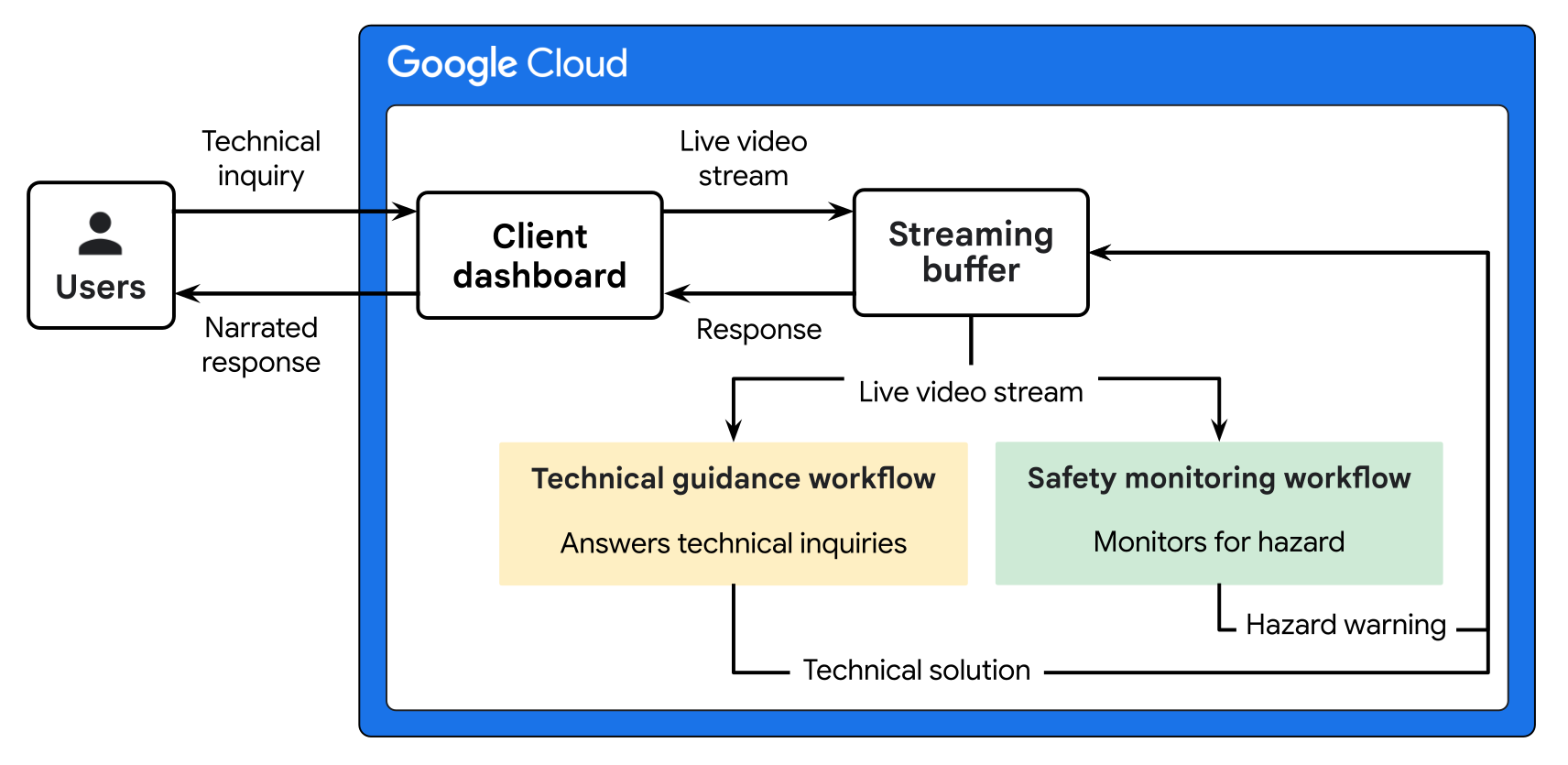
The architecture in the preceding diagram has two workflows: technical guidance and safety monitoring.
- The technical guidance workflow enables users to receive real-time, narrated solutions to complex technical inquiries. This workflow uses the Gemini Live API to process multimodal streams and coordinate with a subagent to retrieve grounded product information from the knowledge database.
- The safety monitoring workflow provides automated hazard detection to ensure user safety during technical procedures. This workflow uses Gemini to analyze live video segments, identify potential risks, and trigger immediate warnings through the client dashboard.
The following tabs provide architecture diagrams that show the technical guidance and safety monitoring workflows:
Technical guidance workflow
The following diagram shows a detailed architecture for a technical guidance workflow.
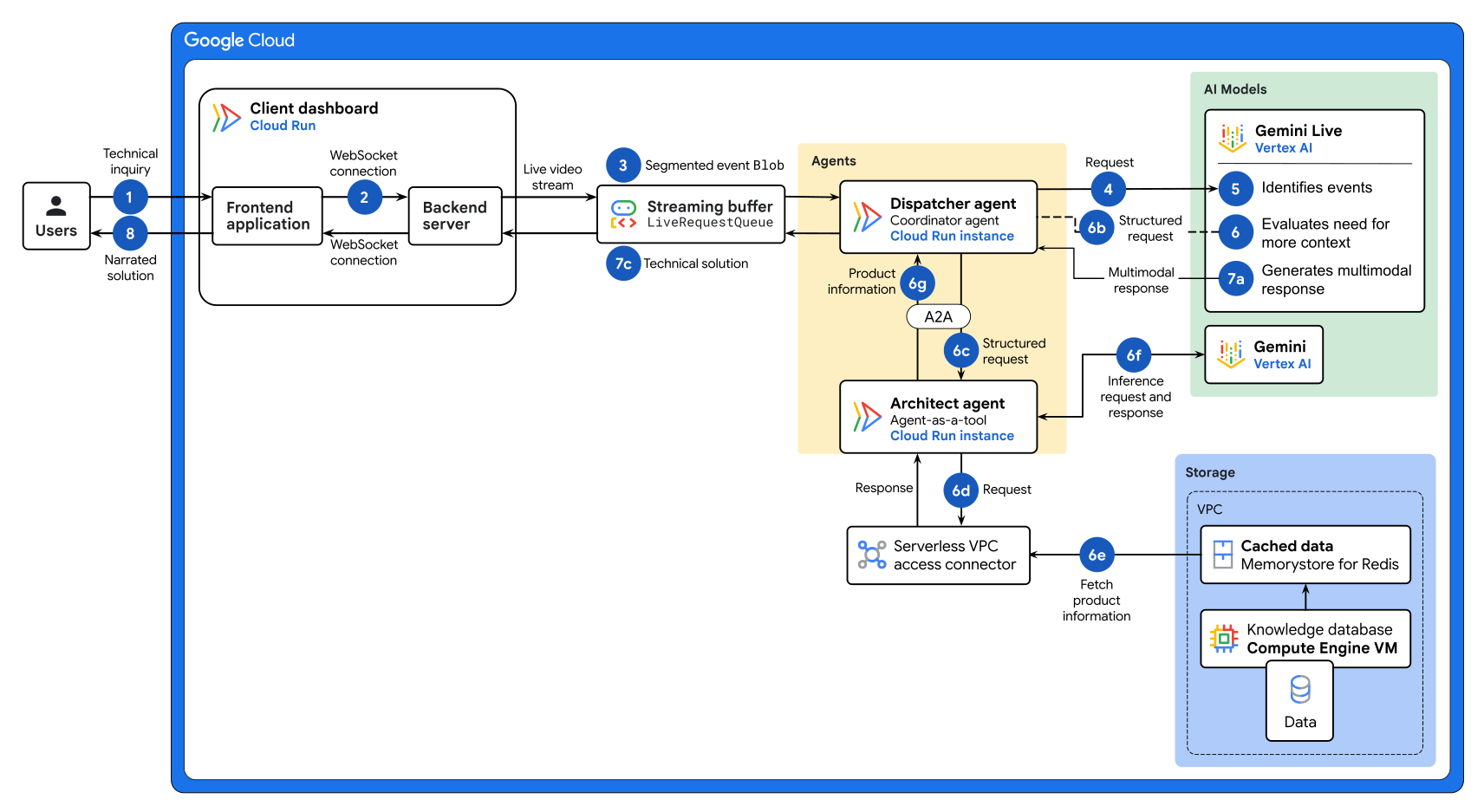
The preceding diagram shows the following data flow:
-
A user initiates a session by making a spoken technical inquiry through the client dashboard. For example, a technician might point their camera at a control panel and ask, "Help, what does this flashing red error light mean?"
-
The client dashboard establishes a persistent WebSocket connection between the frontend and the backend server.
-
WebSocket messages package the raw multimedia data into
Blobobjects. The Agent Development Kit (ADK)LiveRequestQueuecomponent continuously streams the input data to the dispatcher agent. -
The dispatcher agent detects audio or visual commands that require technical guidance and it sends the input stream to the Gemini Live API.
-
The Gemini Live model searches the raw data to identify events. Events are audio keywords, such as "assemble" or "help", or visual cues, such as hand gestures.
Gemini evaluates each event to determine whether it's relevant to the user's inquiry. For example, a hand gesture or filler words might not be relevant, therefore Gemini doesn't process those events.
-
For each relevant event, Gemini enables function calling to evaluate whether it needs additional context. Depending on whether additional context is needed, either Gemini or an architect agent sends a response back to the dispatcher agent.
-
If it needs more context, Gemini looks up the architect agent card to understand how to structure its request.
-
Gemini sends a structured request to the dispatcher agent. The request contains event details, such as the product type, model number, event type, and attributes.
-
The dispatcher agent uses the Agent2Agent (A2A) protocol to send the structured request to the architect agent.
-
The architect agent sends the query through a Serverless VPC Access connector. The connector lets the agent securely access resources in the Virtual Private Cloud (VPC) network that's used for the storage resources in this architecture.
-
The Serverless VPC Access connector interacts with the cached data that's stored in Memorystore for Redis Cluster. If the data isn't available in the cached layer, the architect agent interacts with the Compute Engine instances that host the knowledge database.
-
The architect agent receives the product information from the data cache or knowledge database. The architect agent sends the product information to Gemini to generate a response. For example, "Error code 3B: Fan malfunction. Recommended action: Check for obstructions."
The architect agent sends the product information back to the dispatcher agent.
If it doesn't need more context, Gemini generates a response to the user's request directly.
-
-
The dispatcher agent receives the response from Gemini or from the architect agent, and it generates a multimodal response:
-
Uses the Gemini Live model and ADK
run_liveloop to generate a multimodal response that contains the technical solution. -
Stores the response as a
Blobobject. -
Sends the technical solution through the streaming buffer and persistent WebSocket connection to deliver the technical solution to the client dashboard.
-
-
The client dashboard extracts the
Blobdata from the technical solution to provide immediate narrated guidance and it updates the UI with relevant transcriptions. The request loop is completed while the active bidirectional stream is maintained.
Safety monitoring workflow
The following diagram shows a detailed architecture for a safety monitoring workflow.
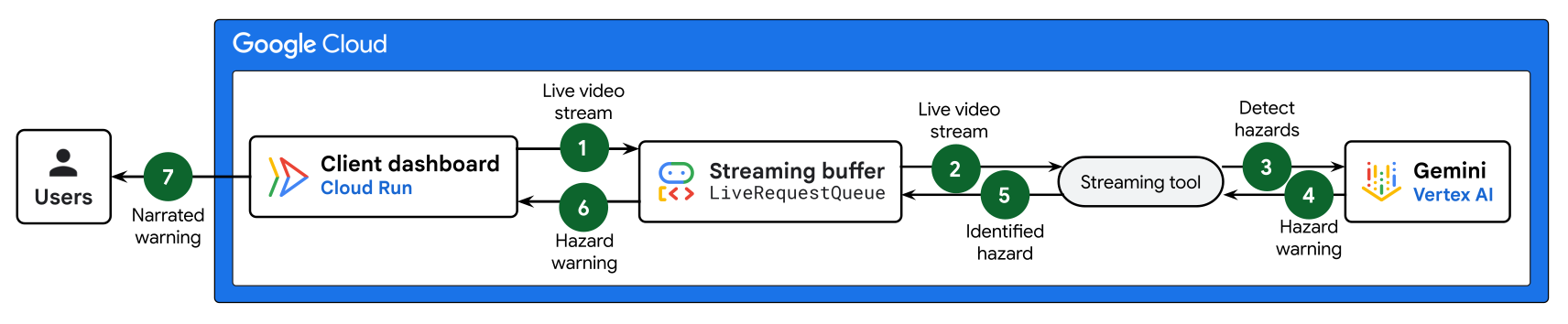
The preceding diagram shows the following data flow:
- The client dashboard establishes a persistent
WebSocket connection
between the frontend and the backend server to observe the live video
stream. The WebSocket message packages this raw multimedia data into
Blobobjects, and sends them continuously to the streaming buffer, using the ADKLiveRequestQueuecomponent. - The streaming buffer directs the input stream to a streaming tool that runs in a continuous background loop to detect hazards in the video frame.
- The streaming tool sends the latest video frame from the streaming buffer to Gemini.
- Gemini observes the video frames
for hazards, such as a bright light or steam.
- If no hazard is detected, nothing happens.
- If a hazard is detected,
Gemini generates a
multimodal response containing the hazard type, attributes, and its
location and stores it as a
Blobobject. Gemini sends the hazard warning response back to the streaming tool.
- The streaming tool forwards the hazard warning response to the streaming buffer.
- The streaming buffer uses the persistent WebSocket connection to deliver the hazard warning response to the client dashboard.
- The client dashboard extracts the
Blobdata from the hazard warning response to provide immediate narrated guidance and updates the UI with relevant transcriptions. This completes the request loop while maintaining the active bidirectional stream.
Products used
This reference architecture uses the following Google Cloud products and tools:
- Cloud Run: A serverless compute platform that lets you run containers directly on top of Google's scalable infrastructure.
- Gemini: A family of multimodal AI models developed by Google.
- Gemini Enterprise Agent Platform: A comprehensive platform that lets you build, scale, govern, and optimize enterprise‑grade AI agents.
- Agent Development Kit (ADK): A set of tools and libraries to develop, test, and deploy AI agents.
- Agent2Agent (A2A) protocol: An open protocol that enables communication and interoperability between agents regardless of their programming language and runtime.
- Serverless VPC Access: A service that lets your serverless environments connect to resources in a Virtual Private Cloud network.
- Virtual Private Cloud (VPC): A virtual system that provides global, scalable networking functionality for your Google Cloud workloads. VPC includes VPC Network Peering, Private Service Connect, private services access, and Shared VPC.
- Memorystore for Redis Cluster: A fully managed, in-memory data store service for Redis.
- Compute Engine: A secure and customizable compute service that lets you create and run VMs on Google's infrastructure.
For information about selecting alternative components for your agentic AI system including framework, agent runtime, tools, memory, and design patterns, see Choose your agentic AI architecture components.
Use case
This reference architecture is designed for use cases that require the real-time synthesis of continuous, bidirectional multimodal data streams. The following are examples of use cases for the architecture that is described in this document:
- Industrial manufacturing and field maintenance: Enable hands-free repair of complex machinery by providing technicians with an AI assistant that processes live audio and video from smart glasses. The technician converses with the AI assistant to fetch machine schematics. The AI assistant uses an internal database agent that accesses product documentation to ensure grounded repair and assembly instructions. A concurrent background vision tool monitors the bidirectional stream to proactively warn the technician of mechanical hazards or incorrect assembly steps.
- Remote technical support: Improve customer troubleshooting outcomes by letting users share a live phone camera feed with a multimodal agentic AI system. The bidirectional streaming architecture supports a dynamic conversation where the system observes hardware in real time. If a background vision process identifies a faulty connection, such as a cable in the wrong port, the system uses the low-latency stream to immediately interrupt the user with corrective guidance.
Design considerations
This section describes design factors, best practices, and recommendations to consider when you use this reference architecture to develop a topology that meets your specific requirements for security, operations, cost, and performance.
The guidance in this section isn't exhaustive. For more information about design factors and best practices, and for recommendations about building and deploying a multi-agent AI system, see Multi-agent AI system in Google Cloud.
Security, privacy, and compliance
To help address the unique security risks of AI agents, Google recommends an approach that combines deterministic security controls with dynamic, reasoning-based defenses:
- Human oversight: Incorporate a human-in-the-loop flow in business-critical systems so human supervisors can review outputs and approve, override, or pause agent actions.
- Agent Identity: Assign each agent a workload-bound identity to enforce least-privilege access control and centrally manage credentials for external tools.
- Agent Gateway: Enforce ingress and egress traffic governance, default-deny access policies, and inline prompt and tool inspection with Model Armor.
Agent Registry: Verify that agents only connect to approved subagents and MCP tools.
Application ingress security: To control access to the application, disable the default
run.appURL of the frontend Cloud Run service and set up a regional external Application Load Balancer. In addition to load-balancing incoming traffic to the application, the load balancer handles SSL certificate management. For added protection, you can use Google Cloud Armor security policies to provide request filtering, DDoS protection, and rate limiting for the service.WebSocket security: Protect sensitive multimodal data, such as voice prints and video, by enforcing TLS encryption for all bidirectional WebSocket connections.
Secure A2A communication:
- Use authenticated extended agent cards to secure A2A communication.
- Attach OpenID Connect (OIDC) identity tokens to requests. The OIDC identity tokens let you use Identity and Access Management (IAM) to validate that only authorized agents access the data.
Operational efficiency
To help ensure that your agent configurations meet your operational efficiency requirements, consider the following recommendations:
- Control loop scripts: Write system prompts for bidirectional live agents as strict state-machine behavior loops rather than just personality guidelines. The system prompt should explicitly command the agent to stay silent until it's triggered. It should enforce brief, action-first responses so that voice interaction is concise and natural.
- Separation of concerns: Use a dedicated background streaming tool to monitor video feeds independently of the primary agent. The root agent in the architecture is bidirectional and it can instantly interrupt its own speech to broadcast these critical safety warnings to the user. Additionally, asking a single agent to constantly monitor a video feed can lead to cognitive overload and hallucinations.
Cost optimization
To help ensure that your agent configurations meet your cost requirements, consider the following recommendations:
- Data ingestion costs: To reduce token costs and prevent context window exhaustion, use a low-frequency frame sampling, such as 2 frames per second, and compress all of the data to Base64 JPEG files.
- Cost-effective prompting: The length of your prompts (input) and the generated responses (output) directly affect performance and cost. Write prompts that are short, direct, and provide sufficient context. Design your prompts to get concise responses from the model. For example, include phrases such as "summarize in 2 sentences" or "list 3 key points". For more information, see the best practices for prompt design.
Performance optimization
To help ensure that your agent configurations meet your performance requirements, consider the following recommendations:
- Asynchronous buffering: To decouple incoming audio and video packets from the model's inference engine, use a thread-safe, asynchronous First-In-First-Out (FIFO) buffer. This buffer acts as a multiplexer that ensures the system remains responsive to user interruptions without freezing the user interface during heavy computation.
- In-memory caching: To achieve sub-millisecond read speeds, use an in-memory Memorystore for Redis Cluster database for the architect agent's schematic vault. This implementation minimizes latency, prevents silences during real-time voice interactions, and provides a scalable single source of truth.
- Resource allocation: Depending on your performance requirements, configure the memory limits and CPU limits to be allocated to the Cloud Run service.
Deployment
To deploy a sample implementation of this architecture, try the following Codelabs:
- Building an ADK bidirectional streaming agent Codelab: Build a single-agent AI system that processes a live video stream to recognize specific user gestures.
- Live bidirectional multi-agent system Codelab: Build a multi-agent AI system that uses bidirectional streaming for real-time voice and video interaction. The system includes a proactive streaming tool for continuous safety monitoring.
What's next
- Learn how to start and manage live sessions.
- Explore the introduction to ADK Gemini Live API Toolkit.
- (Video) Watch Build a real-time voice AI agent with ADK and Gemini Live API
- Learn how to host AI agents on Cloud Run.
- Learn about how to choose your agentic AI architecture components.
- Explore learning resources to build and deploy enterprise-grade agents with Gemini Enterprise Agent Ready (GEAR).
- Explore more agentic AI architecture guides.
- For an overview of architectural principles and recommendations that are specific to AI and ML workloads in Google Cloud, see the AI and ML perspective in the Well-Architected Framework.
- For more reference architectures, diagrams, and best practices, explore the Cloud Architecture Center.
Contributors
Authors:
- Christina Lin | Developer Relations Engineer Manager
- Samantha He | Technical Writer
Other contributors:
- Kumar Dhanagopal | Cross-Product Solution Developer
- Olivier Bourgeois | Developer Relations Engineer