

This document provides a high-level architecture for a multi-agent AI system that consolidates fragmented multimodal data into a searchable knowledge graph. The system enables users to upload data and then use the knowledge graph to identify potential issues or systemic risks. The architecture lets agents navigate complex data webs and maintain long-term personalization. It ensures that distributed resources are matched to search requirements with continuity.
GraphRAG is a graph-based approach to retrieval augmented generation (RAG). RAG helps to ground AI-generated responses by augmenting prompts with contextually relevant data that's retrieved using vector search. GraphRAG combines vector search with a knowledge-graph query to retrieve contextual data that better reflects the interconnectedness of data from diverse sources. Prompts that are augmented using GraphRAG can generate more detailed and relevant AI responses.
The intended audience for this document includes architects, developers, and administrators who build and manage AI infrastructure and applications in the cloud. This document assumes that you have a foundational understanding of AI agents and models. The document doesn't provide specific guidance for designing and coding AI agents.
The deployment section of this document provides a code sample that demonstrates how to define a Spanner Graph schema and link multimodal entities for agentic retrieval.
Architecture
The following shows a high-level view of an architecture of a multi-agent AI system that enables multimodal GraphRAG resource orchestration:
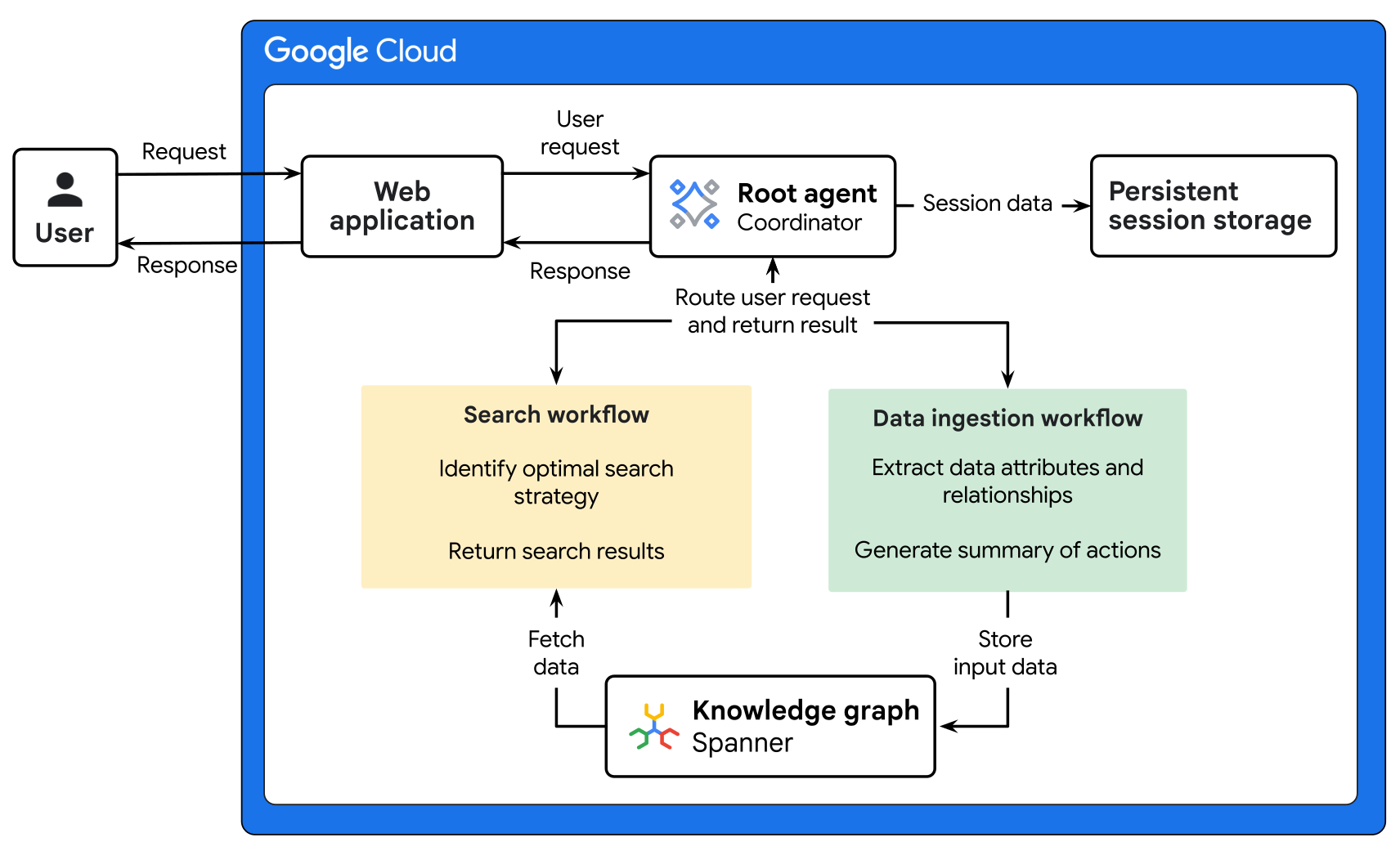
The architecture in the preceding diagram has two workflows: data ingestion and search.
- The data ingestion workflow consolidates fragmented multimodal records into the unified knowledge graph. This workflow uses a sequential multi-agent pattern to upload raw data to Cloud Storage, extract complex relationships using Gemini, and update the Spanner Graph knowledge graph to ensure that the data is available for retrieval.
- The search workflow lets you retrieve insights and ground responses through a GraphRAG process. This workflow uses Gemini and specialized subagents to navigate the knowledge graph and consolidate findings based on previous session data.
The following tabs provide architecture diagrams that show the data ingestion and search workflows:
Data ingestion workflow
The following diagram shows a detailed architecture for a data ingestion workflow.
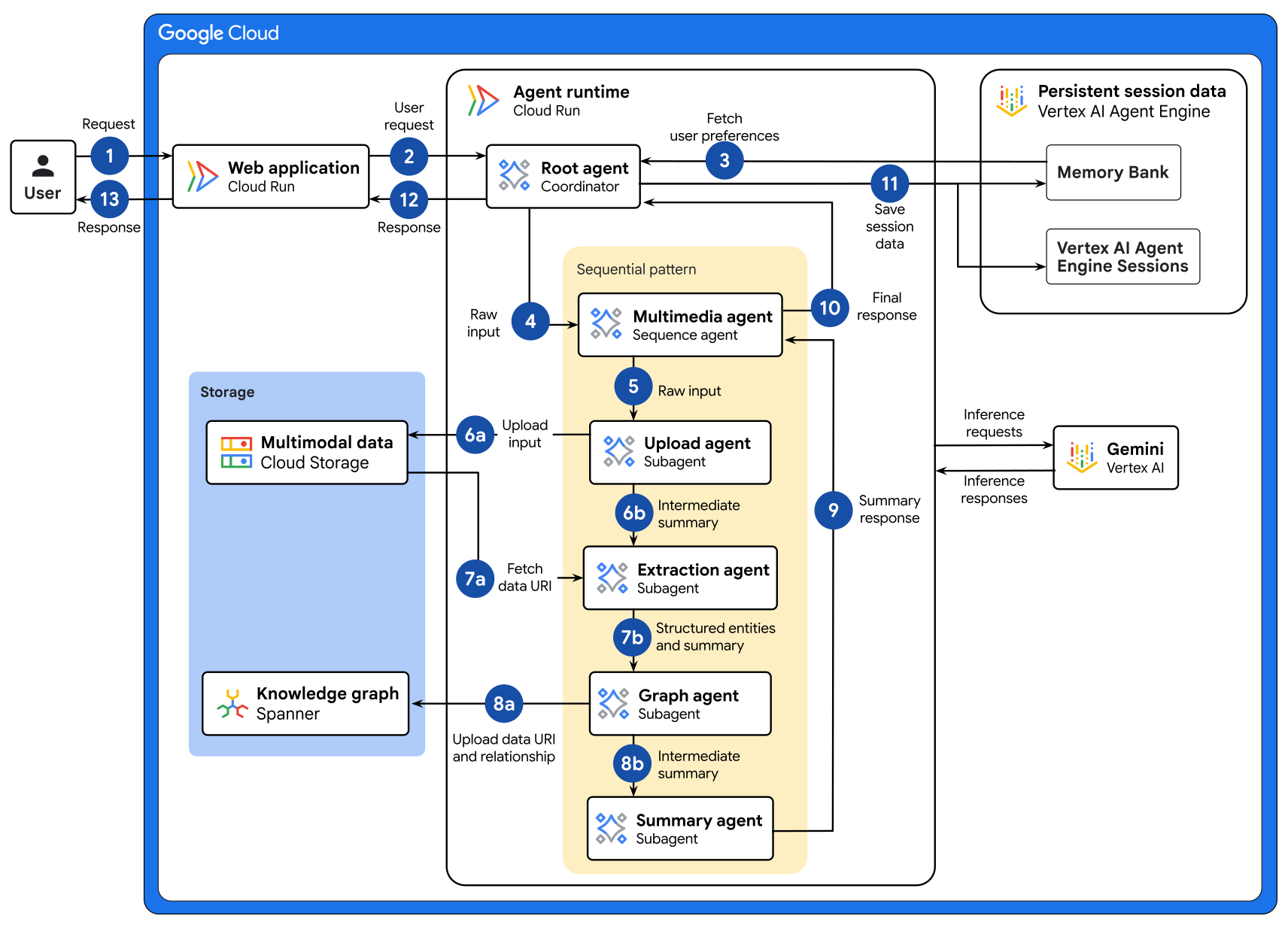
The preceding diagram shows the following data flow:
- The user interacts with the web application to upload new data. For example, a financial analyst might upload an earnings PDF, a recording of a shareholder meeting, or a market performance chart.
- The web application forwards the request to the root agent. The root agent is a coordinator agent that receives requests and is deployed on a Cloud Run service.
- The root agent retrieves persistent session data from Memory Bank to personalize the search results based on the user's preferences from past sessions.
- The root agent uses Gemini on Gemini Enterprise Agent Platform to interpret the request and it delegates the task to the multimedia agent to execute the data ingestion pipeline.
- The multimedia agent initiates the sequential pattern and it forwards the raw input to the upload agent.
- The upload agent performs the following tasks:
- Stores the raw file in a Cloud Storage bucket and detects the media type.
- Forwards an intermediate summary of the actions that it performed to the extraction agent.
- The extraction agent performs the following tasks:
- Fetches the data URI from the storage bucket and uses Gemini to parse the data and identify structured entities. For example, the entities of financial data can include corporate subsidiaries, fiscal quarters, and revenue sentiment.
- Forwards the structured entities and intermediate summary of the actions that it performed to the graph agent.
- The graph agent performs the following tasks:
- Receives the structured entities and uploads the data to the knowledge graph. Spanner Graph creates or links nodes that represent issuers, stakeholders, and market instruments.
- Forwards an intermediate summary of the actions that it performed to the summary agent.
- The summary agent produces a response that contains a text summary of the ingestion results and the actions that were conducted by all subagents. The summary agent sends the response to the multimedia agent.
- The multimedia agent forwards the summary response back to the root agent.
- The root agent triggers a callback function to save session data to Gemini Enterprise Agent Platform Sessions . The root agent extracts custom memory topics from the session to save information about critical focus areas. For example, a financial analyst might create a memory topic to track regulatory flags or sectoral trends.
- The root agent forwards the summary response to the web application.
- The web application forwards the response back to the user.
Search workflow
The following diagram shows a detailed architecture for a search workflow.
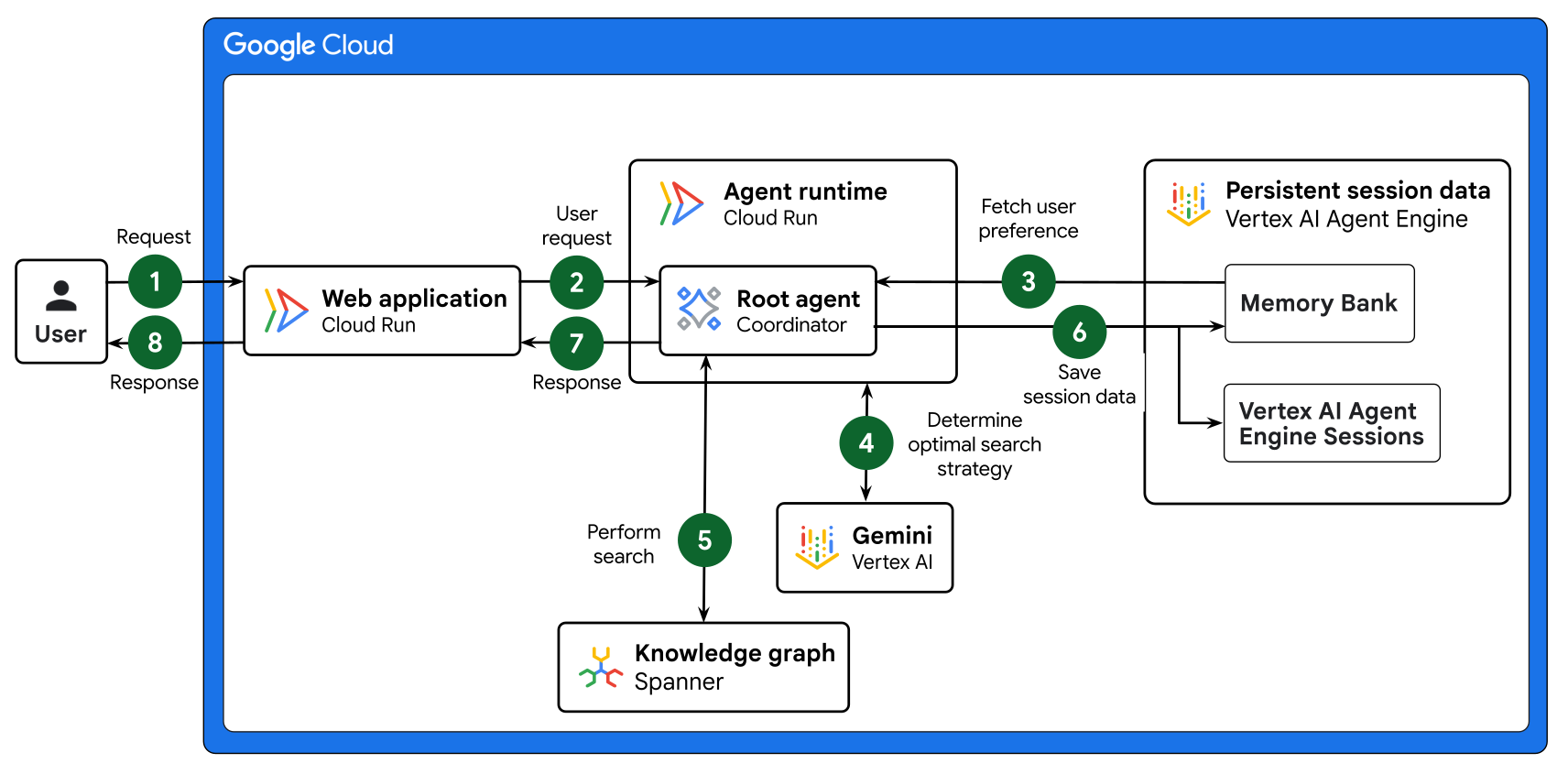
The preceding diagram shows the following data flow:
- A user initiates a search request to the web application. For example, a portfolio manager submits a request to detect any circular transaction patterns that involve more than three entities where the total volume exceeds $1 million within a 24-hour window.
- The web application forwards the request to the root agent. The root agent is a coordinator agent that receives requests and is deployed on a Cloud Run service.
- The root agent retrieves persistent session data from Memory Bank to personalize the search results based on the portfolio manager's historical preferences and context.
- The root agent uses Gemini on Agent Platform to
determine the optimal search strategy:
- Keyword search: Uses SQL
LIKEclauses to match exact categories or locations. - Semantic RAG search: Uses the embedding model and cosine distance to find semantically similar data entries.
- Hybrid search: Executes keyword search and semantic RAG search and merges the results using Reciprocal Rank Fusion (RRF) to ensure high relevance and coverage.
- Keyword search: Uses SQL
- The root agent performs the appropriate search strategy on the knowledge graph, which is stored in Spanner Graph, and retrieves the search results.
- The root agent triggers a callback function to save session data to Agent Platform Sessions. The root agent extracts custom memory topics from the session. For example, a portfolio manager might create a memory topic to track regulatory flags or emerging sectoral trends.
- The root agent forwards the summary response to the web application.
- The web application forwards the response back to the user.
Products used
This reference architecture uses the following Google Cloud products and features:
- Cloud Run: A serverless compute platform that lets you run containers directly on top of Google's scalable infrastructure.
- Gemini: A family of multimodal AI models developed by Google.
- Gemini Enterprise Agent Platform: A comprehensive platform that lets you build, scale, govern, and optimize enterprise‑grade AI agents.
- Cloud Storage: A low-cost, no-limit object store for diverse data types. Data can be accessed from within and outside Google Cloud, and it's replicated across locations for redundancy.
- Spanner Graph: A graph database that provides the scalability, availability, and consistency features of Spanner.
- Gemini Enterprise Agent Platform Sessions: A persistent storage service that saves and retrieves the history of interactions between a user and agents.
- Memory Bank: A persistent storage service that generates, refines, manages, and retrieves long-term memories based on a user's conversations with an agent.
For information about selecting alternative components for your agentic AI system including framework, agent runtime, tools, memory, and design patterns, see Choose your agentic AI architecture components.
Use case
The architecture is designed for use cases that consolidate and analyze fragmented multimodal data to optimize resource allocation and information retrieval. By maintaining independent subagents, the system supports modular updates and ensures that distributed resources are matched to search requirements with high continuity. The integration of Spanner Graph as a knowledge graph enables the agentic AI system to model complex, interconnected data. This integration facilitates rich contextual understanding and sophisticated query capabilities that can be challenging or inefficient with relational or NoSQL databases.
For the following use cases, a graph database excels at representing the arbitrary and evolving connections that are derived from multimodal data. These connections would otherwise require complex and rigid schema management in a relational database.
The following are examples of use cases for the architecture that's described in this document:
- Enterprise HR talent mobility: Improve keyword search for large-scale recruitment search by identifying qualified internal candidates through semantic expansion. The architecture extracts technical skills and soft-skill assessments from multimodal portfolios and video introductions to build a comprehensive talent graph. The Spanner knowledge graph traces relationships between employees, competencies, and project history. The trace results identify experts based on conceptual depth and flag understaffed projects.
- Social media content analysis: Identify specific memories or trends by performing advanced content discovery and network analysis on social media platforms. The system processes uploads like videos, voice memos, and vlogs, and then it extracts entities, topics, sentiment, and mentions. The Spanner knowledge graph traces relationships between users, their connections (friends and followers), posts, likes, comments, shared topics, and trends.
Design considerations
The following sections provide general recommendations for designing the AI agents and implementing this architecture for production.
The guidance in this section isn't exhaustive. For more information about design factors and best practices, and for recommendations about building and deploying a multi-agent AI system, see Multi-agent AI system in Google Cloud.
AI agent design
To improve the cost and performance of your agents, consider the following recommendations:
- Agent system design: Deconstruct complex workflows into multiple specialized agents with well-defined responsibilities instead of a monolithic agent. This separation of concerns simplifies prompt engineering, minimizes instruction drift, and enables granular model scaling. The architecture routes high-volume, well-defined tasks to smaller, faster models while reserving complex reasoning for high-capacity models.
- Tool design: Segregate tools into multiple, focused methods instead of using a single monolithic method. This approach ensures consistency across the codebase, reduces logic branching, and enables specific optimization paths, such as skipping query analysis when a direct search method is invoked.
- Agent context: To prevent downstream agents from repeating queries against upstream data in a sequential pipeline, pass sufficient context through the agent state. Use well-defined JSON structures for shared state so that each agent can parse data reliably.
- Session state storage: Use session state for immediate conversation history and use Memory Bank for distilled facts across sessions. Inject memory context at the start of a session so that the agent can reference preferences without reprocessing long conversation histories.
- Memory quality: Let users clear or update stale memories if their preferences or roles change over time.
Security, privacy, and compliance
To help address the unique security risks of AI agents, Google recommends an approach that combines deterministic security controls with dynamic, reasoning-based defenses:
- Human oversight: Incorporate a human-in-the-loop flow in business-critical systems so human supervisors can review outputs and approve, override, or pause agent actions.
- Agent Identity: Assign each agent a workload-bound identity to enforce least-privilege access control and centrally manage credentials for external tools.
- Agent Gateway: Enforce ingress and egress traffic governance, default-deny access policies, and inline prompt and tool inspection with Model Armor.
Agent Registry: Verify that agents only connect to approved subagents and MCP tools.
Implement fine-grained access control: Use fine-grained access control to authorize access at the table and column level. Restrict the Cloud Storage bucket policy so that only the Cloud Run service account has access.
Sanitize inference and responses: Use Model Armor to inspect and sanitize both inference requests and model responses. This sanitization mitigates prompt injection risks from multimodal content that users upload. It also helps prevent the accidental exfiltration of personally identifiable information (PII) or sensitive data in agent outputs.
Reliability
To help ensure that your agent configurations meet your reliability requirements, consider the following recommendations:
- Implement agent retry logic: To handle transient errors like quota limits, implement retry logic with exponential backoff for calls to Agent Platform endpoints and Spanner.
- Set file limits: To avoid API timeouts from large files, set explicit upload size limits and separate large videos into chunks before data entities are extracted. For more information, see Customize video processing.
Operational efficiency
To help ensure that your agent configurations meet your operational efficiency requirements, consider the following recommendations:
- Use structured logging: Log all agent tool invocations and pipeline outcomes with structured metadata. Structured logs let you query logs and dashboards in Cloud Monitoring.
- Implement tracing: To diagnose latency hotspots, use Cloud Trace to capture end-to-end request traces across the agent runner and tool execution.
- Evaluate agent quality: Periodically evaluate agent output quality using the Gen AI evaluation service to verify tool selection trajectories and response quality.
Cost optimization
To help ensure that your agent configurations meet your cost requirements, consider the following recommendations:
- Storage costs: To reduce storage costs, use Object Lifecycle Management to move files to Nearline or Coldline storage classes after a defined retention period.
- Cost analysis and management: To analyze and manage Agent Platform costs, we recommend that you create baseline metrics for queries per second (QPS) and tokens per second (TPS). Then monitor these metrics after deployment. The baseline that you create as part of cost management can help you determine capacity planning. For example, the baseline helps you determine when Provisioned Throughput might be necessary.
Performance optimization
To help ensure that your agent configurations meet your performance requirements, consider the following recommendations:
- Root agent routing: To minimize latency and avoid unnecessary sub-agent invocations, clearly define routing logic in the agent instructions. Ensure each tool's purpose, input parameters, and expected outputs are documented in string literals to help the model select the correct tool.
- In-database AI models: To reduce latency, use the Spanner
ML.PREDICTfunction to call models inline within SQL queries. Monitor Agent Platform quota usage, because hybrid search workloads can trigger multiple model calls per query. - Resource allocation: Depending on your performance requirements, configure the memory limits and CPU limits to be allocated to the Cloud Run service.
Deployment
To deploy a sample implementation of this architecture, try the Way Back Home Level 2 codelab.
What's next
- Learn about how to host AI agents on Cloud Run.
- Learn how to build a GraphRAG infrastructure for generative AI using Agent Platform and Spanner Graph.
- Learn best practices for designing Spanner Graph schema.
- Learn how to get multimodal embeddings.
- Learn how to build a multi-agent AI system in Google Cloud.
- Explore learning resources to build and deploy enterprise-grade agents with Gemini Enterprise Agent Ready (GEAR).
- For an overview of architectural principles and recommendations that are specific to AI and ML workloads in Google Cloud, see the AI and ML perspective in the Well-Architected Framework.
- For more reference architectures, diagrams, and best practices, explore the Cloud Architecture Center.
Contributors
Authors:
- Annie Wang | Software Engineer
- Samantha He | Technical Writer
Other contributors:
- Christina Lin | Developer Relations Engineer Manager
- Kumar Dhanagopal | Cross-Product Solution Developer
- Olivier Bourgeois | Developer Relations Engineer