

This document provides a high-level architecture for implementing cross-cloud analytics workflows that use AI agents. The document is intended for cloud architects, data engineers, and data scientists who want to use agentic AI for analytics workflows across multi-cloud data lakes, structured data warehouses, and unstructured data stores. The document assumes that you have a foundational understanding of agentic AI concepts, data analytics, and cloud architecture.
The Deployment section of this document provides a codelab that you can use to learn how to build an agentic analytics solution.
Architecture
The following diagram shows an architecture for an agentic analytics solution that derives business insights from structured and unstructured data that's distributed across multiple data stores and cloud service providers.
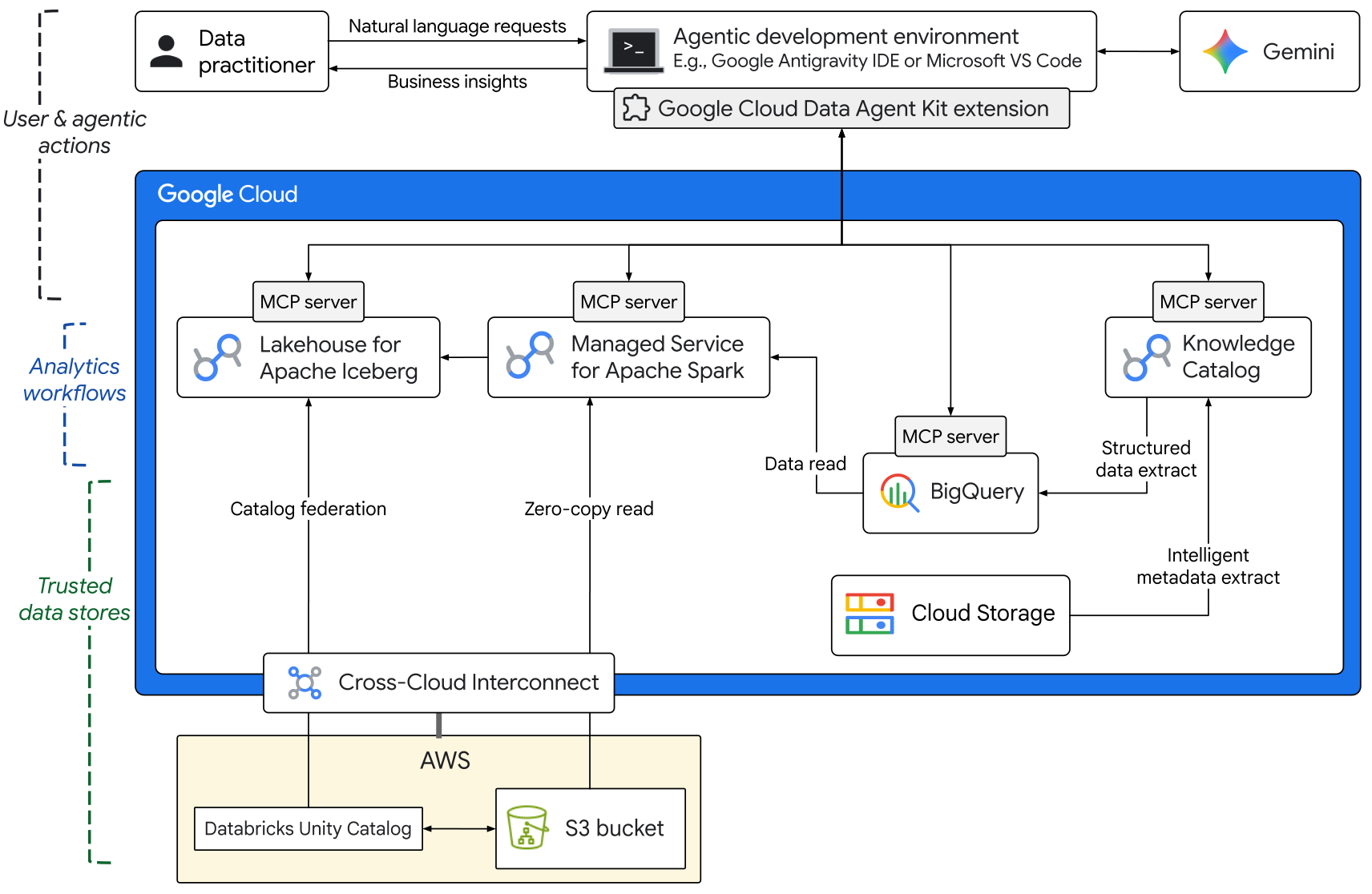
The components in this architecture are organized into the following layers:
User and agentic actions
- Agentic development environment: Data practitioners, like data engineers
and data scientists, submit natural-language requests by using one of the
following methods:
- An agentic development environment like Google Antigravity IDE or Microsoft Visual Studio Code.
- A CLI agent like Gemini CLI, Claude Code, or Codex.
- Google Cloud Data Agent Kit: The Google Cloud Data Agent Kit enables agents to access trusted data in Google Cloud by loading appropriate skills and connecting to remote MCP servers for Google Cloud services.
- Foundation model: To generate business insights from trusted context and data, the agentic development environment uses a foundation model, such as a model from the Gemini family. The model uses appropriate skills from Data Agent Kit and it uses the required MCP server tools to implement complex analytics workflows.
- Agentic development environment: Data practitioners, like data engineers
and data scientists, submit natural-language requests by using one of the
following methods:
Analytics workflows
- Borderless Lakehouse: Lakehouse provides a high-performance, unified metadata catalog that integrates the Apache Iceberg open table format with enterprise-grade storage in Google Cloud.
- Managed Service for Apache Spark: This is the core data processing component in the architecture. The Lightning Engine feature of Managed Service for Apache Spark supports high-performance, serverless data processing in batch and interactive modes. The Spark data-processing jobs use metadata from the Iceberg catalog in Lakehouse, read structured data from BigQuery, and perform zero-copy reads from external sources like Amazon S3.
- Knowledge Catalog: The agent uses Knowledge Catalog to perform intelligent scans of unstructured data in Cloud Storage, extracts semantic metadata, and builds a context graph.
Trusted data stores
- Data in Google Cloud: BigQuery serves as the central warehouse for structured data, including structured extracts from unstructured data in Cloud Storage.
- Data from external sources: The architecture shows external data sources, such as data in Amazon S3 buckets and metadata in Databricks Unity Catalog. Cross-Cloud Interconnect provides high-bandwidth dedicated connectivity between Google Cloud and other cloud service providers.
Products used
The architecture uses the following Google Cloud products and tools:
- Google Cloud Data Agent Kit: Agent extensions to let data scientists, data engineers, and data app developers manage the entire data lifecycle from within their preferred agentic development environments.
- BigQuery: An enterprise data warehouse that helps you manage and analyze your data with built-in features like machine learning, geospatial analysis, and business intelligence.
- Managed Service for Apache Spark: A managed service that runs Apache Spark batch workloads on a managed compute infrastructure.
- Lakehouse: A high-performance storage engine that lets you build open data lakehouses and provides a unified interface for advanced analytics and AI.
- Knowledge Catalog: An AI-powered service that provides a unified catalog of data assets with intelligent metadata and governance capabilities.
- Gemini: A family of multimodal AI models developed by Google.
- Cloud Storage: A low-cost, no-limit object store for diverse data types. Data can be accessed from within and outside Google Cloud, and it's replicated across locations for redundancy.
- Cross-Cloud Interconnect: A service that provides high-bandwidth, low-latency, dedicated connectivity between Google Cloud and other cloud service providers.
- Google Cloud MCP servers: Google-managed remote services that implement the Model Context Protocol (MCP) to provide AI applications access to Google and Google Cloud products and services.
Use cases
The architecture that this document describes is suitable for the following use cases:
- Multi-cloud data analysis: Efficiently query and analyze data that's distributed across Google Cloud and other cloud service providers without moving files or building complex extract, transform, load (ETL) pipelines. For example, a marketing manager at a global retailer can analyze the effectiveness of marketing campaigns by joining customer loyalty data in Amazon S3 with marketing operations data in BigQuery.
- Intelligent data discovery: Use natural language prompts and AI agents to discover, query, and process federated datasets across multiple environments. For example, a procurements specialist can determine common causes for supply chain disruptions based on structured data in a supply chain management (SCM) system combined with insights from unstructured email communications and damage-assessment reports.
- Structured data extraction from unstructured sources: Scan large volumes of unstructured data, derive semantic metadata, and store structured data extracts in BigQuery for downstream analysis. For example, an operations controller can efficiently analyze expenses by extracting structured data from thousands of invoices that are stored in an unstructured format, such as PDF files.
Deployment
To learn how to build an agentic analytics solution by using Data Agent Kit, see the codelab, Raw data to forecasting in seconds with AI agents. The codelab shows how Data Agent Kit lets you efficiently analyze data from within your preferred agentic development environment. All of the sample data that the codelab uses is stored in Google Cloud.
What's next
- Learn how Data Agent Kit lets you use notebooks for data transformation and analysis.
- Explore use cases for Knowledge Catalog.
- Learn more about cross-cloud data access with Lakehouse.
- Learn how to accelerate Apache Spark workloads by using Lightning Engine.
- Learn how you can use Knowledge Catalog as a governance and agentic layer for BigQuery.
- For more reference architectures, diagrams, and best practices, explore the Cloud Architecture Center.
Contributors
Author: Kumar Dhanagopal | Cross-Product Solution Developer
Other contributors:
- Abirami Sukumaran | Staff Developer Advocate
- Arti Prasad | Technical Writer
- Brad Miro | Senior Developer Advocate
- Matthew Rahmann | Senior Product Manager
- Ranadip Chatterjee | Solutions Engineer
- Remigiusz Samborski | Lead Developer Relations Engineer