


בפריסה ברמת הארגון של Security Command Center, הפלטפורמה לניהול זהויות והרשאות גישה (IAM) מאפשרת לכם לנהל הרשאות ברמות שונות בהיררכיית המשאבים, כולל פרויקטים שבהם מופעלת מהדורת Premium. אם הפעלתם את התכונה באופן ספציפי ברמת הפרויקט, כדאי לעיין במאמר IAM להפעלות ברמת הפרויקט.
הרשאות
כדי לקבוע למי יש אפשרות לצפות במשאבים של Security Command Center, ליצור אותם או לעדכן אותם, צריך להעניק תפקידי IAM לגורמים כמו משתמשים, קבוצות או חשבונות שירות. כל תפקיד כולל את ההרשאות הספציפיות שנדרשות למשימות נפוצות.
נדרש להפעלה
כדי להפעיל את Security Command Center, צריך לעיין באחד מהמאמרים הבאים בהתאם לרמת השירות שלכם:
נדרש לניהול ולשימוש שוטפים
בקטע הזה מפורטות ההרשאות שנדרשות כדי לנהל את Security Command Center Premium ו-Standard ולהשתמש בהן. מידע על Security Command Center Enterprise זמין במאמר בנושא הגדרת הרשאות לשימוש שוטף ב-Security Command Center Enterprise.
כדי לשנות את ההגדרות של הארגון, צריך את שני התפקידים הבאים ברמת הארגון:
-
אדמין ארגוני (
roles/resourcemanager.organizationAdmin) -
אדמין ב-Security Center (
roles/securitycenter.admin)
אם משתמש לא צריך הרשאות עריכה, כדאי להקצות לו תפקיד של צופה.
כדי להציג את כל הנכסים, הממצאים ונתיבי התקיפה ב-Security Command Center, המשתמשים צריכים את התפקיד Security Center Admin Viewer (roles/securitycenter.adminViewer) ברמת הארגון.
כדי להציג את ההגדרות, המשתמשים צריכים את התפקיד
אדמין של מרכז האבטחה (roles/securitycenter.admin) ברמת הארגון.
כדי להגביל את הגישה לפרויקטים ולתיקיות ספציפיים, אל תעניקו את כל התפקידים ברמת הארגון. במקום זאת, צריך להקצות את התפקידים הבאים ברמת התיקייה או הפרויקט:
-
צפייה בנכסים במרכז האבטחה (
roles/securitycenter.assetsViewer) - צפייה בתוצאות של מרכז האבטחה
(
roles/securitycenter.findingsViewer)
יכול להיות שיידרשו הרשאות נוספות כדי להפעיל או להגדיר כל שירות זיהוי. מידע נוסף מופיע במאמרי העזרה הספציפיים לכל שירות.
תפקידים ברמת הארגון
כשמחילים תפקידי IAM ברמת הארגון, פרויקטים ותיקיות בארגון הזה יורשים את קישורי התפקידים שלו.
באיור הבא מוצגת היררכיית משאבים אופיינית ב-Security Command Center, עם תפקידים שניתנו ברמת הארגון.
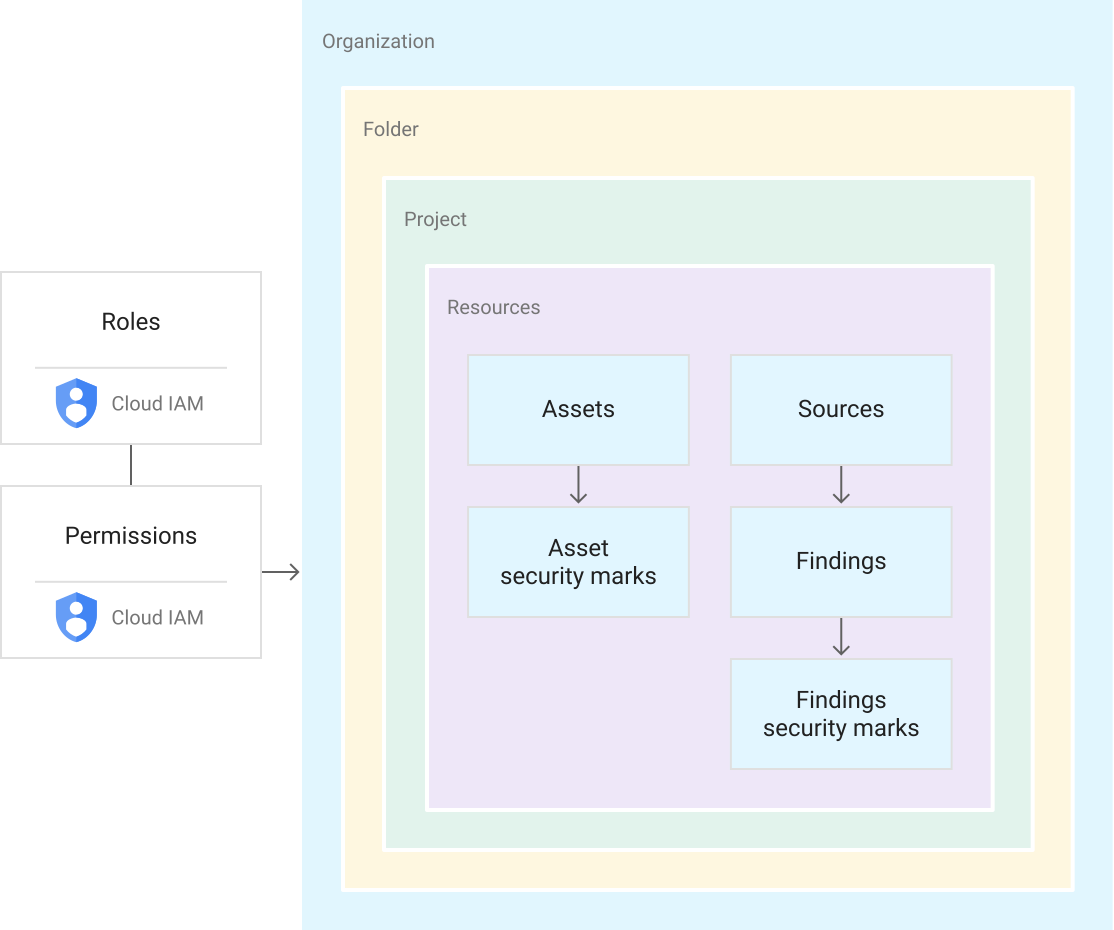
תפקידי IAM כוללים הרשאות לצפייה במשאבים, לעריכה, לעדכון, ליצירה או למחיקה שלהם. תפקידים שמוענקים ברמת הארגון ב-Security Command Center מאפשרים לכם לבצע פעולות שנקבעו מראש לגבי ממצאים, נכסים ומקורות אבטחה בכל הארגון. לדוגמה, משתמש שקיבל את
התפקיד 'עריכת ממצאים ב-Security Center' (roles/securitycenter.findingsEditor) יכול לראות או לערוך ממצאים שצורפו לכל משאב בכל פרויקט או תיקייה בארגון. במבנה הזה, לא צריך להעניק למשתמשים תפקידים בכל תיקייה או פרויקט.
הוראות לניהול תפקידים והרשאות מופיעות במאמר ניהול הגישה לפרויקטים, לתיקיות ולארגונים.
תפקידים ברמת הארגון לא מתאימים לכל תרחישי השימוש, במיוחד לאפליקציות רגישות או לתקני תאימות שדורשים אמצעי בקרה קפדניים לגישה. כדי ליצור מדיניות גישה פרטנית, אפשר להעניק תפקידים ברמת התיקייה והפרויקט.
תפקידים ברמת התיקייה וברמת הפרויקט
ב-Security Command Center אפשר להעניק תפקידי IAM ב-Security Command Center לתיקיות ולפרויקטים ספציפיים, וכך ליצור כמה תצוגות או מאגרי מידע בארגון. אתם מעניקים למשתמשים ולקבוצות הרשאות גישה ועריכה שונות לתיקיות ולפרויקטים בארגון.
באמצעות תפקידים בתיקיות ובפרויקטים, למשתמשים עם תפקידים ב-Security Command Center יש אפשרות לנהל נכסים וממצאים בתוך פרויקטים או תיקיות ייעודיים. לדוגמה, אפשר לתת למהנדס אבטחה גישה מוגבלת לתיקיות ולפרויקטים נבחרים, ולאדמין לענייני אבטחה אפשר לתת הרשאות לניהול כל המשאבים ברמת הארגון.
תפקידים בתיקיות ופרויקטים מאפשרים להחיל הרשאות של Security Command Center ברמות נמוכות יותר בהיררכיית המשאבים של הארגון, אבל הם לא משנים את ההיררכיה. באיור הבא מוצג משתמש עם הרשאות ל-Security Command Center, שמאפשרות לו לגשת לממצאים בפרויקט מסוים.
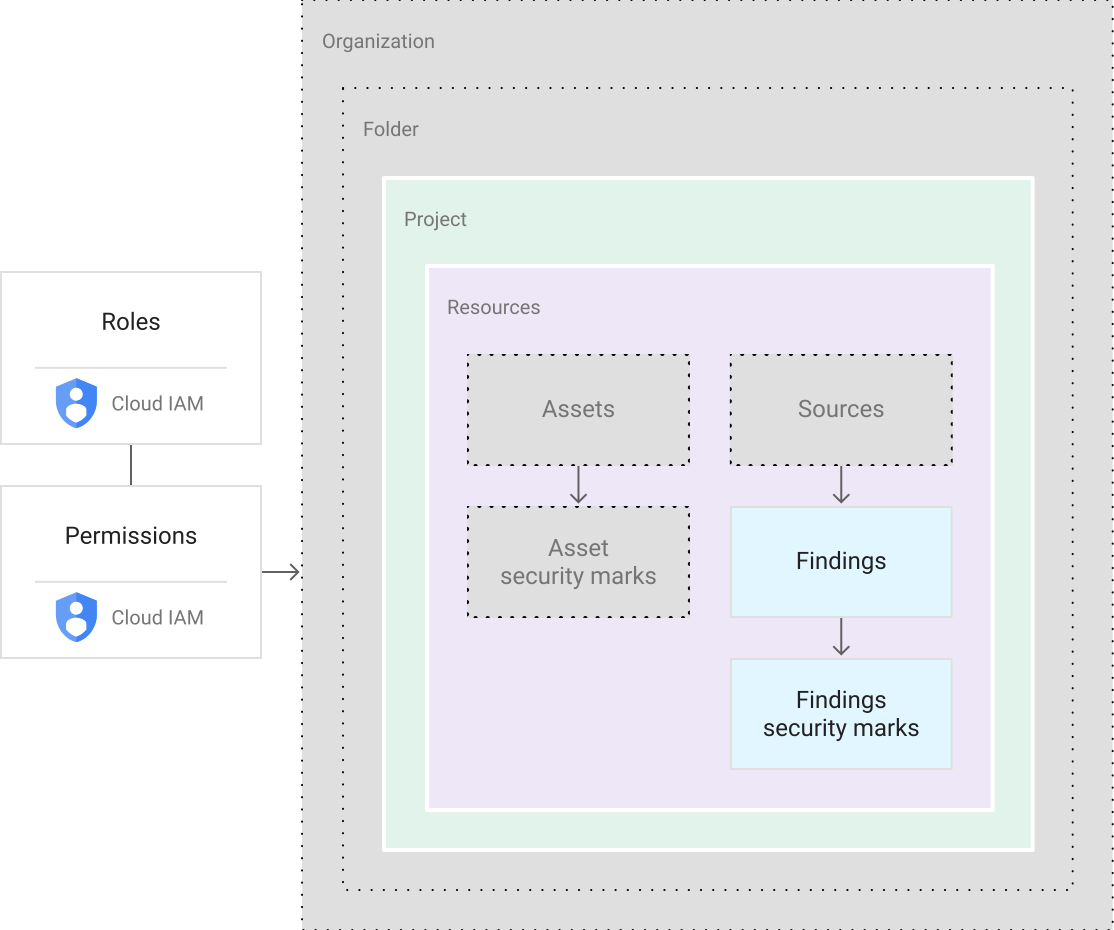
משתמשים עם תפקידים בתיקייה ובפרויקט רואים קבוצת משנה של המשאבים בארגון. כל פעולה שהם יבצעו תהיה מוגבלת לאותו היקף. לדוגמה, אם למשתמש יש הרשאות לתיקייה, הוא יכול לגשת למשאבים בכל פרויקט בתיקייה. הרשאות לפרויקט מעניקות למשתמשים גישה למשאבים בפרויקט הזה.
הוראות לניהול תפקידים והרשאות מופיעות במאמר ניהול הגישה לפרויקטים, לתיקיות ולארגונים.
הגבלות על תפקידים
הקצאת תפקידים ב-Security Command Center ברמת התיקייה או הפרויקט מאפשרת לאדמינים של Security Command Center לבצע את הפעולות הבאות:
- הגבלת הרשאות צפייה או עריכה ב-Security Command Center לתיקיות ולפרויקטים ספציפיים
- מתן הרשאות צפייה ועריכה לקבוצות של נכסים או ממצאים למשתמשים או לצוותים ספציפיים
- להגביל את היכולת להציג או לערוך את פרטי הממצאים, כולל עדכונים של סימני אבטחה ומצב הממצאים, לאנשים פרטיים או לקבוצות עם גישה לממצאים הבסיסיים
- שליטה בגישה להגדרות של Security Command Center, שרק אנשים עם תפקידים ברמת הארגון יכולים לראות
פונקציות של Security Command Center
הגישה לפונקציות של Security Command Center מוגבלת גם על סמך הרשאות הצפייה והעריכה.
במסוף Google Cloud , Security Command Center מאפשר לאנשים שאין להם הרשאות ברמת הארגון לבחור רק משאבים שיש להם גישה אליהם. הבחירה שלהם מעדכנת את כל הרכיבים של ממשק המשתמש, כולל נכסים, ממצאים ואמצעי בקרה של ההגדרות. המשתמשים רואים את ההרשאות שמשויכות לתפקידים שלהם, ויכולים לדעת אם הם יכולים לגשת לממצאים או לערוך אותם בהיקף הנוכחי שלהם.
ממשק ה-API של Security Command Center ו-Google Cloud CLI גם מגבילים את הפונקציות לתיקיות ולפרויקטים שצוינו. אם משתמשים שהוקצו להם תפקידים ברמת התיקייה או הפרויקט מבצעים קריאות לרישום או לקיבוץ של נכסים וממצאים, מוחזרים רק ממצאים או נכסים בהיקפים האלה.
בהפעלות של Security Command Center ברמת הארגון, קריאות ליצירה או לעדכון של ממצאים והתראות על ממצאים תומכות רק בהיקף הארגון. כדי לבצע את המשימות האלה, צריך תפקידים ברמת הארגון.
כדי לראות את נתיבי התקיפה שנוצרים על ידי סימולציות של נתיבי תקיפה, צריך להעניק את ההרשאות המתאימות ברמת הארגון ולהגדיר את התצוגה במסוף Google Cloud לארגון.
מקורות מידע להורים לגבי ממצאים
בדרך כלל, ממצא משויך למשאב, כמו מכונה וירטואלית (VM) או חומת אש. Security Command Center מצרף ממצאים למאגר המיידי ביותר של המשאב שיצר את הממצא. לדוגמה, אם מכונה וירטואלית יוצרת ממצא, הממצא מצורף לפרויקט שמכיל את המכונה הווירטואלית. ממצאים שלא קשורים ל Google Cloud משאב מצורפים לארגון וגלויים לכל מי שיש לו הרשאות ברמת הארגון ב- Security Command Center.
תפקידים ב-Security Command Center
אלה תפקידי ה-IAM שזמינים ל-Security Command Center. אפשר לתת את התפקידים האלה ברמת הארגון, התיקייה או הפרויקט.
| Role | Permissions |
|---|---|
Security Center Admin( Admin(super user) access to security center Lowest-level resources where you can grant this role:
|
|
Security Center Admin Editor( Admin Read-write access to security center Lowest-level resources where you can grant this role:
|
|
Security Center Admin Viewer( Admin Read access to security center Lowest-level resources where you can grant this role:
|
|
Security Center Asset Security Marks Writer( Write access to asset security marks Lowest-level resources where you can grant this role:
|
|
Security Center Assets Discovery Runner( Run asset discovery access to assets Lowest-level resources where you can grant this role:
|
|
Security Center Assets Viewer( Read access to assets Lowest-level resources where you can grant this role:
|
|
Security Center Attack Paths Reader( Read access to security center attack paths |
|
Security Center BigQuery Exports Editor( Read-Write access to security center BigQuery Exports |
|
Security Center BigQuery Exports Viewer( Read access to security center BigQuery Exports |
|
Security Center Compliance Reports Viewer Beta( Read access to security center compliance reports |
|
Security Center Compliance Snapshots Viewer Beta( Read access to security center compliance snapshots |
|
Security Center External Systems Editor( Write access to security center external systems |
|
Security Center Finding Security Marks Writer( Write access to finding security marks Lowest-level resources where you can grant this role:
|
|
Security Center Findings Bulk Mute Editor( Ability to mute findings in bulk |
|
Security Center Findings Editor( Read-write access to findings Lowest-level resources where you can grant this role:
|
|
Security Center Findings Mute Setter( Set mute access to findings |
|
Security Center Findings State Setter( Set state access to findings Lowest-level resources where you can grant this role:
|
|
Security Center Findings Viewer( Read access to findings Lowest-level resources where you can grant this role:
|
|
Security Center Findings Workflow State Setter Beta( Set workflow state access to findings Lowest-level resources where you can grant this role:
|
|
Security Center Issues Editor( Write access to security center issues |
|
Security Center Issues Viewer( Read access to security center issues |
|
Security Center Mute Configurations Editor( Read-Write access to security center mute configurations |
|
Security Center Mute Configurations Viewer( Read access to security center mute configurations |
|
Security Center Notification Configurations Editor( Write access to notification configurations Lowest-level resources where you can grant this role:
|
|
Security Center Notification Configurations Viewer( Read access to notification configurations Lowest-level resources where you can grant this role:
|
|
Security Center Resource Value Configurations Editor( Read-Write access to security center resource value configurations |
|
Security Center Resource Value Configurations Viewer( Read access to security center resource value configurations |
|
Security Center Risk Reports Viewer( Read access to security center risk reports |
|
Security Health Analytics Custom Modules Tester( Test access to Security Health Analytics Custom Modules |
|
Security Center Settings Admin( Admin(super user) access to security center settings Lowest-level resources where you can grant this role:
|
|
Security Center Settings Editor( Read-Write access to security center settings Lowest-level resources where you can grant this role:
|
|
Security Center Settings Viewer( Read access to security center settings Lowest-level resources where you can grant this role:
|
|
Security Center Simulations Reader( Read access to security center simulations |
|
Security Center Sources Admin( Admin access to sources Lowest-level resources where you can grant this role:
|
|
Security Center Sources Editor( Read-write access to sources Lowest-level resources where you can grant this role:
|
|
Security Center Sources Viewer( Read access to sources Lowest-level resources where you can grant this role:
|
|
Security Center Valued Resources Reader( Read access to security center valued resources |
|
Service agent roles
Service agent roles should only be granted to service agents.
| Role | Permissions |
|---|---|
Attack Surface Management Scanner Service Agent( Gives Mandiant Attack Surface Management the ability to scan Cloud Platform resources. |
|
Security Center Automation Service Agent( Security Center automation service agent can configure GCP resources to enable security scanning. |
|
Security Center Control Service Agent( Security Center Control service agent can monitor and configure GCP resources and import security findings. |
|
Security Center Integration Executor Service Agent( Gives Security Center access to execute Integrations. |
|
Security Center Notification Service Agent( Security Center service agent can publish notifications to Pub/Sub topics. |
|
Security Health Analytics Service Agent( Security Health Analytics service agent can scan GCP resource metadata to find security vulnerabilities. |
|
Google Cloud Security Response Service Agent( Gives Playbook Runner permissions to execute all Google authored Playbooks. This role will keep evolving as we add more playbooks |
|
Security Center Service Agent( Security Center service agent can scan GCP resources and import security scans. |
|
תפקידים בממשק Security Command Center Management API
אלה תפקידי ה-IAM שזמינים ל-Security Command Center Management API. אפשר לתת את התפקידים האלה ברמת הארגון, התיקייה או הפרויקט.
| Role | Permissions |
|---|---|
Security Center Management Admin( Full access to manage Cloud Security Command Center services and custom modules configuration. |
|
Security Center Management Editor( Editor role for Security Center Management |
|
Security Center Management Viewer( Readonly access to Cloud Security Command Center services and custom modules configuration. |
|
Security Center Management Custom Modules Editor( Full access to manage Cloud Security Command Center custom modules. |
|
Security Center Management Custom Modules Viewer( Readonly access to Cloud Security Command Center custom modules. |
|
Security Center Management Custom ETD Modules Editor( Full access to manage Cloud Security Command Center ETD custom modules. |
|
Security Center Management ETD Custom Modules Viewer( Readonly access to Cloud Security Command Center ETD custom modules. |
|
Security Center Management Services Editor( Full access to manage Cloud Security Command Center services configuration. |
|
Security Center Management Services Viewer( Readonly access to Cloud Security Command Center services configuration. |
|
Security Center Management Settings Editor( Full access to manage Cloud Security Command Center settings |
|
Security Center Management Settings Viewer( Readonly access to Cloud Security Command Center settings |
|
Security Center Management SHA Custom Modules Editor( Full access to manage Cloud Security Command Center SHA custom modules. |
|
Security Center Management SHA Custom Modules Viewer( Readonly access to Cloud Security Command Center SHA custom modules. |
|
תפקידי IAM ב-Compliance Manager
בטבלה הבאה מפורטים התפקידים וההרשאות ב-IAM שזמינים לשירות Compliance Manager. אפשר לתת את התפקידים האלה ברמת הארגון, התיקייה או הפרויקט.
| Role | Permissions |
|---|---|
Compliance Manager Admin( Full access to Compliance Manager resources. |
|
Compliance Manager Viewer( Readonly access to Compliance Manager resources. |
|
Service agent roles
Service agent roles should only be granted to service agents.
| Role | Permissions |
|---|---|
Cloud Security Compliance Service Agent( Gives CSC Service Account access to consumer resources. |
|
תפקידים ב-Security Posture API
התפקידים הבאים ב-IAM זמינים ל-Security Posture API ולתכונה שלו לאימות תשתית כקוד (IaC). אפשר לתת את התפקידים האלה ברמת הארגון, התיקייה או הפרויקט, אלא אם צוין אחרת.
| Role | Permissions |
|---|---|
Security Posture Admin( Full access to Security Posture service APIs. Lowest-level resources where you can grant this role:
|
|
Security Posture Viewer( Read only access to all the SecurityPosture Service resources. |
|
Security Posture Deployer( Mutate and read permissions to the Posture Deployment resource. |
|
Security Posture Deployments Viewer( Read only access to the Posture Deployment resource. |
|
Security Posture Resource Editor( Mutate and read permissions to the Posture resource. |
|
Security Posture Resource Viewer( Read only access to the Posture resource. |
|
Security Posture Shift-Left Validator( Create access for Reports, e.g. IaC Validation Report. |
|
תפקידי IAM ב-Data Security Posture Management
בטבלה הבאה מפורטים התפקידים וההרשאות ב-IAM שזמינים לשירות Data Security Posture Management (DSPM). אפשר לתת את התפקידים האלה ברמת הארגון, התיקייה או הפרויקט.
| Role | Permissions |
|---|---|
Data Security Posture Management Admin( Full access to Data Security Posture Management resources. |
|
Data Security Posture Management Viewer( Readonly access to Data Security Posture Management resources. |
|
Service agent roles
Service agent roles should only be granted to service agents.
| Role | Permissions |
|---|---|
DSPM Service Agent( Gives DSPM Service Account access to consumer resources. |
|
התפקידים של סוכן שירות
סוכן שירות מאפשר לשירות לגשת למשאבים שלכם.
אחרי שמפעילים את Security Command Center, נוצרים בשבילכם סוכני השירות הבאים:
service-org-ORGANIZATION_ID@security-center-api.iam.gserviceaccount.com.סוכן השירות הזה צריך את תפקיד ה-IAM
roles/securitycenter.serviceAgent.service-org-ORGANIZATION_ID@gcp-sa-ktd-hpsa.iam.gserviceaccount.com.סוכן השירות הזה צריך את תפקיד ה-IAM
roles/containerthreatdetection.serviceAgent.service-org-ORGANIZATION_ID@gcp-sa-csc-hpsa.iam.gserviceaccount.com(רק במסלול פרימיום)סוכן השירות הזה צריך את תפקיד ה-IAM
roles/cloudsecuritycompliance.serviceAgent.service-org-ORGANIZATION_ID@gcp-sa-dspm-hpsa.iam.gserviceaccount.com(רק במסלול פרימיום)סוכן השירות הזה משמש ל-Data Security Posture Management (DSPM) ונדרש לו תפקיד
roles/dspm.serviceAgentIAM.
במהלך תהליך ההפעלה של Security Command Center, תתבקשו להעניק לכל סוכן שירות תפקיד אחד או יותר ב-IAM. כדי ש-Security Command Center יפעל, צריך להקצות את התפקידים לכל סוכן שירות.
כדי לראות את ההרשאות של כל תפקיד, אפשר לעיין במאמרים הבאים:
כדי להקצות את התפקידים, צריכה להיות לכם הרשאת roles/resourcemanager.organizationAdmin.
אם אין לכם את התפקיד roles/resourcemanager.organizationAdmin, האדמין הארגוני יכול להקצות את התפקידים לסוכני השירות באמצעות הפקודה הבאה ב-CLI של gcloud:
gcloud organizations add-iam-policy-binding ORGANIZATION_ID \
    --member="SERVICE_AGENT_NAME" \
    --role="IAM_ROLE"
מחליפים את מה שכתוב בשדות הבאים:
-
ORGANIZATION_ID: מזהה הארגון -
SERVICE_AGENT_NAME: השם של סוכן השירות שרוצים להעניק לו את התפקיד. השם הוא אחד משמות סוכני השירות הבאים:service-org-ORGANIZATION_ID@security-center-api.iam.gserviceaccount.comservice-org-ORGANIZATION_ID@gcp-sa-ktd-hpsa.iam.gserviceaccount.com
-
IAM_ROLE: התפקיד הנדרש הבא שמתאים לסוכן השירות שצוין:roles/securitycenter.serviceAgentroles/containerthreatdetection.serviceAgent
מידע נוסף על תפקידים ב-IAM מופיע במאמר הסבר על תפקידים.
תפקידים ב-Web Security Scanner
התפקידים הבאים ב-IAM זמינים ל-Web Security Scanner. אפשר להעניק את התפקידים האלה ברמת הפרויקט.
| Role | Permissions |
|---|---|
Web Security Scanner Admin( Full access to all Web Security Scanner resources |
|
Web Security Scanner Editor( Full access to all Web Security Scanner resources Lowest-level resources where you can grant this role:
|
|
Web Security Scanner Viewer( Read access to all Web Security Scanner resources Lowest-level resources where you can grant this role:
|
|
Web Security Scanner Runner( Read access to Scan and ScanRun, plus the ability to start scans Lowest-level resources where you can grant this role:
|
|
Service agent roles
Service agent roles should only be granted to service agents.
| Role | Permissions |
|---|---|
Cloud Web Security Scanner Service Agent( Gives the Cloud Web Security Scanner service account access to compute engine details and app engine details. |
|