


BiDiStreamingAnalyzeContent API הוא ה-API הראשי לחוויות אודיו ומולטי-מודאליות מהדור הבא, גם ב-סוכנים בממשק שיחה וגם ב-Agent Assist. ה-API הזה מאפשר להעביר נתוני אודיו בסטרימינג ומחזיר לכם תמלילים או הצעות לנציגים אנושיים.
בניגוד לממשקי API קודמים, הגדרת האודיו הפשוטה כוללת תמיכה אופטימלית בשיחות בין בני אדם ומגבלת זמן מורחבת של 30 דקות. ה-API הזה תומך גם בכל התכונות של Agent Assist שנתמכות ב-StreamingAnalyzeContent.
היסודות של סטרימינג
התרשים הבא ממחיש איך הסטרימינג עובד.
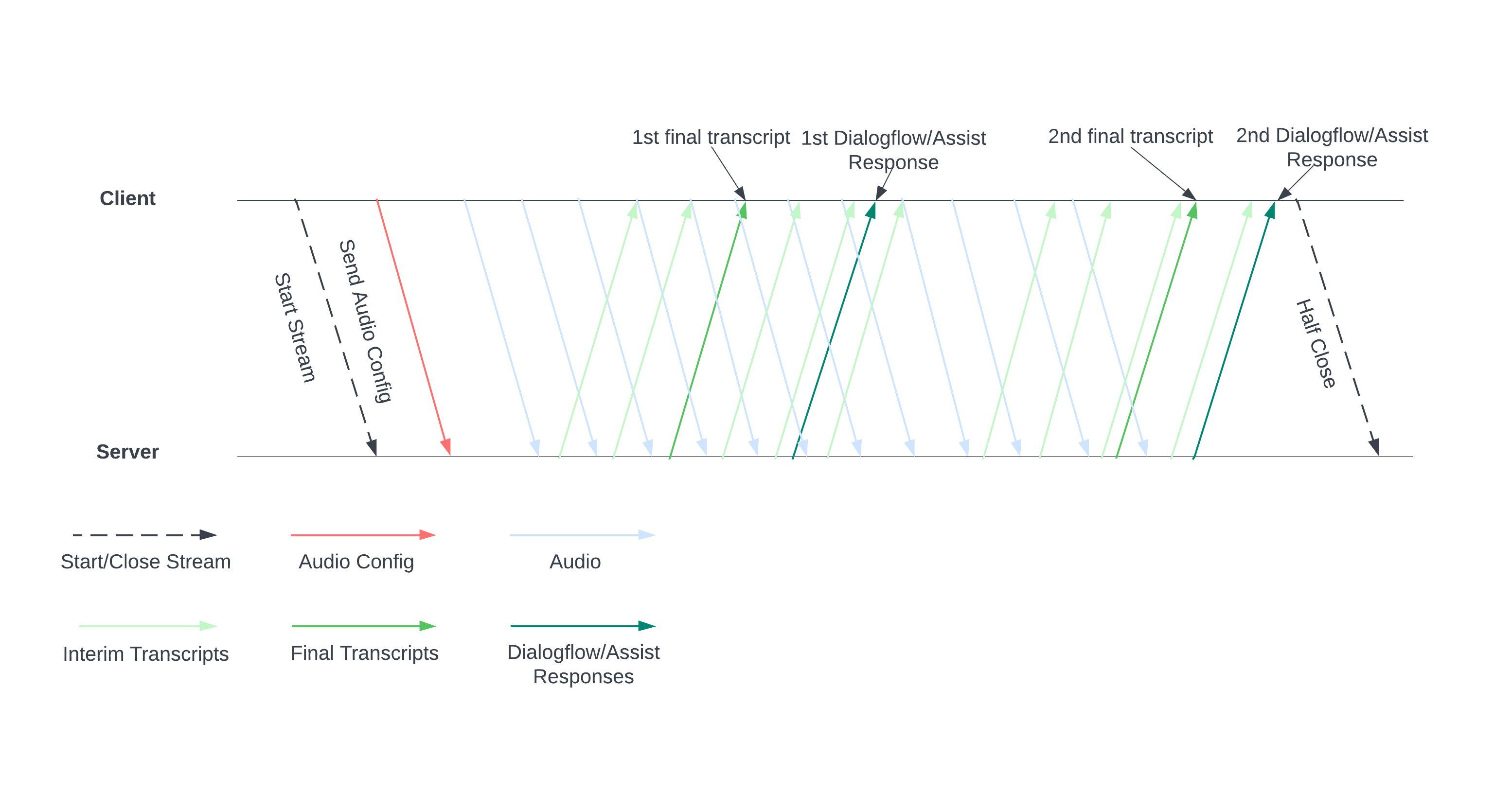
כדי להתחיל סטרימינג, שולחים לשרת הגדרות אודיו. אחרי זה אתם שולחים קובצי אודיו, והשרת שולח לכם תמליל או הצעות לנציג אנושי. כדי לקבל יותר תמלילים והצעות, צריך לשלוח יותר נתוני אודיו. החילופים האלה נמשכים עד שאתם מסיימים אותם על ידי סגירה חלקית של הסטרימינג.
מדריך לסטרימינג
כדי להשתמש ב-API של BiDiStreamingAnalyzeContent בזמן ריצה של שיחה, צריך לפעול לפי ההנחיות הבאות.
- מפעילים את השיטה
BiDiStreamingAnalyzeContentומגדירים את השדות הבאים:BiDiStreamingAnalyzeContentRequest.participant- (אופציונלי)
BiDiStreamingAnalyzeContentRequest.voice_session_config.input_audio_sample_rate_hertz(אם מצוין, זה מבטל את ההגדרה מ-ConversationProfile.stt_config.sample_rate_hertz.) - (אופציונלי)
BiDiStreamingAnalyzeContentRequest.voice_session_config.input_audio_encoding(אם מצוין, זה מבטל את ההגדרה מ-ConversationProfile.stt_config.audio_encoding.)
- מכינים את השידור ומגדירים את האודיו בבקשת ה-
BiDiStreamingAnalyzeContentהראשונה. - בבקשות הבאות, שולחים בייטים של אודיו לסטרימינג דרך
BiDiStreamingAnalyzeContentRequest.audio. - אחרי ששולחים את הבקשה השנייה עם מטען ייעודי (payload) של אודיו, אמורים לקבל
BidiStreamingAnalyzeContentResponsesמהסטרימינג.- תוצאות ביניים ותוצאות סופיות של התמלול זמינות באמצעות הפקודה הבאה:
BiDiStreamingAnalyzeContentResponse.recognition_result. - כדי לגשת להצעות לנציגים אנושיים ולהודעות מעובדות בשיחה, משתמשים בפקודה הבאה:
BiDiStreamingAnalyzeContentResponse.analyze_content_response.
- תוצאות ביניים ותוצאות סופיות של התמלול זמינות באמצעות הפקודה הבאה:
- אתם יכולים לסגור את השידור באופן חלקי בכל שלב. אחרי שסוגרים את הסטרימינג באופן חלקי, השרת שולח בחזרה את התשובה שמכילה את שאר תוצאות הזיהוי, יחד עם הצעות אפשריות של Agent Assist.
- צריך להתחיל שידור חדש או להפעיל מחדש שידור במקרים הבאים:
- השידור לא תקין. לדוגמה, השידור נפסק כשהוא לא היה אמור להיפסק.
- השיחה שלך מתקרבת למגבלת הבקשות של 30 דקות.
- כדי לקבל את האיכות הטובה ביותר, כשמתחילים סטרימינג, צריך לשלוח נתוני אודיו שנוצרו אחרי
speech_end_offsetהאחרון שלBiDiStreamingAnalyzeContentResponse.recognition_resultעםis_final=trueאלBidiStreamingAnalyzeContent.
שימוש ב-API באמצעות ספריית לקוח של Python
ספריות לקוח עוזרות לכם לגשת לממשקי Google API משפת קוד מסוימת. כדי להשתמש בספריית הלקוח של Python ל-Agent Assist עם BidiStreamingAnalyzeContent:
from google.cloud import dialogflow_v2beta1
from google.api_core.client_options import ClientOptions
from google.cloud import storage

import time
import google.auth
import participant_management
import conversation_management


PROJECT_ID="your-project-id"
CONVERSATION_PROFILE_ID="your-conversation-profile-id"
BUCKET_NAME="your-audio-bucket-name"

SAMPLE_RATE =48000
# Calculate the bytes with Sample_rate_hertz * bit Depth / 8 -> bytes
# 48000(sample/second) * 16(bits/sample) / 8 = 96000 byte per second,
# 96000 / 10 = 9600 we send 0.1 second to the stream API
POINT_ONE_SECOND_IN_BYTES = 9600
FOLDER_PTAH_FOR_CUSTOMER_AUDIO="your-customer-audios-files-path"
FOLDER_PTAH_FOR_AGENT_AUDIO="your-agent-audios-file-path"
client_options = ClientOptions(api_endpoint="dialogflow.googleapis.com")
credentials, _ = google.auth.default(scopes=["https://www.googleapis.com/auth/cloud-platform",
                                             "https://www.googleapis.com/auth/dialogflow"])

storage_client = storage.Client(credentials = credentials, project=PROJECT_ID)

participant_client = dialogflow_v2beta1.ParticipantsClient(client_options=client_options,
                                                           credentials=credentials)

def download_blob(bucket_name, folder_path, audio_array : list):
    """Uploads a file to the bucket."""
    bucket = storage_client.bucket(bucket_name, user_project=PROJECT_ID)
    blobs = bucket.list_blobs(prefix=folder_path)
    for blob in blobs:
      if not blob.name.endswith('/'):
          audio_array.append(blob.download_as_string())

def request_iterator(participant : dialogflow_v2beta1.Participant, audios):
    """Iterate the request for bidi streaming analyze content
    """

    yield dialogflow_v2beta1.BidiStreamingAnalyzeContentRequest(
        config={
            "participant": participant.name,
            "voice_session_config": {
                "input_audio_encoding": dialogflow_v2beta1.AudioEncoding.AUDIO_ENCODING_LINEAR_16,
                "input_audio_sample_rate_hertz": SAMPLE_RATE,
            },
        }
    )
    print(f"participant {participant}")

    for i in range(0, len(audios)):
      audios_array = audio_request_iterator(audios[i])
      for chunk in audios_array:
        if not chunk:
            break
        yield dialogflow_v2beta1.BidiStreamingAnalyzeContentRequest(
        input={
            "audio":chunk
            },
        )
        time.sleep(0.1)
    time.sleep(0.1)

def participant_bidi_streaming_analyze_content(participant, audios):
    """call bidi streaming analyze content API
    """
    bidi_responses = participant_client.bidi_streaming_analyze_content(
        requests=request_iterator(participant, audios)
    )

    for response in bidi_responses:
        bidi_streaming_analyze_content_response_handler(response)

def bidi_streaming_analyze_content_response_handler(response: dialogflow_v2beta1.BidiStreamingAnalyzeContentResponse):
    """Call Bidi Streaming Analyze Content
    """
    if  response.recognition_result:
         print(f"Recognition result: { response.recognition_result.transcript}", )

def audio_request_iterator(audio):
    """Iterate the request for bidi streaming analyze content
    """
    total_audio_length = len(audio)
    print(f"total audio length {total_audio_length}")
    array = []
    for i in range(0, total_audio_length, POINT_ONE_SECOND_IN_BYTES):
        chunk = audio[i : i + POINT_ONE_SECOND_IN_BYTES]
        array.append(chunk)
        if not chunk:
            break
    return array

def python_client_handler():
    """Downloads audios from the google cloud storage bucket and stream to
    the Bidi streaming AnalyzeContent site.
    """
    print("Start streaming")
    conversation = conversation_management.create_conversation(
        project_id=PROJECT_ID, conversation_profile_id=CONVERSATION_PROFILE_ID_STAGING
    )
    conversation_id = conversation.name.split("conversations/")[1].rstrip()
    human_agent = human_agent = participant_management.create_participant(
        project_id=PROJECT_ID, conversation_id=conversation_id, role="HUMAN_AGENT"
    )

    end_user =    end_user = participant_management.create_participant(
        project_id=PROJECT_ID, conversation_id=conversation_id, role="END_USER"
    )

    end_user_requests = []
    agent_request= []
    download_blob(BUCKET_NAME, FOLDER_PTAH_FOR_CUSTOMER_AUDIO, end_user_requests)
    download_blob(BUCKET_NAME, FOLDER_PTAH_FOR_AGENT_AUDIO, agent_request)

    participant_bidi_streaming_analyze_content( human_agent, agent_request)
    participant_bidi_streaming_analyze_content( end_user, end_user_requests)

    conversation_management.complete_conversation(PROJECT_ID, conversation_id)
הפעלה לשילוב של SipRec בטלפוניה
אתם יכולים להפעיל את שילוב SipRec בטלפוניה כדי להשתמש ב-BidiStreamingAnalyzeContent לעיבוד אודיו. מגדירים את עיבוד האודיו באמצעות מסוף Agent Assist או בקשת API ישירה.
המסוף
כדי להגדיר את עיבוד האודיו לשימוש ב-BidiStreamingAnalyzeContent, פועלים לפי השלבים הבאים.
נכנסים למסוף Agent Assist ובוחרים את הפרויקט.
לוחצים על Conversation Profiles (פרופילים של שיחות) > השם של הפרופיל.
עוברים אל הגדרות טלפוניה.
לוחצים כדי להפעיל את האפשרות Use Bidirectional Streaming API (שימוש ב-API של סטרימינג דו-כיווני) > Save (שמירה).
API
אפשר לשלוח קריאה ישירות ל-API כדי ליצור או לעדכן פרופיל שיחה, על ידי הגדרת הדגל ב-ConversationProfile.use_bidi_streaming.
הגדרה לדוגמה:
{
"name": "projects/PROJECT_ID/locations/global/conversationProfiles/CONVERSATION_PROFILE_ID",f
"displayName": "CONVERSATION_PROFILE_NAME",
"automatedAgentConfig": {
},
"humanAgentAssistantConfig": {
  "notificationConfig": {
    "topic": "projects/PROJECT_ID/topics/FEATURE_SUGGESTION_TOPIC_ID",
    "messageFormat": "JSON"
      },
  },
"useBidiStreaming": true,
"languageCode": "en-US"
}
מכסות
מספר הבקשות בו-זמנית של BidiStreamingAnalyzeContent מוגבל על ידי מכסה חדשה ConcurrentBidiStreamingSessionsPerProjectPerRegion. ב Google Cloud מדריך למכסות מוסבר איך משתמשים במכסות ואיך מבקשים להגדיל את המכסות.
במכסות, השימוש בבקשות BidiStreamingAnalyzeContent לנקודות הקצה הגלובליות ובמספר אזורים בארה"ב של Dialogflow הוא באזור us-central1.