

콜백은 Python 코드를 사용하여 특정 에이전트의 실행 프로세스에 연결하는 강력한 메커니즘을 제공하는 고급 기능입니다. 콜백을 사용하면 특정 사전 정의된 지점에서 에이전트의 동작을 관찰, 맞춤설정, 제어할 수 있습니다.
다양한 콜백 유형을 활용할 수 있으며 각 콜백 유형은 대화 차례의 특정 지점에서 실행됩니다. 이러한 유형은 아래 섹션에 설명되어 있습니다.
Python 런타임 및 클래스
Python 콜백 코드에서는 코드를 작성하는 데 도움이 되는 특정 클래스와 함수에 액세스할 수 있습니다. 자세한 내용은 Python 런타임 참조를 확인하세요.
콜백 유형
콜백 유형에 따라 기본 콜백 함수는 특정 이름이어야 합니다. 이렇게 하면 콜백 코드 내에서 임의의 이름으로 도우미 함수를 정의할 수 있습니다.
각 콜백 유형은 대화 차례의 특정 지점에서 실행됩니다.
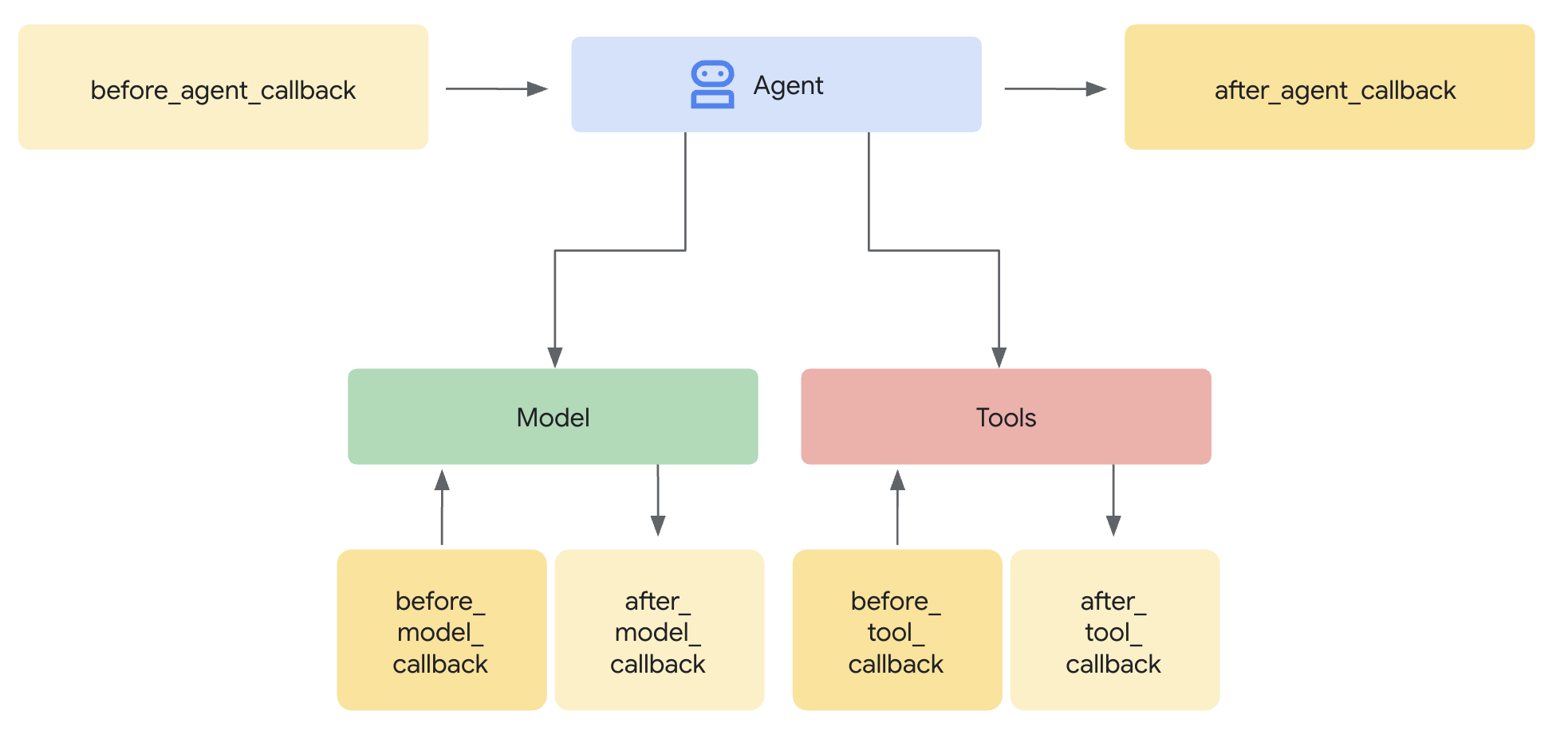
특정 유형의 콜백을 여러 개 정의하면 정의한 순서대로 실행됩니다.
아래 섹션에서는 각 콜백 유형을 설명하며 각 유형에 대해 다음 정보가 설명됩니다.
| X | X |
|---|---|
| 이름 | 필수 콜백 함수 이름 |
| 실행 | 대화 차례 내 실행 지점입니다. |
| 목적 | 콜백을 사용하는 유용한 시나리오입니다. |
| 인수 | 함수의 입력 인수입니다. |
| 돌려주기 | 함수의 반환 값입니다. |
| ADK 콜백 | 해당 ADK 콜백 문서 링크입니다. |
에이전트 시작 전 (before_agent_callback)
| X | X |
|---|---|
| 이름 | before_agent_callback |
| 실행 | 에이전트가 호출되기 전에 호출됩니다. |
| 목적 | 에이전트에 필요한 리소스 또는 상태를 설정하거나, 세션 상태의 유효성 검사를 실행하거나, 에이전트 호출을 방지하는 데 유용합니다. |
| 인수 | CallbackContext |
| 돌려주기 | 콘텐츠(선택사항): 설정된 경우 에이전트가 호출되지 않고 제공된 응답이 사용됩니다. |
| ADK 콜백 | 에이전트 콜백 전 |
코드 샘플:
import random

def before_agent_callback(
  callback_context: CallbackContext
) -> Optional[Content]:
  username = callback_context.variables.get("username", None)
  if not username:
    # default user
    final_name = "Default Name"
  else:
    # add a random integer to the username
    final_name = f"{username} {random.randint(1,10)}"
  # update the username variable
  callback_context.variables["username"] = final_name
에이전트 완료 후 (after_agent_callback)
| X | X |
|---|---|
| 이름 | after_agent_callback |
| 실행 | 에이전트가 완료된 후 호출됩니다. |
| 목적 | 정리 작업, 실행 후 유효성 검사, 최종 상태 수정 또는 에이전트 응답 업데이트에 유용합니다. |
| 인수 | CallbackContext |
| 돌려주기 | 콘텐츠(선택사항): 설정된 경우 에이전트의 출력을 제공된 출력으로 바꿉니다. |
| ADK 콜백 | 에이전트 콜백 후 |
코드 샘플:
def after_agent_callback(
  callback_context: CallbackContext
) -> Optional[Content]:
  if callback_context.agent_name == "Routing Agent":
    counter = callback_context.variables.get("counter", 0)
    counter += 1
    # increment the invoked counter for this agent
    callback_context.variables["counter"] = int(counter)
LLM 호출 전 (before_model_callback)
| X | X |
|---|---|
| 이름 | before_model_callback |
| 실행 | 모델 요청 전에 호출됩니다. |
| 목적 | 모델 요청을 검사/수정하거나 모델 사용을 방지하는 데 유용합니다. |
| 인수 | CallbackContext, LlmRequest |
| 돌려주기 | LlmResponse: 설정된 경우 모델 호출이 건너뛰고 응답이 모델에서 온 것처럼 사용됩니다. |
| ADK 콜백 | 모델 콜백 전 |
코드 샘플:
def before_model_callback(
  callback_context: CallbackContext,
  llm_request: LlmRequest
) -> Optional[LlmResponse]:
  """
  This callback executes *before* a request is sent to the LLM.

  By returning an `LlmResponse` object, we are intercepting the call to the
  LLM. The LLM will *not* be called, and the framework will instead use the
  `LlmResponse` we provide as if it came from the model.

  This is the core mechanism for implementing input guardrails, prompt
  validation, or serving responses from a cache. Here, we force the agent to
  call a function instead of thinking with the LLM.
  """
  # Modify the shared session state.
  callback_context.variables['foo'] = 'baz'

  # Skip the LLM call and return a custom response telling the agent to
  # execute a specific function.
  return LlmResponse(
    content=Content(parts=[Part(
      function_call=FunctionCall(
        name="function_name", args={"arg_name": "arg_value"}))],
      role="model"))
LLM 호출 후 (after_model_callback)
| X | X |
|---|---|
| 이름 | after_model_callback |
| 실행 | 모델 응답이 수신된 후 호출됩니다. |
| 목적 | 모델 응답 형식 재지정, 모델에서 생성된 민감한 정보 검열, 변수에서 사용할 모델의 구조화된 데이터 파싱, 모델 오류 처리에 유용합니다. |
| 인수 | CallbackContext, LlmResponse |
| 돌려주기 | LlmResponse: 설정된 경우 모델 응답을 제공된 응답으로 바꿉니다. |
| ADK 콜백 | 모델 콜백 후 |
코드 샘플:
def after_model_callback(
  callback_context: CallbackContext,
  llm_response: LlmResponse
) -> Optional[LlmResponse]:
  """
  This callback executes *after* a response has been received from the LLM,
  but before the agent processes it.

  The `llm_response` parameter contains the actual data from the LLM.
  By returning `None`, we are approving this response and allowing the agent
  to use it as-is.

  If we returned a new `LlmResponse` object, it would *replace* the original,
  which is useful for redacting sensitive information, enforcing output
  formatting, or adding disclaimers.
  """
  # Returning None allows the LLM's actual response to be used.
  return None
도구 호출 전 (before_tool_callback)
| X | X |
|---|---|
| 이름 | before_tool_callback |
| 실행 | 도구 호출 전에 호출됩니다. |
| 목적 | 도구 인수 검사 및 수정, 도구 실행 전 승인 검사 또는 도구 수준 캐싱 구현에 유용합니다. |
| 인수 | Tool, Dict[str,Any]: 도구 입력, CallbackContext |
| 돌려주기 | Dict[str,Any] : 설정된 경우 도구 실행이 건너뛰고 이 출력이 모델에 제공됩니다. |
| ADK 콜백 | 도구 콜백 전 |
코드 샘플:
def before_tool_callback(
  tool: Tool,
  input: dict[str, Any],
  callback_context: CallbackContext
) -> Optional[dict[str, Any]]:
  """
  This callback executes *before* a specific tool is called by the agent.

  Here, we modify the input arguments intended for the tool and then return
  a dictionary. By returning a dictionary instead of `None`, we are
  overriding the default behavior. The actual tool function will *not* be
  executed. Instead, the dictionary we return will be treated as the
  llm.tool's result and passed back to the LLM for the next step.

  This is ideal for validating tool inputs, applying policies, or returning
  mocked/cached data for testing.
  """
  # Modify the shared session state.
  callback_context.variables['foo'] = 'baz'

  # Modify the arguments for the tool call in-place.
  input['input_arg'] = 'updated_val1'
  input['additional_arg'] = 'updated_val2'

  # Override the tool call and return a mocked result.
  return {"result": "ok"}
도구 호출 후 (after_tool_callback)
| X | X |
|---|---|
| 이름 | after_tool_callback |
| 실행 | 도구 완료 후 호출됩니다. |
| 목적 | 모델에 다시 전송하기 전에 도구 응답을 검사 및 수정하거나, 도구 결과를 후처리하거나, 도구 응답의 특정 부분을 변수에 저장하는 데 유용합니다. |
| 인수 | 도구, Dict[str,Any]: 도구 입력, CallbackContext, Dict[str,Any]: 도구 응답 |
| 돌려주기 | Dict[str,Any]: 설정된 경우 모델에 제공되는 도구 응답을 재정의합니다. |
| ADK 콜백 | 도구 콜백 후 |
코드 샘플:
# Previous tool was named `get_user_info`
# Previous tool returned the payload:
# {"username": "Patrick", "fave_food": ["pizza"]}

def after_tool_callback(
  tool: Tool,
  input: dict[str, Any],
  callback_context: CallbackContext,
  tool_response: dict
) -> Optional[dict]:

  if tool.name == "get_user_info":
    tool_response["username"] = "Gary"
    tool_response["pet"] = "dog"

    # Override tool response
    return tool_response
콜백 만들기
콜백을 만들려면 다음 단계를 따르세요.
- 에이전트 설정을 엽니다.
- 코드 추가 를 클릭합니다.
- 콜백 유형을 선택합니다.
- Python 코드를 제공합니다.
- 저장 을 클릭합니다.
커스텀 페이로드 (custom_payloads)
커스텀 페이로드를 사용하면 에이전트 응답 내에 텍스트가 아닌 구조화된 보조 데이터 (일반적으로 JSON 형식)를 포함할 수 있습니다. 이 페이로드는 에이전트가 외부 시스템 또는 클라이언트 애플리케이션과 상호작용하는 방식을 안내하거나 보강하는 데 유용합니다.
페이로드 값은 대규모 언어 모델 (LLM)에 표시되지 않으며 최종 응답을 생성하는 데만 사용됩니다.
커스텀 페이로드는 콜백, 특히 before_model_callback 또는 after_model_callback을 사용하여 생성되고 설정됩니다.
커스텀 페이로드는 일반적으로 풍부한 구조화된 상호작용을 지원하는 데 중점을 두고 여러 용도로 사용할 수 있습니다.
- 에이전트 에스컬레이션/핸드오프: 라우팅 안내(예: 라우팅할 특정 대기열)를 제공하여 상호작용을 상담사에게 전송하는 데 자주 사용됩니다.
- 리치 콘텐츠 및 클라이언트 측 작업:
리치 위젯 및 기타 리치 콘텐츠를
채팅 환경에 직접 삽입할 수 있도록 지원합니다.
이는 커스텀 채팅 통합에 특히 유용합니다.
- 예로는 통화 도우미와 같은 인터페이스를 사용하는 고객에게 이미지 URL 또는 빠른 답장 칩과 옵션을 표시하는 것이 있습니다.
- 응답 구성:
커스텀 페이로드는 다음과 같은 다양한 방법으로 반환되도록 구성할 수 있습니다.
- 명시적 페이로드만 결정적으로 반환합니다.
- LLM에서 생성된 텍스트 응답과 함께 페이로드를 반환합니다.
- 정적 텍스트 응답과 함께 페이로드를 반환합니다.
에이전트 설정
커스텀 페이로드는 콜백을 통해서만 생성하고 설정할 수 있습니다.
페이로드는
Blob
의 mime_type이 application/json인 Blob으로 설정됩니다.
Part.from_json(data=payload_string)
샘플 after_model_callback
모델 응답과 추가 커스텀 페이로드 응답을 반환하는 샘플 after_model_callback입니다.
import json

def after_model_callback(callback_context: CallbackContext, llm_response: LlmResponse) -> Optional[LlmResponse]:
 """
 Adds a custom payload to every model response which is a text
 """
 if (llm_response.content.parts[0].text is not None):
   # construct payload
   payload_dict = { "custom_payload_key": "custom_payload_value"}
   payload_json_string = json.dumps(payload_dict)

   new_parts = []
   # Keep the origial agent response part, as model only sees text in the historical context.
   new_parts.append(Part(text=llm_response.content.parts[0].text))

   # Append custom payload
   new_parts.append(Part.from_json(data=payload_json_string))

   return LlmResponse(content=Content(parts=new_parts))
샘플 before_model_callback
특정 도구가 트리거된 후 추가 커스텀 페이로드를 반환하는 샘플 before_model_callback입니다.
import json

def has_escalate(llm_request: LlmRequest) -> bool:
  for content in llm_request.contents:
    for part in content.parts:
      if part.function_call and part.function_call.name == 'escalate':
        return True
  return False

def before_model_callback(callback_context: CallbackContext, llm_request: LlmRequest) -> Optional[LlmResponse]:
  # checks if `escalate` tool is being called
  if not has_escalate(llm_request):
    return None
  payload_dict = { "escalate": "user ask for escalation"}
  payload_json_string = json.dumps(payload_dict)

  return LlmResponse(content=Content(parts=[Part(text="ESCALATE!!!"), Part.from_json(data=payload_json_string)]))
응답에서 런타임 페이로드 확인
페이로드는 payload 필드에
RunSession
과
BidiRunSession 모두의 Struct로 채워집니다.
페이로드 값은 LLM에 표시되지 않습니다.