

Callbacks are an advanced feature that provides a powerful mechanism to hook into a specific agent's execution process using Python code. They allow you to observe, customize, and even control the agent's behavior at specific, predefined points.
There are a variety of callback types you can utilize, where each type of callback is executed at a specific point in the conversational turn. These types are described in sections below.
Python runtime and classes
In your Python callback code, you have access to certain classes and functions that help you write the code. For more information, see the Python runtime reference.
Callback types
Depending on the type of callback, your primary callback function must be of a specific name. This lets you to define helper functions of any name within your callback code.
Each type of callback is executed at a specific point in the conversational turn:
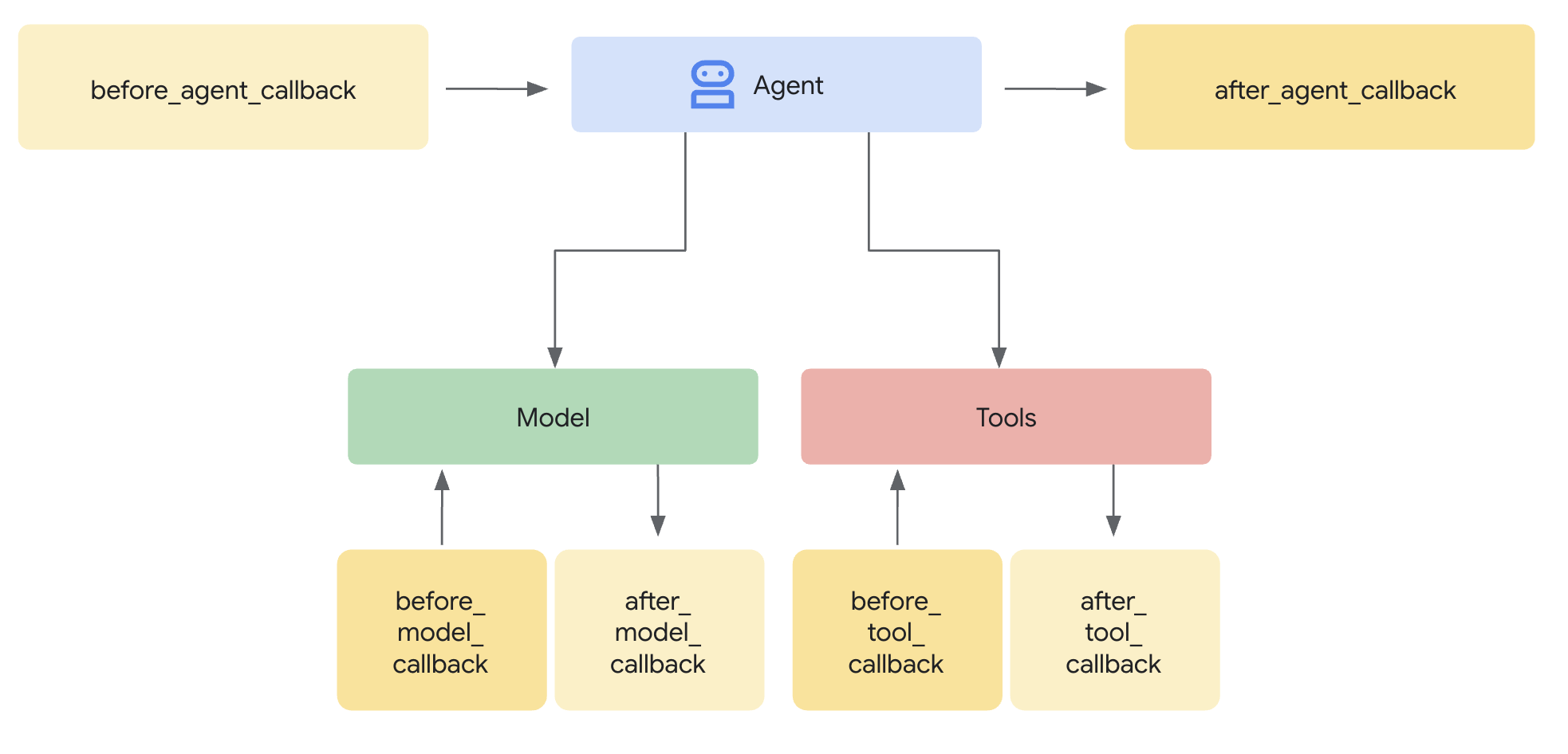
If you define multiple callbacks of a specific type, they will be executed in the order in which you define them.
Sections below describe each callback type, where the following info is described for each type:
| X | X |
|---|---|
| Name | Required callback function name |
| Execution | Execution point within the conversational turn. |
| Purpose | Useful scenarios to use the callback. |
| Arguments | Input arguments for the function. |
| Return | Return value for the function. |
| ADK callback | Link to the corresponding ADK callback documentation. |
Before agent starts (before_agent_callback)
| X | X |
|---|---|
| Name | before_agent_callback |
| Execution | Called before the agent is invoked. |
| Purpose | Useful for setting up resources or state needed for the agent, performing validation checks on the session state, or avoiding agent invocation. |
| Arguments | CallbackContext |
| Return | Content(optional): If set, agent is not invoked, and the provided response is used. |
| ADK callback | before agent callback |
Code sample:
import random

def before_agent_callback(
  callback_context: CallbackContext
) -> Optional[Content]:
  username = callback_context.variables.get("username", None)
  if not username:
    # default user
    final_name = "Default Name"
  else:
    # add a random integer to the username
    final_name = f"{username} {random.randint(1,10)}"
  # update the username variable
  callback_context.variables["username"] = final_name
After agent finishes (after_agent_callback)
| X | X |
|---|---|
| Name | after_agent_callback |
| Execution | Called after the agent completes. |
| Purpose | Useful for cleanup tasks, post-execution validation, modifying final state, or updating the agent response. |
| Arguments | CallbackContext |
| Return | Content(optional): If set, replace the agent's output with the provided output. |
| ADK callback | after agent callback |
Code sample:
def after_agent_callback(
  callback_context: CallbackContext
) -> Optional[Content]:
  if callback_context.agent_name == "Routing Agent":
    counter = callback_context.variables.get("counter", 0)
    counter += 1
    # increment the invoked counter for this agent
    callback_context.variables["counter"] = int(counter)
Before LLM call (before_model_callback)
| X | X |
|---|---|
| Name | before_model_callback |
| Execution | Called before model request. |
| Purpose | Useful for inspection/modification of the model request, or to avoid model use. |
| Arguments | CallbackContext, LlmRequest |
| Return | LlmResponse: If set, model call is skipped, and the response is used as if it came from the model. |
| ADK callback | before model callback |
Code sample:
def before_model_callback(
  callback_context: CallbackContext,
  llm_request: LlmRequest
) -> Optional[LlmResponse]:
  """
  This callback executes *before* a request is sent to the LLM.

  By returning an `LlmResponse` object, we are intercepting the call to the
  LLM. The LLM will *not* be called, and the framework will instead use the
  `LlmResponse` we provide as if it came from the model.

  This is the core mechanism for implementing input guardrails, prompt
  validation, or serving responses from a cache. Here, we force the agent to
  call a function instead of thinking with the LLM.
  """
  # Modify the shared session state.
  callback_context.variables['foo'] = 'baz'

  # Skip the LLM call and return a custom response telling the agent to
  # execute a specific function.
  return LlmResponse(
    content=Content(parts=[Part(
      function_call=FunctionCall(
        name="function_name", args={"arg_name": "arg_value"}))],
      role="model"))
After LLM call (after_model_callback)
| X | X |
|---|---|
| Name | after_model_callback |
| Execution | Called after a model response is received. |
| Purpose | Useful for reformatting model responses, censoring sensitive information generated by the model, parsing structured data from the model for use in variables, and model error handling. |
| Arguments | CallbackContext, LlmResponse |
| Return | LlmResponse: If set, replace the model response with the provided response. |
| ADK callback | after model callback |
Code sample:
def after_model_callback(
  callback_context: CallbackContext,
  llm_response: LlmResponse
) -> Optional[LlmResponse]:
  """
  This callback executes *after* a response has been received from the LLM,
  but before the agent processes it.

  The `llm_response` parameter contains the actual data from the LLM.
  By returning `None`, we are approving this response and allowing the agent
  to use it as-is.

  If we returned a new `LlmResponse` object, it would *replace* the original,
  which is useful for redacting sensitive information, enforcing output
  formatting, or adding disclaimers.
  """
  # Returning None allows the LLM's actual response to be used.
  return None
Before tool call (before_tool_callback)
| X | X |
|---|---|
| Name | before_tool_callback |
| Execution | Called before tool calls. |
| Purpose | Useful for inspection and modification of tool arguments, authorization checks before tool execution, or implementing tool-level caching. |
| Arguments | Tool, Dict[str,Any]: tool inputs, CallbackContext |
| Return | Dict[str,Any] : If set, tool execution is skipped and this output is provided to the model. |
| ADK callback | before tool callback |
Code sample:
def before_tool_callback(
  tool: Tool,
  input: dict[str, Any],
  callback_context: CallbackContext
) -> Optional[dict[str, Any]]:
  """
  This callback executes *before* a specific tool is called by the agent.

  Here, we modify the input arguments intended for the tool and then return
  a dictionary. By returning a dictionary instead of `None`, we are
  overriding the default behavior. The actual tool function will *not* be
  executed. Instead, the dictionary we return will be treated as the
  llm.tool's result and passed back to the LLM for the next step.

  This is ideal for validating tool inputs, applying policies, or returning
  mocked/cached data for testing.
  """
  # Modify the shared session state.
  callback_context.variables['foo'] = 'baz'

  # Modify the arguments for the tool call in-place.
  input['input_arg'] = 'updated_val1'
  input['additional_arg'] = 'updated_val2'

  # Override the tool call and return a mocked result.
  return {"result": "ok"}
After tool call (after_tool_callback)
| X | X |
|---|---|
| Name | after_tool_callback |
| Execution | Called after tool completion. |
| Purpose | Useful for inspection and modification of tool response before sending back to the model, post-processing of tool results, or saving specific parts of a tool response to variables. |
| Arguments | Tool, Dict[str,Any]: tool inputs, CallbackContext, Dict[str,Any]: tool response |
| Return | Dict[str,Any]: If set, this overrides the tool response which is provided to the model. |
| ADK callback | after tool callback |
Code sample:
# Previous tool was named `get_user_info`
# Previous tool returned the payload:
# {"username": "Patrick", "fave_food": ["pizza"]}

def after_tool_callback(
  tool: Tool,
  input: dict[str, Any],
  callback_context: CallbackContext,
  tool_response: dict
) -> Optional[dict]:

  if tool.name == "get_user_info":
    tool_response["username"] = "Gary"
    tool_response["pet"] = "dog"

    # Override tool response
    return tool_response
Create a callback
To create a callback:
- Open the agent settings.
- Click Add code.
- Select a callback type.
- Provide Python code.
- Click Save.
Custom payloads (custom_payloads)
Custom payloads facilitate the inclusion of supplementary, non-textual, structured data (typically formatted as JSON) within an agent's response. This payload is instrumental in directing or augmenting the agent's interaction with external systems or client applications.
The payload value is not visible to the Large Language Model (LLM);
it is only used to generate the final response.
Custom payloads are generated and set using callbacks,
specifically the before_model_callback or after_model_callback.
The custom payload can be used for several purposes, generally centered around enabling rich, structured interactions:
- Agent Escalation/Handoff: It is frequently used for transferring an interaction to a human agent by providing routing instructions (for example, the specific queue to route to).
- Rich Content and Client-Side Actions:
It supports embedding rich widgets and other rich content
directly into chat experiences,
which is especially useful for custom chat integrations.
- Examples include displaying image URLs or quick-reply chips and options for a customer using an interface like call companion.
- Response Composition:
Custom payloads can be configured to be returned in various ways:
- Return only the explicit payload deterministically.
- Return the payload along with an LLM-generated text response.
- Return the payload with a static text response
Agent Setup
Custom payloads can only be generated and set using callbacks.
The payload is set as a
Blob
with a mime_type of application/json.
Part.from_json(data=payload_string)
Sample after_model_callback
This is a sample after_model_callback which returns the model response along with additional custom payload response.
import json

def after_model_callback(callback_context: CallbackContext, llm_response: LlmResponse) -> Optional[LlmResponse]:
 """
 Adds a custom payload to every model response which is a text
 """
 if (llm_response.content.parts[0].text is not None):
   # construct payload
   payload_dict = { "custom_payload_key": "custom_payload_value"}
   payload_json_string = json.dumps(payload_dict)

   new_parts = []
   # Keep the origial agent response part, as model only sees text in the historical context.
   new_parts.append(Part(text=llm_response.content.parts[0].text))

   # Append custom payload
   new_parts.append(Part.from_json(data=payload_json_string))

   return LlmResponse(content=Content(parts=new_parts))
Sample before_model_callback
This is a sample before_model_callback which returns an additional custom payload after a certain tool is triggered.
import json

def has_escalate(llm_request: LlmRequest) -> bool:
  for content in llm_request.contents:
    for part in content.parts:
      if part.function_call and part.function_call.name == 'escalate':
        return True
  return False

def before_model_callback(callback_context: CallbackContext, llm_request: LlmRequest) -> Optional[LlmResponse]:
  # checks if `escalate` tool is being called
  if not has_escalate(llm_request):
    return None
  payload_dict = { "escalate": "user ask for escalation"}
  payload_json_string = json.dumps(payload_dict)

  return LlmResponse(content=Content(parts=[Part(text="ESCALATE!!!"), Part.from_json(data=payload_json_string)]))
Runtime verify payload in response
The payload is populated as a Struct in the payload field for both
RunSession
and
BidiRunSession.
The payload value is not visible to LLM.