


- 如要瞭解 Compute Reliability Insights 的概念資訊,請參閱「Compute Reliability Insights 總覽」。
查看建議
Compute 可靠性洞察資料會在下列位置提供 Compute Engine 風險和建議清單:
Active Assist 可透過控制台、
gcloud和 API 存取。風險洞察 API 可讓您直接存取 Compute Engine 可靠性風險、影響詳細資料,以及工作負載的補救步驟。
Compute 可靠性洞察資料會使用 Recommender 服務,在 Google Cloud 上提供資源建議。 Google Cloud
開始使用
本節說明如何開始使用 Compute Reliability Insights,包括必要步驟和可執行的常見工作。
事前準備
如要查看可靠性風險和建議,請先完成下列必要步驟。
確認 API 存取權
如要使用 Compute Engine Reliability Risks API,您需要 API 存取權。
存取權是在專案層級提供,您必須在特定專案中啟用 Compute Engine API。
啟用 Recommender 服務
請參閱「啟用 Recommender API」,瞭解如何使用 Google Cloud 控制台或 gcloud CLI 啟用 Recommender 服務。
設定權限
如要使用 Compute Reliability Insights 降低風險,您必須具備執行工作所需的 IAM 權限。
管理建議狀態
如要查看、關閉或更新 Active Assist 中任何可靠性建議的狀態,必須具備這些一般權限。
| 工作 | 建議的預先定義角色 | 精細權限 (適用於自訂角色) |
|---|---|---|
| 在 Active Assist 中關閉專案層級的建議。 | roles/recommender.editor |
roles/recommender.editor |
| 更新 Active Assist 中的專案層級建議。 | roles/recommender.editor |
recommender.computeReliabilityRiskRecommendations.update |
| 有權瀏覽 Google Cloud 資源。 | 至少 roles/viewer ( 或具有更多權限的角色,例如 roles/editor、roles/owner) |
|
| 查看 Compute Engine 資源,但無法編輯儲存在其中的資料。 | roles/compute.viewer |
|
| 在建議中心查看專案層級的建議。 | roles/recommender.viewer |
|
| 查看全域 DNS 指標記錄 | roles/logging.viewer |
套用特定風險的緩解措施
套用建議時,需要視風險類型取得特定權限。如要允許 Active Assist 對資源執行實際的緩解變更,請確認您擁有下列權限。
| 工作 | 建議的預先定義角色 | 精細權限 (適用於自訂角色) |
|---|---|---|
| 設定常見的執行個體中繼資料,降低全域 DNS 可靠性風險。 | roles/compute.admin |
compute.projects.setCommonInstanceMetadataiam.serviceAccounts.actAs |
自訂角色範例
gcloud iam roles create UseComputeReliabilityInsight --project=my-project \
--description="Grant permissions for Compute Reliability Insight" \
--permissions=serviceusage.services.use,\
iam.serviceAccounts.actAs,\
compute.projects.setCommonInstanceMetadata,\
recommender.computeReliabilityRiskRecommendations.update,\
compute.reliabilityRisks.get
查看及套用最佳化建議
Active Assist 採用不同的推薦工具。系統會根據每日一次的掃描結果,自動生成建議。如果關閉建議,即使上次掃描後設定未變更,系統也不會再次顯示。如要瞭解所有可用的建議工具,請參閱「Active Assist 簡介」和「Active Assist 快速入門指南」。
在 Active Assist 中,Compute reliability risks 建議工具是指 Compute 可靠性洞察資料發現的風險。您可以使用 API gcloud 和使用者介面查看這些風險。您可以在 Active Assist 中執行下列動作:
- 查看所有風險 (僅提供全域 DNS 風險)。
- 查看特定風險的詳細資料。
- 套用或略過風險建議。
查看 Compute Engine 中的風險
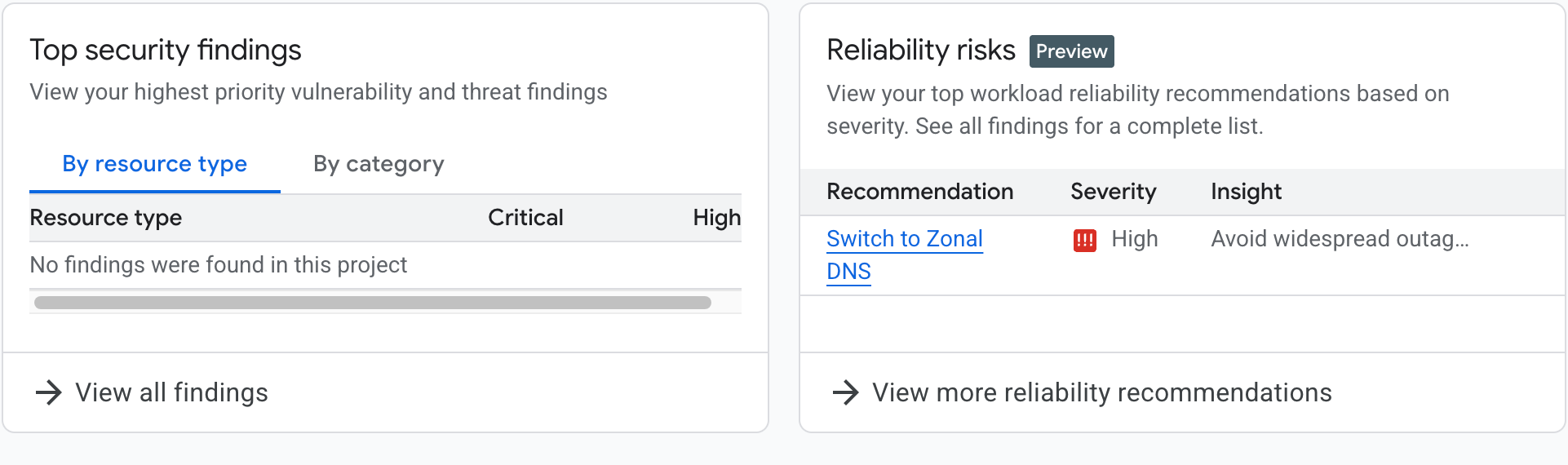
在 Compute Engine 首頁 (「總覽」頁面) 的「最佳化建議」部分,會顯示「可靠性風險」資訊卡。如果專案的內部 DNS 設定為全域 DNS,資訊卡會顯示全域 DNS 風險相關資訊,並呼籲您採取行動。
您可以點選資訊卡上的「切換至可用區 DNS」,進一步瞭解風險,或點選「查看更多可靠性建議」,查看所有可靠性風險 (目前只有全域 DNS 風險),如下圖所示。
查看所有建議
您可以使用Google Cloud 控制台或 gcloud CLI,查看 Compute Engine Reliability Insights 發現的風險。
使用 Google Cloud 控制台
- 前往「Active Assist」。
- 確認已選取要檢視的正確專案、資料夾或機構。
- 在右側導覽面板中,選取「可靠性」。
- 如要查看所有 Compute 可靠性洞察資料,請將「Recommender」篩選器設為
google.compute.ReliabilityRiskRecommender。

使用 gcloud
使用 gcloud recommender recommendations list 指令並指定 Compute Reliability Insights 建議工具,即可查看所有風險,語法如下:
gcloud recommender recommendations list \
      --recommender=google.compute.ReliabilityRiskRecommender\
      --project=[PROJECT_ID] \
      --location=global \
      (--format=[yaml/json/text])
例如:
gcloud recommender recommendations list --project=foo --location=global --recommender=google.compute.ReliabilityRiskRecommender
回覆會包括每個建議的下列各欄位 (使用不同形式):
| 欄位 | 說明 |
|---|---|
RECOMMENDATION_ID |
顯示建議的專屬 ID。 例如: e3762bcb-421f-42d6-9ecf-9c0bd8262014 |
PRIMARY_IMPACT_CATEGORY |
建議的主要類別: 例如: RELIABILITY。 |
RECOMMENDATION_STATE |
建議的目前狀態。例如: ACTIVE |
LAST_REFRESH_TIME |
上次重新整理建議的時間。 舉例來說, 2025-03-10T06:59:59Z |
PRIORITY |
指派給 建議的優先層級。例如: P1。 |
RECOMMENDER_SUBTYPE |
產生建議的建議工具特定子類型。 例如: GLOBAL_DNS |
DESCRIPTION |
使用者可自然閱讀的 建議說明。舉例來說, 解決 Compute Engine 資源的設定錯誤,提高工作負載的 可靠性。 |
回應
RECOMMENDATION_ID                     PRIMARY_IMPACT_CATEGORY  RECOMMENDATION_STATE  LAST_REFRESH_TIME     PRIORITY  RECOMMENDER_SUBTYPE  DESCRIPTION
e3762bcb-421f-42d6-9ecf-9c0bd8262014  RELIABILITY              ACTIVE                2025-03-10T06:59:59Z  P1        GLOBAL_DNS           Improve workload reliability by addressing misconfigurations on Compute Engine resources.
使用 API
curl \
    -H "Authorization: Bearer $(gcloud auth print-access-token)"  \
    -H "x-goog-user-project: [PROJECT_ID]" \
    "https://recommender.googleapis.com/v1/projects/[PROJECT_ID]/locations/global/recommenders/google.compute.ReliabilityRiskRecommender/recommendations"
例如: API 要求
curl \
    -H "Authorization: Bearer $(gcloud auth print-access-token)"  \
    -H "x-goog-user-project: foo" \
    "https://recommender.googleapis.com/v1/projects/foo/locations/global/recommenders/google.compute.ReliabilityRiskRecommender/recommendations"
回應會包括每個建議的下列各欄位:
| 欄位 | 說明 |
|---|---|
| 名稱 | 建議的專屬名稱。例如: projects/1054049711284/locations/global/recommenders/google.compute.ReliabilityRiskRecommender/recommendations/e3762bcb-421f-42d6-9c0bd8262014 |
| 說明 | 使用者可自然閱讀的 建議說明。舉例來說, 解決 Compute Engine 資源的設定錯誤,提高工作負載的 可靠性。 |
| lastRefreshTime | 上次重新整理建議的時間。 例如:2025-03-10T06:59:59Z |
| primaryImpact | 建議的主要類別: 例如「可靠性」。 |
| 內容 | 詳細建議內容。 |
| stateInfo | 建議的目前狀態。 例如:有效 |
| recommenderSubtype | 產生建議的建議工具特定子類型。 例如 GLOBAL_DNS |
| associatedInsights | 與這項建議相關的可靠性風險洞察資料。 |
| 優先順序 | 指派給 建議的優先層級。例如 P1 |
| targetResources | 這項建議的目標資源。 |
詳情請參閱建議工具說明文件。
API 回應
{
  "recommendations": [
    {
      "name": "projects/1054049711284/locations/global/recommenders/google.compute.ReliabilityRiskRecommender/recommendations/e3762bcb-421f-42d6-9ecf-9c0bd8262014",
      "description": "Improve workload reliability by addressing misconfigurations on Compute Engine resources.",
      "lastRefreshTime": "2025-03-10T06:59:59Z",
      "primaryImpact": {
        "category": "RELIABILITY"
      },
      "content": {
        "overview": {
          "RecommendationMessage": "Your compute engine instances are vulnerable to cross-regional outages because they use global internal dns names by default. Google recommends migrating to zonal DNS to isolate registration failures to a single zone. Based on the last 30 days of DNS usage, your project is ready to migrate. %nMore information at: /compute/docs/networking/migrate-to-zonal-dns#migrate-ready-projects",
          "totalQueriesIncompatibleWithZonalDns": 0
        }
      },
      "stateInfo": {
        "state": "ACTIVE"
      },
      "etag": "\"19bbb3610996035f\"",
      "recommenderSubtype": "GLOBAL_DNS",
      "associatedInsights": [
        {
          "insight": "projects/1054049711284/locations/global/insightTypes/google.compute.ReliabilityRiskInsight/insights/74506608-5104-4aa6-a4e4-5ffd4dbb55cc"
        }
      ],
      "priority": "P1",
      "targetResources": [
        "//cloud.googleapis.com/projects/1054049711284"
      ]
    }
  ]
}
查看特定建議的詳細資料
如要查看特定風險的詳細資料,請使用 Google Cloud 控制台或gcloud。
使用 Google Cloud 控制台
- 前往「Active Assist」。
- 確認已選取要檢視的正確專案、資料夾或機構。
- 在右側導覽面板中,選取「可靠性」。
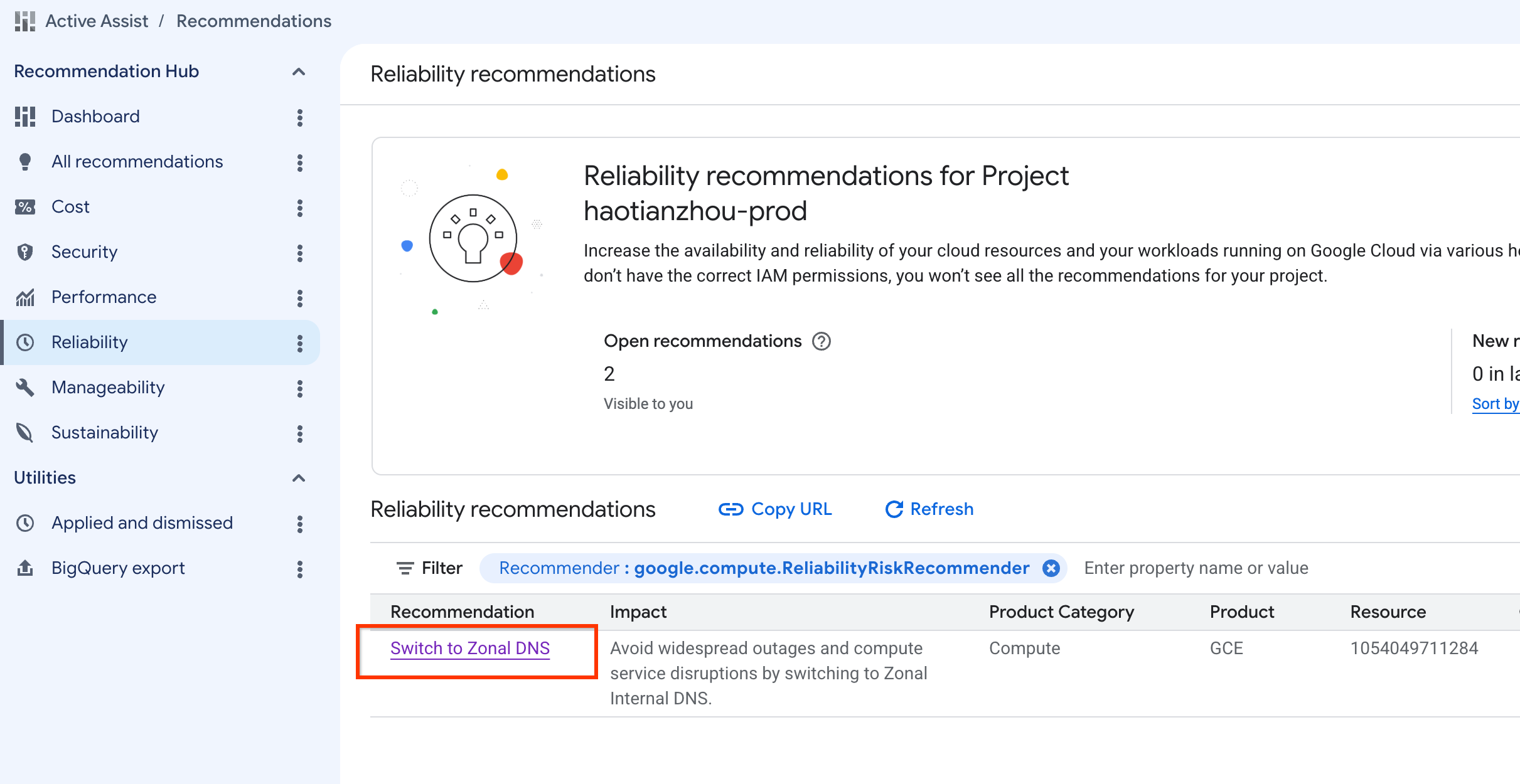
- 如要查看所有 Compute 可靠性洞察資料,請將「Recommender」篩選器設為
google.compute.ReliabilityRiskRecommender。 - 選取建議標題即可查看詳細資料。
DNS 使用記錄
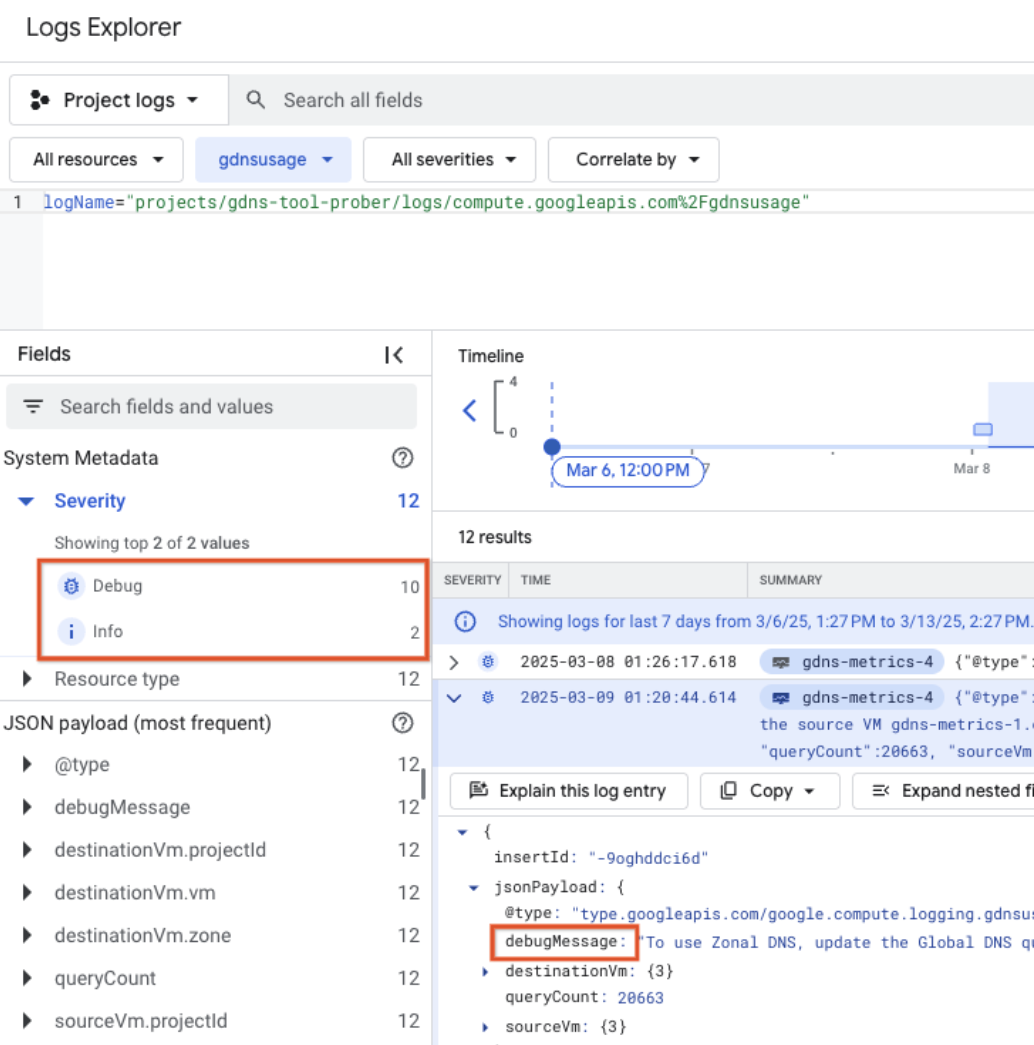
DNS 查詢記錄 (1 到 30 天) 會顯示偵錯 (變更後可能失敗的查詢) 和資訊項目。您必須解決所有偵錯項目,才能啟用區域 DNS 遷移。
使用 gcloud
使用 gcloud recommender recommendations describe 指令指定:
- Compute 可靠性洞察建議工具
- 您要查看詳細資料的風險建議 ID。
gcloud recommender recommendations describe \
      [RECOMMENDATION_ID] \
      --recommender=google.compute.ReliabilityRiskRecommender \
      --project=[PROJECT_ID] \
      --location=global \
      (--format=[yaml/json/text])
gcloud recommender recommendations describe e3762bcb-421f-42d6-9ecf-9c0bd8262014 --project=foo --location=global --recommender=google.compute.ReliabilityRiskRecommender
回應會包括每個建議的下列各欄位:
| 欄位 | 說明 |
|---|---|
| 深入分析 | 與這項建議相關的可靠性風險洞察資料。 |
| 內容 | 詳細建議內容 (包括 RecommendationMessage)。 |
| 說明 | 使用者可自然閱讀的建議說明。 例如: 改善工作負載可靠性,方法是修正 Compute Engine 資源的 設定錯誤 |
| etag | 建議的 etag |
| lastRefreshTime | 上次重新整理建議的時間。例如: 2025-03-10T06:59:59Z |
| 名稱 | 建議的專屬名稱。例如: projects/1054049711284/locations/global/recommenders/google.compute.ReliabilityRiskRecommender/recommendations/e3762bcb-421f-42d6-9ecf-9c0bd8262014 |
| primaryImpact | 建議的主要類別:例如 可靠性。 |
| 優先順序 | 指派給建議的優先順序等級。 例如:P1 |
| recommenderSubtype | 產生建議的建議工具特定子類型。 例如 GLOBAL_DNS |
| stateInfo | 建議的目前狀態。例如: ACTIVE |
| targetResources | 這項建議的目標資源。 |
回應
associatedInsights:
- insight: projects/1054049711284/locations/global/insightTypes/google.compute.ReliabilityRiskInsight/insights/74506608-5104-4aa6-a4e4-5ffd4dbb55cc
content:
  overview:
    RecommendationMessage: 'Your compute engine instances are vulnerable to cross-regional
      outages because they use global internal dns names by default. Google recommends
      migrating to zonal DNS to isolate registration failures to a single zone. Based
      on the last 30 days of DNS usage, your project is ready to migrate. %nMore information
      at: /compute/docs/networking/migrate-to-zonal-dns#migrate-ready-projects'
    totalQueriesIncompatibleWithZonalDns: 0
description: Improve workload reliability by addressing misconfigurations on Compute
  Engine resources.
etag: '"19bbb3610996035f"'
lastRefreshTime: '2025-03-10T06:59:59Z'
name: projects/1054049711284/locations/global/recommenders/google.compute.ReliabilityRiskRecommender/recommendations/e3762bcb-421f-42d6-9ecf-9c0bd8262014
primaryImpact:
  category: RELIABILITY
priority: P1
recommenderSubtype: GLOBAL_DNS
stateInfo:
  state: ACTIVE
targetResources:
- //cloud.googleapis.com/projects/1054049711284
使用 API
curl \
    -H "Authorization: Bearer $(gcloud auth print-access-token)"  \
    -H "x-goog-user-project: [PROJECT_ID]" \
    "https://recommender.googleapis.com/v1/projects/[PROJECT_ID]/locations/global/recommenders/google.compute.ReliabilityRiskRecommender/recommendations/[RECOMMENDATION_ID]"
詳情請參閱建議工具說明文件。例如:
- 在要求結尾使用「View all risks API operation」(查看所有風險 API 作業) 中擷取的名稱欄位結尾的 ID。
API 要求
curl \
    -H "Authorization: Bearer $(gcloud auth print-access-token)"  \
    -H "x-goog-user-project: foo" \
    "https://recommender.googleapis.com/v1/projects/foo/locations/global/recommenders/google.compute.ReliabilityRiskRecommender/recommendations/e3762bcb-421f-42d6-9ecf-9c0bd8262014"
回應會包括每個建議的下列各欄位:
| 欄位 | 說明 |
|---|---|
| 名稱 | 建議的專屬名稱。例如: projects/1054049711284/locations/global/recommenders/google.compute.ReliabilityRiskRecommender/recommendations/e3762bcb-421f-42d6-9ecf-9c0bd8262014 |
| 說明 | 使用者可自然閱讀的 建議說明。舉例來說,解決 Compute Engine 資源的設定錯誤,即可提升工作負載 的可靠性。 |
| lastRefreshTime | 上次重新整理建議的時間。 例如:2025-03-10T06:59:59Z |
| primaryImpact | 建議的主要類別: 例如「可靠性」。 |
| 內容 | 詳細建議內容。 |
| stateInfo | 建議的目前狀態。 例如「ACTIVE」 |
| etag | 建議的 etag |
| recommenderSubtype | 產生建議的建議工具特定子類型。 例如 GLOBAL_DNS |
| associatedInsights | 與這項建議相關聯的可靠性風險洞察資料。 |
| 優先順序 | 指派給 建議的優先順序等級。例如 P1 |
| targetResources | 這項建議的目標資源。 |
API 回應
{
  "name": "projects/1054049711284/locations/global/recommenders/google.compute.ReliabilityRiskRecommender/recommendations/e3762bcb-421f-42d6-9ecf-9c0bd8262014",
  "description": "Improve workload reliability by addressing misconfigurations on Compute Engine resources.",
  "lastRefreshTime": "2025-03-10T06:59:59Z",
  "primaryImpact": {
    "category": "RELIABILITY"
  },
  "content": {
    "overview": {
      "RecommendationMessage": "Your compute engine instances are vulnerable to cross-regional outages because they use global internal dns names by default. Google recommends migrating to zonal DNS to isolate registration failures to a single zone. Based on the last 30 days of DNS usage, your project is ready to migrate. %nMore information at: /compute/docs/networking/migrate-to-zonal-dns#migrate-ready-projects",
      "totalQueriesIncompatibleWithZonalDns": 0
    }
  },
  "stateInfo": {
    "state": "ACTIVE"
  },
  "etag": "\"19bbb3610996035f\"",
  "recommenderSubtype": "GLOBAL_DNS",
  "associatedInsights": [
    {
      "insight": "projects/1054049711284/locations/global/insightTypes/google.compute.ReliabilityRiskInsight/insights/74506608-5104-4aa6-a4e4-5ffd4dbb55cc"
    }
  ],
  "priority": "P1",
  "targetResources": [
    "//cloud.googleapis.com/projects/1054049711284"
  ]
}
套用或略過建議
如要套用或排除風險建議,可以使用 Google Cloud 控制台或 gcloud CLI 和 API。
使用 Google Cloud 控制台
- 完成「查看特定風險的詳細資料」後,即可前往「風險洞察」頁面。
- 選取畫面底部的「套用最佳化建議」或「關閉」。
使用 gcloud 和 API
如要根據風險建議採取行動,並查看 gcloud API 指示,請參閱「變更建議的狀態」。
如要瞭解建議的常見狀態,請參閱常見問題。
以下範例只會說明如何將建議標示為已關閉
使用 gcloud
***RECOMMENDATION_ID和*** ETAG可使用 gcloud describe 或 recommender api get 找到。
gcloud recommender recommendations mark-dismissed [RECOMMENDATION_ID] --project=foo --location=global --recommender=google.compute.ReliabilityRiskRecommender --etag=[ETAG]
例如:
gcloud recommender recommendations mark-dismissed e3762bcb-421f-42d6-9ecf-9c0bd8262014 --project=foo --location=global --recommender=google.compute.ReliabilityRiskRecommender --etag='"19bbb3610996035f"'
回應
stateInfo.state changed to DISMISSED

- insight: projects/1054049711284/locations/global/insightTypes/google.compute.ReliabilityRiskInsight/insights/74506608-5104-4aa6-a4e4-5ffd4dbb55cc
content:
  overview:
    RecommendationMessage: 'Your compute engine instances are vulnerable to cross-regional outages because they use global internal dns names by default. Google recommends migrating to zonal DNS to isolate registration failures to a single zone. Based on the last 30 days of DNS usage, your project is ready to migrate. %nMore information at: /compute/docs/networking/migrate-to-zonal-dns#migrate-ready-projects'
    totalQueriesIncompatibleWithZonalDns: 0
description: Improve workload reliability by addressing misconfigurations on Compute
  Engine resources.
etag: '"288946d3c1b931ca"'
lastRefreshTime: '2025-03-10T06:59:59Z'
name: projects/1054049711284/locations/global/recommenders/google.compute.ReliabilityRiskRecommender/recommendations/e3762bcb-421f-42d6-9ecf-9c0bd8262014
primaryImpact:
  category: RELIABILITY
priority: P1
recommenderSubtype: GLOBAL_DNS
stateInfo:
  state: DISMISSED
targetResources:
- //cloud.googleapis.com/projects/1054049711284
使用 API
curl -X POST \
   -H "Content-Type: application/json" \
   -H "Authorization: Bearer $(gcloud auth print-access-token)"  \
   -H "x-goog-user-project: [PROJECT_ID]" \
   --data-binary @- \
   https://recommender.googleapis.com/v1/projects/[PROJECT_ID]/locations/global/recommenders/google.compute.ReliabilityRiskRecommender/recommendations/[RECOMMENDATION_ID]:markDismissed \
<< EOM
{
 "etag": "[ETAG]"
}
EOM
API 要求
curl -X POST \
   -H "Content-Type: application/json" \
   -H "Authorization: Bearer $(gcloud auth print-access-token)"  \
   -H "x-goog-user-project: foo" \
   --data-binary @- \
   https://recommender.googleapis.com/v1/projects/foo/locations/global/recommenders/google.compute.ReliabilityRiskRecommender/recommendations/e3762bcb-421f-42d6-9ecf-9c0bd8262014:markDismissed \
<< EOM
{
 "etag": "\"82897e60f606f71b\""
}
EOM
API 回應
{
  "name": "projects/1054049711284/locations/global/recommenders/google.compute.ReliabilityRiskRecommender/recommendations/e3762bcb-421f-42d6-9ecf-9c0bd8262014",
  "description": "Improve workload reliability by addressing misconfigurations on Compute Engine resources.",
  "lastRefreshTime": "2025-03-10T06:59:59Z",
  "primaryImpact": {
    "category": "RELIABILITY"
  },
  "content": {
    "overview": {
      "RecommendationMessage": "Your compute engine instances are vulnerable to cross-regional outages because they use global internal dns names by default. Google recommends migrating to zonal DNS to isolate registration failures to a single zone. Based on the last 30 days of DNS usage, your project is ready to migrate. %nMore information at: /compute/docs/networking/migrate-to-zonal-dns#migrate-ready-projects",
      "totalQueriesIncompatibleWithZonalDns": 0
    }
  },
  "stateInfo": {
    "state": "DISMISSED"
  },
  "etag": "\"410b7e8d4f682979\"",
  "recommenderSubtype": "GLOBAL_DNS",
  "associatedInsights": [
    {
      "insight": "projects/1054049711284/locations/global/insightTypes/google.compute.ReliabilityRiskInsight/insights/74506608-5104-4aa6-a4e4-5ffd4dbb55cc"
    }
  ],
  "priority": "P1",
  "targetResources": [
    "//cloud.googleapis.com/projects/1054049711284"
  ]
}
使用 Compute 可靠性風險 API 查看 Compute 可靠性洞察資料
您可以使用 Compute ReliabilityRisks API 執行下列兩項作業:
- 擷取可靠性風險清單:您可以指定參數,依據需求篩選清單。
- 取得工作負載中特定風險的詳細資料:這有助於瞭解特定風險的影響。
- 狀態持續性:Compute ReliabilityRisks API 會回報專案資源的實際風險狀態。即使您在 Active Assist 中關閉建議,Compute ReliabilityRisks API 仍會持續傳回風險,直到風險獲得緩解為止。
- 掃描頻率:系統不會即時評估風險,而是每天掃描一次。如果您採取行動來降低風險,系統會在隔天掃描後顯示更新狀態。
以下名稱可識別第一個暴露的可靠性風險:global-dns
取得風險
擷取專案中特定風險的詳細資料。
使用 API
curl -H "Authorization: Bearer $(gcloud auth print-access-token)" https://compute.googleapis.com/compute/projects/[PROJECT_ID]/global/reliabilityRisks/[RISK_NAME]
| 欄位 | 說明 |
|---|---|
PROJECT_ID |
使用者指定的專案名稱。 |
RISK_NAME |
風險名稱 (目前僅支援 global-dns) |
API 要求
curl -H "Authorization: Bearer $(gcloud auth print-access-token)" https://compute.googleapis.com/compute/projects/foo/global/reliabilityRisks/global-dns
API 回應
{
   "kind": "compute#reliabilityRisk",
   "name": "global-dns",
   "id": "4799391202061532594",
   "details": {
       "globalDnsInsight": {
           "projectDefaultIsGlobalDns": true,
           "totalQueryCount": "0",
           "incompatibleQueryCount": "0",
           "queryObservationWindow": "2592000s"
       },
       "type": "GLOBAL_DNS",
       "severity": "HIGH",
       "lastUpdateTimestamp": "2025-02-24T07:59:59Z",
       "duration": "893857.067964s"
   },
   "recommendation": {
       "content": "Your compute engine instances are vulnerable to cross-regional outages because they use global internal dns names by default. Google recommends migrating to zonal DNS to isolate registration failures to a single zone. Based on the last 30 days of DNS usage, your project is ready to migrate.",
       "referenceUrl": "/compute/docs/networking/migrate-to-zonal-dns#migrate-ready-projects"
   }
}
Your compute engine instances are vulnerable to cross-regional outages because
they use global internal dns names by default. Google recommends migrating to
zonal DNS to isolate registration failures to a single zone. Based on the last
30 days of DNS usage, your project recently made DNS queries that are
incompatible with zonal DNS. Fix those queries and then migrate your project
to zonal dns.
/compute/docs/networking/migrate-to-zonal-dns#fix-queries
如果您沒有取得或列出可靠性風險的必要權限,系統會顯示 PERMISSION_DENIED 錯誤。
回應會包括以下欄位:
| 欄位 | 子欄位 | 說明 |
|---|---|---|
name |
風險名稱。 | |
id |
風險的專屬 ID。 | |
details |
globalDnsInsight |
globalDns特定風險深入分析。 |
type |
風險類型。 | |
severity |
Compute Engine 為工作負載判定的風險等級。 | |
lastupdateTimestamp |
上次更新風險資訊的時間戳記。 | |
duration |
風險持續時間。 | |
recommendation |
content |
建議如何降低風險。 |
referenceUrl |
詳細風險建議或降低風險指南的連結。 |
列出風險
擷取工作負載中所有風險的清單。
使用 API
API 要求:
curl -H "Authorization: Bearer $(gcloud auth print-access-token)" https://compute.googleapis.com/compute/projects/[PROJECT_ID]/global/reliabilityRisks
| 欄位 | 說明 |
|---|---|
PROJECT_ID |
使用者指定的專案名稱。 |
API 要求:
curl -H "Authorization: Bearer $(gcloud auth print-access-token)" https://compute.googleapis.com/compute/projects/foo/global/reliabilityRisks
如果您沒有列出事件的必要權限,系統會顯示 PERMISSION_DENIED 錯誤。
API 回應:
{
   "id": "projects/foo/global/reliabilityRisks",
   "items": [
       {
           "kind": "compute#reliabilityRisk",
           "name": "global-dns",
           "id": "4799391202061532594",
           "details": {
               "globalDnsInsight": {
                   "projectDefaultIsGlobalDns": true,
                   "totalQueryCount": "0",
                   "incompatibleQueryCount": "0",
                   "queryObservationWindow": "2592000s"
               },
               "type": "GLOBAL_DNS",
               "severity": "HIGH",
               "lastUpdateTimestamp": "2025-02-24T07:59:59Z",
               "duration": "893857.067964s"
           },
           "recommendation": {
               "content": "Your compute engine instances are vulnerable to cross-regional outages because they use global internal dns names by default. Google recommends migrating to zonal DNS to isolate registration failures to a single zone. Based on the last 30 days of DNS usage, your project is ready to migrate.",
               "referenceUrl": "/compute/docs/networking/migrate-to-zonal-dns#migrate-ready-projects"
           }
       }
   ],
   "selfLink": "https://www.googleapis.com/compute/projects/panourgias-prod/global/reliabilityRisks",
   "etag": "YYYY"
}
風險嚴重程度和優先順序
本節將進一步說明 Compute Engine 如何判斷可靠性風險的嚴重程度和優先順序。
套用建議後,專案中的所有執行個體 (現有、新執行個體和所有服務) 都會使用區域性 DNS 名稱,並使用特定區域的 DNS 解析。
常見問題
為什麼我的專案在「可靠性風險」資訊卡中顯示兩則不同的訊息?
視遷移準備程度而定,資訊卡會顯示不同訊息。
如果專案已準備好遷移,Active Assist 詳細資料面板中會顯示按鈕,方便您遷移至區域性 DNS。如果專案尚未準備好遷移,您必須查看 DNS 記錄,找出不相容查詢的偵錯訊息,並在遷移前更新這些查詢。
風險建議詳細資料頁面上的每個欄位代表什麼意義?
| 欄位 | 說明 |
|---|---|
Resources impacted |
受顯示風險影響的專案資源 |
Project internal DNS default is global DNS |
如果專案設為全域 DNS,則為 True;如果專案已設為區域性 DNS,則為 False |
Total global DNS query count |
過去 30 天內的全域 DNS 查詢次數。 |
Severity |
根據事件發生時的風險影響程度評分。 |
Total global DNS queries incompatible with zonal DNS |
過去 30 天內,無法使用區域性 DNS 解析的內部 DNS 查詢次數 |
DNS usage logs |
所選專案的內部 DNS 記錄檔 30 天。這些記錄檔會根據來源和目的地 VM 配對匯總,並包含每個記錄檔的偵錯訊息。 |
如要進一步瞭解 Severity,請參閱「風險嚴重程度和優先順序」。
如何確認已成功套用最佳化建議?
在 Active Assist 中套用最佳化建議後,您可以檢查內部 DNS 設定,確認變更是否生效。
您應該會看到 VmDnsSetting 設為 ZonalOnly 值。
如何監控最佳化建議是否對專案造成影響?
Google 內部 DNS 基礎架構不包含提供 DNS 解析記錄的服務。不過,您可以在遷移後觀察應用程式層級的行為,驗證 DNS 解析是否成功。
**為什麼「APPLY_RECOMMENDATION」按鈕呈現灰色且無法點選?**
您需要 compute.projects.setCommonInstanceMetadata 和 recommender.computeReliabilityRiskRecommendations.update 權限。請嘗試使用 gcloud 指令建立自訂角色。
建議狀態有哪些選項?
| 「State」 | 說明 |
|---|---|
| 有效 | 有效建議 (原始狀態) |
| 已採納 | 將最佳化建議標示為已聲明,表示您打算對相關資源套用建議的變更。 |
| 已關閉 | 將最佳化建議標示為已略過,表示您不打算將建議的變更套用至相關資源,或不想繼續看到這項最佳化建議 |
| 失敗 | 無法套用建議。 |
| 成功 | 已成功套用最佳化建議。 |
為什麼可靠性建議資訊主頁是空的?
如果系統在專案、資料夾或機構中未偵測到任何可靠性風險,建議清單會是空白。如果專案是在過去 7 天內建立,或是專案中的 VM 處於閒置狀態,資訊主頁也可能顯示空白,因為管道需要更多遙測資料才能產生建議。
為什麼在降低風險後,系統仍會顯示建議?
風險降低後, Google Cloud 控制台和 API 最多可能仍會顯示建議 24 小時。這是因為系統每 24 小時會執行一次擷取管道,清除已解決的建議。
為什麼使用 API 時會看到 403 或 PERMISSION_DENIED 錯誤?
在初期推出期間,如果標準角色 (檢視者或編輯者) 未完全更新,API 可能會傳回 Error 403 或 PERMISSION_DENIED。如要解決這個問題,請建立包含 compute.reliabilityRisks.get 權限的自訂 IAM 角色,並授予使用者或服務帳戶。