


事前準備
- 如要在 Cloud Logging 中記錄序列埠輸出內容,請先熟悉 Cloud Logging。
-
如果尚未設定驗證,請先完成設定。
驗證可確認您的身分,以便存取 Google Cloud 服務和 API。如要從本機開發環境執行程式碼或範例,請選取下列其中一個選項,向 Compute Engine 進行驗證:
選取這個頁面上範例的預計用途分頁:
控制台
使用 Google Cloud 控制台存取 Google Cloud 服務和 API 時,不需要設定驗證。
gcloud
-
安裝 Google Cloud CLI。 完成後,執行下列指令來初始化 Google Cloud CLI:
gcloud init如果您使用外部識別資訊提供者 (IdP),請先 使用聯合身分登入 gcloud CLI。
-
- 設定預設區域和可用區。
REST
如要在本機開發環境中使用本頁的 REST API 範例,請使用您提供給 gcloud CLI 的憑證。
安裝 Google Cloud CLI。
如果您使用外部識別資訊提供者 (IdP),請先 使用聯合身分登入 gcloud CLI。
詳情請參閱 Google Cloud 驗證說明文件中的「使用 REST 進行驗證」。
核心錯誤
如果核心無法正確載入initramfs
客體 OS 開機所需的模組,就會發生核心錯誤。
如果核心不知道如何處理特定要求,也可能發生核心恐慌,並透過停止運作來保護自身。在執行 RedHat、SUSE、CentOS 或 Ubuntu 的 Compute Engine VM 上,可能會發生核心錯誤。
常見錯誤訊息
以下列舉一些最常見的參考用核心錯誤事件:
Kernel panic - not syncing: hung_task: blocked tasks
Kernel Panic - not syncing: VFS: Unable to mount root fs on unknown-block(0,0)
Kernel panic - not syncing: NMI: Not continuing
Kernel panic - not syncing: out of memory. panic_on_oom is selected
Kernel panic - not syncing: Fatal Machine check
常見原因
造成核心錯誤的原因有很多,常見原因包括:
grub.cfg檔案中沒有與核心對應的initramfs檔案相關項目。- 核心安裝期間,系統不會在
/boot目錄中產生initramfs檔案。 initramfs檔案只產生部分內容或已損毀。
問題
如果 VM 執行個體發生核心錯誤,常見的症狀是核心不允許您連線至 VM,即使使用序列埠控制台也一樣。
您應檢查序列控制台記錄,找出訪客 OS 載入的核心,例如:
[    0.000000] Initializing cgroup subsys cpu
[    0.000000] Initializing cgroup subsys cpuacct
[    0.000000] Linux version 3.10.0-1160.95.1.el7.x86_64 (mockbuild@x86-vm-42.build.eng.bos.redhat.com) (gcc version 4.8.5 20150623 (Red Hat 4.8.5-44) (GCC) ) #1 SMP Thu Aug 10 10:46:21 EDT 2023
以下範例顯示因 initramfs 問題而發生的核心錯誤事件:
[    1.520840] No filesystem could mount root, tried:
[    1.520840]
[    1.521964] Kernel panic - not syncing: VFS: Unable to mount root fs on unknown-block(0,0)
[    1.523495] CPU: 1 PID: 1 Comm: swapper/0 Not tainted 3.10.0-1160.95.1.el7.x86_64 #1
[    1.524932] Hardware name: Google Google Compute Engine/Google Compute Engine, BIOS Google 10/11/2022
[    1.526901] Call Trace:
[    1.527421]  dump_stack+0x41/0x60
[    1.527978]  panic+0xe7/0x2ac
[    1.528578]  mount_block_root+0x2be/0x2e6
[    1.529693]  ? do_early_param+0x95/0x95
[    1.530441]  prepare_namespace+0x135/0x16b
[    1.531237]  kernel_init_freeable+0x203/0x22d
[    1.532081]  ? rest_init+0xaa/0xaa
[    1.532808]  kernel_init+0xa/0x103
[    1.533395]  ret_from_fork+0x35/0x40
[    1.535229] Kernel Offset: 0x23a00000 from 0xffffffff81000000
解決核心錯誤
如要解決核心錯誤,請按照下列步驟操作:
連線至序列埠控制台, 並從 Google Cloud 控制台登入 VM。
在 Google Cloud 控制台中,按一下 VM 的「Reset」(重設)。
GRUB 啟動畫面顯示後,選取先前可正常運作的核心或救援核心,然後啟動系統。這會導致 VM 以所選核心啟動。
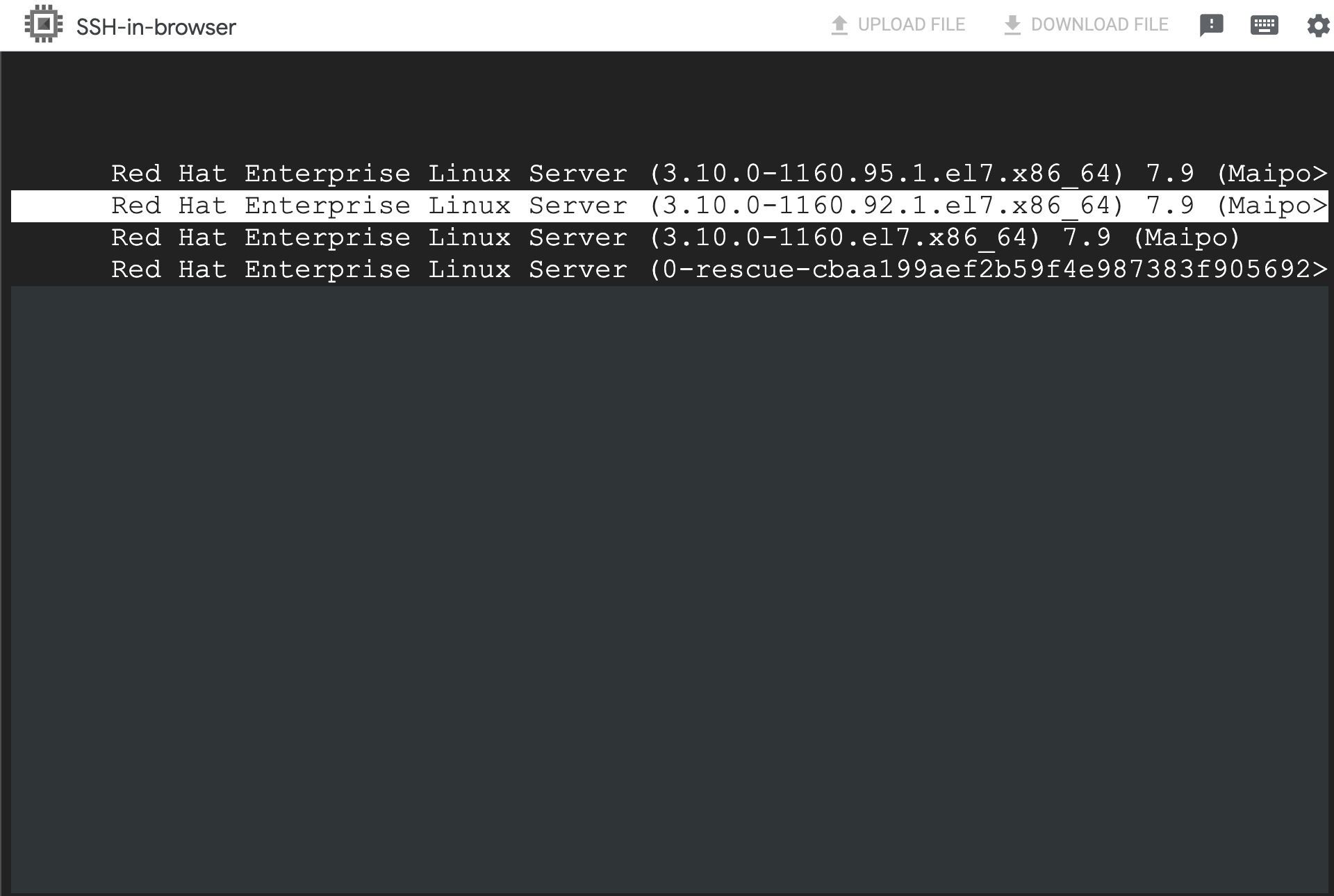
VM 可供存取後,您就能啟動與 VM 的 SSH 連線。
找出問題原因,並據此採取進一步行動。
舉例來說,如果
initramfs檔案遺失或損毀,請完成下列步驟:使用
dracut指令,產生與原始核心對應的initramfs檔案:dracut -f /boot/initramfs-KERNEL_VERSION.img KERNEL_VERSION
將
KERNEL_VERSION替換為 VM 目前的 Kernel 版本。例如:3.10.0-1160.95.1.el7.x86_64。使用
grub2-mkconfig指令更新grub2.cfg檔案,例如:grub2-mkconfig -o /boot/grub2/grub.cfg
產生
initramfs檔案後,您就能重新啟動 VM,不會發生任何錯誤。