

This document explains how to create and manage instant snapshots. Instant snapshots capture the contents of a disk or group of disks and can restore data to a new disk in minutes.
Instant snapshots are stored in the same zone or region as their source disks and are not a replacement for standard snapshots, which offer off-site backup for disaster recovery. Learn about the other data protection options available in Compute Engine.
To access the data on instant snapshots, use the instant snapshots to create a new disk or group of disks.
To copy an instant snapshot to another location or retain the snapshotted data after the source disk is deleted, create a standard snapshot from the instant snapshot.
Before you begin
-
If you haven't already, set up authentication.
Authentication verifies your identity for access to Google Cloud services and APIs. To run
code or samples from a local development environment, you can authenticate to
Compute Engine by selecting one of the following options:
Select the tab for how you plan to use the samples on this page:
Console
When you use the Google Cloud console to access Google Cloud services and APIs, you don't need to set up authentication.
gcloud
-
Install the Google Cloud CLI. After installation, initialize the Google Cloud CLI by running the following command:
gcloud initIf you're using an external identity provider (IdP), you must first sign in to the gcloud CLI with your federated identity.
- Set a default region and zone.
REST
To use the REST API samples on this page in a local development environment, you use the credentials you provide to the gcloud CLI.
Install the Google Cloud CLI.
If you're using an external identity provider (IdP), you must first sign in to the gcloud CLI with your federated identity.
For more information, see Authenticate for using REST in the Google Cloud authentication documentation.
-
Required roles and permissions
To get the permissions that you need to create instant snapshots, ask your administrator to grant you the following IAM roles on the project:
- Compute Instance Admin (v1) (
roles/compute.instanceAdmin.v1) -
To connect to a VM that can run as a service account:
Service Account User (v1) (
roles/iam.serviceAccountUser)
For more information about granting roles, see Manage access to projects, folders, and organizations.
These predefined roles contain the permissions required to create instant snapshots. To see the exact permissions that are required, expand the Required permissions section:
Required permissions
The following permissions are required to create instant snapshots:
-
To create an instant snapshot:
compute.instantSnapshots.create -
To create a consistency group of instant snapshots:
compute.instantSnapshotGroups.create -
To view instant snapshots:
compute.instantSnapshots.list -
To view consistency groups of instant snapshots:
compute.instantSnapshotGroups.list -
To view instant snapshots details:
compute.instantSnapshots.get -
To view details of a consistency group of instant snapshots:
compute.instantSnapshotGroups.get -
To delete an instant snapshot:
compute.instantSnapshots.delete -
To delete a consistency group of instant snapshots:
compute.instantSnapshotGroups.delete
You might also be able to get these permissions with custom roles or other predefined roles.
Limitations
- You can't create instant snapshots of Hyperdisk Throughput or Hyperdisk ML volumes.
You can't select the storage location of an instant snapshot. It's always stored in the same region or zone as the source disk.
When you delete a disk, all instant snapshots of the disk are deleted, including instant snapshots that are part of a consistency group. This means that when you delete an instance, instant snapshots of the instance's boot disk are deleted. Instant snapshots of non-boot disks attached to the instance are also deleted if you've enabled auto-delete for the disk. To retain the data on an instant snapshot before it is deleted, create a standard snapshot from the instant snapshot.
An instant snapshot is accessible only within the zone or region where it's stored. To move an instant snapshot to another region, you must create a standard snapshot from the instant snapshot.
When you create a disk from a CMEK-encrypted instant snapshot, you must provide the instant snapshot's encryption key.
You can create a standard snapshot of an individual disk at most 6 times every 60 minutes. This limit also applies to creating a standard snapshot from an instant snapshot of a disk.
You can't create a VM from an instant snapshot of a boot disk. Create a disk from the instant snapshot first, and choose the disk as the source for the VM.
You can create an instant snapshot of a given disk at most once every 30 seconds.
You can't have more than 32 instant snapshots of the same disk.
You can't create instant snapshots with snapshot schedules.
You can't create instant snapshots on secondary asynchronously replicated Persistent Disk volumes.
Instant snapshots are crash consistent and not application consistent. This means that any in-memory data that hasn't yet been written to the disk isn't captured in the instant snapshot. If you require application consistency, create an application consistent standard snapshot.
You can't move a disk until you delete all the instant snapshots of the disk. For more information, see Moving a disk that has instant snapshots.
You can't edit the data stored in an instant snapshot.
You can't recover deleted instant snapshots.
You can't add new instant snapshots to an existing consistency group of instant snapshots. You must add the disk to the consistency group of disks, then create a new consistency group of instant snapshots using the updated consistency group.
Create instant snapshots
You can create an instant snapshot of a single disk, or create a group of instant snapshots from a group of disks. Instant snapshots of zonal disks are stored in the same zone as the source disk. Likewise, instant snapshots of regional disks are stored in the same region as the source disk.
Create an instant snapshot of a disk
You can create an instant snapshot with the gcloud CLI, Google Cloud console, or REST.
Console
In the Google Cloud console, go to the VM instances page.
Select the project you want to work with.
In the Name column, click the name of the VM attached to the disk you want to back up.
In the Storage section, select a disk in one of the following ways:
- To back up the VM's boot disk, in the Boot disk section, click the Name of the boot disk.
- To back up an attached disk volume, in the Additional disks section, click the Name of the disk.
To finish creating an instant snapshot, on the Create a snapshot page, do the following:
- In the Name field, enter a unique name to identify the instant snapshot.
- Optional: Add more details about the snapshot in the Description field.
- In the Type field, select Instant snapshot. The Location field is automatically set to the same zone or region as the disk.
- In the Snapshot source type field, verify that Disk is selected.
- Optional: To organize your project, add one or more labels.
- Click Create.
gcloud
To create an instant snapshot, use the
gcloud compute instant-snapshots create
command:
Zonal disk
To create an instant snapshot of a zonal disk:
 gcloud compute instant-snapshots create INSTANT_SNAPSHOT_NAME \
   --source-disk=SOURCE_DISK_NAME \
   --zone=SOURCE_DISK_ZONE
Replace the following:
INSTANT_SNAPSHOT_NAME: a unique name for the instant snapshot.SOURCE_DISK_NAME: the name of the source disk.SOURCE_DISK_ZONE: the zone of the source disk. The instant snapshot will be created in the same zone.
Regional disk
To create an instant snapshot of a regional disk:
 gcloud compute instant-snapshots create INSTANT_SNAPSHOT_NAME \
   --source-disk=SOURCE_DISK_NAME \
   --region=SOURCE_DISK_REGION
Replace the following:
INSTANT_SNAPSHOT_NAME: a unique name for the instant snapshot.SOURCE_DISK_NAME: the name of the source disk.SOURCE_DISK_REGION: the region of the source disk. The instant snapshot will be created in the same region.
REST
To create an instant snapshot, make a POST request to the
instantSnapshots.insert
method.
Create an instant snapshot of a zonal disk:
Specify the zone in the URL of the
POSTrequest. In the request body, specify a name for the new snapshot and the URL of the source disk.POST https://compute.googleapis.com/compute/v1/projects/PROJECT_ID/zones/DISK_ZONE/instantSnapshots { "name": "INSTANT_SNAPSHOT_NAME", "sourceDisk": "projects/PROJECT_ID/zones/DISK_ZONE/disks/SOURCE_DISK_NAME" }Replace the following with the corresponding values:
PROJECT_ID: the name of the project containing the disk.DISK_ZONE: the zone where the disk is located. the instant snapshot will be created in this zone.INSTANT_SNAPSHOT_NAME: a unique name for the instant snapshot.SOURCE_DISK_NAME: the name of the source disk.
Create an instant snapshot of a regional disk:
Specify the region in the URL of the
POSTrequest. Include the name and source disk of the new snapshot in the request body.POST https://compute.googleapis.com/compute/v1/projects/PROJECT_ID/regions/DISK_REGION/instantSnapshots { "name": "INSTANT_SNAPSHOT_NAME", "sourceDisk": "projects/PROJECT_ID/regions/DISK_REGION/disks/SOURCE_DISK_NAME" }Replace the following in the request body with the corresponding values:
PROJECT_ID: the name of the project containing the disk.DISK_REGION: the region where the source disk is located. The snapshot will be created in the same region.INSTANT_SNAPSHOT_NAME: a unique name for the snapshot.SOURCE_DISK_NAME: the name of the source disk.
Request response
If the POST request is successful, the response body will be an object
that you can poll to get the status of the instant snapshot's creation. See
Handling API responses
for more information.
Create instant snapshots of a group of disks
To back up a group of disks so that all of the backups have the same timestamp, you must first add the disks that you want to back up to a consistency group of disks. Then, you can create a consistency group of instant snapshots from the consistency group of disks.
You can create a consistency group of instant snapshots by using the gcloud CLI or REST.
gcloud
To create a consistency group of instant snapshots, use the
gcloud compute instant-snapshot-groups create
command.
Create a consistency group of instant snapshots from zonal disks:
gcloud compute instant-snapshot-groups create INSTANT_SNAPSHOT_GROUP_NAME \
 --source-consistency-group=regions/CONSISTENCY_GROUP_REGION/resourcePolicies/SOURCE_CONSISTENCY_GROUP_NAME \
 --zone=SOURCE_ZONE
Replace the following with the corresponding values:
INSTANT_SNAPSHOT_GROUP_NAME: a unique name for the consistency group of instant snapshots.CONSISTENCY_GROUP_REGION: the region where the source consistency group is located.SOURCE_CONSISTENCY_GROUP_NAME: the name of the source consistency group.SOURCE_ZONE: the zone where the source consistency group of disks is located. The consistency group of instant snapshots will be created in this zone.
Create a consistency group of instant snapshots from regional disks:
gcloud compute instant-snapshot-groups create INSTANT_SNAPSHOT_GROUP_NAME \
 --source-consistency-group=regions/CONSISTENCY_GROUP_REGION/resourcePolicies/SOURCE_CONSISTENCY_GROUP_NAME \
 --region=SOURCE_REGION
Replace the following with the corresponding values:
INSTANT_SNAPSHOT_GROUP_NAME: a unique name for the consistency group of instant snapshots.CONSISTENCY_GROUP_REGION: the region where the source consistency group is located.SOURCE_CONSISTENCY_GROUP_NAME: the name of the source consistency group.SOURCE_REGION: the region where the source consistency group of disks is located. The consistency group of instant snapshots will be created in this region.
REST
To create a consistency group of instant snapshots, make a POST request to
the instantSnapshotGroups.insert
method.
Create a consistency group of instant snapshots from zonal disks:
Specify the zone in the URL of the
POSTrequest. In the request body, specify a name for the new consistency group of instant snapshots and the URL of the source consistency group of disks.POST https://compute.googleapis.com/compute/v1/projects/PROJECT_ID/zones/SOURCE_ZONE/instantSnapshotGroups { "name": "INSTANT_SNAPSHOT_GROUP_NAME", "sourceConsistencyGroup": "projects/PROJECT_ID/regions/SOURCE_CONSISTENCY_GROUP_REGION/resourcePolicies/SOURCE_CONSISTENCY_GROUP_NAME" }Replace the following with the corresponding values:
PROJECT_ID: the name of the project that contains the source consistency group of disks.SOURCE_ZONE: the zone where the source disks are located. The consistency group of instant snapshots will be created in this zone.SOURCE_CONSISTENCY_GROUP_REGION: the region where the consistency group of disks is located.INSTANT_SNAPSHOT_GROUP_NAME: a unique name for the consistency group of instant snapshots.SOURCE_CONSISTENCY_GROUP_NAME: the name of the source consistency group.
Create a consistency group of instant snapshots from regional disks:
Specify the region in the URL of the
POSTrequest. In the request body, specify a name for the new consistency group of instant snapshots and the URL of the source consistency group of disks.POST https://compute.googleapis.com/compute/v1/projects/PROJECT_ID/regions/SOURCE_REGION/instantSnapshotGroups { "name": "INSTANT_SNAPSHOT_GROUP_NAME", "sourceConsistencyGroup": "projects/PROJECT_ID/regions/SOURCE_REGION/resourcePolicies/SOURCE_CONSISTENCY_GROUP_NAME" }Replace the following with the corresponding values:
PROJECT_ID: the name of the project that contains the source consistency group of disks.SOURCE_REGION: the region where the source consistency group of disks is located. The consistency group of instant snapshots will be created in this region.INSTANT_SNAPSHOT_GROUP_NAME: a unique name for the consistency group of instant snapshots.SOURCE_CONSISTENCY_GROUP_NAME: the name of the source consistency group.
Request response
If the POST request is successful, the response body will be an object that
you can poll to get the status of the consistency group of instant snapshots'
creation. For more information, see
Handling API responses.
Restore instant snapshots
To restore data backed up with instant snapshots, see Restore from instant snapshots.
View instant snapshots
You can view a list of all instant snapshots by project, location, disk, or consistency group.
View the instant snapshots in a project or location
You can view the list of all instant snapshots in a project or location by using the Google Cloud console, gcloud CLI, or REST.
Console
In the Google Cloud console, go to the Snapshots page.
Click the Instant snapshots tab. The list of instant snapshots appears.
Optional: Narrow your results with the filter_list Filter field. Enter a property name or value in the filter_list Filter field, or choose from the available properties.
gcloud
You can list the instant snapshots in a specific project or location with the
gcloud compute instant-snapshots listcommand:List the instant snapshots in a particular project:
gcloud compute instant-snapshots list --project=PROJECT_ID
Replace
PROJECT_IDwith the ID of the project.List the instant snapshots in a zone with the
--zonesargument:gcloud compute instant-snapshots list --zones=ZONE
Replace
ZONEwith the name of the target zone.List the regional instant snapshots in a region using the
--regionsargument:gcloud compute instant-snapshots list --regions=REGION
Replace
REGIONwith the name of the target region.
You can list the consistency groups of instant snapshots in a specific location with the
gcloud compute instant-snapshot-groups listcommand:List the consistency groups of instant snapshots in a zone with the
--zonesargument:gcloud compute instant-snapshot-groups list \ --zones=ZONE
Replace
ZONEwith the name of the target zone.List the consistency groups of instant snapshots in a region with the
--regionsargument:gcloud compute instant-snapshot-groups list \ --regions=REGION
Replace
REGIONwith the name of the target region.
REST
You can retrieve a list of the instant snapshots in a specific project or location.
List the snapshots in a project:
Make a
GETrequest to the instantSnapshots.aggregatedList method:GET https://compute.googleapis.com/compute/v1/projects/PROJECT_ID/aggregated/instantSnapshots
Replace
PROJECT_IDwith the ID of the project.List the instant snapshots in a zone or region:
Make a
GETrequest to the instantSnapshots.list method.List the instant snapshots in a zone:
GET https://compute.googleapis.com/compute/v1/projects/PROJECT_ID/zones/SOURCE_ZONE//instantSnapshots
Replace the following:
PROJECT_ID: the ID of the project.SOURCE_ZONE: the target zone, for example,us-west1-a.
List the regional instant snapshots in a region:
GET https://compute.googleapis.com/compute/v1/projects/PROJECT_ID/regions/SOURCE_REGION/instantSnapshots
Replace the following:
PROJECT_ID: the ID of the project.SOURCE_REGION: the target region, for example,us-west1.
List the consistency groups of instant snapshots in a zone or region:
List the consistency groups of instant snapshots in a zone:
GET https://compute.googleapis.com/compute/v1/projects/PROJECT_ID/zones/SOURCE_ZONE/instantSnapshotGroups
Replace the following:
PROJECT_ID: the ID of the project.SOURCE_ZONE: the target zone, for example,us-west1-a.
List the consistency groups of instant snapshots in a region:
GET https://compute.googleapis.com/compute/v1/projects/PROJECT_ID/regions/SOURCE_REGION/instantSnapshotGroups
Replace the following:
PROJECT_ID: the ID of the project.SOURCE_REGION: the target region, for example,us-west1.
View the instant snapshots for a disk
You can view the list of instant snapshots for a disk, including instant snapshots that are in a consistency group, by using the gcloud CLI, Google Cloud console, or REST.
Console
In the Google Cloud console, go to the Snapshots page.
Click the Instant snapshots tab. The list of all the instant snapshots in the project appears.
Narrow the results by source disk:
Enter
Source disk:in the filter_list Filter field.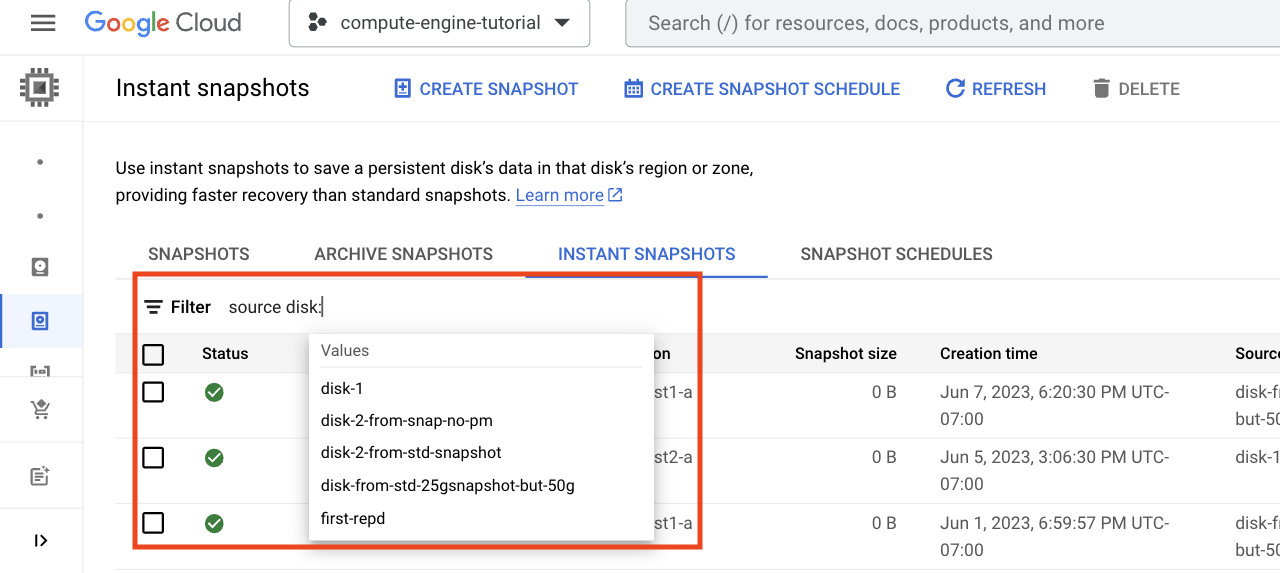
A list of disks with instant snapshots appears.
Select the name of the disk from the Values list. The list of instant snapshots shows all instant snapshots for the disk.
If you don't see the name of a disk in the filter_list Filter field, type in the first few letters of the disk's name to change the list of filtered options that you see.
gcloud
You can list the instant snapshots for a disk with the
gcloud compute instant-snapshots list
command and the --filter
argument.
List the instant snapshots for a zonal disk:
gcloud compute instant-snapshots list \
 --filter="sourceDisk:projects/PROJECT_ID/zones/ZONE/disks/DISK_NAME"
Replace the following:
PROJECT_ID: the ID of the project.ZONE: the name of the zone for the disk, for example,us-west1-a.DISK_NAME: the name of the source disk, for example,disk-1.
List the instant snapshots for a regional disk:
gcloud compute instant-snapshots list \
 --filter="sourceDisk:projects/PROJECT_ID/regions/SOURCE_REGION/disks/DISK_NAME"
Replace the following:
PROJECT_ID: the ID of the project.SOURCE_REGION: the name of the region for the disk, for example,us-west1.DISK_NAME: the name of the disk, for example,disk-1.
REST
List the instant snapshots for a zonal or regional disk with a GET request
to the
instantSnapshots.list
method.
Use the filter=sourceDisk query parameter to specify the name of the disk.
List the instant snapshots for a zonal disk:
GET https://compute.googleapis.com/compute/v1/projects/PROJECT_ID/zones/SOURCE_ZONE/instantSnapshots?filter=sourceDisk:'https://www.googleapis.com/compute/v1/projects/PROJECT_ID/zones/SOURCE_ZONE/disks/DISK_NAME'
Replace the following:
PROJECT_ID: the ID of the project.SOURCE_ZONE: the target zone, for example,us-west1-a.DISK_NAME: the name of the source disk, for example,disk-1.
List the instant snapshots for a regional Persistent Disk volume:
GET https://compute.googleapis.com/compute/v1/projects/PROJECT_ID/regions/SOURCE_REGION/instantSnapshots?filter=sourceDisk:'https://www.googleapis.com/compute/v1/projects/PROJECT_ID/regions/SOURCE_REGION/disks/DISK_NAME'
Replace the following:
PROJECT_ID: the ID of the project.SOURCE_REGION: the target region, for example,us-west1.DISK_NAME: the name of the source disk, for example,disk-1.
View the instant snapshots in a consistency group
You can view a list of all instant snapshots in a consistency group by using the Google Cloud console, gcloud CLI or REST.
Console
In the Google Cloud console, go to the Consistency Groups page.
Click the Instant snapshot groups tab.
In the Name column, click the name of the group. The Instant snapshot group details page for the selected group appears.
Each instant snapshot in the group is listed in the Instant snapshot group members section. To view details about an instant snapshot, click the snapshot's name in the list.
gcloud
To retrieve a list of the instant snapshots in a specific consistency group,
use the gcloud compute instant-snapshots list
command.
List the instant snapshots in a consistency group formed from a group of zonal disks:
gcloud compute instant-snapshots list \
--filter="sourceInstantSnapshotGroup:/projects/PROJECT_ID/zones/ZONE/instantSnapshotGroups/INSTANT_SNAPSHOT_GROUP_NAME"
Replace the following:
PROJECT_ID: the ID of the project.INSTANT_SNAPSHOT_GROUP_NAME: the name of the source consistency group of snapshots, for example,snapshot-group-1.ZONE: the target zone, for example,us-west1-a.
List the instant snapshots in a consistency group formed from a group of regional disks:
gcloud compute instant-snapshots list \
--filter="sourceInstantSnapshotGroup:/projects/PROJECT_ID/regions/REGION/instantSnapshotGroups/INSTANT_SNAPSHOT_GROUP_NAME"
Replace the following:
PROJECT_ID: the ID of the project.INSTANT_SNAPSHOT_GROUP_NAME: the name of the source consistency group of snapshots, for example,snapshot-group-1.REGION: the target region, for example,us-west1.
REST
To retrieve a list of the instant snapshots in a specific consistency group,
make a GET request to the instantSnapshots.list
method.
Use the filter=sourceInstantSnapshotGroup query parameter to specify the
name of the consistency group of instant snapshots.
List the instant snapshots in a consistency group formed from a group of zonal disks:
GET https://compute.googleapis.com/compute/v1/projects/PROJECT_ID/zones/SOURCE_ZONE/instantSnapshots?filter=sourceInstantSnapshotGroup:'https://www.googleapis.com/compute/v1/projects/PROJECT_ID/zones/SOURCE_ZONE/instantSnapshotGroups/INSTANT_SNAPSHOT_GROUP_NAME'
Replace the following:
PROJECT_ID: the ID of the project.SOURCE_ZONE: the target zone, for example,us-west1-a.INSTANT_SNAPSHOT_GROUP_NAME: the name of the source consistency group of snapshots, for example,snapshot-group-1.
List the instant snapshots in a consistency group formed from a group of regional disks:
GET https://compute.googleapis.com/compute/v1/projects/PROJECT_ID/regions/SOURCE_REGION/instantSnapshots?filter=sourceInstantSnapshotGroup:'https://www.googleapis.com/compute/v1/projects/PROJECT_ID/regions/SOURCE_REGION/instantSnapshotGroups/INSTANT_SNAPSHOT_GROUP_NAME'
Replace the following:
PROJECT_ID: the ID of the project.SOURCE_REGION: the target region, for example,us-west1.INSTANT_SNAPSHOT_GROUP_NAME: the name of the source consistency group of snapshots, for example,snapshot-group-1.
View information about instant snapshots
You can retrieve detailed information about a single instant snapshot, or a consistency group of instant snapshots.
View information about an instant snapshot
To retrieve detailed information about an instant snapshot, such as its location, source disk, and size, use the gcloud CLI, Google Cloud console, or REST.
An instant snapshot's size might be zero because no data on the disk has changed since the instant snapshot was created, or because Compute Engine hasn't yet updated the size to reflect the latest disk changes. A size of zero doesn't indicate an issue backing up the disk.
Console
In the Google Cloud console, go to the Snapshots page.
Click the Instant snapshots tab. The list of instant snapshots appears.
In the Name column, click the name of the instant snapshot. The Instant snapshot details page for the selected snapshot appears, showing its properties.
gcloud
To view information about an instant snapshot, use the
gcloud compute instant-snapshots describe
command.
If the snapshot is of a zonal disk, specify the zone with the
--zoneflag:gcloud compute instant-snapshots describe INSTANT_SNAPSHOT_NAME \ --zone=ZONEReplace the following with the corresponding values:
- INSTANT_SNAPSHOT_NAME: the name of the instant snapshot.
- ZONE: the zone where the instant snapshot was
created, for example,
us-west1-a.
If the snapshot is of a regional disk, specify the region with the
--regionflag:gcloud compute instant-snapshots describe INSTANT_SNAPSHOT_NAME \ --region=REGION
Replace the following with the corresponding values:
- INSTANT_SNAPSHOT_NAME: the name of the instant snapshot.
- REGION: the region where the snapshot was
created, for example,
us-central1.
REST
The API method request you use depends on whether you're working with a regional or zonal instant snapshot.
Zonal instant snapshot
Make a GET request to the
instantSnapshots.get
method by specifying the zone in the request:
GET https://compute.googleapis.com/compute/v1/projects/PROJECT_ID/zones/ZONE/instantSnapshots/INSTANT_SNAPSHOT_NAME
Replace the following with the corresponding values:
PROJECT_ID: the name of the project containing the instant snapshot.ZONE: the zone where the instant snapshot was created.INSTANT_SNAPSHOT_NAME: the name of the instant snapshot.
Regional instant snapshot
Make a GET request to the
instantSnapshots.get
method by specifying the region in the request:
GET https://compute.googleapis.com/compute/v1/projects/PROJECT_ID/regions/REGION/instantSnapshots/INSTANT_SNAPSHOT_NAME
Replace the following with the corresponding values:
PROJECT_ID: the name of the project containing the instant snapshot.REGION: the region where the instant snapshot was created.INSTANT_SNAPSHOT_NAME: the name of the instant snapshot.
View information about a consistency group of instant snapshots
To retrieve detailed information about a consistency group of instant snapshots, such as its source consistency group and a list of the instant snapshots in the group, use the Google Cloud console, gcloud CLI or REST.
Console
In the Google Cloud console, go to the Consistency Groups page.
Click the Instant snapshot groups tab.
In the Name column, click the name of the group. The Instant snapshot group details page for the selected group appears, showing its properties.
gcloud
To view information about a consistency group of instant snapshots, use the
gcloud compute instant-snapshot-groups describe
command.
Get information about a consistency group of instant snapshots that was created from a group of zonal disks:
gcloud compute instant-snapshot-groups describe INSTANT_SNAPSHOT_GROUP_NAME \
 --zone=ZONE
Replace the following with the corresponding values:
INSTANT_SNAPSHOT_GROUP_NAME: the name of the consistency group of instant snapshots.ZONE: the zone where the consistency group of instant snapshots was created.
Get information about a consistency group of instant snapshots that was created from a group of regional disks:
gcloud compute instant-snapshot-groups describe INSTANT_SNAPSHOT_GROUP_NAME \
 --region=REGION
Replace the following with the corresponding values:
INSTANT_SNAPSHOT_GROUP_NAME: the name of the consistency group of instant snapshots.REGION: the region where the consistency group of instant snapshots was created.
REST
To view information about a consistency group of instant snapshots, make a
GET request to the instantSnapshotGroups.get
method.
Get information about a consistency group of instant snapshots that was created from a group of zonal disks:
GET https://compute.googleapis.com/compute/v1/projects/PROJECT_ID/zones/ZONE/instantSnapshotGroups/INSTANT_SNAPSHOT_GROUP_NAME
Replace the following with the corresponding values:
PROJECT_ID: the name of the project containing the consistency group of instant snapshots.ZONE: the zone where the consistency group of instant snapshots was created.INSTANT_SNAPSHOT_GROUP_NAME: the name of the consistency group of instant snapshots.
Get information about a consistency group of instant snapshots that was created from a group of regional disks:
GET https://compute.googleapis.com/compute/v1/projects/PROJECT_ID/regions/REGION/instantSnapshotGroups/INSTANT_SNAPSHOT_GROUP_NAME
Replace the following with the corresponding values:
PROJECT_ID: the name of the project containing the consistency group of instant snapshots.REGION: the region where the consistency group of instant snapshots was created.INSTANT_SNAPSHOT_GROUP_NAME: the name of the consistency group of instant snapshots.
Delete instant snapshots
To reduce your storage costs, you can delete your snapshots when you no longer need them.
Delete an instant snapshot
You can delete an instant snapshot by using the gcloud CLI, Google Cloud console, or REST.
Console
In the Google Cloud console, go to the Snapshots page.
Click the Instant snapshots tab.
Select one more snapshots to delete.
At the top of the Snapshots page, click Delete.
gcloud
Delete an instant snapshot with the
gcloud compute instant-snapshots delete
command, specifying either the source zone or the source region.
Delete an instant snapshot of a zonal disk:
gcloud compute instant-snapshots delete INSTANT_SNAPSHOT_NAME \
    --zone=ZONE
Replace the following with the corresponding values:
ZONE: the name of the zone.INSTANT_SNAPSHOT_NAME: the name of the instant snapshot.
Delete an instant snapshot of a regional disk:
gcloud compute instant-snapshots delete INSTANT_SNAPSHOT_NAME \
   --region=REGION
Replace the following:
REGION: the name of the region.INSTANT_SNAPSHOT_NAME: the name of the instant snapshot.
REST
Delete an instant snapshot with a DELETE request to the
instantSnapshots.delete
method:
Delete an instant snapshot of zonal disk:
DELETE https://compute.googleapis.com/compute/v1/projects/PROJECT_ID/zones/ZONE/instantSnapshots/INSTANT_SNAPSHOT_NAME
Replace the following with the corresponding values:
PROJECT_ID: the ID of the project.ZONE: the name of the zone.INSTANT_SNAPSHOT_NAME: the name of the instant snapshot.
Delete an instant snapshot of a regional disk:
DELETE https://compute.googleapis.com/compute/v1/projects/PROJECT_ID/regions/REGION/instantSnapshots/INSTANT_SNAPSHOT_NAME
Replace the following with the corresponding values:
PROJECT_ID: the ID of the project.REGION: the name of the region.INSTANT_SNAPSHOT_NAME: the name of the instant snapshot.
Delete a consistency group of instant snapshots
You can delete a consistency group of instant snapshots by using the gcloud CLI or REST. Deleting a consistency group of instant snapshots also deletes all instant snapshots within the consistency group.
To delete a single snapshot from a consistency group, follow the steps in Delete an instant snapshot.
gcloud
Delete an instant snapshot with the
gcloud compute instant-snapshot-groups delete
command, specifying either the source zone or the source region.
Delete a consistency group of instant snapshots that was formed from a group of zonal disks:
gcloud compute instant-snapshot-groups delete INSTANT_SNAPSHOT_GROUP_NAME \
   --zone=ZONE
Replace the following:
INSTANT_SNAPSHOT_GROUP_NAME: the name of the consistency group of instant snapshots.ZONE: the name of the source zone.
Delete a consistency group of instant snapshots that was formed from a group of regional disks:
gcloud compute instant-snapshot-groups delete INSTANT_SNAPSHOT_GROUP_NAME \
   --region=REGION
Replace the following:
INSTANT_SNAPSHOT_GROUP_NAME: the name of the consistency group of instant snapshots.REGION: the name of the source region.
REST
To delete a consistency group of instant snapshots, make a DELETE request
to the instantSnapshotGroups.delete
method.
Delete a consistency group of instant snapshots that was formed from a group of zonal disks:
DELETE https://compute.googleapis.com/compute/v1/projects/PROJECT_ID/zones/ZONE/instantSnapshotGroups/INSTANT_SNAPSHOT_GROUP_NAME
Replace the following with the corresponding values:
PROJECT_ID: the ID of the project.ZONE: the name of the zone.INSTANT_SNAPSHOT_GROUP_NAME: the name of the consistency group of instant snapshots.
Delete a consistency group of instant snapshots that was formed from a group of regional disks:
DELETE https://compute.googleapis.com/compute/v1/projects/PROJECT_ID/regions/REGION/instantSnapshotGroups/INSTANT_SNAPSHOT_GROUP_NAME
Replace the following with the corresponding values:
PROJECT_ID: the ID of the project.REGION: the name of the region.INSTANT_SNAPSHOT_GROUP_NAME: the name of the consistency group of instant snapshots.
Change the storage location of instant snapshots
Instant snapshots are always stored in the same location as their source disk. You can't make instant snapshots accessible from a different zone or region. Instead, you must create standard snapshots.
To change the storage location of a single instant snapshot, create a standard snapshot from the instant snapshot and use the standard snapshot.
Troubleshooting
See Troubleshooting instant snapshots to resolve problems you encounter working with instant snapshots.