

Monitora le prenotazioni BigQuery
In qualità di amministratore BigQuery, puoi monitorare le prenotazioni nel tuo progetto visualizzando l'utilizzo degli slot del progetto e della prenotazione, nonché la fattura basata sulla capacità.
Visualizzare l'utilizzo di progetti e slot di prenotazione
Puoi visualizzare l'utilizzo del progetto e degli slot di prenotazione nei seguenti modi:
INFORMATION_SCHEMAvisualizzazioni. Per recuperare le informazioni sull'utilizzo del progetto e della prenotazione, esegui una query sulle visteINFORMATION_SCHEMA.JOBS*.Il campo
reservation_idnelle visteINFORMATION_SCHEMA.JOBS*contiene il nome della prenotazione.Google Cloud console. La console Google Cloud include grafici che mostrano l'utilizzo degli slot. Per ulteriori informazioni, vedi Utilizzare i grafici delle risorse amministrative.
Log di controllo. Utilizza i log di controllo per visualizzare le metriche sull'utilizzo degli slot.
Il metodo
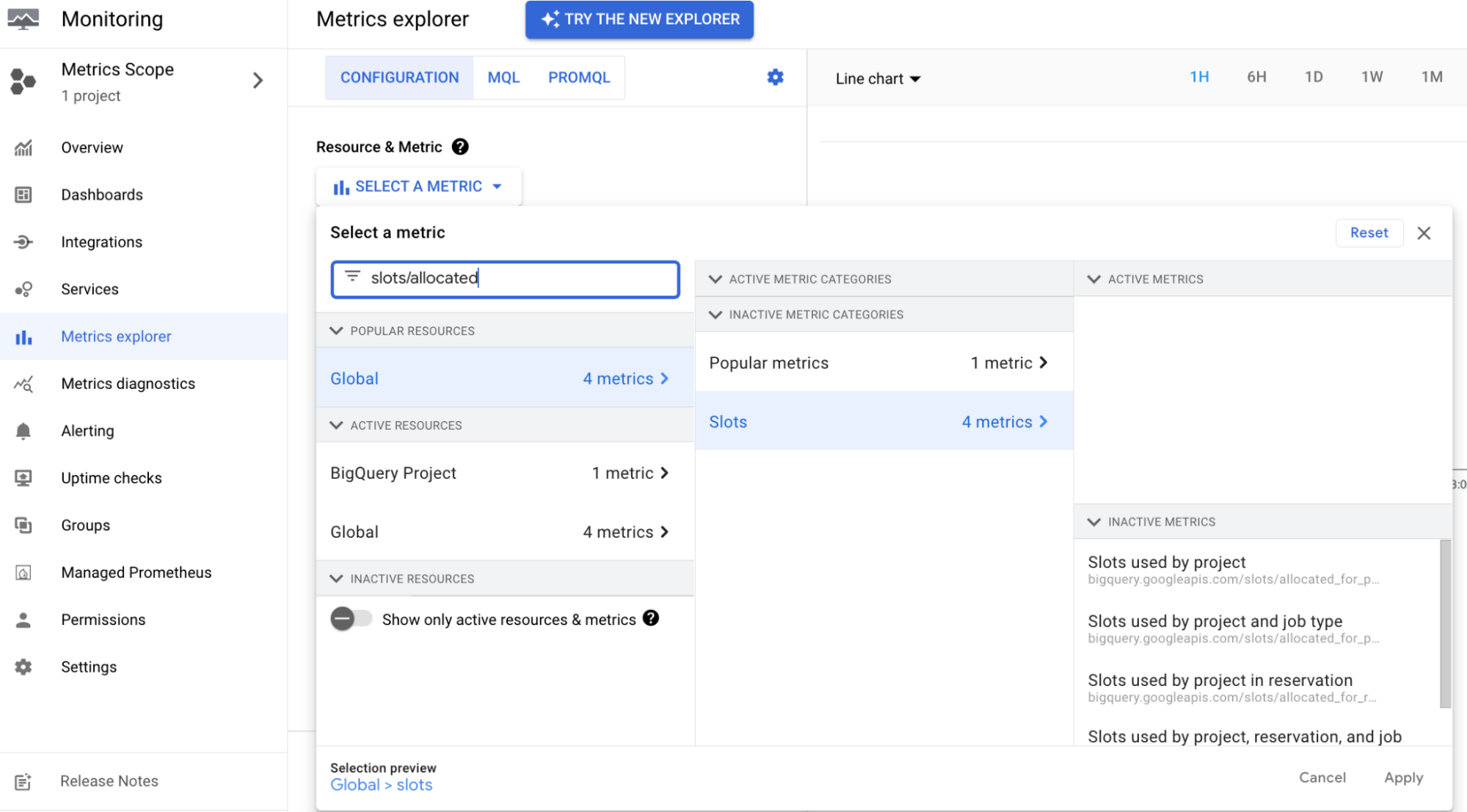
Jobs. Utilizza il metodo APIJobsper visualizzare le metriche sull'utilizzo degli slot per un job.Cloud Monitoring. Puoi utilizzare Cloud Monitoring per creare dashboard per monitorare gli slot allocati. Con una dashboard di Cloud Monitoring, puoi visualizzare l'utilizzo degli slot per ogni prenotazione e per ogni tipo di job in tutti i progetti all'interno della prenotazione. Per ulteriori informazioni sulle metriche disponibili per il dashboard di Cloud Monitoring, consulta Metriche disponibili per la visualizzazione.
Visualizzare la fattura basata sulla capacità
Per visualizzare la fattura basata sulla capacità in tempo reale:
Nella console Google Cloud , vai alla pagina Fatturazione.
Seleziona il progetto dell'account di fatturazione per il quale vuoi visualizzare la fattura.
Vai alla sezione Report e poi, nella sezione Filtri, segui questi passaggi:
- Dall'elenco Servizi, seleziona BigQuery e tutto ciò che è applicabile.
- Seleziona Tutti gli SKU dall'elenco SKU.
Attribuzione dei costi di prenotazione
Questa funzionalità consente di attribuire le commissioni di prenotazione all'utilizzo di query specifiche in tutti i progetti che hanno utilizzato la prenotazione. In questo modo, i costi netti per ogni base di progetto sono più accurati.
Tutti i clienti dell'API BigQuery Reservations hanno una voce di "Attribuzione slot di analisi" nei dati di fatturazione Cloud. Questa voce è inclusa nella pagina Fatturazione e nell'esportazione della fatturazione Cloud.
Questo elemento pubblicitario mostra le ore di slot utilizzate per progetto. Non comporta alcun costo e non influisce sui totali della fattura.
Audit log
La creazione, l'eliminazione e l'aggiornamento delle risorse correlate alle prenotazioni BigQuery vengono registrati negli audit log del proprietario del progetto. Per saperne di più, vedi Log di controllo.
Monitora la scalabilità automatica con lo schema delle informazioni
Puoi utilizzare i seguenti script SQL per controllare i secondi di slot fatturati per una
determinata edizione. Devi eseguire questi script nello stesso progetto in cui sono state create le prenotazioni. Il primo script mostra i secondi di slot fatturati coperti da commitment_plan, mentre il secondo mostra i secondi di slot fatturati non coperti da un impegno.
Per eseguire questi script, devi impostare solo il valore di tre variabili:
start_timeend_timeedition_to_check
Questi script sono soggetti alle seguenti limitazioni:
Le prenotazioni e gli impegni di capacità eliminati vengono rimossi dalle visualizzazioni dello schema delle informazioni al termine del periodo di conservazione dei dati. Specifica un periodo di tempo recente che non contenga prenotazioni ed impegni eliminati per ottenere risultati corretti.
Il risultato degli script potrebbe non corrispondere esattamente alla fattura a causa di piccoli errori di arrotondamento.
Il seguente script aggrega gli slot di scalabilità automatica per edizione.
Espandi per visualizzare lo script per calcolare i secondi di slot di scalabilità automatica per edizione.
SELECT
  edition,
  SUM(s.autoscale_current_slots) AS autoscale_slot_seconds
FROM
  `region-us.INFORMATION_SCHEMA.RESERVATIONS_TIMELINE` m
JOIN
  m.per_second_details s
WHERE
  period_start BETWEEN '2025-09-28'
  AND '2025-09-29'
GROUP BY
  edition
ORDER BY
  edition
Il seguente script aggrega gli slot di scalabilità automatica per prenotazione.
Espandi per visualizzare lo script per calcolare i secondi di slot di scalabilità automatica per prenotazione.
select reservation_id, sum(s.autoscale_current_slots) as autoscale_slot_seconds
from `region-us.INFORMATION_SCHEMA.RESERVATIONS_TIMELINE` m
LEFT JOIN m.per_second_details s
WHERE period_start between '2025-09-28' and '2025-09-29'
group by reservation_id
order by reservation_id
Espandi per visualizzare lo script per calcolare i secondi di slot a partire dagli impegni.
DECLARE start_time,end_time TIMESTAMP;

DECLARE
  edition_to_check STRING;

/* Google uses Pacific Time to calculate the billing period for all customers,
regardless of their time zone. Use the following format if you want to match the
billing report. Change the start_time and end_time values to match the desired
window. */

/* The following three variables (start_time, end_time, and edition_to_check)
are the only variables that you need to set in the script.

During daylight savings time, the start_time and end_time variables should
follow this format: 2024-02-20 00:00:00-08. */

SET start_time = "2023-07-20 00:00:00-07";
SET end_time = "2023-07-28 00:00:00-07";
SET edition_to_check = 'ENTERPRISE';

/* The following function returns the slot seconds for the time window between
two capacity changes. For example, if there are 100 slots between (2023-06-01
10:00:00, 2023-06-01 11:00:00), then during that window the total slot seconds
will be 100 * 3600.

This script calculates a specific window (based on the variables defined above),
which is why the following script includes script_start_timestamp_unix_millis
and script_end_timestamp_unix_millis. */

CREATE TEMP FUNCTION
GetSlotSecondsBetweenChanges(
  slots FLOAT64,
  range_begin_timestamp_unix_millis FLOAT64,
  range_end_timestamp_unix_millis FLOAT64,
  script_start_timestamp_unix_millis FLOAT64,
  script_end_timestamp_unix_millis FLOAT64)
RETURNS INT64
LANGUAGE js
AS r"""
    if (script_end_timestamp_unix_millis < range_begin_timestamp_unix_millis || script_start_timestamp_unix_millis > range_end_timestamp_unix_millis) {
      return 0;
    }
    var begin = Math.max(script_start_timestamp_unix_millis, range_begin_timestamp_unix_millis)
    var end = Math.min(script_end_timestamp_unix_millis, range_end_timestamp_unix_millis)
    return slots * Math.ceil((end - begin) / 1000.0)
""";

/*
Sample CAPACITY_COMMITMENT_CHANGES data (unrelated columns ignored):
+---------------------+------------------------+-----------------+--------+------------+--------+
|  change_timestamp   | capacity_commitment_id | commitment_plan | state  | slot_count | action |
+---------------------+------------------------+-----------------+--------+------------+--------+
| 2023-07-20 19:30:27 | 12954109101902401697   | ANNUAL          | ACTIVE |        100 | CREATE |
| 2023-07-27 22:29:21 | 11445583810276646822   | FLEX            | ACTIVE |        100 | CREATE |
| 2023-07-27 23:10:06 | 7341455530498381779    | MONTHLY         | ACTIVE |        100 | CREATE |
| 2023-07-27 23:11:06 | 7341455530498381779    | FLEX            | ACTIVE |        100 | UPDATE |

The last row indicates a special change from MONTHLY to FLEX, which happens
because of commercial migration.

*/

WITH
  /*
  Information containing which commitment might have plan
  updated (e.g. renewal or commercial migration). For example:
  +------------------------+------------------+--------------------+--------+------------+--------+-----------+----------------------------+
  |  change_timestamp   | capacity_commitment_id | commitment_plan | state  | slot_count | action | next_plan | next_plan_change_timestamp |
  +---------------------+------------------------+-----------------+--------+------------+--------+-----------+----------------------------+
  | 2023-07-20 19:30:27 | 12954109101902401697   | ANNUAL          | ACTIVE |        100 | CREATE | ANNUAL    |        2023-07-20 19:30:27 |
  | 2023-07-27 22:29:21 | 11445583810276646822   | FLEX            | ACTIVE |        100 | CREATE | FLEX      |        2023-07-27 22:29:21 |
  | 2023-07-27 23:10:06 | 7341455530498381779    | MONTHLY         | ACTIVE |        100 | CREATE | FLEX      |        2023-07-27 23:11:06 |
  | 2023-07-27 23:11:06 | 7341455530498381779    | FLEX            | ACTIVE |        100 | UPDATE | FLEX      |        2023-07-27 23:11:06 |
  */
  commitments_with_next_plan AS (
    SELECT
      *,
      IFNULL(
        LEAD(commitment_plan)
          OVER (
            PARTITION BY capacity_commitment_id ORDER BY change_timestamp ASC
          ),
        commitment_plan)
        next_plan,
      IFNULL(
        LEAD(change_timestamp)
          OVER (
            PARTITION BY capacity_commitment_id ORDER BY change_timestamp ASC
          ),
        change_timestamp)
        next_plan_change_timestamp
    FROM
      `region-us.INFORMATION_SCHEMA.CAPACITY_COMMITMENT_CHANGES_BY_PROJECT`
  ),

  /*
  Insert a 'DELETE' action for those with updated plans. The FLEX commitment
  '7341455530498381779' is has no 'CREATE' action, and is instead labeled as an
  'UPDATE' action.

  For example:
  +---------------------+------------------------+-----------------+--------+------------+--------+
  |  change_timestamp   | capacity_commitment_id | commitment_plan | state  | slot_count | action |
  +---------------------+------------------------+-----------------+--------+------------+--------+
  | 2023-07-20 19:30:27 | 12954109101902401697   | ANNUAL          | ACTIVE |        100 | CREATE |
  | 2023-07-27 22:29:21 | 11445583810276646822   | FLEX            | ACTIVE |        100 | CREATE |
  | 2023-07-27 23:10:06 | 7341455530498381779    | MONTHLY         | ACTIVE |        100 | CREATE |
  | 2023-07-27 23:11:06 | 7341455530498381779    | FLEX            | ACTIVE |        100 | UPDATE |
  | 2023-07-27 23:11:06 | 7341455530498381779    | MONTHLY         | ACTIVE |        100 | DELETE |
  */

  capacity_changes_with_additional_deleted_event_for_changed_plan AS (
    SELECT
      next_plan_change_timestamp AS change_timestamp,
      project_id,
      project_number,
      capacity_commitment_id,
      commitment_plan,
      state,
      slot_count,
      'DELETE' AS action,
      commitment_start_time,
      commitment_end_time,
      failure_status,
      renewal_plan,
      user_email,
      edition,
      is_flat_rate,
    FROM commitments_with_next_plan
    WHERE commitment_plan <> next_plan
    UNION ALL
    SELECT * FROM `region-us.INFORMATION_SCHEMA.CAPACITY_COMMITMENT_CHANGES_BY_PROJECT`
  ),

  /*
  The committed_slots change the history. For example:
  +---------------------+------------------------+------------------+-----------------+
  |  change_timestamp   | capacity_commitment_id | slot_count_delta | commitment_plan |
  +---------------------+------------------------+------------------+-----------------+
  | 2023-07-20 19:30:27 | 12954109101902401697   |              100 | ANNUAL          |
  | 2023-07-27 22:29:21 | 11445583810276646822   |              100 | FLEX            |
  | 2023-07-27 23:10:06 | 7341455530498381779    |              100 | MONTHLY         |
  | 2023-07-27 23:11:06 | 7341455530498381779    |             -100 | MONTHLY         |
  | 2023-07-27 23:11:06 | 7341455530498381779    |              100 | FLEX            |
  */

  capacity_commitment_slot_data AS (
    SELECT
      change_timestamp,
      capacity_commitment_id,
      CASE
        WHEN action = "CREATE" OR action = "UPDATE"
          THEN
            IFNULL(
              IF(
                LAG(action)
                  OVER (
                    PARTITION BY capacity_commitment_id ORDER BY change_timestamp ASC, action ASC
                  )
                  IN UNNEST(['CREATE', 'UPDATE']),
                slot_count - LAG(slot_count)
                  OVER (
                    PARTITION BY capacity_commitment_id ORDER BY change_timestamp ASC, action ASC
                  ),
                slot_count),
              slot_count)
        ELSE
          IF(
            LAG(action)
              OVER (PARTITION BY capacity_commitment_id ORDER BY change_timestamp ASC, action ASC)
              IN UNNEST(['CREATE', 'UPDATE']),
            -1 * slot_count,
            0)
        END
        AS slot_count_delta,
      commitment_plan
    FROM
      capacity_changes_with_additional_deleted_event_for_changed_plan
    WHERE
      state = "ACTIVE"
      AND edition = edition_to_check
      AND change_timestamp <= end_time
  ),

  /*
  The total_committed_slots history for each plan. For example:
  +---------------------+---------------+-----------------+
  |  change_timestamp   | capacity_slot | commitment_plan |
  +---------------------+---------------+-----------------+
  | 2023-07-20 19:30:27 |           100 | ANNUAL          |
  | 2023-07-27 22:29:21 |           100 | FLEX            |
  | 2023-07-27 23:10:06 |           100 | MONTHLY         |
  | 2023-07-27 23:11:06 |             0 | MONTHLY         |
  | 2023-07-27 23:11:06 |           200 | FLEX            |
  */

  running_capacity_commitment_slot_data AS (
    SELECT
      change_timestamp,
      SUM(slot_count_delta)
        OVER (
          PARTITION BY commitment_plan
          ORDER BY change_timestamp
          RANGE BETWEEN UNBOUNDED PRECEDING AND CURRENT ROW
        )
        AS capacity_slot,
      commitment_plan,
    FROM
      capacity_commitment_slot_data
  ),

  /*

  The slot_seconds between each changes, partitioned by each plan. For example:
  +---------------------+--------------+-----------------+
  |  change_timestamp   | slot_seconds | commitment_plan |
  +---------------------+--------------+-----------------+
  | 2023-07-20 19:30:27 |     64617300 | ANNUAL          |
  | 2023-07-27 22:29:21 |       250500 | FLEX            |
  | 2023-07-27 23:10:06 |         6000 | MONTHLY         |
  | 2023-07-27 23:11:06 |            0 | MONTHLY         |
  | 2023-07-27 23:11:06 |      5626800 | FLEX            |
  */

  slot_seconds_data AS (
    SELECT
      change_timestamp,
      GetSlotSecondsBetweenChanges(
        capacity_slot,
        UNIX_MILLIS(change_timestamp),
        UNIX_MILLIS(
          IFNULL(
            LEAD(change_timestamp)
              OVER (PARTITION BY commitment_plan ORDER BY change_timestamp ASC),
            CURRENT_TIMESTAMP())),
        UNIX_MILLIS(start_time),
        UNIX_MILLIS(end_time)) AS slot_seconds,
      commitment_plan,
    FROM
      running_capacity_commitment_slot_data
    WHERE
      change_timestamp <= end_time
  )

/*

The final result is similar to the following:
+-----------------+--------------------+
| commitment_plan | total_slot_seconds |
+-----------------+--------------------+
| ANNUAL          |           64617300 |
| MONTHLY         |               6000 |
| FLEX            |            5877300 |
*/

SELECT
  commitment_plan,
  SUM(slot_seconds) AS total_slot_seconds
FROM
  slot_seconds_data
GROUP BY
  commitment_plan
Il seguente script controlla l'utilizzo degli slot non coperti dagli impegni per una determinata edizione. Questo utilizzo contiene due tipi di slot: slot scalati e slot di base non coperti dagli impegni.
Espandi per visualizzare lo script per calcolare i secondi di slot non coperti dagli impegni
/*
This script has several parts:
1. Calculate the baseline and scaled slots for reservations
2. Calculate the committed slots
3. Join the two results above to calculate the baseline not covered by committed
   slots
4. Aggregate the number
*/

-- variables
DECLARE start_time, end_time TIMESTAMP;

DECLARE
  edition_to_check STRING;

/* Google uses Pacific Time to calculate the billing period for all customers,
regardless of their time zone. Use the following format if you want to match the
billing report. Change the start_time and end_time values to match the desired
window. */

/* The following three variables (start_time, end_time, and edition_to_check)
are the only variables that you need to set in the script.

During daylight savings time, the start_time and end_time variables should
follow this format: 2024-02-20 00:00:00-08. */

SET start_time = "2023-07-20 00:00:00-07";
SET end_time = "2023-07-28 00:00:00-07";
SET edition_to_check = 'ENTERPRISE';

/*
The following function returns the slot seconds for the time window between
two capacity changes. For example, if there are 100 slots between (2023-06-01
10:00:00, 2023-06-01 11:00:00), then during that window the total slot seconds
will be 100 * 3600.

This script calculates a specific window (based on the variables defined above),
which is why the following script includes script_start_timestamp_unix_millis
and script_end_timestamp_unix_millis. */

CREATE TEMP FUNCTION GetSlotSecondsBetweenChanges(
  slots FLOAT64,
  range_begin_timestamp_unix_millis FLOAT64,
  range_end_timestamp_unix_millis FLOAT64,
  script_start_timestamp_unix_millis FLOAT64,
  script_end_timestamp_unix_millis FLOAT64)
RETURNS INT64
LANGUAGE js
AS r"""
    if (script_end_timestamp_unix_millis < range_begin_timestamp_unix_millis || script_start_timestamp_unix_millis > range_end_timestamp_unix_millis) {
      return 0;
    }
    var begin = Math.max(script_start_timestamp_unix_millis, range_begin_timestamp_unix_millis)
    var end = Math.min(script_end_timestamp_unix_millis, range_end_timestamp_unix_millis)
    return slots * Math.ceil((end - begin) / 1000.0)
""";
/*
Sample RESERVATION_CHANGES data (unrelated columns ignored):
+---------------------+------------------+--------+---------------+---------------+
|  change_timestamp   | reservation_name | action | slot_capacity | current_slots |
+---------------------+------------------+--------+---------------+---------------+
| 2023-07-27 22:24:15 | res1             | CREATE |           300 |             0 |
| 2023-07-27 22:25:21 | res1             | UPDATE |           300 |           180 |
| 2023-07-27 22:39:14 | res1             | UPDATE |           300 |           100 |
| 2023-07-27 22:40:20 | res2             | CREATE |           300 |             0 |
| 2023-07-27 22:54:18 | res2             | UPDATE |           300 |           120 |
| 2023-07-27 22:55:23 | res1             | UPDATE |           300 |             0 |

Sample CAPACITY_COMMITMENT_CHANGES data (unrelated columns ignored):
+---------------------+------------------------+-----------------+--------+------------+--------+
|  change_timestamp   | capacity_commitment_id | commitment_plan | state  | slot_count | action |
+---------------------+------------------------+-----------------+--------+------------+--------+
| 2023-07-20 19:30:27 | 12954109101902401697   | ANNUAL          | ACTIVE |        100 | CREATE |
| 2023-07-27 22:29:21 | 11445583810276646822   | FLEX            | ACTIVE |        100 | CREATE |
| 2023-07-27 23:10:06 | 7341455530498381779    | MONTHLY         | ACTIVE |        100 | CREATE |
*/

WITH
  /*
  The scaled_slots & baseline change history:
  +---------------------+------------------+------------------------------+---------------------+
  |  change_timestamp   | reservation_name | autoscale_current_slot_delta | baseline_slot_delta |
  +---------------------+------------------+------------------------------+---------------------+
  | 2023-07-27 22:24:15 | res1             |                            0 |                 300 |
  | 2023-07-27 22:25:21 | res1             |                          180 |                   0 |
  | 2023-07-27 22:39:14 | res1             |                          -80 |                   0 |
  | 2023-07-27 22:40:20 | res2             |                            0 |                 300 |
  | 2023-07-27 22:54:18 | res2             |                          120 |                   0 |
  | 2023-07-27 22:55:23 | res1             |                         -100 |                   0 |
  */
  reservation_slot_data AS (
    SELECT
      change_timestamp,
      reservation_name,
      CASE action
        WHEN "CREATE" THEN autoscale.current_slots
        WHEN "UPDATE"
          THEN
            IFNULL(
              autoscale.current_slots - LAG(autoscale.current_slots)
                OVER (
                  PARTITION BY project_id, reservation_name
                  ORDER BY change_timestamp ASC, action ASC
                ),
              IFNULL(
                autoscale.current_slots,
                IFNULL(
                  -1 * LAG(autoscale.current_slots)
                    OVER (
                      PARTITION BY project_id, reservation_name
                      ORDER BY change_timestamp ASC, action ASC
                    ),
                  0)))
        WHEN "DELETE"
          THEN
            IF(
              LAG(action)
                OVER (
                  PARTITION BY project_id, reservation_name
                  ORDER BY change_timestamp ASC, action ASC
                )
                IN UNNEST(['CREATE', 'UPDATE']),
              -1 * autoscale.current_slots,
              0)
        END
        AS autoscale_current_slot_delta,
      CASE action
        WHEN "CREATE" THEN slot_capacity
        WHEN "UPDATE"
          THEN
            IFNULL(
              slot_capacity - LAG(slot_capacity)
                OVER (
                  PARTITION BY project_id, reservation_name
                  ORDER BY change_timestamp ASC, action ASC
                ),
              IFNULL(
                slot_capacity,
                IFNULL(
                  -1 * LAG(slot_capacity)
                    OVER (
                      PARTITION BY project_id, reservation_name
                      ORDER BY change_timestamp ASC, action ASC
                    ),
                  0)))
        WHEN "DELETE"
          THEN
            IF(
              LAG(action)
                OVER (
                  PARTITION BY project_id, reservation_name
                  ORDER BY change_timestamp ASC, action ASC
                )
                IN UNNEST(['CREATE', 'UPDATE']),
              -1 * slot_capacity,
              0)
        END
        AS baseline_slot_delta,
    FROM
      `region-us.INFORMATION_SCHEMA.RESERVATION_CHANGES`
    WHERE
      edition = edition_to_check
      AND change_timestamp <= end_time
  ),

  -- Convert the above to running total
  /*
  +---------------------+-------------------------+----------------+
  |  change_timestamp   | autoscale_current_slots | baseline_slots |
  +---------------------+-------------------------+----------------+
  | 2023-07-27 22:24:15 |                       0 |            300 |
  | 2023-07-27 22:25:21 |                     180 |            300 |
  | 2023-07-27 22:39:14 |                     100 |            300 |
  | 2023-07-27 22:40:20 |                     100 |            600 |
  | 2023-07-27 22:54:18 |                     220 |            600 |
  | 2023-07-27 22:55:23 |                     120 |            600 |
  */
  running_reservation_slot_data AS (
    SELECT
      change_timestamp,
      SUM(autoscale_current_slot_delta)
        OVER (ORDER BY change_timestamp RANGE BETWEEN UNBOUNDED PRECEDING AND CURRENT ROW)
        AS autoscale_current_slots,
      SUM(baseline_slot_delta)
        OVER (ORDER BY change_timestamp RANGE BETWEEN UNBOUNDED PRECEDING AND CURRENT ROW)
        AS baseline_slots,
    FROM
      reservation_slot_data
  ),

  /*
  The committed_slots change history. For example:
  +---------------------+------------------------+------------------+
  |  change_timestamp   | capacity_commitment_id | slot_count_delta |
  +---------------------+------------------------+------------------+
  | 2023-07-20 19:30:27 | 12954109101902401697   |              100 |
  | 2023-07-27 22:29:21 | 11445583810276646822   |              100 |
  | 2023-07-27 23:10:06 | 7341455530498381779    |              100 |
  */
  capacity_commitment_slot_data AS (
    SELECT
      change_timestamp,
      capacity_commitment_id,
      CASE
        WHEN action = "CREATE" OR action = "UPDATE"
          THEN
            IFNULL(
              IF(
                LAG(action)
                  OVER (
                    PARTITION BY capacity_commitment_id ORDER BY change_timestamp ASC, action ASC
                  )
                  IN UNNEST(['CREATE', 'UPDATE']),
                slot_count - LAG(slot_count)
                  OVER (
                    PARTITION BY capacity_commitment_id ORDER BY change_timestamp ASC, action ASC
                  ),
                slot_count),
              slot_count)
        ELSE
          IF(
            LAG(action)
              OVER (PARTITION BY capacity_commitment_id ORDER BY change_timestamp ASC, action ASC)
              IN UNNEST(['CREATE', 'UPDATE']),
            -1 * slot_count,
            0)
        END
        AS slot_count_delta
    FROM
      `region-us.INFORMATION_SCHEMA.CAPACITY_COMMITMENT_CHANGES_BY_PROJECT`
    WHERE
      state = "ACTIVE"
      AND edition = edition_to_check
      AND change_timestamp <= end_time
  ),

  /*
  The total_committed_slots history. For example:
  +---------------------+---------------+
  |  change_timestamp   | capacity_slot |
  +---------------------+---------------+
  | 2023-07-20 19:30:27 |           100 |
  | 2023-07-27 22:29:21 |           200 |
  | 2023-07-27 23:10:06 |           300 |
  */
  running_capacity_commitment_slot_data AS (
    SELECT
      change_timestamp,
      SUM(slot_count_delta)
        OVER (ORDER BY change_timestamp RANGE BETWEEN UNBOUNDED PRECEDING AND CURRENT ROW)
        AS capacity_slot
    FROM
      capacity_commitment_slot_data
  ),

  /* Add next_change_timestamp to the above data,
   which will be used when joining with reservation data. For example:
  +---------------------+-----------------------+---------------+
  |  change_timestamp   | next_change_timestamp | capacity_slot |
  +---------------------+-----------------------+---------------+
  | 2023-07-20 19:30:27 |   2023-07-27 22:29:21 |           100 |
  | 2023-07-27 22:29:21 |   2023-07-27 23:10:06 |           200 |
  | 2023-07-27 23:10:06 |   2023-07-31 00:14:37 |           300 |
  */
  running_capacity_commitment_slot_data_with_next_change AS (
    SELECT
      change_timestamp,
      IFNULL(LEAD(change_timestamp) OVER (ORDER BY change_timestamp ASC), CURRENT_TIMESTAMP())
        AS next_change_timestamp,
      capacity_slot
    FROM
      running_capacity_commitment_slot_data
  ),

  /*
  Whenever we have a change in reservations or commitments,
  the scaled_slots_and_baseline_not_covered_by_commitments will be changed.
  Hence we get a collection of all the change_timestamp from both tables.
  +---------------------+
  |  change_timestamp   |
  +---------------------+
  | 2023-07-20 19:30:27 |
  | 2023-07-27 22:24:15 |
  | 2023-07-27 22:25:21 |
  | 2023-07-27 22:29:21 |
  | 2023-07-27 22:39:14 |
  | 2023-07-27 22:40:20 |
  | 2023-07-27 22:54:18 |
  | 2023-07-27 22:55:23 |
  | 2023-07-27 23:10:06 |
  */
  merged_timestamp AS (
    SELECT
      change_timestamp
    FROM
      running_reservation_slot_data
    UNION DISTINCT
    SELECT
      change_timestamp
    FROM
      running_capacity_commitment_slot_data
  ),

  /*
  Change running reservation-slots and make sure we have one row when commitment changes.
  +---------------------+-------------------------+----------------+
  |  change_timestamp   | autoscale_current_slots | baseline_slots |
  +---------------------+-------------------------+----------------+
  | 2023-07-20 19:30:27 |                       0 |              0 |
  | 2023-07-27 22:24:15 |                       0 |            300 |
  | 2023-07-27 22:25:21 |                     180 |            300 |
  | 2023-07-27 22:29:21 |                     180 |            300 |
  | 2023-07-27 22:39:14 |                     100 |            300 |
  | 2023-07-27 22:40:20 |                     100 |            600 |
  | 2023-07-27 22:54:18 |                     220 |            600 |
  | 2023-07-27 22:55:23 |                     120 |            600 |
  | 2023-07-27 23:10:06 |                     120 |            600 |
  */
  running_reservation_slot_data_with_merged_timestamp AS (
    SELECT
      change_timestamp,
      IFNULL(
        autoscale_current_slots,
        IFNULL(
          LAST_VALUE(autoscale_current_slots IGNORE NULLS) OVER (ORDER BY change_timestamp ASC), 0))
        AS autoscale_current_slots,
      IFNULL(
        baseline_slots,
        IFNULL(LAST_VALUE(baseline_slots IGNORE NULLS) OVER (ORDER BY change_timestamp ASC), 0))
        AS baseline_slots
    FROM
      running_reservation_slot_data
    RIGHT JOIN
      merged_timestamp
      USING (change_timestamp)
  ),

  /*
  Join the above, so that we will know the number for baseline not covered by commitments.
  +---------------------+-----------------------+-------------------------+------------------------------------+
  |  change_timestamp   | next_change_timestamp | autoscale_current_slots | baseline_not_covered_by_commitment |
  +---------------------+-----------------------+-------------------------+------------------------------------+
  | 2023-07-20 19:30:27 |   2023-07-27 22:24:15 |                       0 |                                  0 |
  | 2023-07-27 22:24:15 |   2023-07-27 22:25:21 |                       0 |                                200 |
  | 2023-07-27 22:25:21 |   2023-07-27 22:29:21 |                     180 |                                200 |
  | 2023-07-27 22:29:21 |   2023-07-27 22:39:14 |                     180 |                                100 |
  | 2023-07-27 22:39:14 |   2023-07-27 22:40:20 |                     100 |                                100 |
  | 2023-07-27 22:40:20 |   2023-07-27 22:54:18 |                     100 |                                400 |
  | 2023-07-27 22:54:18 |   2023-07-27 22:55:23 |                     220 |                                400 |
  | 2023-07-27 22:55:23 |   2023-07-27 23:10:06 |                     120 |                                400 |
  | 2023-07-27 23:10:06 |   2023-07-31 00:16:07 |                     120 |                                300 |
  */
  scaled_slots_and_baseline_not_covered_by_commitments AS (
    SELECT
      r.change_timestamp,
      IFNULL(LEAD(r.change_timestamp) OVER (ORDER BY r.change_timestamp ASC), CURRENT_TIMESTAMP())
        AS next_change_timestamp,
      r.autoscale_current_slots,
      IF(
        r.baseline_slots - IFNULL(c.capacity_slot, 0) > 0,
        r.baseline_slots - IFNULL(c.capacity_slot, 0),
        0) AS baseline_not_covered_by_commitment
    FROM
      running_reservation_slot_data_with_merged_timestamp r
    LEFT JOIN
      running_capacity_commitment_slot_data_with_next_change c
      ON
        r.change_timestamp >= c.change_timestamp
        AND r.change_timestamp < c.next_change_timestamp
  ),

  /*
  The slot_seconds between each changes. For example:
  +---------------------+--------------------+
  |  change_timestamp   | slot_seconds |
  +---------------------+--------------+
  | 2023-07-20 19:30:27 |            0 |
  | 2023-07-27 22:24:15 |        13400 |
  | 2023-07-27 22:25:21 |        91580 |
  | 2023-07-27 22:29:21 |       166320 |
  | 2023-07-27 22:39:14 |        13200 |
  | 2023-07-27 22:40:20 |       419500 |
  | 2023-07-27 22:54:18 |        40920 |
  | 2023-07-27 22:55:23 |       459160 |
  | 2023-07-27 23:10:06 |     11841480 |
  */
  slot_seconds_data AS (
    SELECT
      change_timestamp,
      GetSlotSecondsBetweenChanges(
        autoscale_current_slots + baseline_not_covered_by_commitment,
        UNIX_MILLIS(change_timestamp),
        UNIX_MILLIS(next_change_timestamp),
        UNIX_MILLIS(start_time),
        UNIX_MILLIS(end_time)) AS slot_seconds
    FROM
      scaled_slots_and_baseline_not_covered_by_commitments
    WHERE
      change_timestamp <= end_time AND next_change_timestamp > start_time
  )

/*
Final result for this example:
+--------------------+
| total_slot_seconds |
+--------------------+
|           13045560 |
*/
SELECT
  SUM(slot_seconds) AS total_slot_seconds
FROM
  slot_seconds_data
Passaggi successivi
- Scopri di più sui piani di impegno di capacità.
- Scopri come utilizzare i grafici delle risorse amministrative.
- Scopri di più sui prezzi di BigQuery.