

This guide helps you assess the storage requirements of your cloud workload, understand the available storage options in Google Cloud, and design a storage strategy that provides optimal technical and business value.
For information about selecting storage services for AI and ML workloads, see Overview of storage services for AI and ML workloads in AI Hypercomputer.
Overview of the design process
As a cloud architect, when you plan storage for a cloud workload, you need to first consider the functional characteristics of the workload, security constraints, resilience requirements, performance expectations, and cost goals. Next, you need to review the available storage services and features in Google Cloud. Then, based on your requirements and the available options, you select the storage services and features that you need. The following diagram shows this three-phase design process:
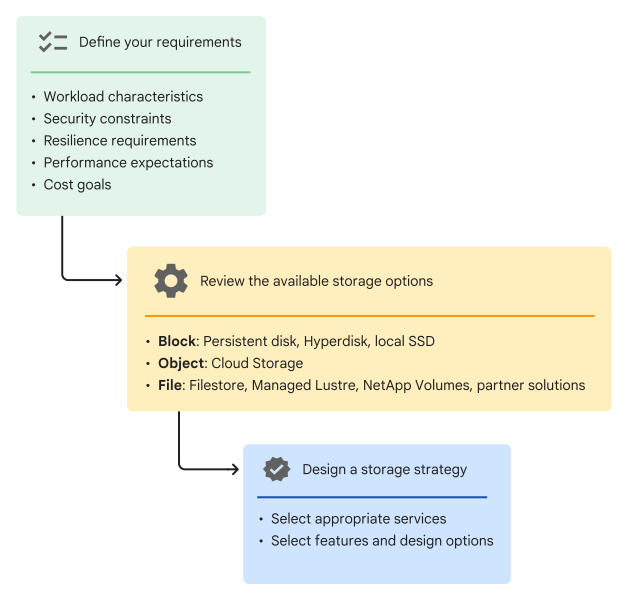
Define your requirements
Use the questionnaires in this section to define the key storage requirements of the workload that you want to deploy in Google Cloud.
Guidelines for defining storage requirements
When answering the questionnaires, consider the following guidelines:
Define requirements granularly
For example, if your application needs Network File System (NFS)-based file storage, identify the required NFS version.
Consider future requirements
For example, your current deployment might serve users in countries within Asia, but you might plan to expand the business to other continents. In this case, consider any storage-related regulatory requirements of the new business territories.
Consider cloud-specific opportunities and requirements
Take advantage of cloud-specific opportunities.
For example, to optimize the storage cost for data stored in Cloud Storage, you can control the storage duration by using data retention policies and lifecycle configurations.
Consider cloud-specific requirements.
For example, the on-premises data might exist in a single data center, and you might need to replicate the migrated data across two Google Cloud locations for redundancy.
Questionnaires
The questionnaires that follow are not exhaustive checklists for planning. Use them as a starting point to systematically analyze all the storage requirements of the workload that you want to deploy to Google Cloud.
Assess your workload's characteristics
What kind of data do you need to store?
Examples
- Static website content
- Backups and archives for disaster recovery
- Audit logs for compliance
- Large data objects that users download directly
- Transactional data
- Unstructured, and heterogeneous data
How much capacity do you need? Consider your current and future requirements.
Should capacity scale automatically with usage?
What are the access requirements? For example, should the data be accessible from outside Google Cloud?
What are the expected read-write patterns?
Examples
- Frequent writes and reads
- Frequent writes, but occasional reads
- Occasional writes and reads
- Occasional writes, but frequent reads
Does the workload need file-based access, using NFS for example?
Should multiple clients be able to read or write data simultaneously?
Identify security constraints
What are your data-encryption requirements? For example, do you need to use keys that you control?
Are there any data-residency requirements?
Define data-resilience requirements
- Does your workload need low-latency caching or scratch space?
- Do you need to replicate the data in the cloud for redundancy?
- Do you need strict read-write consistency for replicated datasets?
Set performance expectations
What is the required I/O rate?
What levels of read and write throughput does your application need?
What environments do you need storage for? For a given workload, you might need high-performance storage for the production environment, but could choose a lower-performance option for the non-production environments.
Review the storage options
Google Cloud offers storage services for all the key storage formats: block, file, and object. Review and evaluate the features, design options, and relative advantages of the services available for each storage format.
Overview
Block storage
The data that you store in block storage is divided into chunks, each stored as a separate block with a unique address. Applications access data by referencing the appropriate block addresses. Block storage is optimized for high-IOPS workloads, such as transaction processing. It's similar to on-premises storage area network (SAN) and directly attached storage (DAS) systems.
The block storage options in Google Cloud are a part of the Compute Engine service.
| Option | Overview |
|---|---|
| Persistent Disk | Dedicated hard-disk drives (HDD) and solid-state drives (SSD) for enterprise and database applications deployed to Compute Engine VMs and Google Kubernetes Engine (GKE) clusters. |
| Google Cloud Hyperdisk | Fast and redundant network storage for Compute Engine VMs and GKE clusters, with capacity that can be dynamically increased and configurable performance. |
| Local SSD | Ephemeral, locally attached block storage for high-performance applications. |
File storage
Data is organized and represented in a hierarchy of files that are stored in folders, similar to on-premises network-attached storage (NAS). File systems can be mounted on clients using protocols such as NFS and Server Message Block (SMB). Applications access data using the relevant filename and directory path.
Google Cloud provides a range of fully managed solutions for file storage.
| Solution | Overview |
|---|---|
| Filestore |
File-based storage using NFS file servers for Compute Engine VMs and GKE clusters. |
| Google Cloud Managed Lustre |
Low-latency parallel file system for AI, high performance computing (HPC), and data-intensive applications. |
| Google Cloud NetApp Volumes | File-based storage using NFS, SMB, or block storage protocols. |
Object storage
Data is stored as objects in a flat hierarchy of buckets. Each object is assigned a globally unique ID. Objects can have system-assigned and user-defined metadata, to help you organize and manage the data. Applications access data by referencing the object IDs, using REST APIs or client libraries.
Cloud Storage provides low-cost, highly durable, and highly scalable object storage for diverse data types. The data you store in Cloud Storage can be accessed from anywhere, within and outside Google Cloud. Optional redundancy across regions provides high availability and reliability. You can select a storage class that suits your data-retention and access-frequency requirements.
Comparative analysis
The following table lists the key capabilities of the storage services in Google Cloud.
| Persistent Disk | Hyperdisk | Local SSD | Filestore | Managed Lustre | NetApp Volumes | Cloud Storage | |
|---|---|---|---|---|---|---|---|
| Capacity limit |
64 TiB per disk and 257 TiB per VM. Latest specifications: Persistent Disk documentation |
64 TiB per disk, 512 TiB per VM, and 5 PiB per storage pool. Exapools are higher capacity Hyperdisk pools. Latest specifications: Hyperdisk documentation |
375 GiB per disk and 12,000 GiB per VM. Titanium SSD disks support up to 6 TiB per disk and 84,000 GiB per VM. Latest specifications: Local SSD documentation |
100 TiB per instance, depending on the service tier. | 80.1 PiB per instance, depending on the performance tier. |
20 PiB per storage pool and 20 PiB per volume. Latest specifications: NetApp Volumes documentation |
5 TiB per object, with no limit per bucket (except Rapid Bucket). Latest specifications: Cloud Storage documentation |
|
Scaling |
|
|
Not scalable | Scale up and down (Zonal and Regional tiers) | Scale up | Scale up and down | Scales automatically based on usage |
| Sharing |
Supported | Supported | Not shareable | Mountable on multiple Compute Engine VMs, remote clients, and GKE clusters | Mountable on multiple Compute Engine VMs and GKE clusters | Mountable on multiple Compute Engine VMs, remote clients, and GKE clusters |
|
| Encryption key options |
|
|
Google-owned and Google-managed encryption keys |
|
|
|
|
| Persistence |
Lifetime of the disk | Lifetime of the disk | Ephemeral (data is lost when the VM is stopped or deleted) | Lifetime of the Filestore instance | Lifetime of the Managed Lustre instance | Lifetime of the volume | Lifetime of the bucket |
| Availability |
|
|
Zonal |
|
Zonal |
|
|
| Performance |
Linear scaling with disk size and CPU count | Dynamic scaling persistent storage | High-performance scratch storage | Zonal and Regional: custom performance | Scaling based on the selected performance tier. | Scalable performance Expectations depend on the service level. |
|
| Management |
Manually format and mount | Manually format and mount | Manually format, stripe, and mount | Fully managed | Fully managed | Fully managed | Fully managed |
The following table lists the workload types that each Google Cloud storage option is appropriate for:
| Storage option | Workload types |
|---|---|
| Hyperdisk or Persistent Disk |
|
| Local SSD |
|
| Filestore |
|
| Managed Lustre |
|
| NetApp Volumes |
|
| Cloud Storage |
|
Choose a storage option
There are two parts to selecting a storage option:
- Deciding which storage services you need.
- Choosing the required features and design options in a given service.
Examples of service-specific features and design options
Persistent Disk
- Deployment region and zone
- Regional replication
- Disk type, size, and IOPS (for Extreme Persistent Disk)
- Encryption keys: Google-owned and Google-managed encryption keys, or customer-managed
- Snapshot schedule
Hyperdisk
- Deployment region and zone
- Disk type, size, and provisioned IOPS or throughput
- Encryption keys: Google-owned and Google-managed encryption keys, or customer-managed
- Replication: synchronous or asynchronous
- Snapshot schedule
Filestore
- Deployment region and zone
- Instance tier
- Capacity
- IP range: auto-allocated or custom
- Access control
Managed Lustre
- Deployment zone
- Capacity and performance tier
- Encryption keys: Google-owned and Google-managed encryption keys, or customer-managed
NetApp Volumes
- Deployment region
- Service level for the storage pool
- Pool and volume capacity
- Volume protocol
- Volume export rules
Cloud Storage
- Location: multi-region, dual-region, single region, single zone
- Storage class: Standard, Nearline, Coldline, Archive, or Rapid
- Access control: uniform or fine-grained
- Encryption keys: Google-owned and Google-managed encryption keys, customer-managed, or customer-supplied
- Retention policy
Storage recommendations
Use the following recommendations as a starting point to choose the storage services and features that meet your requirements. For guidance that's specific to AI and ML workloads, see Overview of storage services for AI and ML workloads in AI Hypercomputer.
For AI, ML, and HPC applications that need a parallel file system, use Managed Lustre.
For applications that need file-based access, choose a suitable file storage service based on your requirements for access protocol, availability, and performance.
Access protocol Recommendation NFS - If you need regional availability and configurable high performance, use Filestore Regional or NetApp Volumes Flex Unified.
- If zonal availability is sufficient:
- To configure performance independently of capacity, use Filestore Zonal or NetApp Volumes Flex Unified.
- For performance that scales with capacity, use Filestore Zonal or NetApp Volumes Standard, Premium, or Extreme.
For more information, see Filestore service tiers and NetApp Volumes service levels.
SMB Use NetApp Volumes. For workloads that need primary storage with high performance, use Hyperdisk, Local SSD, or Persistent Disk depending on your requirements.
Requirement Recommendation Fast scratch disk or cache Use Local SSD disks (ephemeral). Block storage with independently scalable performance and capacity Use Hyperdisk, which is Google's recommended durable block storage and is required for the latest machine series. Choose an appropriate disk type based on your requirements:
- General-purpose workloads:
hyperdisk-balanced - High I/O workloads, such as high-performance databases:
hyperdisk-extreme - Scale-out analytics, data drives for cost-sensitive apps, and cold
storage:
hyperdisk-throughput - ML workloads that need high throughput to multiple VMs in read-only
mode:
hyperdisk-mlin read-only mode - Multiple VMs with simultaneous write access to the same disk:
hyperdisk-balanced-high-availability(across two zones in a region), orhyperdisk-balancedorhyperdisk-extreme(within a single zone) in multi-writer mode
For more information, see About Hyperdisk.
Block storage with scalable capacity for earlier-generation VMs Use Persistent Disk. Choose an appropriate disk type based on your requirements:
- Sequential IOPS:
pd-standard - IOPS-intensive workloads:
pd-extremeorpd-ssd - Balance between performance and cost:
pd-balanced
For more information, see About Persistent Disk.
- Depending on your redundancy requirements, choose between zonal and
regional disks.
Requirement Recommendation Redundancy within a single zone in a region Use Hyperdisk or zonal Persistent Disk. Redundancy across multiple zones within a region Use Hyperdisk Balanced High Availability or regional Persistent Disk.
- General-purpose workloads:
For large-scale and globally available storage, use Cloud Storage.
Depending on the data-access frequency and the storage duration, choose a suitable Cloud Storage class.
Requirement Recommendation Access frequency varies, or the data-retention period is unknown or not predictable. Use the Autoclass feature to automatically transition objects in a bucket to appropriate storage classes based on each object's access pattern. Zonal storage for workloads that require sub-millisecond latency and high throughput, such as AI and ML training, checkpointing, inference, and analytics. Use a Rapid Bucket with the Rapid storage class. Storage for data that's accessed frequently, including for high-throughput analytics, data lakes, websites, streaming videos, and mobile apps. Use the Standard storage class.
To cache frequently accessed data and serve it from locations that are close to the clients, use Cloud CDN.
For read-heavy workloads with infrequent data changes and frequent reads (like ML training, inference, and analytics), you can improve read performance and reduce data transfer costs by using Rapid Cache.
Low-cost storage for infrequently accessed data that can be stored for at least 30 days (for example, backups and long-tail multimedia content). Use the Nearline storage class. Low-cost storage for infrequently accessed data that can be stored for at least 90 days (for example, disaster recovery). Use the Coldline storage class. Lowest-cost storage for infrequently accessed data that can be stored for at least 365 days, including regulatory archives. Use the Archive storage class. For a detailed comparative analysis, see Cloud Storage classes.
Data transfer options
After you choose appropriate Google Cloud storage services, to deploy and run workloads, you need to transfer your data to Google Cloud. The data that you need to transfer might exist on-premises or on other cloud platforms.
You can use the following methods to transfer data to Google Cloud:
- Transfer data online by using Storage Transfer Service: Automate the transfer of large amounts of data between object and file storage systems, including Cloud Storage, Amazon S3, Azure storage services, and on-premises data sources.
- Transfer data offline by using Transfer Appliance: Transfer and load large amounts of data offline to Google Cloud in situations where network connectivity and bandwidth are unavailable, limited, or expensive.
- Upload data to Cloud Storage: Upload data online to Cloud Storage buckets by using the Google Cloud console, Google Cloud CLI, Cloud Storage API, or client libraries.
When you choose a data transfer method, consider factors like the data size, time constraints, bandwidth availability, cost goals, and security and compliance requirements. For information about planning and implementing data transfers to Google Cloud, see Data transfer options.
What's next
- Estimate storage cost using the Google Cloud Pricing Calculator.
- Learn about the best practices for building a cloud topology that's optimized for security, resilience, cost, and performance.
- For more reference architectures, diagrams, and best practices, explore the Cloud Architecture Center.
Contributors
Author: Kumar Dhanagopal | Cross-Product Solution Developer
Other contributors:
- Brennan Doyle | Solutions Architect
- Dean Hildebrand | Technical Director, Office of the CTO
- Geoffrey Noer | Group Product Manager
- Jack Zhou | Technical Writer
- Jason Wu | Director, Product Management
- Jeff Allen | Solutions Architect
- Samantha He | Technical Writer
- Sean Derrington | Group Product Manager, Storage