

This document provides a reference architecture for deploying high-availability (HA) Microsoft SQL Server databases in Google Cloud by using an Always On availability group. The document also includes design considerations for HA and disaster recovery (DR), deployment options, automation recommendations, and guidance for backup and DR operations. This document is intended for technical practitioners who are evaluating Google Cloud as a platform to run SQL Server databases. It assumes that you have basic knowledge of Compute Engine and SQL Server.
Google Cloud provides cost-effective, reliable, secure, and high-performance solutions for running SQL Server databases. For an overview of the supported SQL Server solutions in Google Cloud, see SQL Server on Google Cloud.
To operate a non-development deployment of SQL Server in Google Cloud, use one of the following licensing options:
Bring your own licenses (BYOL): Bring your existing Microsoft SQL Server licenses to Google Cloud. You must use either sole-tenant nodes or Software Assurance with License Mobility.
Use on-demand licenses: Use prebuilt SQL Server images in Google Cloud and pay a fee that includes the compute cost and the Microsoft license cost. Google handles the Microsoft licensing agreements and billing.
The Deployment section of this document provides resources to help you deploy this reference architecture.
Architecture
The following diagram shows a reference architecture for an HA-configured SQL Server deployment in Google Cloud:
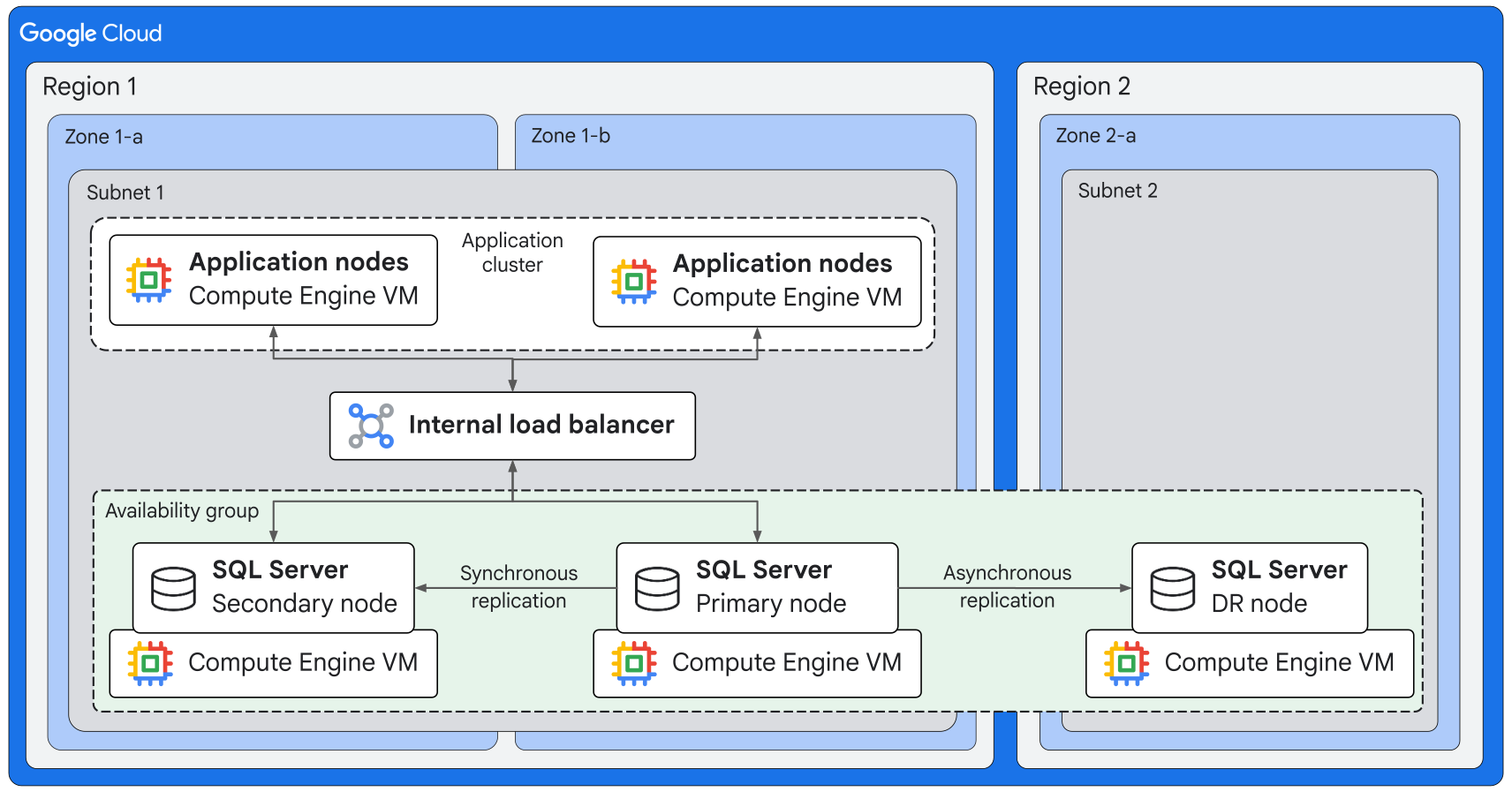
The preceding architecture shows an Always On availability group with three nodes in a Windows Server Failover Cluster (WSFC). Each node is a Compute Engine VM that runs SQL Server.
An Always On availability group is an industry-standard deployment pattern to achieve reliability objectives for mission-critical SQL Server databases. Always On availability groups provide local HA (failover within a region) and cross-region failover for DR. This deployment pattern is an enterprise-grade alternative to database mirroring. An Always On availability group provides the following benefits:
- No need for specialized infrastructure components: SQL Server manages replication across all of the configured database replicas.
- Highest SLA configuration for SQL Server: Less than one minute recovery time objective (RTO) and near-zero recovery point objective (RPO).
- Ability to offload read-only workloads to secondary replicas: Efficiently scale your deployment for analytics and other common use cases.
- Nodes in additional regions for DR: Deploy a primary replica and up to eight secondary replicas.
- Deployable on Windows and Linux: You can use a third-party tool like Pacemaker as the cluster manager for Linux deployments.
In the preceding architecture, the primary and secondary SQL Server nodes are in separate zones within a region. The DR node is in a geographically remote region. Data from the primary node is replicated synchronously to the secondary node and asynchronously to the DR node.
To distribute traffic from the application layer to the primary and secondary database nodes within a region, you can use one of the following approaches:
- An internal load balancer, as shown in the architecture diagram.
- A distributed network name (DNN) listener and a DNS server.
Products used
The architecture uses the following Google Cloud and Microsoft products and components.
Google Cloud products
- Compute Engine: A secure and customizable compute service that lets you create and run VMs on Google's infrastructure.
- Google Cloud Hyperdisk: A network storage service that you can use to provision and dynamically scale block storage volumes with configurable and predictable performance.
- Virtual Private Cloud (VPC): A virtual system that provides global, scalable networking functionality for your Google Cloud workloads. VPC includes VPC Network Peering, Private Service Connect, private services access, and Shared VPC.
- Cloud Load Balancing: A portfolio of high performance, scalable, global and regional load balancers.
Microsoft products and components
The following components are included or enabled on the SQL Server nodes:
- Windows Server (version 2019 or later).
- WSFC: A group of SQL Server instances that are installed across multiple Windows Server cluster nodes or across multiple subnets.
- Always On availability group: An enterprise-grade HA and DR alternative to database mirroring.
- Availability group listener: A virtual network name (VNN) that clients can use to access a database in a primary or secondary replica of an Always On availability group. Clients don't need to know the physical instance name of the replicas. Because the listener routes traffic, the client connection string doesn't need to be modified after a failover.
The following additional components are required for deploying this architecture:
- Active Directory Domain Services: A Windows Server directory service for managing resources that are common across a domain, such as computers, roles and users.
- DNS: A server that resolves domain names to corresponding IP addresses.
- Quorum witness: This can be a server message block (SMB) file share or a locally attached shared disk.
Design considerations
This section describes design factors, best practices, and design recommendations that you should consider when you use this reference architecture to develop a topology that meets your requirements for reliability, operational efficiency, security, cost, and performance.
Reliability
This section describes design considerations and recommendations to build and operate reliable infrastructure for your SQL Server deployment in Google Cloud.
Choose an HA and DR strategy
To deploy reliable SQL Server databases in Google Cloud, you need a strategy that combines the robust infrastructure of Google Cloud with the HA and DR capabilities of SQL Server. This combination shields your databases from failures ranging from zonal outages to regional disasters.
When you design the HA and DR strategy for your SQL Server deployment, consider the following factors:
- RPO: How much data loss is acceptable in the case of a failure?
- To achieve a low RPO (near-zero data loss), use an Always On availability group with synchronous replication.
- If you can tolerate some data loss, use one of the following approaches: asynchronous replication, Backup and DR Service, backup to a Cloud Storage bucket, or log shipping.
- RTO: After a failure, how quickly does the database need to be
operational again?
- To achieve a low RTO, use an Always On availability group.
- If some downtime is acceptable, restore the databases from backups or use log shipping with manual failover.
- Budget: Consider the trade-offs between cost and reliability.
- High cost but reliable: Use an Always On availability group with asynchronous replication to additional nodes in a DR region. Plan for redundant infrastructure and licenses.
- Medium cost: Implement asynchronous disk replication to another region or use Backup and DR Service.
- Low cost but high recovery time: Back up the databases to a multi-region Cloud Storage bucket.
- Types of failures: What types of failures do you need to handle?
- To handle hardware-level, instance-level, and zonal failures, you can use availability groups.
- To recover from site-wide outages or disasters, you need a geographically dispersed DR solution like log shipping or Always On availability groups with asynchronous database replication.
- Business criticality: How critical is the application to your business?
- Mission-critical applications need a strategy that provides the highest level of availability, minimum data loss, and fast recovery.
- For less critical systems, consider a strategy that assumes an acceptable downtime or some data loss.
Use the following decision-flow questionnaire to choose an optimal reliability strategy for your SQL Server database. The strategy options range from an Always On availability group that provides near-zero data loss to cost-efficient offsite backup.
- Do offsite backups meet your RPO and RTO?
- Yes: Use offsite backups or log shipping.
- No: Proceed to the next question.
- Is your RTO or RPO less than one minute?
- Yes (near-zero RPO): Use a SQL Server Always On availability group with a DR database replica.
- No: Proceed to the next question.
- What's your RTO?
- Less than five minutes: Use a SQL Server Always On availability group with an asynchronous disk replica.
- One hour or more: Proceed to the next question.
- What's your RPO?
- Less than two hours: Use a SQL Server Always On availability group with Backup and DR Service.
- Eight hours or more: Use offsite backups or log shipping.
Choose appropriate backup options
If your reliability strategy includes database backups, choose a backup method that meets your requirements. Google Cloud offers the following flexible and enterprise-ready options for backing up SQL Server databases:
- Direct backup to a Cloud Storage bucket:
Write database backups directly to Cloud Storage by using the
BACKUP TO
URL
command and the S3 connector in SQL Server (version 2022 or later). For production environments, you can use a hash-based message authentication code (HMAC) access key. This backup option provides cost-effective protection for databases and logs without the need for intermediate local storage. - Compute Engine instant snapshots: Capture simultaneous snapshots across multiple disks (for example, across Hyperdisk Balanced disks) in less than one second by using Transact-SQL (T-SQL) freeze-thaw operations combined with Compute Engine consistency groups. This option enables high-performance VM-level backups for multi-disk databases, and it has a near-zero write-freeze requirement.
- Backup and DR: Orchestrate application-consistent snapshots by using Microsoft VSS providers and consistency groups. This backup option is suitable when you need granular, multi-database point-in-time recovery (PITR) and the ability to use logs to roll databases forward.
- Google Cloud NetApp Volumes: Create instant snapshots and asynchronous backups to remote vaults by using the ONTAP storage engine. We recommend NetApp Volumes for latency-sensitive enterprise applications that need rapid ransomware mitigation and space-efficient clones.
For multi-cloud and hybrid deployments that need unified data-protection policies, you can choose a third-party backup product like Veeam, Veritas NetBackup, or Cohesity.
Operations
To help ensure high availability and optimal performance of SQL Server databases that are deployed on Compute Engine VMs, set up a comprehensive monitoring and alerting system by using Cloud Monitoring and Cloud Logging.
- Continuously track metrics for core resources such as CPU utilization and memory load. Set up baseline alerts to detect pressure on resources before queries begin to degrade.
- To prevent database-write halts, continuously observe disk-space utilization. Monitor the overall service status and set up alerts to get notifications when databases unexpectedly stop.
- For high-availability deployments, track any unplanned failovers and ensure complete visibility during automated disaster-recovery events.
- Besides system-level telemetry, Google Cloud provides an extensive suite of database-specific metrics such as active-user connection limits, replication lag, and transaction rates. Track these metrics to monitor the availability and performance of your SQL Server databases.
- To capture application-level errors like deadlocks, database corruption, and agent job failures directly from the SQL Server error logs, set up custom log-based alerts in Logging.
Security
This section describes design considerations and recommendations to design a SQL Server deployment in Google Cloud that meets your workload's security requirements.
Network security and isolation
- To prevent external exposure of the databases, deploy the SQL Server instances with private IP addresses within a VPC. Use private services access to route traffic internally. This approach helps to ensure that your database traffic never traverses the public internet.
- Restrict access to the databases further by configuring strict VPC firewall rules that allow traffic from only authorized application subnets or specific CIDR blocks.
- To protect data in transit against eavesdropping and interception, implement encrypted connectivity by enforcing TLS/SSL for all database connections.
Encryption and key control
- By default, Google Cloud uses Google-managed AES-256 keys to automatically encrypt all data at rest in database disks, temporary files, and backups. To help meet compliance environments, you can implement database-level encryption by using the transparent data encryption (TDE) capability of SQL Server.
- To help ensure data sovereignty, you can use customer-managed encryption keys (CMEK) in Cloud Key Management Service. CMEKs give you full cryptographic control. You manage key lifecycles, set automatic rotation schedules, and instantly revoke access to the database and its backups when needed.
Authentication and authorization
- Integrate your database with Microsoft Active Directory, or centralize identity management across your SQL Server databases and other Google Cloud resources by using Identity and Access Management (IAM).
- After identities are established, apply the principle of least privilege so that users and application service accounts have only the permissions that are necessary to perform their functions. Map identities to granular SQL Server database roles.
Cost optimization
This section provides guidance to optimize the cost of setting up and operating a SQL Server deployment that you build by using this reference architecture. Cost optimization helps to ensure that the deployment meets the reliability and performance requirements of your workload within your budget constraints.
Consider the following recommendations:
- Disable simultaneous multi-threading (SMT): By disabling SMT, you can reduce the core count that's reported for licensing purposes by 50%. By overprovisioning your CPUs by 20% and then disabling SMT, you can achieve substantial savings in licensing costs without sacrificing performance. For more information, see Set the number of threads per core.
- Use SQL Server Standard Edition: Depending on your HA and DR requirements, you can reduce licensing cost by using SQL Server Standard edition instead of Enterprise edition. For more information, see Editions and Supported Features of SQL Server.
- Optimize storage: Hyperdisk provides different disk options that you can choose from based on the needs of your SQL Server deployment. Hyperdisk Balanced provides a balance between cost and performance. You can scale throughput and input/output operations per second (IOPS) and independently, so that your infrastructure spend precisely matches the needs of the workload. For more information, see the Choose an appropriate storage disk type section.
Performance optimization
This section describes design considerations and recommendations for a SQL Server deployment that meets your performance requirements.
By deploying SQL Server on Compute Engine VMs, you get full control of the database and the underlying infrastructure. The performance of your workload depends on the infrastructure that you choose. To balance performance with cost and reliability, you need to make informed decisions about the VM machine family and the disk type for the database nodes.
Choose an appropriate VM machine family
The machine family that you choose for the Compute Engine VMs determines the processing power (vCPU) and memory (RAM) that's available for your SQL Server nodes. These resources affect the performance of your databases.
Choose a VM machine family that addresses your primary performance bottleneck. For example, if your SQL Server database is constantly at high CPU usage, choose a machine type from the compute-optimized machine family. If your SQL Server database shows slow reads from disk, choose a memory-optimized machine type.
The following table compares the VM machine families that Compute Engine provides, the primary use case for each machine family, and the performance impact on SQL Server databases:
| Machine family and series | Primary use case | Impact on SQL Server performance |
|---|---|---|
| General-purpose (N4 machine series) | Balanced price and performance | Use this machine family as a starting point for most workloads. The N4 machine series provides an optimal balance of CPU and memory for mixed-use databases, web applications, and development or test environments. |
| Compute-optimized (C3 or C4 machine series) | Highest performance per core | Use this machine family for CPU-bound workloads. For databases that perform complex queries, process large volumes of data, or serve a high number of online transaction processing (OLTP) operations, use the C3 and C4 machine series. Machine types from these series help to significantly reduce query execution time. |
| Memory-optimized (M3 or M4 machine series) | Large memory-to-vCPU ratios | This machine family is ideal for memory-intensive applications. SQL Server caches data and execution plans in memory, which provides higher performance than reading from disks. With very large databases or data warehouses for online analytical processing (OLAP), the queries typically scan large tables and datasets. For such use cases, higher memory helps to improve performance. |
For more information, see Machine families resource and comparison guide.
Choose an appropriate storage disk type
Disk performance is a significant factor for database responsiveness, which is critical for application performance. For the disk types that Google Cloud offers, performance capabilities are indicated by using the following metrics:
- IOPS: The number of read and write requests that a disk can handle per second. IOPS is critical for OLTP workloads that involve many small, random read and write operations like updating customer records or processing orders.
- Throughput: The total amount of data that can be moved to or from the disk per second. Throughput is essential for OLAP workloads that involve scanning large amounts of data, such as running reports, data warehousing, or performing backups.
The following table provides a comparison of the Google Cloud disk types that you can choose from:
| Disk type | Performance characteristics | Workload suitability |
|---|---|---|
SSD Persistent Disk (pd-ssd) |
Medium to high performance depending on the VM machine type and disk size | Workloads that require performance to scale with the size of the disk and the vCPUs of the VM. For more information, see Persistent Disk performance overview. |
| Hyperdisk Balanced | High performance with configurable IOPS and throughput | Production SQL Server data and log files. Hyperdisk Balanced lets you configure IOPS and throughput independently of disk size and based on the needs of the workload. |
| Hyperdisk Extreme | Very high performance with configurable IOPS | High-end, mission-critical OLTP workloads that need maximum IOPS and the lowest latency, such as large-scale financial or ecommerce systems. |
| Local SSD | Highest IOPS and throughput compared with the other disk types | Temporary data that doesn't need the durability of persistent disks. For
data such as the
tempdb
system database and the Windows page file, local SSDs provide the lowest
latency because they are physically attached to the VMs. |
Match the infrastructure to performance requirements
Choose VM machine types and disk types based on the performance requirements of your workload. The following table recommends infrastructure configurations for different workload scenarios:
| Scenario | Performance requirements | Recommended machine type and disk configuration |
|---|---|---|
| High-transaction ecommerce database for OLTP | High IOPS to handle thousands of small, concurrent reads and writes |
VM machine type: Choose a compute-optimized machine type (for example, from the C4 machine series) for efficient processing of transactions. Data and log disks: Use Hyperdisk Balanced disks. Provision a high level of IOPS to meet the transactional demand. Use separate disks for data and logs.
|
| Company data warehouse for OLAP | High throughput to scan and aggregate terabytes of data for reporting |
VM machine type: Choose a memory-optimized machine type (for example, from the M4 machine series), so that you can cache as much of the large dataset as possible. Data disk: Use Hyperdisk Balanced disks. Provision a high level of throughput to accelerate large data scans. |
| Development or staging server | Cost-effectiveness rather than peak performance | VM machine type: Choose a general-purpose machine type with a small machine size from the E2 or N4 machine series. Disks: Use Balanced Persistent Disk
( |
Deployment
To deploy this reference architecture, use one of the following resources:
- Infrastructure as code (IaC): Use a Terraform configuration to provision SQL Server clusters in Google Cloud. The configuration includes a PowerShell desired state configuration (DSC) and bash scripts to configure the necessary components. You can download and modify the code based on your configuration needs.
- Guided workflow: Deploy SQL Server in a single-node or clustered configuration by using Workload Manager.
- Tutorial: Follow step-by-step guidance to configure SQL Server Always On availability groups with synchronous commit using an internal load balancer.
What's next
- Learn about licensing and image options for SQL Server on Google Cloud.
- Review the disaster recovery planning guide.
- Learn about disaster recovery for Microsoft SQL Server.
- Learn how to deploy Microsoft SQL Server for multi-regional disaster recovery.
- Learn how to share disks between Compute Engine instances.
- For more reference architectures, diagrams, and best practices, explore the Cloud Architecture Center.
Contributors
Authors:
- Tom Niedzielak | Staff Systems Development Engineer
- Sung Baek | Software Engineer
Other contributor: Kumar Dhanagopal | Cross-Product Solution Developer