

This document describes a high-level architecture for an application that runs a data science workflow to automate complex data analytics and machine learning tasks.
This architecture uses datasets that are hosted in BigQuery or AlloyDB for PostgreSQL. The architecture is a multi-agent system that lets users run actions in natural language commands and it eliminates the need to write complex SQL or Python code.
The intended audience for this document includes architects, developers, and administrators who build and manage agentic AI applications. This architecture lets business and data teams analyze metrics across a wide range of industries, such as retail, finance, and manufacturing. The document assumes a foundational understanding of agentic AI systems. For information about how agents differ from non-agentic systems, see What is the difference between AI agents, AI assistants, and bots?
Architecture
The following diagram shows the architecture for a data science workflow agent.
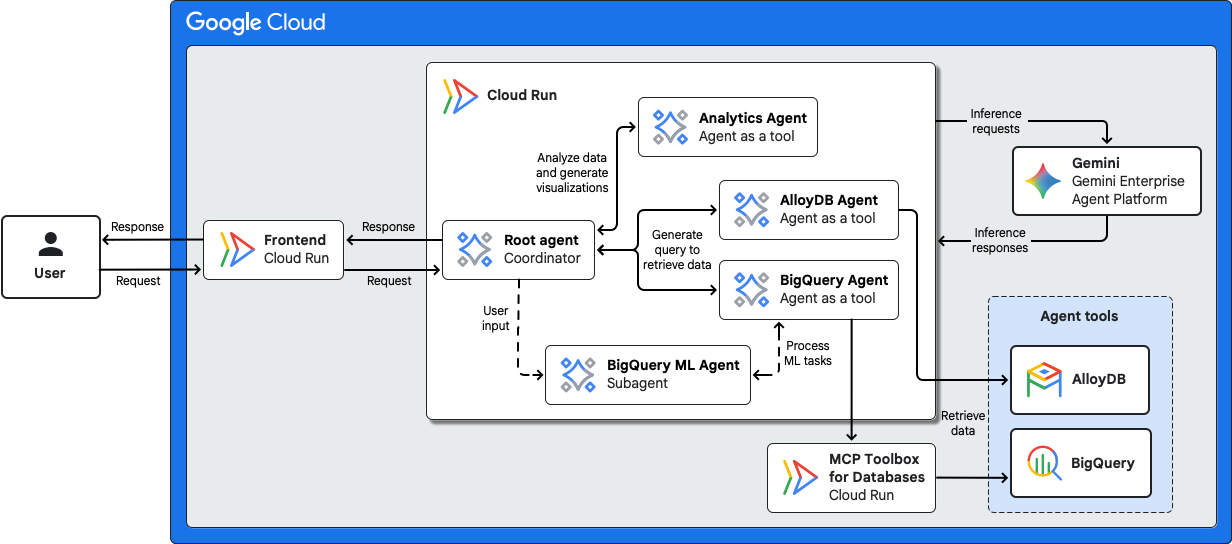
This architecture includes the following components:
- Frontend
- Users interact with the multi-agent system through a frontend, such as a chat interface, that runs as a serverless Cloud Run service.
- AI model and model runtimes
- For inference serving, the agents in this example architecture use the latest Gemini model on Gemini Enterprise Agent Platform.
- Agents
-
This architecture uses the following agents:
- Root agent: A coordinator agent that receives requests from the frontend service. The root agent interprets the user's request and it attempts to resolve a request itself. If the task requires specialized tools, the root agent delegates the request to the appropriate specialized agent.
- Specialized agent: The root agent invokes the following
specialized agents by using the
agent
as a tool feature:
- Analytics agent: A specialized agent for data analysis and visualization. The analytics agent uses the AI model to generate and run Python code to process datasets, create charts, and perform statistical analysis.
- AlloyDB for PostgreSQL agent: A specialized agent for interacting with data in AlloyDB for PostgreSQL. The agent uses the AI model to interpret the user's request and to generate SQL in the PostgreSQL dialect. The agent securely connects to the database using MCP Toolbox for Databases and then it runs the query to retrieve the requested data.
- BigQuery agent: A specialized agent for interacting with data in BigQuery. The agent uses the AI model to interpret the user's request and generate GoogleSQL queries. The agent connects to BigQuery using Agent Development Kit (ADK)'s built-in BigQuery tool and then it runs the query to retrieve the requested data.
- BigQuery ML agent: A subagent of the root agent that is dedicated to machine learning workflows. The agent interacts with BigQuery ML to manage the end-to-end ML lifecycle. The agent can create and train models, run evaluations, and generate predictions based on user requests.
- Agents runtime
- The AI agents in this architecture are deployed as serverless Cloud Run services .
- ADK
- ADK provides tools and a framework to develop, test, and deploy agents. ADK abstracts the complexity of agent creation and lets AI developers focus on the agent's logic and capabilities.
Products used
This example architecture uses the following Google Cloud and open-source products and tools:
- Cloud Run: A serverless compute platform that lets you run containers directly on top of Google's scalable infrastructure.
- Agent Development Kit (ADK): A set of tools and libraries to develop, test, and deploy AI agents.
- Gemini Enterprise Agent Platform: A comprehensive platform that lets you build, scale, govern, and optimize enterprise‑grade AI agents.
- Gemini: A family of multimodal AI models developed by Google.
- BigQuery: An enterprise data warehouse that helps you manage and analyze your data with built-in features like machine learning, geospatial analysis, and business intelligence.
- AlloyDB for PostgreSQL: A fully managed, PostgreSQL-compatible database service that's designed for your most demanding workloads, including hybrid transactional and analytical processing.
- MCP Toolbox for Databases: An open-source Model Context Protocol (MCP) server that lets AI agents securely connect to databases by managing database complexities like connection pooling, authentication, and observability.
Security considerations
To help address the unique security risks of AI agents, Google recommends an approach that combines deterministic security controls with dynamic, reasoning-based defenses:
- Human oversight: Incorporate a human-in-the-loop flow in business-critical systems so human supervisors can review outputs and approve, override, or pause agent actions.
- Agent Identity: Assign each agent a workload-bound identity to enforce least-privilege access control and centrally manage credentials for external tools.
- Agent Gateway: Enforce ingress and egress traffic governance, default-deny access policies, and inline prompt and tool inspection with Model Armor.
- Agent Registry: Verify that agents only connect to approved subagents and MCP tools.
The guidance in this section isn't exhaustive. For more information about design factors and best practices, and for recommendations about building and deploying a multi-agent AI system, see Multi-agent AI system in Google Cloud.
What's next
- (Video) Watch Agent Factory Podcast about AI agents for data engineering and data science.
- (Notebook) Use the data science agent in Colab Enterprise.
- Learn about how to host AI agents on Cloud Run.
- For an overview of architectural principles and recommendations that are specific to AI and ML workloads in Google Cloud, see the AI and ML perspective in the Well-Architected Framework.
- For more reference architectures, diagrams, and best practices, explore the Cloud Architecture Center.
Contributors
Author: Samantha He | Technical Writer
Other contributors:
- Amina Mansour | Tech Lead, Global Developer Relations & Strategic Content
- Kumar Dhanagopal | Cross-Product Solution Developer
- Megan O'Keefe | Developer Advocate
- Rachael Deacon-Smith | Developer Advocate
- Shir Meir Lador | Developer Relations Engineering Manager