

This document provides a high-level architecture for a multi-agent AI system deployed on Cloud Run that analyzes disparate multimodal data and produces a high-confidence classification. This approach cross-validates fragmented media by matching live data against historical ground truth to produce grounded, verifiable insights.
The intended audience for this document includes architects, developers, and administrators who build and manage AI infrastructure and applications in the cloud. This document assumes that you have a foundational understanding of AI agents and models. The document doesn't provide specific guidance for designing and coding AI agents.
The Deployment section of this document lists code samples that you can use to learn how to build and deploy multi-agent AI systems.
Architecture
The following diagram shows the architecture of the multi-agent AI system that uses a parallel agent design pattern to coordinate independent analysis on multimodal data to produce a single classification.
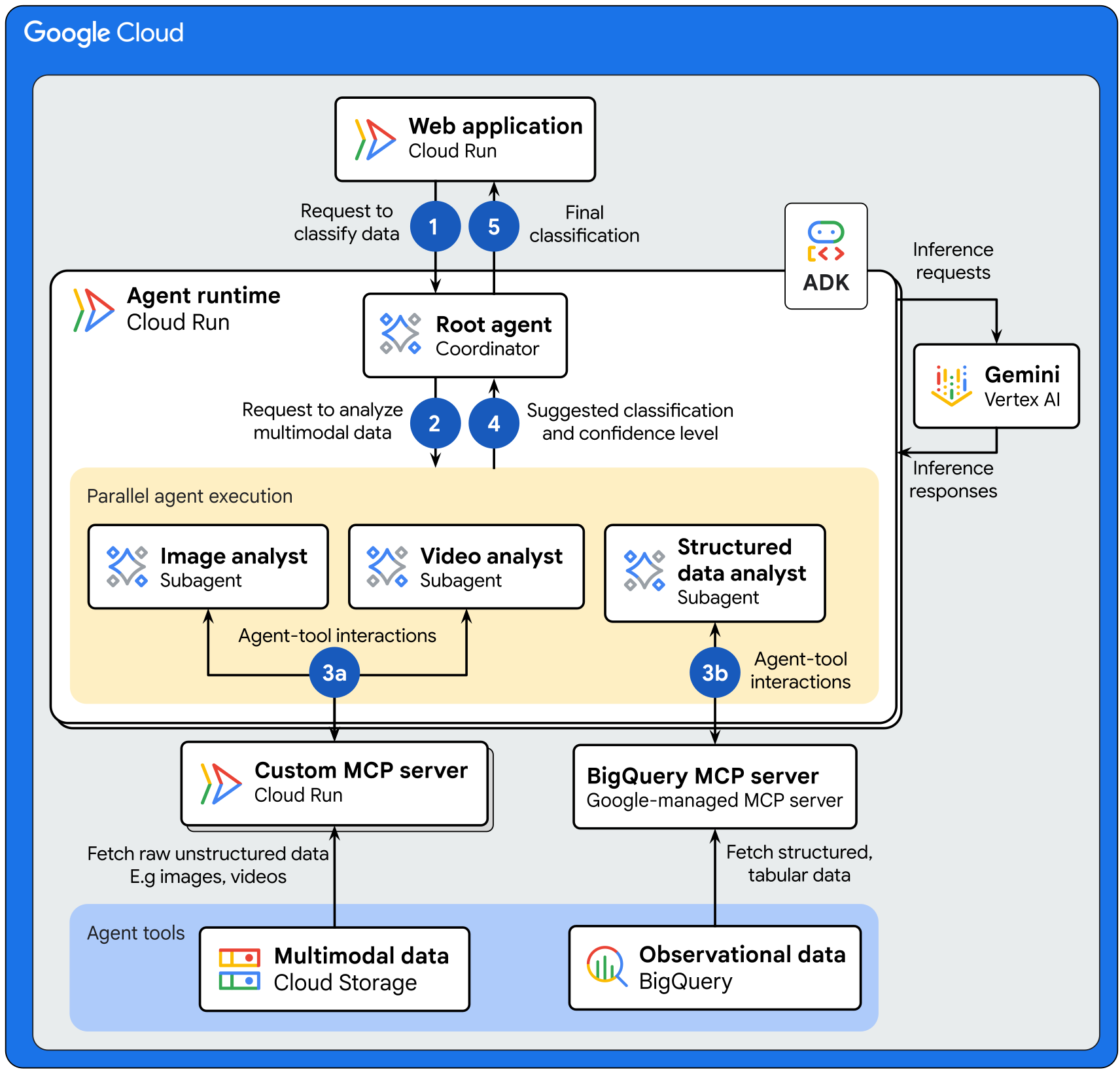
The architecture shows the following data flow:
- The web application sends a request to the root agent to analyze a set of multimodal data for classification. The root agent is a coordinator agent that receives requests and is deployed on a Cloud Run service.
- The root agent handles the request in the following way:
- The root agent initiates a
before_agent_callbackto gather environment configurations, validate user input, and save resource paths in a shared session state. All of the subagents can access the shared session state, which eliminates redundant calls to fetch state data and decreases overall latency. - The root agent uses Gemini on Gemini Enterprise Agent Platform to interpret the user's request and distribute tasks to specialized subagents that run in parallel.
- The root agent initiates a
- Each subagent is specialized in a particular domain and conducts the
following tasks independently:
- The image and video analyst subagents interact with custom Model Context
Protocol (MCP) servers to
perform the following actions:
- Fetch raw unstructured data stored in a Cloud Storage bucket.
- Send a request to Gemini to interpret the input data, classify the data, and calculate a confidence level.
- Gemini sends the suggested classification and confidence level back to the custom MCP server.
- The custom MCP server forwards the response back to the subagent.
- The structured data analyst subagent orchestrates analysis by completing
the following tasks:
- Interacts with the BigQuery MCP server to fetch structured, contextual data (such as historical records, event logs, or sensor readings) stored in a BigQuery dataset.
- The structured data analyst sends a request to Gemini to interpret the input data, classify the data, and calculate a confidence level.
- Gemini sends the suggested classification and confidence level back to the subagent.
- The image and video analyst subagents interact with custom Model Context
Protocol (MCP) servers to
perform the following actions:
- Each subagent sends the suggested classification and confidence level back to the root agent.
- The root agent uses Gemini to summarize the outputs
from the specialized subagents to produce a single, high-confidence
classification.
- If a majority of the classifications from the specialized subagents match, then the root agent sends the matched classification to the web application.
- If the subagents don't provide a matching classification, then the root agent selects the classification with the highest confidence level and sends it to the web application.
Products used
This reference architecture uses the following Google Cloud products and tools:
- Cloud Run: A serverless compute platform that lets you run containers directly on top of Google's scalable infrastructure.
- Gemini Enterprise Agent Platform: A comprehensive platform that lets you build, scale, govern, and optimize enterprise‑grade AI agents.
- Gemini: A family of multimodal AI models developed by Google.
- BigQuery: An enterprise data warehouse that helps you manage and analyze your data with built-in features like machine learning, geospatial analysis, and business intelligence.
- Cloud Storage: A low-cost, no-limit object store for diverse data types. Data can be accessed from within and outside Google Cloud, and it's replicated across locations for redundancy.
- Google Cloud MCP servers: Google-managed remote services that implement the Model Context Protocol (MCP) to provide AI applications access to Google and Google Cloud products and services.
- Model Context Protocol (MCP): An open-source standard for connecting AI applications to external systems.
- Agent Development Kit (ADK): A set of tools and libraries to develop, test, and deploy AI agents.
For information about how to select alternative components for your agentic AI system including framework, agent runtime, tools, memory, and design patterns, see Choose your agentic AI architecture components.
Use case
This architecture is designed for use cases that synthesize diverse multimodal data for classification and detection tasks. For enhanced accuracy and scalability, the architecture uses a multi-agent AI system instead of a monolithic single-agent approach. This design pattern provides focused instructions, avoids conflicting directives, enables smaller tool sets for faster decisions, and supports independent updates, which leads to more robust and sophisticated outcomes.
The following are examples of use cases for the architecture that's described in this document:
- Medical diagnosis: Provide comprehensive diagnostic assessments by deploying specialized agents to independently analyze medical images, patient symptoms, and lab results. The AI system summarizes these findings based on a determined confidence threshold to provide grounded, verifiable insights for clinicians.
- Fraud detection: Detect and flag potential fraud by deploying agents to independently analyze user behavior patterns and transaction data like scanned receipts and merchant invoices. By cross-referencing visual evidence from documents against digital network activity, the system identifies discrepancies and flags any transactions where a single agent identifies a suspicious indicator.
- Document processing: Automate the classification and extraction of information from documents by deploying specialized agents for Optical Character Recognition (OCR), document classification and data extraction. To support high-confidence processing, the AI system requires all agents to agree on the output.
- Quality Control: Classify product quality or detect anomalies by deploying specialized agents for visual inspection, sensor data analysis, and specification checking. The system determines a pass or fail based on a determined confidence threshold among the agents.
Design considerations
To implement this architecture for production, consider the following recommendations:
- Agent security: To limit an agent's ability to take dangerous actions, create an agent identity and then secure access to your MCP servers by using Identity and Access Management (IAM) attributes. By applying the principle of least privilege, you can help ensure that your agentic AI system performs expected behavior and prevents unintended read-write access to your production resources.
- Ingress security: To control access to the application, disable the default run.app URL of the frontend Cloud Run service and set up a regional external Application Load Balancer. In addition to load-balancing incoming traffic to the application, the load balancer handles SSL certificate management. For added protection, use Google Cloud Armor security policies to provide request filtering, DDoS protection, and rate limiting for the service.
- Container image security: To ensure that only authorized container images are deployed to Cloud Run, use Binary Authorization. To identify and mitigate security risks in the container images, automatically run vulnerability scans by using Artifact Analysis. For more information, see Container scanning overview.
- Cost-effective prompting: The length of your prompts (input) and the generated responses (output) directly affect performance and cost. Write prompts that are short, direct, and provide sufficient context. For more information, see the best practices for prompt design.
- Storage costs: To control storage costs, you can choose the Standard storage class and enable object lifecycle management and Autoclass. These features help you optimize costs by automatically moving or deleting data between storage classes based on your access patterns or rules that you set.
- Storage security: Cloud Storage supports two methods for controlling user access to your buckets and objects: IAM and access control lists (ACLs). In most cases, we recommend using IAM, which lets you grant permissions at the bucket and project levels. For more information, see Overview of access control.
- Resource allocation: Depending on your performance requirements, configure the memory limits and CPU limits to be allocated to the Cloud Run service. For more performance optimization guidance, see General Cloud Run development tips.
For information about design factors and best practices, and for recommendations about building and deploying a multi-agent AI system, see Multi-agent AI system in Google Cloud.
Deployment
To deploy a sample implementation of this architecture, try the Way Back Home Level 1 codelab.
What's next
- Learn how to host AI agents on Cloud Run.
- Learn how to build and deploy a remote MCP server on Cloud Run.
- Learn how to choose your agentic AI architecture components
- (Video) Watch the Agent Factory Podcast about building custom tools for agents.
- Explore learning resources to build and deploy enterprise-grade agents with Gemini Enterprise Agent Ready (GEAR).
- Explore more agentic AI architecture guides.
- For an overview of architectural principles and recommendations that are specific to AI and ML workloads in Google Cloud, see the AI and ML perspective in the Well-Architected Framework.
- For more reference architectures, diagrams, and best practices, explore the Cloud Architecture Center.
Contributors
Author: Samantha He | Technical Writer
Other contributors:
- Amina Mansour | Tech Lead, Global Developer Relations & Strategic Content
- Andrey Shakirov | Solutions Architect, Google Cloud
- Ayo Adedeji | Developer Relations Engineer
- Christina Lin | Developer Relations Engineer Manager
- Kumar Dhanagopal | Cross-Product Solution Developer
- Ryan Pei | Product Manager, Google Cloud