


Dokumen ini menjelaskan cara men-deploy OpenTelemetry Collector, mengonfigurasi
collector untuk menggunakan eksportir otlphttp dan
Telemetry (OTLP) API, serta menjalankan generator telemetri
untuk menulis metrik ke Cloud Monitoring. Anda kemudian dapat melihat metrik ini di Cloud Monitoring.
Jika menggunakan Google Kubernetes Engine, Anda dapat mengikuti Managed OpenTelemetry untuk GKE, bukan men-deploy dan mengonfigurasi OpenTelemetry Collector secara manual yang menggunakan Telemetry API.
Jika Anda menggunakan SDK untuk mengirim metrik dari aplikasi langsung ke Telemetry API, lihat Menggunakan SDK untuk mengirim metrik dari aplikasi guna mengetahui informasi dan contoh tambahan.
Anda juga dapat menggunakan OpenTelemetry Collector dan Telemetry API bersama dengan instrumentasi tanpa kode OpenTelemetry. Untuk mengetahui informasi selengkapnya, lihat Menggunakan instrumentasi tanpa kode OpenTelemetry untuk Java.
Sebelum memulai
Bagian ini menjelaskan cara menyiapkan lingkungan untuk men-deploy dan menggunakan collector.
Memilih atau membuat Google Cloud project
Pilih Google Cloud project untuk panduan ini. Jika Anda belum memiliki a Google Cloud project, buatlah:
- Sign in to your Google Cloud account. Jika Anda baru menggunakan Google Cloud, buat akun untuk mengevaluasi performa produk kami dalam skenario dunia nyata. Pelanggan baru juga mendapatkan kredit gratis senilai $300 untuk menjalankan, menguji, dan men-deploy workload.
-
In the Google Cloud console, on the project selector page, select or create a Google Cloud project.
Roles required to select or create a project
- Select a project: Selecting a project doesn't require a specific IAM role—you can select any project that you've been granted a role on.
-
Create a project: To create a project, you need the Project Creator role
(
roles/resourcemanager.projectCreator), which contains theresourcemanager.projects.createpermission. Learn how to grant roles.
-
Verify that billing is enabled for your Google Cloud project.
-
In the Google Cloud console, on the project selector page, select or create a Google Cloud project.
Roles required to select or create a project
- Select a project: Selecting a project doesn't require a specific IAM role—you can select any project that you've been granted a role on.
-
Create a project: To create a project, you need the Project Creator role
(
roles/resourcemanager.projectCreator), which contains theresourcemanager.projects.createpermission. Learn how to grant roles.
-
Verify that billing is enabled for your Google Cloud project.
Menginstal alat command line
Dokumen ini menggunakan alat command line berikut:
gcloudkubectl
Alat gcloud dan kubectl adalah bagian dari Google Cloud CLI. Untuk mengetahui informasi tentang cara menginstalnya, lihat
Mengelola komponen Google Cloud CLI. Untuk melihat komponen gcloud CLI yang telah Anda instal, jalankan perintah berikut:
gcloud components list
Untuk mengonfigurasi gcloud CLI agar dapat digunakan, jalankan perintah berikut:
gcloud auth login
gcloud config set project PROJECT_ID
Mengaktifkan API
Aktifkan Cloud Monitoring API dan Telemetry API di
Google Cloud project Anda. Perhatikan
Telemetry API, telemetry.googleapis.com; dokumen ini
mungkin adalah pertama kalinya Anda menemukan API ini.
Aktifkan API dengan menjalankan perintah berikut:
gcloud services enable monitoring.googleapis.com
gcloud services enable telemetry.googleapis.com
Membuat cluster
Buat cluster GKE.
Buat cluster Google Kubernetes Engine bernama
otlp-testdengan menjalankan perintah berikut:gcloud container clusters create-auto --location CLUSTER_LOCATION otlp-test --project PROJECT_IDSetelah cluster dibuat, hubungkan ke cluster dengan menjalankan perintah berikut:
gcloud container clusters get-credentials otlp-test --region CLUSTER_LOCATION --project PROJECT_ID
Mengotorisasi akun layanan Kubernetes
Perintah berikut memberikan peran Identity and Access Management (IAM) yang diperlukan ke akun layanan Kubernetes. Perintah ini mengasumsikan bahwa Anda menggunakan Workload Identity Federation for GKE:
export PROJECT_NUMBER=$(gcloud projects describe PROJECT_ID --format="value(projectNumber)")

gcloud projects add-iam-policy-binding projects/PROJECT_ID \
  --role=roles/logging.logWriter \
  --member=principal://iam.googleapis.com/projects/$PROJECT_NUMBER/locations/global/workloadIdentityPools/PROJECT_ID.svc.id.goog/subject/ns/opentelemetry/sa/opentelemetry-collector \
  --condition=None

gcloud projects add-iam-policy-binding projects/PROJECT_ID \
  --role=roles/monitoring.metricWriter \
  --member=principal://iam.googleapis.com/projects/$PROJECT_NUMBER/locations/global/workloadIdentityPools/PROJECT_ID.svc.id.goog/subject/ns/opentelemetry/sa/opentelemetry-collector \
  --condition=None

gcloud projects add-iam-policy-binding projects/PROJECT_ID \
  --role=roles/telemetry.tracesWriter \
  --member=principal://iam.googleapis.com/projects/$PROJECT_NUMBER/locations/global/workloadIdentityPools/PROJECT_ID.svc.id.goog/subject/ns/opentelemetry/sa/opentelemetry-collector \
  --condition=None
Jika akun layanan Anda memiliki format yang berbeda, Anda dapat menggunakan perintah di dokumentasi Google Cloud Managed Service for Prometheus untuk mengotorisasi akun layanan, dengan perubahan berikut:
- Ganti
gmp-test-sadengan nama akun layanan Anda. - Berikan peran yang ditampilkan dalam kumpulan perintah sebelumnya, bukan hanya peran
roles/monitoring.metricWriter.
Men-deploy OpenTelemetry Collector
Buat konfigurasi collector dengan membuat salinan file YAML berikut dan menempatkannya dalam file bernama collector.yaml. Anda juga dapat menemukan
konfigurasi berikut di GitHub di otlp-k8s-ingest
repositori.
Di salinan Anda, pastikan untuk mengganti kemunculan ${GOOGLE_CLOUD_PROJECT}
dengan project ID Anda, PROJECT_ID.
OTLP untuk metrik Prometheus hanya berfungsi saat menggunakan OpenTelemetry Collector versi 0.140.0 atau yang lebih baru.
Mengonfigurasi OpenTelemetry Collector yang di-deploy
Konfigurasi deployment collector dengan membuat resource Kubernetes.
Buat namespace
opentelemetrydan buat konfigurasi collector di namespace dengan menjalankan perintah berikut:kubectl create namespace opentelemetry kubectl create configmap collector-config -n opentelemetry --from-file=collector.yamlKonfigurasi collector dengan resource Kubernetes dengan menjalankan perintah berikut:
kubectl apply -f https://raw.githubusercontent.com/GoogleCloudPlatform/otlp-k8s-ingest/refs/heads/otlpmetric/k8s/base/2_rbac.yaml

kubectl apply -f https://raw.githubusercontent.com/GoogleCloudPlatform/otlp-k8s-ingest/refs/heads/otlpmetric/k8s/base/3_service.yaml

kubectl apply -f https://raw.githubusercontent.com/GoogleCloudPlatform/otlp-k8s-ingest/refs/heads/otlpmetric/k8s/base/4_deployment.yaml

kubectl apply -f https://raw.githubusercontent.com/GoogleCloudPlatform/otlp-k8s-ingest/refs/heads/otlpmetric/k8s/base/5_hpa.yaml
Tunggu hingga pod collector mencapai "Running" dan memiliki 1/1 container yang siap. Proses ini memerlukan waktu sekitar tiga menit di Autopilot, jika ini adalah workload pertama yang di-deploy. Untuk memeriksa pod, gunakan perintah berikut:
kubectl get po -n opentelemetry -wUntuk berhenti memantau status pod, masukkan Ctrl-C untuk menghentikan perintah.
Anda juga dapat memeriksa log collector untuk memastikan tidak ada error yang jelas:
kubectl logs -n opentelemetry deployment/opentelemetry-collector
Men-deploy generator telemetri
Anda dapat menguji konfigurasi menggunakan alat open source
telemetrygen. Aplikasi ini menghasilkan telemetri dan mengirimkannya ke collector.
Untuk men-deploy aplikasi
telemetrygendi namespaceopentelemetry-demo, jalankan perintah berikut:kubectl apply -f https://raw.githubusercontent.com/GoogleCloudPlatform/otlp-k8s-ingest/refs/heads/main/sample/app.yamlSetelah Anda membuat deployment, mungkin perlu waktu beberapa saat hingga pod dibuat dan mulai berjalan. Untuk memeriksa status pod, jalankan perintah berikut:
kubectl get po -n opentelemetry-demo -wUntuk berhenti memantau status pod, masukkan Ctrl-C untuk menghentikan perintah.
Membuat kueri metrik menggunakan Metrics Explorer
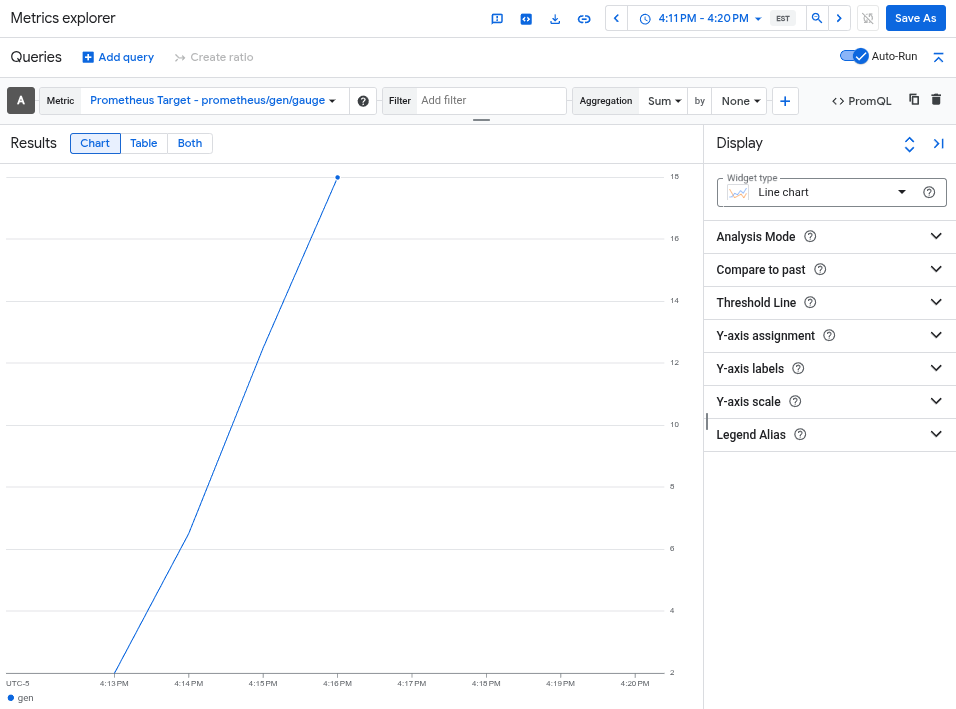
Alat telemetrygen menulis ke metrik yang disebut gen. Anda dapat membuat kueri metrik ini dari antarmuka pembuat kueri dan editor kueri PromQL di Metrics Explorer.
Di Google Cloud konsol, buka halaman leaderboard Metrics explorer:
Jika Anda menggunakan kotak penelusuran untuk menemukan halaman ini, pilih hasil yang subjudulnya adalah Monitoring.
- Jika Anda menggunakan antarmuka pembuat kueri Metrics Explorer, nama lengkap metriknya adalah
prometheus.googleapis.com/gen/gauge. - Jika Anda menggunakan editor kueri PromQL, Anda dapat membuat kueri metrik menggunakan nama
gen.
Gambar berikut menunjukkan diagram metrik gen di Metrics Explorer:
Menghapus cluster
Setelah memverifikasi deployment dengan membuat kueri metrik, Anda dapat menghapus cluster. Untuk menghapus cluster, jalankan perintah berikut:
gcloud container clusters delete --location CLUSTER_LOCATION otlp-test --project PROJECT_ID
Menggunakan collector berbasis OpenTelemetry lainnya
Anda mungkin dapat menggunakan collector berbasis OpenTelemetry lainnya untuk mengirim metrik OTLP ke Telemetry API, meskipun Google Cloud tidak memberikan dukungan pelanggan untuk collector berbasis OpenTelemetry non-standar.
Misalnya, Anda dapat mengirim metrik menggunakan
Grafana Alloy versi 1.16.0 atau
yang lebih baru dengan melakukan autentikasi menggunakan otelcol.auth.google
komponen
dan mengonfigurasinya dengan cara yang sama seperti OpenTelemetry Collector standar
menggunakan petunjuk dalam dokumen ini.
Langkah berikutnya
- Untuk mengetahui informasi tentang cara menggunakan OpenTelemetry Collector dan Telemetry API dengan instrumentasi tanpa kode OpenTelemetry, lihat Menggunakan instrumentasi tanpa kode OpenTelemetry untuk Java.
- Untuk mengetahui informasi tentang cara mengirim metrik dari aplikasi yang menggunakan SDK, lihat Menggunakan SDK untuk mengirim metrik dari aplikasi.
- Untuk mengetahui informasi tentang cara bermigrasi ke eksportir
otlphttpdari eksportir lain, lihat Bermigrasi ke eksportir OTLP. - Untuk mempelajari Telemetry API lebih lanjut, lihat Ringkasan Telemetry (OTLP) API.