


Halaman ini menjelaskan cara menggunakan Identity and Access Management (IAM) untuk mengontrol akses ke resource dalam aktivasi Security Command Center tingkat organisasi. Halaman ini relevan bagi Anda jika salah satu kondisi berikut berlaku:
- Security Command Center diaktifkan di tingkat organisasi, bukan di tingkat project.
- Security Command Center Standard sudah diaktifkan di tingkat organisasi. Selain itu, Anda telah mengaktifkan Security Command Center Premium di satu atau beberapa project.
Jika Anda mengaktifkan Security Command Center di tingkat project—bukan tingkat organisasi—lihat IAM untuk aktivasi tingkat project sebagai gantinya.
Dalam aktivasi Security Command Center tingkat organisasi, Anda dapat mengontrol akses ke resource di berbagai tingkat hierarki resource. Security Command Center menggunakan peran IAM untuk memungkinkan Anda mengontrol siapa yang dapat melakukan apa pada aset, temuan, dan sumber keamanan di lingkungan Security Command Center Anda. Anda memberikan peran kepada individu dan aplikasi, dan setiap peran memberikan izin tertentu.
Izin
Diperlukan untuk aktivasi
Untuk mengaktifkan Security Command Center, lihat salah satu hal berikut berdasarkan tingkat layanan Anda:
Mengaktifkan tingkat Security Command Center Standard untuk organisasi.
Mengaktifkan tingkat Security Command Center Premium untuk organisasi.
Diperlukan untuk administrasi dan penggunaan berkelanjutan
Bagian ini menjelaskan izin yang diperlukan untuk mengelola dan menggunakan Security Command Center Premium dan Standard. Untuk mengetahui informasi tentang Security Command Center Enterprise, lihat Mengonfigurasi izin untuk penggunaan Security Command Center Enterprise yang berkelanjutan.
Untuk mengubah konfigurasi organisasi, Anda memerlukan kedua peran berikut di tingkat organisasi:
-
Administrator Organisasi (
roles/resourcemanager.organizationAdmin) -
Admin Pusat Keamanan (
roles/securitycenter.admin)
Jika pengguna tidak memerlukan izin edit, pertimbangkan untuk memberikan peran penampil kepada mereka.
Untuk melihat semua aset, temuan, dan jalur serangan di Security Command Center, pengguna memerlukan peran
Penampil Admin Pusat Keamanan
(roles/securitycenter.adminViewer) di tingkat organisasi.
Untuk melihat setelan, pengguna memerlukan peran
Admin Pusat Keamanan (roles/securitycenter.admin) di tingkat organisasi.
Untuk membatasi akses ke folder dan project tertentu, jangan berikan semua peran di tingkat organisasi level. Sebagai gantinya, berikan peran berikut di tingkat folder atau project:
-
Penampil Aset Pusat Keamanan (
roles/securitycenter.assetsViewer) - Penampil Temuan Pusat Keamanan
(
roles/securitycenter.findingsViewer)
Setiap layanan deteksi mungkin memerlukan izin tambahan untuk mengaktifkan atau mengonfigurasinya. Lihat dokumentasi khusus untuk setiap layanan guna mengetahui informasi selengkapnya.
Peran tingkat organisasi
Saat peran IAM diterapkan di tingkat organisasi, project dan folder di bawah organisasi tersebut akan mewarisi binding perannya.
Gambar berikut mengilustrasikan hierarki resource Security Command Center umum dengan peran yang diberikan di tingkat organisasi.
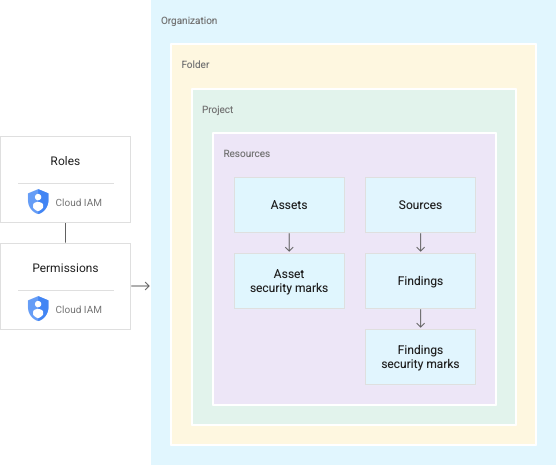
Peran IAM mencakup izin untuk melihat, mengedit, memperbarui, membuat, atau menghapus resource. Peran yang diberikan di tingkat organisasi di Security Command Center memungkinkan Anda melakukan tindakan yang ditentukan pada temuan, aset, dan sumber keamanan di seluruh organisasi. Misalnya, pengguna yang diberi peran
Editor Temuan Pusat Keamanan (roles/securitycenter.findingsEditor)
dapat melihat atau mengedit temuan yang dilampirkan ke resource mana pun di project atau folder mana pun di
organisasi Anda. Dengan struktur ini, Anda tidak perlu memberikan peran kepada pengguna di setiap folder atau project.
Untuk mengetahui petunjuk tentang cara mengelola peran dan izin, lihat Mengelola akses ke project, folder, dan organisasi.
Peran tingkat organisasi tidak cocok untuk semua kasus penggunaan, terutama untuk aplikasi sensitif atau standar kepatuhan yang memerlukan kontrol akses yang ketat. Untuk membuat kebijakan akses yang mendetail, Anda dapat memberikan peran di tingkat folder dan project.
Peran tingkat folder dan level project
Security Command Center memungkinkan Anda memberikan peran IAM Security Command Center untuk folder dan project tertentu, membuat beberapa tampilan, atau silo, dalam organisasi Anda. Anda memberikan izin akses dan edit yang berbeda kepada pengguna dan grup untuk folder dan project di seluruh organisasi Anda.
Dengan peran folder dan project, pengguna yang memiliki peran Security Command Center dapat mengelola aset dan temuan dalam project atau folder yang ditentukan. Misalnya, engineer keamanan dapat diberi akses terbatas untuk memilih folder dan project, sedangkan administrator keamanan dapat mengelola semua resource di tingkat organisasi.
Peran folder dan project memungkinkan izin Security Command Center diterapkan di tingkat hierarki resource organisasi yang lebih rendah, tetapi tidak mengubah hierarki. Gambar berikut mengilustrasikan pengguna dengan izin Security Command Center untuk mengakses temuan dalam project tertentu.
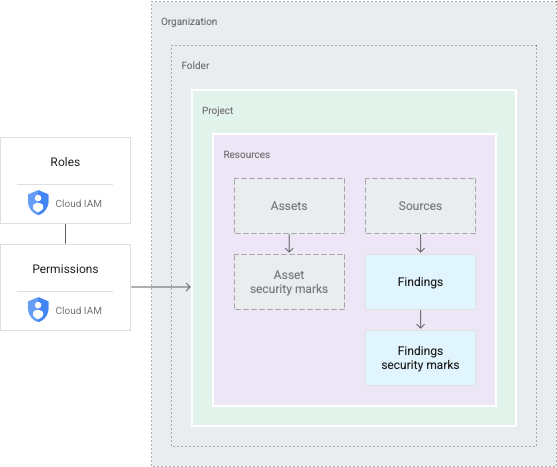
Pengguna dengan peran folder dan project melihat subset resource organisasi. Tindakan apa pun yang mereka lakukan terbatas pada cakupan yang sama. Misalnya, jika pengguna memiliki izin untuk folder, mereka dapat mengakses resource di project mana pun dalam folder tersebut. Izin untuk project memberi pengguna akses ke resource dalam project tersebut.
Untuk mengetahui petunjuk tentang cara mengelola peran dan izin, lihat Mengelola akses ke project, folder, dan organisasi.
Pembatasan peran
Dengan memberikan peran Security Command Center di tingkat folder atau project, administrator Security Command Center dapat melakukan hal berikut:
- Membatasi izin lihat atau edit Security Command Center ke folder dan project tertentu
- Memberikan izin lihat dan edit untuk grup aset atau temuan kepada pengguna atau tim tertentu
- Membatasi kemampuan untuk melihat atau mengedit detail temuan, termasuk pembaruan pada tanda keamanan dan status temuan, kepada individu atau grup yang memiliki akses ke temuan yang mendasarinya
- Mengontrol akses ke setelan Security Command Center, yang hanya dapat dilihat oleh individu dengan peran tingkat organisasi
Fungsi Security Command Center
Fungsi Security Command Center juga dibatasi berdasarkan izin lihat dan edit.
Di Google Cloud konsol, Security Command Center memungkinkan individu tanpa izin tingkat organisasi hanya memilih resource yang dapat mereka akses. Pilihannya memperbarui semua elemen antarmuka pengguna, termasuk aset, temuan, dan kontrol setelan. Pengguna melihat hak istimewa yang dilampirkan ke perannya dan apakah mereka dapat mengakses atau mengedit temuan dalam cakupan saat ini.
Security Command Center API dan Google Cloud CLI juga membatasi fungsi ke folder dan project yang ditentukan. Jika panggilan untuk mencantumkan atau mengelompokkan aset dan temuan dilakukan oleh pengguna yang diberi peran folder atau project, hanya temuan atau aset dalam cakupan tersebut yang akan ditampilkan.
Untuk aktivasi Security Command Center tingkat organisasi, panggilan untuk membuat atau memperbarui temuan dan notifikasi temuan hanya mendukung cakupan organisasi. Anda memerlukan peran tingkat organisasi untuk melakukan tugas ini.
Untuk melihat jalur serangan yang dihasilkan oleh simulasi jalur serangan, izin yang sesuai harus diberikan di tingkat organisasi dan tampilan konsol harus ditetapkan ke organisasi. Google Cloud
Resource induk untuk temuan
Biasanya, temuan dilampirkan ke resource, seperti mesin virtual (VM) atau firewall. Security Command Center melampirkan temuan ke container terdekat untuk resource yang menghasilkan temuan. Misalnya, jika VM menghasilkan temuan, temuan tersebut akan dilampirkan ke project yang berisi VM. Temuan yang tidak terhubung ke Google Cloud resource dilampirkan ke organisasi dan dapat dilihat oleh siapa saja yang memiliki izin Security Command Center tingkat organisasi.
Peran Security Command Center
Peran IAM berikut tersedia untuk Security Command Center. Anda dapat memberikan peran ini di tingkat organisasi, folder, atau project.
| Role | Permissions |
|---|---|
Security Center Admin( Admin(super user) access to security center Lowest-level resources where you can grant this role:
|
|
Security Center Admin Editor( Admin Read-write access to security center Lowest-level resources where you can grant this role:
|
|
Security Center Admin Viewer( Admin Read access to security center Lowest-level resources where you can grant this role:
|
|
Security Center Asset Security Marks Writer( Write access to asset security marks Lowest-level resources where you can grant this role:
|
|
Security Center Assets Discovery Runner( Run asset discovery access to assets Lowest-level resources where you can grant this role:
|
|
Security Center Assets Viewer( Read access to assets Lowest-level resources where you can grant this role:
|
|
Security Center Attack Paths Reader( Read access to security center attack paths |
|
Security Center BigQuery Exports Editor( Read-Write access to security center BigQuery Exports |
|
Security Center BigQuery Exports Viewer( Read access to security center BigQuery Exports |
|
Security Center Compliance Reports Viewer Beta( Read access to security center compliance reports |
|
Security Center Compliance Snapshots Viewer Beta( Read access to security center compliance snapshots |
|
Security Center External Systems Editor( Write access to security center external systems |
|
Security Center Finding Security Marks Writer( Write access to finding security marks Lowest-level resources where you can grant this role:
|
|
Security Center Findings Bulk Mute Editor( Ability to mute findings in bulk |
|
Security Center Findings Editor( Read-write access to findings Lowest-level resources where you can grant this role:
|
|
Security Center Findings Mute Setter( Set mute access to findings |
|
Security Center Findings State Setter( Set state access to findings Lowest-level resources where you can grant this role:
|
|
Security Center Findings Viewer( Read access to findings Lowest-level resources where you can grant this role:
|
|
Security Center Findings Workflow State Setter Beta( Set workflow state access to findings Lowest-level resources where you can grant this role:
|
|
Security Center Issues Editor( Write access to security center issues |
|
Security Center Issues Viewer( Read access to security center issues |
|
Security Center Mute Configurations Editor( Read-Write access to security center mute configurations |
|
Security Center Mute Configurations Viewer( Read access to security center mute configurations |
|
Security Center Notification Configurations Editor( Write access to notification configurations Lowest-level resources where you can grant this role:
|
|
Security Center Notification Configurations Viewer( Read access to notification configurations Lowest-level resources where you can grant this role:
|
|
Security Center Resource Value Configurations Editor( Read-Write access to security center resource value configurations |
|
Security Center Resource Value Configurations Viewer( Read access to security center resource value configurations |
|
Security Center Risk Reports Viewer( Read access to security center risk reports |
|
Security Health Analytics Custom Modules Tester( Test access to Security Health Analytics Custom Modules |
|
Security Center Settings Admin( Admin(super user) access to security center settings Lowest-level resources where you can grant this role:
|
|
Security Center Settings Editor( Read-Write access to security center settings Lowest-level resources where you can grant this role:
|
|
Security Center Settings Viewer( Read access to security center settings Lowest-level resources where you can grant this role:
|
|
Security Center Simulations Reader( Read access to security center simulations |
|
Security Center Sources Admin( Admin access to sources Lowest-level resources where you can grant this role:
|
|
Security Center Sources Editor( Read-write access to sources Lowest-level resources where you can grant this role:
|
|
Security Center Sources Viewer( Read access to sources Lowest-level resources where you can grant this role:
|
|
Security Center Valued Resources Reader( Read access to security center valued resources |
|
Service agent roles
Service agent roles should only be granted to service agents.
| Role | Permissions |
|---|---|
Attack Surface Management Scanner Service Agent( Gives Mandiant Attack Surface Management the ability to scan Cloud Platform resources. |
|
Security Center Automation Service Agent( Security Center automation service agent can configure GCP resources to enable security scanning. |
|
Security Center Control Service Agent( Security Center Control service agent can monitor and configure GCP resources and import security findings. |
|
Security Center Integration Executor Service Agent( Gives Security Center access to execute Integrations. |
|
Security Center Notification Service Agent( Security Center service agent can publish notifications to Pub/Sub topics. |
|
Security Health Analytics Service Agent( Security Health Analytics service agent can scan GCP resource metadata to find security vulnerabilities. |
|
Google Cloud Security Response Service Agent( Gives Playbook Runner permissions to execute all Google authored Playbooks. This role will keep evolving as we add more playbooks |
|
Security Center Service Agent( Security Center service agent can scan GCP resources and import security scans. |
|
Peran Security Command Center Management API
Peran IAM berikut tersedia untuk Security Command Center Management API. Anda dapat memberikan peran ini di tingkat organisasi, folder, atau project.
| Role | Permissions |
|---|---|
Security Center Management Admin( Full access to manage Cloud Security Command Center services and custom modules configuration. |
|
Security Center Management Editor( Editor role for Security Center Management |
|
Security Center Management Viewer( Readonly access to Cloud Security Command Center services and custom modules configuration. |
|
Security Center Management Custom Modules Editor( Full access to manage Cloud Security Command Center custom modules. |
|
Security Center Management Custom Modules Viewer( Readonly access to Cloud Security Command Center custom modules. |
|
Security Center Management Custom ETD Modules Editor( Full access to manage Cloud Security Command Center ETD custom modules. |
|
Security Center Management ETD Custom Modules Viewer( Readonly access to Cloud Security Command Center ETD custom modules. |
|
Security Center Management Services Editor( Full access to manage Cloud Security Command Center services configuration. |
|
Security Center Management Services Viewer( Readonly access to Cloud Security Command Center services configuration. |
|
Security Center Management Settings Editor( Full access to manage Cloud Security Command Center settings |
|
Security Center Management Settings Viewer( Readonly access to Cloud Security Command Center settings |
|
Security Center Management SHA Custom Modules Editor( Full access to manage Cloud Security Command Center SHA custom modules. |
|
Security Center Management SHA Custom Modules Viewer( Readonly access to Cloud Security Command Center SHA custom modules. |
|
Peran IAM di Compliance Manager
Berikut adalah daftar peran dan izin IAM yang tersedia untuk layanan Compliance Manager. Anda dapat memberikan peran ini di tingkat organisasi, folder, atau project.
| Role | Permissions |
|---|---|
Compliance Manager Admin( Full access to Compliance Manager resources. |
|
Compliance Manager Viewer( Readonly access to Compliance Manager resources. |
|
Service agent roles
Service agent roles should only be granted to service agents.
| Role | Permissions |
|---|---|
Cloud Security Compliance Service Agent( Gives CSC Service Account access to consumer resources. |
|
Peran Security Posture API
Peran IAM berikut tersedia untuk Security Posture API dan fitur validasi infrastruktur sebagai kode (IaC). Kecuali jika disebutkan, Anda dapat memberikan peran ini di tingkat organisasi, folder, atau project.
| Role | Permissions |
|---|---|
Security Posture Admin( Full access to Security Posture service APIs. Lowest-level resources where you can grant this role:
|
|
Security Posture Viewer( Read only access to all the SecurityPosture Service resources. |
|
Security Posture Deployer( Mutate and read permissions to the Posture Deployment resource. |
|
Security Posture Deployments Viewer( Read only access to the Posture Deployment resource. |
|
Security Posture Resource Editor( Mutate and read permissions to the Posture resource. |
|
Security Posture Resource Viewer( Read only access to the Posture resource. |
|
Security Posture Shift-Left Validator( Create access for Reports, e.g. IaC Validation Report. |
|
Peran IAM di Data Security Posture Management
Berikut adalah daftar peran dan izin IAM yang tersedia untuk layanan Data Security Posture Management (DSPM). Anda dapat memberikan peran ini di tingkat organisasi, folder, atau project.
| Role | Permissions |
|---|---|
Data Security Posture Management Admin( Full access to Data Security Posture Management resources. |
|
Data Security Posture Management Viewer( Readonly access to Data Security Posture Management resources. |
|
Service agent roles
Service agent roles should only be granted to service agents.
| Role | Permissions |
|---|---|
DSPM Service Agent( Gives DSPM Service Account access to consumer resources. |
|
Peran agen layanan
Agen layanan memungkinkan layanan mengakses resource Anda.
Setelah Anda mengaktifkan Security Command Center, agen layanan berikut akan dibuat untuk Anda:
service-org-ORGANIZATION_ID@security-center-api.iam.gserviceaccount.com.Agen layanan ini memerlukan peran IAM
roles/securitycenter.serviceAgent.service-org-ORGANIZATION_ID@gcp-sa-ktd-hpsa.iam.gserviceaccount.com.Agen layanan ini memerlukan peran IAM
roles/containerthreatdetection.serviceAgent.service-org-ORGANIZATION_ID@gcp-sa-csc-hpsa.iam.gserviceaccount.com(khusus tingkat Premium)Agen layanan ini memerlukan peran IAM
roles/cloudsecuritycompliance.serviceAgent.service-org-ORGANIZATION_ID@gcp-sa-dspm-hpsa.iam.gserviceaccount.com(khusus tingkat Premium)Agen layanan ini digunakan oleh Data Security Posture Management (DSPM) dan memerlukan peran IAM
roles/dspm.serviceAgent.
Selama proses aktivasi Security Command Center, Anda akan diminta untuk memberikan satu atau beberapa peran IAM yang diperlukan kepada setiap agen layanan. Memberikan peran kepada setiap agen layanan diperlukan agar Security Command Center dapat berfungsi.
Untuk melihat izin untuk setiap peran, lihat hal berikut:
Untuk memberikan peran, Anda harus memiliki peran roles/resourcemanager.organizationAdmin.
Jika Anda tidak memiliki peran roles/resourcemanager.organizationAdmin, administrator organisasi Anda dapat memberikan peran kepada agen layanan untuk Anda dengan perintah gcloud CLI berikut:
gcloud organizations add-iam-policy-binding ORGANIZATION_ID \
    --member="SERVICE_AGENT_NAME" \
    --role="IAM_ROLE"
Ganti kode berikut:
ORGANIZATION_ID: ID organisasi AndaSERVICE_AGENT_NAME: nama agen layanan yang Anda berikan perannya. Nama tersebut adalah salah satu nama agen layanan berikut:service-org-ORGANIZATION_ID@security-center-api.iam.gserviceaccount.comservice-org-ORGANIZATION_ID@gcp-sa-ktd-hpsa.iam.gserviceaccount.com
IAM_ROLE: peran yang diperlukan berikut yang sesuai dengan agen layanan yang ditentukan:roles/securitycenter.serviceAgentroles/containerthreatdetection.serviceAgent
Untuk mengetahui informasi selengkapnya tentang peran IAM, lihat memahami peran.
Peran Web Security Scanner
Peran IAM berikut tersedia untuk Web Security Scanner. Anda dapat memberikan peran ini di tingkat project.
| Role | Permissions |
|---|---|
Web Security Scanner Admin( Full access to all Web Security Scanner resources |
|
Web Security Scanner Editor( Full access to all Web Security Scanner resources Lowest-level resources where you can grant this role:
|
|
Web Security Scanner Viewer( Read access to all Web Security Scanner resources Lowest-level resources where you can grant this role:
|
|
Web Security Scanner Runner( Read access to Scan and ScanRun, plus the ability to start scans Lowest-level resources where you can grant this role:
|
|
Service agent roles
Service agent roles should only be granted to service agents.
| Role | Permissions |
|---|---|
Cloud Web Security Scanner Service Agent( Gives the Cloud Web Security Scanner service account access to compute engine details and app engine details. |
|