


本文說明如何在專案、批次工作負載或互動式工作階段或執行階段設定檔 (工作階段範本) 層級,為 Managed Service for Apache Spark 批次工作負載和互動式工作階段啟用資料歷程。
總覽
資料歷程是 Knowledge Catalog 的功能,可以追蹤資料在系統的移動情形,包括來源、傳遞目的地和採用的轉換作業。
Managed Service for Apache Spark 工作負載和工作階段會擷取歷程事件,並發布至 Knowledge Catalog Data Lineage API。Managed Service for Apache Spark 透過 OpenLineage 與 Data Lineage API 整合,並使用 OpenLineage Spark 外掛程式。
您可以透過 Knowledge Catalog,使用歷程圖和 Data Lineage API 存取歷程資訊。詳情請參閱「在 Knowledge Catalog 中查看歷程圖」。
可用性
資料歷程支援 BigQuery 和 Cloud Storage 資料來源,適用於支援的 Managed Service for Apache Spark 執行階段版本執行的工作負載和工作階段,但有下列例外狀況和限制:
- 資料歷程不適用於 SparkR 或 Spark 串流工作負載或工作階段。
事前準備
在 Google Cloud 控制台的專案選取器頁面中,選取要用於 Managed Service for Apache Spark 工作負載或工作階段的專案。
啟用 Data Lineage API。
即將推出的 Spark 資料歷程異動:請參閱 Managed Service for Apache Spark 版本資訊,瞭解異動公告。啟用 Data Lineage API 後,Spark 資料歷程會自動提供給專案、批次工作負載和互動式工作階段 (請參閱「控管服務的歷程擷取作業」),不需額外設定專案、批次工作負載或互動式工作階段。
必要的角色
如果批次工作負載使用預設的 Managed Service for Apache Spark 服務帳戶,則會具備 Managed Service for Apache Spark Worker 角色,其中包含資料歷程所需的權限。
不過,如果批次工作負載使用自訂服務帳戶啟用 資料歷程,則必須將下列段落列出的 其中一個角色,授予自訂服務帳戶,這些角色包含資料 歷程所需的權限。
如要取得在 Managed Service for Apache Spark 中使用資料歷程功能所需的權限,請要求管理員在批次工作負載自訂服務帳戶中,授予下列 IAM 角色:
-
授予下列其中一個角色:
- Managed Service for Apache Spark Worker (
roles/dataproc.worker) - 資料歷程編輯者 (
roles/datalineage.editor) - 資料歷程產生者 (
roles/datalineage.producer) - 資料歷程管理員 (
roles/datalineage.admin)
- Managed Service for Apache Spark Worker (
如要進一步瞭解如何授予角色,請參閱「管理專案、資料夾和組織的存取權」。
啟用 Spark 資料歷程
您可以為專案、批次工作負載或互動式工作階段啟用 Spark 資料歷程。
在專案層級啟用資料歷程
在專案層級啟用 Spark 資料歷程後,在批次工作負載或互動式工作階段中執行的後續 Spark 工作,都會啟用 Spark 資料歷程。
如要在專案中啟用 Spark 資料歷程,請設定下列自訂專案中繼資料:
| 鍵 | 值 |
|---|---|
DATAPROC_LINEAGE_ENABLED |
true |
如要停用專案的 Spark 資料歷程,請將 DATAPROC_LINEAGE_ENABLED 中繼資料設為 false。
為 Spark 批次工作負載啟用資料歷程
如要為批次工作負載啟用資料歷程,請在提交工作負載時,將 spark.dataproc.lineage.enabled 屬性設為 true。這項設定會覆寫專案層級的所有 Spark 資料歷程設定:如果專案層級停用 Spark 資料歷程,但批次工作負載啟用,則以批次工作負載設定為準。
提交 Spark 批次工作負載時,只要將 spark.dataproc.lineage.enabled 屬性設為 false,即可停用 Spark 資料歷程。
這個範例使用 gcloud CLI 提交已啟用 Spark 系列功能的批次lineage-example.py工作負載。
gcloud dataproc batches submit pyspark lineage-example.py \
    --region=REGION \
    --deps-bucket=gs://BUCKET \
    --properties=spark.dataproc.lineage.enabled=true
下列 lineage-example.py 程式碼會從公開 BigQuery 資料表讀取資料,然後將輸出內容寫入現有 BigQuery 資料集的新資料表。並使用 Cloud Storage bucket 做為暫時儲存空間。
#!/usr/bin/env python

from pyspark.sql import SparkSession
import sys

spark = SparkSession \
  .builder \
  .appName('LINEAGE_BQ_TO_BQ') \
  .getOrCreate()

source = 'bigquery-public-data:samples.shakespeare'
words = spark.read.format('bigquery') \
  .option('table', source) \
  .load()
words.createOrReplaceTempView('words')

word_count = spark.sql('SELECT word, SUM(word_count) AS word_count FROM words GROUP BY word')

destination_table = 'PROJECT_ID:DATASET.TABLE'
word_count.write.format('bigquery') \
  .option('table', destination_table) \
  .option('writeMethod', 'direct') \
  .save()
更改下列內容:
- REGION:執行工作負載的區域
- BUCKET:現有 Cloud Storage bucket 的名稱,用於儲存依附元件
- PROJECT_ID、DATASET 和 TABLE:專案 ID、現有 BigQuery 資料集的名稱,以及要在資料集中建立的新資料表名稱 (資料表不得存在)
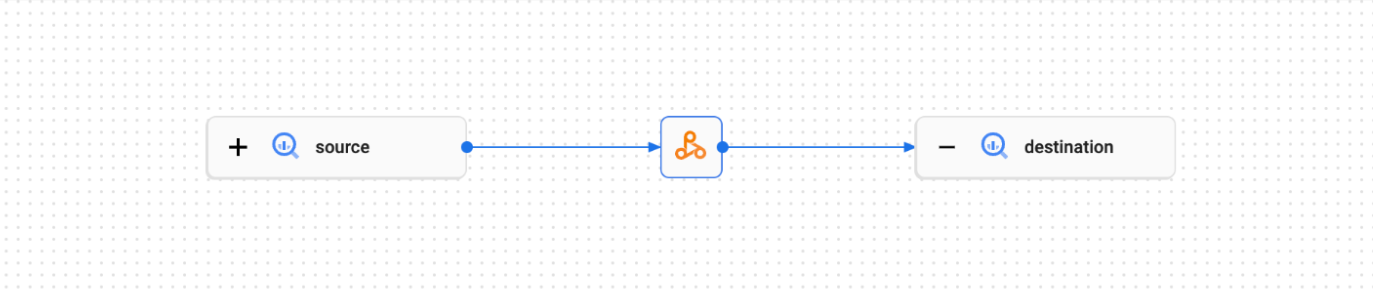
您可以在 Knowledge Catalog UI 中查看歷程圖。
在 Spark 互動式工作階段或執行階段設定檔 (工作階段範本) 啟用資料歷程
如要在 Spark 互動式工作階段或執行階段設定檔 (工作階段範本) 啟用資料歷程,請在建立工作階段或執行階段設定檔 (工作階段範本) 時,將 spark.dataproc.lineage.enabled 屬性設為 true。舉例來說,在 Google Cloud 控制台的「Create a runtime profile」(建立執行階段設定檔) 頁面中,編輯「Additional configuration」(其他設定) 下方的「Other customizations」(其他自訂項目),然後在「Spark properties」(Spark 屬性) 下方新增 spark.dataproc.lineage.enabled 屬性,並將值設為 true。這項設定會覆寫專案層級的所有 Spark 資料歷程設定:如果專案層級停用 Spark 資料歷程,但互動式工作階段啟用,則互動式工作階段設定優先。
建立互動式工作階段或執行階段設定檔 (工作階段範本) 時,只要將 spark.dataproc.lineage.enabled 屬性設為 false,即可停用 Spark 資料歷程。
下列 PySpark 筆記本程式碼會設定 Managed Service for Apache Spark 互動式工作階段,並啟用 Spark 資料歷程。接著,系統會建立 Spark Connect 工作階段,對公開 BigQuery Shakespeare 資料集執行字詞計數查詢,然後將輸出內容寫入現有 BigQuery 資料集的新資料表 (請參閱「在 BigQuery Studio 筆記本中建立 Spark 工作階段」)。
# Configure the Dataproc Serverless interactive session
# to enable Spark data lineage.
from google.cloud.dataproc_v1 import Session

session = Session()
session.runtime_config.properties["spark.dataproc.lineage.enabled"] = "true"

# Create the Spark Connect session.
from google.cloud.dataproc_spark_connect import DataprocSparkSession

spark = DataprocSparkSession.builder.dataprocSessionConfig(session).getOrCreate()

# Run a wordcount query on the public BigQuery Shakespeare dataset.
source = "bigquery-public-data:samples.shakespeare"
words = spark.read.format("bigquery").option("table", source).load()
words.createOrReplaceTempView('words')
word_count = spark.sql(
           'SELECT word, SUM(word_count) AS word_count FROM words GROUP BY word')

# Output the results to a BigQuery destination table.
destination_table = 'PROJECT_ID:DATASET.TABLE'
word_count.write.format('bigquery') \
  .option('table', destination_table) \
  .save()
更改下列內容:
- PROJECT_ID、DATASET 和 TABLE:專案 ID、現有 BigQuery 資料集的名稱,以及要在資料集中建立的新資料表名稱 (資料表不得存在)
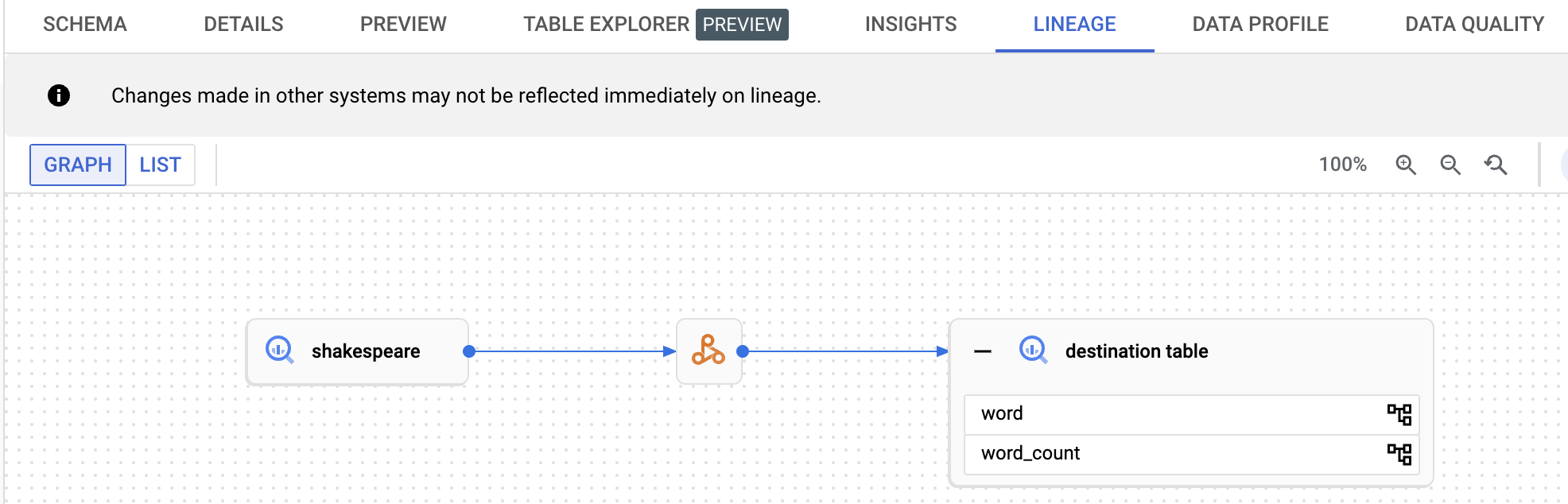
如要查看資料歷程圖,請在 BigQuery「Explorer」頁面的導覽窗格中,點選列出的目的地資料表名稱,然後在資料表詳細資料窗格中選取「歷程」分頁標籤。
在 Knowledge Catalog 中查看歷程
歷程圖會顯示專案資源與建立這些資源的程序之間的關係。您可以在 Google Cloud 控制台中查看資料歷程資訊,也可以從 Data Lineage API 擷取 JSON 格式的資料歷程資訊。
後續步驟
- 進一步瞭解資料歷程。
- 在互動式實驗室中試用資料歷程:在 Dataplex 中使用資料歷程和 OpenLineage 擷取及探索資料更新。