

You can use dynamic resource allocation (DRA) to allocate GPUs to your Google Kubernetes Engine (GKE) workloads. This document explains the fundamentals of DRA, how to use DRA in GKE, and the benefits of using DRA.
This document is intended for the following roles:
- Platform administrators who want to reduce the complexity and overhead of setting up infrastructure with specialized hardware devices.
- App operators and Data engineers who run workloads like AI/ML or high performance computing (HPC).
You should already be familiar with the following:
Introduction to DRA
DRA is a built-in Kubernetes feature that lets you flexibly request, allocate, and share hardware in your cluster among Pods and containers. DRA improves the experience of allocating attached hardware, such as accelerators, by letting device vendors and platform administrators declare classes of devices that can be requested and allocated. App operators can ask for specific device configurations within those classes and then request those configurations in their workloads. Kubernetes and GKE manage Pod scheduling, node assignments, and device allocation based on workload requests.
For example, a platform administrator might define a device class that has only NVIDIA A100 GPUs. App operators can then filter the devices in that device class based on workload requirements, such as filtering for a minimum of 80 GB of GPU memory. When the app operator deploys a workload that requests the filtered configuration, GKE places the Pods on nodes that meet the selected criteria. In this example, GKE finds nodes that have available A100 (80 GB) GPUs. The app operator doesn't need to select specific nodes or device configurations in the workload manifest.
Benefits of DRA
Without DRA, allocating hardware devices in Kubernetes relies on device plugins. To attach hardware resources to Pods by using device plugins, you use node labels to place Pods on specific nodes. Additionally, to dedicate an entire node's resources to a single Pod, you request the exact number of devices that's attached to the nodes.
With DRA, allocating devices to Pods is similar to allocating volumes for storage. You define classes of devices, request devices within those classes, and then assign those requested devices to workloads. DRA provides a significantly more extensible surface to filter for devices based on workload and business needs. The DRA approach of using expressions and templates to claim hardware and schedule Pods has the following benefits:
- Declarative device allocation: platform administrators can define device configurations for specific types of workloads or teams.
- Reduced cross-team complexity: when platform administrators provision nodes that have specialized hardware configurations, app operators don't need to know which nodes have specific configurations. Platform administrators don't need to label nodes or communicate information about specific nodes and devices to operators.
- Reduced developer complexity: Kubernetes schedules Pods based on the referenced device configuration. App operators don't need to select specific nodes in their workloads and don't need to ensure that each Pod requests exactly the number of devices that are attached to those nodes.
- Centralized infrastructure management: platform administrators can centrally define hardware configurations that meet specific business requirements. For example, a platform administrator could declare a high-performance configuration that has H100 GPUs alongside a small inference configuration that has Tesla T4 GPUs.
- Flexible hardware selection: you can use CEL expressions to filter for devices that have specific attributes. Using expressions provides the flexibility to filter for devices that are optimal for specific workloads.
When to use DRA
The primary reason to use DRA in GKE is the flexibility with which you can request devices for workloads. You can write a manifest once and deploy the workload to different clusters with different device types without needing to change the manifest. This flexibility is ideal for use cases like the following:
- Improve GPU obtainability: for workloads that need access to GPU hardware, you can use DRA to request any available GPU in the cluster instead of needing to specify a GPU model. If those workloads have specific GPU memory (VRAM) requirements, you can request any GPU in the cluster that has a minimum amount of memory. This type of flexible request expands the set of GPU nodes that a workload can run on, which reduces the risk of the workload not being scheduled because of unavailable resources.
Optimize node availability during scaling: the quantity of devices that a workload requires might change depending on factors like the type of device and its capabilities. You can use GKE ComputeClasses to place accelerated Pods on specific node pools based on device availability. You can then configure your Pods to claim the devices in any node that GKE places the Pods on.
Using DRA with ComputeClasses lets you minimize the risk of unscheduled workloads while also helping you to run workloads on optimized hardware.
Terminology
Open source Kubernetes and managed Kubernetes providers like GKE use the following core DRA API kinds:
- ResourceSlice
- A ResourceSlice lists one or more hardware devices in the cluster that nodes can access. For example, in a node that can access a single GPU, the ResourceSlice lists the GPU and the name of the node. The DRA device drivers on each node create ResourceSlices. The Kubernetes scheduler uses ResourceSlices to decide which devices to allocate to satisfy workload requests.
- DeviceClass
-
A DeviceClass defines a category of devices, such as GPUs, that are available to request for
workloads.
Some device drivers provide built-in DeviceClasses, such as the
gpu.nvidia.comDeviceClass for NVIDIA GPUs. Platform administrators can also create custom DeviceClasses that define specific device configurations. - ResourceClaim
-
A ResourceClaim lets a Pod or a user request hardware resources by filtering for certain parameters within a DeviceClass. When a workload references a ResourceClaim, Kubernetes assigns devices that match the specified parameters to that ResourceClaim.
For example, consider a scenario in which you create a ResourceClaim for one A100 (40 GB) GPU and then deploy a workload that selects that ResourceClaim. Kubernetes assigns an available A100 (40 GB) GPU to the ResourceClaim and schedules your Pod on a node that can access that GPU.
- ResourceClaimTemplate
-
A ResourceClaimTemplate defines a template that Pods can use to automatically create new per-Pod ResourceClaims. ResourceClaimTemplates are useful when you have multiple workloads that need access to similar device configurations, especially when using a workload controller like Deployments or StatefulSets.
App operators deploy ResourceClaimTemplates and then reference the templates in workloads. Kubernetes creates ResourceClaims for each Pod based on the specified template, allocates devices, and schedules the Pods. When the Pods terminate, Kubernetes cleans up the corresponding ResourceClaims.
For more information about DRA API kinds, see DRA terminology.
How DRA works
Using DRA in your clusters and workloads is a similar process to using StorageClasses, PersistentVolumeClaims, and PersistentVolumes to dynamically provision volumes for Pods.
The following diagram shows the steps that cluster administrators and app operators take to allocate devices by using DRA:
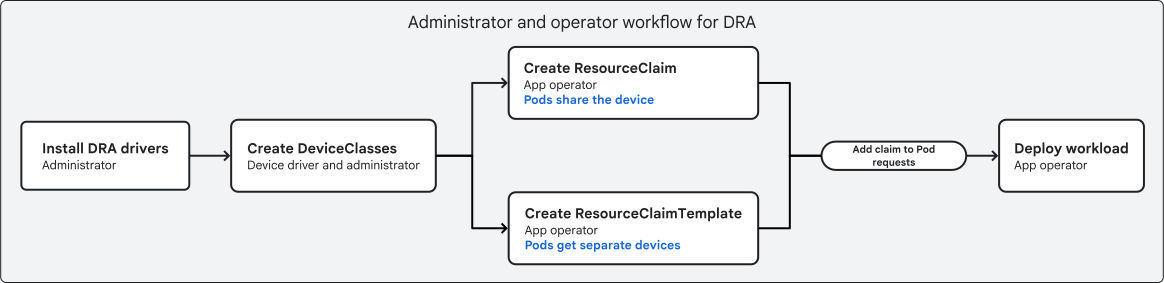
In this diagram, cluster administrators and app operators do the following:
- Cluster administrators install device drivers that support DRA in the nodes.
- Cluster administrators create DeviceClasses that filter for hardware that meets specific requirements, such as all GPUs with more than 40 GB of memory. Some devices might also include built-in DeviceClasses.
- Application operators create ResourceClaimTemplates or ResourceClaims
that request device configurations. The primary use case for each type of
claim is as follows:
- A ResourceClaim lets multiple Pods share access to the same device.
- A ResourceClaimTemplate lets multiple Pods access separate, similar devices by automatically generating per-Pod ResourceClaims.
- Application operators add the ResourceClaimTemplates or ResourceClaims to their workload manifests.
- Application operators deploy the workload.
When you deploy a workload that references a ResourceClaimTemplate or a ResourceClaim, Kubernetes performs the following scheduling steps:
- If the workload references a ResourceClaimTemplate, Kubernetes creates
a new
ResourceClaimobject for every instance of the workload (for example, every replica in a Deployment). - The Kubernetes scheduler uses the ResourceSlices in the cluster to allocate available, eligible devices to each Pod's ResourceClaim.
- The scheduler places each Pod on a node that has access to the devices that were allocated to the Pod's ResourceClaim.
- The
kubeleton the destination node calls the on-node DRA driver to attach the allocated hardware to the Pod to satisfy its resource request.
When to use ResourceClaims and ResourceClaimTemplates
You can use ResourceClaims or ResourceClaimTemplates to indicate to Kubernetes
that you want devices that meet specific requirements. When a ResourceClaim
is referenced in a Pod, Kubernetes allocates devices to the corresponding
ResourceClaim API resource in the Kubernetes API server. This allocation
happens regardless of whether you created the ResourceClaim or Kubernetes
created the ResourceClaim from a ResourceClaimTemplate.
If you create a ResourceClaim and then reference it in multiple Pods, all of those Pods can access the devices that Kubernetes allocates for that ResourceClaim. For example, this shared access might happen if you reference a specific ResourceClaim in a Deployment manifest that has multiple replicas. However, if the allocated devices aren't configured to be shared by multiple processes, this shared device access across Pods might result in unintended behavior.
To allocate separate devices to Pods, you can use a ResourceClaimTemplate, which is a template that Kubernetes uses to automatically create individual ResourceClaims. For example, if you reference a ResourceClaimTemplate in a Deployment that has multiple replicas, Kubernetes creates a separate ResourceClaim for each replicated Pod. As a result, each Pod gets its own allocated device instead of sharing access to the device with other Pods. These auto-generated ResourceClaims are bound to the lifetime of the corresponding Pod, and are deleted when the Pod terminates. If you have independent Pods that need access to similar device configurations, use a ResourceClaimTemplate to allocate devices to each Pod separately.
The following table describes some differences between manually creating ResourceClaims and letting Kubernetes create ResourceClaims from a ResourceClaimTemplate:
| Manually-created ResourceClaims | Automatically-created ResourceClaims |
|---|---|
| Managed by you | Managed by Kubernetes |
| Provides access to the same devices from multiple Pods | Provides access to devices from a single Pod |
| Exists in the cluster independently of Pods | Bound to the lifecycle of the corresponding Pod |
| Ideal for multiple workloads that need to share a specific device | Ideal for multiple workloads that need independent device access |
Comparison of DRA with manual device allocation
DRA makes allocating attached devices a similar experience to dynamically provisioning PersistentVolumes. Kubernetes also supports allocating devices by using device plugins. This method involves the following steps:
- A cluster administrator creates nodes that have attached devices, like GPUs.
- The cluster administrator communicates information about specific nodes and their attached devices to workload operators.
- A workload operator requests devices in the workload manifest as follows:
- Select a node that has the required device configuration, like
the GPU model, by using a
nodeSelectorfield. - Specify the exact number of devices for the containers to consume by
using the
resourcesfield in the Pod specification.
- Select a node that has the required device configuration, like
the GPU model, by using a
This manual allocation method requires the application operators and cluster administrators to communicate about which specific nodes or node pools have certain device configurations. They must coordinate workload requests to match the devices on the nodes, or the deployment fails. In comparison, DRA lets you use expressions to flexibly filter for devices based on attributes, and doesn't require workload operators to know the exact configuration of nodes in the cluster.
The following table compares DRA with device plugins:
| DRA | Manual allocation |
|---|---|
| Flexible device selection using CEL expressions | Specific node selection using selectors and resource requests |
| Scheduling decisions made by Kubernetes | Scheduling decisions made by the operator using node selectors |
| Device filtering is separate from workload creation | Device filtering has to be done in the workload manifest |
| Centralized device filtering and needs-based classes, managed by platform administrators | Isolated device filtering by application operators |
| App operators don't need to know node capacity, node label information, or the attached device models for each node | App operators must know which nodes have specific models and quantities of certain devices attached. |
DRA and infrastructure autoscaling
To automatically adjust the number of nodes within a Standard mode node pool, you use the cluster autoscaler. You can enable the cluster autoscaler in any manually created node pools, including node pools that have DRA drivers.
For node pools that use DRA, device utilization affects how the cluster autoscaler adds and removes nodes in a node pool. To calculate device utilization in a node pool, the cluster autoscaler considers the following factors:
- All of the devices in a resource pool must be local to a specific node. If a ResourceSlice has a pool of devices that are attached to multiple nodes, then the cluster autoscaler ignores those devices.
- All devices in the node pool are equally important and are identical.
- DRA devices are higher priority than CPU or memory. In DRA node pools, the cluster autoscaler ignores CPU and memory usage.
These factors might mean that you notice different scale-down behavior in DRA node pools than in other node pools.
Supported GKE devices for DRA
The following table describes the devices that you can allocate to workloads with DRA in GKE:
| Supported devices for DRA | |
|---|---|
| GPUs | Any GPU type that's available in your location. For more information, see GPU locations. |
| Network interfaces | Multiple types of network interfaces, such as RDMA-capable interfaces, by installing the managed DRANET driver. For more information, see Allocate network resources using GKE managed DRANET. |
Limitations
The following limitations apply when you use DRA:
Mode of operation: DRA is available only in Standard mode clusters.
Accelerator type: DRA in GKE supports only GPUs.
GPUs:
- You can't use time-sharing GPUs, multi-instance GPUs, or Multi-Process Service (MPS).
- For nodes that use the DRA GPU drivers, you can't use the managed NVIDIA Data Center GPU Manager (DCGM) metrics package to send DCGM metrics to Cloud Monitoring.
- The GPU driver for DRA is owned by NVIDIA, not by GKE. For more information, see the NVIDIA documentation.
Network interfaces: see Limitations in "Allocate network resources using GKE managed DRANET".
Autoscaling:
- For third-party DRA drivers that you install, the cluster
autoscaler requires your node pools to have at least one node. To
prevent node pools that use third-party drivers from scaling to zero
nodes, set the
minimum number of nodes
to at least
1. - The cluster autoscaler might not work correctly with third-party DRA drivers. If you do use third-party drivers, verify that the drivers publish information only for devices that are local to specific nodes.
- For DaemonSets in autoscaled node pools that use a static ResourceClaim
to share device access amongst Pods, autoscaling supports up to 128
DaemonSet Pods. To avoid this limitation, do one of the following:
- Prevent the node pool from scaling to more than 128 nodes by setting the maximum number of nodes.
- Use the
adminAccessfield (beta), in the ResourceClaim, which lets the DaemonSet access devices that are in use.
- If your Pods reference ResourceClaims and have a PriorityClass that sets
the preemption policy to
PreemptLowerPriority, then the autoscaling latency might increase.PreemptLowerPriorityis the default preemption policy for PriorityClass, so ensure that your PriorityClasses explicitly set thepreemptionPolicyfield toNever. For more information, see Non-preempting PriorityClass.
- For third-party DRA drivers that you install, the cluster
autoscaler requires your node pools to have at least one node. To
prevent node pools that use third-party drivers from scaling to zero
nodes, set the
minimum number of nodes
to at least
Recommended skills for understanding and using DRA
This section provides recommendations for platform administrators or app operators who want to use DRA to allocate devices to workloads. DRA significantly changes the method by which you request attached devices, both in GKE and in Kubernetes. To benefit from more advanced use cases, such as cross-device fallback or fine-grained device filtering and selection, consider the following guidance:
Learn CEL: with DRA, you can use CEL expressions to perform fine-grained device filtering in your resource allocation requests and DeviceClasses. The following resources might help you to learn CEL:
Learn about ComputeClasses in GKE: you can use ComputeClasses with DRA to meet business needs like provisioning Spot VMs to run inference workloads that request cost-efficient GPUs. The following resources help you to learn about ComputeClasses:
What's next
- Prepare your GKE infrastructure for DRA workloads
- Dynamically allocate devices to workloads with DRA