

By default, users access Gemini Enterprise interfaces for features such as agents, the assistant, and Gemini Notebook Enterprise, through the public internet. To meet organizational security requirements, you can establish private UI access using hybrid networking solutions like Cloud VPN or Cloud Interconnect.
To configure private connectivity to Gemini Enterprise, you must route Google Cloud API traffic through a Private Service Connect (PSC) endpoint. This allows users to access Gemini Enterprise interfaces through an internal IP address within your Virtual Private Cloud (VPC), avoiding the public internet.
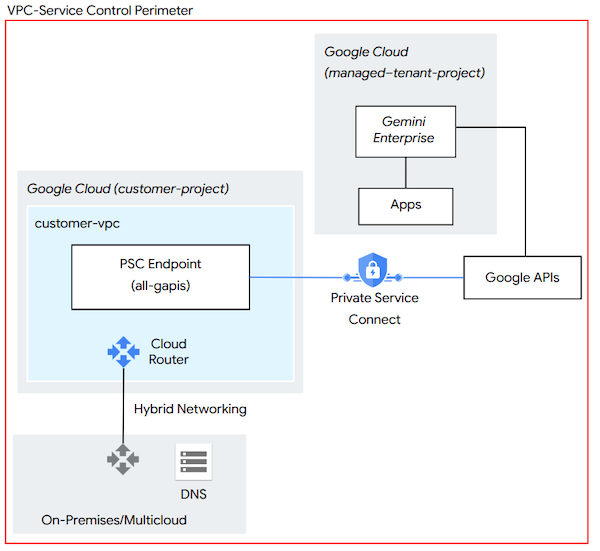
In this reference architecture, on-premises or multi-cloud users connect to a PSC endpoint, which enables access to Google APIs through a user-defined internal IP address within your Google Cloud Virtual Private Cloud. In addition, you must configure your internal DNS to resolve Gemini Enterprise domains to the IP address of the PSC endpoint.
Before you begin
Before configuring private UI access, ensure that you have the following:
A Google Cloud Virtual Private Cloud network connected to your on-premises network through Cloud Router, using Cloud VPN or Cloud Interconnect.
Permissions to create Private Service Connect endpoints and manage Cloud Router custom routes.
Configure Private Service Connect
Private and restricted virtual IP addresses (VIPs) used for
Private Google Access don't support private access to the
Gemini Enterprise UI. To ensure full functionality, you must resolve the Gemini Enterprise domains to a Private Service Connect endpoint
configured with the all-apis bundle.
Create a new PSC endpoint in the same Virtual Private Cloud as the Cloud Router used for hybrid networking.
Target the All Google APIs API bundle. This bundle provides access to most Google APIs, including
*.googleapis.comservice endpoints. The VPC-SC API bundle doesn't support all Gemini Enterprise domains.
Configure network routing
The PSC endpoint uses a /32 IP address that doesn't originate from a standard
VPC subnet and won't be visible from on-premises or multi-cloud networks. You
must configure your Cloud Router to advertise the IP address. For more
information about IP address requirements for Private Service Connect
endpoints, see
IP address requirements.
Identify the IP address that you assigned to your PSC endpoint.
In your Cloud Router configuration, create a custom route for the IP address. For more information about specifying custom advertised routes on a Cloud Router, see Advertise custom address ranges.
Update on-premises or multi-cloud firewalls to permit outbound traffic to the IP address.
Update DNS settings
Finally, update your DNS settings to resolve the Gemini Enterprise domains using the PSC endpoint. For more information, see Create DNS records by using default DNS names.
Configure internal on-premises or cloud network DNS records to resolve the following Gemini Enterprise domains to the internal IP address of the PSC endpoint:
content-discoveryengine.googleapis.comcontent-discoveryengine.mtls.googleapis.comcontent-eu-discoveryengine.googleapis.comcontent-eu-discoveryengine.mtls.googleapis.comcontent-global-discoveryengine.googleapis.comcontent-global-discoveryengine.mtls.googleapis.comcontent-us-discoveryengine.googleapis.comcontent-us-discoveryengine.mtls.googleapis.comcontent-webchannel-assistant-discoveryengine.googleapis.comcontent-us-webchannel-assistant-discoveryengine.googleapis.comcontent-eu-webchannel-assistant-discoveryengine.googleapis.comdiscoveryengine.googleapis.comdiscoveryengine.mtls.googleapis.comdiscoveryengine.clients6.google.comeu-discoveryengine.clients6.google.comus-discoveryengine.clients6.google.comeu-discoveryengine.googleapis.comeu-discoveryengine.mtls.googleapis.comglobal-discoveryengine.googleapis.comglobal-discoveryengine.mtls.googleapis.comus-discoveryengine.googleapis.comus-discoveryengine.mtls.googleapis.comvertexaisearch.cloud.google.comvertexaisearch.cloud.googlenotebooklm.cloud.google.comnotebooklm.cloud.googleauth.cloud.googlepayments.cloud.googleaccounts.googleapis.com
If your environment requires strict data exfiltration protection boundaries, configure the
discoveryengine.googleapis.comdomain to the VPC-SC bundle IP address.
About securing your app with VPC Service Controls
For advanced security, you can implement VPC Service Controls (VPC-SC) to prevent data exfiltration from managed services like Gemini Enterprise and BigQuery. Unlike Identity and Access Management, which controls who can access data, VPC-SC controls dictate where data can be accessed and moved.
If considering this approach, keep the following in mind:
While optional, using VPC Service Controls is a best practice for blocking public access to Google services exposed through
googleapis.com.Among other implications, services (such as
discoveryengine.googleapis.com) that are added to a VPC-SC perimeter are blocked to all public access, including access through the Google Cloud console.To allow access to protected services within a VPC-SC perimeter, admins must explicitly allow ingress, by using VPC-SC ingress rules or defining access levels using Access Context Manager.
For more information about securing your Gemini Enterprise app using VPC-SC and Access Context Manager, see Secure your app with VPC Service Controls.