

借助 Dialogflow CX 的自定义载荷,您可以增强虚拟客服体验,使其不再局限于纯文本聊天和互动。通过在 Dialogflow CX 中使用自定义载荷,您可以配置虚拟客服来呈现自定义回答和引用。
自定义响应消息类型
借助自定义响应,您可以呈现以下类型的消息:
文本
内嵌按钮
按钮卡滞
图片
视频
文档
复杂视图(一种或多种消息类型的组合)
借助自定义操作,虚拟助理可以执行以下操作:
升级到人工客服
计划转接给人工客服
结束支持会话
Contact Center AI 平台 (CCAI 平台) 载荷
在 Dialogflow CX 中用作自定义载荷。以下示例展示了使用 Dialogflow CX 时,webSDK 中响应的格式。
{
  "ujet": {
    "type": "text|inline_button|sticky_button|image|video|document|complex|action",
    "action": "escalation|end",
    "title": "message displayed on the top of the message",
    "escalation_reason": "by_consumer|by_virtual_agent",
    "session_variable": {
      "capture_target": "payload|end_user_response",
      "capture_key": "key",
      "payload": {
      }
    },
    "messages": [
      "Hello",
      "How can I help you?"
    ],
    "buttons": [
      {
        "title": "Button 1",
        "action": "quick_reply"
      },
      {
        "title": "Button 2",
        "action": "quick_reply"
      }
    ],
    "images": [
      {
        "url": "https://image.url",
        "text": "an alternate text for an image for when failed to load an image"
      },
      {
        "url": "https://image.url",
        "text": "an alternate text for an image"
      }
    ],
    "videos": [
      {
        "url": "https://video.url",
        "text": "an alternate text for a video for when failed to load a video"
      },
      {
        "url": "https://video.url",
        "text": "an alternate text for a video"
      }
    ],
    "documents": [
      {
        "url": "https://document.url",
        "text": "an alternate text for a document for when failed to load a document"
      },
      {
        "url": "https://document.url",
        "text": "an alternate text for a document"
      }
    ],
    "components": [
      {
        "type": "text",
        "messages": [
          "We need the information for helping you.",
          "Could you please choose the following options?"
        ]
      },
      {
        "type": "inline_button",
        "buttons": [
          {
            "title": "Button 1",
            "action": "quick_reply"
          },
          {
            "title": "Button 2",
            "action": "quick_reply"
          }
        ]
      },
      {
        "type": "image",
        "images": [
          {
            "url": "https://image.url",
            "text": "an alternate text for an image for when failed to load an image"
          },
          {
            "url": "https://image.url",
            "text": "an alternate text for an image"
          }
        ]
      }
    ]
  }
}
自定义载荷的 Chat 消息格式
与 CCAI 平台 SDK 搭配使用,以显示合适的界面。Dialogflow CX 自定义载荷格式也是如此,但根中没有“ujet”字段。
如需了解详情,请参阅以下示例。
示例
以下各部分包含可在 Dialogflow CX 中使用的载荷示例。
文本
{
  "ujet": {
    "type": "text",
    "messages": [
      "Hello",
      "How can I help you?"
    ]
  }
}
升级到同一队列
通过虚拟客服:
{
  "ujet": {
    "type": "action",
    "action": "escalation",
    "escalation_reason": "by_virtual_agent"
  }
}
按最终用户:
{
  "ujet": {
    "type": "action",
    "action": "escalation",
    "escalation_reason": "by_consumer"
  }
}
escalation_reason 值会在信息中心内报告。
升级到目标队列
通过虚拟客服:
{
  "ujet": {
    "type": "action",
    "action": "escalation",
    "escalation_reason": "by_virtual_agent",
    "menu_id": 100,
    "language": "ko"
  }
}
按最终用户:
{
  "ujet": {
      "type": "action",
      "action": "escalation",
      "escalation_reason": "by_consumer",
      "menu_id": 100,
      "language": "ko"
  }
}
escalation_reason 值会在信息中心内报告。
结束对话
{
  "ujet": {
    "type": "action",
    "action": "end"
  }
}
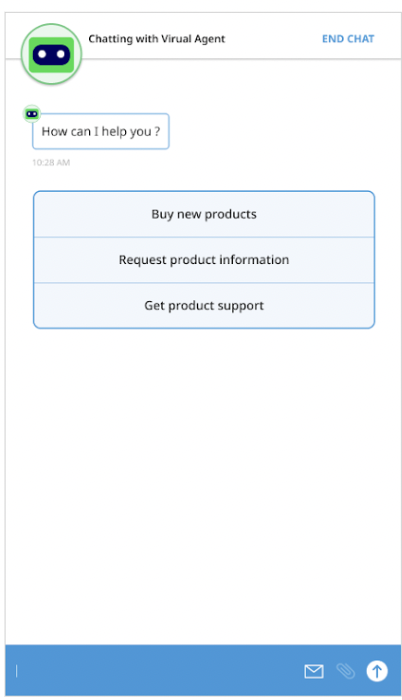
内嵌按钮
{
  "ujet": {
    "type": "inline_button",
    "title": "Select a menu",
    "buttons": [
      {
        "title": "Lorem Ipsum",
        "action": "quick_reply"
      },
      {
        "title": "Lorem Ipsum Dolor Sit Amet",
        "action": "escalation"
      }
    ]
  }
}
示例
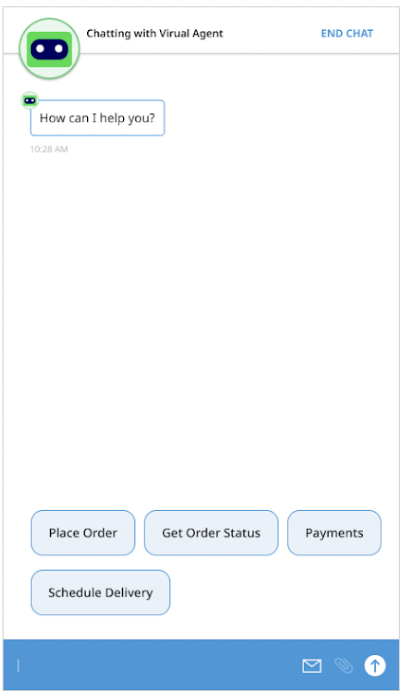
粘性按钮
{
  "ujet": {
    "type": "sticky_button",
    "title": "Select a menu",
    "buttons": [
      {
        "title": "Lorem Ipsum",
        "action": "quick_reply"
      },
      {
        "title": "Lorem Ipsum Dolor Sit Amet",
        "action": "escalation"
      }
    ]
  }
}
示例
图片视图
{
  "ujet": {
    "type": "image",
    "title": "Please see the following images",
    "images": [
      {
        "url": "https://image1.url",
        "text": "an alternate text for an image for when failed to load an image"
      },
      {
        "url": "https://image2.url",
        "text": "an alternate text for an image"
      }
    ]
  }
}
视频观看
{
  "ujet": {
    "type": "video",
    "title": "Please see the following videos",
    "videos": [
      {
        "url": "https://video1.url",
        "text": "an alternate text for a video for when failed to load a video"
      },
      {
        "url": "https://video2.url",
        "text": "an alternate text for a video"
      }
    ]
  }
}
文档查看
{
  "ujet": {
    "type": "document",
    "title": "Please see the following document",
    "documents": [
      {
        "url": "https://document1.url",
        "text": "an alternate text for a document for when failed to load a document"
      },
      {
        "url": "https://document2.url",
        "text": "an alternate text for a document"
      }
    ]
  }
}
复杂视图
{
  "ujet": {
    "type": "complex",
    "type": "Welcome to CCAI Platform world!",
    "components": [
      {
        "type": "text",
        "messages": [
          "We need the information for helping you.",
          "Could you please choose the following options?"
        ]
      },
      {
        "type": "inline_button",
        "buttons": [
          {
            "title": "Button 1",
            "action": "quick_reply"
          },
          {
            "title": "Button 2",
            "action": "quick_reply"
          }
        ]
      },
      {
        "type": "image",
        "images": [
          {
            "url": "https://image1.url",
            "text": "an alternate text for an image for when failed to load an image"
          },
          {
            "url": "https://image2.url",
            "text": "an alternate text for an image"
          }
        ]
      }
    ]
  }
}
在 Dialogflow 中配置自定义载荷
如需详细了解如何使用 Dialogflow 配置自定义载荷,请参阅自定义载荷响应 (Dialogflow ES) 或自定义载荷 (Dialogflow CX) 资源。
如需了解详情,请参阅用于自定义载荷处理的自定义会话变量。
虚拟客服转接到手机号码或 SIP 端点
您可以使用 Dialogflow CX 自定义载荷将通话从语音虚拟客服转接到您指定的手机号码或 SIP 端点。如果连接成功,虚拟客服会从通话中移除,通话会继续进行。如果连接失败,系统会播放转接失败消息,并继续与虚拟客服通话。
虚拟代理转接功能适用于内部和外部来电。虚拟客服转接在报告中记录为 Planned Transfers。
将通话转接到手机号码
如需将通话从虚拟客服转接到手机号码,请使用类似于以下代码示例的 Dialogflow CX 载荷:
{
  "ujet": {
    "type": "action",
    "action": "deflection",
    "deflection_type" : "phone",
    "phone_number": "+16509424879"
  }
}
将通话转移到 SIP 端点
如需以标准方式将通话从虚拟客服转接到 SIP 端点,请使用类似于以下代码示例的 Dialogflow CX 载荷:
{
  "ujet": {
    "type": "action",
    "action": "deflection",
    "deflection_type" : "sip",
    "sip_uri": "sip:1-999-123-4567@voip-provider.example.net"
  }
}
使用 SIP REFER 方法将通话转接到 SIP 端点
如需使用 SIP REFER 方法将通话从虚拟客服转移到 SIP 端点,请使用类似于以下代码示例的 Dialogflow CX 载荷。借助 SIP REFER 方法,您可以使用标头属性传递实用信息。
{
    "ujet": {
       "type": "action",
       "action": "deflection",
       "deflection_type" : "sip"
       "sip_uri": "sip:1-999-123-4567@voip-provider.example.net"
       "sip_refer": true
       "sip_parameters": {
       "x-header": "value",
       "x-header": "value"
       }
    }
}
用于处理自定义载荷的自定义会话变量
使用自定义会话变量捕获意图响应和最终用户响应中的值,然后收集所有这些值并将其作为注释上传到 CRM。如需了解详情,请参阅用于自定义会话变量的 Dialogflow 载荷。
从最终用户回答中捕获
Flow
CCAI 平台向 Dialogflow CX 请求响应。
Dialogflow CX 可能会通过 Fulfillment 回调到客户的服务器。
客户的服务器应在响应中填充 session_variable 字段。
Dialogflow CX 返回包含自定义载荷的响应,其中包括 capture_target =
end_user_response的session_variable字段最终用户发送消息。
CCAI 平台会保留在上一步中发送的最终用户消息。
当虚拟客服人员离开聊天会话时,CCAI 平台会将聊天会话中捕获的所有会话变量作为评论发布到 CRM。
自定义载荷格式
{
  "ujet": {
    "session_variable": {
      "capture_target": "end_user_response",
      "capture_key": "key"
    }
  }
}
虚拟客服发送自定义载荷后,紧随其后的下一条最终用户消息将作为会话变量捕获,其键为“key”。
从意图响应中捕获
Flow
CCAI 平台向 Dialogflow CX 请求响应。
Dialogflow CX 可能会通过履单回调客户的服务器。
客户的服务器应在响应中填充
session_variable字段。
Dialogflow CX 返回包含自定义载荷的响应,其中包括
capture_target = "payload"的session_variable字段。CCAI 平台服务器会保留步骤 2 中的
payload对象。
当虚拟客服人员离开聊天会话时,CCAI 平台会将聊天会话中捕获的所有会话变量作为评论发布到 CRM。
自定义载荷格式
{
  "ujet": {
    "session_variable": {
      "capture_target": "payload",
      "capture_type": [
        "comment",
        "agent"
      ],
      "payload": {
        "status": "STATUS",
        "order_id": "ORDER_ID",
        "personal_id": "PERSONAL_ID"
      },
        "invisible_to_agent": ["INVISIBLE_TO_AGENT"],
        "display_order_in_adapter": ["DISPLAY_ORDER_IN_ADAPTER"]
    }
  }
}
替换以下内容:
STATUS:订单的状态ORDER_ID:订单 IDPERSONAL_ID:最终用户的标识符。INVISIBLE_TO_AGENT:您不想在代理适配器中显示的属性的数组。例如,如果此处的值为"personal_id",则会阻止personal_id属性显示在代理适配器中。如需了解详情,请参阅显示虚拟客服会话变量。DISPLAY_ORDER_IN_ADAPTER:一个属性数组,用于指定会话变量应在代理适配器和 CRM 记录中显示的顺序。如需了解详情,请参阅显示虚拟客服会话变量。
在 CRM 中上传自定义会话变量
对于每个会话变量,服务器应在内部收集所有会话变量,然后在虚拟客服离开时将其上传到 CRM。
CRM 消息示例
    ###########################

    Chat ID: 1
    Menu ID: 1
    Chatbot Platform: Platform Name
    Chatbot Workflow: Workflow Name
    Virtual Agent: Virtual Agent Name

    ###########################

    Intent: Intent Captured from End User Response
    Captured At: 2020-06-25 14:54:19

    Captured Variables
    request: Cancel Order

    ###########################

    Intent: Intent Captured from Payload
    Captured At: 2020-06-25 14:58:23

    Captured Variables
    status: Cancelled
    order_id: #12345

    ###########################
示例情境
以下是一个对话示例,其中展示了虚拟客服与最终用户之间交换的不同步骤和消息。
第 1 步
虚拟代理的聊天消息
How can I help you?
(Button) Show my orders
(Button) Cancel an order
意图响应(自定义载荷)
{
  "ujet": {
    "type": "inline_button",
    "title": "How can I help you?",
    "buttons": [
      {
        "title": "Show my orders",
        "action": "quick_reply"
      },
      {
        "title": "Cancel an order",
        "action": "quick_reply"
      }
    ]
  }
}
捕获的会话变量
无
第 2 步
最终用户的聊天消息
Click "Cancel an order" button.
捕获的会话变量
无
第 3 步
虚拟代理的聊天消息
Can you provide the order id please
意图响应(自定义载荷)
{
  "ujet": {
    "type": "text"
    "messages": [
      "Can you provide the order id please"
    ],
    "session_variable": {
       "capture_target": "end_user_response",
       "capture_key": "order_id";
    }
  }
}
捕获的会话变量
无
第 4 步
最终用户的聊天消息
Order id is #12345
捕获的会话变量
order_id: "Order ID is #12345"
第 5 步
虚拟代理的聊天消息
Order #12345 is cancelled.
Do you need anything else?
意图响应(自定义载荷)
{
  "ujet": {
    "type": "text",
    "messages": [
      "Order #12345 is canceled.",
      "Do you need anything else?"
    ],
    "session_variable": {
      "capture_target": "payload",
      "capture_type": [
        "agent",
        "comment",
        "event"
      ],
      "payload": {
        "order_id": "#12345",
        "order_status": "cancelled"
      }
    }
  }
}
捕获的会话变量
order_id: "#12345",
order_status: canceled
第 6 步
最终用户的聊天消息
I would like to speak with a human agent.
第 7 步
虚拟代理的聊天消息
Virtual Agent is left from the conversation.
{
  "ujet": {
    "type": "escalation",
    "escalation_reason": "by_consumer"
  }
}
在 CRM 中上传自定义会话变量
在上一个场景中,CRM 工单上发布了以下评论:
    ---------------------------------

    Chat ID: 1
    Menu ID: 1
    Chatbot Platform: Platform Name
    Chatbot Workflow: Workflow Name
    Virtual Agent: Virtual Agent Name

    --------------------------------

    Intent: Intent Captured from End User Response
    Captured At: 2020-06-25 14:54:19

    Captured Variables
    order_id: Order id is #12345.

    --------------------------------

    Intent: Intent Captured from Payload
    Captured At: 2020-06-25 14:58:23

    Captured Variables
    order_id: #12345
    order_status: canceled

    --------------------------------
配置内容卡片
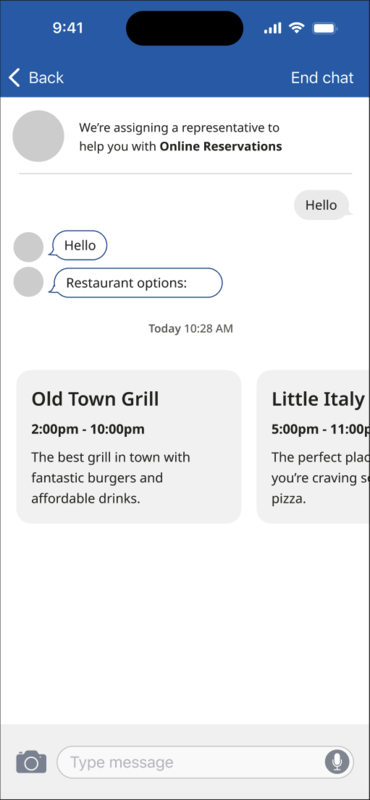
内容卡片以卡片格式显示简洁且具有视觉吸引力的内容,让最终用户能够更轻松地互动并获取所呈现的信息。您可以使用 Dialogflow CX 创建内容卡片,并使用标题、副标题和正文对其进行自定义。
以下示例使用内容卡片向最终用户显示餐厅选项:
内容卡片属性
| 属性名称 | 说明 | 必需 | 类型 |
|---|---|---|---|
title |
卡片的标题。 | 是 | 字符串 |
subtitle |
卡片的副标题。 | 否 | 字符串 |
body |
内容卡的说明。 | 是 | 字符串 |
link |
网页链接或深层链接。SDK 将使用操作系统功能来打开该文件。 | 否 | 字符串 |
event_params |
一个字典,包含有关点击事件的额外信息。SDK 将使用此值。 | 否 | 字典 |
Dialogflow CX 载荷:添加验证并接受内容卡类型
当通过聊天机器人服务器收到最终用户的消息时,特定的 Dialogflow CX 载荷类型会处理内容卡片。以下是 Dialogflow CX 载荷的示例:
{
  "ujet": {
    "type": "content_card",
    "cards": [
      {
        "title": "Title",
        "subtitle": "Subtitle",
        "body": "Body",
        "link": "app://page",
        "event_params": {} # for deep-link click event
      }
    ]
  }
}
有关 CRM 对话历史记录中的内容卡片的信息
系统会记录卡片标题信息,以便跟踪最终用户点击了哪些卡片。这些信息会记录在 CRM 聊天记录中。
在以下示例中,CRM 中的聊天消息历史记录显示了内容卡片互动。
[Chat message history]
ID: 305   |   2023-07-06     PDT
--------------------------------------------------
[01:13:32     VA]     Welcome message

[01:14:35     Mobile U.]     Content Cards:
- Title 1
- Title 2
日志内容卡片标题点击事件
如需记录最终用户点击内容卡片标题的时间,请使用以下格式捕获相应事件:
{end_user_name} clicked on the '{title}' card.
Note Title: Content Card click
Note Comment: 'John Doe' clicked on the 'See our new website' card.
使用最终用户事件 API 创建内容卡片点击事件
当最终用户点击内容卡的标题时,您可以通过向指定网址发送 POST 请求来记录此事件,同时发送所点击卡的标题。
API 端点: POST /api/v2/chat/:id/end_user_event
用法:创建内容卡片点击事件。
网址: /api/v2/chats/:id/end_user_event
方法: POST
参数:
| 字段 | 类型 | 说明 |
|---|---|---|
event |
对象 | |
event.name |
字符串 | 对于内容卡片点击事件,请使用 content_card_clicked。 |
event.payload |
对象 | |
event.payload.title |
字符串 | 输入所点击卡片的标题。 |
(可选)end_user_name |
字符串 | 输入最终用户的名称。如果留空,系统将从 CRM 中检索名称。 |
示例请求:
{
  "event": {
    "name": "content_card_clicked",
    "payload": {
      "title": "New our website"
    }
  },
  "end_user_name": "consumer 1"   ## optional
}
回答:Status: 202 Accepted