


本文說明 Cloud Billing 帳戶的角色和存取權限。
Cloud Billing 帳戶是在 Google Cloud 中設定,會累計及計算您在Google Cloud、Google Maps Platform、Firebase 和 Google AI Studio 中使用資源和服務的費用。Cloud Billing 帳戶會定義由誰支付使用費,然後將費用轉送至連結的 Google Payments 帳戶,以便支付帳單費用。Cloud Billing 和 Google 付款的存取權限是在兩個不同的系統中設定,具體取決於您要提供的存取權類型。
- Cloud Billing IAM 角色可讓您在資源上設定 Identity and Access Management (IAM) 政策,控管哪些使用者具備特定資源的管理和費用查看權限。特定 Cloud Billing 帳戶權限也會授予相關聯機構 Google 付款資料的存取權,可用於查看付款詳細資料、編輯付款方式和付款資料設定,以及手動付款。
- 在 Google 付款中心,您可以將使用者新增至您管理的任何 Google 付款機構資料,並根據付款使用者的需求授予不同層級的存取權。您也可以設定使用者的電子郵件接收設定,以便接收帳單和付款電子郵件。
| Cloud Billing 權限 | Google 付款設定和權限 |
|---|---|
Cloud Billing 帳戶的存取權限是透過 IAM 角色管理。某些 Cloud Billing 帳戶權限也會授予相關聯 Google 付款資料的存取權,可用於查看付款詳細資料、編輯付款方式和付款資料設定,以及手動付款。您可以設定帳單帳戶權限,讓使用者完成下列工作:
|
Google 付款資料的存取權限是在 Google 付款設定中管理。您可以設定 Google 付款權限,讓使用者執行下列操作:
使用者只要具備 Google 付款權限,就能直接在 Google 付款中心存取及管理付款資料和付款帳戶,不必另外取得 Cloud Billing 帳戶權限。 如要全面管理 Cloud Billing 控制台中的付款資料和付款帳戶,使用者必須具備 Cloud Billing 權限和 Google 付款權限。舉例來說,如果使用者在 Cloud Billing 帳戶中具備帳單帳戶檢視者角色,並在相關聯的 Google 付款資料中獲派具備所有權限的管理員角色,就能直接透過 Cloud Billing 控制台完整管理 Google 付款資料和帳戶。 |
Cloud Billing 帳單存取權
如要授予或限制 Cloud Billing 的存取權,您可以在組織層級、Cloud Billing 帳戶層級或專案層級設定 IAM 政策。 Google Cloud 資源會繼承其父節點的 IAM 政策,也就是說,您可以在組織層級設定政策,將其套用至組織中的所有 Cloud Billing 帳戶、專案和資源。
您可以在 Cloud Billing 帳戶或專案層級設定存取權限,控管不同使用者或角色的檢視權限。
如要授予使用者權限,讓他們查看 Cloud Billing 帳戶下「所有」專案的費用,請授予使用者查看 Cloud Billing 帳戶費用的權限 (billing.accounts.getSpendingInformation)。如要授予使用者權限,讓他們查看「特定」專案的費用,請授予使用者個別專案的檢視權限 (billing.resourceCosts.get)。
IAM 中的 Cloud Billing 角色總覽
您不會直接授予使用者權限,而是授予「角色」,其中包含一或多個權限。
您可以將一或多個角色授予同一位使用者或同一項資源。
下列預先定義的 Cloud Billing IAM 角色可讓您使用存取控管功能,強制分散權責:
| 角色 | 目的 | 層級 | 用途 |
|---|---|---|---|
|
帳單帳戶建立者 ( roles/billing.creator) |
建立新的自助式 (線上) 帳單帳戶。 | 組織 | 這個角色可用於初始帳單設定,或允許建立其他帳單帳戶。 使用者必須具備這個角色,才能使用公司身分以信用卡註冊 Google Cloud 。 提示:盡量減少具備這個角色的使用者人數,有助於防止組織內未追蹤的雲端支出增加。 |
|
帳單帳戶管理員 ( roles/billing.admin)
|
管理帳單帳戶 (但並非建立帳單帳戶)。 | 機構或帳單帳戶。 | 這是帳單帳戶的擁有者角色。管理員可以新增及編輯付款方式、更新付款資料設定檔資訊 (包括郵寄地址)、設定帳單匯出作業、查看費用資訊、手動付款、連結及取消連結專案,以及管理帳單帳戶的其他使用者角色。根據預設,建立 Cloud Billing 帳戶的使用者就是該帳戶的帳單帳戶管理員。 |
|
帳單帳戶費用管理員 ( roles/billing.costsManager) |
管理預算,以及查看和匯出帳單帳戶的費用資訊 (但不包括定價資訊)。 | 機構或帳單帳戶。 | 建立、編輯及刪除預算、查看帳單帳戶已計費用資訊和交易,以及管理將帳單已計費用資料匯出至 BigQuery 的作業。不具備匯出定價資料,或在「定價」頁面查看自訂定價的權限。無法連結或取消連結專案,也無法管理帳單帳戶的屬性。 |
|
帳單帳戶檢視者 ( roles/billing.viewer) |
檢視帳單帳戶的費用資訊與交易。 | 機構或帳單帳戶。 | 帳單帳戶檢視者存取權通常會授予財務團隊。具備這項角色,即可讀取費用和付款資訊,但無法連結或取消連結專案,也無法管理帳單帳戶的屬性。 |
|
專案已計費用管理員 ( roles/billing.projectCostsManager) |
查看帳單帳戶費用資訊,範圍僅限專案。 | 機構或帳單帳戶。 | 如果與 專案的費用查看權限一併授予, 專案帳單費用管理員就能存取帳單資訊,不過帳單資訊範圍僅限於 使用者可以存取費用資料的專案。專案層級的帳單資訊包括報表、FinOps 中心、預算和快訊,以及異常狀況。 |
|
帳單帳戶使用者 ( roles/billing.user) |
將專案與帳單帳戶連結。 | 機構或帳單帳戶。 | 這個角色的權限非常有限,因此您可以廣泛授予。如果與專案建立者角色一併授予,使用者就能建立新專案,並連結至已授予帳單帳戶使用者角色的帳單帳戶。或者,如果與「專案帳單管理員」角色一併授予,這兩個角色可讓使用者在授予「帳單帳戶使用者」角色的帳單帳戶中連結及取消連結專案。 |
|
專案帳單管理員 ( roles/billing.projectManager)
|
將專案連結至帳單帳戶,或取消連結。 | 機構、資料夾或專案。 | 如果同時授予「專案帳單管理員」和「帳單帳戶使用者」角色,使用者就能將專案連結至帳單帳戶,但不會獲得任何資源權限。專案擁有者可以使用這個角色,讓其他人管理專案的帳單,而不必授予資源存取權。 |
下表列出預先定義 IAM Billing 角色的詳細資料,包括各角色內含的權限。
| Role | Permissions |
|---|---|
Billing Account Administrator( Provides access to see and manage all aspects of billing accounts. Lowest-level resources where you can grant this role:
|
|
Project Billing Manager( When granted in conjunction with the Billing Account User role, provides access to assign a project's billing account or disable its billing. Lowest-level resources where you can grant this role:
|
|
Billing Account Viewer( View billing account cost and pricing information, transactions, and billing and commitment recommendations. Lowest-level resources where you can grant this role:
|
|
Carbon Footprint Viewer(
|
|
Billing Account Costs Manager( Manage budgets for a billing account, and view, analyze, and export cost information of a billing account. Lowest-level resources where you can grant this role:
|
|
Billing Account Creator( Provides access to create billing accounts. Lowest-level resources where you can grant this role:
|
|
Account Hierarchy Manager( Authorized to manage billing account hierarchy |
|
Project Billing Costs Manager( When granted in conjunction with cost view permissions on projects, provides access to billing information scoped to the projects to which the user has cost access. Lowest-level resources where you can grant this role:
|
|
Billing Account User( When granted in conjunction with the Project Owner role or Project Billing Manager role, provides access to associate projects with billing accounts. Lowest-level resources where you can grant this role:
|
|
組織、專案、Cloud Billing 帳戶和 Google 付款資料之間的 IAM 關係
組織、Cloud Billing 帳戶和專案之間的互動,是由兩種關係控管:擁有權和付款連結。
- 擁有權是指 IAM 權限繼承。
- 付款連結定義了由哪個 Cloud Billing 帳戶支付特定專案的費用。
下圖顯示範例機構的擁有權與付款連結之間的關係。
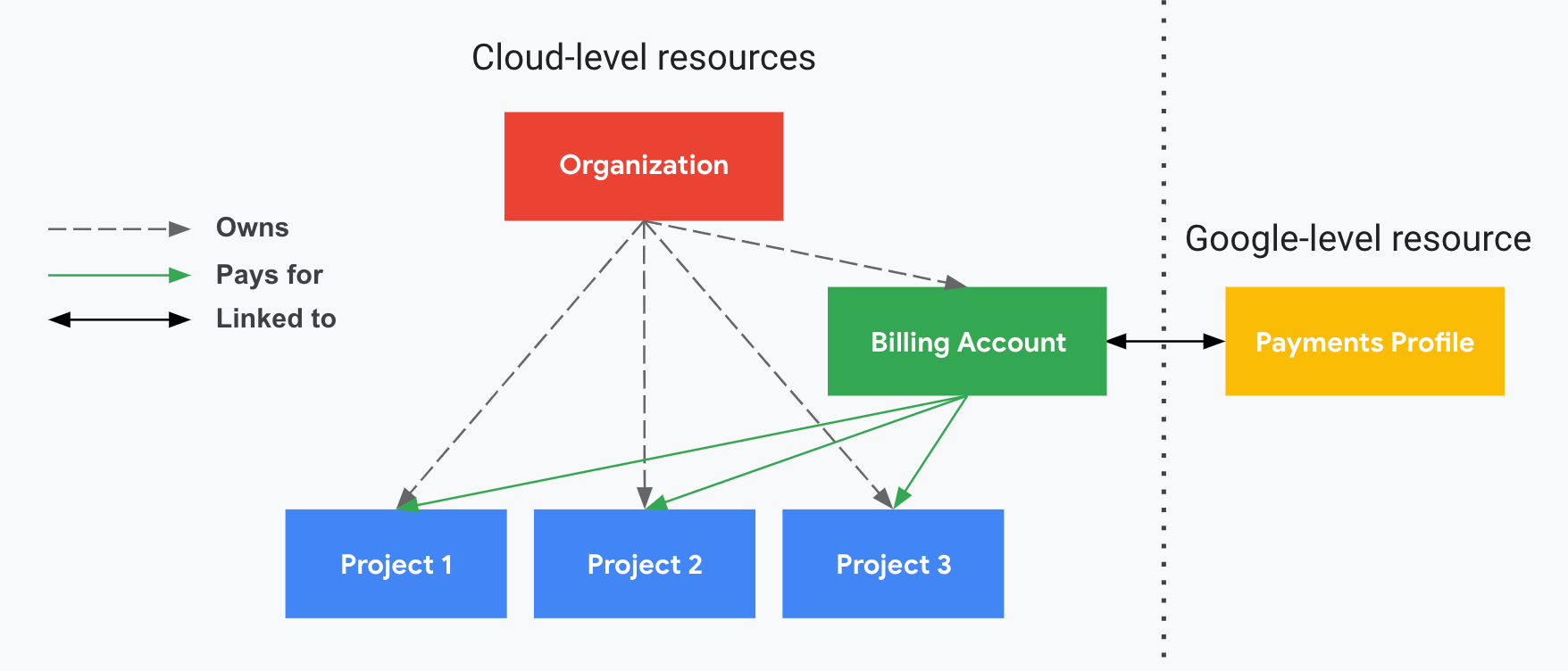
在圖表中,機構節點擁有專案 1、2 和 3,也就是說,它是這三個專案的 IAM 權限父項。
Cloud Billing 帳戶連結至專案 1、2 和 3,代表該帳戶會支付這三個專案產生的費用。Cloud Billing 帳戶也可以支付其他組織的專案費用,但帳單帳戶會繼承上層組織的 IAM 權限。
Cloud Billing 帳戶也會連結至 Google 付款資料,其中會儲存姓名、地址和付款方式等資訊。瞭解如何管理 Google 付款資料使用者權限。雖然 Cloud Billing 帳戶會連結至專案,但就 IAM 而言,Cloud Billing 帳戶「不是」專案的上層,因此專案不會從連結的 Cloud Billing 帳戶繼承權限。
在這個範例中,凡是獲派組織 IAM 帳單角色的使用者,也會在 Cloud Billing 帳戶或專案中擁有這些角色。
Cloud Billing 存取控管範例
請按照下列方式組合 IAM 角色,以滿足各種情境的需求。
| 情境:偏好集中控管的小型至中型企業。 | ||
|---|---|---|
| 使用者類型 | 帳單 IAM 角色 | 帳單活動 |
| 執行長 | 帳單帳戶管理員 | 管理付款方式。 查看及核准月結單。 |
| 技術長 | 帳單帳戶管理員 專案建立者 |
設定預算快訊。 查看支出。 建立新的計費專案。 |
| 開發團隊 | 無 | 無 |
| 情境:偏好委派授權的小型至中型企業。 | ||
|---|---|---|
| 使用者類型 | 帳單 IAM 角色 | 帳單活動 |
| 執行長 | 帳單帳戶管理員 | 管理付款方式。 委派權限。 |
| 財務長 | 帳單帳戶管理員 | 設定預算快訊。 查看支出。 |
| 應付帳款 | 帳單帳戶檢視者 | 檢視及核准月結單。 |
| 開發團隊 | 帳單帳戶使用者 專案建立者 |
建立新的可計費專案。 |
| 情境:區分財務規劃和採購功能 | ||
|---|---|---|
| 使用者類型 | 帳單 IAM 角色 | 帳單活動 |
| 採購或中央 IT | 帳單帳戶管理員 | 管理付款方式。 設定預算快訊。 向開發團隊傳達支出資訊。 |
| 財務規劃 | 帳單帳戶檢視者 | 檢視帳單報表。 處理匯出作業。 與 CxO 溝通。 |
| 應付帳款 | 帳單帳戶檢視者 | 核准月結單。 |
| 開發團隊 | 帳單帳戶使用者 專案建立者 |
建立新的可計費專案。 |
| 情境:開發代理商 | ||
|---|---|---|
| 使用者類型 | 帳單 IAM 角色 | 帳單活動 |
| 執行長 | 帳單帳戶管理員 | 管理付款方式。 委派權限。 |
| 財務長 | 帳單帳戶管理員 | 設定預算快訊。 查看支出。 核准應付憑據。 |
| 專案負責人 | 帳單帳戶使用者 專案建立者 |
建立新的可計費專案。 |
| 專案開發團隊 | 無 | 在現有專案的範圍內進行開發作業。 |
| 客戶 | 專案帳單管理員 | 在專案完成後接管付款。 |
如何更新 Cloud Billing 權限
如要瞭解如何查看、新增或移除 Cloud Billing 權限,請按照「管理 Cloud Billing 帳戶的存取權」一文的指引操作。