

This document provides a reference architecture to create a multiple-model inference service using Google Kubernetes Engine (GKE). In the architecture, GKE-hosted inference pools are placed behind a GKE Inference Gateway. This architecture provides the following benefits:
- A single interface for all of your inference requests.
- Intelligent routing for each request to the model and the inference server that can handle it most efficiently.
- Centralized authorization, security, and other services.
This document is intended for networking architects who are responsible for unifying the deployment of inference servers that run in GKE. If all of your inference servers aren't hosted in GKE, then see Networking for AI inference model serving on all backends. This document doesn't provide guidance about how to design an application or deploy an individual generative AI model. For guidance about how to deploy a model, see Build and deploy generative AI and machine learning models in an enterprise.
This architecture works with application networking architectures Cross-Cloud Network for distributed applications and other designs.
Architecture
The following diagram shows an architecture that contains an Inference Gateway in front of GKE-hosted inference servers. The Gateway provides consolidated services for all of the hosted models.
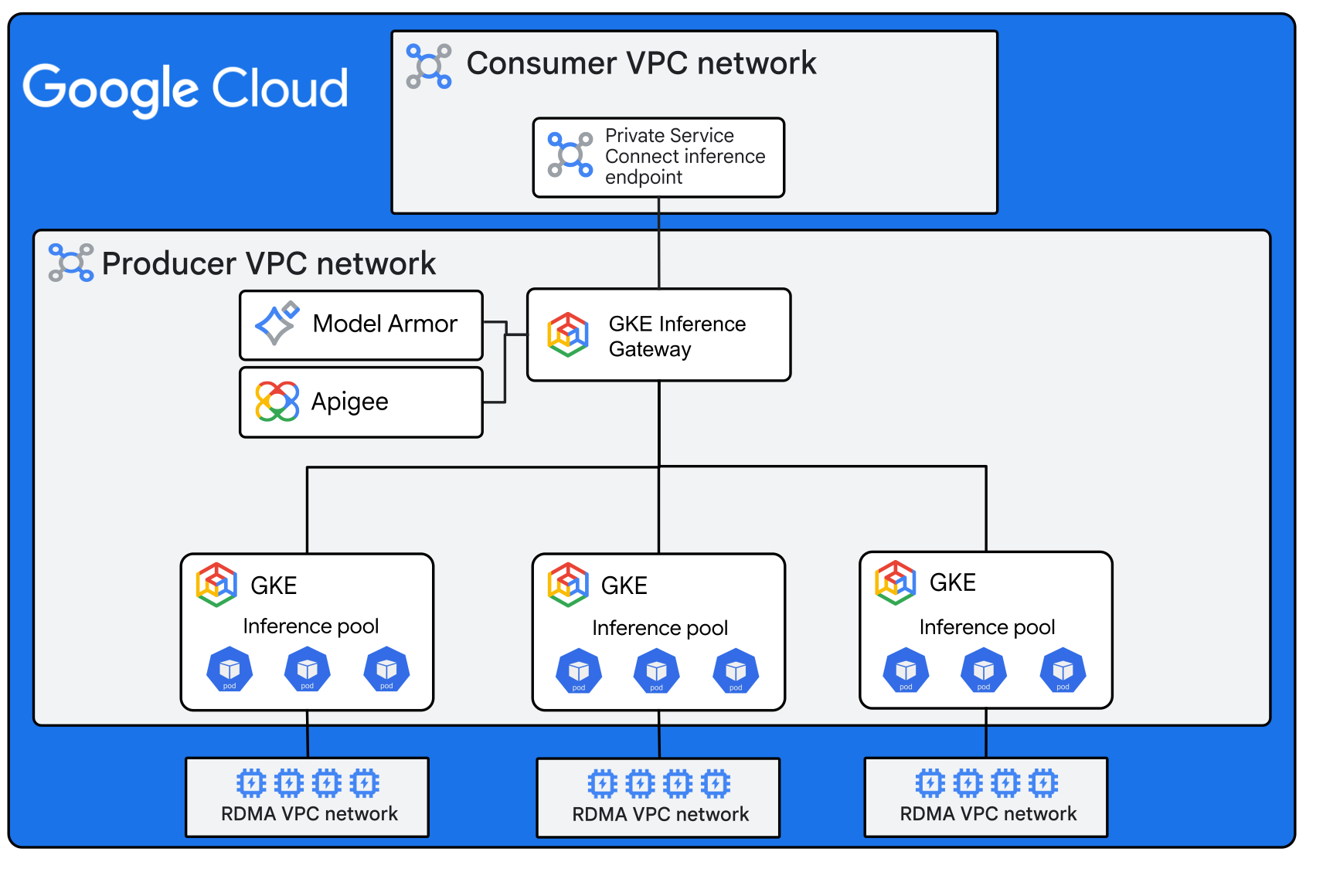
The architecture in the diagram includes the following components:
- Private Service Connect inference endpoint: A unified endpoint for all of the hosted models. The end user sends inference requests to the endpoint IP address. The diagram shows a Private Service Connect endpoint in a single consumer Virtual Private Cloud (VPC) network. You can host endpoints in several VPC networks or in a shared-services VPC network.
- Inference Gateway: The
Inference Gateway enhances the GKE Gateway
to optimize how GKE serves generative AI applications and
workloads. It routes traffic to inference pools of model replicas based on the
model name. The Gateway uses prefix matching to route traffic
within the replica pool. If there isn't a prefix match, then the Gateway
inference processor uses GPU or TPU Prometheus metrics to pick the
least-loaded replica within the pool.
The inference processor also handles prefix caching. In this architecture, the
customer-facing application makes OpenAI
API calls to
access the models through the Gateway. The Gateway is deployed based on a
regional internal Application Load Balancer (
gke-l7-rilb), so it isn't accessible directly from the internet.- API management: An API manager provides for API authentication, security, rate limiting, quota tracking, and other API management services. This architecture uses Apigee, but the architecture supports other options. To call Apigee from the load balancer, the architecture and the Terraform deployment use a Service Extensions traffic extension to call the Apigee Extension Processor.
- Model Armor: An AI guardrails system that performs safety checks on inference prompts before they get to the inference server. It then performs safety checks on the outgoing responses. This architecture uses Model Armor for AI guardrails, but it also supports other options such as NVIDIA Nemo Guardrails. The Terraform deployment that's provided with this reference architecture includes a basic Model Armor configuration.
- Inference pools: An inference pool contains replicas of the same model.
When the Gateway receives a prompt, it uses an
HTTPRoutelookup to select an inference pool based on the model identifier. Pools have an initial size, but they can be configured to autoscale. - Model replica sets: A model replica is a copy of an inference server that is deployed to one or more GPUs or TPUs. A model replica can be single-node or multi-node. A replica set is a uniform group of model replicas that is fronted by a load balancer. If the replica set is multi-node, then the GPUs connect to each other through a backend RDMA VPC network. The network provides rail-aligned inter-GPU lossless low-latency networking.
Request flow
The system routes inference requests as follows:
- An end user sends an OpenAI API request to the
Private Service Connect endpoint. This request contains the
following:
- The prompt.
- The model name, which must match the model name of one of the hosted inference servers.
- The Private Service Connect endpoint forwards the request to the regional internal Application Load Balancer version of the Inference Gateway.
- The Gateway extracts the model name from the request body and injects it into the request header using body-based routing.
- The Gateway forwards the request to the API management system for API management services that are needed.
- The Gateway sends the prompt to Model Armor for screening.
- If the prompt contains sensitive information that can't be redacted, the prompt is blocked and Model Armor returns a response to indicate that a policy violation was found.
- If the prompt contains sensitive information that can be redacted, or if the prompt has no issues at all, Model Armor redacts any sensitive information and forwards the prompt along.
- The Gateway consults
HTTPRoutefor a list of Inference Pools that match the request's model. From this list the Gateway chooses one based on a priority. - The Gateway consults the prefix cache and the current load for all replicas in the pool, then uses that information to choose a replica.
- The replica processes the request and sends it back to the Gateway.
- The Gateway sends the response to Model Armor for approval or rejection.
- The Gateway sends the response back to the Private Service Connect endpoint and on to the end user.
The following diagram shows a routing view of a sample deployment.
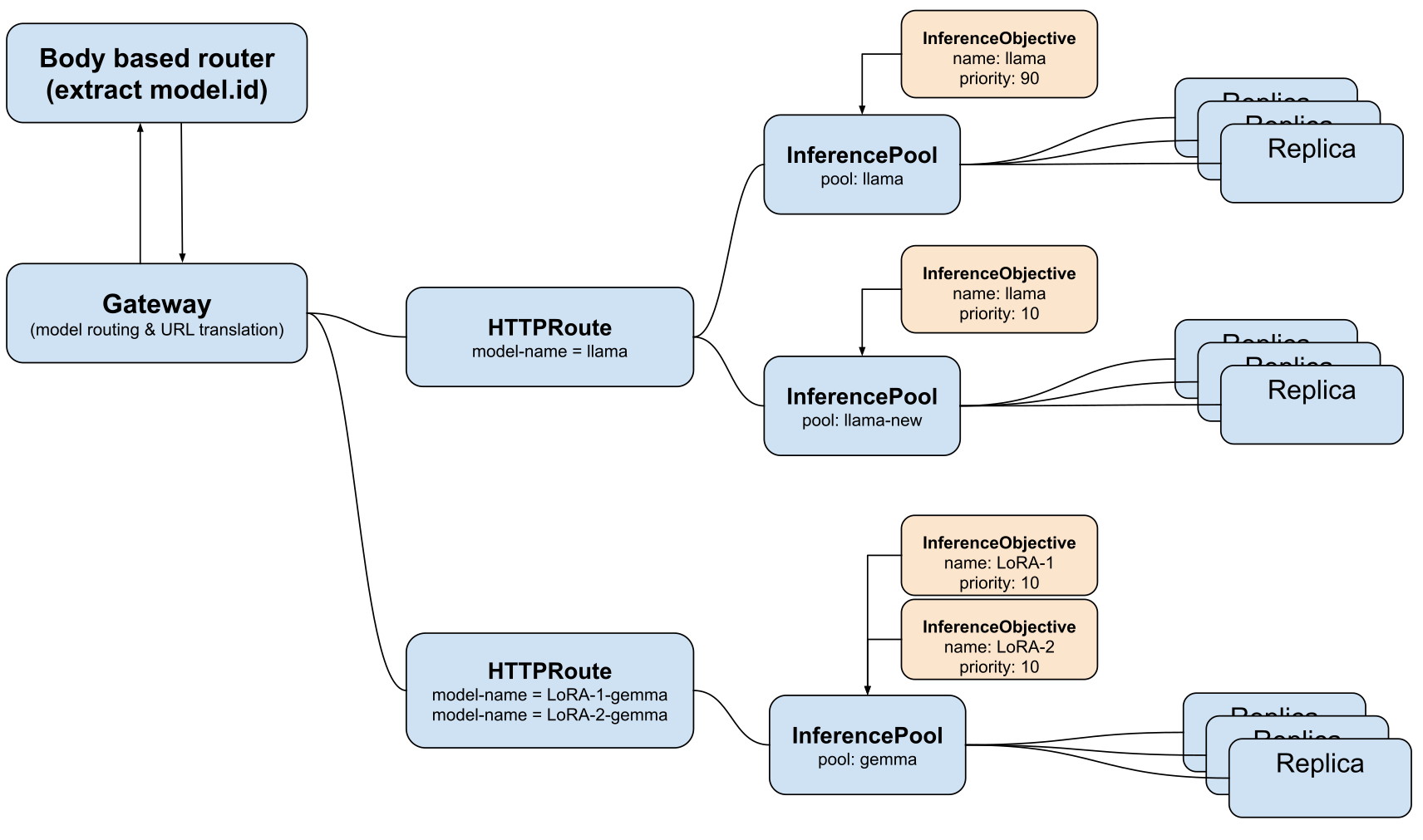
In this example, prompts are handled depending on the model that the user selects:
- Llama: The system load balances these prompts at a 90/10 ratio between two replica sets that both host the Llama model. These two replica sets don't have to be hosted in the same way. For example, one replica set could be hosted in Gemini Enterprise Agent Platform and the other replica set could be hosted in GKE.
- LoRA-1-gemma or LoRA-2-gemma: The system sends all of the prompts to the same replica set, which can handle both models.
In all cases, the Gateway uses a combination of prefix matching and least-load to choose a replica in the relevant pool.
Products used
This reference architecture uses the following Google Cloud products:
- Google Kubernetes Engine (GKE): A Kubernetes service that you can use to deploy and operate containerized applications at scale using Google's infrastructure.
- GKE Inference Gateway: An extension to the Google Kubernetes Engine Gateway that provides optimized routing and load balancing for serving generative AI workloads. It simplifies the deployment, management, and observability of AI inference workloads.
- Virtual Private Cloud (VPC): A virtual system that provides global, scalable networking functionality for your Google Cloud workloads. VPC includes VPC Network Peering, Private Service Connect, private services access, and Shared VPC.
- Private Service Connect: A feature that lets consumers access managed services privately from inside their VPC network.
- Cloud Run: A serverless compute platform that lets you run containers directly on top of Google's scalable infrastructure.
- Apigee: An API management tool that gives you granular control over how your APIs are accessed and used. It provides security, rate limiting, quota enforcement, and analytics.
- Model Armor: A service that provides protection for your generative and agentic AI resources against prompt injection, sensitive data leaks, and harmful content.
Design alternatives
This section describes alternatives to some of the base assumptions of this architecture.
AI guardrails
We recommend that you use Model Armor for AI guardrails. To centralize administration, we recommend that you call it directly from the load balancer, as in this architecture. You can also implement Model Armor in these alternative ways:
- Use an API management policy to call Model Armor.
- Deploy Model Armor at the replica only.
If you implement AI guardrails other than at the model endpoint, then you can turn off Model Armor at the frontend load balancer if you don't need it. If you don't want to use Model Armor, you can use traffic extensions to deploy other guardrail offerings such as NVIDIA NeMo Guardrails.
API management
The architecture in this document uses Apigee for API management, which is deployed using a load balancer Service Extension. If Apigee doesn't meet your needs, you can use Service Extensions to deploy a different API management service.
If deploying API management using Service Extensions doesn't meet your needs, then you might need to deploy a client-facing network and an API-facing network. In this scenario, the API management service acts as a bridge between the two networks. For information about how to deploy this for Apigee, see Apigee networking options.
Connecting to other networks
The architecture in this document uses a single consumer VPC network. However, you can share the Private Service Connect endpoint with many other networks by using a services-access VPC network in a Cross-Cloud Network deployment.
Design considerations
When you build the architecture for your workload, consider best practices and recommendations in the Google Cloud Well-Architected Framework.
Security, privacy, and compliance
To add distributed denial-of-service attack (DDoS) protection, Web Application Firewall (WAF) functionality, and IP address inspection to your deployment, add Google Cloud Armor to your frontend regional internal Application Load Balancer.
Reliability
To guard against regional failures, replicate your deployment to a second region using the Google Cloud multi-regional deployment archetype.
Cost optimization
For GKE cost-optimization recommendations, see Best practices for running cost-optimized Kubernetes applications on GKE.
Operational efficiency
Monitor the performance of your Inference Gateway inference requests by using the Inference Gateway dashboard. The dashboard exposes errors and metrics like request rate, latency, and saturation. Use the findings in the dashboard to help optimize your deployment.
Performance optimization
Follow the recommendations in the Overview of inference best practices on GKE.
Deployment
To deploy a sample implementation of this architecture, use the Networking for AI Inference Model Serving code sample that's available in GitHub.
What's next
- For information about adding retrieval-augmented generation (RAG) to your deployment, see Private connectivity for RAG-capable generative AI applications.
- For more reference architectures, diagrams, and best practices, explore the Cloud Architecture Center.
Contributors
Author: Victor Moreno | Product Manager, Cloud Networking
Other contributors:
- Mark Schlagenhauf | Technical Writer, Networking
- James Duncan | Solutions Product Manager
- Ammett Williams | Developer Relations Engineer