

想法簽章是模型內部思考過程的加密表示法。在多輪和多步驟對話中,思維簽章會保留 Gemini 的推理狀態,這在使用函式呼叫時非常實用。回覆內容可以在任何內容部分中包含 thought_signature 欄位 (例如 text、functionCall)。
Gemini 3 模型會對想法簽章執行比先前 Gemini 版本更嚴格的驗證,因為這有助於提升函式呼叫的模型效能。如要確保模型在多輪對話中維持完整脈絡,即使使用 MINIMAL 思考層級,也必須在後續要求中傳回先前回覆的思考簽章。使用 Gemini 3 模型時,如果未傳回必要想法簽章,模型會傳回 400 錯誤。
雖然 Gemini 3 Pro Image 不會強制執行這項驗證,但為確保模型在多輪對話中維持完整脈絡,您仍須在後續要求中傳回先前回覆的思維簽章。如果未傳回想法簽章,Gemini 3 Pro Image 不會傳回 400 錯誤。如要查看使用 Gemini 3 Pro Image 進行多輪圖像編輯的程式碼範例,請參閱使用思維簽章進行多輪圖像編輯的範例。
如果您使用官方 Google Gen AI SDK (Python、Node.js、Go 或 Java),並使用標準對話記錄功能,或將完整模型回覆附加至記錄,系統會自動處理思維簽章。
為什麼這些指標很重要?
當 Thinking 模型呼叫外部工具時,會暫停內部推理程序。思維簽章可做為「儲存狀態」,讓模型在您提供函式結果後,順暢地繼續思維鏈。如果沒有思維簽章,模型會在工具執行階段「忘記」特定的推論步驟。將簽章傳回可確保:
- 脈絡連續性:模型會保留並檢查呼叫工具的理由。
- 複雜推理:可執行多步驟工作,其中一個工具的輸出結果會做為下一個工具的推理依據。
轉彎和步驟
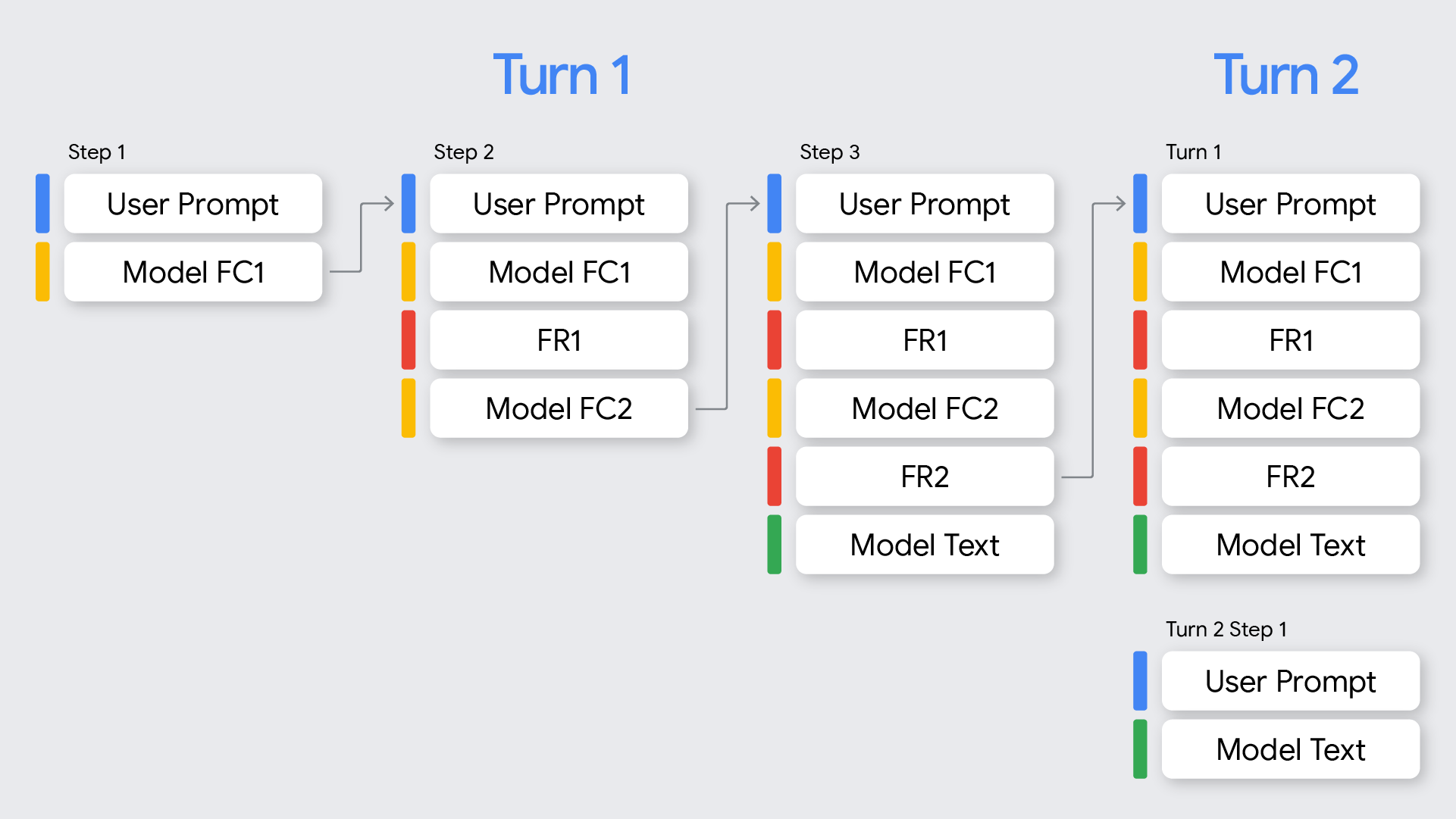
在函式呼叫的脈絡中,請務必瞭解「回合」和「步驟」之間的差異:
- 回合代表完整的對話過程,從使用者提示開始,到模型提供最終回應 (非函式呼叫) 為止。
- 步驟是指模型在單一回合中呼叫函式,並需要函式回應才能繼續推理的過程。如圖所示,如果模型需要依序呼叫多個函式才能完成使用者的要求,單一回合可能就會涉及多個步驟。
如何使用想法簽章
處理思維簽章最簡單的方法,就是在傳送新要求時,將對話記錄中所有先前訊息的 Part 納入其中,與模型傳回的內容完全相同。
如果未使用 Google Gen AI SDK,或需要修改或刪除對話記錄,請務必保留並傳回模型「想法簽章」。
使用 Google Gen AI SDK (建議做法)
使用 SDK 的對話記錄功能,或將先前回應中的模型 content 物件附加至下一個要求的 contents 時,系統會自動處理簽章。
以下 Python 範例顯示自動處理方式:
from google import genai
from google.genai.types import Content, FunctionDeclaration, GenerateContentConfig, Part, ThinkingConfig, Tool

client = genai.Client()

# 1. Define your tool
get_weather_declaration = FunctionDeclaration(
   name="get_weather",
   description="Gets the current weather temperature for a given location.",
   parameters={
       "type": "object",
       "properties": {"location": {"type": "string"}},
       "required": ["location"],
   },
)
get_weather_tool = Tool(function_declarations=[get_weather_declaration])

# 2. Send a message that triggers the tool
prompt = "What's the weather like in London?"
response = client.models.generate_content(
   model="gemini-2.5-flash",
   contents=prompt,
   config=GenerateContentConfig(
       tools=[get_weather_tool],
       thinking_config=ThinkingConfig(include_thoughts=True)
   ),
)

# 3. Handle the function call
function_call = response.function_calls[0]
location = function_call.args["location"]
print(f"Model wants to call: {function_call.name}")

# Execute your tool (for example, call an API)
# (This is a mock response for the example)
print(f"Calling external tool for: {location}")
function_response_data = {
   "location": location,
   "temperature": "30C",
}

# 4. Send the tool's result back
# Append this turn's messages to history for a final response.
# The `content` object automatically attaches the required thought_signature behind the scenes.
history = [
   Content(role="user", parts=[Part(text=prompt)]),
   response.candidates[0].content, # Signature preserved here
   Content(
     role="tool",
     parts=[
         Part.from_function_response(
             name=function_call.name,
             response=function_response_data,
         )
     ],
   )
]

response_2 = client.models.generate_content(
   model="gemini-2.5-flash",
   contents=history,
   config=GenerateContentConfig(
       tools=[get_weather_tool],
       thinking_config=ThinkingConfig(include_thoughts=True)
   ),
)

# 5. Get the final, natural-language answer
print(f"\nFinal model response: {response_2.text}")
使用 REST 或手動處理時
如果您直接與 API 互動,請務必根據下列 Gemini 3 Pro 規則實作簽章處理程序:
- 函式呼叫:
- 如果模型回應包含一或多個
functionCall部分,則需要thought_signature才能正確處理。 - 如果單一回應中包含平行函式呼叫,只有第一個
functionCall部分會包含thought_signature。 - 如果回合中有多個步驟,且每個步驟都依序呼叫函式,則每個
functionCall部分都會包含thought_signature。 - 規則:建構下一個要求時,您必須包含
part,其中包含模型傳回的functionCall和thought_signature完全相同。如要進行循序 (多步驟) 函式呼叫,系統會驗證目前回合中的所有步驟,且如果省略任何步驟中第一個functionCall部分的必要thought_signature,就會導致400錯誤。對話輪次會從最新的使用者訊息開始,但不能是functionResponse。 - 如果模型傳回平行函式呼叫 (例如
FC1+signature、FC2),回應就必須包含所有函式呼叫,然後是所有函式回應 (FC1+signature、FC2、FR1、FR2)。交錯回應 (FC1+signature、FR1、FC2、FR2) 會導致400錯誤。 - 在極少數情況下,您需要提供 API 未產生的
functionCall部分,因此這些部分沒有相關聯的思維簽章 (例如從不含思維簽章的模型轉移記錄時)。您可以將thought_signature設為skip_thought_signature_validator,但這應是最後手段,因為這會對模型效能造成負面影響。
- 如果模型回應包含一或多個
- 非函式呼叫:
- 如果模型回覆不含
functionCall,可能在回覆的最後part(例如最後一個text部分) 包含thought_signature。 - 規則:為獲得最佳成效,建議在下一個要求中加入這個簽章,但如果省略,也不會造成錯誤。串流時,這項簽章可能會在文字內容空白的部分傳回,因此請務必剖析所有部分,直到模型傳回
finish_reason為止。
- 如果模型回覆不含
請遵守下列規則,確保模型保留情境:
- 請務必將
thought_signature放回模型內的原裝Part。 - 請勿將含有簽章的
Part與不含簽章的Part合併。這會破壞想法的位置脈絡。 - 請勿合併兩個都含有簽章的
Part,因為簽章字串無法合併。
循序呼叫函式範例
以下範例顯示多步驟函式呼叫範例,使用者要求「Check flight status for AA100 and book a taxi if delayed」(查詢 AA100 航班狀態,如果誤點就預約計程車),這需要執行多項工作。
REST
以下範例說明如何使用 REST API,在循序函式呼叫工作流程的多個步驟中處理思維簽章。
第 1 回合,步驟 1 (使用者要求)
{
  "contents": [
    {
      "role": "user",
      "parts": [
        {
          "text": "Check flight status for AA100 and book a taxi 2 hours before if delayed."
        }
      ]
    }
  ],
  "tools": [
    {
      "functionDeclarations": [
        {
          "name": "check_flight",
          "description": "Gets the current status of a flight",
          "parameters": {
            "type": "object",
            "properties": {
              "flight": {
                "type": "string",
                "description": "The flight number to check"
              }
            },
            "required": [
              "flight"
            ]
          }
        },
        {
          "name": "book_taxi",
          "description": "Book a taxi",
          "parameters": {
            "type": "object",
            "properties": {
              "time": {
                "type": "string",
                "description": "time to book the taxi"
              }
            },
            "required": [
              "time"
            ]
          }
        }
      ]
    }
  ]
}
第 1 輪第 1 步 (模型回應)
{
"content": {
        "role": "model",
        "parts": [
          {
            "functionCall": {
              "name": "check_flight",
              "args": {
                "flight": "AA100"
              }
            },
            "thoughtSignature": "<SIGNATURE_A>"
          }
        ]
  }
}
第 1 回合,步驟 2 (使用者回應 - 傳送工具輸出內容)
由於這個使用者回合只包含 functionResponse (沒有新文字),我們仍處於第 1 回合。您必須保留 <SIGNATURE_A>。
{
      "role": "user",
      "parts": [
        {
          "text": "Check flight status for AA100 and book a taxi 2 hours before if delayed."
        }
      ]
    },
    {
        "role": "model",
        "parts": [
          {
            "functionCall": {
              "name": "check_flight",
              "args": {
                "flight": "AA100"
              }
            },
            "thoughtSignature": "<SIGNATURE_A>"
          }
        ]
      },
      {
        "role": "user",
        "parts": [
          {
            "functionResponse": {
              "name": "check_flight",
              "response": {
                "status": "delayed",
                "departure_time": "12 PM"
                }
              }
            }
        ]
}
第 1 輪,步驟 2 (模型回應)
模型現在會根據先前的工具輸出內容,決定是否預約計程車。
{
      "content": {
        "role": "model",
        "parts": [
          {
            "functionCall": {
              "name": "book_taxi",
              "args": {
                "time": "10 AM"
              }
            },
            "thoughtSignature": "<SIGNATURE_B>"
          }
        ]
      }
}
第 1 輪,步驟 3 (使用者回覆 - 傳送工具輸出內容)
如要傳送預約計程車的確認訊息,您必須在這個迴圈中加入所有函式呼叫的簽章 (<SIGNATURE_A> 和 <SIGNATURE_B>)。
{
      "role": "user",
      "parts": [
        {
          "text": "Check flight status for AA100 and book a taxi 2 hours before if delayed."
        }
      ]
    },
    {
        "role": "model",
        "parts": [
          {
            "functionCall": {
              "name": "check_flight",
              "args": {
                "flight": "AA100"
              }
            },
            "thoughtSignature": "<SIGNATURE_A>"
          }
        ]
      },
      {
        "role": "user",
        "parts": [
          {
            "functionResponse": {
              "name": "check_flight",
              "response": {
                "status": "delayed",
                "departure_time": "12 PM"
              }
              }
            }
        ]
      },
      {
        "role": "model",
        "parts": [
          {
            "functionCall": {
              "name": "book_taxi",
              "args": {
                "time": "10 AM"
              }
            },
            "thoughtSignature": "<SIGNATURE_B>"
          }
        ]
      },
      {
        "role": "user",
        "parts": [
          {
            "functionResponse": {
              "name": "book_taxi",
              "response": {
                "booking_status": "success"
              }
              }
            }
        ]
    }
}
Chat Completions
以下範例說明如何使用 Chat Completions API,在循序函式呼叫工作流程的多個步驟中處理想法簽章。
第 1 回合,步驟 1 (使用者要求)
{
  "model": "google/gemini-3-pro-preview",
  "messages": [
    {
      "role": "user",
      "content": "Check flight status for AA100 and book a taxi 2 hours before if delayed."
    }
  ],
  "tools": [
    {
      "type": "function",
      "function": {
        "name": "check_flight",
        "description": "Gets the current status of a flight",
        "parameters": {
          "type": "object",
          "properties": {
            "flight": {
              "type": "string",
              "description": "The flight number to check."
            }
          },
          "required": [
            "flight"
          ]
        }
      }
    },
    {
      "type": "function",
      "function": {
        "name": "book_taxi",
        "description": "Book a taxi",
        "parameters": {
          "type": "object",
          "properties": {
            "time": {
              "type": "string",
              "description": "time to book the taxi"
            }
          },
          "required": [
            "time"
          ]
        }
      }
    }
  ]
}
第 1 輪第 1 步 (模型回應)
{
      "role": "model",
        "tool_calls": [
          {
            "extra_content": {
              "google": {
                "thought_signature": "<SIGNATURE_A>"
              }
            },
            "function": {
              "arguments": "{\"flight\":\"AA100\"}",
              "name": "check_flight"
            },
            "id": "function-call-1",
            "type": "function"
          }
        ]
    }
第 1 回合,步驟 2 (使用者回應 - 傳送工具輸出內容)
由於這個使用者回合只包含 functionResponse (沒有新文字),我們仍處於第 1 回合。您必須保留 <SIGNATURE_A>。
"messages": [
    {
      "role": "user",
      "content": "Check flight status for AA100 and book a taxi 2 hours before if delayed."
    },
    {
      "role": "model",
        "tool_calls": [
          {
            "extra_content": {
              "google": {
                "thought_signature": "<SIGNATURE_A>"
              }
            },
            "function": {
              "arguments": "{\"flight\":\"AA100\"}",
              "name": "check_flight"
            },
            "id": "function-call-1",
            "type": "function"
          }
        ]
    },
    {
      "role": "tool",
      "name": "check_flight",
      "tool_call_id": "function-call-1",
      "content": "{\"status\":\"delayed\",\"departure_time\":\"12 PM\"}"
    }
  ]
第 1 輪,步驟 2 (模型回應)
模型現在會根據先前的工具輸出內容,決定是否預約計程車。
{
"role": "model",
"tool_calls": [
{
"extra_content": {
"google": {
"thought_signature": "<SIGNATURE_B>"
}
            },
            "function": {
              "arguments": "{\"time\":\"10 AM\"}",
              "name": "book_taxi"
            },
            "id": "function-call-2",
            "type": "function"
          }
       ]
}
第 1 輪,步驟 3 (使用者回覆 - 傳送工具輸出內容)
如要傳送預約計程車的確認訊息,您必須在這個迴圈中加入所有函式呼叫的簽章 (<SIGNATURE_A> 和 <SIGNATURE_B>)。
"messages": [
    {
      "role": "user",
      "content": "Check flight status for AA100 and book a taxi 2 hours before if delayed."
    },
    {
      "role": "model",
        "tool_calls": [
          {
            "extra_content": {
              "google": {
                "thought_signature": "<SIGNATURE_A>"
              }
            },
            "function": {
              "arguments": "{\"flight\":\"AA100\"}",
              "name": "check_flight"
            },
            "id": "function-call-1d6a1a61-6f4f-4029-80ce-61586bd86da5",
            "type": "function"
          }
        ]
    },
    {
      "role": "tool",
      "name": "check_flight",
      "tool_call_id": "function-call-1d6a1a61-6f4f-4029-80ce-61586bd86da5",
      "content": "{\"status\":\"delayed\",\"departure_time\":\"12 PM\"}"
    },
    {
      "role": "model",
        "tool_calls": [
          {
            "extra_content": {
              "google": {
                "thought_signature": "<SIGNATURE_B>"
              }
            },
            "function": {
              "arguments": "{\"time\":\"10 AM\"}",
              "name": "book_taxi"
            },
            "id": "function-call-65b325ba-9b40-4003-9535-8c7137b35634",
            "type": "function"
          }
        ]
    },
    {
      "role": "tool",
      "name": "book_taxi",
      "tool_call_id": "function-call-65b325ba-9b40-4003-9535-8c7137b35634",
      "content": "{\"booking_status\":\"success\"}"
    }
  ]
並行函式呼叫範例
以下範例顯示平行函式呼叫範例,使用者詢問「Check weather in Paris and London」(查看巴黎和倫敦的天氣)。
REST
以下範例說明如何使用 REST API,在平行函式呼叫工作流程中處理思維簽章。
第 1 回合,步驟 1 (使用者要求)
{
  "contents": [
    {
      "role": "user",
      "parts": [
        {
          "text": "Check the weather in Paris and London."
        }
      ]
    }
  ],
  "tools": [
    {
      "functionDeclarations": [
        {
          "name": "get_current_temperature",
          "description": "Gets the current temperature for a given location.",
          "parameters": {
            "type": "object",
            "properties": {
              "location": {
                "type": "string",
                "description": "The city name, e.g. San Francisco"
              }
            },
            "required": [
              "location"
            ]
          }
        }
      ]
    }
  ]
}
第 1 輪第 1 步 (模型回應)
{
  "content": {
    "parts": [
      {
        "functionCall": {
          "name": "get_current_temperature",
          "args": {
            "location": "Paris"
          }
        },
        "thoughtSignature": "<SIGNATURE_A>"
      },
      {
        "functionCall": {
          "name": "get_current_temperature",
          "args": {
            "location": "London"
          }
        }
      }
    ]
  }
}
第 1 回合,步驟 2 (使用者回應 - 傳送工具輸出內容)
您必須保留第一部分的 <SIGNATURE_A>,與收到的內容完全一致。
[
  {
    "role": "user",
    "parts": [
      {
        "text": "Check the weather in Paris and London."
      }
    ]
  },
  {
    "role": "model",
    "parts": [
      {
        "functionCall": {
          "name": "get_current_temperature",
          "args": {
            "city": "Paris"
          }
        },
        "thought_signature": "<SIGNATURE_A>"
      },
      {
        "functionCall": {
          "name": "get_current_temperature",
          "args": {
            "city": "London"
          }
        }
      }
    ]
  },
  {
    "role": "user",
    "parts": [
      {
        "functionResponse": {
          "name": "get_current_temperature",
          "response": {
            "temp": "15C"
          }
        }
      },
      {
        "functionResponse": {
          "name": "get_current_temperature",
          "response": {
            "temp": "12C"
          }
        }
      }
    ]
  }
]
Chat Completions
以下範例說明如何使用 Chat Completions API,在平行函式呼叫工作流程中處理思維簽章。
第 1 回合,步驟 1 (使用者要求)
{
  "contents": [
    {
      "role": "user",
      "parts": [
        {
          "text": "Check the weather in Paris and London."
        }
      ]
    }
  ],
  "tools": [
    {
      "functionDeclarations": [
        {
          "name": "get_current_temperature",
          "description": "Gets the current temperature for a given location.",
          "parameters": {
            "type": "object",
            "properties": {
              "location": {
                "type": "string",
                "description": "The city name, e.g. San Francisco"
              }
            },
            "required": [
              "location"
            ]
          }
        }
      ]
    }
  ]
}
第 1 輪第 1 步 (模型回應)
{
"role": "assistant",
        "tool_calls": [
          {
            "extra_content": {
              "google": {
                "thought_signature": "<SIGNATURE_A>"
              }
            },
            "function": {
              "arguments": "{\"location\":\"Paris\"}",
              "name": "get_current_temperature"
            },
            "id": "function-call-f3b9ecb3-d55f-4076-98c8-b13e9d1c0e01",
            "type": "function"
          },
          {
            "function": {
              "arguments": "{\"location\":\"London\"}",
              "name": "get_current_temperature"
            },
            "id": "function-call-335673ad-913e-42d1-bbf5-387c8ab80f44",
            "type": "function"
          }
        ]
}
第 1 回合,步驟 2 (使用者回應 - 傳送工具輸出內容)
您必須保留第一部分中的 <SIGNATURE_A>,與收到的內容完全一致。
"messages": [
    {
      "role": "user",
      "content": "Check the weather in Paris and London."
    },
    {
      "role": "assistant",
        "tool_calls": [
          {
            "extra_content": {
              "google": {
                "thought_signature": "<SIGNATURE_A>"
              }
            },
            "function": {
              "arguments": "{\"location\":\"Paris\"}",
              "name": "get_current_temperature"
            },
            "id": "function-call-f3b9ecb3-d55f-4076-98c8-b13e9d1c0e01",
            "type": "function"
          },
          {
            "function": {
              "arguments": "{\"location\":\"London\"}",
              "name": "get_current_temperature"
            },
            "id": "function-call-335673ad-913e-42d1-bbf5-387c8ab80f44",
            "type": "function"
          }
        ]
    },
    {
      "role":"tool",
      "name": "get_current_temperature",
      "tool_call_id": "function-call-f3b9ecb3-d55f-4076-98c8-b13e9d1c0e01",
      "content": "{\"temp\":\"15C\"}"
    },
    {
      "role":"tool",
      "name": "get_current_temperature",
      "tool_call_id": "function-call-335673ad-913e-42d1-bbf5-387c8ab80f44",
      "content": "{\"temp\":\"12C\"}"
    }
  ]
非 functionCall Part 的簽名
即使沒有函式呼叫,Gemini 也可能會在回應的最後一個 Part 中傳回 thought_signature。
- 行為:模型傳回的最終內容
Part(text、inlineData等) 可能含有thought_signature。 - 必要條件:建議傳回這個簽章,確保模型維持高品質的推理能力,特別是複雜的指令遵循或模擬代理功能工作流程。
- 驗證:API「不會」嚴格強制驗證非
functionCall部分的簽章。如果省略這些欄位,您不會收到封鎖錯誤,但效能可能會降低。
文字部分含有簽章的模型回覆範例:
以下範例顯示模型回應,其中 thought_signature 包含在非 functionCall Part 中,以及如何在後續要求中處理這類回應。
第 1 輪第 1 步 (模型回應)
{
  "role": "model",
  "parts": [
    {
      "text": "I need to calculate the risk. Let me think step-by-step...",
      "thought_signature": "<SIGNATURE_C>" // OPTIONAL (Recommended)
    }
  ]
}
第 2 回合,步驟 1 (使用者)
[
  { "role": "user", "parts": [{ "text": "What is the risk?" }] },
  {
    "role": "model",
    "parts": [
      {
        "text": "I need to calculate the risk. Let me think step-by-step...",
        // If you omit <SIGNATURE_C> here, no error will occur.
      }
    ]
  },
  { "role": "user", "parts": [{ "text": "Summarize it." }] }
]
使用思維簽章進行多輪圖像編輯的範例
下列範例說明如何在使用 Gemini 3 Pro Image 建立及編輯圖像時,擷取並傳遞思維簽章。
第 1 輪:取得回應並儲存包含想法簽章的資料
chat = client.chats.create(
   model="gemini-3-pro-image-preview",
   config=types.GenerateContentConfig(
       response_modalities=['TEXT', 'IMAGE']
   )
)
message = "Create an image of a clear perfume bottle sitting on a vanity."
response = chat.send_message(message)
data = b''
for part in response.candidates[0].content.parts:
   if part.text:
       display(Markdown(part.text))
   if part.inline_data:
       data = part.inline_data.data
       display(Image(data=data, width=500))
第 2 輪:傳遞包含想法簽章的資料
response = chat.send_message(
   message=[
       types.Part.from_bytes(
           data=data,
           mime_type="image/png",
       ),
       "Make the perfume bottle purple and add a vase of hydrangeas next to the bottle.",
   ],
)
for part in response.candidates[0].content.parts:
   if part.text:
       display(Markdown(part.text))
   if part.inline_data:
       display(Image(data=part.inline_data.data, width=500))