

As your Gemini API applications mature, you might find that you need a more expansive platform for building and deploying generative AI applications and solutions end-to-end. Gemini Enterprise Agent Platform provides a comprehensive ecosystem of tools to enable developers to harness the power of generative AI, from the initial stages of app development to app deployment, app hosting, and managing complex data at scale.
With Gemini Enterprise Agent Platform, you get access to a suite of Machine Learning Operations (MLOps) tools to streamline usage, deployment, and monitoring of AI models for efficiency and reliability. Additionally, integrations with databases, Development Operations (DevOps) tools, logging, monitoring, and IAM offer a comprehensive approach to managing the entire generative AI lifecycle.
Differences between using the Gemini API on its own and Gemini Enterprise Agent Platform
The following table summarizes the main differences between the Gemini API and Gemini Enterprise Agent Platform to help you decide which option is right for your use case:
| Feature | Gemini API | Gemini Enterprise Agent Platform |
|---|---|---|
| Endpoint names | generativelanguage.googleapis.com |
aiplatform.googleapis.com |
| Sign up | Google Account | Google Cloud account (with terms agreement and billing) |
| Authentication | API Key or OAuth (if connected to Google Cloud project) | Google Cloud service account |
| User interface playground | Google AI Studio | Agent Studio on Gemini Enterprise Agent Platform |
| API & SDK |
Server and mobile/web client SDKs
|
Server and mobile/web client SDKs
|
| No-cost usage of API & SDK | Yes, where applicable | $300 Google Cloud credit for new users |
| Quota (requests per minute) | Varies based on model and pricing plan (see detailed information) | Varies based on model and region (see detailed information) |
| Commercial terms | Standard Terms of Service. Doesn't count toward Google Cloud commitments. All customers pay the same price. | Enterprise-ready terms for data processing, security, and privacy. Counts toward Google Cloud commitments. Custom contracts and discounts available for large volume workloads (contact sales). |
| Enterprise support and SLA | No enterprise-level support or Service Level Agreements (SLAs). | 24/7 enterprise-level support and SLAs for service availability. |
| Compliance and governance | No compliance certifications (for example, HIPAA, SOC2). Regulated customers should use Gemini Enterprise Agent Platform instead. | Supports compliance with certifications like HIPAA and SOC2. Provides data residency, customer-managed encryption keys, and Access Transparency. |
| Security | API key authentication. | Authentication using IAM (service accounts, OAuth) for increased security. Enhanced security through Virtual Private Cloud. |
| Infrastructure | Global endpoint. | Global endpoint and regional endpoints. |
| Dedicated capacity | No access to dedicated capacity. | Access to Provisioned Throughput for dedicated capacity. |
| Model access | Access to Google's models. | Access to a broad selection of Google and third-party models in the Model Garden. |
| Google model improvement |
|
Your prompts, responses, and data are never used to improve Google products. |
| Advanced features | Standard feature set. | Full support for features like model tuning and a wider variety of embedding models. |
| MLOps | No | Full MLOps on Gemini Enterprise Agent Platform (examples: model evaluation, Model Monitoring, Model Registry) |
Enable APIs
To use Gemini Enterprise Agent Platform, you must enable the Gemini Enterprise Agent Platform API in your Google Cloud project:
Enable the Gemini Enterprise Agent Platform API
Additionally, to build and deploy agents using features like Agent Runtime on Gemini Enterprise Agent Platform or Agent Studio on Gemini Enterprise Agent Platform, you might need to enable the following APIs:
- Cloud Storage API
- Cloud Logging API
- Cloud Monitoring API
- Cloud Trace API
- Cloud Resource Manager API
- Artifact Registry API
Other features, such as Agent Gateway or integrations with other Google services like Google Workspace, might require enabling additional APIs. To enable other APIs, visit the API Library in the Google Cloud console.
Migration steps
The following sections cover the steps required to migrate your Gemini API code to Gemini Enterprise Agent Platform. These steps assume you have prompt data from Google AI Studio saved in Google Drive.
When migrating to Gemini Enterprise Agent Platform:
- You can use your existing Google Cloud project (the same one you used to generate your Gemini API key) or you can create a new Google Cloud project.
- Supported regions might differ between the Gemini API and Gemini Enterprise Agent Platform. See the list of supported regions for generative AI on Google Cloud.
- Any models you created in Google AI Studio need to be retrained in Gemini Enterprise Agent Platform.
1. Migrate your prompts to Agent Studio
Your Google AI Studio prompt data is saved in a Google Drive folder. This section shows how to migrate your prompts to Agent Studio.
- Open Google Drive.
- Navigate to the AI_Studio folder where the prompts are stored.
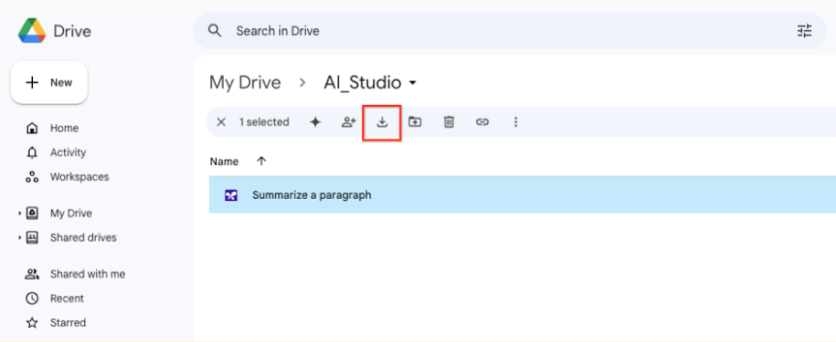
Download your prompts from Google Drive to a local directory.
Open Agent Studio in the Google Cloud console.
In the Gemini Enterprise Agent Platform menu, click Recents > View all to open the Prompt management menu.
Click Import prompt.
Next to the Prompt file field, click Browse and select a prompt from your local directory.
To upload prompts in bulk, you must manually combine your prompts into a single JSON file.
Click Upload.
2. Upload training data to Agent Studio
To migrate your training data to Gemini Enterprise Agent Platform, you need to upload your data to a Cloud Storage bucket. For more information, see Introduction to tuning .
3. Delete unused API Keys
If you no longer need to use your Gemini API key, then follow security best practices and delete it.
To delete an API key:
Open the Google Cloud API Credentials page.
Find the API key that you want to delete and click the Actions icon.
Select Delete API key.
In the Delete credential modal, select Delete.
Deleting an API key takes a few minutes to propagate. After propagation completes, any traffic using the deleted API key is rejected.
What's next
Try a quickstart tutorial using Agent Studio