


בקשה להפעלת פונקציה, שנקראת גם שימוש בכלים, מספקת ל-LLM הגדרות של כלים חיצוניים (לדוגמה, פונקציית get_current_weather).
כשמעבדים הנחיה, המודל קובע בצורה חכמה אם נדרש כלי. אם כן, הוא מפיק נתונים מובנים שמציינים את הכלי להפעלה ואת הפרמטרים שלו (לדוגמה, get_current_weather(location='Boston')). לאחר מכן, האפליקציה מפעילה את הכלי הזה ומעבירה את התוצאה בחזרה למודל, וכך הוא יכול להשלים את התגובה שלו עם מידע דינמי מהעולם האמיתי או עם תוצאה של פעולה. הפעולה הזו יוצרת גשר בין מודל ה-LLM לבין המערכות שלכם, ומרחיבה את היכולות שלו.
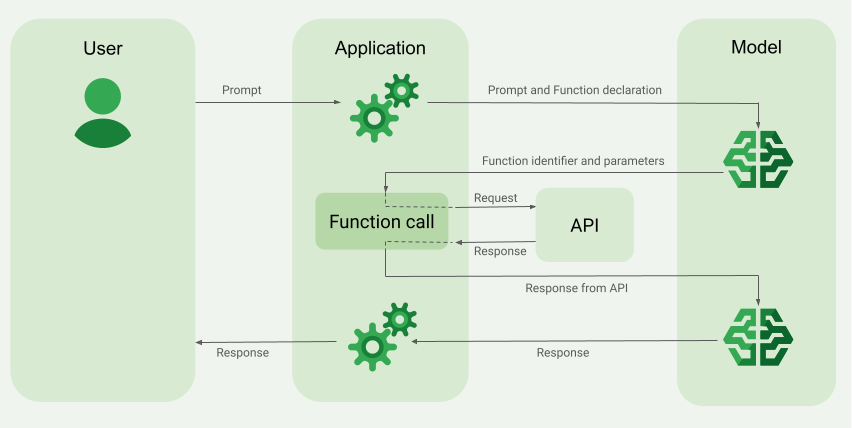
קריאה להפעלת פונקציות מאפשרת שני תרחישי שימוש עיקריים:
אחזור נתונים: אחזור מידע עדכני לתשובות של המודל, כמו מזג האוויר הנוכחי, המרת מטבע או נתונים ספציפיים ממאגרי ידע ומממשקי API (RAG).
ביצוע פעולה: ביצוע פעולות חיצוניות כמו שליחת טפסים, עדכון מצב האפליקציה או תזמור של תהליכי עבודה מבוססי-סוכן (למשל, העברת שיחות).
דוגמאות נוספות לתרחישי שימוש שמבוססים על קריאה להפעלת פונקציות זמינות במאמר תרחישי שימוש.
תכונות ומגבלות
המודלים הבאים תומכים בקריאה להפעלת פונקציות:
- מודלים של Gemini:
לחצו כדי להרחיב את רשימת המודלים הנתמכים
- Gemini 4 Argon Cyber Permissive
- Gemini 4 Argon
- Gemini 3.8 Live
- Gemini 3.8 Flash
- Gemini 3.7 Flash
- Gemini 3.6 Flash
- Gemini 3.5 Flash-Lite
- Gemini 3.5 Flash
- Gemini 3.1 Pro
- Gemini 3.1 Flash-Lite
- גרסת טרום-השקה של Gemini 3 Flash
- Gemini 2.5 Pro
- Gemini 2.5 Flash-Lite
- Gemini 2.5 Flash עם אודיו מקורי של Gemini Live API
- Gemini 2.5 Flash
מודלים פתוחים:
מגדירים את הפונקציות בפורמט סכימת OpenAPI.
במודלים של Gemini 3 ואילך, אפשר לכלול תוכן מולטימודאלי (תמונות וקובצי PDF) בהודעות
functionResponseששולחים בחזרה ל מודל. מידע נוסף זמין במאמר בנושא תשובות פונקציה מולטימודאליות.ב-Gemini 3 ובמודלים חדשים יותר, אפשר להעביר בסטרימינג ארגומנטים של קריאה להפעלת פונקציות בזמן שהם נוצרים, על ידי הגדרת
streamFunctionCallArgumentsל-trueב-functionCallingConfig. מידע נוסף זמין במאמר ארגומנטים של קריאה להפעלת פונקציות בסטרימינג.לשיטות מומלצות שקשורות להצהרות על פונקציות, כולל טיפים לשמות ולתיאורים, אפשר לעיין במאמר שיטות מומלצות.
לגבי מודלים פתוחים, אפשר לעיין במדריך למשתמש.
איך יוצרים אפליקציה עם קריאה להפעלת פונקציות
כדי להשתמש בהפעלת פונקציות, צריך לבצע את המשימות הבאות:
שלב 1: שולחים את ההנחיה ואת הצהרות הפונקציה למודל
מצהירים על Tool בפורמט סכימה שתואם לסכימת OpenAPI. מידע נוסף זמין במאמר בנושא דוגמאות לסכימות.
בדוגמאות הבאות נשלחים פרומפט והצהרת פונקציה למודלים של Gemini:
REST
PROJECT_ID=myproject
LOCATION=us-central1
MODEL_ID=gemini-2.5-flash

curl -X POST \
  -H "Authorization: Bearer $(gcloud auth print-access-token)" \
  -H "Content-Type: application/json" \
  https://${LOCATION}-aiplatform.googleapis.com/v1/projects/${PROJECT_ID}/locations/${LOCATION}/publishers/google/models/${MODEL_ID}:generateContent \
  -d '{
    "contents": [{
      "role": "user",
      "parts": [{
        "text": "What is the weather in Boston?"
      }]
    }],
    "tools": [{
      "functionDeclarations": [
        {
          "name": "get_current_weather",
          "description": "Get the current weather in a given location",
          "parameters": {
            "type": "object",
            "properties": {
              "location": {
                "type": "string",
                "description": "The city name of the location for which to get the weather.",
                "default": {
                  "string_value": "Boston, MA"
                }
              }
            },
            "required": [
              "location"
            ]
          }
        }
      ]
    }]
  }'
Google Gen AI SDK ל-Python
from google import genai
from google.genai.types import GenerateContentConfig, Part

# The project and location are passed directly to the client,
# and vertexai=True is added to specify the use of the Agent Platform backend.
client = genai.Client(vertexai=True, project="PROJECT_ID", location="global")

def get_current_weather(location: str) -> str:
  """Returns the current weather.

  Args:
    location: The city and state, e.g. San Francisco, CA
  """
  return 'sunny'

response = client.models.generate_content(
    model="gemini-2.5-flash",
    contents="What is the weather in boston?",
    config=GenerateContentConfig(tools=[get_current_weather]),
)
Agent Platform SDK
אתם יכולים לציין את הסכימה באופן ידני באמצעות מילון Python, או באופן אוטומטי באמצעות פונקציית העזר from_func. בדוגמה הבאה אפשר לראות איך מגדירים פונקציה באופן ידני:
import vertexai
from vertexai.generative_models import (
    Content,
    FunctionDeclaration,
    GenerationConfig,
    GenerativeModel,
    Part,
    Tool,
    ToolConfig
)

# Initialize Agent Platform
# TODO(developer): Update the project
vertexai.init(project="PROJECT_ID", location="us-central1")

# Initialize Gemini model
model = GenerativeModel(model_name="gemini-2.5-flash")

# Manual function declaration
get_current_weather_func = FunctionDeclaration(
    name="get_current_weather",
    description="Get the current weather in a given location",
    # Function parameters are specified in JSON schema format
    parameters={
        "type": "object",
        "properties": {
            "location": {
              "type": "string",
              "description": "The city name of the location for which to get the weather.",
              "default": {
                "string_value": "Boston, MA"
              }
           }
        },
    },
)

response = model.generate_content(
    contents = [
      Content(
        role="user",
          parts=[
              Part.from_text("What is the weather like in Boston?"),
          ],
      )
    ],
    generation_config = GenerationConfig(temperature=0),
    tools = [
      Tool(
        function_declarations=[get_current_weather_func],
      )
    ]
)
אפשר גם להצהיר על הפונקציה באופן אוטומטי באמצעות פונקציית העזר from_func, כמו בדוגמה הבאה:
def get_current_weather(location: str = "Boston, MA"):
  """
  Get the current weather in a given location

  Args:
      location: The city name of the location for which to get the weather.

  """
  # This example uses a mock implementation.
  # You can define a local function or import the requests library to call an API
  return {
    "location": "Boston, MA",
    "temperature": 38,
    "description": "Partly Cloudy",
    "icon": "partly-cloudy",
    "humidity": 65,
    "wind": {
        "speed": 10,
        "direction": "NW"
    }
  }
get_current_weather_func = FunctionDeclaration.from_func(get_current_weather)
Node.js
בדוגמה הזו מוצג תרחיש טקסט עם פונקציה אחת והנחיה אחת.
Node.js
לפני שמנסים את הדוגמה הזו, צריך לפעול לפי Node.jsההוראות להגדרה במאמר התחלה מהירה של פלטפורמת הסוכנים באמצעות ספריות לקוח.
כדי לבצע אימות בפלטפורמת הסוכן, צריך להגדיר את Application Default Credentials. למידע נוסף, ראו הגדרת אימות לסביבת פיתוח מקומית.
המשך
הדוגמה הזו ממחישה תרחיש טקסט עם פונקציה אחת והנחיה אחת.
מידע נוסף זמין ב מאמרי העזרה של ה-SDK.
מגדירים משתני סביבה כדי להשתמש ב-Google Gen AI SDK עם Vertex AI:
# Replace the `GOOGLE_CLOUD_PROJECT` and `GOOGLE_CLOUD_LOCATION` values
# with appropriate values for your project.
export GOOGLE_CLOUD_PROJECT=GOOGLE_CLOUD_PROJECT
export GOOGLE_CLOUD_LOCATION=global
export GOOGLE_GENAI_USE_ENTERPRISE=True
C#
בדוגמה הזו מוצג תרחיש טקסט עם פונקציה אחת והנחיה אחת.
C#
לפני שמנסים את הדוגמה הזו, צריך לפעול לפי C#ההוראות להגדרה במאמר התחלה מהירה של פלטפורמת הסוכנים באמצעות ספריות לקוח.
כדי לבצע אימות ב-Agent Platform, צריך להגדיר את Application Default Credentials. למידע נוסף, ראו הגדרת אימות לסביבת פיתוח מקומית.
Java
Java
לפני שמנסים את הדוגמה הזו, צריך לפעול לפי Javaההוראות להגדרה במאמר התחלה מהירה של פלטפורמת הסוכנים באמצעות ספריות לקוח.
כדי לבצע אימות בפלטפורמת הסוכן, צריך להגדיר את Application Default Credentials. למידע נוסף, ראו הגדרת אימות לסביבת פיתוח מקומית.
אם המודל קובע שהוא צריך את הפלט של פונקציה מסוימת, התגובה שהאפליקציה מקבלת מהמודל מכילה את שם הפונקציה ואת ערכי הפרמטרים שצריך להפעיל את הפונקציה איתם.
הדוגמה הבאה היא תשובה של מודל להנחיה של המשתמש "What is the weather like in Boston?". המודל מציע להפעיל את הפונקציה get_current_weather עם הפרמטר Boston, MA.
candidates {
  content {
    role: "model"
    parts {
      function_call {
        name: "get_current_weather"
        args {
          fields {
            key: "location"
            value {
              string_value: "Boston, MA"
            }
          }
        }
      }
    }
  }
  ...
}
שלב 2: מספקים למודל את הפלט של ה-API
מפעיל את ה-API החיצוני ומעביר את הפלט של ה-API בחזרה למודל.
בדוגמה הבאה נעשה שימוש בנתונים סינתטיים כדי לדמות מטען תגובה (payload) מ-API חיצוני, והפלט נשלח בחזרה למודל:
REST
PROJECT_ID=myproject
MODEL_ID=gemini-2.5-flash
LOCATION="us-central1"

curl -X POST \
-H "Authorization: Bearer $(gcloud auth print-access-token)" \
-H "Content-Type: application/json" \
https://${LOCATION}-aiplatform.googleapis.com/v1/projects/${PROJECT_ID}/locations/${LOCATION}/publishers/google/models/${MODEL_ID}:generateContent \
-d '{
"contents": [
{
  "role": "user",
  "parts": {
    "text": "What is the weather in Boston?"
  }
},
{
  "role": "model",
  "parts": [
    {
      "functionCall": {
        "name": "get_current_weather",
        "args": {
          "location": "Boston, MA"
        }
      }
    }
  ]
},
{
  "role": "user",
  "parts": [
    {
      "functionResponse": {
        "name": "get_current_weather",
        "response": {
          "temperature": 20,
          "unit": "C"
        }
      }
    }
  ]
}
],
"tools": [
{
  "function_declarations": [
    {
      "name": "get_current_weather",
      "description": "Get the current weather in a specific location",
      "parameters": {
        "type": "object",
        "properties": {
          "location": {
            "type": "string",
            "description": "The city name of the location for which to get the weather."
          }
        },
        "required": [
          "location"
        ]
      }
    }
  ]
}
]
}'
Agent Platform SDK
function_response_contents = []
function_response_parts = []

# Iterates through the function calls in the response in case there are parallel function call requests
for function_call in response.candidates[0].function_calls:
    print(f"Function call: {function_call.name}")

    # In this example, we'll use synthetic data to simulate a response payload from an external API
    if (function_call.args['location'] == "Boston, MA"):
      api_response = { "location": "Boston, MA", "temperature": 38, "description": "Partly Cloudy" }
    if (function_call.args['location'] == "San Francisco, CA"):
      api_response = { "location": "San Francisco, CA", "temperature": 58, "description": "Sunny" }

    function_response_parts.append(
        Part.from_function_response(
            name=function_call.name,
            response={"contents": api_response}
        )
    )
    # Add the function call response to the contents
    function_response_contents = Content(role="user", parts=function_response_parts)

# Submit the User's prompt, model's response, and API output back to the model
response = model.generate_content(
  [
    Content( # User prompt
      role="user",
      parts=[
          Part.from_text("What is the weather like in Boston?"),
      ],
    ),
    response.candidates[0].content,  # Function call response
    function_response_contents   # API output
  ],
  tools=[
    Tool(
      function_declarations=[get_current_weather_func],
    )
  ],
)
# Get the model summary response
print(response.text)
לשיטות מומלצות שקשורות להפעלת API, כדאי לעיין במאמר שיטות מומלצות – הפעלת API.
אם המודל הציע כמה קריאות להפעלת פונקציות במקביל, האפליקציה צריכה לספק את כל התשובות בחזרה למודל. מידע נוסף זמין במאמר דוגמה לקריאה להפעלת פונקציות במקביל.
יכול להיות שהמודל יקבע שהפלט של פונקציה אחרת נחוץ כדי להגיב להנחיה. במקרה כזה, התשובה שהאפליקציה מקבלת מהמודל מכילה שם פונקציה אחר וקבוצה אחרת של ערכי פרמטרים.
אם המודל קובע שהתשובה של ה-API מספיקה כדי להגיב לפרומפט של המשתמש, הוא יוצר תשובה בשפה טבעית ומחזיר אותה לאפליקציה. במקרה כזה, האפליקציה צריכה להחזיר את התשובה למשתמש. זוהי דוגמה לתשובה בשפה טבעית:
It is currently 38 degrees Fahrenheit in Boston, MA with partly cloudy skies.
בקשה להפעלת פונקציה עם מחשבות
כשמפעילים פונקציות עם ההגדרה thinking, צריך לקבל את thought_signature מאובייקט התשובה של המודל ולהחזיר אותו כששולחים את התוצאה של הפעלת הפונקציה בחזרה למודל. לדוגמה:
Python
# Call the model with function declarations
# ...Generation config, Configure the client, and Define user prompt (No changes)

# Send request with declarations (using a thinking model)
response = client.models.generate_content(
  model="gemini-2.5-flash", config=config, contents=contents)

# See thought signatures
for part in response.candidates[0].content.parts:
  if not part.text:
    continue
  if part.thought and part.thought_signature:
    print("Thought signature:")
    print(part.thought_signature)
לא חובה להציג את חתימות המחשבה, אבל צריך לשנות את שלב 2 כדי שהן יוחזרו יחד עם תוצאת ההפעלה של הפונקציה, וכך המודל יוכל לשלב את המחשבות בתשובה הסופית שלו:
Python
# Create user friendly response with function result and call the model again
# ...Create a function response part (No change)

# Append thought signatures, function call and result of the function execution to contents
function_call_content = response.candidates[0].content
# Append the model's function call message, which includes thought signatures
contents.append(function_call_content)
contents.append(types.Content(role="user", parts=[function_response_part])) # Append the function response

final_response = client.models.generate_content(
    model="gemini-2.5-flash",
    config=config,
    contents=contents,
)

print(final_response.text)
כשמחזירים חתימות של מחשבות, צריך לפעול לפי ההנחיות הבאות:
- המודל מחזיר חתימות בחלקים אחרים בתשובה, למשל בחלקים של קריאה להפעלת פונקציות, טקסט או סיכומי מחשבות. להחזיר את כל התשובה עם כל החלקים למודל בסבבים הבאים.
- אל תמזגו חלק עם חתימה אחת עם חלק אחר שגם מכיל חתימה. אי אפשר לשרשר חתימות.
- אל תמזגו חלק עם חתימה עם חלק אחר בלי חתימה. זה פוגע במיקום הנכון של הרעיון שמיוצג על ידי החתימה.
מידע נוסף על מגבלות ושימוש ב'חתימות מחשבה' ועל מודלים של חשיבה
קריאה להפעלת פונקציות במקביל
בהנחיות כמו "Get weather details in Boston and San Francisco?", המודל עשוי להציע כמה קריאות להפעלת פונקציות במקביל. ברשימת המודלים הנתמכים מפורטים המודלים שתומכים בקריאה להפעלת פונקציות במקביל.
REST
בדוגמה הזו מוצג תרחיש עם פונקציה אחת של get_current_weather.
ההנחיה של המשתמש היא "Get weather details in Boston and San Francisco?". המודל מציע שתי קריאות מקבילות לפונקציה get_current_weather: אחת עם הפרמטר Boston והשנייה עם הפרמטר San Francisco.
{
"candidates": [
  {
    "content": {
      "role": "model",
      "parts": [
        {
          "functionCall": {
            "name": "get_current_weather",
            "args": {
              "location": "Boston"
            }
          }
        },
        {
          "functionCall": {
            "name": "get_current_weather",
            "args": {
              "location": "San Francisco"
            }
          }
        }
      ]
    },
    ...
  }
],
...
}
הפקודה הבאה מדגימה איך אפשר לספק למודל את הפלט של הפונקציה. מחליפים את my-project בשם הפרויקט ב- Google Cloud .
בקשה למודל
PROJECT_ID=my-project
MODEL_ID=gemini-2.5-flash
LOCATION="us-central1"
curl -X POST \
-H "Authorization: Bearer $(gcloud auth print-access-token)" \
-H "Content-Type: application/json" \
https://${LOCATION}-aiplatform.googleapis.com/v1/projects/${PROJECT_ID}/locations/${LOCATION}/publishers/google/models/${MODEL_ID}:generateContent \
-d '{
"contents": [
{
  "role": "user",
  "parts": {
    "text": "What is difference in temperature in Boston and San Francisco?"
  }
},
{
  "role": "model",
  "parts": [
    {
      "functionCall": {
        "name": "get_current_weather",
        "args": {
          "location": "Boston"
        }
      }
    },
    {
      "functionCall": {
        "name": "get_current_weather",
        "args": {
          "location": "San Francisco"
        }
      }
    }
  ]
},
{
  "role": "user",
  "parts": [
    {
      "functionResponse": {
        "name": "get_current_weather",
        "response": {
          "temperature": 30.5,
          "unit": "C"
        }
      }
    },
    {
      "functionResponse": {
        "name": "get_current_weather",
        "response": {
          "temperature": 20,
          "unit": "C"
        }
      }
    }
  ]
}
],
"tools": [
{
  "function_declarations": [
    {
      "name": "get_current_weather",
      "description": "Get the current weather in a specific location",
      "parameters": {
        "type": "object",
        "properties": {
          "location": {
            "type": "string",
            "description": "The city name of the location for which to get the weather."
          }
        },
        "required": [
          "location"
        ]
      }
    }
  ]
}
]
}'
התשובה בשפה טבעית שנוצרה על ידי המודל דומה לתשובה הבאה:
תשובה מהמודל
[
{
    "candidates": [
        {
            "content": {
                "parts": [
                    {
                        "text": "The temperature in Boston is 30.5C and the temperature in San Francisco is 20C. The difference is 10.5C. \n"
                    }
                ]
            },
            "finishReason": "STOP",
            ...
        }
    ]
    ...
}
]
Python
בדוגמה הזו מוצג תרחיש עם פונקציית get_current_weather אחת.
ההנחיה של המשתמש היא "What is the weather like in Boston and San Francisco?" (מה מזג האוויר בבוסטון ובסן פרנסיסקו?).
מחליפים את my-project בשם הפרויקט ב- Google Cloud .
import vertexai
from vertexai.generative_models import (
    Content,
    FunctionDeclaration,
    GenerationConfig,
    GenerativeModel,
    Part,
    Tool,
    ToolConfig
)

# Initialize Agent Platform
# TODO(developer): Update the project
vertexai.init(project="my-project", location="us-central1")

# Initialize Gemini model
model = GenerativeModel(model_name="gemini-2.5-flash")

# Manual function declaration
get_current_weather_func = FunctionDeclaration(
    name="get_current_weather",
    description="Get the current weather in a given location",
    # Function parameters are specified in JSON schema format
    parameters={
        "type": "object",
        "properties": {
            "location": {
              "type": "string",
              "description": "The city name of the location for which to get the weather.",
              "default": {
                "string_value": "Boston, MA"
              }
          }
        },
    },
)

response = model.generate_content(
    contents = [
      Content(
        role="user",
          parts=[
              Part.from_text("What is the weather like in Boston and San Francisco?"),
          ],
      )
    ],
    generation_config = GenerationConfig(temperature=0),
    tools = [
      Tool(
        function_declarations=[get_current_weather_func],
      )
    ]
)
בדוגמה הבאה אפשר לראות איך מספקים את פלט הפונקציה למודל.
function_response_contents = []
function_response_parts = []

# You can have parallel function call requests for the same function type.
# For example, 'location_to_lat_long("London")' and 'location_to_lat_long("Paris")'
# In that case, collect API responses in parts and send them back to the model

for function_call in response.candidates[0].function_calls:
    print(f"Function call: {function_call.name}")

    # In this example, we'll use synthetic data to simulate a response payload from an external API
    if (function_call.args['location'] == "Boston, MA"):
      api_response = { "location": "Boston, MA", "temperature": 38, "description": "Partly Cloudy" }
    if (function_call.args['location'] == "San Francisco, CA"):
      api_response = { "location": "San Francisco, CA", "temperature": 58, "description": "Sunny" }

    function_response_parts.append(
        Part.from_function_response(
            name=function_call.name,
            response={"contents": api_response}
        )
    )
    # Add the function call response to the contents
    function_response_contents = Content(role="user", parts=function_response_parts)

function_response_contents

response = model.generate_content(
    contents = [
        Content(
        role="user",
          parts=[
              Part.from_text("What is the weather like in Boston and San Francisco?"),
          ],
        ),  # User prompt
        response.candidates[0].content,  # Function call response
        function_response_contents,  # Function response
    ],
    tools = [
      Tool(
        function_declarations=[get_current_weather_func],
      )
    ]
)
# Get the model summary response
print(response.text)
המשך
תשובות של פונקציות מולטי-מודאליות
ב-Gemini 3 ובמודלים מתקדמים יותר, אתם יכולים לכלול תוכן מולטימודלי בחלקי התגובה של הפונקציה שאתם שולחים למודל. המודל יכול לעבד את התוכן המולטי-מודאלי הזה בסבב הבא כדי ליצור תשובה מושכלת יותר. אלה סוגי ה-MIME שנתמכים בתוכן מולטימודלי בתגובות לפונקציות:
- תמונות:
image/png,image/jpeg,image/webp - מסמכים:
application/pdf, text/plain
כדי לכלול נתונים מרובי-אופנים בתשובה של פונקציה, צריך לכלול אותם כחלק אחד או יותר שמוטמעים בחלק functionResponse. כל חלק מולטימודלי חייב להכיל את inlineData או את fileData. אם אתם מפנים לחלק מולטימודלי מתוך השדה המובנה response, הוא חייב להכיל displayName ייחודי.
אפשר גם להפנות לחלק מולטימודלי מתוך השדה המובנה response של החלק functionResponse באמצעות פורמט ההפניה של JSON {"$ref": "<displayName>"}. המודל מחליף את ההפניה בתוכן המולטימודלי כשהוא מעבד את התשובה. אפשר להפנות לכל displayName רק פעם אחת בשדה המובנה response.
בדוגמה הבאה מוצגת הודעה שמכילה functionResponse לפונקציה בשם get_image וחלק בתצורה של עץ שמכיל נתוני תמונה. השדה response של התג functionResponse מפנה לחלק התמונה הזה:
Python
from google import genai
from google.genai import types

client = genai.Client()

# This is a manual, two turn multimodal function calling workflow:

# 1. Define the function tool
get_image_declaration = types.FunctionDeclaration(
  name="get_image",
  description="Retrieves the image file reference for a specific order item.",
  parameters={
      "type": "object",
      "properties": {
          "item_name": {
              "type": "string",
              "description": "The name or description of the item ordered (e.g., 'green shirt')."
          }
      },
      "required": ["item_name"],
  },
)
tool_config = types.Tool(function_declarations=[get_image_declaration])

# 2. Send a message that triggers the tool
prompt = "Show me the green shirt I ordered last month."
response_1 = client.models.generate_content(
  model="gemini-3.5-flash",
  contents=[prompt],
  config=types.GenerateContentConfig(
      tools=[tool_config],
  )
)

# 3. Handle the function call
function_call = response_1.function_calls[0]
requested_item = function_call.args["item_name"]
print(f"Model wants to call: {function_call.name}")

# Execute your tool (e.g., call an API)
# (This is a mock response for the example)
print(f"Calling external tool for: {requested_item}")

function_response_data = {
  "image_ref": {"$ref": "dress.jpg"},
}

function_response_multimodal_data = types.FunctionResponsePart(
  file_data=types.FunctionResponseFileData(
    mime_type="image/png",
    display_name="dress.jpg",
    file_uri="gs://cloud-samples-data/generative-ai/image/dress.jpg",
  )
)

# 4. Send the tool's result back
# Append this turn's messages to history for a final response.
history = [
  types.Content(role="user", parts=[types.Part(text=prompt)]),
  response_1.candidates[0].content,
  types.Content(
    role="tool",
    parts=[
        types.Part.from_function_response(
          name=function_call.name,
          response=function_response_data,
          parts=[function_response_multimodal_data]
        )
    ],
  )
]

response_2 = client.models.generate_content(
  model="gemini-3.5-flash",
  contents=history,
  config=types.GenerateContentConfig(
      tools=[tool_config],
      thinking_config=types.ThinkingConfig(include_thoughts=True)
  ),
)

print(f"\nFinal model response: {response_2.text}")
REST
"contents": [
  ...,
  {
    "role": "user",
    "parts": [
      {
        "functionResponse": {
          "name": "get_image",
          "response": {
            "image_ref": {
              "$ref": "wakeupcat.jpg"
            }
          },
          "parts": [
            {
              "fileData": {
                "displayName": "wakeupcat.jpg",
                "mimeType": "image/jpeg",
                "fileUri": "gs://cloud-samples-data/vision/label/wakeupcat.jpg"
              }
            }
          ]
        }
      }
    ]
  }
]
ארגומנטים של בקשות להפעלת פונקציות בסטרימינג
במודלים של Gemini 3 ואילך, אפשר לבקש שהארגומנטים של קריאות הפונקציות יועברו בסטרימינג בזמן שהמודל יוצר אותם, במקום לחכות עד ליצירת כל הארגומנטים. האפשרות הזו שימושית כדי לצמצם את זמן האחזור הנתפס כשצריך להפעיל פונקציות.
יש לתכונה הזו את המגבלות הבאות:
- התכונה הזו זמינה גם בגרסה
v1וגם בגרסהv1beta1של ה-API.
כדי להפעיל סטרימינג של ארגומנטים של קריאות לפונקציות, מגדירים את streamFunctionCallArguments ל-true בתוך toolConfig.functionCallingConfig כשקוראים ל-streamGenerateContent.
כשהערך של streamFunctionCallArguments הוא true, תשובות ביניים יכילו אובייקט functionCall עם השדות partialArgs ו-willContinue.
השדה partialArgs מכיל קטעי ארגומנטים כפי שהם נוצרים, והשדה willContinue מציין אם צפויים קטעים נוספים לבקשה להפעלת פונקציה.
-
partialArgs: מערך של אובייקטים מסוגPartialArg, שכל אחד מהם מכיל:-
jsonPath: מחרוזת JSONPath שמציינת את הנתיב לקטע הזה באובייקט הפרמטרים של הפונקציה. הנתיב יכול להצביע על ארגומנט (למשל$.location) או על רכיב בתוך ארגומנט אם הארגומנט הוא אובייקט (למשל$.location.latitude). - ערך לקטע, שיכול להיות
numberValue,stringValue,boolValueאוnullValue. -
willContinue: ערך בוליאני בתוך אובייקטpartialArgs. השדה הזה הואtrueרק עבור קטעיstringValueכשערך המחרוזת מועבר בחלקים וצפויים עוד חלקים לארגומנט הזה.
-
-
willContinue: ערך בוליאני בתוך האובייקטfunctionCall. אם צפויים עודtrue,partialArgsעבור הקריאה הכוללת לפונקציה בתגובות הבאות שמוזרמות. אם הערך הואfalseאו שהוא לא קיים, זו התשובה הסופית בסטרימינג לבקשה הנוכחית להפעלת פונקציה.
בדוגמה הבאה מוצג רצף של נתחי generateContent שמוזרמים, שבהם הארגומנטים של קריאה יחידה לפונקציה מוזרמים:
{
  "parts": [
    {
      "functionCall": {
        "name": "controlLight",
        "partialArgs": [
          {
            "jsonPath": "$.brightness",
            "numberValue": 50
          }
        ],
        "willContinue": true
      }
    }
  ],
  "role": "model"
}
{
  "parts": [
    {
      "functionCall": {
        "partialArgs": [
          {
            "jsonPath": "$.colorTemperature",
            "stringValue": "warm",
            "willContinue": true
          }
        ],
        "willContinue": true
      }
    }
  ],
  "role": "model"
}
{
  "parts": [
    {
      "functionCall": {
        "partialArgs": [
          {
            "jsonPath": "$.colorTemperature"
          }
        ],
        "willContinue": true
      }
    }
  ],
  "role": "model"
}
{
  "parts": [
    {
      "functionCall": {}
    }
  ],
  "role": "model"
}
בדוגמה הבאה מוצג איך ארגומנטים לקריאות פונקציה מקבילות יכולים להיות מוזרמים בכמה תשובות להנחיה 'מה ההבדל בטמפרטורה בין ניו דלהי לסן פרנסיסקו?':
{
  "candidates": [{
    "content": {
      "role": "model",
      "parts": [{
        "functionCall": {
          "name": "get_current_weather",
          "willContinue": true
        },
      }]
    }
  }],
}
{
  "candidates": [{
    "content": {
      "role": "model",
      "parts": [{
        "functionCall": {
          "partialArgs": [{
            "jsonPath": "$.location",
            "stringValue": "New Delhi",
            "willContinue": true
          }],
          "willContinue": true
        }
      }]
    }
  }],
}
{
  "candidates": [{
    "content": {
      "role": "model",
      "parts": [{
        "functionCall": {
          "partialArgs": [{
            "jsonPath": "$.location",
            "stringValue": ""
          }],
          "willContinue": true
        }
      }]
    }
  }],
}
{
  "candidates": [{
    "content": {
      "role": "model",
      "parts": [{
        "functionCall": {
        }
      }]
    }
  }],
}
{
  "candidates": [{
    "content": {
      "role": "model",
      "parts": [{
        "functionCall": {
          "name": "get_current_weather",
          "willContinue": true
        },
      }]
    }
  }],
}
{
  "candidates": [{
    "content": {
      "role": "model",
      "parts": [{
        "functionCall": {
          "partialArgs": [{
            "jsonPath": "$.location",
            "stringValue": "San Francisco",
            "willContinue": true
          }],
          "willContinue": true
        }
      }]
    }
  }],
}
{
  "candidates": [{
    "content": {
      "role": "model",
      "parts": [{
        "functionCall": {
          "partialArgs": [{
            "jsonPath": "$.location",
            "stringValue": ""
          }],
          "willContinue": true
        }
      }]
    }
  }],
}
{
  "candidates": [{
    "content": {
      "role": "model",
      "parts": [{
        "functionCall": {
        }
      }]
    }
  }],
}
Python
from google import genai
from google.genai import types

client = genai.Client()

get_weather_declaration = types.FunctionDeclaration(
  name="get_weather",
  description="Gets the current weather temperature for a given location.",
  parameters={
      "type": "object",
      "properties": {"location": {"type": "string"}},
      "required": ["location"],
  },
)
get_weather_tool = types.Tool(function_declarations=[get_weather_declaration])

for chunk in client.models.generate_content_stream(
  model="gemini-3.5-flash",
  contents="What's the weather in London and New York?",
  config=types.GenerateContentConfig(
      tools=[get_weather_tool],
      tool_config = types.ToolConfig(
          function_calling_config=types.FunctionCallingConfig(
              mode=types.FunctionCallingConfigMode.AUTO,
              stream_function_call_arguments=True,
          )
      ),
  ),
):
  function_call = chunk.function_calls[0]
  if function_call and function_call.name:
      print(f"{function_call.name}")
      print(f"will_continue={function_call.will_continue}")
מצבי קריאה להפעלת פונקציות
אתם יכולים לקבוע איך המודל ישתמש בכלים שסיפקתם (הצהרות פונקציה) על ידי הגדרת המצב בתוך function_calling_config.
| מצב | תיאור |
|---|---|
AUTO |
התנהגות ברירת המחדל של המודל. המודל מחליט אם לחזות בקשות להפעלת פונקציות או להגיב בשפה טבעית על סמך ההקשר. זהו המצב הגמיש ביותר והוא מומלץ לרוב התרחישים. |
VALIDATED |
המודל מוגבל לחיזוי של בקשות להפעלת פונקציות או של שפה טבעית, ומבטיח עמידה בסכימה של הפונקציה. אם לא מציינים את allowed_function_names, המודל בוחר מכל הצהרות הפונקציות הזמינות. אם צוין allowed_function_names, המודל בוחר מתוך קבוצת הפונקציות המותרות. החל מ-Gemini 3, המצב הזה גם אוכף את הנוכחות של פרמטרים נדרשים. |
ANY |
המודל מוגבל כך שתמיד יחזיר בקשה להפעלת פונקציה אחת או יותר, ומוודא שהסכימה של הפונקציה תואמת. אם לא מציינים את allowed_function_names, המודל בוחר מתוך כל הצהרות הפונקציות הזמינות. אם צוין allowed_function_names, המודל בוחר מתוך קבוצת הפונקציות המותרות. השתמשו במצב הזה כשאתם צריכים תשובה עם בקשה להפעלת פונקציה לכל פרומפט (אם רלוונטי). |
NONE |
אסור למודל לבצע קריאות לפונקציות. זה שווה ערך לשליחת בקשה בלי הצהרות על פונקציות. השתמש במצב זה כדי להשבית זמנית קריאה להפעלת פונקציות בלי להסיר את הגדרות הכלים. |
בקשה להפעלת פונקציה בכוח
במקום לאפשר למודל לבחור בין תשובה בשפה טבעית לבין בקשה להפעלת פונקציה, אתם יכולים לאלץ אותו לחזות רק בקשות להפעלת פונקציות. הפעולה הזו נקראת קריאה מאולצת לפונקציה. אפשר גם לספק למודל קבוצה מלאה של הצהרות פונקציות, אבל להגביל את התשובות שלו לקבוצת משנה של הפונקציות האלה.
בדוגמה הבאה, המודל נאלץ לחזות רק בקשות להפעלת פונקציה get_weather.
Python
response = model.generate_content(
    contents = [
      Content(
        role="user",
          parts=[
              Part.from_text("What is the weather like in Boston?"),
          ],
      )
    ],
    generation_config = GenerationConfig(temperature=0),
    tools = [
      Tool(
        function_declarations=[get_weather_func, some_other_function],
      )
    ],
    tool_config=ToolConfig(
        function_calling_config=ToolConfig.FunctionCallingConfig(
            # ANY mode forces the model to predict only function calls
            mode=ToolConfig.FunctionCallingConfig.Mode.ANY,
            # Allowed function calls to predict when the mode is ANY. If empty, any of
            # the provided function calls will be predicted.
            allowed_function_names=["get_weather"],
        )
    )
)
דוגמאות לסכימת פונקציות
הצהרות על פונקציות תואמות לסכימה של OpenAPI. אנחנו תומכים במאפיינים הבאים: type, nullable, required, format, description, properties, items, enum, anyOf, $ref ו-$defs. אין תמיכה במאפיינים הנותרים.
פונקציה עם פרמטרים של אובייקט ומערך
בדוגמה הבאה נעשה שימוש במילון Python כדי להצהיר על פונקציה שמקבלת גם פרמטרים של אובייקטים וגם פרמטרים של מערכים:
extract_sale_records_func = FunctionDeclaration(
  name="extract_sale_records",
  description="Extract sale records from a document.",
  parameters={
      "type": "object",
      "properties": {
          "records": {
              "type": "array",
              "description": "A list of sale records",
              "items": {
                  "description": "Data for a sale record",
                  "type": "object",
                  "properties": {
                      "id": {"type": "integer", "description": "The unique id of the sale."},
                      "date": {"type": "string", "description": "Date of the sale, in the format of MMDDYY, e.g., 031023"},
                      "total_amount": {"type": "number", "description": "The total amount of the sale."},
                      "customer_name": {"type": "string", "description": "The name of the customer, including first name and last name."},
                      "customer_contact": {"type": "string", "description": "The phone number of the customer, e.g., 650-123-4567."},
                  },
                  "required": ["id", "date", "total_amount"],
              },
          },
      },
      "required": ["records"],
  },
)
פונקציה עם פרמטר enum
בדוגמה הבאה נעשה שימוש במילון Python כדי להצהיר על פונקציה שמקבלת פרמטר של מספר שלם enum:
set_status_func = FunctionDeclaration(
  name="set_status",
  description="set a ticket's status field",
  # Function parameters are specified in JSON schema format
  parameters={
      "type": "object",
      "properties": {
        "status": {
          "type": "integer",
          "enum": [ "10", "20", "30" ],   # Provide integer (or any other type) values as strings.
        }
      },
  },
)
פונקציה עם ref ו-def
ההצהרה הבאה על פונקציית JSON משתמשת במאפיינים ref ו-defs:
{
  "contents": ...,
  "tools": [
    {
      "function_declarations": [
        {
          "name": "get_customer",
          "description": "Search for a customer by name",
          "parameters": {
            "type": "object",
            "properties": {
              "first_name": { "ref": "#/defs/name" },
              "last_name": { "ref": "#/defs/name" }
            },
            "defs": {
              "name": { "type": "string" }
            }
          }
        }
      ]
    }
  ]
}
הערות לגבי שימוש:
- בניגוד לסכימת OpenAPI, צריך לציין את
refו-defsבלי הסמל$. -
refחייב להתייחס לצאצא ישיר שלdefs; אסור להשתמש בהפניות חיצוניות. - העומק המקסימלי של סכימה בתצוגת עץ הוא 32.
- עומק הרקורסיה ב-
defs(הפניה עצמית) מוגבל לשנייה.
from_func עם פרמטר מערך
בדוגמת הקוד הבאה מוצהרת פונקציה שמכפילה מערך של מספרים ומשתמשת ב-from_func כדי ליצור את סכימת FunctionDeclaration.
from typing import List

# Define a function. Could be a local function or you can import the requests library to call an API
def multiply_numbers(numbers: List[int] = [1, 1]) -> int:
  """
  Calculates the product of all numbers in an array.

  Args:
      numbers: An array of numbers to be multiplied.

  Returns:
      The product of all the numbers. If the array is empty, returns 1.
  """

  if not numbers:  # Handle empty array
      return 1

  product = 1
  for num in numbers:
      product *= num

  return product

multiply_number_func = FunctionDeclaration.from_func(multiply_numbers)

"""
multiply_number_func contains the following schema:

{'name': 'multiply_numbers',
  'description': 'Calculates the product of all numbers in an array.',
  'parameters': {'properties': {'numbers': {'items': {'type': 'INTEGER'},
    'description': 'list of numbers',
    'default': [1.0, 1.0],
    'title': 'Numbers',
    'type': 'ARRAY'}},
  'description': 'Calculates the product of all numbers in an array.',
  'title': 'multiply_numbers',
  'property_ordering': ['numbers'],
  'type': 'OBJECT'}}
"""
שיטות מומלצות לקריאה להפעלת פונקציות
כדי לשפר את התוצאות כשמשתמשים בהפעלת פונקציות, כדאי לפעול לפי השיטות המומלצות הבאות:
לכתוב שמות ברורים ומפורטים של פונקציות, תיאורים של פרמטרים והוראות
שמות של פונקציות צריכים להתחיל באות או בקו תחתון, ולהכיל רק את התווים a-z, A-Z, 0-9, קווים תחתונים, נקודות או מקפים, באורך מקסימלי של 64 תווים.
התיאורים של הפונקציות והפרמטרים צריכים להיות ברורים וספציפיים מאוד. המודל מסתמך על הנתונים האלה כדי לבחור את הפונקציה הנכונה ולספק ארגומנטים מתאימים. לדוגמה, לפונקציה
book_flight_ticketיכול להיות התיאורbook flight tickets after confirming users' specific requirements, such as time, departure, destination, party size and preferred airline
שימוש בפרמטרים עם הקלדה חזקה
אם ערכי הפרמטרים הם מקבוצה סופית, צריך להוסיף שדה enum במקום להזין את קבוצת הערכים בתיאור. אם ערך הפרמטר הוא תמיד מספר שלם, מגדירים את הסוג בתור integer ולא בתור number.
בחירת כלי
אף על פי שהמודל יכול להשתמש במספר שרירותי של כלים, אם מספקים לו יותר מדי כלים, גדל הסיכון שהוא יבחר בכלי לא מתאים או לא אופטימלי. כדי לקבל את התוצאות הטובות ביותר, מומלץ לספק רק את הכלים הרלוונטיים להקשר או למשימה, ובאופן אידיאלי להגביל את הסט הפעיל ל-10 עד 20 כלים. אם יש לכם מספר גדול של כלים, כדאי לשקול בחירת כלים דינמית על סמך ההקשר של השיחה.
אם תספקו כלים כלליים ברמה נמוכה (כמו bash), יכול להיות שהמודל ישתמש בכלי לעיתים קרובות יותר, אבל עם פחות דיוק. אם תספקו כלי ספציפי ברמה גבוהה (כמו get_weather), המודל יוכל להשתמש בכלי בצורה מדויקת יותר, אבל יכול להיות שהוא לא ישתמש בו לעיתים קרובות.
שימוש בהוראות המערכת
כשמשתמשים בפונקציות עם פרמטרים של תאריך, שעה או מיקום, צריך לכלול בהוראות למערכת את התאריך, השעה או פרטי המיקום הרלוונטיים (לדוגמה, עיר ומדינה). כך המודל מקבל את ההקשר שדרוש לו כדי לעבד את הבקשה בצורה מדויקת, גם אם חסרים פרטים בהנחיה של המשתמש.
הנדסת פרומפטים
כדי לקבל את התוצאות הכי טובות, כדאי להוסיף את הפרטים הבאים לפני הנחיית המשתמש:
- הקשר נוסף למודל – לדוגמה,
You are a flight API assistant to help with searching flights based on user preferences. - פרטים או הוראות לגבי אופן השימוש בפונקציות ומתי להשתמש בהן, לדוגמה
Don't make assumptions on the departure or destination airports. Always use a future date for the departure or destination time. - הוראות לשאילת שאלות הבהרה אם השאילתות של המשתמש לא ברורות – לדוגמה,
Ask clarifying questions if not enough information is available.
שימוש בהגדרות של תהליך הייצור
בפרמטר הטמפרטורה, משתמשים בערך 0 או בערך נמוך אחר. ההנחיה הזו גורמת למודל ליצור תוצאות מהימנות יותר ומפחיתה את התופעה של הזיות.
שימוש בפלט מובנה
אפשר להשתמש בקריאה להפעלת פונקציות יחד עם פלט מובנה כדי שהמודל תמיד יחזה בקשות להפעלת פונקציות או פלטים שתואמים לסכימה ספציפית. כך תקבלו תשובות בפורמט עקבי כשהמודל לא יוצר בקשות להפעלת פונקציות.
אימות הקריאה ל-API
אם המודל מציע הפעלה של פונקציה שתשלח הזמנה, תעדכן מסד נתונים או תגרום לתוצאות משמעותיות אחרות, צריך לאמת את קריאת הפונקציה עם המשתמש לפני שמבצעים אותה.
שימוש בחתימות מחשבה
כדי לקבל את התוצאות הכי טובות, תמיד צריך להשתמש בחתימות של מחשבות עם קריאות לפונקציות.
תמחור
התמחור של קריאה להפעלת פונקציות מבוסס על מספר התווים בקלט ובפלט של הטקסט. מידע נוסף זמין במאמר בנושא תמחור של פלטפורמת הסוכנים של Gemini Enterprise.
במקרה הזה, קלט טקסט (פרומפט) מתייחס לפרומפט של המשתמש בתור הנוכחי של השיחה, להצהרות הפונקציה בתור הנוכחי של השיחה ולהיסטוריית השיחה. היסטוריית השיחה כוללת את השאילתות, בקשות להפעלת פונקציות והתשובות לפונקציות של תפניות קודמות בשיחה. פלטפורמת הסוכנים של Gemini Enterprise מקצרת את היסטוריית השיחה ל-32,000 תווים.
פלט טקסט (תשובה) מתייחס לבקשות להפעלת פונקציות ולתשובות הטקסט של התור הנוכחי בשיחה.
תרחישי שימוש של קריאה להפעלת פונקציות
אפשר להשתמש בהפעלת פונקציות למשימות הבאות:
| תרחיש לדוגמה | תיאור לדוגמה | קישור לדוגמה |
|---|---|---|
| שילוב עם ממשקי API חיצוניים | קבלת מידע על מזג האוויר באמצעות API מטאורולוגי | מדריך ל-Notebook |
| המרת כתובות לקואורדינטות של קו רוחב/אורך | מדריך בנושא Notebook | |
| המרת מטבעות באמצעות API להמרת מטבעות | Codelab | |
| יצירת צ'אטבוטים מתקדמים | לענות על שאלות של לקוחות לגבי מוצרים ושירותים | מדריך בנושא Notebook |
| אפשר ליצור עוזר דיגיטלי שיענה על שאלות פיננסיות וחדשותיות לגבי חברות | מדריך ל-Notebook | |
| מבנה ושליטה בבקשות להפעלת פונקציות | חילוץ ישויות מובְנות מנתוני יומן גולמיים | מדריך ל-Notebook |
| חילוץ פרמטר אחד או כמה פרמטרים מהקלט של המשתמשים | מדריך בנושא Notebook | |
| טיפול ברשימות ובמבני נתונים מקוננים בקריאה להפעלת פונקציות | מדריך ל-Notebook | |
| הגדרת התנהגות של קריאות להפעלת פונקציות | טיפול בקריאות להפעלת פונקציות ותשובות במקביל | מדריך ל-Notebook |
| איך קובעים מתי ובאילו פונקציות המודל יכול להשתמש | מדריך ל-Notebook | |
| שליחת שאילתות למסדי נתונים בשפה טבעית | המרת שאלות בשפה טבעית לשאילתות SQL ל-BigQuery | אפליקציה לדוגמה |
| קריאה להפעלת פונקציות מולטי-מודאליות | שימוש בתמונות, בסרטונים, בקובצי אודיו ובקובצי PDF כקלט להפעלת פונקציות | מדריך בנושא Notebook |
הנה עוד כמה תרחישי שימוש:
פרשנות של פקודות קוליות: יצירת פונקציות שתואמות למשימות שמתבצעות ברכב. לדוגמה, אתם יכולים ליצור פונקציות שמפעילות את הרדיו או את המזגן. שולחים למודל קובצי אודיו של פקודות קוליות של המשתמש, ומבקשים מהמודל להמיר את האודיו לטקסט ולזהות את הפונקציה שהמשתמש רוצה להפעיל.
אוטומציה של תהליכי עבודה על סמך טריגרים סביבתיים: יצירת פונקציות שמייצגות תהליכים שאפשר לבצע להם אוטומציה. מספקים למודל נתונים מחיישנים סביבתיים ומבקשים ממנו לנתח ולעבד את הנתונים כדי לקבוע אם צריך להפעיל אחד או יותר מהתהליכי העבודה. לדוגמה, מודל יכול לעבד נתוני טמפרטורה במחסן ולבחור להפעיל פונקציית ממטרה.
הקצאה אוטומטית של כרטיסי תמיכה: מספקים למודל כרטיסי תמיכה, יומנים וכללים מודעים-הקשר. מבקשים מהמודל לעבד את כל המידע הזה כדי לקבוע למי צריך להקצות את הפנייה. קוראים לפונקציה כדי להקצות את הכרטיס לאדם שהמודל הציע.
אחזור מידע מבסיס ידע: יצירת פונקציות לאחזור מאמרים אקדמיים בנושא מסוים וסיכומם. הפעלת המודל כדי שיענה על שאלות בנושאים אקדמיים ויספק ציטוטים לתשובות שלו.
המאמרים הבאים
- מידע נוסף זמין במאמר בנושא מאמרי העזרה של ה-API לקריאה להפעלת פונקציות.