


部署 Kubernetes Gateway 資源,管理外部流量如何到達單一 Google Kubernetes Engine (GKE) 叢集內的應用程式。設定 GKE Gateway 可讓您靈活且強大地控管輸入流量,提高應用程式的擴充性和可靠性。舉例來說,GKE Gateway 提供最佳化轉送和自動調度資源功能。這些功能對於低延遲線上提供至關重要,可確保使用者體驗流暢,同時協助控管成本。
如要在多個叢集或機群中部署閘道,請參閱「部署多叢集閘道」。如要瞭解跨命名空間轉送和 HTTP 流量拆分等特定閘道設定,請參閱閘道 API 使用手冊。
事前準備
開始之前,請確認您已執行下列工作:
- 啟用 Google Kubernetes Engine API。 啟用 Google Kubernetes Engine API
- 如要使用 Google Cloud CLI 執行這項工作,請安裝並初始化 gcloud CLI。如果先前已安裝 gcloud CLI,請執行
gcloud components update指令,取得最新版本。較舊的 gcloud CLI 版本可能不支援執行本文件中的指令。
確認您已有 Autopilot 或 Standard 叢集。如要建立新叢集,請參閱「建立 Autopilot 叢集」。
確認使用者帳戶具備 Certificate Manager 編輯者 (
roles/certificatemanager.editor) 角色,以便建立必要的憑證對應組合。
GKE Gateway 控制器需求
- Gateway API 僅支援 VPC 原生叢集。
- 如果使用區域性或跨區域 GatewayClass,則必須啟用僅限 Proxy 的子網路。
- 叢集必須啟用
HttpLoadBalancing外掛程式。 - 如果您使用 Istio,則必須將 Istio 升級至下列其中一個版本:
- 1.15.2 以上版本
- 1.14.5 以上版本
- 1.13.9 以上版本。
- 如果您使用 Shared VPC,則必須在主專案中,將
Compute Network User角色指派給服務專案的 GKE 服務帳戶。
規定與限制
使用 GKE Gateway 時,請注意下列限制:
GKE GatewayClass 支援的功能會因使用的負載平衡器而異。如要進一步瞭解各 GatewayClass 支援的不同功能,請參閱「GatewayClass 功能」。
最佳做法: 為確保最佳效能,閘道數量上限為 100 個。超過這個上限可能會影響效能,或導致延遲時間增加。
GKE Gateway 僅支援 Gateway API 標準發布版本。
Autopilot 叢集一律會啟用 GKE Gateway。您無法在 Autopilot 叢集上安裝 Gateway API 實驗性發布管道 CRD。
您無法使用 FrontendConfig 或 BackendConfig 設定閘道。您必須使用政策。
GKE Gateway 的行為與 Ingress 不同,因為 Gateway 不會推論健康狀態檢查參數。如果服務未針對
GET /的要求傳回 200,或您有其他經過調整的 Pod 準備度檢查,則需要為服務設定 HealthCheckPolicy。您無法直接在主機名稱中指定通訊埠編號 (例如 web.example.com:80) 來轉送流量。
您可以在 Google Cloud 控制台中查看 GKE 為閘道建立的負載平衡器資源,但這些資源不會參照其附加的閘道或 GKE 叢集。
您無法透過閘道自動產生 Google 代管的 SSL 憑證,但可以手動建立及參照 Google 代管的 SSL 憑證。詳情請參閱「保護閘道」。
HTTPRoute 是唯一支援的路由類型。不支援 TCPRoute、UDPRoute 和 TLSRoute。如要查看 GKE Gateway 控制器支援的欄位清單,請參閱「GatewayClass 功能」。
只有 GKE 1.27 以上版本,才支援透過閘道自訂要求和回應標頭,或透過閘道重新導向路徑和重寫網址。
如果是含有閘道和路徑重新導向的自訂要求和回應標頭,以及含有閘道的網址重寫,則不支援 GatewayClass
gke-l7-gxlb。設定 HTTPRoute 自訂要求標頭時,不支援Google Cloud 變數
origin_request_header。如要設定 CORS,可以使用CORS篩選器類型。Google Cloud 傳統版應用程式負載平衡器的限制適用於 GKE Gateway。此外,您無法在後端服務中設定自訂 Host 回應標頭。
路徑重新導向和網址重寫功能互斥,無法在相同規則中同時使用這兩種篩選器。
Cloud Load Balancing 不支援將流量重新導向至其他通訊埠。如要查看 GKE Gateway 控制器支援的欄位清單,請參閱「GatewayClass 功能」。
GKE Gateway 不支援萬用字元和動態網址。
gke-l7-gxlb和gke-l7-gxlb-mcGatewayClass 不支援規則運算式。詳情請參閱「設定規則運算式比對」。如果您指定具有區域性外部閘道類別的閘道,控制器會佈建內部 IP 位址,而非外部位址。如要瞭解如何將具名位址與區域性外部應用程式負載平衡器搭配使用,請參閱「部署區域性外部閘道」。
Gateway 會使用獨立 NEG 佈建網路端點群組。為確保閘道控制器能正確協調負載平衡器設定,您無法修改閘道中 Service 的
cloud.google.com/neg註解。GKE Gateway 不支援參照 GKE Ingress 也參照的 Service。
如果閘道設為佈建 IP 位址,則不支援變更
Gateway.spec.gatewayClass。為確保閘道控制器正確協調負載平衡器,請刪除現有閘道,並使用更新後的gatewayClass值重新部署資訊清單。系統不支援
networking.gke.io/app-protocols註解。請改用appProtocol欄位,達到相同效果。如果您將 GKE Gateway 與
external-dns搭配使用,且 Gateway 的健康狀態不良,則根據預設,與 Gateway 相關聯的所有 DNS 記錄都會從 DNS 區域中刪除。最佳做法: 執行
external-dns時,請設定policy=upsert-only旗標。這項設定有助於防止刪除現有的 DNS 記錄。如果從 GKE Gateway 透過路由參照的 Service 中移除通訊埠,您也必須更新 Service 上的獨立 NEG 註解,以移除該通訊埠。否則 NEG 控制器最終會停止同步處理這個 Service 的 Pod 端點。詳情請參閱「從 Service 移除通訊埠時,NEG 控制器會停止管理端點」。
如果部署作業使用多叢集閘道 (MCG) 和可用區叢集,在叢集升級期間,服務可能會中斷。發生這個問題的原因是,當可用區叢集的控制層暫時無法使用時,舊版網路端點群組 (NEG) 探索機制可能會誤報後端數量為零。我們正在著手長期修正。為避免發生單點故障,請使用區域 GKE 叢集搭配 MCG。
在叢集中啟用 Gateway API
您必須先在叢集啟用 Gateway API,才能在 GKE 中使用閘道資源。
更新現有 GKE 叢集以啟用 Gateway API 前,請先確認符合最低需求,再繼續更新。
如要在現有的 GKE 叢集 (Autopilot 或 Standard) 啟用 Gateway API,請使用下列指令。這項作業最多可能需要 45 分鐘,叢集才能協調並安裝 CustomResourceDefinition。
gcloud container clusters update CLUSTER_NAME \
    --location=CLUSTER_LOCATION\
    --gateway-api=standard
更改下列內容:
CLUSTER_NAME:現有叢集的名稱。CLUSTER_LOCATION:叢集的 Compute Engine 區域或可用區。
--gateway-api=standard 旗標會指示 GKE 透過叢集安裝 Gateway API 標準管道的 CRD。
驗證叢集
建立或升級叢集後,GKE Gateway 控制器會自動安裝 GatewayClass。控制器可能需要幾分鐘才能辨識 CRD 並安裝 GatewayClasses。
確認 GKE 控制層已啟用 Gateway API:
gcloud container clusters describe CLUSTER_NAME \ --location=CLUSTER_LOCATION \ --format json輸出結果大致如下。如果輸出內容空白,請重新執行叢集更新指令。
"networkConfig": {
  ...
  "gatewayApiConfig": {
    "channel": "CHANNEL_STANDARD"
  },
  ...
},
確認叢集已安裝 GatewayClasses:
kubectl get gatewayclass輸出結果會與下列內容相似:
NAME                             CONTROLLER                  ACCEPTED   AGE
gke-l7-global-external-managed   networking.gke.io/gateway   True       16h
gke-l7-regional-external-managed networking.gke.io/gateway   True       16h
gke-l7-gxlb                      networking.gke.io/gateway   True       16h
gke-l7-rilb                      networking.gke.io/gateway   True       16h
如要瞭解各個 GatewayClass 的功能,請參閱「GatewayClass 功能」。
系統只會自動安裝單一叢集 GatewayClass。如要安裝及使用多叢集 GatewayClass,進行內部和外部多叢集負載平衡,請參閱「啟用多叢集閘道」。
部署內部閘道
內部閘道會公開只能從虛擬私有雲或連線至虛擬私有雲的網路存取的應用程式。
部署區域性內部閘道
以下範例說明如何部署區域性內部閘道,在特定地理區域內的服務之間,實現高效且安全的通訊。
設定 Proxy 專用子網路
您必須先設定僅限 Proxy 的子網路,才能建立使用內部應用程式負載平衡器的閘道。在您使用內部應用程式負載平衡器的虛擬私有雲中,每個區域都必須有僅限 Proxy 子網路。這個子網路會為負載平衡器 Proxy 提供內部 IP 位址。
建立 Proxy 專用子網路:
gcloud compute networks subnets create SUBNET_NAME \
    --purpose=REGIONAL_MANAGED_PROXY \
    --role=ACTIVE \
    --region=COMPUTE_REGION \
    --network=VPC_NETWORK_NAME \
    --range=CIDR_RANGE
更改下列內容:
SUBNET_NAME:僅限 Proxy 的子網路名稱。COMPUTE_REGION:僅限 Proxy 子網路的區域。VPC_NETWORK_NAME:要在其中建立這個僅限 Proxy 子網路的虛擬私有雲網路名稱。請確認這個虛擬私有雲網路與 GKE 叢集和閘道部署位置相同。這項設定很重要,可確保負載平衡器與後端服務之間的通訊順暢。CIDR_RANGE:子網路的主要 IP 位址範圍。您必須使用不超過/26的子網路遮罩,確保該區域中的 Proxy 至少有 64 個可用的 IP 位址。建議的子網路遮罩為/23。
驗證 Proxy 專用子網路:
gcloud compute networks subnets describe SUBNET_NAME \
    --region=COMPUTE_REGION
輸出結果會與下列內容相似:
...
gatewayAddress: 10.1.1.1
ipCidrRange: 10.1.1.0/24
kind: compute#subnetwork
name: proxy-subnet
network: https://www.googleapis.com/compute/v1/projects/PROJECT_NAME/global/networks/default
privateIpGoogleAccess: false
privateIpv6GoogleAccess: DISABLE_GOOGLE_ACCESS
purpose: REGIONAL_MANAGED_PROXY
region: https://www.googleapis.com/compute/v1/projects/PROJECT_NAME/regions/REGION
role: ACTIVE
selfLink: https://www.googleapis.com/compute/v1/projects/PROJECT_NAME/regions/REGION/subnetworks/proxy-subnet
state: READY
建立閘道
閘道資源代表在 Kubernetes 中轉送流量的資料層。Gateway 可代表多種不同的負載平衡和轉送,具體取決於其衍生自的 GatewayClass。如要進一步瞭解閘道資源,請參閱閘道資源說明或 API 規格。
在這個案例中,GKE 叢集的管理員想要建立一個閘道,供不同團隊在內部公開應用程式。管理員部署閘道,應用程式團隊則獨立部署路徑,並將路徑附加至這個閘道。
將下列閘道資訊清單儲存至名為
gateway.yaml的檔案:kind: Gateway apiVersion: gateway.networking.k8s.io/v1 metadata: name: internal-http spec: # Specify an existing GatewayClass. gatewayClassName: gke-l7-rilb listeners: # Listen for HTTP traffic on port 80. - name: http protocol: HTTP port: 80這個資訊清單包含下列欄位:
gatewayClassName: gke-l7-rilb:指定這個閘道衍生自哪個 GatewayClass。gke-l7-rilb對應至內部應用程式負載平衡器。port: 80:指定閘道僅公開通訊埠 80,用於監聽 HTTP 流量。
這個閘道設為僅處理通訊埠 80 的 HTTP 流量。根據預設,這項服務不支援 HTTPS (通訊埠 443),如果嘗試透過 HTTPS 連線,要求可能會失敗。
在叢集中部署閘道:
kubectl apply -f gateway.yaml確認閘道已正確部署。所有資源應該會在幾分鐘內部署完畢。
kubectl describe gateways.gateway.networking.k8s.io internal-http輸出結果會與下列內容相似:
Name:         internal-http
Namespace:    default
Spec:
  Gateway Class Name:  gke-l7-rilb
  Listeners:
    Allowed Routes:
      Kinds:
        Group:  gateway.networking.k8s.io
        Kind:   HTTPRoute
      Namespaces:
        From:  Same
    Name:      http
    Port:      80
    Protocol:  HTTP
 Status:
   Addresses:
     Type:   IPAddress
     Value:  192.168.1.14
   Conditions:
     Last Transition Time:  2025-03-19T19:53:46Z
     Message:               The OSS Gateway API has deprecated this condition, do not depend on it.
     Observed Generation:   1
     Reason:                Scheduled
     Status:                True
     Type:                  Scheduled
     Last Transition Time:  2025-03-19T19:53:46Z
     Message:
     Observed Generation:   1
     Reason:                Accepted
     Status:                True
     Type:                  Accepted
     Last Transition Time:  2025-03-19T19:53:46Z
     Message:
     Observed Generation:   1
     Reason:                Programmed
     Status:                True # Indicates that the Gateway is ready.
     Type:                  Programmed
     Last Transition Time:  2025-03-19T19:53:46Z
     Message:               The OSS Gateway API has altered the "Ready" condition semantics and reserved it for future use.  GKE Gateway will stop emitting it in a future update, use "Programmed" instead.
     Observed Generation:   1
     Reason:                Ready
     Status:                True
     Type:                  Ready
     Last Transition Time:  2025-03-19T19:53:46Z
     Message:
     Observed Generation:   1
     Reason:                Healthy
     Status:                True
     Type:                  networking.gke.io/GatewayHealthy
Events:
  Type    Reason  Age                From                       Message
  ----    ------  ----               ----                       -------
  Normal  ADD     92s                networking.gke.io/gateway  test/internal-http
  Normal  UPDATE  45s (x3 over 91s)  networking.gke.io/gateway  test/internal-http
  Normal  SYNC    45s                networking.gke.io/gateway  SYNC on test/internal-http was a success
在這個輸出內容中,
Programmed條件的True狀態表示閘道已就緒。此時,叢集中已部署閘道,並佈建負載平衡器和 IP 位址。不過,閘道沒有路徑,因此不知道如何將流量傳送至後端。如果沒有路徑,所有流量都會傳送至預設後端,並傳回 HTTP 404。接著,您要部署應用程式和路由,讓閘道知道如何連至應用程式後端。
部署試用版應用程式
應用程式團隊可以獨立部署應用程式和路徑,不受閘道部署作業影響。在某些情況下,應用程式團隊可能也想擁有閘道,並自行部署為應用程式專用的資源。如要瞭解閘道和路由的不同擁有權模式,請參閱「路由繫結」。不過,在這個範例中,商店團隊會部署應用程式和隨附的 HTTPRoute,透過上一節建立的 internal-http 閘道公開應用程式。
HTTPRoute 資源有許多可設定的流量比對欄位。如需 HTTPRoute 欄位的說明,請參閱 API 規格。
將商店應用程式 (store-v1、store-v2 和 store-german Deployment) 部署至叢集:
kubectl apply -f https://raw.githubusercontent.com/GoogleCloudPlatform/gke-networking-recipes/main/gateway/gke-gateway-controller/app/store.yaml這會建立三個 Deployment 和三個 Service,分別名為 store-v1、store-v2 和 store-german。
確認應用程式已成功部署:
kubectl get pod應用程式執行後,輸出內容大致如下:
NAME                        READY   STATUS    RESTARTS   AGE
store-german-66dcb75977-5gr2n   1/1     Running   0          38s
store-v1-65b47557df-jkjbm       1/1     Running   0          14m
store-v2-6856f59f7f-sq889       1/1     Running   0          14m
確認服務已部署:
kubectl get service輸出內容會顯示各商店 Deployment 的 Service:
NAME           TYPE        CLUSTER-IP    EXTERNAL-IP   PORT(S)    AGE
store-german   ClusterIP   10.48.3.183   <none>        8080/TCP   4s
store-v1       ClusterIP   10.48.2.224   <none>        8080/TCP   5s
store-v2       ClusterIP   10.48.4.48    <none>        8080/TCP   5s
部署 HTTPRoute
路由資源會定義通訊協定專屬規則,將流量從閘道對應至 Kubernetes 後端。HTTPRoute 資源會比對及篩選 HTTP 和 HTTPS 流量,且所有 gke-l7 GatewayClass 都支援這項資源。
在本節中,您將部署 HTTPRoute,為閘道設定連至商店應用程式所需的路由規則。
將下列 HTTPRoute 資訊清單儲存至名為
store-route.yaml的檔案:kind: HTTPRoute apiVersion: gateway.networking.k8s.io/v1 metadata: name: store spec: # Attach the HTTPRoute to a Gateway. parentRefs: - kind: Gateway name: internal-http # Route requests that have `store.example.com` in the Host header. hostnames: - "store.example.com" rules: # Send requests with the `env: canary` header to the `store-v2` Service. - matches: - headers: - name: env value: canary backendRefs: - name: store-v2 port: 8080 # Send requests with `/de` in the path to the `store-german` Service. - matches: - path: value: /de backendRefs: - name: store-german port: 8080 # Send unmatched requests to the store-v1 Service. - backendRefs: - name: store-v1 port: 8080在叢集中部署 HTTPRoute:
kubectl apply -f store-route.yamlstoreHTTPRoute 會使用parentRefs屬性繫結至internal-http閘道。這些路由規則是在基礎負載平衡器上設定,如下圖所示: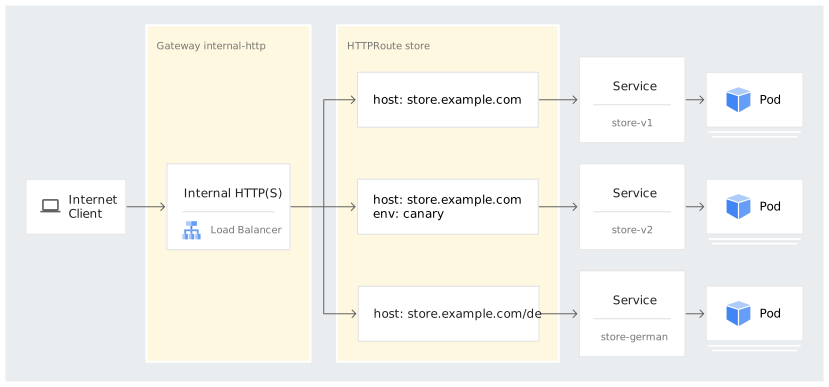
這些路由規則會以下列方式處理 HTTP 流量:
store.example.com/de的流量會傳送至 Servicestore-german。- 含有 HTTP 標頭
"env: canary"的store.example.com流量會傳送至 Servicestore-v2。 - 其餘流向
store.example.com的流量會傳送至服務store-v1。
確認 HTTPRoute 已部署:
kubectl describe httproute store輸出結果會與下列內容相似:
Name:         store
Namespace:    default
Labels:       <none>
Annotations:  <none>
API Version:  gateway.networking.k8s.io/v1
Kind:         HTTPRoute
# Multiple lines are omitted here.
Spec:
  Hostnames:
    store.example.com
  Parent Refs:
    Group:  gateway.networking.k8s.io
    Kind:   Gateway
    Name:   internal-http
  Rules:
    Backend Refs:
      Group:
      Kind:    Service
      Name:    store-v1
      Port:    8080
      Weight:  1
    Matches:
      Path:
        Type:   PathPrefix
        Value:  /
    Backend Refs:
      Group:
      Kind:    Service
      Name:    store-v2
      Port:    8080
      Weight:  1
    Matches:
      Headers:
        Name:   env
        Type:   Exact
        Value:  canary
      Path:
        Type:   PathPrefix
        Value:  /
    Backend Refs:
      Group:
      Kind:    Service
      Name:    store-german
      Port:    8080
      Weight:  1
    Matches:
      Path:
        Type:   PathPrefix
        Value:  /de
Status:
  Parents:
    Conditions:
      Last Transition Time:  2022-11-01T04:18:52Z
      Message:
      Reason:                Accepted
      Status:                True
      Type:                  Accepted
      Last Transition Time:  2022-11-01T04:18:52Z
      Message:
      Reason:                ReconciliationSucceeded
      Status:                True
      Type:                  Reconciled
    Controller Name:         networking.gke.io/gateway
    Parent Ref:
      Group:  gateway.networking.k8s.io
      Kind:   Gateway
      Name:   internal-http
Events:
  Type    Reason  Age                From                   Message
  ----    ------  ----               ----                   -------
  Normal  ADD     24m                sc-gateway-controller  default/store
  Normal  SYNC    16m (x4 over 23m)  sc-gateway-controller  Bind of HTTPRoute "default/store" to ParentRef {Group:       gateway.networking.k8s.io",
  # Multiple lines are omitted here.
確認 HTTPRoute 已繫結至閘道:
kubectl describe gateway輸出結果會與下列內容相似:
Name:         internal-http
Namespace:    default
Labels:       <none>
<...>
Status:
  Addresses:
    Type:   IPAddress
    Value:  10.128.15.203
  Conditions:
    Last Transition Time:  2022-11-01T03:47:01Z
    Message:
    Reason:                Scheduled
    Status:                True
    Type:                  Scheduled
    Last Transition Time:  2022-11-01T03:47:01Z
    Message:
    Reason:                Ready
    Status:                True
    Type:                  Ready
  Listeners:
    Attached Routes:  1
    Conditions:
      Last Transition Time:  2022-11-01T03:47:01Z
      Message:
      Reason:                Ready
      Status:                True
      Type:                  Ready
    Name:                    http
    Supported Kinds:
      Group:  gateway.networking.k8s.io
      Kind:   HTTPRoute
      <...>
將流量傳送至應用程式
現在,閘道、路徑和應用程式已部署至叢集,您可以將流量傳送至應用程式。閘道設定為僅在通訊埠 80 提供 HTTP 流量。除非已另外設定 TLS,否則使用 HTTPS 提出的要求可能會失敗。
從閘道擷取 IP 位址,以便將流量傳送至應用程式:
kubectl get gateways.gateway.networking.k8s.io internal-http -o=jsonpath="{.status.addresses[0].value}"輸出內容為 IP 位址。
從與叢集連線的虛擬機器 (VM) 執行個體,將流量傳送至這個 IP 位址。這是因為閘道具有內部 IP 位址,且只能從虛擬私有雲網路存取。由於
internal-http是區域性負載平衡器,用戶端 VM 必須與 GKE 叢集位於相同區域。在相同的虛擬私有雲網路和區域中,建立測試 VM:
gcloud compute instances create test-vm \
    --zone=COMPUTE_ZONE \
    --network=VPC_NETWORK_NAME
使用 SSH 連線至 VM:
gcloud compute ssh test-vm --zone=COMPUTE_ZONE在 VM 的殼層中,向
store.example.com發出要求:curl http://store.example.com --resolve store.example.com:80:GATEWAY_IP_ADDRESS -v將
GATEWAY_IP_ADDRESS替換為上一個步驟中的 IP 位址。試用版應用程式的輸出內容會顯示應用程式執行位置的相關資訊:
{ "cluster_name": "gke1", "host_header": "store.example.com", "metadata": "store-v1", "node_name": "gke-gke1-pool-2-bd121936-5pfc.c.gateway-demo-243723.internal", "pod_name": "store-v1-84b47c7f58-pmgmk", "pod_name_emoji": "💇🏼♀️", "project_id": "gateway-demo-243723", "timestamp": "2022-10-25T13:31:17", "zone": "ZONE_NAME" }前往
store.example.com/de的德文版商店服務,測試路徑比對:curl http://store.example.com/de --resolve store.example.com:80:GATEWAY_IP_ADDRESS -v輸出內容會確認要求是由
store-germanPod 提供:{ "cluster_name": "gke1", "host_header": "store.example.com", "metadata": "Gutentag!", "node_name": "gke-gke1-pool-2-bd121936-n3xn.c.gateway-demo-243723.internal", "pod_name": "store-german-5cb6474c55-lq5pl", "pod_name_emoji": "🧞♀", "project_id": "gateway-demo-243723", "timestamp": "2022-10-25T13:35:37", "zone": "ZONE_NAME" }最後,使用
env: canaryHTTP 標頭,將流量傳送至商店 Service 的初期測試版本:curl -H "env: canary" http://store.example.com --resolve store.example.com:80:GATEWAY_IP_ADDRESS -v輸出內容會確認要求是由
store-v2Pod 提供:{ "cluster_name": "gke1", "host_header": "store.example.com", "metadata": "store-v2", "node_name": "gke-gke1-pool-2-bd121936-5pfc.c.gateway-demo-243723.internal", "pod_name": "store-v2-5788476cbd-s9thb", "pod_name_emoji": "🦰", "project_id": "gateway-demo-243723", "timestamp": "2022-10-25T13:38:26", "zone": "ZONE_NAME" }
部署外部閘道
外部閘道會公開可從網際網路或虛擬私有雲網路以外網路連線的應用程式。這項部署作業與內部閘道部署作業類似,但您必須保護應用程式,因為閘道可透過公開網際網路存取。
建立外部閘道的方式有兩種:全域外部閘道或區域性外部閘道。
- 區域性外部閘道:這個閘道會使用區域性 IP 位址做為閘道的前端。這個閘道的行為取決於您選取的網路服務級別:
- 如果選擇標準網路服務級別 (預設),區域性 IP 位址只會在部署區域性外部閘道的本機 Google Cloud Compute 區域中 advertise。用戶端將流量傳送至這個 IP 位址時,流量會先由本機網際網路服務供應商 (ISP) 透過公開網際網路轉送,然後才抵達公告 IP 位址的 Google 區域。
- 如果選擇進階網路服務級別,區域性 IP 位址會在 Google 的全球網路中 advertise。這表示用戶端流量會從盡可能靠近用戶端的 Google 邊緣對接點,進入 Google 的優質全球骨幹網路,即使目的地是區域性 IP 位址也一樣。這個位置可大幅縮短延遲時間並提升效能,因為流量在公開網際網路上的傳輸距離會縮到最短。
- 全域外部閘道:這類閘道使用全域 IP 位址 (或任意傳播 IP 位址) 做為前端。這個 IP 位址會在所有 Google Cloud Compute 區域中 advertising。用戶端將流量傳送至這個任意傳播 IP 位址時,系統會將流量轉送至最靠近的 Google 位置,也就是該 IP 位址的 advertise 位置。全域外部閘道僅適用於進階網路服務級別。
部署區域性外部閘道
以下範例說明如何使用自行管理的憑證和 HTTPRoute,公開附加多個憑證至區域性外部閘道的商店應用程式。
為區域性閘道建立 Proxy 子網路
您必須先設定僅限 Proxy 的子網路,才能建立使用區域性外部應用程式負載平衡器的閘道。在您使用區域性外部應用程式負載平衡器的虛擬私有雲中,每個區域都必須有 external_managed_proxy 子網路。這個子網路會為負載平衡器 Proxy 提供內部 IP 位址。
建立憑證,保護用戶端流量
您可以使用憑證授權單位 (CA) 核發及驗證的憑證,也可以建立自行簽署的憑證。如要進一步瞭解如何建立憑證,請參閱「將憑證儲存在 Kubernetes Secret 中」。
如要保護用戶端與區域閘道之間的流量,可以採用下列方法:
- Google 代管或自行管理的 Certificate Manager 憑證
- 自行管理的區域性 SSL 憑證
- Kubernetes Secret
區域性閘道不支援CertificateMap或 Google 代管的 SSL 憑證。
詳情請參閱「憑證和 Google Cloud 負載平衡器」。
建立區域性外部 HTTP(S) 閘道
為外部負載平衡器建立區域性靜態 IP 位址。
gcloud compute addresses create IP_ADDRESS_NAME \
  --region=COMPUTE_REGION \
  --network-tier=STANDARD
更改下列內容:
IP_ADDRESS_NAME:新靜態 IP 位址的名稱。COMPUTE_REGION:叢集執行的 Compute Engine 區域。
使用自行管理的憑證建立區域性外部應用程式負載平衡器閘道,如下所示,並將資訊清單儲存為
regional-gateway.yaml:kind: Gateway apiVersion: gateway.networking.k8s.io/v1 metadata: name: external-regional-http spec: # Name of an existing GatewayClass. gatewayClassName: gke-l7-regional-external-managed # Listen for HTTPS traffic on port 443 listeners: - name: https protocol: HTTPS port: 443 tls: # Terminate the TLS session with the client at the Gateway. mode: Terminate # Certificates for the Gateway to use to create a new TLS session. certificateRefs: - name: store-example-com # The name of the static IP address of the external load balancer. # You can also use the `IPAddress` type to specify the actual IP address. addresses: - type: NamedAddress value: IP_ADDRESS_NAME套用
regional-gateway資訊清單:kubectl apply -f regional-gateway.yaml驗證設定。
kubectl get gateway輸出結果會與下列內容相似:
NAME            CLASS                              ADDRESS         READY   AGE
external-http   gke-l7-regional-external-managed   35.118.32.224   True    49s
如要查看更多詳細資料,請使用 describe 指令:
kubectl describe gateway輸出結果會與下列內容相似:
Name:         external-regional-http
Namespace:    default
Labels:       <none>
...
Spec:
  Gateway Class Name:  gke-l7-regional-external-managed
  Listeners:
    Allowed Routes:
      Namespaces:
        From:  Same
    Name:      https
    Port:      443
    Protocol:  HTTPS
    Tls:
      Certificate Refs:
        Group:
        Kind:   Secret
        Name:   store-example-com
      Mode:     Terminate
  ...
部署試用版應用程式
應用程式團隊可以獨立部署應用程式和路徑,不受閘道部署作業影響。在某些情況下,應用程式團隊可能也想擁有閘道,並自行部署為應用程式專用的資源。如要瞭解閘道和路由的不同擁有權模式,請參閱「路由繫結」。在這個範例中,商店團隊部署應用程式和隨附的 HTTPRoute,透過上一節建立的 external-http Gateway 公開應用程式。
如要進一步瞭解 HTTPRoute 欄位,請參閱 API 規格。
將範例應用程式部署至叢集:
kubectl apply -f https://raw.githubusercontent.com/GoogleCloudPlatform/gke-networking-recipes/main/gateway/gke-gateway-controller/app/store.yaml這個範例應用程式會建立三個 Deployment 和三個 Service,分別命名為
store-v1、store-v2和store-german。確認應用程式已成功部署:
kubectl get pod輸出結果會與下列內容相似:
NAME                            READY   STATUS    RESTARTS   AGE
store-german-66dcb75977-5gr2n   1/1     Running   0          38s
store-v1-65b47557df-jkjbm       1/1     Running   0          14m
store-v2-6856f59f7f-sq889       1/1     Running   0          14m
確認 Service 已成功部署:
kubectl get service輸出結果會與下列內容相似:
NAME           TYPE        CLUSTER-IP    EXTERNAL-IP   PORT(S)    AGE
store-german   ClusterIP   10.48.3.183   <none>        8080/TCP   4s
store-v1       ClusterIP   10.48.2.224   <none>        8080/TCP   5s
store-v2       ClusterIP   10.48.4.48    <none>        8080/TCP   5s
建立 HTTPRoute
路由資源會定義通訊協定專屬規則,將流量從閘道對應至 Kubernetes 後端。HTTPRoute 資源會比對及篩選 HTTP 和 HTTPS 流量,且所有 gke-l7-* GatewayClass 都支援這項資源。
在本節中,您將部署 HTTPRoute,為閘道設定連至範例應用程式所需的路由規則。
將下列資訊清單儲存至名為
store-route-external.yaml的檔案:kind: HTTPRoute apiVersion: gateway.networking.k8s.io/v1 metadata: name: store-external spec: parentRefs: # Bind the route to the 'external-http' Gateway. - kind: Gateway name: external-http hostnames: - "store.example.com" rules: # Default rule for store.example.com that sends traffic to the store-v1 service. - backendRefs: - name: store-v1 port: 8080 # Match requests with the "env: canary" header and send them to the store-v2 service. - matches: - headers: - name: env value: canary backendRefs: - name: store-v2 port: 8080 # Match requests with the path "/de" and sends them to the store-german service. - matches: - path: value: /de backendRefs: - name: store-german port: 8080這個資訊清單描述參照
external-http閘道的 HTTPRoute。將資訊清單套用至叢集:
kubectl apply -f store-route-external.yamlstoreHTTPRoute 會使用parentRefs屬性繫結至external-http閘道。下圖顯示基礎負載平衡器上設定的路由規則: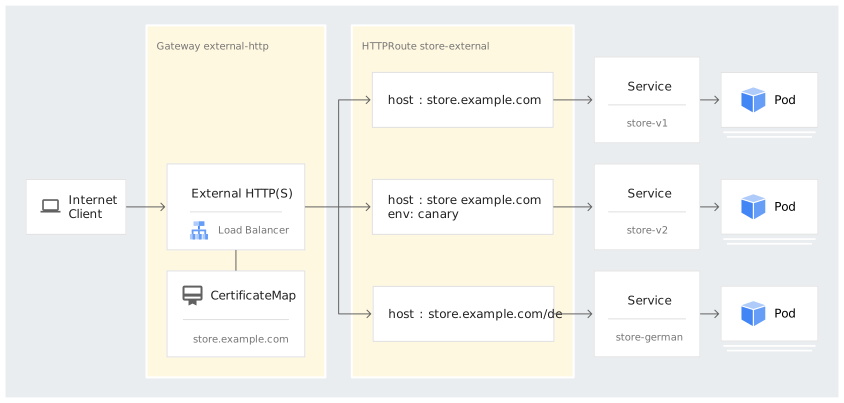
路由規則會按照下列方式處理 HTTP 流量:
- 傳送至
store.example.com/de的流量會轉送至服務store-german。 - HTTP 標頭為
"env: canary"的store.example.com流量會轉送至服務store-v2。 - 其餘流向
store.example.com的流量則會轉送至服務store-v1。
- 傳送至
確認 HTTPRoute 已部署:
kubectl describe httproute store-external輸出結果會與下列內容相似:
Name:         store-external
Namespace:    default
Labels:       <none>
Annotations:  <none>
API Version:  gateway.networking.k8s.io/v1
Kind:         HTTPRoute
# Multiple lines are omitted here.
Spec:
  Hostnames:
    store.example.com
  Parent Refs:
    Group:  gateway.networking.k8s.io
    Kind:   Gateway
    Name:   external-http
  Rules:
    Backend Refs:
      Group:
      Kind:    Service
      Name:    store-v1
      Port:    8080
      Weight:  1
    Matches:
      Path:
        Type:   PathPrefix
        Value:  /
    Backend Refs:
      Group:
      Kind:    Service
      Name:    store-v2
      Port:    8080
      Weight:  1
    Matches:
      Headers:
        Name:   env
        Type:   Exact
        Value:  canary
      Path:
        Type:   PathPrefix
        Value:  /
    Backend Refs:
      Group:
      Kind:    Service
      Name:    store-german
      Port:    8080
      Weight:  1
    Matches:
      Path:
        Type:   PathPrefix
        Value:  /de
Status:
  Parents:
    # This section shows the status of this route in relation to each Gateway attached.
    Conditions:
      Last Transition Time:  2022-11-01T05:42:31Z
      Message:
      Reason:                Accepted
      Status:                True # Means that the Gateway has validated and accepted this route's configuration.
      Type:                  Accepted
      Last Transition Time:  2022-11-01T05:43:18Z
      Message:
      Reason:                ReconciliationSucceeded
      Status:                True
      Type:                  Reconciled
    Controller Name:         networking.gke.io/gateway
    Parent Ref:
      Group:  gateway.networking.k8s.io
      Kind:   Gateway
      Name:   external-http
Events:
  Type     Reason  Age    From                   Message
  ----     ------  ----   ----                   -------
  Normal   ADD     2m48s  sc-gateway-controller  default/store-external
  Normal  SYNC  61s (x3 over 2m27s)  sc-gateway-controller  Bind of HTTPRoute "default/store-external" to ParentRef Group:       "gateway.networking.k8s.io",
  ...
確認 HTTPRoute 已繫結至閘道:
kubectl describe gateway external-http輸出結果會與下列內容相似:
Name:         external-http
Namespace:    default
Labels:       <none>
# Multiple lines are omitted here.
Status:
  Addresses:
    Type:   IPAddress
    Value:  34.149.207.45
  Conditions:
    Last Transition Time:  2022-11-01T05:37:21Z
    Message:
    Reason:                Scheduled
    Status:                True
    Type:                  Scheduled
    Last Transition Time:  2022-11-01T05:43:18Z
    Message:
    Reason:                Ready
    Status:                True
    Type:                  Ready
  Listeners:
    Attached Routes:  1
    Conditions:
      Last Transition Time:  2022-11-01T05:43:18Z
      Message:
      Reason:                Ready
      Status:                True
      Type:                  Ready
    Name:                    https
    Supported Kinds:
      Group:  gateway.networking.k8s.io
      Kind:   HTTPRoute
      # Multiple lines are omitted here.
將流量傳送至應用程式
現在,閘道、路徑和應用程式已部署至叢集,您可以將流量傳送至應用程式。
取得閘道的 IP 位址:
kubectl get gateways.gateway.networking.k8s.io external-http -o=jsonpath="{.status.addresses[0].value}"輸出內容為 IP 位址。
建立 VM:
gcloud cloud-shell ssh從 VM 將流量傳送至閘道 IP 位址。您必須手動設定主機標頭,因為您並非
example.com主機名稱的擁有者。curl https://store.example.com --resolve store.example.com:443:GATEWAY_IP_ADDRESS --cacert cacert.pem -v將
GATEWAY_IP_ADDRESS替換為上一個步驟中的閘道 IP 位址。cacert.pem:您產生的憑證檔案。請務必將這個檔案儲存在用來連線至閘道的機器上。
輸出內容會顯示試用版應用程式的資訊,說明應用程式的執行位置:
{ "cluster_name": "gke1", "host_header": "store.example.com", "metadata": "store-v1", "node_name": "gke-gke1-pool-2-bd121936-5pfc.c.gateway-demo-243723.internal", "pod_name": "store-v1-84b47c7f58-pmgmk", "pod_name_emoji": "💇🏼♀️", "project_id": "gateway-demo-243723", "timestamp": "2022-09-25T13:31:17", "zone": "us-central1-a" }前往
store.example.com/de的德文版store服務,測試路徑比對:curl https://store.example.com/de --resolve store.example.com:443:GATEWAY_IP_ADDRESS --cacert cacert.pem -v輸出內容會確認要求是由
store-germanPod 提供:{ "cluster_name": "gke1", "host_header": "store.example.com", "metadata": "Gutentag!", "node_name": "gke-gke1-pool-2-bd121936-n3xn.c.gateway-demo-243723.internal", "pod_name": "store-german-5cb6474c55-lq5pl", "pod_name_emoji": "🧞♀", "project_id": "gateway-demo-243723", "timestamp": "2022-09-25T13:35:37", "zone": "us-central1-a" }使用
env: canaryHTTP 標頭,將流量傳送至store服務的金絲雀版本:curl -H "env: canary" https://store.example.com --resolve store.example.com:443:GATEWAY_IP_ADDRESS --cacert cacert.pem -v輸出內容會確認要求是由
store-v2Pod 提供:{ "cluster_name": "gke1", "host_header": "store.example.com", "metadata": "store-v2", "node_name": "gke-gke1-pool-2-bd121936-5pfc.c.gateway-demo-243723.internal", "pod_name": "store-v2-5788476cbd-s9thb", "pod_name_emoji": "👩🏿", "project_id": "gateway-demo-243723", "timestamp": "2022-09-25T13:38:26", "zone": "us-central1-a" }
部署全域外部閘道
以下範例說明如何使用 Certificate Manager 和 HTTPRoute,公開附加多個憑證至全域外部閘道,並分組至憑證對應組合的商店應用程式。
建立憑證對應組合
如果每個閘道需要 15 個以上的憑證,或需要使用萬用字元憑證,Google 建議您使用 Certificate Manager 管理憑證。
您也可以使用 Kubernetes Secret 或 Google 代管的 SSL 憑證,保護外部閘道。詳情請參閱「閘道安全性」。
在本節中,您將使用 Certificate Manager 建立憑證,保護在叢集上執行的應用程式。
啟用 Certificate Manager API:
gcloud services enable certificatemanager.googleapis.com建立憑證對應組合:
gcloud beta certificate-manager maps create store-example-com-map將 Google 代管的憑證和金鑰載入憑證:
gcloud beta certificate-manager certificates create store-example-com-cert \
    --certificate-file="CERTIFICATE_FILE" \
    --private-key-file="PRIVATE_KEY_FILE"
更改下列內容:
CERTIFICATE_FILE:憑證檔案名稱。檔案的副檔名必須是.pem。例如:cert.pem。PRIVATE_KEY_FILE:私密金鑰檔案的名稱。
詳情請參閱「建立私密金鑰和憑證」。
建立
CertificateMapEntry,將憑證指派給憑證對應組合:gcloud beta certificate-manager maps entries create store-example-com-map-entry \ --map=store-example-com-map \ --hostname=store.example.com \ --certificates=store-example-com-cert
如要瞭解如何使用其他憑證來源 (例如 Kubernetes Secret 或 SSL 憑證) 保護閘道,請參閱「保護閘道」。
建立閘道
閘道資源代表在 Kubernetes 中轉送流量的資料層。Gateway 可根據使用的 GatewayClass,代表多種不同的負載平衡和轉送。
如要進一步瞭解閘道資源,請參閱閘道資源說明或 API 規格。
在本節中,您將建立閘道。應用程式團隊可以獨立部署路徑,並將路徑安全地附加至閘道,透過閘道將應用程式公開至網際網路。
將下列資訊清單儲存至名為
gateway.yaml的檔案:kind: Gateway apiVersion: gateway.networking.k8s.io/v1 metadata: name: external-http annotations: networking.gke.io/certmap: store-example-com-map spec: # This GatewayClass uses a global external Application Load Balancer. gatewayClassName: gke-l7-global-external-managed listeners: - name: https protocol: HTTPS port: 443這個資訊清單描述的閘道包含下列欄位:
gatewayClassName: gke-l7-global-external-managed:指定這個閘道的 GatewayClass。這個閘道類別使用全域外部應用程式負載平衡器。protocol: HTTPS和port: 443:指定閘道公開 HTTPS 流量的通訊埠 443。這些欄位會啟用 TLS。networking.gke.io/certmap: store-example-com-map:指定 Certificate Manager 中的憑證對應組合名稱。
由於 TLS 是透過 Certificate Manager 設定,並使用
networking.gke.io/certmap註解,因此沒有 TLS 區段。將資訊清單套用至叢集:
kubectl apply -f gateway.yamlGKE 可能需要幾分鐘才能部署資源。
確認閘道已成功部署:
kubectl describe gateway輸出結果會與下列內容相似:
Name:         external-http
Namespace:    default
Labels:       <none>
...
Spec:
  Gateway Class Name:  gke-l7-global-external-managed
  Listeners:
    Allowed Routes:
      Namespaces:
        From:  Same
    Name:      https
    Port:      443
    Protocol:  HTTPS
    Tls:
      Certificate Refs:
        Group:
        Kind:   Secret
        Name:   store-example-com
      Mode:     Terminate
 ...
這項輸出內容顯示,叢集內部署的閘道具有負載平衡器和公開 IP 位址。閘道沒有任何路由,因此無法將流量傳送至後端。如果沒有路徑,所有流量都會傳送至預設後端,並傳回 HTTP 404 回應。在下一節中,您將部署路由,指示閘道將流量傳送至後端。
部署試用版應用程式
您可以獨立部署應用程式和路徑,不受閘道部署作業影響。
如要進一步瞭解如何部署試用版應用程式,請參閱「部署試用版應用程式」。
建立 HTTPRoute
您必須建立 HTTPRoute,才能比對及篩選 HTTP 和 HTTPS 流量。
將流量傳送至應用程式
部署應用程式並建立 HTTPRoute 後,即可將流量傳遞至應用程式。
如要進一步瞭解如何將流量傳送至應用程式,請參閱「將流量傳送至應用程式」。
部署區域性外部閘道
以下範例說明如何使用自行管理的憑證和 HTTPRoute,公開附加多個憑證至區域性外部閘道的商店應用程式。
為區域性閘道建立 Proxy 子網路
您必須先設定僅限 Proxy 的子網路,才能建立使用區域性外部應用程式負載平衡器的閘道。在您使用區域性外部應用程式負載平衡器的虛擬私有雲中,每個區域都必須有 external_managed_proxy 子網路。這個子網路會為負載平衡器 Proxy 提供內部 IP 位址。
建立憑證,保護用戶端流量
您可以使用憑證授權單位 (CA) 核發及驗證的憑證,也可以建立自行簽署的憑證。如要進一步瞭解如何建立憑證,請參閱「將憑證儲存在 Kubernetes Secret 中」。
如要保護用戶端與區域閘道之間的流量,可以採用下列方法:
- Google 代管或自行管理的 Certificate Manager 憑證
- 自行管理的區域性 SSL 憑證
- Kubernetes Secret
區域性閘道不支援 CertificateMap 或 Google 代管的 SSL 憑證。
詳情請參閱「憑證和 Google Cloud 負載平衡器」
建立區域性外部 HTTP(S) 閘道
為外部負載平衡器建立區域性靜態 IP 位址。
gcloud compute addresses create IP_ADDRESS_NAME \
  --region=COMPUTE_REGION \
  --network-tier=STANDARD
更改下列內容:
IP_ADDRESS_NAME:新靜態 IP 位址的名稱。COMPUTE_REGION:叢集執行的 Compute Engine 區域。
使用自行管理的憑證建立區域性外部應用程式負載平衡器閘道,如下所示,並將資訊清單儲存為
regional-gateway.yaml:kind: Gateway apiVersion: gateway.networking.k8s.io/v1 metadata: name: external-regional-http spec: # Name of an existing GatewayClass. gatewayClassName: gke-l7-regional-external-managed # Listen for HTTPS traffic on port 443 listeners: - name: https protocol: HTTPS port: 443 tls: # Terminate the TLS session with the client at the Gateway. mode: Terminate # Certificates for the Gateway to use to create a new TLS session. certificateRefs: - name: store-example-com # The name of the static IP address of the external load balancer. # You can also use the `IPAddress` type to specify the actual IP address. addresses: - type: NamedAddress value: IP_ADDRESS_NAME套用
regional-gateway資訊清單:kubectl apply -f regional-gateway.yaml驗證設定。
kubectl get gateway輸出結果會與下列內容相似:
NAME            CLASS                              ADDRESS         READY   AGE
external-http   gke-l7-regional-external-managed   35.118.32.224   True    49s
如要查看更多詳細資料,請使用 describe 指令:
kubectl describe gateway輸出結果會與下列內容相似:
Name:         external-regional-http
Namespace:    default
Labels:       <none>
...
Spec:
  Gateway Class Name:  gke-l7-regional-external-managed
  Listeners:
    Allowed Routes:
      Namespaces:
        From:  Same
    Name:      https
    Port:      443
    Protocol:  HTTPS
    Tls:
      Certificate Refs:
        Group:
        Kind:   Secret
        Name:   store-example-com
      Mode:     Terminate
  ...
部署試用版應用程式
您可以獨立部署應用程式和路徑,不受閘道部署作業影響。
如要進一步瞭解如何部署試用版應用程式,請參閱「部署試用版應用程式」。
建立 HTTPRoute
您必須建立 HTTPRoute,才能比對及篩選 HTTP 和 HTTPS 流量。
將流量傳送至應用程式
部署應用程式並建立 HTTPRoute 後,即可將流量傳遞至應用程式。
如要進一步瞭解如何將流量傳送至應用程式,請參閱「將流量傳送至應用程式」。
使用共用閘道
Gateway API 會使用獨立的資源「閘道」和「路由資源」,部署負載平衡器和路由規則。這與將所有內容合併至單一資源的 Ingress 不同。Gateway 會將責任分配給不同資源,因此可分別部署負載平衡器和其路由規則,並由不同使用者或團隊部署。這樣一來,閘道就能成為共用閘道,附加許多不同的路徑,並由獨立團隊完全擁有及管理,甚至可以跨不同命名空間。
針對共用閘道部署路由
這個範例是以部署內部閘道中部署的 internal-http 閘道為基礎。
在這個範例中,網站團隊部署了應用程式、服務和 HTTPRoute,以便將閘道的流量與這些服務進行比對。
部署範例應用程式:
kubectl apply -f https://raw.githubusercontent.com/GoogleCloudPlatform/gke-networking-recipes/main/gateway/gke-gateway-controller/app/site.yaml將下列資訊清單儲存至名為
site-route-internal.yaml的檔案:kind: HTTPRoute apiVersion: gateway.networking.k8s.io/v1 metadata: name: site-internal spec: # Attach the HTTPRoute to the `internal-http` Gateway. parentRefs: - kind: Gateway name: internal-http # Route requests that have `site.example.com` in the Host header. hostnames: - "site.example.com" # Send all requests to the `site-v1` Service. rules: - backendRefs: - name: site-v1 port: 8080這個資訊清單描述的 HTTPRoute 會比對
site.example.com的所有流量,並將其轉送至site-v1服務。將資訊清單套用至叢集:
kubectl apply -f site-route-internal.yaml確認 HTTPRoute 已附加至閘道:
kubectl describe httproute.gateway.networking.k8s.io site-internal輸出結果會與下列內容相似:
Status:
  Parents:
    Conditions:
      Last Transition Time:  2023-01-09T15:05:43Z
      Message:
      Reason:                Accepted
      Status:                True
      Type:                  Accepted
      Last Transition Time:  2023-01-09T15:05:43Z
      Message:
      Reason:                ReconciliationSucceeded
      Status:                True
      Type:                  Reconciled
    Controller Name:         networking.gke.io/gateway
    Parent Ref:
      Group:  gateway.networking.k8s.io
      Kind:   Gateway
      Name:   internal-http
      ...
如果閘道的
Accepted條件為True,表示 HTTPRoute 已成功繫結至閘道。如要進一步瞭解「Status」(狀態) 欄位,請參閱「路徑狀態」。確認傳送至閘道的流量是否正確轉送:
curl -H "host: site.example.com" GATEWAY_IP_ADDRESS
curl -H "host: store.example.com" GATEWAY_IP_ADDRESS
將
GATEWAY_IP_ADDRESS替換為內部閘道的 IP 位址。您必須使用與閘道位於相同虛擬私有雲的虛擬機器 (VM)。
輸出結果會與下列內容相似:
{ "cluster_name": "CLUSTER_NAME", "host_header": "site.example.com", "metadata": "site-v1", "pod_name": "site-v1-5d64fc4d7d-fz6f6", "pod_name_emoji": "👩🏼🍳", "project_id": "PROJECT_ID", "timestamp": "2022-11-02T19:07:01", "zone": "ZONE_NAME" } ... { "cluster_name": "CLUSTER_NAME", "host_header": "store.example.com", "metadata": "store-v1", "pod_name": "store-v1-6d8d58d78-vz8pn", "pod_name_emoji": "🧝🏻♂️", "project_id": "PROJECT_ID", "timestamp": "2022-11-02T19:07:01", "zone": "ZONE_NAME" }這項輸出內容表示,含有
site.example.com主機標頭的要求會傳送至site-v1服務,而含有store.example.com主機標頭的要求則會傳送至store-v1服務。
設定網路級別
您可以在閘道定義的 addresses[] 陣列中使用 type 欄位,指定區域性外部應用程式負載平衡器監聽器位址的網路級別。如未指定網路級別,閘道預設會使用標準級暫時 IP 位址。
type 欄位請使用下列值:
networking.gke.io/premium-ephemeral-ipv4-address:指派進階級 IP 位址。networking.gke.io/standard-ephemeral-ipv4-address:指派標準級 IP 位址。
如要從兩個網路級別指派 IP 位址,請在 addresses 欄位中指定這兩種類型。
以下範例說明如何讓 Google Cloud 將進階級 IP 位址指派給閘道。如要佈建標準級 IP 位址,請使用 networking.gke.io/standard-ephemeral-ipv4-address。
將下列資訊清單範例儲存為
external-regional-http.yaml:kind: Gateway apiVersion: gateway.networking.k8s.io/v1 metadata: name: external-regional-http spec: # Name of an existing GatewayClass. gatewayClassName: gke-l7-regional-external-managed # Listen for HTTPS traffic on port 443. listeners: - name: https protocol: HTTPS port: 443 tls: # Terminate the TLS session with the client at the Gateway. mode: Terminate # Certificates for the Gateway to use to create a new TLS session. certificateRefs: - name: store-example-com addresses: # Request a Premium Tier ephemeral IPv4 address for the Gateway. - type: networking.gke.io/premium-ephemeral-ipv4-address套用範例資訊清單:
kubectl apply -f external-regional-http.yaml
設定閘道預設後端
所有 gke-l7-* GatewayClass 都會針對不相符的流量傳回 HTTP 404。您可以設定預設後端,方法是使用明確的預設路徑,將不相符的流量傳送至使用者提供的服務。
即使沒有明確的後端定義,閘道也會設定為處理 404 (找不到) 和 500 (伺服器錯誤) 等錯誤代碼。預設行為可能會因閘道實作方式而異。如要進一步控管錯誤處理,建議您設定自訂後端。
以下 HTTPRoute 範例說明如何自訂預設後端。如果套用類似下列的 HTTPRoute,其優先順序會高於隱含的預設後端:
kind: HTTPRoute
apiVersion: gateway.networking.k8s.io/v1
metadata:
  name: custom-default-backend
spec:
  parentRefs:
  - kind: Gateway
    name: my-internal-gateway
  # Omit the `hostnames` field to route all unmatched traffic from the
  # attached Gateway.
  rules:
  - backendRefs:
    - name: my-custom-default-backend-service
      port: 8080
這個 HTTPRoute 會比對來自特定閘道的所有流量。每個閘道只能有一項這類規則,否則規則會發生衝突,並套用優先順序。
您可以使用預設後端,防止使用者建立轉送所有閘道流量的預設路徑後端。明確的 HTTPRoute 一律優先於具有衝突路由規則的新 HTTPRoute。
為閘道設定靜態 IP 位址
每個閘道都有一個 IP 位址,用於監聽流量。如未在閘道指定 IP 位址,閘道控制器會自動提供 IP 位址。您也可以建立靜態 IP 位址,讓 IP 位址獨立於閘道生命週期存在。
部署閘道後,其 IP 位址會顯示在狀態欄位中:
kind: Gateway
...
status:
  addresses:
    - value: 10.15.32.3
視 GatewayClass 而定,IP 位址會從下列子網路分配:
| GatewayClasses | 預設 IP 位址集區 |
|---|---|
|
|
主要節點 IPv4/IPv6 位址範圍中的區域性私人 IP 位址 |
|
|
Google 區域性外部 IPv4/IPv6 範圍中的區域性公開 IP 位址 |
|
|
Google 全域外部 IPv4/IPv6 範圍的全域公開 IP 位址 |
addresses.NamedAddress 欄位可讓您指定與閘道無關的 IP 位址。您可以在部署閘道前建立靜態 IP 位址資源,並由 NamedAddress 參照該資源。即使刪除閘道,您仍可重複使用靜態 IP 位址。
使用已命名的 IP 位址
您可以指定 NamedAddress,設定 IPv4 或 IPv6 位址。建立閘道前,請務必先佈建靜態 IP 位址。
建立靜態 IP 位址資源:
gcloud compute addresses create IP_ADDRESS_NAME \
    --purpose=SHARED_LOADBALANCER_VIP \
    --region=COMPUTE_REGION \
    --subnet=SUBNET \
    --project=PROJECT_ID
更改下列內容:
IP_ADDRESS_NAME:新靜態 IP 位址的名稱COMPUTE_REGION:如果是區域性閘道,則為叢集執行的 Compute Engine 區域。全域外部閘道不需要這個旗標。SUBNET:IP 位址的子網路。全域外部閘道不需要這個旗標。PROJECT_ID:GKE 叢集運作中的專案。
將下列資訊清單儲存至名為
named-ip-gateway.yaml的檔案:kind: Gateway apiVersion: gateway.networking.k8s.io/v1 metadata: name: internal-http spec: gatewayClassName: gke-l7-rilb listeners: - name: http protocol: HTTP port: 80 addresses: - type: NamedAddress value: IP_ADDRESS_NAME這個資訊清單描述的閘道會參照具名 IP 位址。
將資訊清單套用至叢集:
kubectl apply -f named-ip-gateway.yaml驗證閘道 IP 位址:
kubectl describe gateway internal-http輸出結果會與下列內容相似:
Name:         internal-http
Namespace:    default
Labels:       <none>
...
Spec:
  Addresses:
    Type:              NamedAddress
    Value:             IP_ADDRESS_NAME
  Gateway Class Name:  gke-l7-rilb
  Listeners:
    Allowed Routes:
      Namespaces:
        From:  Same
    Name:      http
    Port:      80
    Protocol:  HTTP
Status:
  Addresses:
    Type:   IPAddress
    Value:  10.15.32.103
設定從 HTTP 重新導向至 HTTPS
Cloud Load Balancing 提供從 HTTP 重新導向至 HTTPS 的功能。外部應用程式負載平衡器會將未加密的 HTTP 要求,重新導向至使用相同 IP 位址的 HTTPS 負載平衡器。建立閘道並啟用 HTTP 至 HTTPS 重新導向功能時,系統會自動建立這兩個負載平衡器。傳送至閘道外部 IP 位址 (通訊埠 80) 的要求,會自動重新導向至相同的外部 IP 位址 (通訊埠 443)。
根據預設,閘道不會定義從 HTTP 重新導向至 HTTPS。
如要將 HTTP 流量重新導向至 HTTPS,請設定閘道來處理 HTTP 和 HTTPS 流量。如果停用 HTTP 或 HTTPS,閘道就不會重新導向流量。
以下範例說明如何使用 HTTP 到 HTTPS 重新導向,確保用戶端傳送至網頁應用程式的流量一律重新導向至安全網頁。
gke-l7-gxlb 和 gke-l7-gxlb-mc GatewayClass 不支援從 HTTP 重新導向至 HTTPS。如要進一步瞭解各 GatewayClass 支援的不同功能,請參閱「GatewayClass 功能」。
請注意,HTTPRoute 中的 hostnames 區段為選用。您可以省略 hostnames 部分,為特定 HTTP 通訊埠上的所有主機名稱建立 catch-all 重新導向。此外,您也可以使用萬用字元重新導向,例如:
...
hostnames:
- "*.example.com" # Matches all subdomains of example.com
...
重新導向來自基礎架構命名空間的 HTTP 流量
在某些情況下,基礎架構或平台管理員團隊與應用程式團隊之間沒有明確區別,因此可能難以防止 Gateway 遭到濫用。
以下範例進一步限制 HTTP 監聽器的使用,防止應用程式團隊不小心使用不安全的通訊協定。這個範例會設定閘道,只有在 HTTPRoute 位於具有 otherInfra: httpToHttps 標籤的命名空間時,才允許 HTTPRoute 使用 HTTP 監聽器。不過,閘道允許任何命名空間中的 HTTPRoute 使用 HTTPS 監聽器。您可以使用 Kubernetes RBAC 限制 http-redirect 命名空間,以免應用程式團隊誤在這個命名空間中建立 HTTPRoute。
建立閘道的命名空間。將資訊清單儲存為
gateway-namespace.yaml:apiVersion: v1 kind: Namespace metadata: name: gateway-infra套用資訊清單:
kubectl apply -f gateway-namespace.yaml建立閘道的命名空間,並將資訊清單儲存為
redirect-namespace.yaml:apiVersion: v1 kind: Namespace metadata: name: http-redirect labels: otherInfra: httpToHttps這個
http-redirect命名空間具有otherInfra: httpToHttps標籤。套用資訊清單:
kubectl apply -f redirect-namespace.yaml如要限制 HTTP 監聽器的使用,請使用下列資訊清單建立閘道。將資訊清單儲存為
external-gateway.yaml:kind: Gateway apiVersion: gateway.networking.k8s.io/v1 metadata: name: external-http namespace: gateway-infra spec: # Name of an existing GatewayClass. gatewayClassName: gke-l7-global-external-managed listeners: - name: http protocol: HTTP port: 80 # Allow only HTTPRoutes from namespaces that have the # `otherInfra: httpToHttps` label to use this listener. allowedRoutes: kinds: - kind: HTTPRoute namespaces: from: Selector selector: matchLabels: otherInfra: httpToHttps - name: https protocol: HTTPS port: 443 # Allow HTTPRoutes from any namespace to use this listener. allowedRoutes: kinds: - kind: HTTPRoute namespaces: from: All tls: mode: Terminate options: networking.gke.io/pre-shared-certs: store-example-comnamespace欄位指定在gateway-infra命名空間中建立閘道。allowedRoutes區段中的namespaces欄位會將 HTTP 監聽器限制在與標籤otherInfra: httpToHttps相符的命名空間。
套用資訊清單:
kubectl apply -f external-gateway.yaml如要強制執行 HTTPS 重新導向,請使用下列資訊清單建立預設 HTTPRoute。將資訊清單儲存為
http-redirect.yaml:kind: HTTPRoute apiVersion: gateway.networking.k8s.io/v1 metadata: name: redirect # Create the HTTPRoute in the `http-redirect` namespace. namespace: http-redirect spec: # Attach the HTTPRoute to the `http` listener in the `external-http` # Gateway. parentRefs: - namespace: gateway-infra name: external-http sectionName: http rules: # Respond to the request with an HTTPS redirection. - filters: - type: RequestRedirect requestRedirect: scheme: httpssectionName欄位會指示閘道僅比對 HTTP 監聽器。RequestRedirect篩選器會強制重新導向至 HTTPS 監聽器。
套用資訊清單:
kubectl apply -f http-redirect.yaml使用下列資訊清單為應用程式建立 Service。將資訊清單儲存為
service-deployment.yaml:apiVersion: v1 kind: Service metadata: name: store-v1 spec: selector: app: store version: v1 ports: - port: 8080 targetPort: 8080 --- apiVersion: apps/v1 kind: Deployment metadata: name: store-v1 spec: replicas: 2 selector: matchLabels: app: store version: v1 template: metadata: labels: app: store version: v1 spec: containers: - name: whereami image: us-docker.pkg.dev/google-samples/containers/gke/whereami:v1 ports: - containerPort: 8080 env: - name: METADATA value: "store-v1"套用資訊清單:
kubectl apply -f service-deployment.yaml使用下列資訊清單,為僅允許 HTTPS 的應用程式建立 HTTPRoute。將資訊清單儲存為
http-route.yaml:kind: HTTPRoute apiVersion: gateway.networking.k8s.io/v1 metadata: name: store-external labels: gateway: external-http spec: # Attach the HTTPRoute to the HTTPS listener in the `external-http` # Gateway. parentRefs: - name: external-http namespace: gateway-infra sectionName: https # Match requests that have the `store.example.com` Host header. hostnames: - "store.example.com" # Route requests to the `store-v1` Service. rules: - backendRefs: - name: store-v1 port: 8080套用資訊清單:
kubectl apply -f http-route.yaml
設定路徑重新導向和網址重寫
路徑重新導向是指將傳入要求從一個網址路徑重新導向至另一個網址路徑。路徑重新導向可讓您在需要處理過時或已淘汰的網址時,變更網址結構。
網址重寫:在伺服器處理傳入的網址前,先修改網址。您可以變更網址的結構或格式,而不必實際變更基礎內容或檔案結構。網址重寫有助於建立容易使用、有利於搜尋引擎最佳化 (SEO) 的網址,方便使用者記憶和理解。根據預設,系統不會設定路徑重新導向和網址重寫,您必須使用 HTTPRoute 中的篩選器,明確設定這些重新導向或重寫。
GKE Gateway 支援路徑重新導向和網址重寫。詳情請參閱「HTTP 路徑重新導向和重寫」。
設定路徑重新導向
您可以設定路徑重新導向,取代整個路徑或僅取代網址中的前置字串。
取代整個路徑
如要取代整個路徑,請在 HTTPRoute 中設定篩選器,將網址路徑中包含前置字串
/any-path的任何網址,替換為嚴格值/new-path。建立 HTTPRoute 資訊清單,並命名為
store.yaml:apiVersion: gateway.networking.k8s.io/v1 kind: HTTPRoute metadata: name: store spec: parentRefs: - kind: Gateway name: external-http hostnames: - store.example.com rules: - matches: - path: # Match requests by a prefix, like `/any-path` and `/any-path/home`. type: PathPrefix value: /any-path filters: - type: RequestRedirect requestRedirect: path: # Replace the full path with `/new-path`. For example, both # `/any-path/home` and `/any-path` become `/new-path`. type: ReplaceFullPath replaceFullPath: /new-path statusCode: 302舉例來說,這個資訊清單會為 HTTPRoute 設定路由規則,如下所示:任何連往網址
https://store.example.com/any-path/...的路徑都應重新導向至新位置https://store.example.com/new-path/(嚴格)。套用資訊清單:
kubectl apply -f store.yaml
這項路由規則遵循嚴格的重新導向規則,也就是說,瀏覽器不會嘗試快取重新導向,而是重新導向至最新版本。
僅取代前置字串
如要僅取代前置字串,請在 HTTPRoute 中設定篩選器,將網址路徑中包含前置字串
/any-prefix的任何網址,替換為嚴格值/new-prefix。建立 HTTPRoute 資訊清單,並命名為
store.yaml:apiVersion: gateway.networking.k8s.io/v1 kind: HTTPRoute metadata: name: store spec: parentRefs: - kind: Gateway name: external-http hostnames: - store.example.com rules: - matches: - path: # Match requests by prefix, like `/any-prefix` and # `/any-prefix/home`. type: PathPrefix value: /any-prefix filters: - type: RequestRedirect requestRedirect: path: # Replace the matched prefix with `/new-prefix`. For example, # `/any-prefix` becomes `/new-prefix` and `/any-prefix/home` # becomes `/new-prefix/home`. type: ReplacePrefixMatch replacePrefixMatch: /new-prefix statusCode: 302舉例來說,這個資訊清單會為 HTTPRoute 設定路由規則,如下所示:任何連往網址
https://store.example.com/any-path/v1/...的路由都應重新導向至新位置https://store.example.com/new-path/v1/...(僅限)。套用資訊清單:
kubectl apply -f store.yaml
這項路由規則遵循唯一的重新導向規則,有助於確保瀏覽器一律將您重新導向至相同的預期頁面。
設定網址重寫
設定網址重寫,變更網址向使用者顯示的方式。您可以使用網址重寫功能,讓網址更容易使用、改善搜尋引擎最佳化 (SEO),或將使用者重新導向至新網頁。
重新編寫整個主機名稱
如要重寫整個主機名稱:
在 HTTPRoute 中設定篩選器,指示閘道在將要求轉送至後端服務之前,將要求標頭中的
Host資訊從www.example.com替換為store.example.com。建立 HTTPRoute 資訊清單,並命名為
www.yaml:apiVersion: gateway.networking.k8s.io/v1 kind: HTTPRoute metadata: name: www spec: parentRefs: - kind: Gateway name: external-http hostnames: - www.example.com rules: - filters: - type: URLRewrite # Replace the hostname in the URL with `store.example.com`. urlRewrite: hostname: store.example.com backendRefs: - name: store-v1 port: 8080舉例來說,在上述設定中,任何傳送至
https://www.example.com的要求都會轉送至具有Host: store.example.com標頭的後端服務,而不是Host: www.example.com。套用資訊清單:
kubectl apply -f www.yaml
使用路徑修飾符重新編寫
您可以將重寫與路徑修飾符結合,在將要求轉送至後端服務之前,提供進階網址和路徑修改。
如要使用路徑修飾符重新編寫,請按照下列步驟操作:
在 HTTPRoute 中設定篩選器,指示閘道將要求標頭中的「Host」資訊從 www.example.com
to store.example.com替換,並將值/store替換為/,然後再將要求轉送至後端服務。建立 HTTPRoute 資訊清單,並命名為
www.yaml:apiVersion: gateway.networking.k8s.io/v1 kind: HTTPRoute metadata: name: www spec: parentRefs: - kind: Gateway name: external-http hostnames: - www.example.com rules: - matches: - path: type: PathPrefix value: /store filters: - type: URLRewrite # For URLs that have `/store` in the path, replace the hostname with # store.example.com and replace the `/store` prefix with `/de`. urlRewrite: hostname: store.example.com path: type: ReplacePrefixMatch replacePrefixMatch: /de backendRefs: - name: store-german port: 8080舉例來說,在上述設定中,任何傳送至
https://www.example.com/store/...的要求都會轉送至後端服務,要求標頭中會包含Host: store.example.com(而非Host: www.example.com),且/store會重寫為/de。套用資訊清單:
kubectl apply -f www.yaml
使用規則運算式重寫
您可以使用 GCPHTTPFilter 資源搭配 spec.urlRewrite.regexModifier,在將要求轉送至後端服務前,使用規則運算式重寫網址路徑。
如要使用規則運算式重寫網址路徑,請按照下列步驟操作:
將下列資訊清單儲存為
store-regex-rewrite-filter.yaml:apiVersion: networking.gke.io/v1 kind: GCPHTTPFilter metadata: name: store-regex-rewrite-filter spec: urlRewrite: regexModifier: pathPattern: /service1/ pathSubstitution: /service2/這份資訊清單描述 GCPHTTPFilter,並包含下列屬性:
urlRewrite.regexModifier:使用規則運算式設定網址路徑重寫。pathPattern:指定與要求網址路徑相符的 RE2 規則運算式,例如/service1/([a-zA-Z0-9]+)。pathSubstitution:指定用於取代相符網址路徑的替換字串,可參照pathPattern中的編號擷取群組,例如/service2/\1。
將資訊清單套用至叢集:
kubectl apply -f store-regex-rewrite-filter.yaml將下列資訊清單儲存為
www-regex-rewrite.yaml:apiVersion: gateway.networking.k8s.io/v1 kind: HTTPRoute metadata: name: www-regex-rewrite spec: parentRefs: - kind: Gateway name: external-http hostnames: - www.example.com rules: - matches: - path: type: PathPrefix value: /service1/ filters: - type: ExtensionRef extensionRef: group: networking.gke.io kind: GCPHTTPFilter name: store-regex-rewrite-filter backendRefs: - name: store-v1 port: 8080這份資訊清單描述的 HTTPRoute 具有下列屬性:
extensionRef:參照上一步建立的store-regex-rewrite-filterGCPHTTPFilter。backendRefs:將重寫的要求轉送至store-v1服務。舉例來說,對https://www.example.com/service1/item123的要求會先重寫為/service2/item123,再轉送至store-v1後端服務。
將資訊清單套用至叢集:
kubectl apply -f www-regex-rewrite.yaml
驗證您的設定
如要確認篩選器是否已套用,請在使用網址重寫或路徑重新導向篩選器建立 HTTPRoute 後,執行下列操作:
kubectl get httproute www -o yaml
輸出結果會與下列內容相似:
  apiVersion: gateway.networking.k8s.io/v1
  kind: HTTPRoute
  metadata:
    annotations:
      kubectl.kubernetes.io/last-applied-configuration: |
        {"apiVersion":"gateway.networking.k8s.io/v1","kind":"HTTPRoute","metadata":{"annotations":{},"name":"www","namespace":"default"},"spec":{"hostnames":["www.example.com"],"parentRefs":[{"kind":"Gateway","name":"external-http"}],"rules":[{"backendRefs":[{"name":"store-german","port":8080}],"filters":[{"type":"URLRewrite","urlRewrite":{"hostname":"store.example.com","path":{"replacePrefixMatch":"/de","type":"ReplacePrefixMatch"}}}],"matches":[{"path":{"type":"PathPrefix","value":"/store"}}]}]}}
    creationTimestamp: "2023-06-22T01:00:42Z"
    generation: 3
    name: www
    namespace: default
    resourceVersion: "51268631"
    uid: e516493e-806d-44d6-ae0d-1c9ff25682cf
  spec:
    hostnames:
    - www.example.com
    parentRefs:
    - group: gateway.networking.k8s.io
      kind: Gateway
      name: external-http
    rules:
    - backendRefs:
      - group: ""
        kind: Service
        name: store-german
        port: 8080
        weight: 1
      filters:
      - type: URLRewrite
        urlRewrite:
          hostname: store.example.com
          path:
            replacePrefixMatch: /de
            type: ReplacePrefixMatch
      matches:
      - path:
          type: PathPrefix
          value: /store
  status:
    parents:
    - conditions:
      - lastTransitionTime: "2023-06-22T01:11:26Z"
        message: ""
        observedGeneration: 2
        reason: Accepted
        status: "True"
        type: Accepted
      - lastTransitionTime: "2023-06-22T01:11:26Z"
        message: ""
        observedGeneration: 2
        reason: ReconciliationSucceeded
        status: "True"
        type: Reconciled
      controllerName: networking.gke.io/gateway
      parentRef:
        group: gateway.networking.k8s.io
        kind: Gateway
        name: external-http
如要取得更多詳細資料,請使用 describe 指令:
kubectl describe httproute
設定跨源資源共享 (CORS)
跨源資源共享 (CORS) 是一種安全機制,可協助在某個來源 (網域) 執行的網頁應用程式,安全存取託管於其他來源的資源。
您可以使用 CORS 篩選器,直接在 HTTPRoute 資源中設定 CORS 政策。這種做法可讓負載平衡器插入適當的 CORS 回應標頭,並處理 CORS 預檢 (OPTIONS) 要求,減輕後端服務的負擔。
設定 CORS 政策
以下範例顯示 HTTPRoute 設有 CORS 篩選器,允許來自 https://www.example.com 的跨源要求使用特定方法和標頭:
apiVersion: gateway.networking.k8s.io/v1
kind: HTTPRoute
metadata:
  name: route-with-cors
  namespace: default
spec:
  parentRefs:
  - name: my-gateway
  rules:
  - matches:
    - path:
        type: PathPrefix
        value: /api
    backendRefs:
    - name: my-backend
      port: 8080
    filters:
    - type: CORS
      cors:
        allowOrigins:
        - "https://www.example.com"
        allowMethods:
        - GET
        - POST
        - DELETE
        allowHeaders:
        - "x-request-header-1"
        - "x-request-header-2"
        exposeHeaders:
        - "x-response-header-a"
        - "x-response-header-b"
        allowCredentials: true
        maxAge: 3600
cors 設定區塊支援下列欄位:
allowOrigins:允許的來源清單。支援http和https通訊協定。您可以使用下列任一格式指定這些來源:- 明確來源 (例如
https://www.example.com)。 - 單一萬用字元 (
*) 可允許所有來源。如果使用這個萬用字元,就無法指定其他來源。基於安全考量,我們強烈建議不要將 catch-all 萬用字元與allowCredentials設定結合 (詳情請參閱下方的欄位定義)。 - 萬用字元模式 (例如
https://*.domain.com)。*萬用字元必須緊接在配置 (http://或https://) 後方,且後方必須接點 (例如http://*.domain.com)、通訊埠 (例如https://*:4433),或做為最後一個字元 (例如http://*)。
- 明確來源 (例如
allowMethods:CORS 要求允許的 HTTP 方法。支援萬用字元 (*),可允許所有方法。如果使用萬用字元,則無法指定其他方法。allowHeaders:用戶端可傳送的 HTTP 標頭。支援萬用字元 (*),允許所有標頭。如果使用萬用字元,則無法指定其他標頭。exposeHeaders:可安全向用戶端指令碼公開的 HTTP 標頭。支援萬用字元 (*),可公開所有標頭。allowCredentials:控制瀏覽器是否能分享以憑證模式傳送的要求 (例如包含 Cookie 或 HTTP 驗證的要求) 的伺服器回應。預設為false。設定這項功能時,請考量下列安全性層面:- 如果您將
*萬用字元指定為allowMethods、allowHeaders或exposeHeaders欄位的值,瀏覽器會封鎖對憑證模式要求的任何回應。基於安全考量,即使allowCredentials欄位的值設為true,系統仍會封鎖。 - 如果
allowOrigins包含*萬用字元,GKE Gateway 控制器不會將*萬用字元從allowOrigins欄位複製到回應標頭。因此,瀏覽器「不會」封鎖這類對憑證模式要求的回應,允許任何可能惡意的網站存取使用者資料。因此,我們強烈不建議使用下列設定:allowCredentials: true和allowOrigins搭配萬用字元*。
- 如果您將
maxAge:指定瀏覽器可快取預檢回應的時間長度 (以秒為單位)。預設為5秒。值必須大於或等於1。
限制
- 僅限單一叢集閘道:多叢集閘道不支援 CORS。
- 與
RequestRedirect不相容:您無法在同一路由規則中使用CORS篩選器和RequestRedirect篩選器。 - 規則運算式限制:GKE Gateway 控制器會在內部將
allowOrigins欄位值中的萬用字元模式表示為規則運算式。規則運算式的使用有限制,會影響 GatewayClass,如下所示:- 對於
gke-l7-global-external-managedGatewayClass,每個閘道監聽器只能使用一個規則運算式 (與其他功能共用)。這項限制適用於重複計算規則,也就是說,不支援將萬用字元模式與PathPrefix比對結合。 - 如果是
gke-l7-regional-external-managed和gke-l7-rilbGatewayClass,每個主機名稱最多可以使用五個規則運算式 (與其他功能共用)。 - 萬用字元 (
*) 不計入這些限制。 - CORS 篩選器中的單一萬用字元模式,可能會多次計入規則運算式限制。GKE Gateway 控制器會將 HTTPRoute 規則中的 CORS 篩選器,乘以該規則中的比對數量。此外,除非路徑為
/,否則PathPrefix類型的比對會計為兩次。
- 對於
如要進一步瞭解 Gateway API 中的標準 CORS 行為,請參閱上游 CORS 使用手冊。
設定自訂要求和回應標頭
您可以透過自訂要求和回應標頭,為 HTTP(S) 要求和回應指定其他標頭。視負載平衡器偵測到的資訊而定,這些標頭可能包含下列資訊:
- 用戶端延遲時間
- 用戶端 IP 位址的地理位置
- TLS 連線參數
根據預設,傳送至後端服務或從後端服務接收的要求不會新增自訂標頭,您必須使用 HTTPRoute 中的篩選器,明確設定自訂標頭。
如要設定自訂標頭,請在 HTTPRoute 規則中新增篩選器部分,如下所示:
設定自訂要求標頭
建立含有 RequestHeaderModifier 篩選器的 HTTPRoute 資訊清單,並儲存為 http-route-request.yaml:
  apiVersion: gateway.networking.k8s.io/v1
  kind: HTTPRoute
  metadata:
    name: store
  spec:
    <...>
    rules:
        filters:
          - type: RequestHeaderModifier
            requestHeaderModifier:
              <...>
套用資訊清單:
kubectl apply -f http-route-request.yaml
設定自訂回應標頭
建立含有 ResponseHeaderModifier 篩選器的 HTTPRoute 資訊清單,並儲存為 http-route-response.yaml:
apiVersion: gateway.networking.k8s.io/v1
kind: HTTPRoute
metadata:
  name: store
spec:
  <...>
  rules:
      filters:
        - type: ResponseHeaderModifier
          responseHeaderModifier:
            <...>
套用資訊清單:
kubectl apply -f http-route-response.yaml
您可以按照「Gateway API 實作」中的說明,新增、設定及移除標頭。您可以使用Google Cloud 支援的變數,為 HTTPRoute 設定自訂標頭。
範例 1:
如要設定 HTTPRoute,在將 HTTP 要求傳送至後端服務之前,先將用戶端位置資訊新增至 HTTP 要求,請建立 HTTPRoute 資訊清單,並命名為 external-http-request.yaml:
  apiVersion: gateway.networking.k8s.io/v1
  kind: HTTPRoute
  metadata:
    name: store
  spec:
    parentRefs:
      - kind: Gateway
        name: external-http
    hostnames:
    - store.example.com
    rules:
      - matches:
        - path:
            type: PathPrefix
            value: /fr
        filters:
          # Add custom headers to requests that have `/fr` in the path.
          - type: RequestHeaderModifier
            requestHeaderModifier:
              add:
                - name: X-Client-Geo-Location
                  value: "{client_region},{client_city}"
        backendRefs:
          - name: store-french
            port: 8080
舉例來說,如果用戶端位於法國史特拉斯堡,閘道會新增 X-Client-Geo-Location:FR,Strasbourg 標頭。
範例 2:
如要設定 HTTPRoute,新增自訂回應標頭來支援 HTTP 嚴格傳輸安全性,請建立 HTTPRoute 資訊清單,並命名為 external-http-response.yaml:
  apiVersion: gateway.networking.k8s.io/v1
  kind: HTTPRoute
  metadata:
    name: store
  spec:
    parentRefs:
      - kind: Gateway
        name: external-http
    hostnames:
    - store.example.com
    rules:
      - matches:
        - path:
            type: PathPrefix
            value: /de
        filters:
          # Add custom headers to responses to requests that have `/de` in the
          # path.
          - type: ResponseHeaderModifier
            responseHeaderModifier:
              add:
                - name: Strict-Transport-Security
                  value: max-age=63072000
        backendRefs:
          - name: store-german
            port: 8080
驗證您的設定
設定自訂要求和回應標頭後,請按照下列步驟驗證設定:
kubectl get httproute輸出結果會與下列內容相似:
  NAME    HOSTNAMES               AGE
  store   ["store.example.com"]   4d23h
如要取得更多詳細資料,請使用 describe 指令:
kubectl describe httproute輸出結果會與下列內容相似:
  Name:         store
  Namespace:    default
  Labels:       <none>
  Annotations:  <none>
  API Version:  gateway.networking.k8s.io/v1
  Kind:         HTTPRoute
  Metadata:
    Creation Timestamp:  2023-05-27T00:51:01Z
    Generation:          5
    Resource Version:    25418887
    UID:                 2e07a1b8-420b-41b4-acd1-cecbfcd39f42
  Spec:
    Hostnames:
      store.example.com
    Parent Refs:
      Group:  gateway.networking.k8s.io
      Kind:   Gateway
      Name:   external-http
    Rules:
      Backend Refs:
        Group:
        Kind:    Service
        Name:    store-v1
        Port:    8080
        Weight:  1
      Matches:
        Path:
          Type:   PathPrefix
          Value:  /
      Backend Refs:
        Group:
        Kind:    Service
        Name:    store-v2
        Port:    8080
        Weight:  1
      Matches:
        Headers:
          Name:   env
          Type:   Exact
          Value:  canary
        Path:
          Type:   PathPrefix
          Value:  /
      Backend Refs:
        Group:
        Kind:    Service
        Name:    store-german
        Port:    8080
        Weight:  1
      Filters:
        Request Header Modifier:
          Add:
            Name:   X-Client-Geo-Location
            Value:  {client_region},{client_city}
        Type:       RequestHeaderModifier
      Matches:
        Path:
          Type:   PathPrefix
          Value:  /de
  Status:
    <...>
設定規則運算式比對
GKE Gateway 支援 HTTPRoute 路徑、查詢參數和標頭的規則運算式比對。您可以使用規則運算式定義彈性的路由規則。
下列 GatewayClass 支援規則運算式比對:
gke-l7-global-external-managedgke-l7-global-external-managed-mcgke-l7-regional-external-managedgke-l7-regional-external-managed-mcgke-l7-rilbgke-l7-rilb-mcgke-l7-cross-regional-internal-managed-mc
限制
- RE2 語法:僅支援 RE2 語法。RE2 不支援前瞻、後顧或反向參照。
- 配額與限制:
- 規則運算式比對數量上限:每個路徑比對器 (HTTPRoute) 最多可設定五個規則運算式比對。
- 長度上限:規則運算式的長度上限為 250 個半形字元。
- 成效影響:規則運算式比對需要耗費大量運算資源。使用規則運算式比對器可能會增加要求延遲時間:
- 一個規則運算式比對器:每個要求的延遲時間增加約 100 微秒。
- 五個規則運算式比對器:每項要求的延遲時間增加約 200 微秒。
設定路徑規則運算式比對
如要使用規則運算式設定路徑比對,請在 path 比對規則中,將 type 欄位的值設為 RegularExpression。
以下範例會將路徑與 /videos/hd.* 規則運算式相符 (例如 /videos/hd-123 或 /videos/hd-promo.mp4) 的要求轉送至 store-videos-hd 服務:
apiVersion: gateway.networking.k8s.io/v1
kind: HTTPRoute
metadata:
  name: store-path-regex
spec:
  parentRefs:
  - kind: Gateway
    name: internal-http
  hostnames:
  - "store.example.com"
  rules:
  - matches:
    - path:
        type: RegularExpression
        value: /videos/hd.*
    backendRefs:
    - name: store-videos-hd
      port: 8080
設定查詢參數規則運算式比對
如要使用規則運算式比對查詢參數,請在 queryParams 比對規則中,將 type 欄位的值設為 RegularExpression。
以下範例會將 param1 查詢參數與 .*param_value.*-hd 規則運算式相符的要求轉送至 android-hd 服務:
apiVersion: gateway.networking.k8s.io/v1
kind: HTTPRoute
metadata:
  name: store-query-regex
spec:
  parentRefs:
  - kind: Gateway
    name: internal-http
  hostnames:
  - "store.example.com"
  rules:
  - matches:
    - queryParams:
      - name: param1
        type: RegularExpression
        value: .*param_value.*-hd
    backendRefs:
    - name: android-hd
      port: 8080
設定標頭規則運算式比對
如要使用規則運算式比對 HTTP 標頭,請在 headers 比對規則中,將 type 欄位的值設為 RegularExpression。
以下範例會將 User-Agent 標頭與 .*Android.*-hd 規則運算式相符的要求轉送至 android-hd 服務:
apiVersion: gateway.networking.k8s.io/v1
kind: HTTPRoute
metadata:
  name: store-header-regex
spec:
  parentRefs:
  - kind: Gateway
    name: internal-http
  hostnames:
  - "store.example.com"
  rules:
  - matches:
    - headers:
      - name: User-Agent
        type: RegularExpression
        value: .*Android.*-hd
    backendRefs:
    - name: android-hd
      port: 8080
設定前端 mTLS
為啟用用戶端憑證驗證,Google 應用程式負載平衡器提供前端 mTLS。如果是 GKE Gateway,您可以透過前端 mTLS,為所有支援的 GatewayClass 資源 (無論是全域或區域性) 設定及套用用戶端憑證驗證。詳情請參閱「設定閘道的前端 mTLS」。
設定後端 TLS
後端驗證 TLS 是一項安全防護功能,可讓 GKE Gateway 負載平衡器驗證連線後端的身分。如果是 GKE Gateway,這項功能可讓您設定後端憑證驗證,並套用至支援的 GatewayClass,例如全域或區域性外部代管負載平衡器,以及區域性內部負載平衡器。
詳情請參閱「保護閘道」。
如要要求閘道也向後端驗證自身身分 (mTLS),請在閘道資源上使用用戶端憑證。如需操作說明,請參閱「為閘道設定後端雙向傳輸層安全標準 (mTLS)」。
路徑狀態
HTTPRoute 資源會發出條件和事件,協助使用者瞭解 HTTPRoute 是否已成功繫結至一或多個閘道,或是否遭到拒絕。
HTTPRoute 條件
HTTPRoute 條件會指出路徑和繫結閘道的狀態。由於路徑可以繫結至多個閘道,因此這份清單會列出閘道,以及路徑與各閘道之間的個別條件。
Accepted=True表示 HTTPRoute 已成功繫結至閘道。Accepted=False表示 HTTPRoute 已遭拒絕,無法與這個閘道繫結。
如果 Gateway bindings 標題下方未列出任何閘道,表示 HTTPRoute 標籤和閘道標籤選取器可能不相符。如果沒有任何閘道選取路徑,就可能發生這種情況。
HTTPRoute 事件
HTTPRoute 事件會提供 HTTPRoute 狀態的詳細資料。事件會依下列原因分組:
- 新增資源會觸發
ADD事件。 UPDATE事件是由資源更新觸發。SYNC事件是由定期對帳觸發。
路徑合併、優先順序和驗證
路由優先順序
Gateway API 定義了嚴格的優先順序規則,用於決定路由規則重疊的路由如何比對流量。兩個重疊 HTTPRoute 之間的優先順序如下:
- 主機名稱合併:最長/最明確的主機名稱比對。
- 路徑合併:最長/最明確的路徑比對。
- 標頭合併:相符的 HTTP 標頭數量最多。
- 衝突:如果前三項規則無法建立優先順序,則優先順序會由時間戳記最舊的 HTTPRoute 資源取得。
路徑合併
如果是 gke-l7 GatewayClass,特定閘道的所有 HTTPRoute 都會合併至同一個網址對應資源。HTTPRoute 的合併方式取決於 HTTPRoute 之間的重疊類型。先前範例中的 HTTPRoute 可拆分為三個獨立的 HTTPRoute,以說明路由合併和優先順序:
- 路由合併:三個 HTTPRoute 都附加至同一個
internal-http閘道,因此會合併在一起。 - 主機名稱合併:
store.example.com的三個路徑都相符,因此主機名稱規則會合併。 - 路徑合併:store-german-route 有更具體的路徑
/de,因此不會進一步合併。store-v1-route 和 store-v2-route 也都與相同的/*路徑相符,因此會合併到該路徑。 - 標頭合併:store-v2-route 的 HTTP 標頭比對條件比 store-v1-route 更具體,因此不會進一步合併。
- 衝突:由於路由可以依主機名稱、路徑和標頭合併,因此不會發生衝突,且所有路由規則都會套用至流量。
先前範例中使用的單一 HTTPRoute 相當於下列三個獨立路徑:
kind: HTTPRoute
apiVersion: gateway.networking.k8s.io/v1
metadata:
  name: store-v1-route
spec:
  parentRefs:
  - kind: Gateway
    name: internal-http
  hostnames:
  - "store.example.com"
  rules:
  - backendRefs:
    - kind: Service
      name: store-v1
      port: 8080
---
kind: HTTPRoute
apiVersion: gateway.networking.k8s.io/v1
metadata:
  name: store-v2-route
spec:
  parentRefs:
  - kind: Gateway
    name: internal-http
  hostnames:
  - "store.example.com"
  rules:
  - matches:
    - headers:
      - type: Exact
        name: env
        value: canary
    backendRefs:
    - kind: Service
      name: store-v2
      port: 8080
---
kind: HTTPRoute
apiVersion: gateway.networking.k8s.io/v1
metadata:
  name: store-german-route
spec:
  parentRefs:
  - kind: Gateway
    name: internal-http
  hostnames:
  - "store.example.com"
  rules:
  - matches:
    - path:
        type: PathPrefix
        value: /de
    backendRefs:
    - kind: Service
      name: store-german
      port: 8080
Kubernetes 閘道和 Istio 閘道
請注意,Kubernetes Gateway API 和 Istio API 都有名為 Gateway 的資源。雖然兩者執行的功能類似,但並非相同資源。如果您在同一個 Kubernetes 叢集中使用 Istio 和 Gateway API,在指令列上使用 kubectl 時,這些名稱會重疊。kubectl get gateway 可能會傳回 Kubernetes 閘道資源,而非 Istio 閘道資源,反之亦然。
$ kubectl api-resources
NAME       SHORTNAMES   APIGROUP                       NAMESPACED   KIND
gateways   gw           networking.istio.io/v1beta1    true         Gateway
gateways   gtw          networking.k8s.io/v1beta1      true         Gateway
如果您使用 Istio 並升級至 GKE 1.20 以上版本,建議您開始使用閘道資源簡稱或指定 API 群組。Kubernetes 閘道的簡稱是 gtw,Istio 閘道的簡稱是 gw。下列指令會分別傳回 Kubernetes Gateway 和 Istio Gateway 資源。
# Kubernetes Gateway
$ kubectl get gtw
NAME                        CLASS
multi-cluster-gateway       gke-l7-global-external-managed-mc

$ kubectl get gateway.networking.x-k8s.io
NAME                        CLASS
multi-cluster-gateway       gke-l7-global-external-managed-mc

# Istio Gateway
$ kubectl get gw
NAME               AGE
bookinfo-gateway   64m

$ kubectl get gateway.networking.istio.io
NAME               AGE
bookinfo-gateway   64m
疑難排解
區域中缺少 Proxy 專用子網路
問題:
建立區域性閘道 (內部或外部) 時,可能會發生下列問題:
generic::invalid_argument: error ensuring load balancer: Insert: Invalid value for field 'resource.target': 'regions/[REGION_NAME]/targetHttpProxies/gkegw-x5vt-default-internal-http-[ID]'. A reserved managed proxy subnetwork with purpose REGIONAL_MANAGED_PROXY is required.
原因:
這則錯誤訊息表示閘道所在區域沒有 Proxy 專用子網路。
解決方法:
如要解決這個問題,請設定僅限 Proxy 的子網路。
該區域已有 Proxy 專用子網路,但用途不正確
問題:
為區域性閘道 (內部或外部) 建立 Proxy 專用子網路時,可能會發生下列問題:
ERROR: (gcloud.compute.networks.subnets.create) Could not fetch resource:
 - The resource 'projects/[PROJECT_NAME]/regions/[REGION_NAME]/subnetworks/[PROXY_ONLY_SUBNET_NAME]' already exists
原因:
這則錯誤訊息表示,您嘗試在已有僅限 Proxy 子網路的區域中,建立區域性僅限 Proxy 子網路。
解決方法:
如要解決這個問題,請按照下列步驟操作:
確認該區域中已有 Proxy 專用子網路,且用途正確:
列出子網路,找出該區域中的 Proxy 專用子網路:
gcloud compute networks subnets list --regions=COMPUTE_REGION將
COMPUTE_REGION替換為要建立區域性閘道的 Compute Engine 區域。描述該區域中的 Proxy 專用子網路,找出其用途:
gcloud compute networks subnets describe PROXY_ONLY_SUBNET \
    --region COMPUTE_REGION | grep -E 'name|purpose'
將
PROXY_ONLY_SUBNET替換為 Proxy 專用子網路。
GKE Gateway 僅支援區域性閘道 (內部或區域性) 的
REGIONAL_MANAGED_PROXY僅限 Proxy 子網路。如果該區域現有的 Proxy 專用子網路是以
INTERNAL_HTTPS_LOAD_BALANCER用途建立,請將用途遷移至REGIONAL_MANAGED_PROXY。
沒有健康狀態良好的上游
問題:
建立閘道時,可能會發生下列問題,導致無法存取後端服務 (503 回應代碼):
no healthy upstream
原因:
這則錯誤訊息表示健康狀態檢查探測器找不到健康的後端服務。後端服務可能健康狀態良好,但您可能需要自訂健康狀態檢查。
解決方法:
如要解決這個問題,請使用 HealthCheckPolicy,根據應用程式的需求 (例如 /health) 自訂健康狀態檢查。
叢集刪除後,閘道資源成為孤立資源
問題:
嘗試重新建立閘道時,GKE 代管的負載平衡器資源仍會顯示在 Google Cloud 控制台中,但無法透過使用者介面刪除,並會顯示類似下列的訊息:
This load balancing service is read-only. It is managed by GKE and can be modified only by GKE.
原因:
在刪除及重新建立叢集或閘道時,如果閘道控制器無法清除過時的基礎 Google Cloud 資源,就會發生這個問題。
解決方法:
如要解決這個問題,請使用 Google Cloud CLI 指令刪除孤立的負載平衡資源,如下所示:
gcloud compute forwarding-rules delete FORWARDING_RULE_NAME

# For HTTP proxies
gcloud compute target-http-proxies delete PROXY_NAME

# For HTTPS proxies
gcloud compute target-https-proxies delete PROXY_NAME

gcloud compute url-maps delete URL_MAP_NAME

# For global backend services
gcloud compute backend-services delete BACKEND_SERVICE_NAME --global

# For regional backend services
gcloud compute backend-services delete BACKEND_SERVICE_NAME --region=REGION

gcloud compute health-checks delete HEALTH_CHECK_NAME

gcloud compute network-endpoint-groups delete NEG_NAME --zone=ZONE
更改下列內容:
FORWARDING_RULE_NAME:轉送規則的名稱。PROXY_NAME:目標 Proxy 的名稱。URL_MAP_NAME:網址對應的名稱。BACKEND_SERVICE_NAME:後端服務的名稱。HEALTH_CHECK_NAME:健康狀態檢查的名稱。NEG_NAME:網路端點群組的名稱。REGION:區域性後端服務的區域。ZONE:網路端點群組的可用區。
後續步驟
- 進一步瞭解閘道控制器。
- 瞭解如何使用政策設定閘道資源。
- 如要瞭解其他閘道設定,請參閱 Gateway API 說明文件。