

This document describes how multi-cluster Gateways operate within Google Kubernetes Engine (GKE). Multi-cluster Gateways are a powerful networking solution that let you manage traffic for services deployed across multiple GKE clusters.
This document is for Cloud architects and Networking specialists who design and architect their organization's network. To learn more about common roles and example tasks that we reference in Google Cloud content, see Common GKE Enterprise user roles and tasks.
Overview
Multi-cluster Gateway is configured by using the Kubernetes Gateway API resources. The GKE Gateway controller watches these resources (Gateway, HTTPRoute) and automatically provisions and maintains the required Google Cloud global load-balancing infrastructure. This infrastructure provides advanced traffic management for services deployed across multiple GKE clusters within a fleet. Multi-cluster Gateways uses Google Cloud's global load-balancing infrastructure to provide a single, unified entry point for your applications. This approach has the following benefits:
- Simplifies management
- Improves reliability
- Enables advanced traffic management capabilities
Traffic management capabilities
Multi-cluster Gateways provide you with advanced capabilities to manage traffic across multiple clusters. You can implement sophisticated routing strategies, such as phased rollouts and blue-green strategies, to safely deploy changes. For fine-grained control, you can use header-based matching to test changes with a small percentage of traffic, or split traffic by weight to gradually shift requests between different cluster backends.
Multi-cluster Gateways also let you mirror traffic, which sends a copy of live user requests to a new service to test performance without impacting users. To ensure reliability and prevent overloads, multi-cluster Gateways support health-based failover and capacity-based load balancing, which distributes requests based on the defined capacity of your services.
How multi-cluster Gateway works
All GKE clusters that participate in a multi-cluster Gateway setup must be registered to a fleet. A fleet provides a logical grouping of clusters, which enables consistent management and communication across the clusters. One GKE cluster within the fleet is designated as the config cluster.
The config cluster acts as a centralized control point for your
multi-cluster Gateway configuration. You deploy all multi-cluster Gateway API
resources, such as Gateway and HTTPRoute, only to this designated cluster.
The GKE Gateway controller
watches the Kubernetes API server of the config cluster for these resources.
To choose a config cluster, consider a regional cluster or another highly available GKE cluster. This helps ensure that updates to your Gateway API resources can be continuously reconciled by the controller.
The multi-cluster Gateway controller uses multi-cluster Services (MCS) to discover and access Kubernetes Services across multiple GKE clusters within a fleet. MCS is a GKE feature that enables service discovery and connectivity between Services that run in different GKE clusters within a fleet.
MCG uses MCS to discover which Services are available in which clusters in order to route external traffic to the Services. The MCG controller uses MCS API resources to group Pods into a single Service that is addressable and spans multiple clusters.
Based on the configurations that you defined in the Gateway API resources, the GKE Gateway controller provides either an external Application Load Balancer or an internal Application Load Balancer. This load balancer serves as the frontend for your application, and distributes traffic directly to the healthy Pods across your fleet, regardless of their location.
The following high-level steps describe the process to deploy a multi-cluster Gateway:
Define a Gateway: in a multi-cluster Gateway setup, you create a Gateway resource that defines the entry point for your traffic in the config cluster. The Gateway resource specifies a GatewayClass, which is a template for a particular type of load balancer, such as a Global external Application Load Balancer or a Regional internal Application Load Balancer. In GKE, the following GatewayClasses deploy multi-cluster Gateways:
gke-l7-global-external-managed-mc: provisions a Global external Application Load Balancer.gke-l7-regional-external-managed-mc: provisions a Regional external Application Load Balancer.gke-l7-cross-regional-internal-managed-mc: provisions a Internal Application Load Balancer.gke-l7-rilb-mc: provisions a Internal Application Load Balancer.gke-l7-gxlb-mc: provisions a Classic Application Load Balancer.
The Gateway also defines how the load balancer listens for incoming traffic by specifying which network listeners (ports and protocols) to expose. For more information about Gateway Classes that GKE supports, see Multi-cluster Services.
Attach HTTPRoutes to the Gateway: HTTPRoute resources define how incoming HTTP/S traffic is routed to specific backend services. HTTPRoutes are attached to Gateway resources and specify rules based on hostnames, paths, headers, and more. HTTPRoute also supports advanced traffic management features like traffic splitting and traffic mirroring.
Create load balancer: when you deploy Gateway and HTTPRoute resources, the GKE Gateway controller interprets these API objects and, in turn, dynamically configures the necessary Google Cloud load balancing infrastructure. The load balancer then directs traffic to the correct Pods, regardless of which cluster the Pods are in. This process provides a highly efficient and scalable way to route traffic.
Traffic flow
The following diagram illustrates how a multi-cluster Gateway works as a centralized load balancer for applications that run across two GKE clusters in different regions:
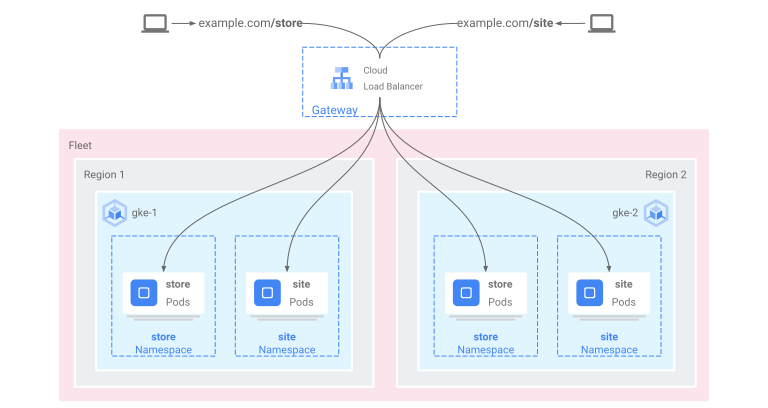
The load balancer's behavior is configured based on the rules defined in your HTTPRoute resources. When user traffic arrives at the IP address of the provisioned Google Cloud load balancer (as defined by your Gateway resource), the load balancer, which is a Google-managed proxy, routes the traffic. This proxy (either a Google Front End proxy or a regional proxy) directs the traffic to the appropriate backend service endpoint within the correct GKE cluster, based on the following criteria:
- Health checks
- Traffic splitting rules
- Capacity
The traffic flows directly to the optimal Pod in the selected cluster.
What's next
- Learn how to enable multi-cluster Gateways.
- Read an overview on how Gateways work in GKE.