


本教學課程說明如何使用 Google Kubernetes Engine (GKE) 上的多主機 TPU 節點集區,透過 Saxml 部署及提供大型語言模型 (LLM) 服務,打造可擴充的高效率架構。
背景
Saxml 是實驗性系統,可為 Paxml、JAX 和 PyTorch 架構提供服務。您可以使用 TPU,透過這些架構加速資料處理。為示範在 GKE 中部署 TPU,本教學課程會提供 175B LmCloudSpmd175B32Test 測試模型。GKE 會在兩個 v5e TPU 配量節點集區上部署這個測試模型,拓撲分別為 4x8。
為順利部署測試模型,系統已根據模型大小定義 TPU 拓撲。由於 N 十億個 16 位元模型大約需要 2 倍 (2xN) GB 的記憶體,因此 175B LmCloudSpmd175B32Test 模型需要約 350 GB 的記憶體。單一 TPU v5e 晶片有 16 GB。 如要支援 350 GB,GKE 需要 21 個 v5e TPU 晶片 (350/16= 21)。根據 TPU 設定的對應關係,本教學課程適用的 TPU 設定如下:
- 機器類型:
ct5lp-hightpu-4t - 拓撲:
4x8(32 個 TPU 晶片)
在 GKE 中部署 TPU 時,為模型服務選取合適的 TPU 拓撲非常重要。詳情請參閱「規劃 TPU 設定」。
目標
本教學課程適用於 MLOps 或 DevOps 工程師,以及想要使用 GKE 自動化調度管理功能提供資料模型的平台管理員。
本教學課程包含下列步驟:
- 請使用標準叢集準備環境。叢集有兩個 v5e TPU 配量節點集區,拓撲為
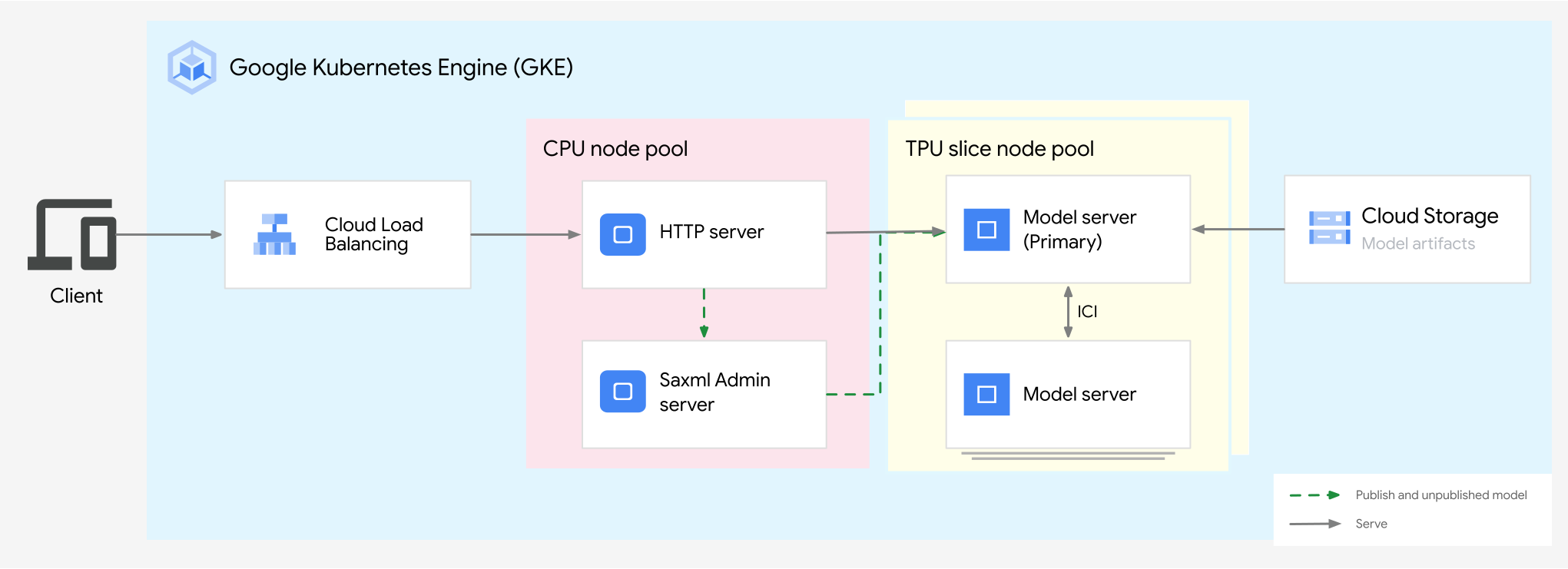
4x8。 - 部署 Saxml。Saxml 需要管理員伺服器、一組做為模型伺服器的 Pod、預先建構的 HTTP 伺服器和負載平衡器。
- 使用 Saxml 提供 LLM。
下圖顯示下列教學課程實作的架構:
事前準備
- 登入 Google Cloud 帳戶。如果您是 Google Cloud新手,歡迎 建立帳戶,親自體驗產品的實際應用成效。新客戶還能獲得價值 $300 美元的免費抵免額,能用於執行、測試及部署工作負載。
-
In the Google Cloud console, on the project selector page, select or create a Google Cloud project.
Roles required to select or create a project
- Select a project: Selecting a project doesn't require a specific IAM role—you can select any project that you've been granted a role on.
-
Create a project: To create a project, you need the Project Creator role
(
roles/resourcemanager.projectCreator), which contains theresourcemanager.projects.createpermission. Learn how to grant roles.
-
Verify that billing is enabled for your Google Cloud project.
Enable the required API, if it is not already enabled.
Roles required to enable APIs
To enable APIs, you need the
serviceusage.services.enablepermission. If you created the project, then you likely already have this permission through the Owner role (roles/owner). Otherwise, you can get this permission through the Service Usage Admin role (roles/serviceusage.serviceUsageAdmin). Learn how to grant roles.-
In the Google Cloud console, on the project selector page, select or create a Google Cloud project.
Roles required to select or create a project
- Select a project: Selecting a project doesn't require a specific IAM role—you can select any project that you've been granted a role on.
-
Create a project: To create a project, you need the Project Creator role
(
roles/resourcemanager.projectCreator), which contains theresourcemanager.projects.createpermission. Learn how to grant roles.
-
Verify that billing is enabled for your Google Cloud project.
Enable the required API, if it is not already enabled.
Roles required to enable APIs
To enable APIs, you need the
serviceusage.services.enablepermission. If you created the project, then you likely already have this permission through the Owner role (roles/owner). Otherwise, you can get this permission through the Service Usage Admin role (roles/serviceusage.serviceUsageAdmin). Learn how to grant roles.-
請確認您在專案中具備下列角色: roles/container.admin、roles/iam.serviceAccountAdmin、roles/iam.policyAdmin
檢查角色
-
前往 Google Cloud 控制台的「IAM」頁面。
前往「IAM」頁面 - 選取專案。
-
在「主體」欄中,找出所有可識別您或您所屬群組的資料列。如要瞭解自己所屬的群組,請與管理員聯絡。
- 針對指定或包含您的所有資料列,檢查「角色」欄,確認角色清單是否包含必要角色。
授予角色
-
前往 Google Cloud 控制台的「IAM」頁面。
前往「IAM」頁面 - 選取專案。
- 按一下「Grant access」(授予存取權)。
-
在「New principals」(新增主體) 欄位中,輸入您的使用者 ID。 這通常是指 Google 帳戶的電子郵件地址。
- 按一下「Select a role」(選取角色),然後搜尋角色。
- 如要授予其他角色,請按一下「Add another role」(新增其他角色),然後新增其他角色。
- 按一下「Save」(儲存)。
-
- 確認專案有足夠的配額,可供 GKE 中的 Cloud TPU 使用。
準備環境
在 Google Cloud 控制台中啟動 Cloud Shell 執行個體:
開啟 Cloud Shell設定預設環境變數:
  gcloud config set project PROJECT_ID
  export PROJECT_ID=$(gcloud config get project)
  export CONTROL_PLANE_LOCATION=CONTROL_PLANE_LOCATION
  export BUCKET_NAME=PROJECT_ID-gke-bucket
替換下列值:
- PROJECT_ID:您的 Google Cloud 專案 ID。
- CONTROL_PLANE_LOCATION:叢集控制層的 Compute Engine 可用區。選取
ct5lp-hightpu-4t可用的區域。
在此指令中,
BUCKET_NAME指定儲存 Saxml 管理員伺服器設定的 Google Cloud 儲存空間值區名稱。
建立叢集
使用 Cloud Shell 執行下列操作:
建立使用 Workload Identity Federation for GKE 的 Standard 叢集:
gcloud container clusters create saxml \
    --location=${CONTROL_PLANE_LOCATION} \
    --workload-pool=${PROJECT_ID}.svc.id.goog \
    --cluster-version=VERSION \
    --num-nodes=4
將
VERSION換成 GKE 版本號碼。GKE 1.27.2-gke.2100 以上版本支援 TPU v5e。詳情請參閱「GKE 中的 TPU 適用情形」。建立叢集可能需要幾分鐘的時間。
建立名為
tpu1的第一個節點集區:gcloud container node-pools create tpu1 \ --location=${CONTROL_PLANE_LOCATION} \ --machine-type=ct5lp-hightpu-4t \ --tpu-topology=4x8 \ --num-nodes=8 \ --cluster=saxml--num-nodes標記的值計算方式為:將 TPU 拓撲除以每個 TPU 配量的 TPU 晶片數量。在本例中,計算方式為:(4 * 8) / 4。建立名為
tpu2的第二個節點集區:gcloud container node-pools create tpu2 \ --location=${CONTROL_PLANE_LOCATION} \ --machine-type=ct5lp-hightpu-4t \ --tpu-topology=4x8 \ --num-nodes=8 \ --cluster=saxml--num-nodes標記的值計算方式為:將 TPU 拓撲除以每個 TPU 配量的 TPU 晶片數量。在本例中,計算方式為 (4 * 8) / 4。
您已建立下列資源:
- 具有四個 CPU 節點的標準叢集。
- 兩個具有
4x8拓撲的 v5e TPU 配量節點集區。每個節點集區代表八個 TPU 切片節點,每個節點有 4 個 TPU 晶片。
175B 模型必須在多主機 v5e TPU 節點上提供服務,且至少須有 4x8拓撲節點 (32 個 v5e TPU 晶片)。
建立 Cloud Storage bucket
建立 Cloud Storage bucket,用來儲存 Saxml 管理員伺服器設定。執行中的管理員伺服器會定期儲存狀態和已發布模型的詳細資料。
在 Cloud Shell 中執行下列指令:
gcloud storage buckets create gs://${BUCKET_NAME}
使用 Workload Identity Federation for GKE 設定工作負載存取權
將 Kubernetes ServiceAccount 指派給應用程式,並將該 Kubernetes ServiceAccount 設為 IAM 服務帳戶。
設定
kubectl,與叢集通訊:gcloud container clusters get-credentials saxml --location=${CONTROL_PLANE_LOCATION}為應用程式建立要使用的 Kubernetes ServiceAccount:
kubectl create serviceaccount sax-sa --namespace default為應用程式建立 IAM 服務帳戶:
gcloud iam service-accounts create sax-iam-sa為 IAM 服務帳戶新增 IAM 政策繫結,以便讀取及寫入 Cloud Storage:
gcloud projects add-iam-policy-binding ${PROJECT_ID} \
  --member "serviceAccount:sax-iam-sa@${PROJECT_ID}.iam.gserviceaccount.com" \
  --role roles/storage.admin
在兩個服務帳戶之間新增 IAM 政策繫結,允許 Kubernetes ServiceAccount 模擬 IAM 服務帳戶。這個繫結可讓 Kubernetes ServiceAccount 充當 IAM 服務帳戶,因此 Kubernetes ServiceAccount 可以讀取及寫入 Cloud Storage。
gcloud iam service-accounts add-iam-policy-binding sax-iam-sa@${PROJECT_ID}.iam.gserviceaccount.com \
  --role roles/iam.workloadIdentityUser \
  --member "serviceAccount:${PROJECT_ID}.svc.id.goog[default/sax-sa]"
使用 IAM 服務帳戶的電子郵件地址為 Kubernetes 服務帳戶加註。這樣一來,範例應用程式就能知道要使用哪個服務帳戶存取 Google Cloud 服務。因此,當應用程式使用任何標準的 Google API 用戶端程式庫存取 Google Cloud 服務時,會使用該 IAM 服務帳戶。
kubectl annotate serviceaccount sax-sa \
  iam.gke.io/gcp-service-account=sax-iam-sa@${PROJECT_ID}.iam.gserviceaccount.com
部署 Saxml
在本節中,您將部署 Saxml 管理員伺服器和 Saxml 模型伺服器。
部署 Saxml 管理員伺服器
建立下列
sax-admin-server.yaml資訊清單:將
BUCKET_NAME替換為稍早建立的 Cloud Storage:perl -pi -e 's|BUCKET_NAME|BUCKET_NAME|g' sax-admin-server.yaml套用資訊清單:
kubectl apply -f sax-admin-server.yaml確認管理員伺服器 Pod 是否已啟動並運作中:
kubectl get deployment輸出結果會與下列內容相似:
NAME               READY   UP-TO-DATE   AVAILABLE   AGE
sax-admin-server   1/1     1            1           52s
部署 Saxml 模型伺服器
在多主機 TPU 節點中執行的工作負載,需要為每個 Pod 提供穩定的網路 ID,才能在同一個 TPU 節點中探索對等互連。如要定義這些 ID,請使用 IndexedJob、StatefulSet (搭配無標題服務) 或 JobSet,這會為屬於 JobSet 的所有 Job 自動建立無標題服務。JobSet 是一種工作負載 API,可讓您以單元形式管理一組 Kubernetes 工作。JobSet 最常見的用途是分散式訓練,但您也可以用來執行批次工作負載。
以下章節說明如何使用 JobSet 管理多個模型伺服器 Pod 群組。
安裝 JobSet v0.2.3 以上版本。
kubectl apply --server-side -f https://github.com/kubernetes-sigs/jobset/releases/download/JOBSET_VERSION/manifests.yaml將
JOBSET_VERSION替換為 JobSet 版本。 例如:v0.2.3。驗證 JobSet 控制器是否在
jobset-system命名空間中執行:kubectl get pod -n jobset-system輸出結果會與下列內容相似:
NAME                                        READY   STATUS    RESTARTS   AGE
jobset-controller-manager-69449d86bc-hp5r6   2/2     Running   0          2m15s
在兩個 TPU 節點集區中部署兩個模型伺服器。儲存下列
sax-model-server-set資訊清單:將
BUCKET_NAME替換為稍早建立的 Cloud Storage:perl -pi -e 's|BUCKET_NAME|BUCKET_NAME|g' sax-model-server-set.yaml在這個資訊清單中:
replicas: 2是 Job 副本的數量。每個工作都代表一個模型伺服器。因此,這組 Pod 共有 8 個。parallelism: 8和completions: 8等於每個節點集區中的節點數。- 如果任何 Pod 失敗,
backoffLimit: 0必須為零,才能將 Job 標示為失敗。 ports.containerPort: 8471是 VM 通訊的預設連接埠name: MEGASCALE_NUM_SLICES會取消設定環境變數,因為 GKE 並未執行 Multislice 訓練。
套用資訊清單:
kubectl apply -f sax-model-server-set.yaml確認 Saxml 管理伺服器和模型伺服器 Pod 的狀態:
kubectl get pods輸出結果會與下列內容相似:
NAME                                              READY   STATUS    RESTARTS   AGE
sax-admin-server-557c85f488-lnd5d                 1/1     Running   0          35h
sax-model-server-set-sax-model-server-0-0-nj4sm   1/1     Running   0          24m
sax-model-server-set-sax-model-server-0-1-sl8w4   1/1     Running   0          24m
sax-model-server-set-sax-model-server-0-2-hb4rk   1/1     Running   0          24m
sax-model-server-set-sax-model-server-0-3-qv67g   1/1     Running   0          24m
sax-model-server-set-sax-model-server-0-4-pzqz6   1/1     Running   0          24m
sax-model-server-set-sax-model-server-0-5-nm7mz   1/1     Running   0          24m
sax-model-server-set-sax-model-server-0-6-7br2x   1/1     Running   0          24m
sax-model-server-set-sax-model-server-0-7-4pw6z   1/1     Running   0          24m
sax-model-server-set-sax-model-server-1-0-8mlf5   1/1     Running   0          24m
sax-model-server-set-sax-model-server-1-1-h6z6w   1/1     Running   0          24m
sax-model-server-set-sax-model-server-1-2-jggtv   1/1     Running   0          24m
sax-model-server-set-sax-model-server-1-3-9v8kj   1/1     Running   0          24m
sax-model-server-set-sax-model-server-1-4-6vlb2   1/1     Running   0          24m
sax-model-server-set-sax-model-server-1-5-h689p   1/1     Running   0          24m
sax-model-server-set-sax-model-server-1-6-bgv5k   1/1     Running   0          24m
sax-model-server-set-sax-model-server-1-7-cd6gv   1/1     Running   0          24m
在本範例中,共有 16 個模型伺服器容器:
sax-model-server-set-sax-model-server-0-0-nj4sm 和
sax-model-server-set-sax-model-server-1-0-8mlf5 是每個群組中的兩個主要模型伺服器。
您的 Saxml 叢集有兩個模型伺服器,分別部署在兩個 v5e TPU 切片節點集區,拓撲分別為 4x8。
部署 Saxml HTTP 伺服器和負載平衡器
請使用下列預先建構的映像檔 HTTP 伺服器映像檔。儲存下列
sax-http.yaml資訊清單:將
BUCKET_NAME替換為稍早建立的 Cloud Storage:perl -pi -e 's|BUCKET_NAME|BUCKET_NAME|g' sax-http.yaml套用
sax-http.yaml資訊清單:kubectl apply -f sax-http.yaml等待 HTTP 伺服器容器建立完成:
kubectl get pods輸出結果會與下列內容相似:
NAME                                              READY   STATUS    RESTARTS   AGE
sax-admin-server-557c85f488-lnd5d                 1/1     Running   0          35h
sax-http-65d478d987-6q7zd                         1/1     Running   0          24m
sax-model-server-set-sax-model-server-0-0-nj4sm   1/1     Running   0          24m
...
等待系統為服務指派外部 IP 位址:
kubectl get svc輸出結果會與下列內容相似:
NAME           TYPE           CLUSTER-IP    EXTERNAL-IP   PORT(S)          AGE
sax-http-lb    LoadBalancer   10.48.11.80   10.182.0.87   8888:32674/TCP   7m36s
使用 Saxml
在 v5e TPU 多主機切片中,於 Saxml 上載入、部署及提供模型:
載入模型
擷取 Saxml 的負載平衡器 IP 位址。
LB_IP=$(kubectl get svc sax-http-lb -o jsonpath='{.status.loadBalancer.ingress[*].ip}')
PORT="8888"
在兩個 v5e TPU 切片節點集區中載入
LmCloudSpmd175B測試模型:curl --request POST \ --header "Content-type: application/json" \ -s ${LB_IP}:${PORT}/publish --data \ '{ "model": "/sax/test/spmd", "model_path": "saxml.server.pax.lm.params.lm_cloud.LmCloudSpmd175B32Test", "checkpoint": "None", "replicas": 2 }'測試模型沒有微調的檢查點,權重是隨機產生。載入模型最多可能需要 10 分鐘。
輸出結果會與下列內容相似:
{
    "model": "/sax/test/spmd",
    "path": "saxml.server.pax.lm.params.lm_cloud.LmCloudSpmd175B32Test",
    "checkpoint": "None",
    "replicas": 2
}
檢查模型是否已準備就緒:
kubectl logs sax-model-server-set-sax-model-server-0-0-nj4sm輸出結果會與下列內容相似:
...
loading completed.
Successfully loaded model for key: /sax/test/spmd
模型已完全載入。
取得模型相關資訊:
curl --request GET \
--header "Content-type: application/json" \
-s ${LB_IP}:${PORT}/listcell --data \
'{
    "model": "/sax/test/spmd"
}'
輸出結果會與下列內容相似:
{
"model": "/sax/test/spmd",
"model_path": "saxml.server.pax.lm.params.lm_cloud.LmCloudSpmd175B32Test",
"checkpoint": "None",
"max_replicas": 2,
"active_replicas": 2
}
提供模型
處理提示要求:
curl --request POST \
--header "Content-type: application/json" \
-s ${LB_IP}:${PORT}/generate --data \
'{
  "model": "/sax/test/spmd",
  "query": "How many days are in a week?"
}'
輸出內容會顯示模型回覆範例。由於測試模型具有隨機權重,因此這項回覆可能沒有意義。
取消發布模型
執行下列指令來取消發布模型:
curl --request POST \
--header "Content-type: application/json" \
-s ${LB_IP}:${PORT}/unpublish --data \
'{
    "model": "/sax/test/spmd"
}'
輸出結果會與下列內容相似:
{
  "model": "/sax/test/spmd"
}
清除所用資源
為避免因為本教學課程所用資源,導致系統向 Google Cloud 帳戶收取費用,請刪除含有相關資源的專案,或者保留專案但刪除個別資源。
刪除已部署的資源
刪除您為本教學課程建立的叢集:
gcloud container clusters delete saxml --location ${CONTROL_PLANE_LOCATION}刪除服務帳戶:
gcloud iam service-accounts delete sax-iam-sa@${PROJECT_ID}.iam.gserviceaccount.com刪除 Cloud Storage bucket:
gcloud storage rm -r gs://${BUCKET_NAME}
後續步驟
- 透過 Cloud TPU 系統架構瞭解目前的 TPU 版本。
- 進一步瞭解 GKE 中的 TPU。