

This document provides best practices for running batch inference workloads on Google Kubernetes Engine (GKE). Batch inference is the process of using a machine learning model to generate predictions on large datasets, prioritizing high throughput and cost-efficiency over immediate, low-latency responses.
This guide distinguishes batch inference from request batching (or dynamic batching)—a server-side technique in engines like vLLM or SGLang that groups concurrent real-time requests to optimize accelerator efficiency. You can apply request batching to batch inference workloads.
The best practices in this guide cover two common types of batch inference patterns:
- Async inference: processes data in chunks shortly after it is generated. With a typical latency of seconds to minutes, this approach balances the need for fresh data with the efficiency of processing multiple items simultaneously. Async inference is sometimes referred to as near-real time inference.
- Batch inference: processes large volumes of accumulated data at scheduled intervals (for example, nightly or weekly). Latency typically ranges from hours to days, as these jobs are often scheduled during off-peak times to maximize resource availability.
These recommendations are a specialized layer of optimization built on the foundations described in the Overview of inference best practices on GKE. Before optimizing for batch workloads, ensure you have followed the core best practices for model selection, quantization, and accelerator choice.
Choose an architectural pattern for batch inference processing
Selecting the correct architectural pattern is the most critical decision for deploying your batch inference workloads because it affects trade-offs between latency, throughput, and cost. To maintain efficiency, ensure that your inference throughput exceeds the rate of incoming queries during off-peak hours to prevent queues from growing indefinitely.
Use async inference for bursty work
Async inference works well for use cases that require frequent, incremental updates, such as the following:
- Updating user recommendation profiles every few minutes based on recent interactions.
- Processing social media mentions at one-minute intervals for real-time monitoring.
- Detecting market-moving signals from high-frequency financial data streams.
- Performing sentiment analysis on incoming customer feedback or news feeds.
Choose this pattern if your workload can tolerate latency ranging from several seconds to a few minutes.
When you implement async inference, consider the following characteristics:
- Latency: you can expect a time-to-first-token ranging from tens of seconds to minutes.
- Data sources: you typically process datasets ranging from megabytes to gigabytes, such as messages from Pub/Sub or files from Cloud Storage accumulated over a short time window.
- Compute pattern: your infrastructure should support a continuous service that handles frequent bursts of work.
- Cost optimization: this pattern offers a balance between low-latency real-time inference and high-throughput batch processing.
Use batch inference for massive datasets
Batch inference is ideal for large-scale, episodic jobs that can tolerate delays of hours or days, such as the following:
- Generating nightly risk assessment reports based on the previous day's financial transactions.
- Creating product embeddings for an entire catalog to power downstream search and recommendation systems.
- Labeling large datasets of images for model training or archival categorization.
Choose this pattern if you are processing large volumes of data and can tolerate latencies ranging from hours to several days.
When you implement batch inference, consider the following characteristics:
- Latency: workload start latency typically ranges from minutes to days because jobs are often scheduled during off-peak times.
- Data sources: you process large datasets from gigabytes to petabytes, typically stored in Cloud Storage or BigQuery tables.
- Compute pattern: you use episodic, bursty jobs that initialize, process the data, and then terminate.
- Cost optimization: this pattern is highly optimizable with a pay-per-use model. Because batch jobs have flexible completion windows, we recommend using Spot VMs to reduce costs.
Optimize for throughput and cost-efficiency
Batch inference workloads are uniquely suited for cost-saving infrastructure that might involve interruptions.
Use Spot VMs to reduce compute costs
Use the discounts of Spot VMs for batch jobs. Because batch inference workloads are typically tolerant of latency and interruptions, they are good candidates for the reduced pricing of Spot capacity.
Ensure your batch inference code implements checkpointing to handle potential preemption events. If a Spot VM is preempted, you can create a new node and resume your workload from the last processed batch rather than restarting from zero.
Tune your workload batch size and request batch size
To avoid resource contention and job timeouts, ensure the number of items sent to your engine (workload batch) is at least as large as the concurrent requests the server can process (request batch) to avoid underutilizing accelerators.
Tune your workload batch size
The workload batch size is the total number of items sent to your inference engine in a single unit of work. You configure this in your client submission logic or Kubernetes Job configuration by sharding your data or grouping multiple items into a single request.
To determine the optimal workload batch size, use the following boundaries:
- Calculate the minimum batch size: ensure your workload batch size is at
least as large as your request batch size. For example, sending one item to
a server that can process 256 items concurrently results in significant
underutilization. To find your minimum size, check your inference server
configuration, such as the
max_num_seqsargument in vLLM. You can configure your client logic to group multiple items into a single request, or you can shard your data so that each Job receives a minimum amount of data that meets or exceeds the request batch size. - Calculate the maximum batch size: ensure your workload batch size allows
the Pod to finish before reaching the
activeDeadlineSecondstimeout defined in your Kubernetes Job. Estimate the time required to process one request batch and set the workload size so the Pod completes well within the deadline. For example, if youractiveDeadlineSecondsis 3,600 seconds, and your startup overhead is 600 seconds, ensure the maximum execution time allows the Pod to finish under 3,000 seconds.
If your workload batch size is too small, your job will waste time on Pod
startup overhead (downloading weights, provisioning, initializing the accelerator);
if it is too large, you risk the Job being terminated by
GKE due to the
activeDeadlineSeconds
timeout, causing the Job to fail and lose its progress.
Tune your request batch size
The request batch size is the number of concurrent requests the inference server
processes simultaneously on the accelerator. You optimize this parameter by
tuning server-specific flags in your inference server configuration (for
example, the --max-num-seqs flag for vLLM).
Your goal is to maximize GPU utilization without triggering Out-Of-Memory (OOM)
errors. If the request batch size is uncalibrated, your system will either
underutilize the accelerator or crash the model server. For vLLM, you can use
tools like the vLLM auto_tune
script to
find the best values for max_num_seqs and max_num_batched_tokens settings for your
specific hardware. For more information, see
Optimize the configuration of your inference server
in the Overview of inference best practices on GKE guide.
Implement asynchronous components for Async inference
For Async inference, we recommend using messaging buffers to decouple your ingestion layer from your inference layer.
The following architecture diagram illustrates an example of a async inference platform. This architecture protects inference servers from traffic spikes, manages work backlogs, and ensures high accelerator utilization.
The diagram shows the flow from Pub/Sub to subscribers, an inference gateway, and an inference server, with results persisted in AlloyDB and failed messages sent to a dead-letter topic.
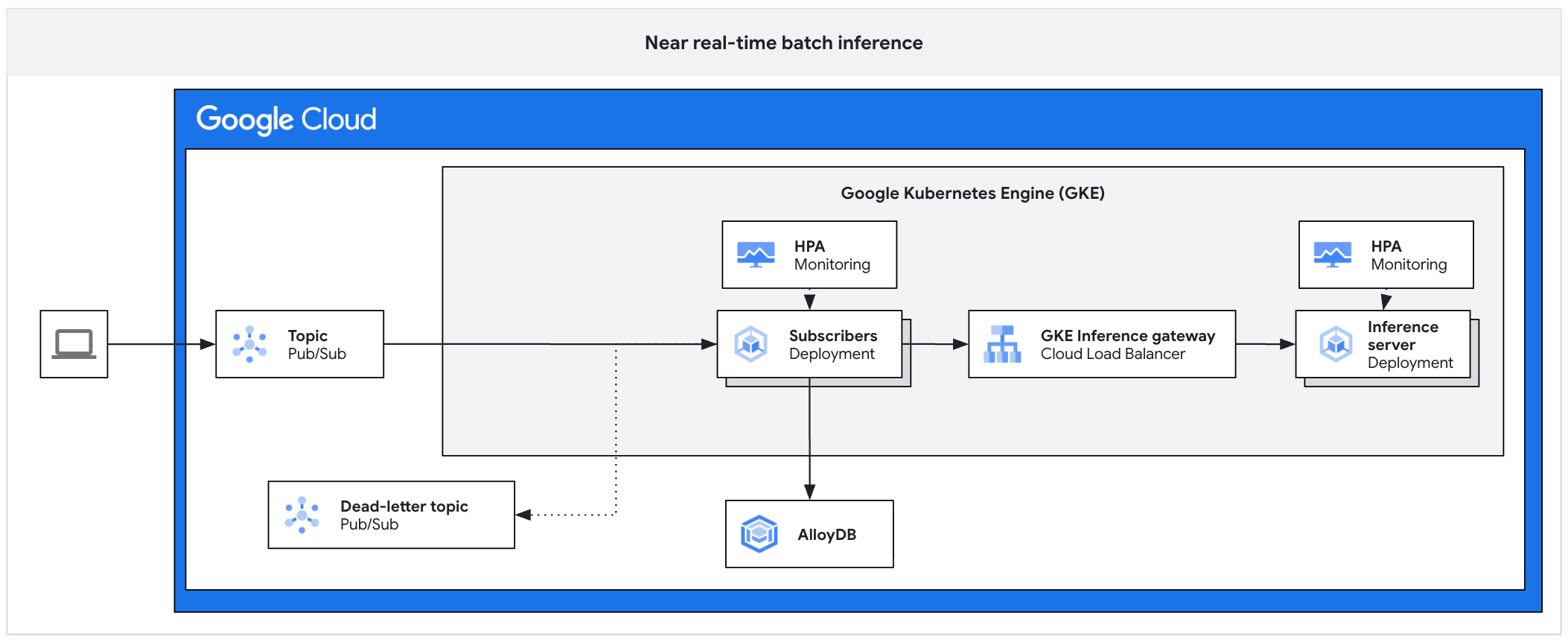
The architecture consists of the following components:
- Pub/Sub topic: acts as a persistent buffer for incoming client messages, with a retention period of 7 to 31 days.
- Subscriber: a component that reads message batches, sends requests to the inference server, and acknowledges processing.
- Subscriber HPA: scales the subscriber deployment based on the
num_undelivered_messagesmetric (the number of unacknowledged messages). - Storage: persist inference results by using a database (such as AlloyDB) or object storage (such as Cloud Storage) .
- Inference Gateway: exposes the inference workloads to the subscriber.
- Inference Server: processes the batched inference requests (for example, vLLM).
- Server HPA: scales the inference engine based on engine-specific metrics
like
vllm:num_requests_waiting. - Dead-letter topic: captures messages that fail processing after a set number of exponential backoff retries.
For more information, see the reference implementation on GitHub.
Buffer and aggregate requests
To manage the flow of requests, do the following:
- Use Pub/Sub as a durable buffer: implement Pub/Sub to store inference requests durably. This setup acts as a FIFO buffer that holds requests until a consumer has the capacity to process them, preventing server overload during bursty traffic.
- Use pull subscriptions with client-side flow control: configure a Pull subscription model. This allows your subscriber application to explicitly request messages only when it has the capacity to process them, granting you full control over the consumption rate.
- Aggregate messages to fill the server batch size: avoid sending one
Pub/Sub message as one inference request. Instead, the subscriber
should bundle multiple messages into a single batch request that aligns with
your inference server's optimal batch size (for example, matching
max_num_seqssettings in vLLM). This approach helps ensure accelerators are fully saturated and maximizes throughput. Specifically, configure your subscriber'smax_messagespull setting to a multiple ofmax_num_seqsto ensure every model forward pass is fully saturated.
Autoscale subscribers and servers
Effective batch inference requires scaling the subscribers (CPU-bound) differently from the inference servers (GPU or TPU-bound).
Scale subscribers based on work backlog: configure the HorizontalPodAutoscaler (HPA) for your subscriber deployment based on the
num_undelivered_messagesmetric from Pub/Sub. For more information, see the Pub/Sub HPA sample. Calculate the replicas that you want to use using the following equation:\[ desiredReplicas = \frac{num\_undelivered\_messages}{target\_latency\_seconds \times throughput\_per\_replica} \]
Respect infrastructure quotas: explicitly cap the maximum replicas of your subscribers by configuring the
maxReplicassetting in your HPA. Don't scale subscribers beyond what your inference servers' GPU or TPU quota can support. Over-provisioning subscribers will shift the bottleneck to the inference server, increasing resource contention without increasing throughput.Scale inference servers based on engine metrics: scale your inference server deployment based on metrics exported directly by the inference engine (not only through CPU/Memory). For example, use the
vllm:num_requests_waitingsetting for vLLM, which directly measures the processing backlog at the model server level. For more information, see Automatically scale your Pods.
Handle errors and timeouts
To handle errors and timeouts, do the following:
- Proactively extend acknowledgment deadlines: configure your subscriber to proactively extend the Pub/Sub acknowledgment (ack) deadline for messages being processed to prevent redelivery loops and duplicate processing. This approach is needed because inference tasks often take longer than default timeout windows. As a general rule, set the extension period to be longer than your worst-case batch inference time.
- Isolate failures with a dead-letter topic: enable a dead-letter topic to automatically isolate malformed messages that fail delivery repeatedly. This approach prevents "poison pill" messages from blocking the queue and halting your entire pipeline.
- Implement backoff strategies: if the inference server returns
429(Too Many Requests) or503(Service Unavailable) errors, the subscriber must catch these and implement an exponential backoff strategy, temporarily pausing consumption from Pub/Sub until the server recovers.
Orchestrate batch jobs at scale
Follow these best practices to maximize throughput, ensure cost-efficiency, implement comprehensive traceability for auditing, and apply advanced quota management and job prioritization, when processing massive datasets.
Use JobSet for multi-node distributed inference
We recommend that you use the Kubernetes JobSet resource to orchestrate distributed inference workloads that require multiple nodes to cooperate, such as large models running on TPU Pods or multi-node GPU clusters. Standard Kubernetes Jobs cannot guarantee that all required Pods start simultaneously, which can lead to deadlocks in distributed workloads.
JobSet is a Kubernetes-native API that manages groups of Jobs as a unit and provides the following benefits for batch inference:
- Gang scheduling: helps to ensure all required resources, such as TPU slices or GPU nodes, are available before starting the workload to prevent deadlocks.
- Exclusive placement: helps to ensure that a single JobSet has exclusive access to the network topology (for example, a TPU slice) to maximize interconnect performance.
- Failure recovery: lets you restart specific replicated jobs or the entire set if a worker fails, depending on your configuration.
Use Indexed Jobs for data sharding
When you use JobSet, configure the ReplicatedJob to use the completionMode:
Indexed setting. This setting automatically injects a JOB_COMPLETION_INDEX
environment variable into each Pod. Your inference code can use this index to
deterministically select a unique shard of data to process.
For example, if you have a Cloud Storage bucket with 100,000 images and deploy a JobSet with a parallelism of 10, each of the 10 Pods reads its index (0-9) at startup. Pod 0 can then calculate it should process images 0-9,999, while Pod 1 processes 10,000-19,999. This approach reduces the need for a separate task queue service.
Use the sidecar pattern for server saturation
To maximize accelerator utilization, configure your JobSet Pods with two containers using the sidecar pattern:
- Inference server: an optimized server (such as vLLM) that focuses entirely on GPU or TPU computation.
- Client driver: a logic container that asynchronously sends a high volume of requests to the server on localhost.
This decoupling helps ensure that the GPU or TPU remains busy and is never idle while waiting for network I/O or data pre-processing. Without this approach, models loading data sequentially can cause the accelerator to wait for I/O operations to complete, leading to underutilization. For example, instead of waiting for the data to be processed, the client driver can prefetch data and continuously send asynchronous requests to the inference server, which helps ensure that the accelerator's request queue remains saturated.
Checklist summary
| Category | Best practice |
|---|---|
| Architectural patterns |
|
| Cost and throughput |
|
| Messaging and scaling |
|
| Orchestration |
|