


Knowledge Catalog 探索代理程式是 AI 輔助工具,可根據 Knowledge Catalog 搜尋功能,提升複雜自然語言查詢的搜尋關聯性。這項 API 可最佳化查詢解讀和公式化程序,提供比標準 Knowledge Catalog 搜尋 API 更準確的結果。這項功能對於複雜或冗長的查詢特別重要。
用途
探索代理可提供豐富的對話式體驗,適用於下列情境:
- 複雜或合併的意圖和限制:處理具有多項條件的搜尋要求,例如在
us-central1中尋找資料集,但排除 BigQuery 中的資源。 - 以業務為導向的搜尋:根據意圖和業務情境探索資料資產,而非比對確切的技術用語。
- 多輪探索:透過對話式對談縮小搜尋範圍,進而獲得更精確的結果。
探索代理程式是以知識目錄語意搜尋為基礎建構而成,可提供開箱即用的混合搜尋功能。如需處理高意圖搜尋 (您知道特定資源或資料欄)、低延遲需求或零設定混合搜尋,可以繼續直接使用 Knowledge Catalog 語意搜尋。
運作方式
探索代理程式會執行下列步驟來回應搜尋查詢:
- 分析輸入內容的意圖,瞭解查詢內容、產生多種搜尋變化,並將字詞對應至中繼資料篩選器。
- 使用 Knowledge Catalog 語意搜尋功能搜尋資源。
- 根據關聯性排序合併結果。
下圖詳細說明瞭這個程序:
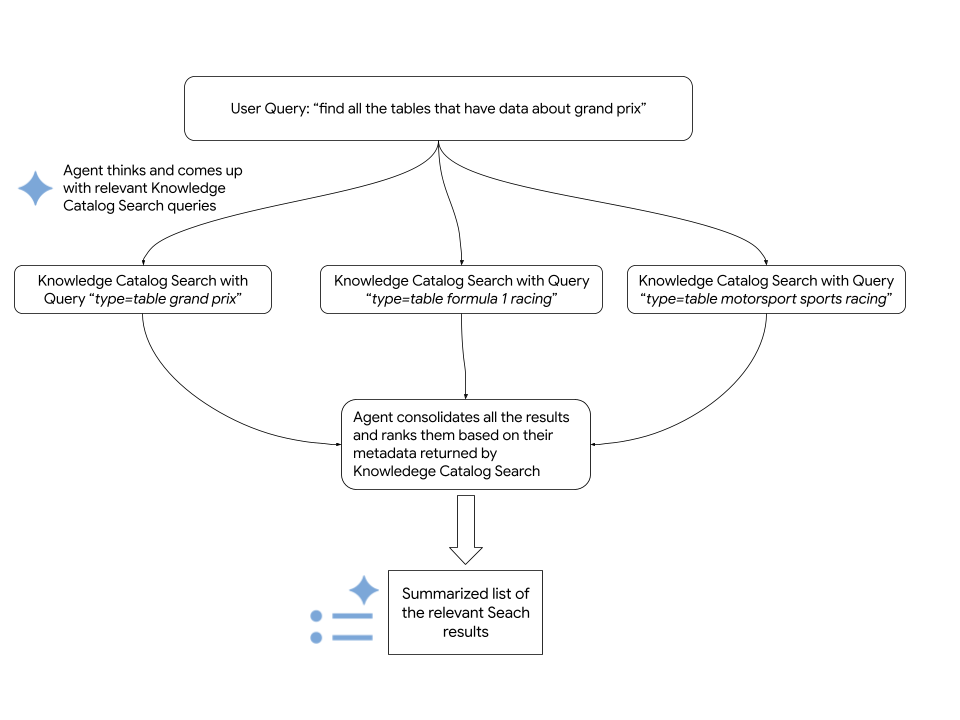
代理會使用 Knowledge Catalog Search API 擷取相關Google Cloud 資源。下列程式碼片段顯示代理程式如何呼叫 Knowledge Catalog 語意搜尋:
      # Configure the request parameters for the
      # call to Knowledge Catalog Semantic Search API.
      endpoint = "dataplex.googleapis.com"

      client = dataplex_v1.CatalogServiceClient(
          client_options={"api_endpoint": endpoint}
      )

      location = "global"
      consumer_project_id = "my-gcp-project"
      parent_name = f"projects/{consumer_project_id}/locations/{location}"

      # Call Knowledge Catalog Semantic Search API.
      response = client.search_entries(
          request={
              "name": parent_name,
              "query": query,
              "page_size": 50,
              "semantic_search": True,
          }
      )

      # Call Knowledge Catalog LookupContext for each search result
      # to retrieve rich, LLM-ready metadata.
      entries = []
      for result in response.results:
          entry_name = result.dataplex_entry.name

          # Prepare the LookupContext request for the specific resource
          lookup_request = {
              "name": parent_name,
              "resources": [entry_name]
          }

          # Call the LookupContext API
          lookup_response = client.lookup_context(request=lookup_request)

          # Extract the rich context YAML to share with the agent
          entries.append({
              "entry_name": entry_name,
              "context": lookup_response.context
          })

      return {"results": entries}
事前準備
如要執行 Knowledge Catalog 探索代理程式,請確認您符合下列規定:
必要的角色
如要取得使用探索代理程式所需的權限,請要求管理員在 Google Cloud 專案 iam.gserviceaccount.com中授予您下列 IAM 角色:
- Dataplex 檢視器 (
roles/dataplex.viewer) - Vertex AI 使用者 (
roles/aiplatform.user) - 服務使用情形消費者 (
roles/serviceusage.serviceUsageConsumer)
如要進一步瞭解如何授予角色,請參閱「管理專案、資料夾和組織的存取權」。
這些預先定義的角色具備使用探索代理程式所需的權限。如要查看確切的必要權限,請展開「Required permissions」(必要權限) 部分:
所需權限
如要使用探索代理程式,必須具備下列權限:
-
dataplex.projects.search -
aiplatform.endpoints.predict -
serviceusage.services.use
啟用 API
如要使用 Knowledge Catalog 探索代理程式,請在專案中啟用下列 API:Knowledge Catalog API、Vertex AI API 和 Service Usage API。
啟用 API 時所需的角色
您必須具備 serviceusage.services.enable 權限,才能啟用 API。如果您建立了專案,可能已透過「擁有者」角色 (roles/owner) 取得這項權限。否則,您可以透過「服務使用情形管理員」角色 (roles/serviceusage.serviceUsageAdmin) 取得這項權限。瞭解如何授予角色。
設定環境
如要設定探索代理程式的開發環境,請按照下列步驟操作:
複製
dataplex-labs存放區。git clone https://github.com/GoogleCloudPlatform/dataplex-labs.git切換至代理程式目錄:
cd dataplex-labs/knowledge_catalog_discovery_agent建立並啟用 Python 虛擬環境,然後安裝
requirements.txt檔案中列出的依附元件:google-adk(Agent Development Kit)google-cloud-dataplex(Knowledge Catalog Python 用戶端)google-api-core
  python3 -m venv /tmp/kcsearch

  source /tmp/kcsearch/bin/activate

  pip3 install -r requirements.txt
使用下列指令設定環境變數:
export GOOGLE_CLOUD_PROJECT=PROJECT_ID
export GOOGLE_GENAI_USE_VERTEXAI=True
更改下列內容:
- 將
PROJECT_ID替換為專案的 ID
- 將
以根代理身分執行探索代理
如要直接以根代理程式身分執行探索代理程式,請按照下列步驟操作:
- 在
knowledge_catalog_discovery_agent資料夾中的agent.py檔案中,將discovery_agent變數重新命名為root_agent。 使用
adk run指令執行代理程式:adk run path/to/agent/parent/folder更改下列內容:
path/to/agent/parent/folder,其中包含代理所在的資料夾。舉例來說,如果您的代理程式位於knowledge_catalog_discovery_agent/,請從agents/目錄執行adk run。
將探索代理做為代理工具執行
如要將探索代理程式整合到較大的自訂代理程式 (例如 my_custom_agent),請按照下列步驟操作:
設定專案結構,內含探索代理程式模組:
my_custom_agent/
├── agent.py
└── knowledge_catalog_discovery_agent/
    ├── SKILL.md
    ├── agent.py
    ├── tools.py
    └── utils.py
在自訂代理程式的
agent.py檔案中,匯入探索代理程式並做為代理程式工具使用。請參閱以下範例:root_agent = llm_agent.Agent( model=google_llm.Gemini(model=GEMINI_MODEL), name="my_custom_agent", instruction=( "You are a Custom Agent. Your goal is to help users understand" " their data landscape, evaluate data assets, and derive insights" " from available resources. **IMPORTANT**: You should use the" " `knowledge_catalog_discovery_agent` to search for and discover" " data assets. For best results, pass in the Natural Language user'" " query as is to the `knowledge_catalog_discovery_agent`. Once assets" " are found, you should analyze their metadata, compare them, and" " provide recommendations or summaries to the user to help them make" " decisions. Focus on general metadata summary and comparison." ), tools=[ agent_tool.AgentTool(discovery_agent), ], )使用
adk run指令執行代理程式:adk run path/to/agent/parent/folder更改下列內容:
path/to/agent/parent/folder,其中包含my_custom_agent/資料夾的上層目錄。舉例來說,如果您的代理程式位於agents/my_custom_agent/,請從agents/目錄執行adk run。
後續步驟
- 瞭解 Knowledge Catalog 的搜尋語法。
- 進一步瞭解 Agent Development Kit。
- 參考其他 Knowledge Catalog 應用實例。