

This page describes how to configure VPC Service Controls to secure your data products.
Use VPC Service Controls to prevent data exfiltration and ensure that communication between data products, data assets, and users stays within authorized perimeters.
A data product is a logical grouping of resources (data assets) that can span multiple projects. When your projects belong to different VPC Service Controls perimeters, you must configure ingress and egress rules to allow the Dataplex API to manage resources and metadata.
Before you begin
- Familiarize yourself with the VPC Service Controls.
- Understand the data products concepts.
- Ensure you have the necessary permissions to manage VPC Service Controls perimeters and Knowledge Catalog resources.
Service perimeter rules for creating data products
The following projects define the communication boundaries required to create a data product across service perimeters:
Project R (Caller): the project where the user, service account, or application resides that initiates the create request.
Project E (Data product): the project that hosts the data product resource.
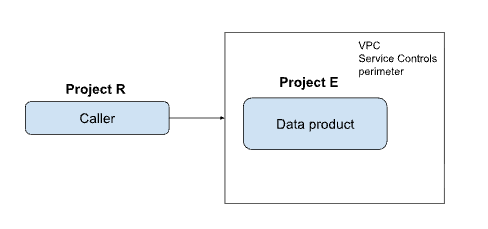
To create a data product in a different project than your caller project, configure the following ingress and egress rules:
| Project | Rule required |
|---|---|
| Project R | Egress rule for Project E |
| Project E | Ingress rule for Project R |
Service perimeter rules for managing data assets
When you manage data assets (such as adding a BigQuery table to a data product), the architecture involves three distinct project roles:
Project R (Caller): the project initiating the asset management request.
Project D (Data product): the project hosting the data product that groups the assets. An asset in a data product is a pointer to a physical data resource, such as a BigQuery dataset, table, or view. A data product can contain one or more assets.
Project S (Source resource): the project where the actual data resource is located.
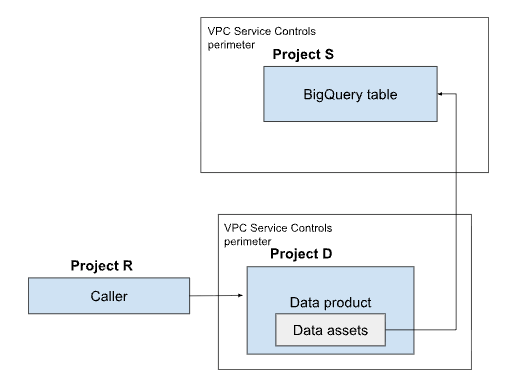
When you add or manage a data asset that resides in a different project than the data product, you must bridge the communication between all three projects by configuring the following ingress and egress rules:
| Project | Rules required |
|---|---|
| Project R | Egress rule for Project D Egress rule for Project S |
| Project D | Ingress rule for Project R Egress rule for Project S |
| Project S | Ingress rule for Project R Ingress rule for Project D |
Service perimeter rules for adding aspects and metadata to a data product
The following projects define the communication boundaries required to attach metadata and aspects to a data product across service perimeters:
Project R (Caller): the project initiating the request to attach an aspect.
Project D (Data product): the project hosting the data product receiving the aspect.
Project A (Aspect type): the project where the specific aspect type (the metadata schema) is defined and stored.
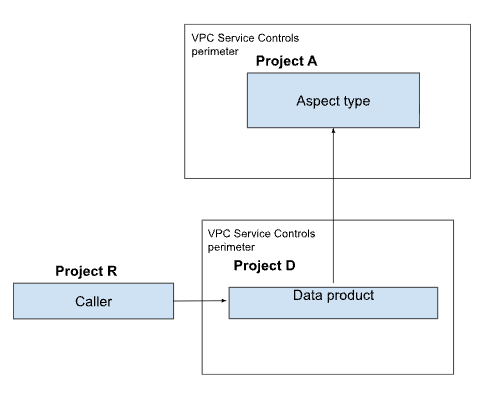
To attach aspects when these projects reside in separate perimeters, configure the following ingress and egress rules:
| Project | Rules required |
|---|---|
| Project R | Egress rule for Project D Egress rule for Project A |
| Project D | Ingress rule for Project R Egress rule for Project A |
| Project A | Ingress rule for Project R Ingress rule for Project D |
Service perimeter rules for consuming data products
For data product consumers to access data products protected by VPC Service Controls, you must allowlist the consumer project or the specific user identities. To grant this access to data product consumers, configure ingress rules in the data product's service perimeter.
Limitations
Data products don't support method-based rules. To ensure functionality, you must allow all methods (
*) for thedataplex.googleapis.comservice in your ingress and egress rules. For example:ingressTo: operations: - methodSelectors: - method: '*' serviceName: dataplex.googleapis.com resources: - projects/PROJECT_IDIf your underlying BigQuery resources are protected by service perimeters, you must configure ingress and egress rules for the
bigquery.googleapis.comservice. For example:ingressTo: operations: - methodSelectors: - method: '*' serviceName: bigquery.googleapis.com resources: - projects/PROJECT_ID
What's next
- Learn more about data products.
- Understand the Ingress and egress rules.