

Managed connectivity pipelines import metadata from third-party sources into Knowledge Catalog (formerly Dataplex Universal Catalog). You can use these pipelines to import metadata into Knowledge Catalog at scale to extract data from your sources. The pipelines also create Knowledge Catalog entry groups in your Google Cloud project as needed. With this approach, you can orchestrate workflows and schedule import jobs according to your requirements.
You build custom connectors to extract metadata from various third-party sources, including MySQL, SQL Server, Oracle, Snowflake, and Databricks. Alternatively, you can use community-contributed custom connectors for a wider range of sources.
How managed connectivity works
The following diagram shows a managed connectivity pipeline.
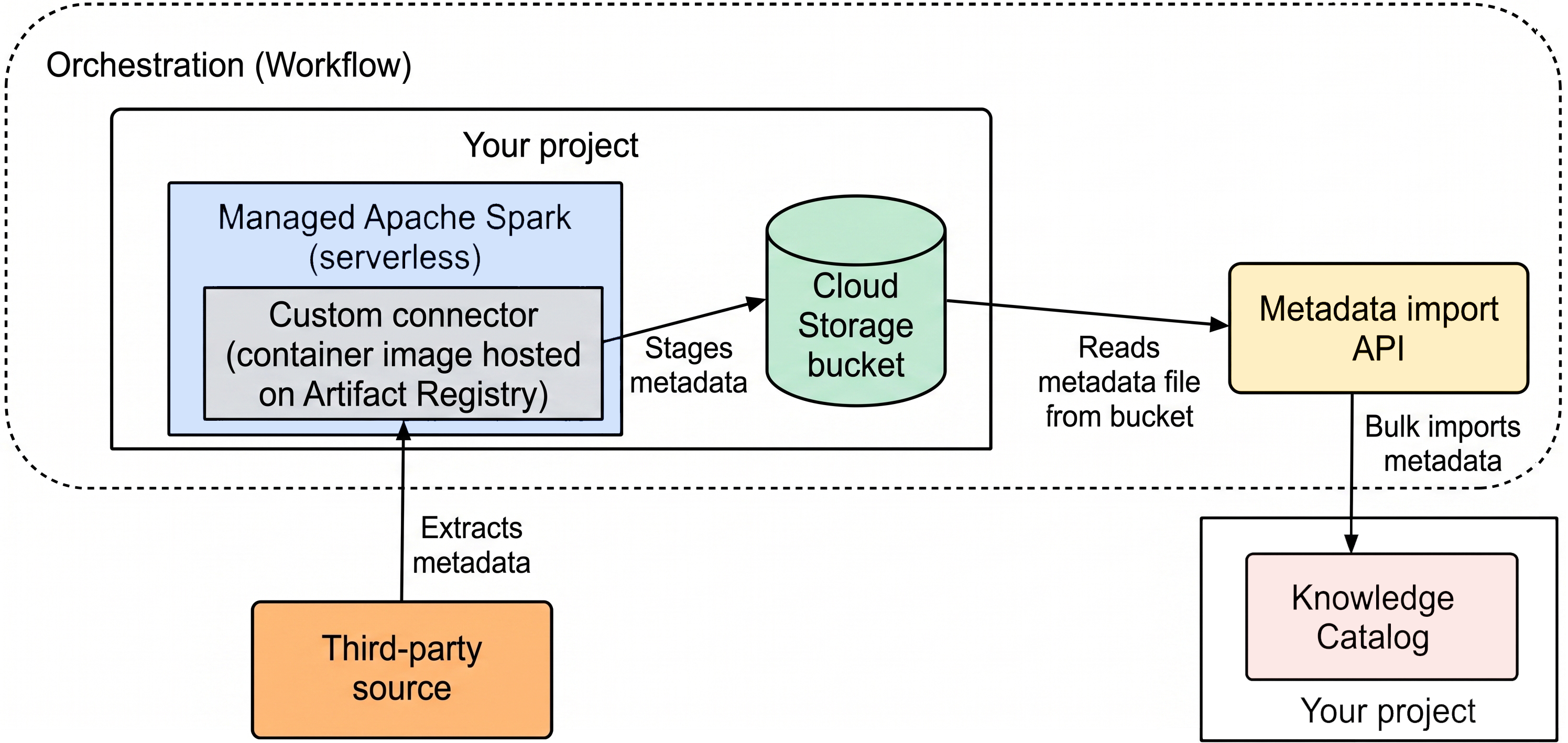
At a high level, here's how managed connectivity works:
You build a connector for your data source.
The connector must be an Artifact Registry image that can run on Managed Service for Apache Spark.
You run the managed connectivity pipeline in Workflows, an orchestration platform.
The managed connectivity pipeline performs the following actions:
- Creates a target entry group based on your configuration, if the entry group doesn't exist.
- Runs the connector. The connector extracts the metadata from your data source and generates a metadata import file that can be imported into Knowledge Catalog.
- Monitors the progress of the metadata extraction.
- Runs a metadata import job to import the metadata into Knowledge Catalog.
- Monitors the progress of the metadata import job.
The managed connectivity pipeline uses Managed Service for Apache Spark to run the connector, and Knowledge Catalog metadata import API methods to run the metadata import job.
The metadata that you import consists of Knowledge Catalog entries and their aspects. For more information about Knowledge Catalog metadata, see About metadata management in Knowledge Catalog.
Community-contributed custom connectors
To import metadata from third-party sources, you can use custom connectors that are contributed by the community. See each connector's README file for setup instructions and more information about the connector.
| Data source | Repository |
|---|---|
| MySQL | mysql-connector |
| Oracle | oracle-connector |
| PostgreSQL | postgresql-connector |
| Snowflake | snowflake-connector |
| SQL Server | sql-server-connector |
What's next
- Import metadata from a custom source using Workflows
- Develop a custom connector for metadata import
- Import metadata using a custom pipeline