

The Knowledge Catalog discovery agent is an AI-powered assistant that improves search relevance for complex natural language queries based on Knowledge Catalog search capabilities. By optimizing query understanding and formulation, it provides more accurate results than the standard Knowledge Catalog Search API. This capability is critical especially for complex or lengthy queries.
Use cases
The discovery agent provides a rich, conversational experience for scenarios such as the following:
- Complex or combined intents and constraints: Handling search requests
with multiple criteria, such as finding datasets in
us-central1but excluding resources in BigQuery. - Business-oriented search: Discovering data assets based on intent and business context rather than matching exact technical terms.
- Multi-turn exploration: Refining your search through a conversational dialogue to narrow down results.
The discovery agent is built on top of Knowledge Catalog semantic search which provides you out-of-the box hybrid search. You can continue to use Knowledge Catalog semantic search directly when you need to process high-intent searches (when you know the specific resource or column), low-latency requirements, or zero-setup hybrid search.
How it works
The discovery agent performs the following steps to respond to a search query:
- Analyzes input for intent to understand the query, generates multiple search variations, and maps terms to metadata filters.
- Searches for resources using the Knowledge Catalog semantic search.
- Ranks the merged results based on relevance.
The following diagram provides the details of the process:
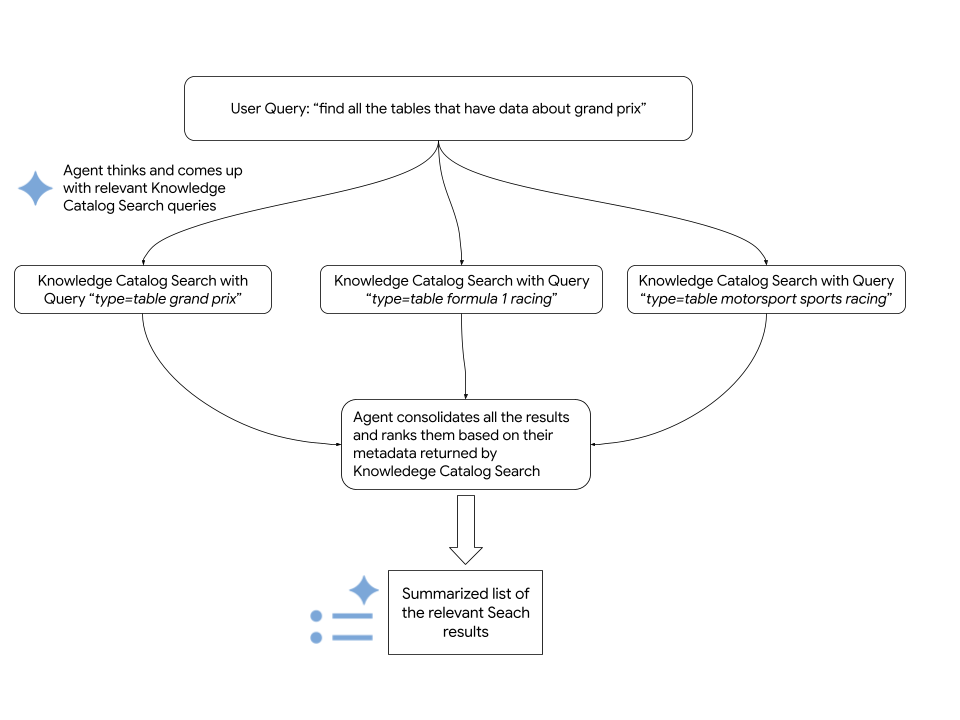
The agent relies on the Knowledge Catalog Search API to fetch relevant Google Cloud resources. The following code snippet shows how the agent calls Knowledge Catalog semantic search:
      # Configure the request parameters for the
      # call to Knowledge Catalog Semantic Search API.
      endpoint = "dataplex.googleapis.com"

      client = dataplex_v1.CatalogServiceClient(
          client_options={"api_endpoint": endpoint}
      )

      location = "global"
      consumer_project_id = "my-gcp-project"
      parent_name = f"projects/{consumer_project_id}/locations/{location}"

      # Call Knowledge Catalog Semantic Search API.
      response = client.search_entries(
          request={
              "name": parent_name,
              "query": query,
              "page_size": 50,
              "semantic_search": True,
          }
      )

      # Call Knowledge Catalog LookupContext for each search result
      # to retrieve rich, LLM-ready metadata.
      entries = []
      for result in response.results:
          entry_name = result.dataplex_entry.name

          # Prepare the LookupContext request for the specific resource
          lookup_request = {
              "name": parent_name,
              "resources": [entry_name]
          }

          # Call the LookupContext API
          lookup_response = client.lookup_context(request=lookup_request)

          # Extract the rich context YAML to share with the agent
          entries.append({
              "entry_name": entry_name,
              "context": lookup_response.context
          })

      return {"results": entries}
Before you begin
To run the Knowledge Catalog discovery agent, ensure you meet the following requirements:
Required roles
To get the permissions that you need to use the discovery agent, ask your administrator to grant you the following IAM roles on your Google Cloud project iam.gserviceaccount.com:
- Dataplex Viewer (
roles/dataplex.viewer) - Vertex AI User (
roles/aiplatform.user) - Service Usage Consumer (
roles/serviceusage.serviceUsageConsumer)
For more information about granting roles, see Manage access to projects, folders, and organizations.
These predefined roles contain the permissions required to use the discovery agent. To see the exact permissions that are required, expand the Required permissions section:
Required permissions
The following permissions are required to use the discovery agent:
-
dataplex.projects.search -
aiplatform.endpoints.predict -
serviceusage.services.use
You might also be able to get these permissions with custom roles or other predefined roles.
Enable APIs
To use Knowledge Catalog discovery agent, enable the following APIs in your project: Knowledge Catalog API, Vertex AI API, and Service Usage API.
Roles required to enable APIs
To enable APIs, you need the serviceusage.services.enable permission. If you
created the project, then you likely already have this permission through the
Owner role (roles/owner). Otherwise, you can get this permission through the
Service Usage Admin role (roles/serviceusage.serviceUsageAdmin).
Learn how to grant roles.
Set up the environment
To set up the development environment for the discovery agent, do the following:
Clone the
dataplex-labsrepository.git clone https://github.com/GoogleCloudPlatform/dataplex-labs.gitChange to the agent directory:
cd dataplex-labs/knowledge_catalog_discovery_agentCreate and activate a Python Virtual Environment, then install the dependencies listed in the
requirements.txtfile:google-adk(Agent Development Kit)google-cloud-dataplex(Knowledge Catalog Python Client)google-api-core
  python3 -m venv /tmp/kcsearch

  source /tmp/kcsearch/bin/activate

  pip3 install -r requirements.txt
Set up the environment variables with the following command:
export GOOGLE_CLOUD_PROJECT=PROJECT_ID
export GOOGLE_GENAI_USE_VERTEXAI=True
Replace the following:
PROJECT_IDwith the ID of your project
Run the discovery agent as the root agent
To run the discovery agent directly as the root agent, do the following:
- In the
agent.pyfile located in theknowledge_catalog_discovery_agentfolder, rename thediscovery_agentvariable toroot_agent. Run the agent using the
adk runcommand:adk run path/to/agent/parent/folderReplace the following:
path/to/agent/parent/folderwith the parent directory that contains the folder with your agent. For example, if your agent resides inknowledge_catalog_discovery_agent/, runadk runfrom theagents/directory.
Run the discovery agent as an agent tool
To integrate the discovery agent into a larger custom agent, such as
my_custom_agent, do the following:
Set up your project structure to contain the discovery agent module:
my_custom_agent/
├── agent.py
└── knowledge_catalog_discovery_agent/
    ├── SKILL.md
    ├── agent.py
    ├── tools.py
    └── utils.py
In your custom agent's
agent.pyfile, import the discovery agent and use it as an agent tool. See the example:root_agent = llm_agent.Agent( model=google_llm.Gemini(model=GEMINI_MODEL), name="my_custom_agent", instruction=( "You are a Custom Agent. Your goal is to help users understand" " their data landscape, evaluate data assets, and derive insights" " from available resources. **IMPORTANT**: You should use the" " `knowledge_catalog_discovery_agent` to search for and discover" " data assets. For best results, pass in the Natural Language user'" " query as is to the `knowledge_catalog_discovery_agent`. Once assets" " are found, you should analyze their metadata, compare them, and" " provide recommendations or summaries to the user to help them make" " decisions. Focus on general metadata summary and comparison." ), tools=[ agent_tool.AgentTool(discovery_agent), ], )Run the agent using the
adk runcommand:adk run path/to/agent/parent/folderReplace the following:
path/to/agent/parent/folderwith the parent directory that contains yourmy_custom_agent/folder. For example, if your agent resides inagents/my_custom_agent/, runadk runfrom theagents/directory.
What's next
- Understand search syntax for Knowledge Catalog.
- Learn more about Agent Development Kit.
- Try other Knowledge Catalog use cases.