

Compute Engine offers sustained use discounts (SUDs) on resources that are used for more than 25% of a billing month and are not receiving any other discounts. Whenever you use an applicable resource for more than a fourth of a billing month, you automatically receive a discount for every incremental hour that you continue to use that resource. The discount increases incrementally with usage and you can get up to a 30% net discount off of the resource cost for virtual machine (VM) instances that run the entire month.
Limitations
Sustained use discounts have the following limitations:
Only Self-serve (or Online) Cloud Billing accounts are eligible for receiving SUDs.
SUDs don't apply to the resource usage that is already covered by committed use discounts (CUDs).
SUDs don't apply to VMs created using the App Engine (standard and flexible) environments and Dataflow. Only VMs created by Google Kubernetes Engine and Compute Engine are eligible for SUDs.
Sustained use discounts apply only to the machine series listed in the Eligible resources and discount percentages section.
Eligible resources and discount percentages
The following resources are eligible to receive sustained use discounts:
- The vCPUs and memory for general-purpose N1, N2, and N2D custom and predefined machine types
- The vCPUs and memory for compute-optimized C2 machine types
- The vCPUs and memory for memory-optimized M1 and M2 machine types
- The vCPUs and memory for sole-tenant nodes
- The premium cost for sole-tenant nodes, even if the vCPUs and memory in those nodes are covered by CUDs
- GPU types that are attached to N1 general-purpose machines. However, sustained use discounts don't apply to any GPUs that are available with the accelerator-optimized machines.
Compute Engine offers a maximum monthly SUD percentage of either 20% or 30% depending on the resource and machine types. The following table shows the list of resources that are eligible for each SUD percentage:
| Maximum of 20% monthly SUDs | Maximum of 30% monthly SUDs |
|---|---|
|
|
How sustained use discounts work
Compute Engine automatically calculates and applies SUDs to resource usage within a Cloud Billing account, so there is no action required on your part to enable these discounts.
Sustained use discount credits
You receive SUDs in the form of monthly credits. At the end of every month, for every eligible Compute Engine resource that you use, you receive applicable SUDs as credits based on the duration of time for which you used that resource. Any credits that you receive for your SUDs have no cash value. Compute Engine uses these credits to offset your monthly resource usage costs. You can't store or use these credits beyond the month in which you receive them.
You can view all your earned credits during a particular month in the cost table report for your Cloud Billing account on the Google Cloud console. To learn more about credits and how to view them, see View and analyze your credits.
Sustained resource usage time
To calculate SUDs for your eligible resources, Compute Engine first calculates the total sustained resource usage time during a given month, for all those resources. You then receive SUDs credits for each of those individual resources, based on their usage and maximum monthly SUD percentage.
You don't have to run your VMs continuously throughout the month for them to qualify for sustained resource usage time. Even if you stop your VMs for certain time periods during the month, Compute Engine aggregates all the individual usage times for each resource during that month. For each resource, Compute Engine also aggregates usage times from that machine family and region. See Example scenario for sustained use discounts calculation for a detailed example.
Incremental usage levels
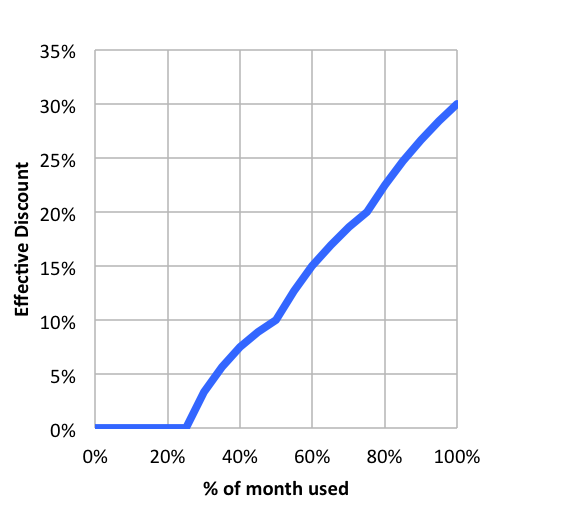
You receive applicable SUDs for incremental resource usage. During a month, the discount rate for your resources increases after you reach certain usage thresholds. These usage thresholds are 25%, 50%, 75%, and 100% of the month. If you use a resource for the entire duration of the month, then the incremental discounts add up on that resource, and you effectively receive the maximum monthly SUD rate that's available for that resource.
For example, consider a resource that has a maximum monthly SUD rate of 30%. If you use the resource for 50% of time in a month, then you get an effective SUD rate of 10%. If you use it for 75% of time in a month, you get an effective SUD rate of 20%. If you use it for 100% of time in a month, you get an effective SUD rate of 30%. You can also use the Google Cloud Pricing Calculator to estimate the SUD rate for any arbitrary workload. Google Cloud uses the same mechanism to calculate SUDs for resources that are used with custom machine types.
Your SUD rates reset at the beginning of each month. To get the maximum available SUD rate for your resources, create your VM instances on the first day of the month and use them for the entire month. If you don't use your resources for the entire month, then Compute Engine automatically gives you the best price by calculating the discount rate based on your usage levels.
Sustained use discounts per usage level for maximum 30% monthly discount
The following table shows the SUDs breakdown per usage level for the resources that receive a maximum monthly discount of 30%. Each row provides information about the resource cost and discount percentage for that usage level. To calculate your monthly SUDs, Compute Engine aggregates discounts across the individual usage levels. In this example, the table shows the data for an N1 machine type resource that has an on-demand price of US$0.0475 per hour.
| Sustained resource usage level | Cost with no discount (US$ per hour) | Discounted cost for the usage level (US$ per hour)* | Effective cost at the usage threshold (US$ per hour) | Overall SUD at the usage threshold |
|---|---|---|---|---|
| 0% to 25% of the month | 0.0475 | 0.0475 (100% of the on-demand price) | 0.0475 | 0% |
| 25% to 50% of the month | 0.0475 | 0.038 (80% of the on-demand price) | 0.04275 (average of the first two usage levels) | 10% |
| 50% to 75% of the month | 0.0475 | 0.0285 (60% of the on-demand price) | 0.038 (average of the first three usage levels) | 20% |
| 75% to 100% of the month | 0.0475 | 0.019 (40% of the on-demand price) | 0.03325 (average of all the usage levels) | 30% |
Sustained use discounts per usage level for maximum 20% monthly discount
The following table shows the SUDs breakdown per usage level for the resources that receive a maximum monthly discount of 20%. Each row provides information about the resource cost and discount percentage for that usage level. To calculate your monthly SUDs, Compute Engine aggregates discounts across the individual usage levels. In this example, the table shows the data for a C2 machine type resource that has an on-demand price of US$0.2088 per hour.
| Sustained resource usage level | Cost with no discount (US$ per hour) | Discounted cost for the usage level (US$ per hour)* | Effective cost at the usage threshold (US$ per hour) | Overall SUD at the usage threshold |
|---|---|---|---|---|
| 0% to 25% of the month | 0.2088 | 0.2088 (100% of the on-demand price) | 0.2088 | 0% |
| 25% to 50% of the month | 0.2088 | 0.1811 (86.78% of the on-demand price) | 0.19495 (average of the first two usage levels) | 6.6% |
| 50% to 75% of the month | 0.2088 | 0.1530 (73.3% of the on-demand price) | 0.180967 (average of the first three usage levels) | 13.3% |
| 75% to 100% of the month | 0.2088 | 0.1252 (60% of the on-demand price) | 0.167025 (average of all usage levels) | 20% |
The following graph shows an example scenario where your effective sustained use discount increases with use, up to a maximum of 30% by the end of the month:
Example scenario for sustained use discounts calculation
Consider a scenario where you have two VMs or sole-tenant nodes in the same region that have different machine types and run at different times of the month. Compute Engine breaks down the quantities of vCPUs and memory that were used across all VMs that use predefined machine types. Compute Engine then combines the resource quantities to maximize your sustained usage discounts.
Assume you run the following two VMs in the us-central1 region during
a month:
- For the first half of the month, you run an
n1-standard-4VM with 4 vCPUs and 15 GB of memory - For the second half of the month, you run a larger
n1-standard-16VM with 16 vCPUs and 60 GB of memory
In this scenario, Compute Engine reorganizes these machine types into individual vCPU and memory resources and combines their usage to create the following resources:
- 4 vCPUs for a full month
- 12 vCPUs for half of the month
- 15 GB of memory for a full month
- 45 GB of memory for half of the month
For example, you can see how the sustained use discounts apply to the vCPUs for this scenario:

(4 vCPUs x $0.031611 x 730 hours) x 0.7 for the 30% full-month discount = $64.612884
(12 vCPUs x $0.031611 x 365 hours) x 0.9 for the 10% half-month discount = $124.610562
(15 GB x $0.004237 x 730 hours) x 0.7 for the 30% full-month discount = $32.476605
(45 GB x $0.004237 x 365 hours) x 0.9 for the 10% half-month discount = $62.6334525
Sustained use discounts for GPUs
For GPU devices, Compute Engine calculates sustained use discounts based on the number of a GPU model that you have attached to running VMs during the month. You can receive sustained use discounts only on GPUs of the same model. Sustained use discounts for GPUs are calculated separately from VM machine type, vCPU, and memory discounts.
For example, consider a scenario where you have two VMs with different numbers of GPUs that run at different non-overlapping times of the month. Compute Engine breaks down the GPUs used across all VMs and combines them to maximize your sustained usage discounts.
If you run one VM with 1 GPU for the first half of the month, and then run another VM with 4 GPUs for the second half of the month, then Google calculates your total discount as if you used 1 GPU for a full month and 3 remaining GPUs for half of the month. Compute Engine applies the following sustained use discounts:
- A 30% discount off the cost of using 1 GPU for a full month
- A 10% discount off the cost of using the remaining 3 GPUs because you used each resource for half of the month
View sustained use discounts
Sustained use discounts automatically appear on your bill at the end of the billing cycle. Sustained use discounts are a separate line item combining all discounts for all machine types and projects in your Cloud Billing account.
You can view the total sustained use discounts that you receive for each project and the cost of your VMs in the Google Cloud console billing history.
Sustained use discounts and Always Free usage quotas
Google Cloud offers Always Free usage quotas that provide free use of one e2-micro VM equivalent to the total hours within the current month. This is enough to run one VM without interruption for the entire month. You don't receive sustained use discounts for use of the free tier VM.
What's next
- Review the pricing page to understand the price points for different machine types.
- Consider purchasing resource-based or compute flexible commitments if you have a predictable workload.