

To view the relationships between Compute Engine instances and other Compute Engine resources, use gcloud CLI or the REST.
When you list referrers to compute instances, Compute Engine returns a list of references that describe:
- The source resource: the resource that is pointing to the target resource
- The target resource: the resource in question
- The reference type: the relationship between the two resources
For example, you can list referrers to view a list of instance groups that a compute instance belongs to.
Before you begin
-
If you haven't already, set up authentication.
Authentication verifies your identity for access to Google Cloud services and APIs. To run
code or samples from a local development environment, you can authenticate to
Compute Engine by selecting one of the following options:
Select the tab for how you plan to use the samples on this page:
gcloud
-
Install the Google Cloud CLI. After installation, initialize the Google Cloud CLI by running the following command:
gcloud initIf you're using an external identity provider (IdP), you must first sign in to the gcloud CLI with your federated identity.
- Set a default region and zone.
REST
To use the REST API samples on this page in a local development environment, you use the credentials you provide to the gcloud CLI.
Install the Google Cloud CLI.
If you're using an external identity provider (IdP), you must first sign in to the gcloud CLI with your federated identity.
For more information, see Authenticate for using REST in the Google Cloud authentication documentation.
-
Limitations
- You can list relationships only between compute instances and instance groups. Both managed and unmanaged instance groups are supported.
List a single referrer
A referrer is a resource that refers to another resource. For compute instances, a common referrer is an instance group.
For example, assume that you have a compute instance named example-ig-a1 in
zone us-central1-a. The compute instance is a member of an instance group
called example-ig in the same zone, as shown in the following diagram:

To view this relationship, use the gcloud CLI or REST:
gcloud
Use the
gcloud compute instances list-referrers
command:
gcloud compute instances list-referrers INSTANCE_NAME \
    --zone=ZONE
Replace the following:
INSTANCE_NAME: the name of the compute instance for which you want to list referrers.ZONE: the zone where the compute instance is located.
For example, to list referrers for the example-ig-a1 instance in the
us-central1-a zone, run the following command:
gcloud compute instances list-referrers example-ig-a1 \
    --zone=us-central1-a
The output is similar to the following:
REFERRER                                                                                          REFERENCE_TYPE  TARGET
https://www.googleapis.com/compute/v1/projects/myproject/zones/us-central1-a/instanceGroups/example-ig  MEMBER_OF       https://www.googleapis.com/compute/v1/projects/myproject/zones/us-central1-a/instances/example-ig-a1
REST
Make a GET request to the
instances.listReferrers
method:
GET https://compute.googleapis.com/compute/v1/projects/PROJECT_ID/zones/ZONE/instances/INSTANCE_NAME/referrers
Replace the following:
PROJECT_ID: the ID of the project where the compute instance is located.ZONE: the zone where the compute instance is located.INSTANCE_NAME: the name of the compute instance for which you want to list referrers.
For example, to list referrers for the example-ig-a1 instance in the
us-central1-a zone, make the following HTTP request:
GET https://compute.googleapis.com/compute/v1/projects/myproject/zones/us-central1-a/instances/example-ig-a1/referrers
The server returns a standard list response containing the following items:
{
  "items": [
    {
      "target": "https://compute.googleapis.com/compute/v1/projects/myproject/zones/us-central1-a/instances/example-ig-a1",
      "referenceType": "MEMBER_OF",
      "referrer": "https://compute.googleapis.com/compute/v1/projects/myproject/zones/us-central1-a/instanceGroups/example-ig"
    }
  ]
}
In this case, the target resource is example-ig-a1, which is a MEMBER_OF
the referrer resource, the example-ig instance group.
List multiple referrers
If a resource has more than one referrer, then the response returns a list of all referrers for the target resource. If an instance belongs to two instance groups, then the response contains both instance groups.
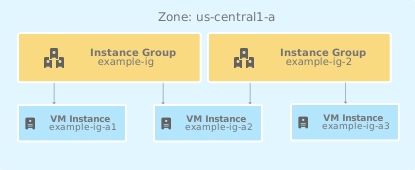
For example, assume that the instance named example-instance-a2 in the
us-central1-a zone belongs to two instance groups, example-ig and
example-ig-2:
gcloud
Use the
gcloud compute instances list-referrers
command:
gcloud compute instances list-referrers INSTANCE_NAME \
    --zone=ZONE
Replace the following:
INSTANCE_NAME: the name of the compute instance for which you want to list referrers.ZONE: the zone where the compute instance is located.
For example, to list referrers for the example-instance-a2 instance in the
us-central1-a zone, run the following command:
gcloud compute instances list-referrers example-instance-a2 \
    --zone=us-central1-a
The output is similar to the following:
REFERRER                                                                                            REFERENCE_TYPE  TARGET
https://www.googleapis.com/compute/v1/projects/myproject/zones/us-central1-a/instanceGroups/example-ig    MEMBER_OF       https://www.googleapis.com/compute/v1/projects/myproject/zones/us-central1-a/instances/example-instance-a2
https://www.googleapis.com/compute/v1/projects/myproject/zones/us-central1-a/instanceGroups/example-ig-2  MEMBER_OF       https://www.googleapis.com/compute/v1/projects/myproject/zones/us-central1-a/instances/example-instance-a2
REST
Make a GET request to the
instances.listReferrers
method:
GET https://compute.googleapis.com/compute/v1/projects/PROJECT_ID/zones/ZONE/instances/INSTANCE_NAME/referrers
Replace the following:
PROJECT_ID: the ID of the project where the compute instance is located.ZONE: the zone where the compute instance is located.INSTANCE_NAME: the name of the compute instance for which you want to list referrers.
For example, to list referrers for the example-instance-a2 instance in the
us-central1-a zone, make the following HTTP request:
GET https://compute.googleapis.com/compute/v1/projects/myproject/zones/us-central1-a/instances/example-instance-a2/referrers
The server returns a standard list response containing the following items:
{
  "items": [
    {
      "target": "https://compute.googleapis.com/compute/v1/projects/myproject/zones/us-central1-a/instances/example-instance-a2",
      "referenceType": "MEMBER_OF",
      "referrer": "https://compute.googleapis.com/compute/v1/projects/myproject/zones/us-central1-a/instanceGroups/example-ig"
    },
    {
      "target": "https://compute.googleapis.com/compute/v1/projects/myproject/zones/us-central1-a/instances/example-instance-a2",
      "referenceType": "MEMBER_OF",
      "referrer": "https://compute.googleapis.com/compute/v1/projects/myproject/zones/us-central1-a/instanceGroups/example-ig-2"
    }
  ]
}
List cross-scope referrers
You can also view information about referrers that exist inside other scopes, such as other regions or zones. For example, assume that you have a compute instance that belongs to a regional managed instance group (regional MIG):
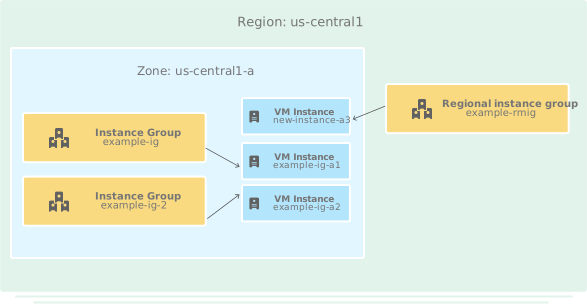
To view referrers targeting this instance, use the gcloud CLI or REST:
gcloud
Use the
gcloud compute instances list-referrers
command:
gcloud compute instances list-referrers INSTANCE_NAME \
    --zone=ZONE
Replace the following:
INSTANCE_NAME: the name of the compute instance for which you want to list referrers.ZONE: the zone where the compute instance is located.
For example, to list referrers for the new-instance-a3 instance in the
us-central1-a zone, run the following command:
gcloud compute instances list-referrers new-instance-a3 \
    --zone=us-central1-a
The output is similar to the following:
REFERRER                                                                                          REFERENCE_TYPE  TARGET
https://www.googleapis.com/compute/v1/projects/myproject/regions/us-central1/instanceGroups/example-rmig  MEMBER_OF       https://www.googleapis.com/compute/v1/projects/myproject/zones/us-central1-a/instances/new-instance-a3
REST
Make a GET request to the
instances.listReferrers
method:
GET https://compute.googleapis.com/compute/v1/projects/PROJECT_ID/zones/ZONE/instances/INSTANCE_NAME/referrers
Replace the following:
PROJECT_ID: the ID of the project where the compute instance is located.ZONE: the zone where the compute instance is located.INSTANCE_NAME: the name of the compute instance for which you want to list referrers.
For example, to list referrers for the new-instance-a3 instance in the
us-central1-a zone, make the following HTTP request:
GET https://compute.googleapis.com/compute/v1/projects/myproject/zones/us-central1-a/instances/new-instance-a3/referrers
The server returns a standard list response containing the following items:
{
  "items": [
    {
      "target": "https://compute.googleapis.com/compute/v1/projects/myproject/zones/us-central1-a/instances/new-instance-a3",
      "referenceType": "MEMBER_OF",
      "referrer": "https://compute.googleapis.com/compute/v1/projects/myproject/regions/us-central1/instanceGroups/example-rmig"
    }
  ]
}
The response shows the regional instance group in the list of referrers.
List referrers to all resources in a collection
By using the wildcard character (-), you can request a list of all
referrers to all compute instances within a specific zone:
gcloud
Use the
gcloud compute instances list-referrers
command with the - wildcard character:
gcloud compute instances list-referrers - \
    --zone=ZONE
Replace ZONE with the zone where you want to list referrers for all
compute instances.
For example, to list referrers for all compute instances in the
us-central1-a zone, run the following command:
gcloud compute instances list-referrers - \
    --zone=us-central1-a
The output is similar to the following:
REFERRER                                                                                            REFERENCE_TYPE  TARGET
https://www.googleapis.com/compute/v1/projects/myproject/zones/us-central1-a/instanceGroups/example-ig    MEMBER_OF       https://www.googleapis.com/compute/v1/projects/myproject/zones/us-central1-a/instances/example-ig-a1
https://www.googleapis.com/compute/v1/projects/myproject/zones/us-central1-a/instanceGroups/example-ig    MEMBER_OF       https://www.googleapis.com/compute/v1/projects/myproject/zones/us-central1-a/instances/example-ig-a2
https://www.googleapis.com/compute/v1/projects/myproject/zones/us-central1-a/instanceGroups/example-ig-2  MEMBER_OF       https://www.googleapis.com/compute/v1/projects/myproject/zones/us-central1-a/instances/example-ig-a2
https://www.googleapis.com/compute/v1/projects/myproject/regions/us-central1/instanceGroups/example-rmig  MEMBER_OF       https://www.googleapis.com/compute/v1/projects/myproject/zones/us-central1-a/instances/new-instance-a3
REST
Make a GET request to the
instances.listReferrers
method with the - wildcard character:
GET https://compute.googleapis.com/compute/v1/projects/PROJECT_ID/zones/ZONE/instances/-/referrers
Replace the following:
PROJECT_ID: the ID of the project where you want to list referrers.ZONE: the zone where you want to list referrers for all compute instances.
For example, to list referrers for all compute instances in the
us-central1-a zone, make the following HTTP request:
GET https://compute.googleapis.com/compute/v1/projects/myproject/zones/us-central1-a/instances/-/referrers
The server returns a response containing a list of compute instances in the zone and references to each instance. For example:
{
  "items": [
    {
      "target": "https://compute.googleapis.com/compute/v1/projects/myproject/zones/us-central1-a/instances/example-ig-a1",
      "referenceType": "MEMBER_OF",
      "referrer": "https://compute.googleapis.com/compute/v1/projects/myproject/zones/us-central1-a/instanceGroups/example-ig"
    },
    {
      "target": "https://compute.googleapis.com/compute/v1/projects/myproject/zones/us-central1-a/instances/example-ig-a2",
      "referenceType": "MEMBER_OF",
      "referrer": "https://compute.googleapis.com/compute/v1/projects/myproject/zones/us-central1-a/instanceGroups/example-ig"
    },
    {
      "target": "https://compute.googleapis.com/compute/v1/projects/myproject/zones/us-central1-a/instances/example-ig-a2",
      "referenceType": "MEMBER_OF",
      "referrer": "https://compute.googleapis.com/compute/v1/projects/myproject/zones/us-central1-a/instanceGroups/example-ig-2"
    },
    {
      "target": "https://compute.googleapis.com/compute/v1/projects/myproject/zones/us-central1-a/instances/new-instance-a3",
      "referenceType": "MEMBER_OF",
      "referrer": "https://compute.googleapis.com/compute/v1/projects/myproject/regions/us-central1/instanceGroups/example-rmig"
    }
  ]
}
What's next
- Learn more about instance groups.
- See a list of applicable zones and regions.