

This document explains how to plan and design your compute infrastructure by prompting the Compute Advisor, an AI-powered interface that is powered by Gemini. To learn more about the components that you must configure before or when you create a compute instance, see Overview of creating Compute Engine instances.
Compute Advisor helps you evaluate hardware options, estimate deployment costs, and view recommended configurations for your Compute Engine instances. To tailor its recommendations, Compute Advisor evaluates your Google Cloud project by checking your quota limits, existing reservations, committed use discounts (CUDs), default region and zone, and any resource location constraints. By using Compute Advisor to help with your planning, you can reach an optimal configuration for your workload before you create or modify a compute instance.
Limitations
When you prompt Compute Advisor in the Google Cloud console, you can't directly create, modify, or delete resources.
Before you begin
When you use the Google Cloud console to access Google Cloud services and APIs, you don't need to set up authentication.
Required roles
To get the permissions that
you need to access and prompt Gemini,
ask your administrator to grant you the
Compute Viewer (roles/compute.viewer) IAM role on the project.
For more information about granting roles, see Manage access to projects, folders, and organizations.
This predefined role contains the permissions required to access and prompt Gemini. To see the exact permissions that are required, expand the Required permissions section:
Required permissions
The following permissions are required to access and prompt Gemini:
-
To view a list of instances:
compute.instances.list
You might also be able to get these permissions with custom roles or other predefined roles.
Access Compute Advisor in the Google Cloud console
To access Compute Advisor in the Google Cloud console, complete the following steps:
In the Google Cloud console, go to the Overview page.
In the Design your infrastructure with Compute Advisor section, you can view the following:
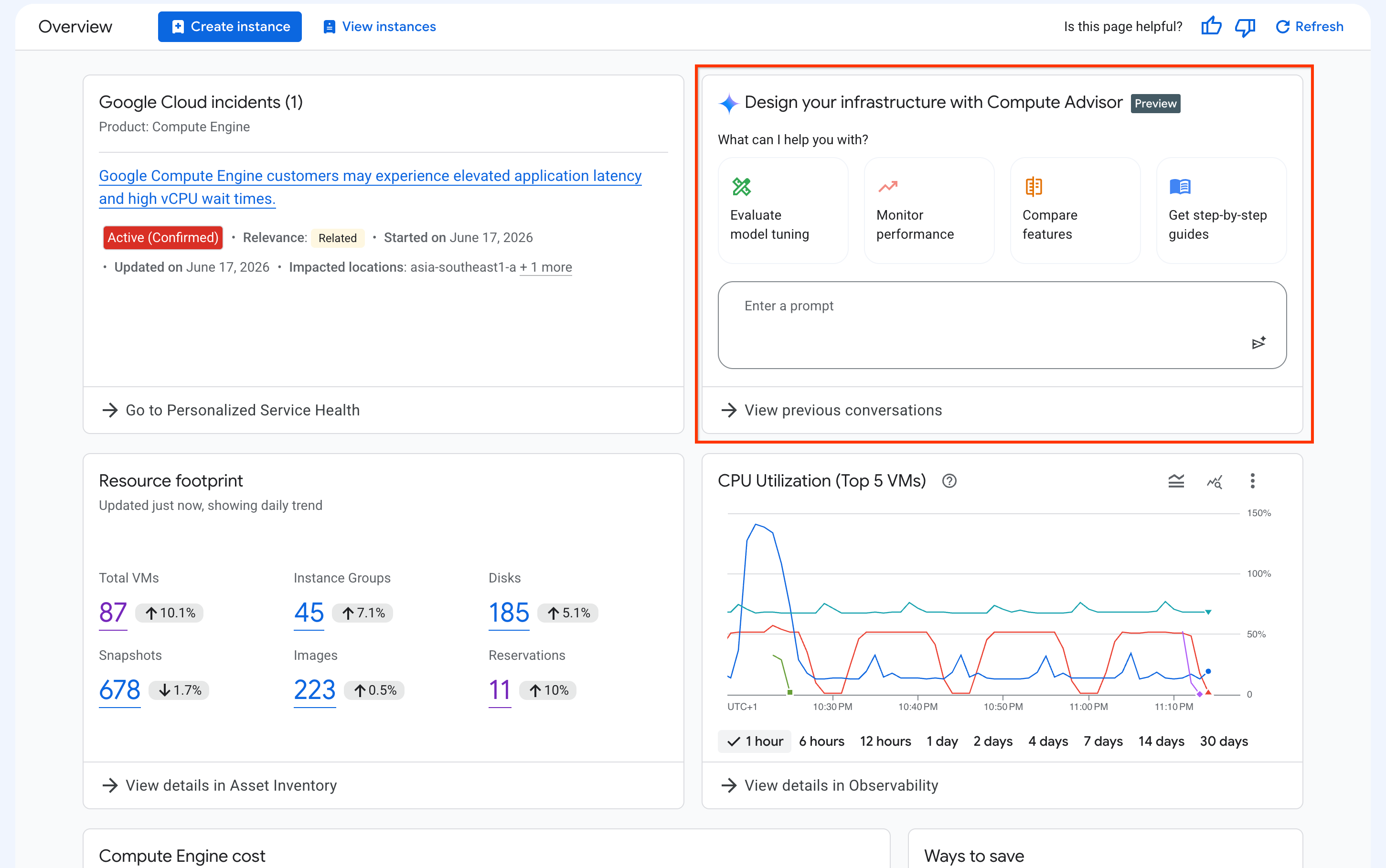
The UI elements that are displayed in the preceding screenshot are the following:
Quick-action prompt cards: a set of cards that each contain a sample prompt. If you click a card, then Google Cloud console automatically populates the prompt box with the sample prompt.
Prompt box: this field lets you enter and submit prompts. To submit a prompt, click Submit prompt.
View previous conversations: this feature lets you view the details of a past conversation and resume it, or delete conversations if you no longer need them.
Conversation history side panel: shows your recent chats. This panel is visible only after you start prompting from the Overview page. You can interact with this panel as follows:
To start a new conversation, click New chat.
To resume a recent conversation, in the Recent chats section, click the conversation.
To view a list of all your conversations, click View all. On the My history page, you can view the details of a past conversation and resume it, or delete conversations if you no longer need them.
Prompt Compute Advisor
After you submit a prompt, Compute Advisor starts to generate a response. A pane appears and Google Cloud console displays the response to your prompt in the pane, as shown in the following screenshot:
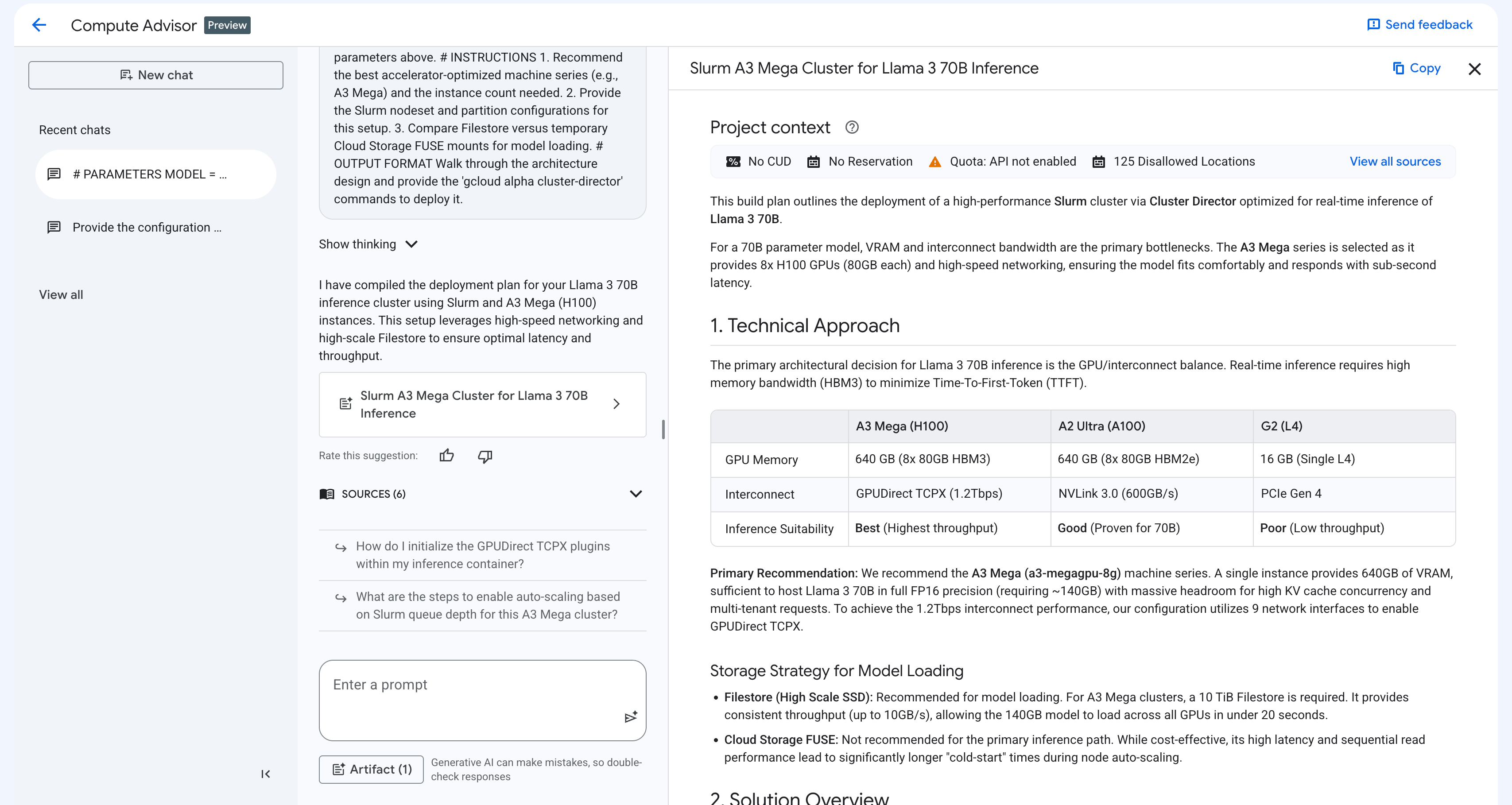
Based on your prompt, the response pane includes the following elements:
Contextual grounding: Compute Advisor automatically evaluates your project context to deliver highly tailored recommendations, including quota limits, existing reservations, CUDs, your default region and zone, and any resource location constraints.
Interactive code snippets: Compute Advisor generates gcloud commands, REST API methods, or Terraform resources. You can copy and paste these code snippets or run them in Cloud Shell.
Visual canvas: Compute Advisor organizes recommendations into structured tables and side-by-side comparisons. This view helps you evaluate product features and architectural approaches. It also provides an implementation plan for your use case.
The following sections outline the best practices for writing prompts, and example prompts that you can use before you create or modify a compute instance.
Best practices for prompts
To get the most accurate and actionable recommendations from Compute Advisor, we recommend that you structure your prompts in the same way that you would do a code block. This approach guides the generative AI by using clear parameter declarations, role definitions, specific instructions, and explicit output formats.
When you prompt Compute Advisor, consider the following best practices:
Focus on design and planning: we recommend that you don't prompt Compute Advisor for troubleshooting compute instance errors. To resolve these errors, see instead Troubleshoot creating, updating, and deleting compute instances.
Specify a persona or role: declare a target role or persona, such as an IT administrator, AI researcher, or platform engineer, for Compute Advisor to adopt. This approach guides the tone, depth, and expertise level of the resulting recommendations.
Provide explicit, numbered instructions: break your objective down into concrete, step-by-step questions or tasks. This approach structures the Compute Advisor's reasoning process and helps ensure that Compute Advisor addresses all of your requirements.
Define a specific output format: explicitly state how you want the recommendation to be formatted, such as a walkthrough explanation, a Markdown comparison table, or a ready-to-use gcloud code block.
Leverage automatic context grounding: you don't need to include your default region or zone, available quotas, CUDs, or resource location constraints into your prompt. Compute Advisor can access this information in your Google Cloud project.
Iteratively refine your designs: you can modify or expand the response that Compute Advisor generated by sending new prompts. For example, you can ask the assistant to add networking recommendations to your deployment plan or modify the storage requirements without starting a new conversation.
Example prompts
The following are examples of prompts that you can use to help you design and optimize your compute infrastructure:
Compute instance topology and placement strategy: to determine the optimal deployment model and placement policy for a high-availability workload, use a prompt like the following:
Act as a cloud architect. I need to design a compute instance topology for a
distributed database that balances multi-zone resilience with
sub-millisecond latency.

Please provide the following:
1. A side-by-side comparison of regional MIGs against zonal MIGs.
2. An explanation of whether compact placement policies work regionally.
3. The optimal autoscaling configuration for this workload.

Format the comparison as a Markdown table, and provide the deployment steps
as ready-to-use gcloud code blocks.
Provisioning model and cost optimization: to evaluate provisioning models and reduce batch processing costs, use a prompt like the following:
Act as a platform engineer. I need to find the cheapest way to run large,
interruptible analytics jobs on our cloud servers without risking data loss.

Please provide the following:
1. A cost and reliability comparison of standard discounted servers against
   queue-based servers.
2. An explanation of how to boot all our compute power at the exact same
   time.
3. A deployment script that gives our jobs a two-minute warning before a
   server gets reclaimed.

Format the comparison as a Markdown table, and provide the script as a
ready-to-use code block.