

This document provides a reference architecture that you can use to deploy a Cross-Cloud Network inter-VPC network topology in Google Cloud. This network design enables the deployment of software services across Google Cloud and external networks, like on-premises data centers or other Cloud Service Providers (CSPs).
The intended audience for this document includes network administrators, cloud architects, and enterprise architects that will build out the network connectivity. It also includes cloud architects who plan how workloads are deployed. The document assumes a basic understanding of routing and internet connectivity.
This design supports multiple external connections, multiple services-access Virtual Private Cloud (VPC) networks that contain services and service access points, and multiple workload VPC networks.
In this document, the term service access points refers to access points to services made available using Google Cloud private services access and Private Service Connect. NCC is a hub-and-spoke control plane model for network connectivity management in Google Cloud. The hub resource provides centralized connectivity management for NCC VPC spokes.
NCC hub is a global control plane that learns and distributes routes between the various spoke types that are connected to it. VPC spokes typically inject subnet routes into the centralized hub route table. Hybrid spokes typically inject dynamic routes into the centralized hub route table. Using the NCC hub's control plane information, Google Cloud automatically establishes data-plane connectivity between NCC spokes.
NCC is the recommended approach to interconnect VPCs for scalable growth on Google Cloud. If you must insert network virtual appliances (NVAs) in the traffic path, you can use Router appliance functionality for dynamic routes or use static or policy-based routes along with VPC Network Peering to interconnect VPCs. For more information, see Cross-Cloud Network inter-VPC connectivity with VPC Network Peering.
Architecture
The following diagram shows a high-level view of the architecture of the networks and the different packet flows this architecture supports.
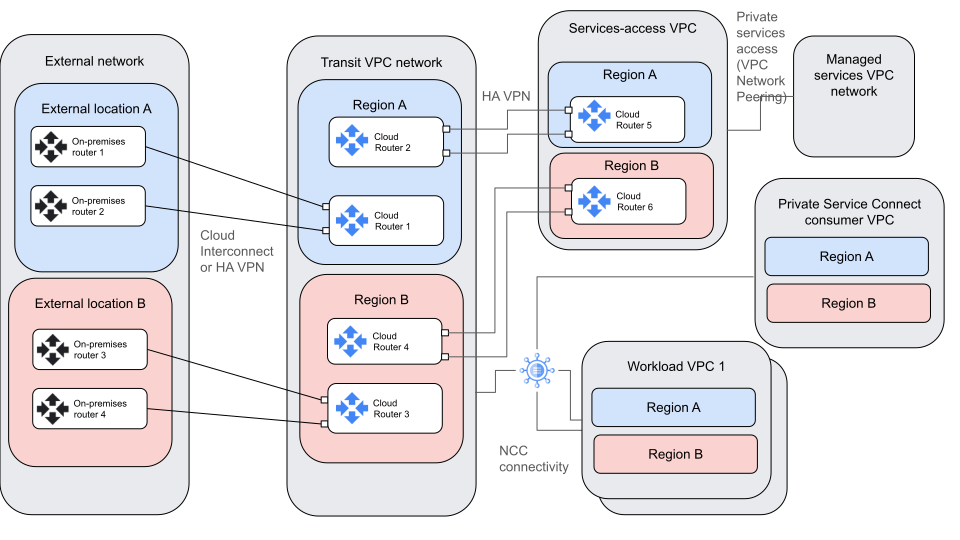
The architecture contains the following high-level elements:
| Component | Purpose | Interactions |
|---|---|---|
| External networks (On-premises or other CSP network) | Hosts the clients of workloads that run in the workload VPCs and in the services-access VPCs. External networks can also host services. | Exchanges data with Google Cloud's VPC networks
through the transit network. Connects to the transit network by using
Cloud Interconnect or HA VPN. Terminates one end of the following flows:
|
| Transit VPC network (also known as a Routing VPC network in NCC) | Acts as a hub for the external network, the services-access VPC network, and the workload VPC networks. | Connects the external network, the services-access VPC network, Private Service Connect consumer network, and the workload VPC networks together through a combination of Cloud Interconnect, HA VPN, and NCC. |
| Services-access VPC network | Provides access to services that are needed by workloads that are running in the workload VPC networks or external networks. Also provides access points to managed services that are hosted in other networks. | Exchanges data with the external, workload, and
Private Service Connect consumer networks through the
transit network. Connects to the transit VPC by using
HA VPN. Transitive routing provided by
HA VPN allows external traffic to reach managed
services VPCs through the services-access
VPC network. Terminates one end of the following flows:
|
| Managed services VPC network | Hosts managed services that are needed by clients in other networks. | Exchanges data with the external, services-access,
Private Service Connect consumer, and workload
networks. Connects to the services-access VPC network
by using private services access, which
uses VPC Network Peering. The managed services VPC can also
connect to the
Private Service Connect consumer VPC by using
Private Service Connect or private services access. Terminates one end of flows from all other networks. |
| Private Service Connect consumer VPC | Hosts Private Service Connect endpoints that are accessible from other networks. This VPC might also be a workload VPC. | Exchanges data with the external and services-access VPC networks through the transit VPC network. Connects to the transit network and other workload VPC networks by using NCC VPC spokes. |
| Workload VPC networks | Hosts workloads that are needed by clients in other networks. This architecture allows for multiple workload VPC networks. | Exchanges data with the external and services-access
VPC networks through the transit VPC
network. Connects to the transit network, Private Service Connect
consumer networks, and other workload VPC networks by using
NCC VPC spokes. Terminates one end of the following flows:
|
| NCC | The NCC hub incorporates a global routing database that serves as a network control plane for VPC subnet and hybrid connection routes across any Google Cloud region. | Interconnects multiple VPC and hybrid networks in an any-to-any topology by building a datapath that uses the control plane routing table. |
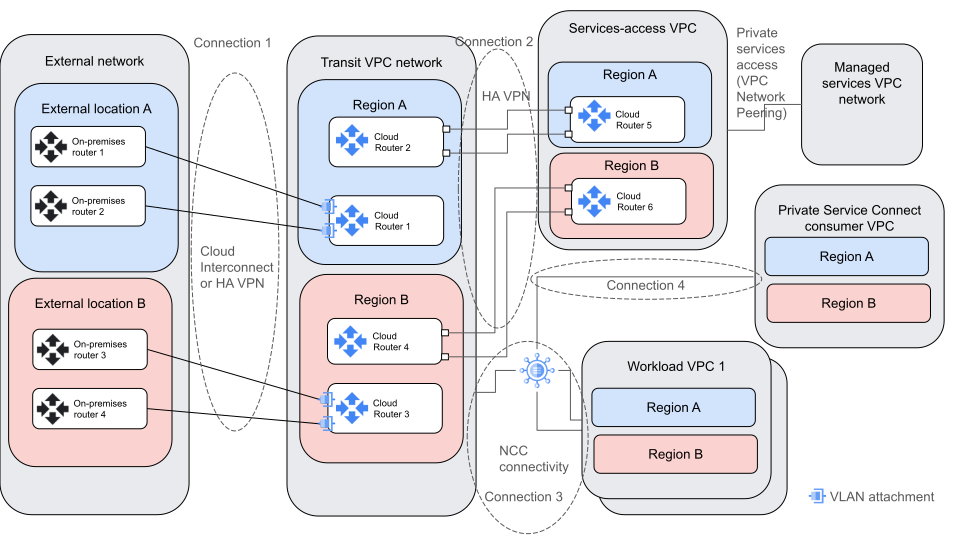
The following diagram shows a detailed view of the architecture that highlights the four connections among the components:
Connections descriptions
This section describes the four connections that are shown in the preceding diagram. The NCC documentation refers to the transit VPC network as the routing VPC. While these networks have different names, they serve the same purpose.
Connection 1: Between external networks and the transit VPC networks
This connection between the external networks and the transit VPC networks happens over Cloud Interconnect or HA VPN. The routes are exchanged by using BGP between the Cloud Routers in the transit VPC network and between the external routers in the external network.
- Routers in the external networks announce the routes for the external subnets to the transit VPC Cloud Routers. In general, external routers in a given location announce routes from the same external location as more preferred than routes for other external locations. The preference of the routes can be expressed by using BGP metrics and attributes.
- Cloud Routers in the transit VPC network advertise routes for prefixes in Google Cloud's VPCs to the external networks. These routes must be announced using Cloud Router custom route announcements.
- NCC lets you transfer data between different on-premises networks by using the Google backbone network. When you configure the interconnect VLAN attachments as NCC hybrid spokes, you must enable site-to-site data transfer.
- Cloud Interconnect VLAN attachments that source the same external network prefixes are configured as a single NCC spoke.
Connection 2: Between transit VPC networks and services-access VPC networks
This connection between transit VPC networks and services-access VPC networks happens over HA VPN with separate tunnels for each region. Routes are exchanged by using BGP between the regional Cloud Routers in the transit VPC networks and in the services-access VPC networks.
- Transit VPC HA VPN Cloud Routers announce routes for external network prefixes, workload VPCs, and other services-access VPCs to the services-access VPC Cloud Router. These routes must be announced using Cloud Router custom route announcements.
- The services-access VPC announces its subnets and the subnets of any attached managed services VPC networks to the transit VPC network. Managed services VPC routes and the services-access VPC subnet routes must be announced using Cloud Router custom route announcements.
Connection 3: Between the transit VPC network, workload VPC networks, and Private Service Connect services-access VPC networks
The connection between the transit VPC network, workload VPC networks, and Private Service Connect consumer VPC networks occurs when subnets and prefix routes are exchanged using NCC. This connection enables communication between the workload VPC networks, services-access VPC networks that are connected as NCC VPC spokes, and other networks that are connected as NCC hybrid spokes. These other networks include the external networks and the services-access VPC networks that are using connection 1 and connection 2, respectively.
- The Cloud Interconnect or HA VPN attachments in the transit VPC network use NCC to export dynamic routes to the workload VPC networks.
- When you configure the workload VPC network as a spoke of the NCC hub, the workload VPC network automatically exports its subnets to the transit VPC network. Optionally, you can set up the transit VPC network as a VPC spoke. No static routes are exported from the workload VPC network to the transit VPC network. No static routes are exported from the transit VPC network to the workload VPC network.
Connection 4: Private Service Connect Consumer VPC with NCC propagation
- Private Service Connect endpoints are organized in a common VPC that allows consumers access to first-party and third-party managed services.
- The Private Service Connect consumer VPC network is configured as a NCC VPC spoke. This spoke enables Private Service Connect propagation on the NCC hub. Private Service Connect propagation announces the host prefix of the Private Service Connect endpoint as a route into the NCC hub routing table.
- Private Service Connect services-access consumer VPC networks connect to workload VPC networks and to transit VPC networks. These connections enable transitive connectivity to Private Service Connect endpoints. The NCC hub must have Private Service Connect connection propagation enabled.
- NCC automatically builds a data path from all spokes to the Private Service Connect endpoint.
Traffic flows
The following diagram shows the flows that are enabled by this reference architecture.
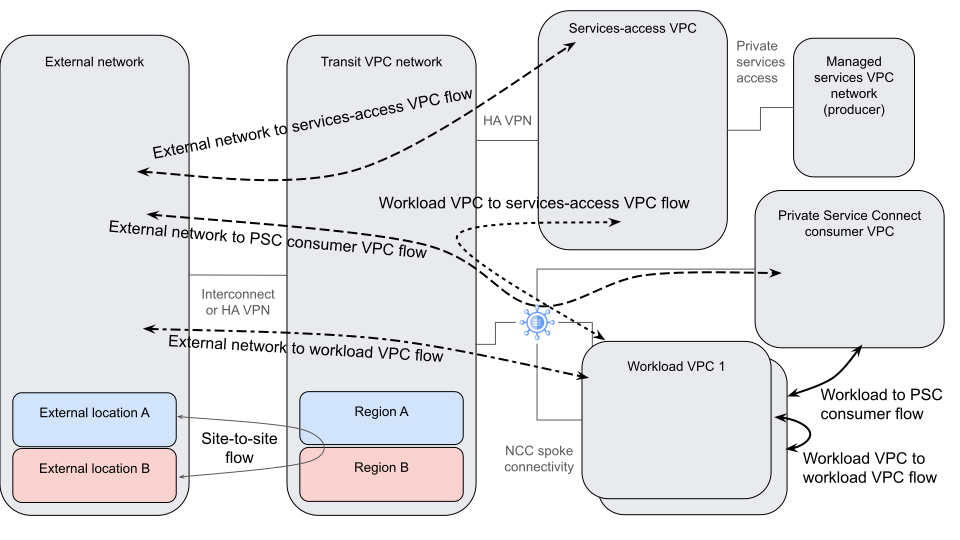
The following table describes the flows in the diagram:
| Source | Destination | Description |
|---|---|---|
| External network | Services-access VPC network |
|
| Services-access VPC network | External network |
|
| External network | Workload VPC network or Private Service Connect consumer VPC network |
|
| Workload VPC network or Private Service Connect consumer VPC network | External network |
|
| Workload VPC network | Services-access VPC network |
|
| Services-access VPC network | Workload VPC network |
|
| Workload VPC network | Workload VPC network | Traffic that leaves one workload VPC follows the more specific route to the other workload VPC through NCC. Return traffic reverses this path. |
Products used
- Virtual Private Cloud (VPC): A virtual system that provides global, scalable networking functionality for your Google Cloud workloads. VPC includes VPC Network Peering, Private Service Connect, private services access, and Shared VPC.
- Network Connectivity Center: An orchestration framework that simplifies network connectivity among spoke resources that are connected to a central management resource called a hub.
- Cloud Interconnect: A service that extends your external network to the Google network through a high-availability, low-latency connection.
- Cloud VPN: A service that securely extends your peer network to Google's network through an IPsec VPN tunnel.
- Cloud Router: A distributed and fully managed offering that provides Border Gateway Protocol (BGP) speaker and responder capabilities. Cloud Router works with Cloud Interconnect, Cloud VPN, and Router appliances to create dynamic routes in VPC networks based on BGP-received and custom learned routes.
- Cloud Next Generation Firewall: A fully distributed firewall service with advanced protection capabilities, micro-segmentation, and simplified management to help protect your Google Cloud workloads from internal and external attacks.
Design considerations
This section describes design factors, best practices, and design recommendations that you should consider when you use this reference architecture to develop a topology that meets your specific requirements for security, reliability, and performance.
Security and compliance
The following list describes the security and compliance considerations for this reference architecture:
- For compliance reasons, you might want to deploy workloads in a single region only. If you want to keep all traffic in a single region, you can use a 99.9% topology.
- Use Cloud Next Generation Firewall (Cloud NGFW) to secure traffic that enters and leaves the services-access and workload VPC networks. To inspect traffic that passes between hybrid networks through the transit network or between external networks and Google managed services, you need to use external firewalls or NVA firewalls.
- If you require L7 traffic inspection, enable the intrusion detection and prevention service (optionally with TLS inspection support) to block malicious activity and protect your workloads against threats, supporting vulnerability, anti-spyware and antivirus. The service works by creating Google-managed zonal firewall endpoints that use packet intercept technology to transparently inspect the workloads without requiring any route re-architecture. Cloud Next Generation Firewall Enterprise incurs zonal firewall endpoint and data processing charges.
- If you want to allow or block traffic based on Google Threat Intelligence data, use Google Threat Intelligence. You incur Cloud Next Generation Firewall Standard data processing charges.
- Enable Firewall Rules Logging and use Firewall Insights to audit, verify the effect of, understand, and optimize your firewall rules. Firewall Rules Logging can incur costs, so you might want to use it selectively.
- Enable Connectivity Tests to ensure that traffic is behaving as expected.
- Enable logging and monitoring as appropriate for your traffic and compliance needs. To gain insights into your traffic patterns, use VPC Flow Logs along with Flow Analyzer.
- Use Cloud IDS or Cloud NGFW Enterprise intrusion prevention service in alert mode to gather additional insight into your traffic.
Reliability
The following list describes the reliability considerations for this reference architecture:
- To get 99.99% availability for Cloud Interconnect, you must connect into two different Google Cloud regions from different metros across two distinct zones.
- To improve reliability and minimize exposure to regional failures, you can distribute workloads and other cloud resources across regions.
- To handle your expected traffic, create a sufficient number of VPN tunnels. Individual VPN tunnels have bandwidth limits.
Performance optimization
The following list describes the performance considerations for this reference architecture:
- You might be able to improve network performance by increasing the maximum transmission unit (MTU) of your networks and connections. For more information, see Maximum transmission unit.
- Communication between the transit VPC and workload resources is over a NCC connection. This connection provides a full-line-rate throughput for all VMs in the network at no additional cost. You have several choices for how to connect your external network to the transit network. For more information about how to balance cost and performance considerations, see Choosing a Network Connectivity product.
Deployment
This section discusses how to deploy the Cross-Cloud Network inter-VPC connectivity by using the NCC architecture described in this document.
The architecture in this document creates three types of connections to a central transit VPC, plus a connection between workload VPC networks and workload VPC networks. After NCC is fully configured, it establishes communication between all networks.
This deployment assumes that you are creating connections between the external and transit networks in two regions, although workload subnets can be in other regions. If workloads are placed in one region only, subnets need to be created in that region only.
To deploy this reference architecture, complete the following tasks:
- Create network segmentation with NCC
- Identify regions to place connectivity and workloads
- Create your VPC networks and subnets
- Create connections between external networks and your transit VPC network
- Create connections between your transit VPC network and services-access VPC networks
- Establish connectivity between your transit VPC network and workload VPC networks
- Configure Cloud NGFW policies
- Test connectivity to workloads
Create network segmentation with NCC
Before you create a NCC hub for the first time, you must decide whether you want to use a full mesh topology or a star topology. The decision to commit to a full-mesh of interconnected VPCs or a star topology of VPCs is irreversible. Use the following general guidelines to make this irreversible decision:
- If the business architecture of your organization permits traffic between any of your VPC networks, use the NCC mesh.
- If traffic flows between certain different VPC spokes aren't permitted, but these VPC spokes can connect to a core group of VPC spokes, use a NCC star topology.
Identify regions to place connectivity and workloads
In general, you want to place connectivity and Google Cloud workloads in close proximity to your on-premises networks or other cloud clients. For more information about placing workloads, see Google Cloud Region Picker and Best practices for Compute Engine regions selection.
Create your VPC networks and subnets
To create your VPC networks and subnets, complete the following tasks:
Create or identify the projects where you will create your VPC networks. For guidance, see Network segmentation and project structure. If you intend to use Shared VPC networks, provision your projects as Shared VPC host projects.
Plan your IP address allocations for your networks. You can preallocate and reserve your ranges by creating internal ranges. Doing so makes later configuration and operations more straightforward.
Create a transit network VPC with global routing enabled.
Create services-access VPC networks. If you plan to have workloads in multiple regions, enable global routing.
Create workload VPC networks. If you will have workloads in multiple regions, enable global routing.
Create connections between external networks and your transit VPC network
This section assumes connectivity in two regions and assumes that the external locations are connected and can fail over to each other. It also assumes that there is a preference for clients in an external location to reach services in the region where the external location exists.
- Set up the connectivity between external networks and your transit network. For an understanding of how to think about this, see External and hybrid connectivity. For guidance on choosing a connectivity product, see Choosing a Network Connectivity product.
Configure BGP in each connected region as follows:
- Configure the router in the given external location as follows:
- Announce all subnets for that external location using the same BGP MED on both interfaces, such as 100. If both interfaces announce the same MED, then Google Cloud can use ECMP to load balance traffic across both connections.
- Announce all subnets from the other external location by using a lower-priority MED than that of the first region, such as 200. Announce the same MED from both interfaces.
- Configure the external-facing Cloud Router in the
transit VPC of the connected region as follows:
- Set your Cloud Router with a private ASN.
- Use custom route advertisements, to announce all subnet ranges from all regions over both external-facing Cloud Router interfaces. Aggregate them if possible. Use the same MED on both interfaces, such as 100.
- Configure the router in the given external location as follows:
Work with NCC hub and hybrid spokes, use the default parameters.
- Create a NCC hub. If your organization permits traffic between all of your VPC networks, use the default full-mesh configuration.
- If you are using Partner Interconnect,
Dedicated Interconnect, HA-VPN, or a Router appliance to
reach on-premises prefixes, configure these components
as different NCC hybrid spokes.
- To announce the NCC hub route table subnets to remote BGP neighbors, set a filter to include all IPv4 address ranges.
- If hybrid connectivity terminates on a Cloud Router in a region that supports data transfer, configure the hybrid spoke with site-to-site data transfer enabled. Doing so supports site-to-site data transfer that uses Google's backbone network.
Create connections between your transit VPC network and services-access VPC networks
To provide transitive routing between external networks and the services-access VPC and between workload VPCs and the services-access VPC, the services-access VPC uses HA VPN for connectivity.
- Estimate how much traffic needs to travel between the transit and services-access VPCs in each region. Scale your expected number of tunnels accordingly.
Configure HA VPN between the transit VPC network and the services-access VPC network in region A by using the instructions in Create HA VPN gateways to connect VPC networks. Create a dedicated HA VPN Cloud Router in the transit VPC network. Leave the external-network-facing router for external network connections.
- Transit VPC Cloud Router configuration:
- To announce external-network and workload VPC subnets to the services-access VPC, use custom route advertisements on the Cloud Router in the transit VPC.
- Services-access VPC Cloud Router configuration:
- To announce services-access VPC network subnets to the transit VPC, use custom route advertisements on the services-access VPC network Cloud Router.
- If you use private services-access to connect a managed services VPC network to the services-access VPC, use custom routes to announce those subnets as well.
- On the transit VPC side of the
HA VPN tunnel,
configure the pair of tunnels as a NCC hybrid spoke:
- To support inter-region data transfer, configure the hybrid spoke with site-to-site data transfer enabled.
- To announce the NCC hub route table subnets
to remote BGP neighbors, set a filter to
include all IPv4 address ranges. This action announces all IPv4
subnet routes to the neighbor.
- To install dynamic routes when capacity is limited on the external router, configure the Cloud Router to announce a summary route with a custom route advertisement. Use this approach instead of announcing the full route table of the NCC hub.
- Transit VPC Cloud Router configuration:
If you connect a managed services VPC to the services-access VPC by using private services-access after the VPC Network Peering connection is established, you also have to update the services-access VPC side of the VPC Network Peering connection to export custom routes.
Establish connectivity between your transit VPC network and workload VPC networks
To establish inter-VPC connectivity at scale, use NCC with VPC spokes. NCC supports two different types of data plane models—the full-mesh data plane model or the star-topology data plane model.
- If all of your networks can be allowed to intercommunicate, then Establish full-mesh connectivity.
- If your business architecture requires a point-to-multipoint topology, then Establish star topology connectivity.
Establish full-mesh connectivity
The NCC VPC spokes include the transit VPCs, the Private Service Connect consumer VPCs, and all workload VPCs.
- Although NCC builds a fully meshed network of VPC spokes, the network operators must permit traffic flows between the source networks and the destination networks by using firewall rules or firewall policies.
- Configure all of the workload, transit, and
Private Service Connect consumer VPCs as
NCC VPC spokes. There can't be subnet overlaps
across VPC spokes.
- When you configure the VPC spoke, announce
non-overlapping IP address subnet ranges to the NCC hub
route table:
- Include export subnet ranges.
- Exclude export subnet ranges.
- When you configure the VPC spoke, announce
non-overlapping IP address subnet ranges to the NCC hub
route table:
- If VPC spokes are in different projects and the spokes
are managed by administrators other than the NCC hub
administrators, the VPC spoke administrators must initiate a
request to join the NCC hub in the other projects.
- Use Identity and Access Management (IAM) permissions in the
NCC hub project to grant the
roles/networkconnectivity.groupUserrole to that user.
- Use Identity and Access Management (IAM) permissions in the
NCC hub project to grant the
- To enable private service connections to be transitively and globally accessible from other NCC spokes, enable the propagation of Private Service Connect connections on the NCC hub.
If fully mesh inter-VPC communication between workload VPCs isn't allowed, consider using a NCC star topology.
Establish star topology connectivity
Centralized business architectures that require a point-to-multipoint topology can use a NCC star topology.
To use a NCC star topology, complete the following tasks:
- In NCC, create a NCC hub and specify a star topology.
- To allow private service connections to be transitively and globally accessible from other NCC spokes, enable the propagation of Private Service Connect connections on the NCC hub.
- When you configure the NCC hub for a star topology, you can group VPCs in one of two predetermined groups: center groups or edge groups.
To group VPCs in the center group, configure the transit VPC and Private Service Connect consumer VPCs as a NCC VPC spoke as part of the center group.
NCC builds a fully meshed network between VPC spokes that are placed in the center group.
To group workload VPCs in the edge group, configure each of these networks as NCC VPC spokes within that group.
NCC builds a point-to-point data path from each NCC VPC spoke to all VPCs in the center group.
Configure Cloud NGFW policies
In addition to the guidance in Security and compliance, consider Best practices for firewall rules.
Other considerations:
- We recommend that you use network firewall policies instead of VPC firewall rules if if your workloads run on Compute Engine VMs. Network firewall policies have benefits such as granular security and access control by using Tags, simplified rule management, ease of operations, richer feature set and flexible data residency. If you already have VPC firewall rules, you can use the VPC firewall rules migration tool to aid with the migration to a global network firewall policy.
- Google Kubernetes Engine automatically creates and manages certain VPC firewall rules to allow essential traffic, thus we recommend that you don't modify or delete those rules. However, network firewall policies can still be used together with VPC firewall rules, and optionally change the policy enforcement order.
- We recommend that you use Tags instead of network tags with firewall rules because of IAM controls, improved scaling, and support for network firewall policies. However, Tags are not supported by hierarchical firewall policies or over Network Connectivity Center peered networks, thus in those cases you need to create rules based on CIDR ranges.
- If you want to enable L7 inspection on Cloud NGFW, configure the intrusion prevention service, including security profiles, firewall endpoint, and VPC association.
- Create a global network firewall policy and any required firewall rules. Take into consideration the existing implied rules to allow egress traffic and deny ingress traffic present in every VPC network.
- Associate the policy with the VPC networks.
- If you are already using VPC firewall rules in your networks, you might want to change the policy and rule evaluation order so that your new rules are evaluated before the VPC firewall rules.
- Optionally, enable firewall rules logging.
Test connectivity to workloads
If you have workloads that are already deployed in your VPC networks, test access to them now. If you connected the networks before you deployed workloads, you can deploy the workloads now and test.
What's next
- Learn more about the Google Cloud products used in this design guide:
- For more reference architectures, diagrams, and best practices, explore the Cloud Architecture Center.
Contributors
Authors:
- Eric Yu | Networking Specialist Customer Engineer
- Deepak Michael | Networking Specialist Customer Engineer
- Victor Moreno | Product Manager, Cloud Networking
- Osvaldo Costa | Networking Specialist Customer Engineer
Other contributors:
- Mark Schlagenhauf | Technical Writer, Networking
- Ammett Williams | Developer Relations Engineer
- Ghaleb Al-habian | Network Specialist
- Tony Sarathchandra | Senior Product Manager