

This tutorial guides you through training and deploying a Smart Compose model using the Agent Assist console. If you prefer, you can also perform all of the following actions by calling the API directly. You can use the console to train a model and test its performance. All runtime operations must be carried out by calling the API directly. See the smart compose how-to guide for instructions.
Before you begin
- If you are using the publicly-available conversation dataset, review the documentation that guides you through using these resources.
- If you are using your own data, make sure that you have created one or more conversation datasets. At least one conversation dataset is required for model training.
Create and train a smart compose model
The process of creating a smart compose model using the Agent Assist console is the same as creating a Smart reply model. Navigate to the smart reply model training tutorial and follow the instructions for creating & training a new model, then deploying it. Instead of selecting Smart Reply when you choose your model type, select Smart Compose.
Smart compose model allowlist management
Smart compose model allowlist management is broadly similar to smart reply allowlist management, but with a few different capabilities. The following features are unique to Smart Compose and operate in addition to smart reply allowlist functionality.
Message grouping
As with smart reply allowlists, smart compose allowlists are grouped according to similar messages. You can click Show [X] similar messages next to a message to see the other messages in the group. Smart compose allowlists display an additional icon next to some messages:
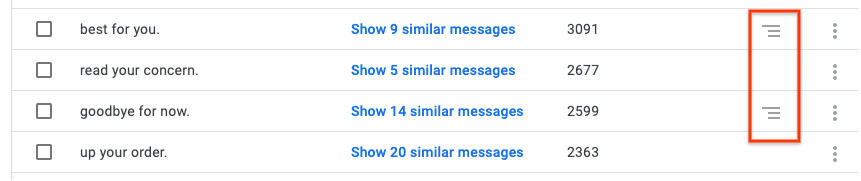
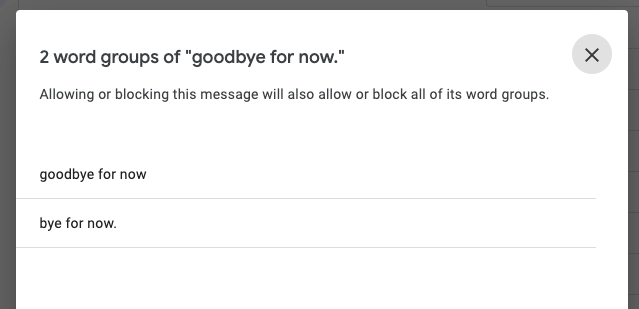
Clicking this icon brings up a group of substrings of that parent message that are also included in the allowlist. The following example shows the substrings for the parent message goodbye for now.. In addition to the parent message, there is one substring, bye for now.:
Message searching, editing, and creation
If you search for a word or string of words in a smart compose allowlist, results are returned as a list of parent messages containing that string (if the string has any parent messages). Continuing the previous example, if you search for the string bye for now., the result returned will be goodbye for now.. You can view the string bye for now. by clicking the substring icon.
Message editing is disabled for smart compose, so you cannot edit any of the messages. Like smart reply, however, you can create new messages and add them to a smart compose allowlist if necessary.
What's next
Create a conversation profile for your smart compose model and test its performance using the Agent Assist simulator.