

Proactive generative knowledge assist follows an ongoing conversation and proactively provides search query suggestions and answers. Proactive generative knowledge assist supports search context, multiple suggested queries, and you can customize initiating events.
Search context
Proactive generative knowledge assist generates a search query and context. It extracts information from the conversation as key-value pairs to improve the search context and provide better answers to the search query.
You can also disable the search context. In some scenarios, you can opt out of using search context and only use the query itself. Control this with the disable_query_search_context field. When this field is set to true, Proactive generative knowledge assist generates the search context but doesn't add it to the search query, which is sent to the knowledge base.
Multiple suggested queries
Proactive generative knowledge assist can generate multiple relevant queries for different topics discussed in a conversation. It uses the primary query for automatic knowledge search and provides additional queries in the response for the agent to use if needed.
Customize event initiation
By default, a CUSTOMER_MESSAGE initiates suggestions from Proactive generative knowledge assist. To define which event initiates a new Proactive generative knowledge assist suggestion, choose one of the following value options for the suggestion_trigger_event field.
CUSTOMER_MESSAGE: Keep the default message received from the end user.AGENT_MESSAGE: A message is sent by the human agent.END_OF_UTTERANCE: Proactive generative knowledge assist detects the end of a user utterance.
Implement Proactive generative knowledge assist
Follow these steps to start using Proactive generative knowledge assist.
Step 1: Create a conversation profile
Create a conversation profile using the Agent Assist console or the API. We recommend that you create a conversation profile using the Agent Assist console.
Console
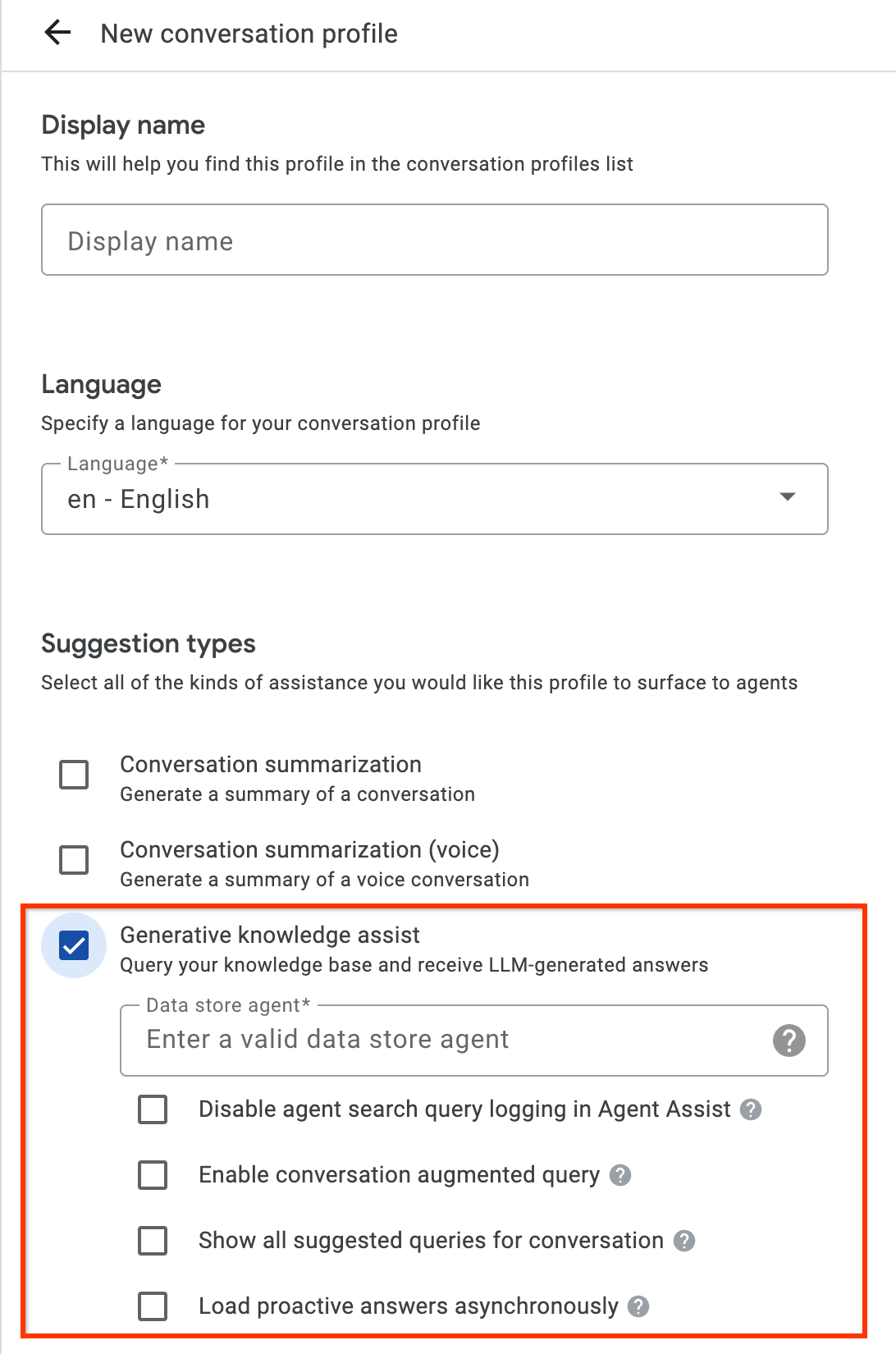
- Enable the Generative knowledge assist suggestion type and link it to the flow-based data store agent or playbook-based data store agent from the previous step. This enables the flow-based data store agent or playbook-based data store agent to proactively provide query and answer suggestions and answer manual search queries from your human agents.
- Optional: Use the Show all suggested queries for conversation checkbox to have the flow-based data store agent or playbook-based data store agent show all these queries, even when there is not an answer found from your knowledge documents. This is intended for testing which queries can be pulled from the ongoing conversation.
- Optional: Use the Load proactive answers asynchronously checkbox to only get query suggestions. You can manually submit the suggested query to the SearchKnowledge API and automatically submit in the Agent Assist console simulator and UI modules.
API
The following steps create a ConversationProfile with a HumanAgentAssistantConfig object. You can also perform these actions using the Agent Assist console.
To create a conversation profile, call the create method on the ConversationProfile resource and update the `baseline_model_version`.
Before using any of the request data, make the following replacements:- PROJECT_ID: your project ID
- LOCATION_ID: the ID for your location
- AGENT_ID: your flow-based data store agent or playbook-based data store agent ID from the previous step
 {
  "name": "projects/PROJECT_ID/locations/LOCATION/conversationProfiles/PROFILE_ID",
  "human_agent_assistant_config": {
    "human_agent_suggestion_config": {
      "feature_configs": [
        {
          "suggestion_feature": {
            "type": "KNOWLEDGE_ASSIST"
          },
          "query_config": {
            "dialogflow_query_source": {
              "agent": "projects/PROJECT_ID/locations/LOCATION/agents/AGENT_ID"
            }
          },
          "conversation_model_config": {
            "baseline_model_version": "2.0"
          }
        "disable_query_search_context": false,
    "enableQuerySuggestionWhenNoAnswer": false,
    "suggestion_trigger_event": "END_OF_UTTERANCE",
        }
      ]
    }
  }
}
Step 2: Handle conversations at runtime
Proactive generative knowledge assist processes conversations at runtime to proactively provide search query suggestions based on the current conversation context and the answer.
Create a conversation
First, you must create a conversation:
REST
To create a conversation,
call the create method on the
Conversation
resource.
Before using any of the request data, make the following replacements:
- PROJECT_ID: your Cloud project ID
- LOCATION_ID: your location ID
- CONVERSATION_PROFILE_ID: the ID you received when creating the conversation profile
HTTP method and URL:
POST https://dialogflow.googleapis.com/v2/projects/PROJECT_ID/locations/LOCATION_ID/conversations
Request JSON body:
{
  "conversationProfile": "projects/PROJECT_ID/locations/LOCATION_ID/conversationProfiles/CONVERSATION_PROFILE_ID",
}
To send your request, expand one of these options:
You should receive a JSON response similar to the following:
{
  "name": "projects/PROJECT_ID/locations/LOCATION_ID/conversations/CONVERSATION_ID",
  "lifecycleState": "IN_PROGRESS",
  "conversationProfile": "projects/PROJECT_ID/locations/LOCATION_ID/conversationProfiles/CONVERSATION_PROFILE_ID",
  "startTime": "2018-11-05T21:05:45.622Z"
}
The path segment after conversations contains your new conversation ID.
Python
For more information, see the Agent Search Python API reference documentation.
To authenticate to Agent Search, set up Application Default Credentials. For more information, see Set up authentication for a local development environment.
Create a user-participant
Add user- and agent-participants to the conversation to see suggestions. First, add the user-participant to the conversation:
REST
To create a user-participant, call the create method on the
Participant
resource.
Before using any of the request data, make the following replacements:
- PROJECT_ID: your Cloud project ID
- LOCATION_ID: your location ID
- CONVERSATION_ID: your conversation ID
HTTP method and URL:
POST https://dialogflow.googleapis.com/v2/projects/PROJECT_ID/locations/LOCATION_ID/conversations/CONVERSATION_ID/participants
Request JSON body:
{
  "role": "END_USER",
}
To send your request, expand one of these options:
You should receive a JSON response similar to the following:
{
  "name": "projects/PROJECT_ID/locations/LOCATION_ID/conversations/CONVERSATION_ID/participants/PARTICIPANT_ID",
  "role": "END_USER"
}
The path segment after participants contains your new user-participant ID.
Python
For more information, see the Agent Search Python API reference documentation.
To authenticate to Agent Search, set up Application Default Credentials. For more information, see Set up authentication for a local development environment.
Create an agent-participant
Add an agent-participant to the conversation:
REST
To create an agent-participant, call the create method on the
Participant
resource.
Before using any of the request data, make the following replacements:
- PROJECT_ID: your Cloud project ID
- LOCATION_ID: your location ID
- CONVERSATION_ID: your conversation ID
HTTP method and URL:
POST https://dialogflow.googleapis.com/v2/projects/PROJECT_ID/locations/LOCATION_ID/conversations/CONVERSATION_ID/participants
Request JSON body:
{
  "role": "HUMAN_AGENT",
}
To send your request, expand one of these options:
You should receive a JSON response similar to the following:
{
  "name": "projects/PROJECT_ID/locations/LOCATION_ID/conversations/CONVERSATION_ID/participants/PARTICIPANT_ID",
  "role": "HUMAN_AGENT"
}
The path segment after participants contains your new human agent-participant ID.
Python
For more information, see the Agent Search Python API reference documentation.
To authenticate to Agent Search, set up Application Default Credentials. For more information, see Set up authentication for a local development environment.
Add and analyze a message from the agent
Each time either participant types a message in the conversation, you need to send that message to the API for processing. The data store agent bases its suggestions on analysis of human agent and user messages. In the following example, the human agent starts the conversation by asking "How may I help you?"
No suggestions are returned yet in the response.
REST
To add and analyze a human agent message in the conversation,
call the analyzeContent method on the
Participant
resource.
Before using any of the request data, make the following replacements:
- PROJECT_ID: your project ID
- CONVERSATION_ID: your conversation ID
- PARTICIPANT_ID: your human agent participant ID
HTTP method and URL:
POST https://dialogflow.googleapis.com/v2/projects/PROJECT_ID/conversations/CONVERSATION_ID/participants/PARTICIPANT_ID:analyzeContent
Request JSON body:
{
  "textInput": {
    "text": "How may I help you?",
    "languageCode": "en-US"
  }
}
To send your request, expand one of these options:
You should receive a JSON response similar to the following:
{
  "message": {
    "name": "projects/PROJECT_ID/conversations/CONVERSATION_ID/messages/MESSAGE_ID",
    "content": "How may I help you?",
    "languageCode": "en-US",
    "participant": "PARTICIPANT_ID",
    "participantRole": "HUMAN_AGENT",
    "createTime": "2020-02-13T00:01:30.683Z"
  }
}
Python
For more information, see the Agent Search Python API reference documentation.
To authenticate to Agent Search, set up Application Default Credentials. For more information, see Set up authentication for a local development environment.
Add a message from the user for suggestions
In response to the agent, the user asks, "When can I get my return refund?" This time, the API response contains a suggested query and the generative AI answer based on the knowledge documents.
REST
To add and analyze a user message for the conversation, call the
analyzeContent method on the
Participant
resource.
Before using any of the request data, make the following replacements:
- PROJECT_ID: your project ID
- CONVERSATION_ID: your conversation ID
- PARTICIPANT_ID: your end-user participant ID
HTTP method and URL:
POST https://dialogflow.googleapis.com/v2/projects/PROJECT_ID/conversations/CONVERSATION_ID/participants/PARTICIPANT_ID:analyzeContent
Request JSON body:
{
  "textInput": {
    "text": "When can I get my return refund?",
    "languageCode": "en-US"
  }
}
To send your request, expand one of these options:
You should receive a JSON response similar to the following:
{
  "message": {
    "name": "projects/PROJECT_ID/conversations/CONVERSATION_ID/messages/MESSAGE_ID",
    "content": "When can I get my return refund?",
    "languageCode": "en-US",
    "participant": "PARTICIPANT_ID",
    "participantRole": "END_USER",
    "createTime": "2020-02-13T00:07:35.925Z"
  },
  "humanAgentSuggestionResults": [
    {
      "suggestKnowledgeAssistResponse": {
        "knowledgeAssistAnswer": {
          "suggestedQuery": {
            "queryText": "Refund processing time"
          },
          "suggestedQueryAnswer": {
            "answerText": "After your return is processed, you receive your refund in 7 days. The refund amount should be for the full value of the items returned, but doesn't include shipping & service fees.",
            "generativeSource": {
              "snippets": [
                {
                  "title": "Returns & refunds - Help",
                  "uri": "https://example.com/",
                  "text": "When the package with your return arrives at the seller's return center, it may take up to 7 additional business days to process. Check the status of your refund with the return tracking number found on your orders page."
                }
              ]
            },
          },
          "answerRecord": "projects/PROJECT_ID/answerRecords/ANSWER_RECORD_ID"
        },
      }
    }
  ]
}
Python
For more information, see the Agent Search Python API reference documentation.
To authenticate to Agent Search, set up Application Default Credentials. For more information, see Set up authentication for a local development environment.
Complete the conversation
When the conversation ends, use the API to complete the conversation.
REST
To complete the conversation,
call the complete method on the
conversations
resource.
Before using any of the request data, make the following replacements:
- PROJECT_ID: your GCP project ID
- CONVERSATION_ID: the ID you received when creating the conversation
HTTP method and URL:
POST https://dialogflow.googleapis.com/v2/projects/PROJECT_ID/conversations/CONVERSATION_ID:complete
To send your request, expand one of these options:
You should receive a JSON response similar to the following:
{
  "name": "projects/PROJECT_ID/conversations/CONVERSATION_ID",
  "lifecycleState": "COMPLETED",
  "conversationProfile": "projects/PROJECT_ID/conversationProfiles/CONVERSATION_PROFILE_ID",
  "startTime": "2018-11-05T21:05:45.622Z",
  "endTime": "2018-11-06T03:50:26.930Z"
}
Python
For more information, see the Agent Search Python API reference documentation.
To authenticate to Agent Search, set up Application Default Credentials. For more information, see Set up authentication for a local development environment.
Simulator
You can test your flow-based data store agent or playbook-based data store agent in the Agent Assist simulator.
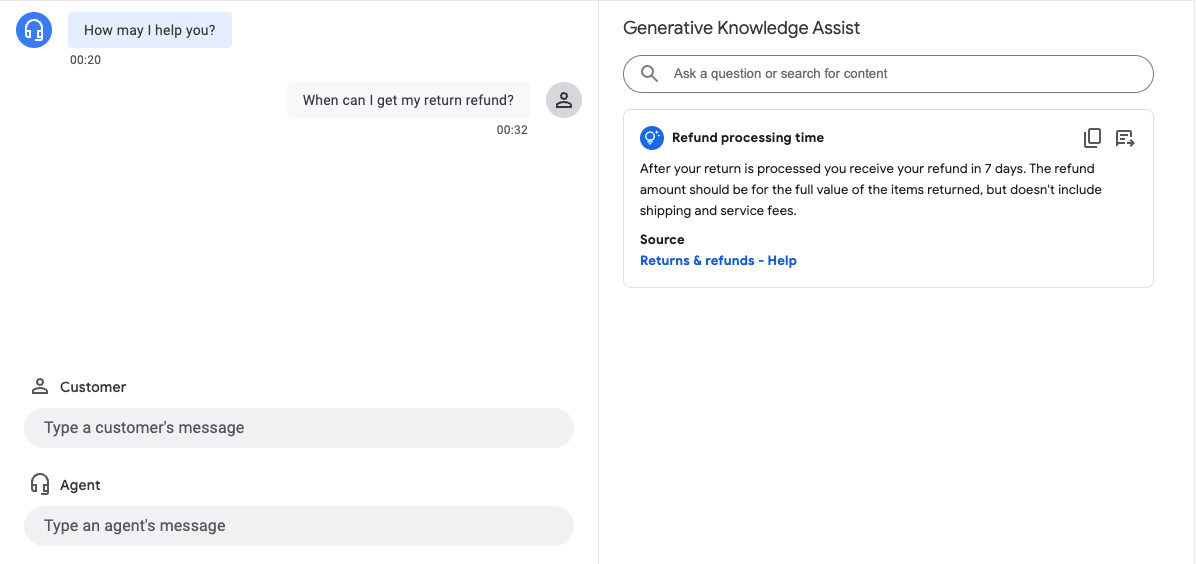
In the preceding example, the flow-based data store agent provides the following suggestions:
- Suggested query: Refund processing time.
- Generative AI generated answer: After your return is processed, you receive your refund in 7 days. The refund amount should be for the full value of the items returned, but doesn't include shipping & service fees.
- Title of the relevant knowledge document: Returns & refunds - Help.
Step 3: Pub/Sub suggestion notifications
You can set the notificationConfig field when creating a conversation profile to receive notifications for suggestions. This option uses Pub/Sub to send suggestion notifications to your application as the conversation proceeds and new suggestions become
available.
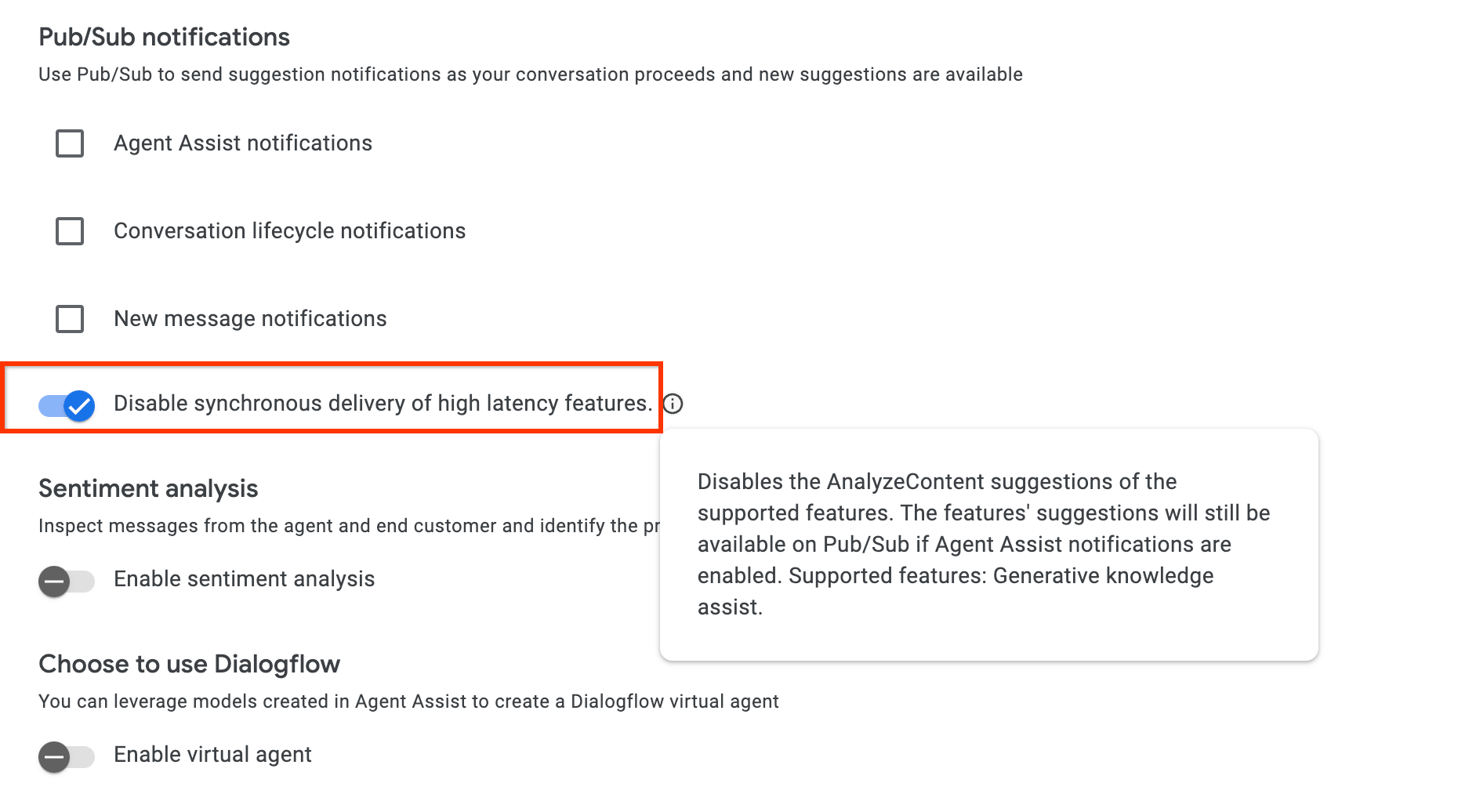
If you're integrating through the AnalyzeContent API, you have the option to enable the disable_high_latency_features_sync_delivery config in ConversationProfile to ensure that the AnalyzeContent API will respond, without waiting for the Proactive generative knowledge assist suggestions, and deliver the suggestions through Pub/Sub.
You can also enable this configuration from the Agent Assist console.
Access data through Customer Experience Insights
Alternatively, your Proactive generative knowledge assist generated queries and answers are automatically populated to Customer Experience Insights. To access this data there, follow the instructions at Enable Dialogflow runtime integration.
Send feedback
For the steps to send feedback, go to Send feedback to Agent Assist.
Answer agent questions
The following is an example JSON request for sending feedback about answering agent questions.
{
 "name": "projects/PROJECT_ID/locations/LOCATION_ID/answerRecords/ANSWER_RECORD_ID",
 "answerFeedback": {
   "displayed": true
   "clicked": true
   "correctnessLevel": "FULLY_CORRECT"
   "agentAssistantDetailFeedback": {
     "knowledgeSearchFeedback": {
       "answerCopied": true
       "clickedUris": [
         "url_1",
         "url_2",
         "url_3",
       ]
     }
   }
 }
}
Proactively suggest Q&A
The following is an example JSON request for sending feedback about proactive suggestions.
{
 "name": "projects/PROJECT_ID/locations/LOCATION_ID/answerRecords/ANSWER_RECORD_ID",
 "answerFeedback": {
   "displayed": true
   "clicked": true
   "correctnessLevel": "FULLY_CORRECT"
   "agentAssistantDetailFeedback": {
     "knowledgeAssistFeedback": {
       "answerCopied": true
       "clickedUris": [
         "url_1",
         "url_2",
         "url_3",
       ]
     }
   }
 }
}