


Vertex AI 上的 Gemini 和 Imagen 为应用开发者提供了 Google 最先进的图片生成式 AI 功能。借助 Vertex AI 上的 Gemini 和 Imagen,应用开发者可以构建新一代 AI 产品,这类产品采用 AI 生成技术,可在几秒钟内将用户的想象力转化为高品质的视觉素材资源。
借助 Gemini 和 Imagen,您可以执行以下操作:
- 仅使用文本提示生成新图片(文本转图片 AI 生成)。
- 使用您定义的蒙版区域修改或扩展已上传或生成的图片。
- 放大现有、生成的或编辑后的图片。




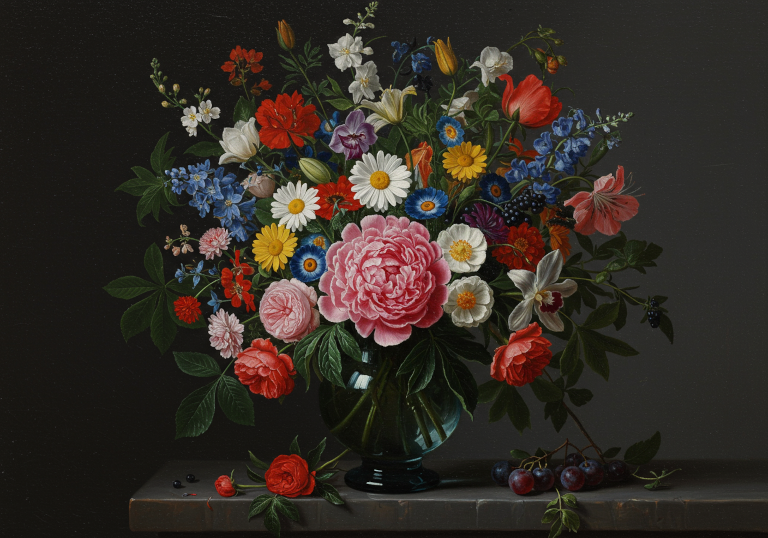
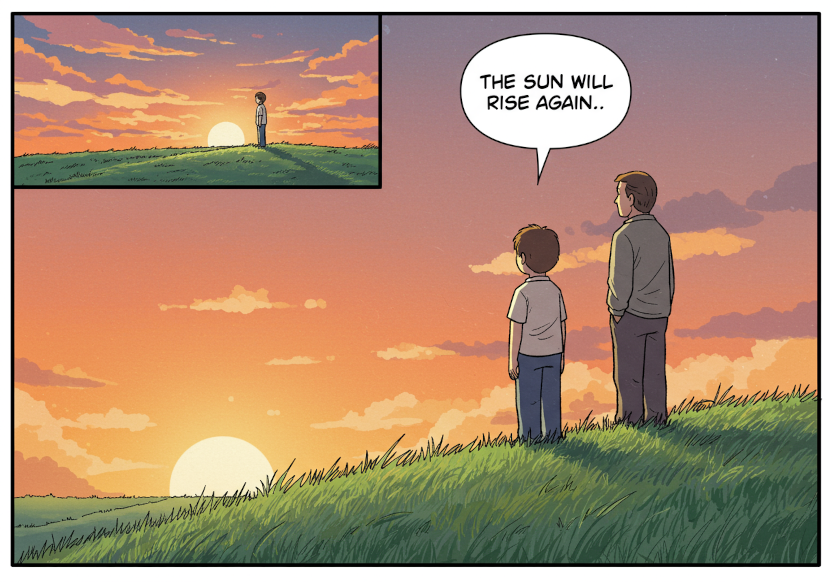
上方图片的提示
这些图片是使用通用的 Imagen 3 图片生成模型 (imagen-3.0-generate-002) 和以下提示生成的:
- Claymation scene. A medium wide shot of an elderly woman. She is wearing flowing clothing. She is standing in a lush garden watering the plants with an orange watering can
- Shot in the style of DSLR camera with the polarizing filter. A photo of two hot air balloons over the unique rock formations in Cappadocia, Turkey. The colors and patterns on these balloons contrast beautifully against the earthy tones of the landscape below. This shot captures the sense of adventure that comes with enjoying such an experience.
- A weathered, wooden mech robot covered in flowering vines stands peacefully in a field of tall wildflowers, with a a small blue bird resting on its outstrecteched hand. Digital Cartoon, with warm colors and soft lines. A large cliff with a waterfall looms behind.
- A view of a person's hand as they hold a little clay figurine of a bird in their hand and sculpt it with a modeling tool in their other hand. You can see the sculptor's scarf. Their hands are covered in clay dust. A macro DSLR image highlighting the texture and craftsmanship.
- A large, colorful bouquet of flowers in an old blue glass vase on the table. In front is one beautiful peony flower surrounded by various other blossoms like roses, lilies, daisies, orchids, fruits, berries, green leaves. The background is dark gray. Oil painting in the style of the Dutch Golden Age.
- A single comic book panel of a boy and his father on a grassy hill, staring at the sunset. A speech bubble points from the boy's mouth and says: The sun will rise again. Muted, late 1990s coloring style
快速入门:使用 Imagen 根据文本提示生成图片
您可以仅使用描述性文本作为输入来生成新图片。以下示例展示了生成图片的简化情况,但您也可以使用其他参数,以便根据自己的需求定制生成式图片。
- 登录您的 Google Cloud 账号。如果您是 Google Cloud新手,请 创建一个账号来评估我们的产品在实际场景中的表现。新客户还可获享 $300 赠金,用于运行、测试和部署工作负载。
-
In the Google Cloud console, on the project selector page, select or create a Google Cloud project.
Roles required to select or create a project
- Select a project: Selecting a project doesn't require a specific IAM role—you can select any project that you've been granted a role on.
-
Create a project: To create a project, you need the Project Creator role
(
roles/resourcemanager.projectCreator), which contains theresourcemanager.projects.createpermission. Learn how to grant roles.
-
Verify that billing is enabled for your Google Cloud project.
Enable the Vertex AI API, if it is not already enabled.
Roles required to enable APIs
To enable APIs, you need the
serviceusage.services.enablepermission. If you created the project, then you likely already have this permission through the Owner role (roles/owner). Otherwise, you can get this permission through the Service Usage Admin role (roles/serviceusage.serviceUsageAdmin). Learn how to grant roles.-
In the Google Cloud console, on the project selector page, select or create a Google Cloud project.
Roles required to select or create a project
- Select a project: Selecting a project doesn't require a specific IAM role—you can select any project that you've been granted a role on.
-
Create a project: To create a project, you need the Project Creator role
(
roles/resourcemanager.projectCreator), which contains theresourcemanager.projects.createpermission. Learn how to grant roles.
-
Verify that billing is enabled for your Google Cloud project.
Enable the Vertex AI API, if it is not already enabled.
Roles required to enable APIs
To enable APIs, you need the
serviceusage.services.enablepermission. If you created the project, then you likely already have this permission through the Owner role (roles/owner). Otherwise, you can get this permission through the Service Usage Admin role (roles/serviceusage.serviceUsageAdmin). Learn how to grant roles.-
为您的环境设置身份验证。
如需在本地开发环境中使用本页面上的 REST API 示例,请使用您提供给 gcloud CLI 的凭证。
安装 Google Cloud CLI。
如果您使用的是外部身份提供方 (IdP),则必须先使用联合身份登录 gcloud CLI。
如需了解详情,请参阅 Google Cloud 身份验证文档中的使用 REST 时进行身份验证。
-
使用以下示例生成图片:
REST
-
设置环境变量:
export GOOGLE_CLOUD_PROJECT=GOOGLE_CLOUD_PROJECT # Replace with your Google Cloud project
export GOOGLE_CLOUD_LOCATION=us-central1 # Replace with the appropriate location for your project
-
运行以下命令:
curl -X POST \
-H "Authorization: Bearer $(gcloud auth print-access-token)" \
-H "Content-Type: application/json; charset=utf-8" \
"https://${GOOGLE_CLOUD_LOCATION}-aiplatform.googleapis.com/v1/projects/${GOOGLE_CLOUD_PROJECT}/locations/${GOOGLE_CLOUD_LOCATION}/publishers/google/models/imagen-4.0-generate-preview-05-20:predict" -d \
$'{
  "instances": [
    {
      "prompt": "a cat reading a book"
    }
  ],
  "parameters": {
    "sampleCount": 1
  }
}'
模型会返回一个 base64 编码的图片字节对象。
如需了解详情,请参阅 Imagen Generate images API。
-
何时使用 Vertex AI 上的 Gemini 或 Imagen
除了使用 Gemini 的内置图片生成功能外,你还可以使用我们的专用图片生成模型 Imagen。
| 属性 | Gemini 图片 | Imagen 4 |
|---|---|---|
| 优势 | 默认建议。 出色的灵活性、情境理解能力,以及无蒙版编辑功能。独具多轮对话式编辑功能。 |
最佳画质/延迟 |
| 可用性 | 已全面推出 | 已全面推出 |
| 延迟时间 | 提高。其高级功能需要更多计算资源。 | 低。针对近乎实时的性能进行了优化。 |
| 费用 | 基于 token 的定价。 | 经济高效,适合处理专业任务。 |
| 推荐的任务 |
|
|
我们建议您先使用 Gemini 生成图片。 如果需要处理高级用例或需要最佳图片质量,请选择 Imagen 4 Ultra。
模型版本
您可以使用多种图片生成模型。如需了解详情,请参阅 Gemini 模型或 Imagen 模型。
尝试更多示例
如需查看使用 Imagen 的 Jupyter 笔记本教程的完整列表,请参阅 Vertex AI 上的生成式 AI cookbook。
后续步骤
使用以下链接查看功能文档。



图片来源:使用 Imagen on Vertex AI 生成的所有图片。